
ProjectGui MCP server
Commit Oct 26, 2026Lets coding agents read and update local project tasks, priorities, and stages through a single SQLite database.
Also known as Gu1L3RM3/projectgui
- Stars
- 1
- Tools
- —
- Downloads, 30 days
- —
- Latest version
- —
- Last commit
- Oct 26, 2026
- License
- MIT
What is ProjectGui MCP?
ProjectGui lets coding agents read and update local project tasks, priorities, and stages through a single SQLite database.
Summary generated from the project's README
About ProjectGui MCP server
Managing multiple development projects and tracking task progress is what ProjectGui enables for developers and their AI assistants. This tool uses a local SQLite database to store project details like priority, stage, and task status without requiring any cloud accounts or background services. It provides a unified way to keep track of work through a command line interface, a desktop window, and an MCP server.
Coding agents like Claude Code, Codex, and OpenCode can use the MCP server to read project lists, create new tasks, and mark items as done. The server enforces safety by requiring exact project or task IDs for any data modifications, preventing accidental edits. Because the data lives in a single local file, you can also maintain a .project-status TOML file in your repositories to keep your documentation in sync with your actual progress.
What you can do with it
- 1Automated task managementAsk your coding agent to create a new project and populate it with tasks based on your repository's README.
- 2Real-time progress trackingHave an AI client identify which of your active projects are currently facing the most obstacles.
- 3Linking development artifactsInstruct an agent to mark a specific task as finished and associate it with a pull request.
Written from the project's README. Every use case is checked against a quote from it.
Configuration
PROJECTGUI_DB
Automated checks
Ran Nov 15, 2026Full report →Not verified yet. A server needs a score of 80, no serious finding, and enough data for us to check. How checks work · What to fix for more points

- Source repository linked and reachablegu1l3rm3/projectgui is public and reachablegithub.com/gu1l3rm3/projectgui ↗Pass
- Package names this repository as its sourceNot checked
- Build provenance (Sigstore attestation)Not checked
- Open source license (OSI)MITspdx.org/licenses/MIT.html ↗Pass
- Commit or release in the last yearLast commit or release 2026-10-26github.com/gu1l3rm3/projectgui ↗Pass
- OpenSSF ScorecardNot checked
- Package name not close to a popular packageNot checked
- No critical advisory in the package or its dependenciesNot checked
- No hidden instructions to the model0 tool descriptions and the README read; no override phrases, credential paths or hidden charactersPass
- Destructive tools are labelledNot checked
- Remote endpoint answers the MCP handshakeNot checked
README
View on GitHubProjectGui
A local project tracker for people who juggle many projects, and for the coding agents that help them.
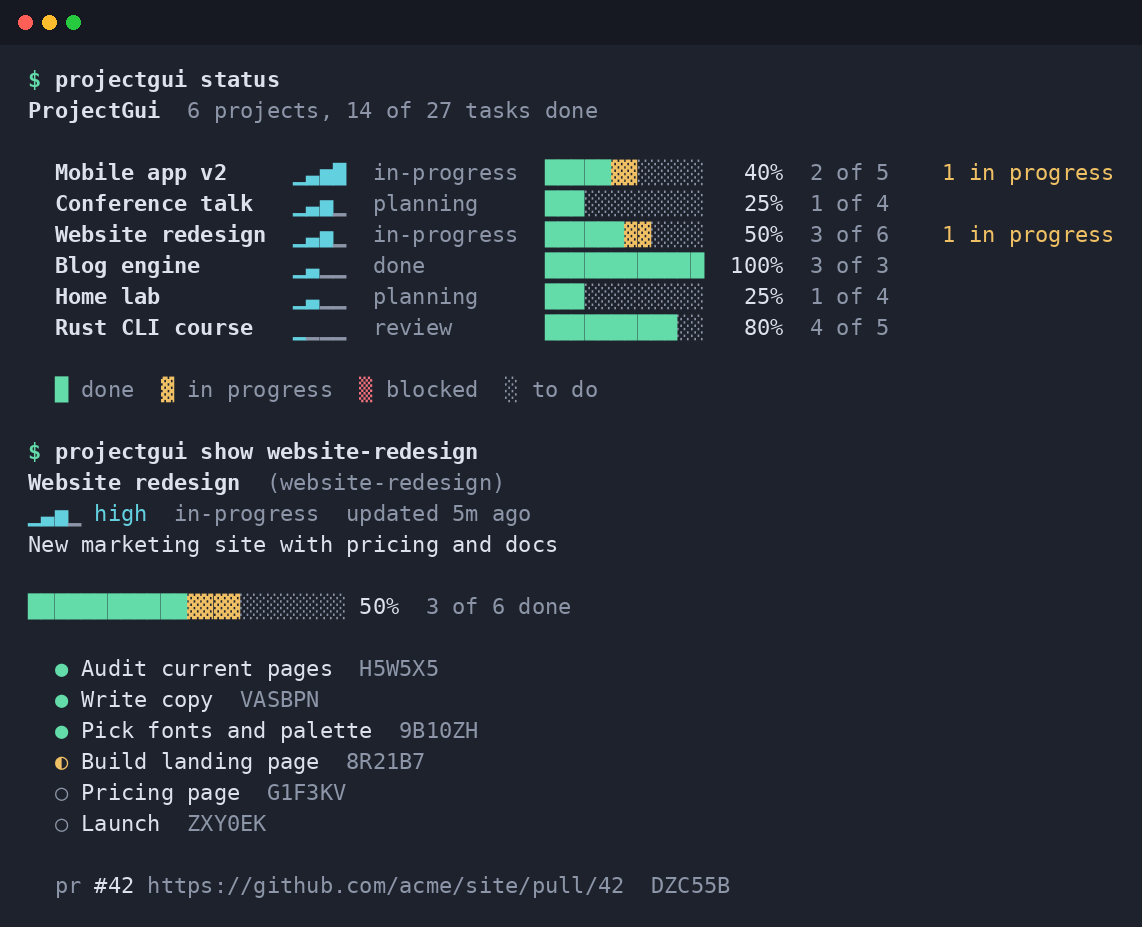
ProjectGui keeps a list of your projects, each with a priority, a stage and a list of tasks. Progress is never typed in by hand: it is calculated from the tasks you finish. You can use the same data from several places:
- a command line (
pgui status) with colored progress bars, - an MCP server, so Claude Code, Codex, OpenCode and other agents can read and update your projects,
- a desktop window with a tray icon on Linux,
- a COSMIC panel applet that shows your progress in the top bar.
Everything lives in one SQLite file on your machine. No account, no cloud, no background service.
Contents
- Features
- Install
- Five-minute tutorial
- Keep a status file in your repository
- Let your coding agent manage tasks (MCP)
- The desktop window, tray and panel applet
- Your data: location, backup, export
- Updates
- Configuration reference
- Platform support
- How it works
- Development
Features
- Projects with title, description, priority (
low,medium,high,critical) and stage (idea,planning,in-progress,review,done,paused). Archive what you are not working on. - Tasks with status
todo,in-progress,blockedordone. The progress bar shows each state in its own color. - References: attach commit hashes, pull requests and issues to a project or task (stored locally, nothing is synced).
- Fuzzy lookups for reading, exact names for writing.
pgui show webfinds "Website redesign", but a command that changes data needs the exact slug or id, so a typo never edits the wrong project. .project-statusfile: a small TOML file in a project folder, kept in step with the database both ways.- MCP server with tools, resources and prompts; one command registers it with Claude Code, Codex and OpenCode.
- Safe for concurrent use: the CLI, the agents and the window can all write at the same time.
- COSMIC panel applet: overall progress in the top bar, tick tasks off without opening the window.
- Scriptable: every data command has
--json; exit codes are stable and documented in--help.
Install
Installer (recommended)
Linux and macOS:
curl --proto '=https' --tlsv1.2 -LsSf https://github.com/Gu1L3RM3/projectgui/releases/latest/download/pgui-installer.sh | sh
Windows (PowerShell):
powershell -ExecutionPolicy Bypass -c "irm https://github.com/Gu1L3RM3/projectgui/releases/latest/download/pgui-installer.ps1 | iex"
The installer puts pgui in ~/.cargo/bin (it tells you if that folder is not on your PATH). Installed this
way, pgui update can update itself later.
Download an archive
Every release has archives for Linux (x86_64, arm64),
macOS (Intel, Apple Silicon) and Windows (x86_64), with SHA-256 checksums. Unpack and put the binary on your PATH.
Build from source
You need a recent stable Rust toolchain and a C compiler (SQLite is compiled in).
git clone https://github.com/Gu1L3RM3/projectgui
cd projectgui
cargo install --path .                 # CLI + MCP server + update check
cargo install --path . --features gui  # also the desktop window and tray
Check that it works:
pgui version
Five-minute tutorial
1. Create a project with a few tasks
pgui add "Website redesign" -p high -s in-progress \
  -d "New marketing site" \
  -t "Write copy" -t "Pick fonts" -t "Build landing page"
Each project gets a slug (website-redesign) that you use to refer to it. If you rename the project later, the
old slug keeps working.
2. See everything at a glance
pgui status
One line per project: priority signal, stage, a progress bar and how many tasks are done. Projects are sorted by
priority; try pgui list --sort progress or pgui list --help for filters.
3. Look inside a project
pgui show website-redesign
Website redesign  (website-redesign)
▁▃▅▁ high  in-progress  updated just now
New marketing site

░░░░░░░░░░░░░░░░░░░░░░░░ 0%  0 of 3 done

  ○ Write copy  2F7F2A
  ○ Pick fonts  Q46F5K
  ○ Build landing page  4TC1DN
The short code after each task is the end of its id. Use it to point at a task.
4. Move tasks forward
pgui task start website-redesign 2F7F2A      # in progress
pgui task done  website-redesign 2F7F2A      # done: the progress bar moves
pgui task block website-redesign Q46F5K      # blocked
pgui task add   website-redesign "Pricing page" "Launch"
5. Change the project itself
pgui edit website-redesign --stage review --priority critical
pgui archive website-redesign                 # hide it; `unarchive` brings it back
6. Link a folder to a project
Inside the project's folder:
cd ~/code/website
pgui link website-redesign
pgui status --here                            # shows the project for the current folder
Tips
pgui --helpandpgui <command> --helpexplain every option, the exit codes and environment variables.- Add
--jsonto any data command to use it in scripts:pgui list --json | jq '.[].title'. - Deleting is deliberate:
pgui rm website-redesignasks you to type the project's title.
Keep a status file in your repository
A .project-status file is a TOML description of the project that lives next to your code. It is handy for
reviewing project status in pull requests, or for editing tasks in your editor.
cd ~/code/website
pgui init-file            # writes .project-status for the linked project
title = "Website redesign"
description = "New marketing site"
priority = "high"
stage = "in-progress"

[[task]]
title = "Write copy"
status = "done"

[[task]]
title = "Pick fonts"
status = "in-progress"
How it stays in sync:
- You edit the file, then run
pgui syncto load it into the database. - You change the project anywhere else (CLI, window, agent): ProjectGui writes the change back into the file.
- If you edited the file and have not synced yet, ProjectGui does not overwrite it; it tells you instead.
- Tasks missing from the file are never deleted from the database.
Find and load many files at once: pgui scan ~/code (dry run) and pgui scan ~/code --apply.
Full format: docs/project-file.md.
Let your coding agent manage tasks (MCP)
ProjectGui includes an MCP server. Once registered, your agent can list projects, create tasks, mark them done and attach pull requests while it works.
pgui install-mcp all            # dry run: shows what it would change
pgui install-mcp all --write    # registers with Claude Code, Codex and OpenCode
Then ask your agent things like:
"Which of my projects has the most blocked tasks?"
"Create a project for this repository with tasks for the TODOs in the README."
"Mark the 'Write copy' task in website-redesign as done and attach PR #42."
Safety rules the server enforces (not just the agent):
- Changing data requires the full project or task id; the agent cannot act on a guessed name.
- Deleting a project requires the exact title; removing a task requires an explicit confirmation.
- The server never uses the network.
Tools, resources, prompts and manual setup for other clients: docs/agents.md.
The desktop window, tray and panel applet
Start it with:
pgui gui
(Requires a build with the gui feature; the installers and release archives include it.)
What you can do in the window:
- See every project as a row with a segmented progress bar; click a row to open its tasks.
- Change task status, add, rename and remove tasks.
- Create, edit, archive and delete projects; add references.
- Search (title, slug, description, task titles), sort, and filter by priority or stage.
- Changes from the CLI or an agent appear within about two seconds.
Themes. Pick one in the footer: frosted (translucent, default), slate, paper, dusk and contrast.
The choice is saved in the config file. Set the frosted window's opacity with
pgui config set gui_opacity 70 (20-100).
Tray (Linux). While the window is open, a tray icon shows your top open projects with their progress, an update
notice when there is one, Open and Quit. Running pgui gui again brings the open window to the front
instead of starting a second copy. When the COSMIC panel applet (below) is running, the window skips the tray icon, since the
applet already shows the same projects.
COSMIC panel applet
On the COSMIC desktop you can also keep ProjectGui in the top panel: the icon shows overall progress, and a click opens a popup with your open projects. Click a project to see its tasks and tick them off; Open ProjectGui opens the window.
The applet is built from source (it needs libcosmic) and talks to the
pgui command you installed above:
cd applet
cargo build --release
./install.sh        # applet, icons and a ProjectGui launcher under ~/.local
Then add it in Settings → Desktop → Panel → Configure panel applets → Add applet → ProjectGui.
Your data: location, backup, export
pgui config path # where the config file and the database are
| Task | Command |
|---|---|
| Consistent copy of the database (safe while other programs write) | pgui backup or pgui backup --out ~/pg-backup.db |
| Everything as JSON | pgui export --out projects.json |
| Merge a JSON export (existing ids are kept) | pgui import projects.json |
| Use another database (e.g. a synced folder) | PROJECTGUI_DB=/path/to/file.db pgui status |
Ids are ULIDs and never change, so exports from two machines merge cleanly.
Updates
pgui update --check       # only report (exit code 10 means an update is available)
pgui update               # update in place (when installed with the installer)
Once a day, interactive commands check GitHub for a newer release in the background and print a one-line notice.
The check is skipped in --json mode, when output is not a terminal, and in the MCP server. Turn it off with
pgui config set update.check false or PROJECTGUI_NO_UPDATE_CHECK=1.
Details, including the notice.json format: docs/update.md.
Configuration reference
pgui config list prints all settings; pgui config set <key> <value> changes one.
| Setting | Default | Meaning |
|---|---|---|
db_path |
platform data dir | database file |
color |
auto |
auto, always, never |
ascii |
false |
plain ASCII progress bars |
default_sort |
priority |
sort order of status and list |
gui_theme |
frosted |
window theme |
gui_opacity |
80 |
frosted window opacity (20-100) |
update.check |
true |
daily background update check |
| Environment variable | Effect |
|---|---|
PROJECTGUI_DB |
database file path |
PROJECTGUI_CONFIG |
config file path |
NO_COLOR |
disable colors |
COLORTERM=truecolor |
the terminal uses the window's exact colors |
PROJECTGUI_NO_UPDATE_CHECK |
disable the background update check |
Platform support
| Linux | macOS | Windows | |
|---|---|---|---|
| CLI and MCP server | tested by hand and in CI | tested in CI | tested in CI |
| Desktop window | tested by hand (COSMIC) | builds; not tested by hand | builds; not tested by hand |
| Tray icon | yes (StatusNotifierItem) | no | no |
| Panel applet | COSMIC | no | no |
Reports from macOS and Windows users are welcome.
How it works
flowchart TD
    CLI["CLI<br/>pgui ..."] --> SVC
    APPLET["COSMIC panel applet"] -->|"runs pgui --json"| CLI
    MCP["MCP server<br/>pgui mcp"] --> SVC
    GUI["Window + tray<br/>pgui gui"] --> SVC
    SVC["Service<br/>validation, rules, confirmations"] --> DOM["Domain<br/>projects, tasks, progress"]
    SVC --> REPO["Repository<br/>SQLite, one transaction per change"]
    SVC <--> FILE[".project-status files"]
    REPO --> DB[("projectgui.db")]
- The three front ends are thin: they parse input, call the service and show the result.
- All rules (validation, exact names for changes, confirmation before deleting) live in the service, so the CLI, the agents and the window behave the same way.
- Every change is one SQLite transaction, so separate processes can write at the same time without losing updates.
Development
cargo build
cargo test
cargo fmt --check
cargo clippy --all-targets --all-features -- -D warnings
Try the CLI against a throwaway database, never your real one:
export PROJECTGUI_DB=/tmp/pg.db PROJECTGUI_CONFIG=/tmp/pg.toml
cargo run -- add "Demo" -p high -t "first task"
cargo run -- status
cargo run --features gui -- gui
Cargo features: mcp and update are on by default; gui (window and tray) is opt-in. CI runs the test suite on
Linux, macOS and Windows for each feature combination. Architecture rules and conventions are in
CLAUDE.md.
The COSMIC applet in applet/ is its own crate (libcosmic is pinned there); build, lint and test it from that
directory with cargo build --release, cargo clippy --release -- -D warnings and cargo test --release.
Releases are built by cargo-dist when a vX.Y.Z tag is pushed.
License
ProjectGui MCP questions
Can coding agents manage my tasks?
Yes, the MCP server allows agents like Claude Code, Codex, and OpenCode to list projects, create tasks, and mark them as done.
Is my data stored in the cloud?
No, everything is stored in a single SQLite file locally on your machine with no account or cloud required.