
Freelancer.com MCP server
✓ VerifiedEnables AI clients to search projects, place bids, manage messages, and update professional profiles directly on Freelancer.com.
Also known as godesigntech/freelancer-mcp-server
- Stars
- 4
- Tools
- —
- Downloads, 30 days
- —
- Latest version
- 2.0.0
- Last commit
- Jul 6, 2026
- License
- MIT
What is Freelancer.com MCP?
Freelancer.com enables AI clients to search projects, place bids, manage messages, and update professional profiles directly on Freelancer.com.
Summary generated from the project's README
About Freelancer.com MCP server
Managing freelance work and client communications from within an AI chat interface is what this server enables. It connects Claude Desktop or Claude Code directly to Freelancer.com, allowing users to search for projects, place bids, and manage professional profiles. The server acts as a thin API wrapper that communicates exclusively with the official Freelancer public API using provided access tokens.
Users can connect a single account or manage multiple accounts simultaneously by providing a JSON object of tokens. This makes it useful for freelancers managing their own presence or for agencies handling several client profiles. The setup requires only a Freelancer access token, which can be generated through the developer settings on the platform. Once configured via npx or local installation, the AI can perform tasks like reading inbox threads, updating skills, or analyzing bid history to improve winning strategies.
What you can do with it
- 1Finding and bidding on projectsAsk the AI to find specific automation projects within a certain budget and place a bid on them.
- 2Managing client communicationsRead incoming messages from a specific thread and draft replies to clients.
- 3Optimizing professional profilesUpdate your specialty profiles or add new skills to your account to improve visibility.
- 4Analyzing bidding performanceCompare awarded and rejected bids to understand which proposal styles are most successful.
Written from the project's README. Every use case is checked against a quote from it.
How to install Freelancer.com MCP
Formats verified 10 Nov 2026Add to CursorAdd to GooseInstall Freelancer.com MCP in Claude Code
$ claude mcp add --env 'FREELANCER_ACCOUNTS=<YOUR_FREELANCER_ACCOUNTS>' --env 'FREELANCER_OAUTH_TOKEN=<YOUR_FREELANCER_OAUTH_TOKEN>' freelancer-mcp-server -- npx -y freelancer-mcp-serverInstall Freelancer.com MCP in Cursor
~/.cursor/mcp.json
{
  "mcpServers": {
    "freelancer-mcp-server": {
      "command": "npx",
      "args": [
        "-y",
        "freelancer-mcp-server"
      ],
      "env": {
        "FREELANCER_ACCOUNTS": "<YOUR_FREELANCER_ACCOUNTS>",
        "FREELANCER_OAUTH_TOKEN": "<YOUR_FREELANCER_OAUTH_TOKEN>"
      }
    }
  }
}Install Freelancer.com MCP in VS Code
.vscode/mcp.json
{
  "servers": {
    "freelancer-mcp-server": {
      "type": "stdio",
      "command": "npx",
      "args": [
        "-y",
        "freelancer-mcp-server"
      ],
      "env": {
        "FREELANCER_ACCOUNTS": "<YOUR_FREELANCER_ACCOUNTS>",
        "FREELANCER_OAUTH_TOKEN": "<YOUR_FREELANCER_OAUTH_TOKEN>"
      }
    }
  }
}Install Freelancer.com MCP in VS Code CLI
$ code --add-mcp '{"name":"freelancer-mcp-server","type":"stdio","command":"npx","args":["-y","freelancer-mcp-server"],"env":{"FREELANCER_ACCOUNTS":"<YOUR_FREELANCER_ACCOUNTS>","FREELANCER_OAUTH_TOKEN":"<YOUR_FREELANCER_OAUTH_TOKEN>"}}'Install Freelancer.com MCP in Claude Desktop
claude_desktop_config.json
{
  "mcpServers": {
    "freelancer-mcp-server": {
      "command": "npx",
      "args": [
        "-y",
        "freelancer-mcp-server"
      ],
      "env": {
        "FREELANCER_ACCOUNTS": "<YOUR_FREELANCER_ACCOUNTS>",
        "FREELANCER_OAUTH_TOKEN": "<YOUR_FREELANCER_OAUTH_TOKEN>"
      }
    }
  }
}Install Freelancer.com MCP in Codex
$ codex mcp add freelancer-mcp-server --env 'FREELANCER_ACCOUNTS=<YOUR_FREELANCER_ACCOUNTS>' --env 'FREELANCER_OAUTH_TOKEN=<YOUR_FREELANCER_OAUTH_TOKEN>' -- npx -y freelancer-mcp-serverInstall Freelancer.com MCP in Codex config.toml
~/.codex/config.toml
[mcp_servers.freelancer-mcp-server]
command = "npx"
args = ["-y", "freelancer-mcp-server"]

[mcp_servers.freelancer-mcp-server.env]
FREELANCER_ACCOUNTS = "<YOUR_FREELANCER_ACCOUNTS>"
FREELANCER_OAUTH_TOKEN = "<YOUR_FREELANCER_OAUTH_TOKEN>"
Install Freelancer.com MCP in Gemini CLI
$ gemini mcp add -s user -e 'FREELANCER_ACCOUNTS=<YOUR_FREELANCER_ACCOUNTS>' -e 'FREELANCER_OAUTH_TOKEN=<YOUR_FREELANCER_OAUTH_TOKEN>' freelancer-mcp-server npx -- -y freelancer-mcp-serverInstall Freelancer.com MCP in Gemini settings.json
~/.gemini/settings.json
{
  "mcpServers": {
    "freelancer-mcp-server": {
      "command": "npx",
      "args": [
        "-y",
        "freelancer-mcp-server"
      ],
      "env": {
        "FREELANCER_ACCOUNTS": "<YOUR_FREELANCER_ACCOUNTS>",
        "FREELANCER_OAUTH_TOKEN": "<YOUR_FREELANCER_OAUTH_TOKEN>"
      }
    }
  }
}Configuration
FREELANCER_ACCOUNTSSecretJSON object mapping account labels to Personal Access Tokens, for connecting multiple Freelancer.com accounts in one server, e.g. {"main":"token1","client_acme":"token2"}
FREELANCER_OAUTH_TOKENSecretPersonal Access Token for a single Freelancer.com account. Get one at https://accounts.freelancer.com/settings/develop
Automated checks
Ran Nov 15, 2026Full report →Passed our automated checks. That is not a security audit: read the code and give the server the narrowest access it needs. How checks work

- Source repository linked and reachablegodesigntech/freelancer-mcp-server is public and reachablegithub.com/godesigntech/freelancer-mcp-server ↗Pass
- Package names this repository as its sourcefreelancer-mcp-server names godesigntech/freelancer-mcp-server as sourcenpmjs.com/package/freelancer-mcp-server ↗Pass
- Build provenance (Sigstore attestation)No build attestation published for this releaseNot checked
- Open source license (OSI)MITspdx.org/licenses/MIT.html ↗Pass
- Commit or release in the last yearLast commit or release 2026-07-06github.com/godesigntech/freelancer-mcp-server ↗Pass
- OpenSSF ScorecardNot checked
- Package name not close to a popular packageNo popular package one edit away from freelancer-mcp-serverPass
- No critical advisory in the package or its dependencies112 resolved dependencies checked; no critical advisoryosv.dev ↗Pass
- No hidden instructions to the model0 tool descriptions and the README read; no override phrases, credential paths or hidden charactersPass
- Destructive tools are labelledNot checked
- Remote endpoint answers the MCP handshakeNot checked
README
View on GitHubFreelancer MCP Server
An MCP server that connects Claude (Desktop, Code, or any MCP-compatible client) directly to Freelancer.com. Search and bid on projects, read and reply to client messages, review your track record, and manage skills/specialty profiles — all from a chat.
Supports multiple Freelancer accounts in one server (e.g. your own account plus one or more clients' accounts you manage), switchable per tool call.
This project is 100% self-contained: it talks only to freelancer.com's public API using whatever access token(s) you provide. No other data source, project, or third-party service is involved.
Get your access token (do this first)
- Log in to Freelancer.com
- Go to accounts.freelancer.com/settings/develop
- Under Application Dashboard, click Generate Token
- Copy the token shown under Access Token
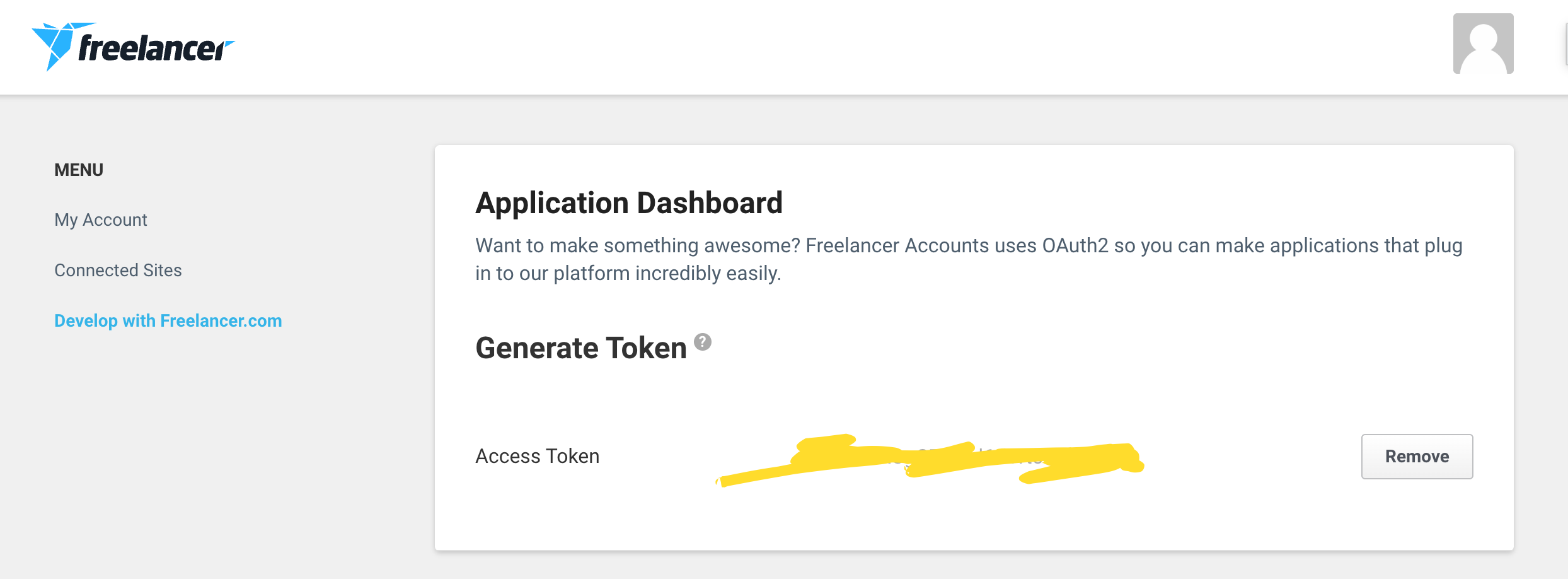
That token is all this server needs — no password, no app review, no OAuth redirect flow. Repeat this for each additional Freelancer account you want connected (see Multiple accounts).
What you can ask Claude
| Tool | Example prompt |
|---|---|
freelancer_list_accounts |
"Which Freelancer accounts are connected?" |
freelancer_get_self |
"Show my profile and reputation" |
freelancer_get_user |
"Look up @some_freelancer on Freelancer" |
freelancer_search_projects |
"Find the latest n8n automation projects under $500" |
freelancer_get_project |
"Get details on project 12345678" |
freelancer_my_projects |
"List my active projects" / "Show my completed projects" |
freelancer_get_project_bids |
"Who has bid on project 12345 and how much?" |
freelancer_my_bids |
"Show my awarded bids" / "Show my rejected bids" |
freelancer_place_bid |
"Bid $200 on project 12345 with 5-day delivery" |
freelancer_get_milestones |
"What milestones are on project 12345?" |
freelancer_list_threads |
"Show my inbox" |
freelancer_get_messages |
"Read this chat: freelancer.com/messages/thread/98765" |
freelancer_send_message |
"Reply to thread 98765 saying..." |
freelancer_search_skills / list_skills / add_skills / remove_skills / set_skills |
"Add n8n and Zapier to my skills" |
freelancer_list_profiles / create_profile / update_profile |
"Create a specialty profile for AI automation" |
Every tool accepts an optional account argument to pick which connected Freelancer account it should act on/as (see Multiple accounts).
Analyzing past projects & winning strategy
There's no single "analyze my strategy" button — instead, Claude does the analysis itself over the raw data this server exposes. This keeps the server a thin, honest API wrapper instead of a black box. Ask things like:
"Pull my awarded bids and my rejected bids, then compare amount, delivery time, and proposal length/style to figure out what's working."
"Look at my completed projects and tell me which skills show up most often."
"Compare my bid on project X to the other bids on it — am I priced competitively?"
Claude will chain freelancer_my_bids (status awarded vs rejected), freelancer_my_projects (status complete), and freelancer_get_project_bids to gather the data, then reason over it directly in the conversation.
Chat links and thread IDs
freelancer_get_messages and freelancer_send_message accept either a plain numeric thread ID or a pasted Freelancer chat/message link — the server extracts the ID either way.
See it in action
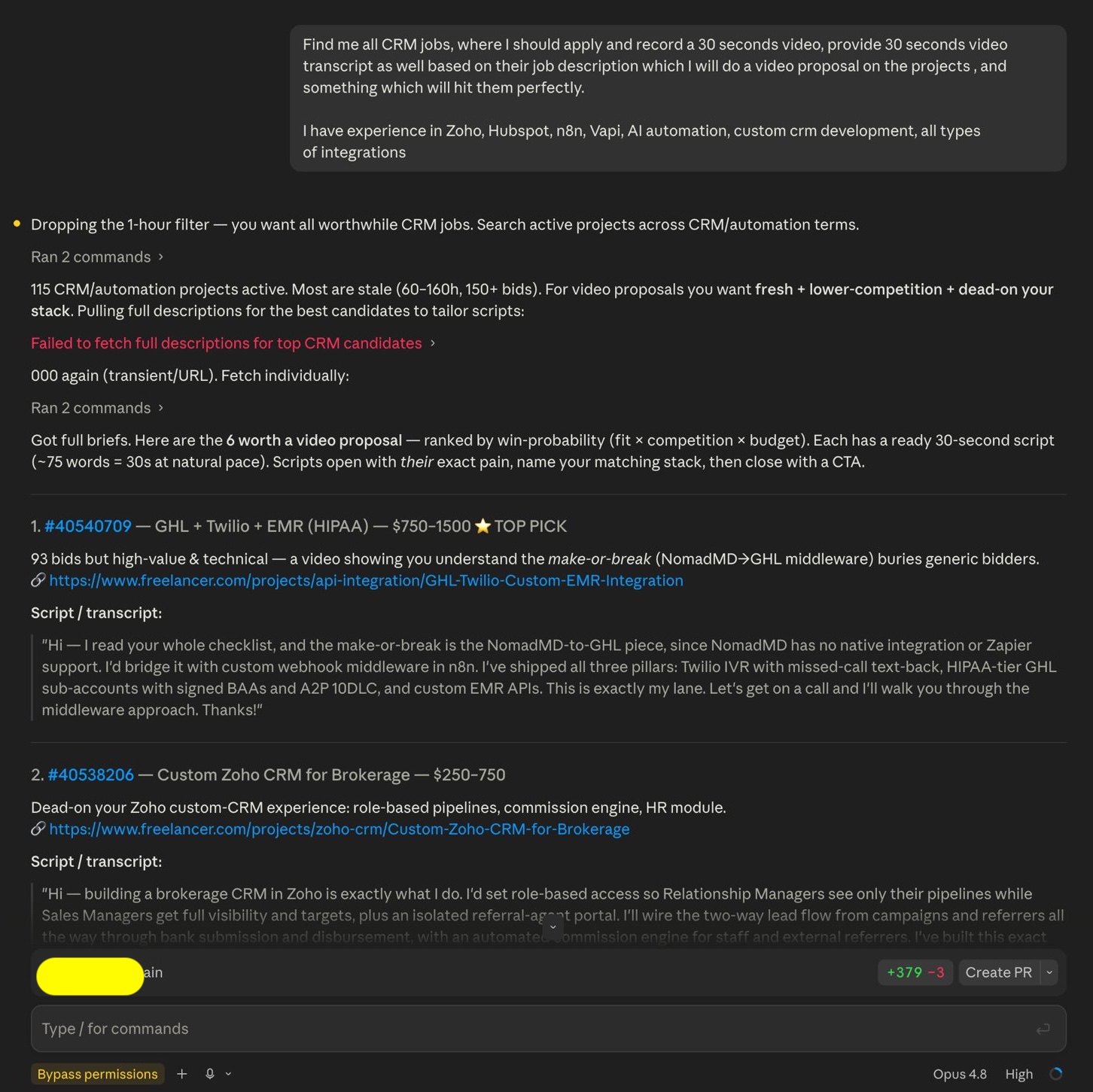
Finding and scoring the best projects to bid on, with a ready pitch script for each:
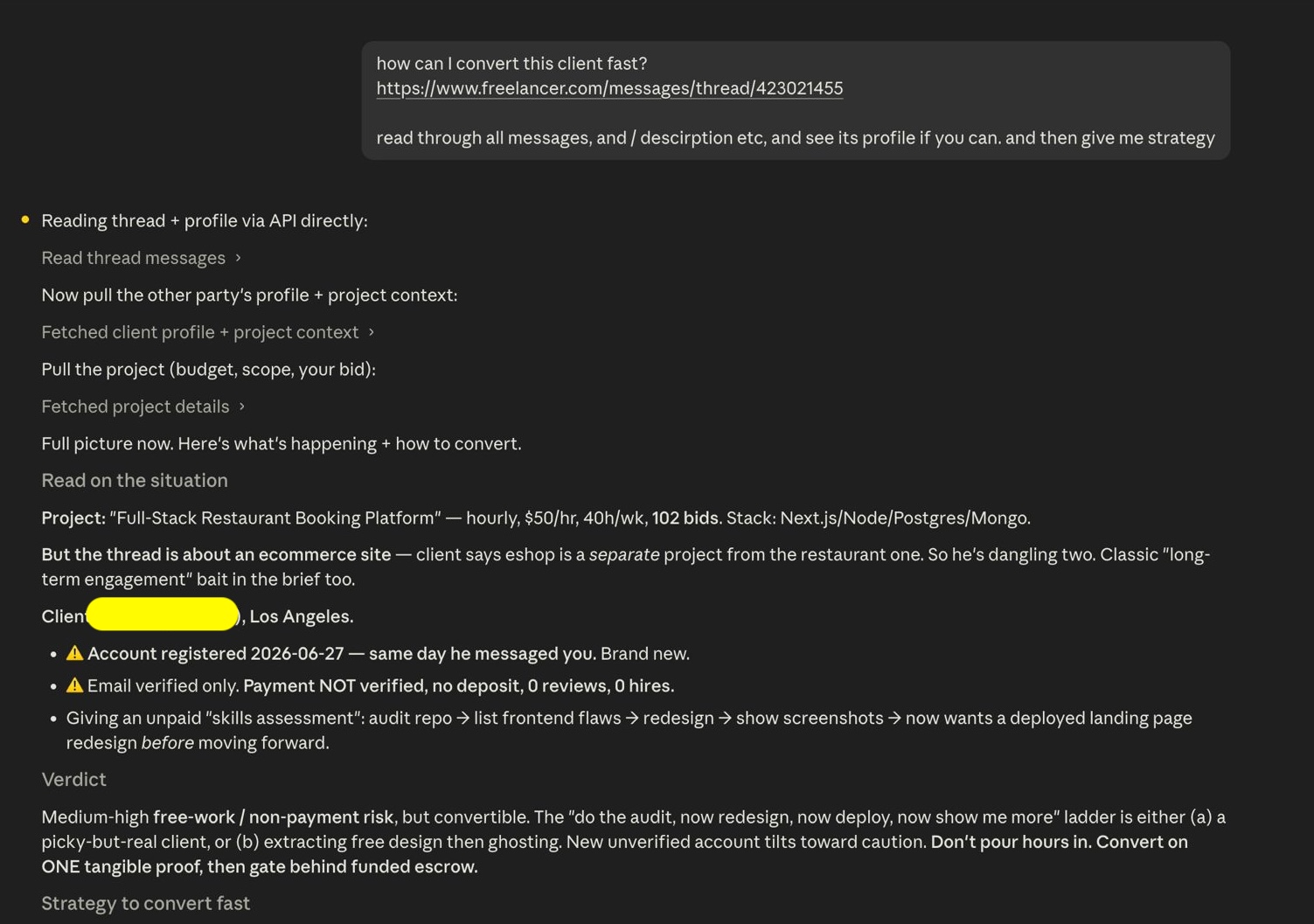
Reading a client thread by chat link and building a conversion strategy:
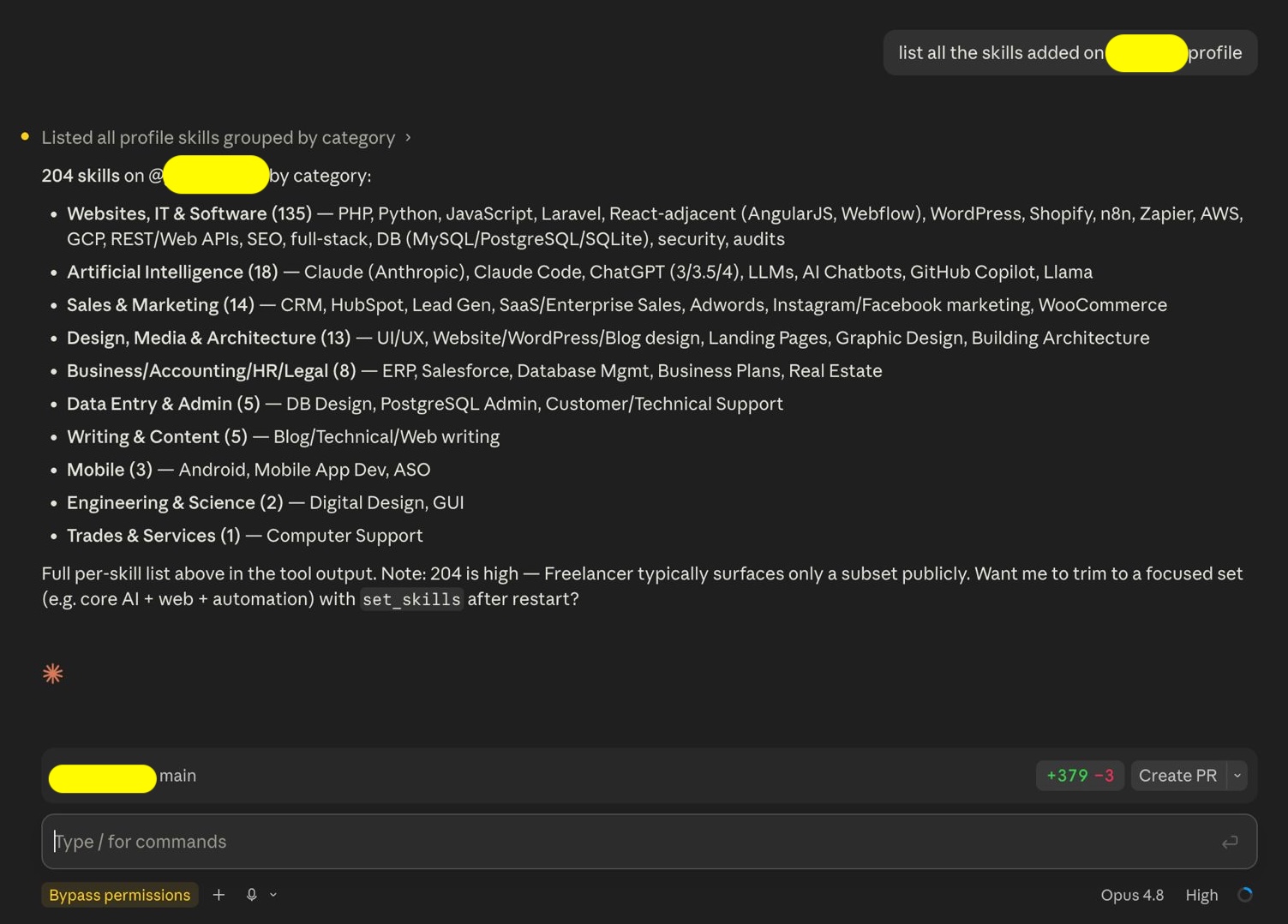
Auditing skills already on a profile:
Setup
The package is published on npm as freelancer-mcp-server — no clone, no build, npx fetches and runs it on demand.
Claude Code (CLI)
claude mcp add freelancer --env FREELANCER_OAUTH_TOKEN=your_token_here -- npx -y freelancer-mcp-server
Or just ask Claude Code directly, in plain English, once you have your token:
"Add the freelancer-mcp-server MCP server using npx, with my Freelancer access token set as FREELANCER_OAUTH_TOKEN"
Claude Code can run the claude mcp add command itself — you don't have to type it.
Claude Desktop
Open your Claude Desktop config file:
- macOS:
~/Library/Application Support/Claude/claude_desktop_config.json - Windows:
%APPDATA%\Claude\claude_desktop_config.json
Add this block inside "mcpServers" (create the file if it doesn't exist):
{
  "mcpServers": {
    "freelancer": {
      "command": "npx",
      "args": ["-y", "freelancer-mcp-server"],
      "env": {
        "FREELANCER_OAUTH_TOKEN": "your_token_here"
      }
    }
  }
}
Restart Claude Desktop — you should see a 🔌 indicating the server connected.
Multiple accounts
To connect more than one Freelancer account (your own plus, say, two clients'), use FREELANCER_ACCOUNTS instead of FREELANCER_OAUTH_TOKEN — a JSON object mapping a label you choose to each token:
{
  "mcpServers": {
    "freelancer": {
      "command": "npx",
      "args": ["-y", "freelancer-mcp-server"],
      "env": {
        "FREELANCER_ACCOUNTS": "{\"main\":\"token1\",\"client_acme\":\"token2\"}"
      }
    }
  }
}
Or via claude mcp add:
claude mcp add freelancer --env FREELANCER_ACCOUNTS='{"main":"token1","client_acme":"token2"}' -- npx -y freelancer-mcp-server
The first account listed becomes the default (used when a tool call omits account). Ask Claude "which Freelancer accounts are connected?" to confirm, then say e.g. "using the client_acme account, show me the latest projects" to target a specific one. Tokens are never logged, echoed back, or written anywhere by this server — they only ever go into the outgoing freelancer-oauth-v1 header.
Running from source (contributing)
git clone https://github.com/godesigntech/freelancer-mcp-server.git
cd freelancer-mcp-server
npm install
npm run build
claude mcp add freelancer --env FREELANCER_OAUTH_TOKEN=your_token_here -- node /FULL/PATH/TO/freelancer-mcp-server/dist/index.js
Testing
Ask Claude:
"Show my Freelancer profile"
If it responds with your username and stats, you're set.
Profile editing — what the Freelancer API actually allows
The Freelancer.com public REST API is read-mostly for profiles. After probing the live API, here's the real boundary:
Editable:
- ✅ Skills/jobs — add, remove, or replace the skills on an account (
/users/0.1/self/jobs). Freelancer caps the total number of skills per account. - ✅ Specialty profiles — create/update focused sub-profiles (
/users/0.1/profiles): tagline, hourly_rate, description, skills. Caveats: the API has no endpoint to list your own profile IDs (you must already know them), and some account types (e.g. certain corporate accounts) cannot create new ones.
NOT possible via the public API (web-UI only):
- ❌ Main account bio/tagline/hourly rate shown on your public page
- ❌ Profile photo / avatar
- ❌ Experience, education, publications, references, certifications
- ❌ Portfolio (read-only via API)
Security notes
- Tokens live only in your local MCP client config (or
.envfornpm run dev) — never committed, never sent anywhere but Freelancer's own API. - The server runs entirely on your machine; no telemetry, no third-party calls.
- Destructive/real-world actions (
place_bid,send_message, skill/profile edits) always surface for your review before they execute, since Claude shows tool calls before running them. - This repo contains no data from, and no dependency on, any other project — it's a clean, standalone Freelancer.com integration.
Troubleshooting
"no Freelancer accounts configured"
→ Set FREELANCER_OAUTH_TOKEN or FREELANCER_ACCOUNTS in your MCP client config.
401 Unauthorized → Token expired or wrong. Generate a fresh one at https://accounts.freelancer.com/settings/develop
"Unknown account "x""
→ Run freelancer_list_accounts to see the exact labels configured, then use one of those.
Tool not appearing in Claude
→ If using npx, confirm Node.js 18+ is installed and npx -y freelancer-mcp-server runs without error from a terminal. If running from source, confirm the path in your config is the absolute path to dist/index.js, and that npm run build succeeded.
Contributing
Issues and PRs welcome. Keep changes scoped to the Freelancer.com API surface — this project intentionally stays a single-purpose, dependency-light MCP server.
License
MIT
Freelancer.com MCP questions
How do I add Freelancer.com MCP to Claude Code?
Run claude mcp add --env 'FREELANCER_ACCOUNTS=<YOUR_FREELANCER_ACCOUNTS>' --env 'FREELANCER_OAUTH_TOKEN=<YOUR_FREELANCER_OAUTH_TOKEN>' freelancer-mcp-server -- npx -y freelancer-mcp-server in your terminal. Add --scope user to make it available in every project.
How do I add Freelancer.com MCP to Cursor?
Open ~/.cursor/mcp.json and add the server under mcpServers, using the Cursor config shown in the install section above.
Can I manage multiple Freelancer accounts at once?
Yes, the server supports multiple accounts by using the FREELANCER_ACCOUNTS environment variable with a JSON object mapping labels to tokens.
Does the server require an OAuth redirect flow?
No, it only requires the access token you provide, which avoids the need for app reviews or redirect flows.