
GoBuildWP MCP server
Commit Nov 9, 2026Turns your WordPress site into an MCP server that allows AI agents to build, edit, and audit websites using Elementor, Gutenberg, and WooCommerce.
Also known as gobuildwp/wordpress-mcp-ai-gobuildwp
- Stars
- 65
- Tools
- —
- Downloads, 30 days
- —
- Latest version
- —
- Last commit
- Nov 9, 2026
- License
- GPL-2.0
What is GoBuildWP MCP?
GoBuildWP turns your WordPress site into an MCP server that allows AI agents to build, edit, and audit websites using Elementor, Gutenberg, and WooCommerce.
Summary generated from the project's README
About GoBuildWP MCP server
Transforming a WordPress site into an interactive environment for AI agents is what GoBuildWP enables. Developers and site owners can connect clients like Claude, ChatGPT, Cursor, or Claude Code to their local or remote WordPress installation to build, edit, and audit websites. The server uses a compact three-tool interface to manage complex tasks through typed abilities, ensuring that AI agents interact with the site using specific schemas rather than generic endpoints.
The free version provides extensive capabilities for managing Gutenberg blocks, menus, media, and Elementor layouts. It includes tools to perform accessibility audits, check PageSpeed Insights without a Google key, and manage SEO metadata. Users can also audit site health and perform search and replace operations. Every write action is recorded in an undoable change ledger, allowing for single changes or entire sessions to be reversed.
Pro users gain access to WooCommerce store management, additional page builders, and the ability to generate custom premium WordPress themes using PHP, CSS, and JavaScript. The system operates under your own user permissions and safety profiles, meaning you maintain full control over what the AI can modify on your server.
What you can do with it
- 1Automated Elementor page constructionAn AI agent can build a complete landing page using a single nested description of elements and styles.
- 2Website accessibility and SEO auditingDevelopers can task an AI with performing WCAG 2.2 accessibility audits and checking for missing meta descriptions.
- 3Safe content and style editingYou can instruct an AI to update specific headings or buttons on a page without affecting the rest of the layout.
- 4Custom theme generationPro users can describe a site to an AI to have it write original PHP templates, CSS, and JavaScript for a custom theme.
Written from the project's README. Every use case is checked against a quote from it.
Automated checks
Ran Nov 14, 2026Full report →Not verified yet. A server needs a score of 80, no serious finding, and enough data for us to check. How checks work · What to fix for more points

- Source repository linked and reachablegobuildwp/wordpress-mcp-ai-gobuildwp is public and reachablegithub.com/gobuildwp/wordpress-mcp-ai-gobuildwp ↗Pass
- Package names this repository as its sourceNot checked
- Build provenance (Sigstore attestation)Not checked
- Open source license (OSI)GPL-2.0spdx.org/licenses/GPL-2.0.html ↗Pass
- Commit or release in the last yearLast commit or release 2026-11-09github.com/gobuildwp/wordpress-mcp-ai-gobuildwp ↗Pass
- OpenSSF ScorecardNot checked
- Package name not close to a popular packageNot checked
- No critical advisory in the package or its dependenciesNot checked
- No hidden instructions to the model0 tool descriptions and the README read; no override phrases, credential paths or hidden charactersPass
- Destructive tools are labelledNot checked
- Remote endpoint answers the MCP handshakeNot checked
README
View on GitHubGoBuildWP: WordPress MCP server and AI website builder for Claude, ChatGPT, Cursor and Codex
Current releases: GoBuildWP Free 1.20.0 / Pro 1.14.4. Pro requires Free 1.18.1 or newer; that minimum is not the latest Free release.







GoBuildWP turns your WordPress site into an MCP server. Connect Claude, ChatGPT, Claude Code, Codex, Cursor or any other MCP client, and an AI agent can build and edit pages, Elementor layouts, Gutenberg blocks, menus, media and SEO metadata, check PageSpeed and security, and read your WooCommerce store, all through typed WordPress abilities that your user permissions, a safety profile and an undoable change ledger still govern. The free plugin in this repository is a complete WordPress MCP server and a free Elementor MCP server. GoBuildWP Pro adds WooCommerce writes, the other page builders, SEO suites, safe updates and backups. GoBuildWP Cloud is an optional hosted link for many sites.
GoBuildWP was previously called WPPilot. It is the same plugin, with the same slug and settings, and existing installs keep working.
Website: https://gobuildwp.com · Docs: https://gobuildwp.com/docs · Client setup guides: https://gobuildwp.com/wordpress-mcp · Release notes and build demos on X: https://x.com/gobuildwp
What's new in 1.19.0
- Security scans with GoBuildWP Cloud. File integrity against the official WordPress.org checksums, PHP hidden in uploads and images, and injected scripts and spam links in the database, scanned in the background in small steps.
- Fixes you can undo. Quarantine or restore a file, clean an infected file or setting, demote an unexpected administrator, unpublish an injected post.
- Website protection. Firewall, login lockouts, IP blocks, virtual patches for known plugin vulnerabilities, and two-factor sign-in for chosen roles. Security writes run only for a signed GoBuildWP Cloud request.
- Database cleanup and a 404 log. Remove old spam, trashed comments and revisions with an undo, and see which paths return 404.
- AI change notifications in wp-admin. A Dashboard widget, a notice and a menu count for changes AI agents made.
What's new in 1.18.8
- Works with strict MCP clients when ACF Pro is active. ACF Pro's native no-input abilities declare a
"type": "null"input schema, which made Cloudflare MCP Portals and other strict clients reject the whole tool list. Both transports now serve an empty object schema for them, and calling them with{}works. - Safety hints on the modern transport.
tools/listnow carriesreadOnlyHint,destructiveHint,idempotentHintandopenWorldHint, as the legacy adapter did. - Pro: custom premium WordPress themes with AI. Describe the site to ChatGPT, Claude or your AI IDE and it writes a real classic or hybrid theme: PHP templates, CSS and JavaScript you own. GoBuildWP Pro keeps it as a managed project with source review, an isolated private preview, approved installation and activation, and recovery that never overwrites newer content. How it works: https://gobuildwp.com/ai-wordpress-theme-builder · Watch Claude build an animated agency theme: https://www.youtube.com/watch?v=KJk96c-XW4c
What's new in 1.18.7
- Build a whole Elementor page in one call.
wppilot/elementor-build-pagetakes the page as one nested description ({type, settings, styles, children}) on v3 containers or v4 atomic elements. The whole page is validated before anything is written, so a rejected widget never leaves a half-built page; the error carries that widget's compact schema so the agent can fix it in the next call.dry_run=truechecks a description without touching the page, and the build is one undoable change. - Style edits no longer wipe a layout.
wppilot/elementor-edit-elementnow merges styles property by property within the same breakpoint and state. Before, one small edit such as right-aligning a row deleted the row's other desktop styles and every tablet, mobile and hover variant. - Clearer errors. Block-note abilities say "No note has that ID" instead of "Permission denied" for an ID that does not exist, and
wppilot/import-media-urlnames the host and the real HTTP status when a site refuses a download. - Pro 1.13.0: whole websites in Elementor. Plan every page and the menu in one checked call (
elementor-plan-site), build the pages as drafts in short, resumable batches with a cross-page design review (elementor-build-site), then publish them with the front page and menu after a person approves (elementor-publish-site). Pages use the Elementor Canvas template by default, so the theme does not print a second header and page title above each page. The whole site, publish included, is one undo on the Changes screen.
Tested on WordPress 7.1 with Elementor 4.3.5 over a real MCP connection: every free read-only ability and the write abilities with their undo, a full landing page from one elementor-build-page call, and a three-page Pro site planned, built, published and rendered. Full history: CHANGELOG.txt.
What GoBuildWP does
GoBuildWP is a self-hosted WordPress MCP server built on the WordPress Abilities API and the official WordPress MCP Adapter. AI clients discover, inspect and run typed WordPress abilities through a compact three-tool interface instead of loading hundreds of one-off endpoints into context.
It is a control layer, not an AI wrapper. No AI model is bundled: your MCP client brings its own model access, and policy is enforced on your own server. The free plugin needs no licence, key or account.
What an agent can do with the free plugin alone:
- Build and edit the site: posts and pages, Gutenberg block content, block-theme templates, template parts, global styles and patterns, menus and menu locations, the front page, media with alt text, a site-wide header, and taxonomies.
- Edit Elementor pages: read the element tree, then add, edit, move, duplicate, reorder and delete elements. This is a free Elementor MCP server, with no Pro install needed.
- Design to a system: typed design tokens, saved designs, and checks that grade a built page for contrast, composition and layout.
- Audit and fix: WCAG 2.2 accessibility audits, content audits for broken links, orphan pages and missing meta descriptions, search and replace with undo, and an Elementor editability score.
- Check site health: Google PageSpeed Insights with no Google key needed, configuration-security checks, a log of PHP fatal errors, and status from your backup and security plugins.
- Read WooCommerce, SEO and form plugins: store reads plus a single-product editor, per-post SEO title, description and robots in seven SEO plugins, and form entries with contact details redacted.
- Undo: every supported write is recorded and can be undone one change at a time, as a batch, or as a whole agent session.
You do not have to phrase prompts in a particular way. A client's first call is discovery. GoBuildWP answers with every ability registered on your install, plus a catalogue of the skills available for them, so "rebuild the pricing page and keep our spacing" already pulls in the right build skill, the element schemas and your design tokens.
GoBuildWP also ships a prompt library in wp-admin: ten complete landing-page briefs, one per industry. Each has its own palette, type pairing, design signature and content facts, so a bakery and a law firm do not come out as the same page. Pick Elementor or the block editor and the brief is written for it. GoBuildWP Pro adds 300 more industry briefs.
Example: editing an Elementor page from Claude Code
This is an illustration of the sequence an agent follows, not a recorded transcript. You type:
On the About page, change the hero heading to "Family law in Leeds since 1998" and point the hero button at /contact.
The agent then makes these calls on your site:
| Step | Ability | What happens |
|---|---|---|
| 1 | wppilot/elementor-check-setup |
Confirms Elementor is active and which element model (v3 widgets or v4 atomic) the install offers. |
| 2 | wppilot/elementor-find-elements |
Finds the hero heading and the button on the About page by their text. |
| 3 | wppilot/elementor-edit-element (twice) |
Changes the heading text and the button link in place, validated against the widget schema. The rest of the page is untouched. |
| 4 | wppilot/elementor-clear-document-cache |
Regenerates Elementor's CSS for the page. |
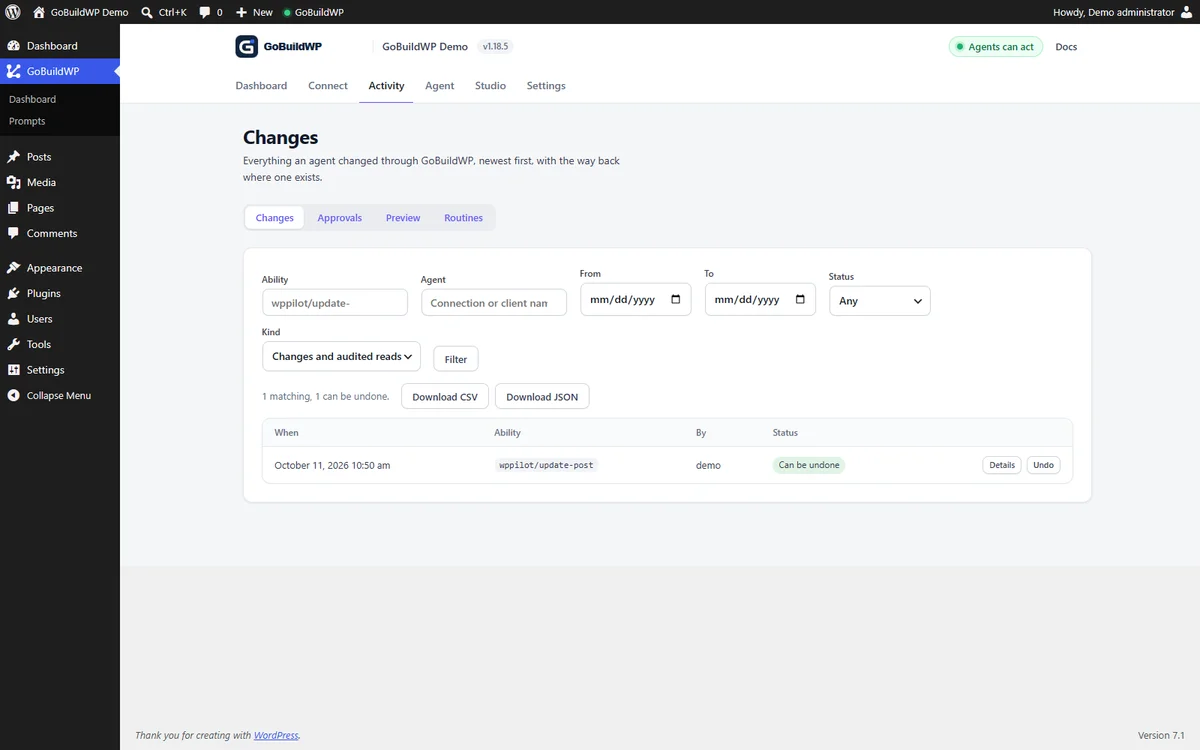
Both edits are checked against your WordPress capabilities and the active safety profile before they run. They appear on GoBuildWP → Changes, attributed to the agent that made them, and wppilot/undo-session (or Undo session on that screen) reverses them.
Real results: full pages built through GoBuildWP
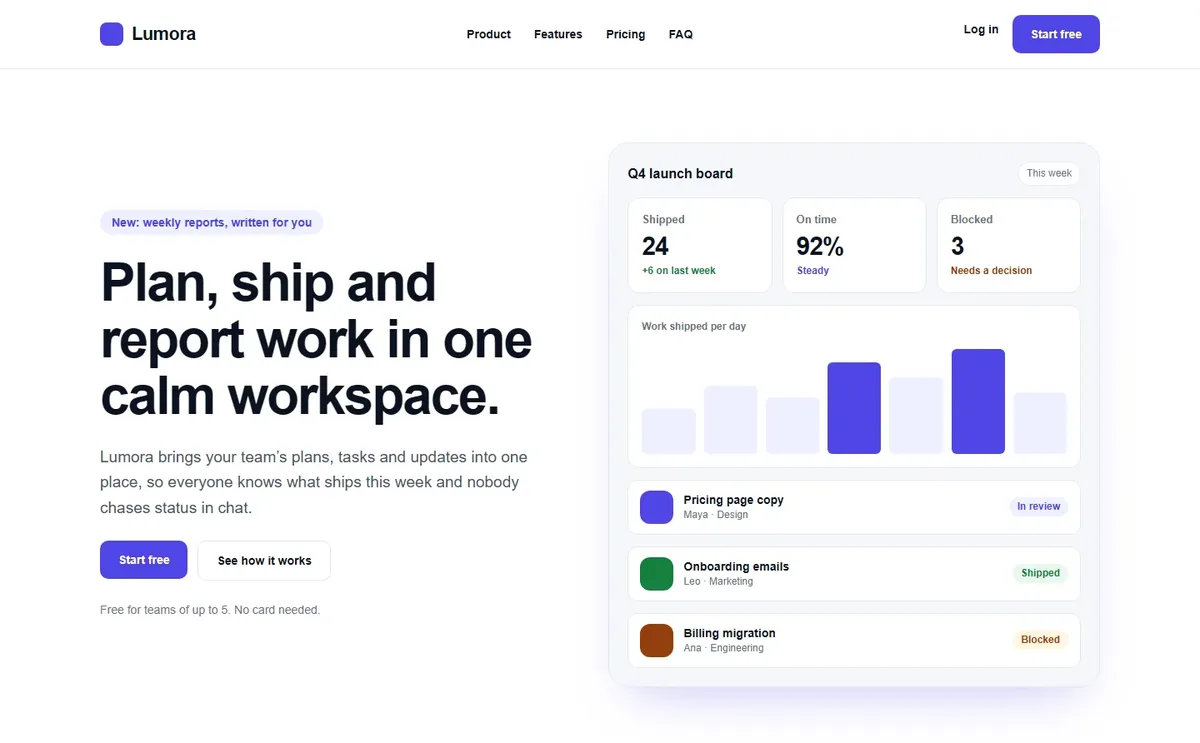
Each page below was built from one plain-language request through the real MCP, in native Elementor, saved as a draft and checked on desktop and mobile. Nothing was edited by hand afterwards. Full pages and the exact requests: gobuildwp.com.
| SaaS homepage (Lumora) | Car showroom (Noir Motor House) | Bakery (Hearth & Crumb) |
|---|---|---|
 |
 |
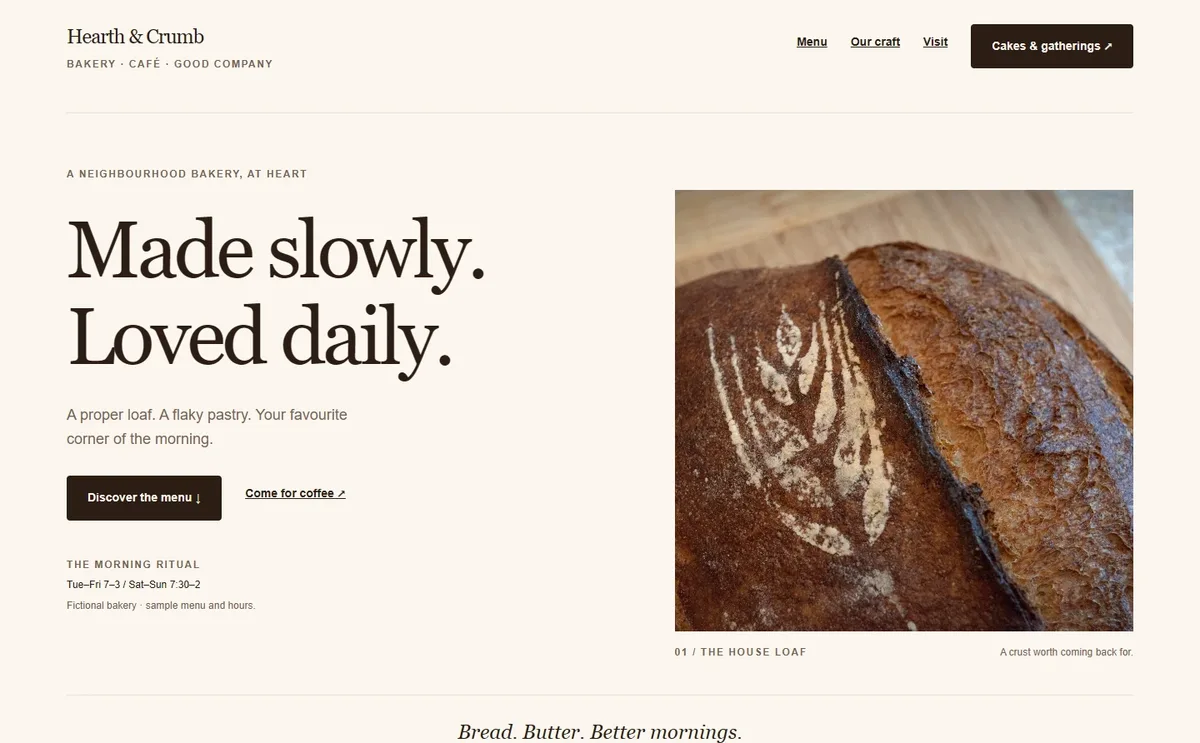 |
| 250 Elementor elements, checked at 1440 and 390 px | 130 elements, checked at 1920 to 390 px | 295 elements, checked at 1920 to 390 px |
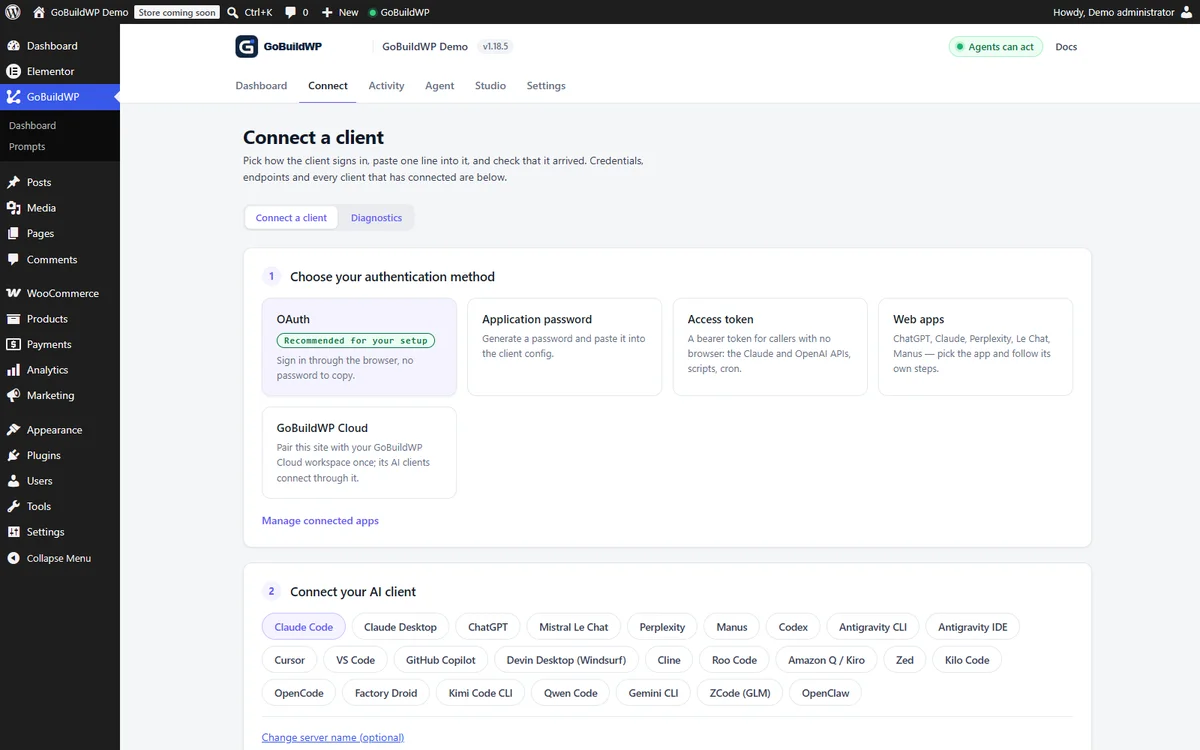
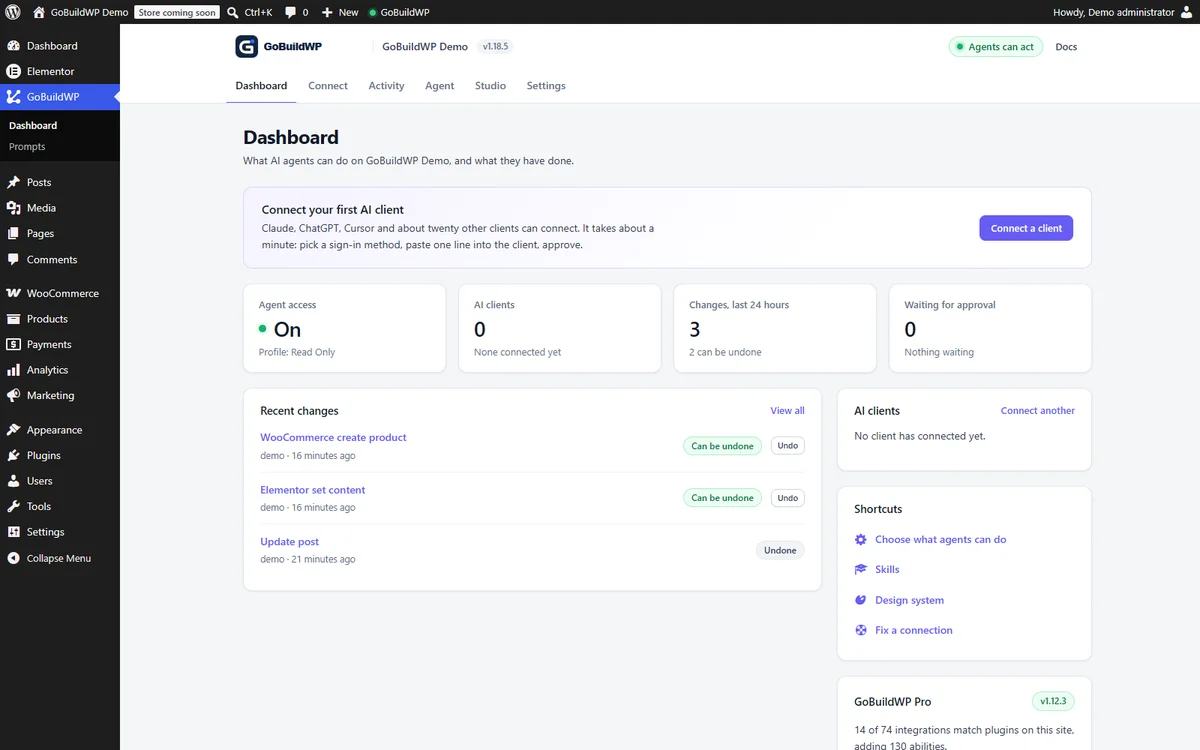
Inside WordPress: every change an agent makes is listed with a way back, and each site shows what is connected.
| Changes and undo | Connect your AI client | Dashboard |
|---|---|---|
 |
 |
 |
How it compares to other WordPress MCP servers
WordPress MCP servers differ most in what happens after an agent writes: who confirms a destructive call, whether a change can be undone, and whether the server runs on your own site or through someone else's relay. GoBuildWP runs on your site, can require a person rather than the model to confirm destructive calls, and verifies every undo against the recorded before-image instead of assuming it worked.
Best WordPress MCP servers · vs Respira · vs Easy MCP AI · vs EMCP · vs Elementor's MCP · vs WPVibe · vs Royal MCP · vs AI Engine · vs the WordPress MCP Adapter · Undo and rollback, compared
What the free plugin can do
236 registered abilities, plus one MCP prompt per skill you save. The WooCommerce, SEO, form, backup, security and Site Kit abilities register only while their plugin is active, and developer abilities only under Developer Full Access, so a fresh install with none of those plugins registers 170 on the default profile. Each ability can be switched off individually on the Abilities screen.
| Domain | Abilities | What it covers |
|---|---|---|
| Content | 8 |
List, search and read posts, pages and public custom post types. Create, update, trash, restore, and permanently delete with explicit confirmation. |
| Taxonomies | 7 |
Discover taxonomies, list and read terms, create, update, delete with confirmation, and assign terms to content. |
| Media | 10 |
List, read, import from a URL, search openly-licensed stock, update metadata and alt text, set and clear featured images, attach and detach, delete with confirmation. |
| Comments | 6 |
List and read with commenter email and IP withheld below moderate_comments. Reply, edit, approve, hold, spam, unspam, trash, restore, delete with confirmation. |
| Menus | 10 |
Create, rename and delete menus, add, update, reorder and remove items, list theme locations and assign menus to them. |
| Revisions | 3 |
List with autosaves distinguished, read against the live post, and restore. |
| Users | 4 |
Privacy-minimized reads. Login name, roles and registration date need list_users; the email address needs edit_users. |
| Site | 2 |
Site information and an explicit settings allowlist. |
| Plugins and themes | 12 |
Search the WordPress.org plugin directory and read one extension in detail. Activate, deactivate, update and switch themes with explicit confirmation. Install and delete are Developer Full Access only: they write executable code to the server. |
| Gutenberg | 11 |
Block-editor content, staged pending changes and browser finalization for native blocks. |
| Elementor | 18 |
Read a document, inspect the widgets and style properties this install offers, build a whole page from one description, and edit the element tree: add, edit, move, duplicate, reorder and delete. Page settings included. Detail below. |
| Design system | 19 |
Typed design tokens, saved designs and activation, plus the checks that grade a built page against them: contrast, composition, layout grammars and a rendered-page verification pass. |
| Preview | 8 |
Compute what a write would change without performing it, then apply the reviewed result. Plus a view link, so an agent with a browser can look at the page it built, including a draft, and a capture store that compares two screenshots of a page and reports which regions moved. |
| Skills | 4 + prompts |
Reusable skills and site-wide instructions. Each saved skill also registers one MCP prompt, so this grows with the skills you write. |
| Changes | 8 |
Read the redacted change ledger, attributed to the agent credential that made each write, export it as rows for a client report or an audit, roll a change back, and undo or redo everything one agent session did. |
| Diagnostics | 5 |
Scoped health, performance and configuration-security checks, a Connection Doctor that finds what blocks an MCP client and names the fix, and a site issues log: the PHP fatal errors behind "There has been a critical error", with the file and plugin they came from, plus paused plugins, rolled-back updates and failed backups. |
| Search and replace | 4 |
Preview a search-and-replace across posts and their meta (serialized and builder JSON included) as a reviewed plan, apply only posts unchanged since, 100 per call or as a background job, cancel it, and undo one post or the whole run. |
| Media and accessibility | 5 |
Resize, crop, rotate or flip an image as a copy or in place, with undo. Audit a served page against WCAG 2.2, find images with missing or filename alt text, show an image to the model so it can write real alt text, and set alt text in bulk with undo. |
| Content audit | 2 |
Broken internal links, orphan pages, thin content, missing SEO descriptions and structured-data problems across the site, as a background job. |
| Builder quality | 1 |
Score how editable an Elementor page is, 0-100, and list per element what to fix: layout in HTML widgets, scripts, shortcodes, inline styles, custom CSS, fixed colours instead of the global palette, deep nesting and empty containers. |
| Block themes | 11 |
Global Styles, templates and template parts (list, read, save, revert to the theme file), the site's own synced and unsynced patterns, and block navigation menus, all through WordPress's own REST controllers and all undoable. |
| Site header | 1 |
Build the site-wide header: logo and title, the menu (a menu button on tablets and phones), a language dropdown, an optional button and the cart, one header per Polylang language. It checks the served header before reporting success and can be undone. Needs Elementor Pro (Elementor's own paid plugin), or a block theme. |
| Block Notes | 4 |
Leave a note on a block for a person, reply, resolve, and read the notes they resolved. Every one can be undone. |
| Site tools | 8 |
WP-Cron list, run and delete (undoable), Site Health tests, transient flush, and, on Developer Full Access and audited, an options explorer and a read-only database SELECT with redaction. |
| Database cleanup | 2 |
Preview, then permanently remove spam comments, trashed comments and post revisions older than a number of days, oldest first and up to a limit, with undo through the change log. |
| 404 log | 1 |
The paths visitors hit that returned 404, most-hit first, with the referring host and when each was last seen, to find broken links and moved pages that need a redirect. |
| Multisite | 2 |
List a network's sites and run an ability on one of them through that site's own safety profile and gates. Loads only on a multisite network. |
| WooCommerce | 13 |
Check the setup, list and read products, variations, categories, tags and store settings, read orders and customers, and edit one product's name, description, prices and stock with undo. |
| SEO | 14 |
One post's SEO title, meta description and robots in Yoast SEO, Rank Math, All in One SEO, SEOPress, The SEO Framework, Slim SEO and SmartCrawl, read and set with undo. |
| Forms | 8 |
List the forms of WPForms, Contact Form 7, Gravity Forms and Forminator and read their entries with email addresses, phone numbers and sensitive fields withheld. |
| Backups and security | 5 |
Backup status and history (UpdraftPlus, Duplicator, BackWPup, All-in-One WP Migration); security plugin status, scan findings and lockouts with IPs shown as networks (Wordfence, Solid Security). |
| Page speed | 2 |
Google PageSpeed Insights for any page of the site (Lighthouse scores, lab metrics, Core Web Vitals field data and the biggest opportunities) with no Google key needed. With Site Kit by Google active, turn on its read-only dashboard sharing for Administrators, undoably. |
| Scheduled audits | 5 |
Routines that run the accessibility, content and alt-text audits on a schedule, store each report, compare it with the last and email what changed. |
| Developer | 13 |
PHP execution, WP-CLI, filesystem and temporary admin access. Blocked outside Developer Full Access, and excluded entirely from the WordPress.org build. |
Content creation is draft-first: an absent, blank or malformed status resolves to draft before any capability check, so nothing is published by accident.
Learn: videos and guides
- Video: build a custom WordPress theme with Claude and GoBuildWP Pro. From a creative brief to Afterglyph, an animated agency theme with GSAP and ScrollTrigger: site connection, the brief, private preview, approval and content editing. https://www.youtube.com/watch?v=KJk96c-XW4c
- AI WordPress theme builder (Pro): how the managed theme workflow goes from brief to installed theme. https://gobuildwp.com/ai-wordpress-theme-builder
- Connect your AI client: step-by-step setup for ChatGPT, Claude, Cursor and other MCP clients. https://gobuildwp.com/wordpress-mcp
- Documentation and ability reference: https://gobuildwp.com/docs
- Release notes and build demos on X: https://x.com/gobuildwp
Quick setup
1. Install the plugin
- Download
gobuildwp.zipand upload it in Plugins → Add New → Upload Plugin. The folder inside the archive iswppilot/, so the plugin installs aswp-content/plugins/wppilot. That is its internal id, kept so existing installs update in place. GitHub's own "Source code (zip)" download is not installable: it has novendor/and uses a versioned folder name. Older versions are on the releases page. - Activate GoBuildWP.
- Open GoBuildWP → Configuration and leave Production Safe selected.
- Open GoBuildWP → Connect and choose your AI client. The screen generates the exact configuration for that client, with your site's URL and a suggested server name (
gobuildwp-<your-site>) filled in.
The MCP endpoints:
https://example.com/wp-json/mcp/wppilot         # application passwords and access tokens
https://example.com/wp-json/mcp/wppilot-oauth   # OAuth clients
The older /wp-json/mcp/mcp-adapter-default-server route still resolves as a legacy alias, but new configurations should use the paths above.
GoBuildWP MCP questions
Can I undo changes made by an AI agent?
Yes, every supported write is recorded and can be undone individually, in batches, or as an entire agent session.
What is the difference between the Free and Pro versions?
The free version allows building posts, pages, and Elementor layouts, while Pro adds WooCommerce writes, other page builders, SEO suites, and backups.
Does it work with Elementor?
Yes, it includes a free Elementor MCP server that allows agents to read the element tree and add, edit, move, or delete elements.