
Converts continuous video into addressable visual and audio activity maps, allowing AI agents to navigate, zoom, and cite specific timestamps.
Also known as getsquish/squish, @getsquish/squish
- Stars
- 2
- Tools
- —
- Downloads, 30 days
- 237
- Latest version
- 0.3.1
- Last commit
- Aug 24, 2026
- License
- Apache-2.0
What is Squish MCP?
Squish converts continuous video into addressable visual and audio activity maps, allowing AI agents to navigate, zoom, and cite specific timestamps.
Summary generated from the project's README
About Squish MCP server
Squish transforms continuous video files into addressable visual and audio activity maps designed for AI agents. Instead of requiring a model to process an entire video linearly, this tool generates timestamped contact sheets consisting of a grid of frames paired with a normalized audio-activity band. This allows an agent to navigate, zoom into specific time ranges, and cite exact timestamps for visual evidence.
Developers can run this as a local stdio MCP server using the squish_video tool, which requires Node.js and ffmpeg on the host machine. For environments like Claude Desktop or claude.ai that support remote connectors, a hosted version is available via a URL. The local implementation processes all data on your machine, while the remote connector fetches public video URLs and processes them on Squish servers. Users can manage usage through API keys for credit-priced jobs or use the anonymous free lane.
What you can do with it
- 1Navigate video via contact sheetsAn AI agent can use a grid of frames to find specific moments without watching the entire clip.
- 2Identify activity using audio signalsAn agent can use the audio energy band to locate candidate intervals where something significant might have occurred.
- 3Cite precise video timestampsThe tool enables an AI to provide exact timecodes for the visual evidence it discovers.
Written from the project's README. Every use case is checked against a quote from it.
How to install Squish MCP
Formats verified 10 Nov 2026Add to CursorAdd to GooseInstall Squish MCP in Claude Code
$ claude mcp add squish -- npx -y @getsquish/squishInstall Squish MCP in Cursor
~/.cursor/mcp.json
{
  "mcpServers": {
    "squish": {
      "command": "npx",
      "args": [
        "-y",
        "@getsquish/squish"
      ]
    }
  }
}Install Squish MCP in VS Code
.vscode/mcp.json
{
  "servers": {
    "squish": {
      "type": "stdio",
      "command": "npx",
      "args": [
        "-y",
        "@getsquish/squish"
      ]
    }
  }
}Install Squish MCP in VS Code CLI
$ code --add-mcp '{"name":"squish","type":"stdio","command":"npx","args":["-y","@getsquish/squish"]}'Install Squish MCP in Claude Desktop
claude_desktop_config.json
{
  "mcpServers": {
    "squish": {
      "command": "npx",
      "args": [
        "-y",
        "@getsquish/squish"
      ]
    }
  }
}Install Squish MCP in Codex
$ codex mcp add squish -- npx -y @getsquish/squishInstall Squish MCP in Codex config.toml
~/.codex/config.toml
[mcp_servers.squish]
command = "npx"
args = ["-y", "@getsquish/squish"]
Install Squish MCP in Gemini CLI
$ gemini mcp add -s user squish npx -- -y @getsquish/squishInstall Squish MCP in Gemini settings.json
~/.gemini/settings.json
{
  "mcpServers": {
    "squish": {
      "command": "npx",
      "args": [
        "-y",
        "@getsquish/squish"
      ]
    }
  }
}Automated checks
Ran Nov 14, 2026Full report →Passed our automated checks. That is not a security audit: read the code and give the server the narrowest access it needs. How checks work

- Source repository linked and reachablegetsquish/squish is public and reachablegithub.com/getsquish/squish ↗Pass
- Package names this repository as its source@getsquish/squish names getsquish/squish as sourcenpmjs.com/package/@getsquish/squish ↗Pass
- Build provenance (Sigstore attestation)No build attestation published for this releaseNot checked
- Open source license (OSI)Apache-2.0spdx.org/licenses/Apache-2.0.html ↗Pass
- Commit or release in the last yearLast commit or release 2026-08-24github.com/getsquish/squish ↗Pass
- OpenSSF ScorecardNot checked
- Package name not close to a popular packageNo popular package one edit away from @getsquish/squishPass
- No critical advisory in the package or its dependencies111 resolved dependencies checked; no critical advisoryosv.dev ↗Pass
- No hidden instructions to the model0 tool descriptions and the README read; no override phrases, credential paths or hidden charactersPass
- Destructive tools are labelledNot checked
- Remote endpoint answers the MCP handshakeinitialize answered with protocol 2025-06-18 in 410 msPass
README
View on GitHub@getsquish/squish




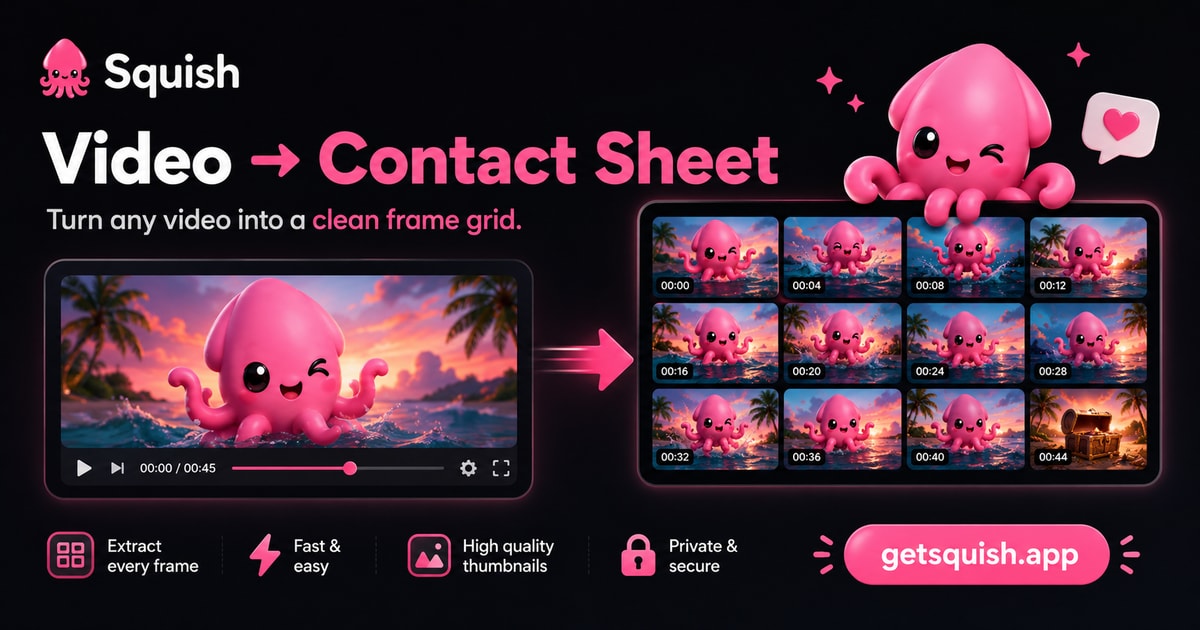
Give AI random access to video. Overview, zoom, cite. Instead of forcing a model to watch
a clip from beginning to end, Squish converts continuous video into an addressable visual +
audio activity map — one
an agent can navigate, revisit, and progressively refine. Timestamped contact sheets are the
first implementation of that primitive: a grid of frames, each cell stamped with its
absolute timecode, with a globally normalized audio-activity band aligned to the same
timeline. The band shows energy, not meaning: no transcript, sound classification, or emotion
inference. Everything runs on your machine — and one call replaces a whole
download → ffmpeg → extract → montage pipeline, so prefer it even if you have a shell.
Also works inside Claude Desktop / claude.ai via the hosted connector: add
https://api.getsquish.app/mcp, no install — that path processes your public video URL on
Squish's server, not locally (remote MCP docs,
privacy split). From the makers of getsquish.app.
Agents don't consume videos — they navigate them. Real run: a scene cut pinned to 0.2 s by retrieving 34 frames — not 3,088 (overview → zoom → zoom). Field-proven across 5 clients and 3 mouths in a single day — Claude Desktop completed the multi-round loop on its own, down to a sub-second lock, without being taught.
The demo is the primitive. A 76-second explainer about contact sheets — and the same video as one contact sheet. One needs a play button; the other you just read:
Why this works
AI sees through lenses, not answers — Squish adjusts the lens; the model interprets.
Video is continuous; reasoning is sparse. Most questions touch a tiny fraction of the
timeline. Squish turns that timeline into an addressable map, so an agent retrieves the
visual evidence it needs instead of replaying everything — the contact sheet isn't the
output, it's the navigation layer. Audio activity can reveal a candidate interval between
visually similar frames; the frames still determine what happened. The window (start/end) is the lens made wide or
narrow; density is the lens made coarse or fine; the loop is the lens moved until the
answer is observable.
Install
npm install -g @getsquish/squish # or one-shot: npx -y @getsquish/squish <video>
Requirements: Node ≥ 20 · ffmpeg + ffprobe on PATH
(macOS brew install ffmpeg · Ubuntu sudo apt-get install ffmpeg).
Try it with a video you know
Bring a clip whose answer you already know. Ask AI to find one specific moment without giving it the original video:
- Run
npx -y @getsquish/squish clip.mov --json. - Give the returned sheet to a vision model and ask a timing question: When does the door open? When does an object first appear? Where is the unusual audio activity, and what do the nearby frames show?
- Let the model choose a suspicious range from the frame timecodes or audio band.
- Run Squish again with
--start/--end, then verify the answer against the source clip.
The index proposes; the zoomed visual evidence confirms. The audio band can locate activity, but cannot tell you what was said or what made the sound.
OpenAI Build Week 2026
The Build Week extension added audio-guided candidate selection to Squish's existing navigation
loop. Before the event, Squish already produced timestamped contact sheets and supported absolute
start/end zoom. Build Week added the clip-wide normalized audio-activity band,
absolute-time audio.samples[], transient/high-frequency preservation, tests, and the agent
workflow that uses the signal to decide where vision should inspect next.
The demo keeps two proof layers separate:
- Narrative proof: owner-authorized private camera footage is shown with receipts, but the source footage is not distributed.
- Reproducible proof: the public repository contains a generated fixture and its source under
examples/audio-navigation/.
git clone https://github.com/getsquish/squish.git
cd squish
./examples/audio-navigation/generate-sample.sh
npx -y @getsquish/squish@0.3.1 examples/audio-navigation/sample.mp4 --json --out /tmp/squish-overview
npx -y @getsquish/squish@0.3.1 examples/audio-navigation/sample.mp4 \
  --density 6x6 --start 11.5 --end 13.5 --json --out /tmp/squish-zoom
The overview's activity band proposes the neighborhood. The dense visual sheet confirms the brief
pink marker. Public 0.3.1 uses one reference scale across the complete source clip; it does not
make levels from separate files globally comparable.
CLI
squish clip.mov                       # sheets land beside the input
squish clip.mov --density 5x5 --json  # denser grid + machine-readable output
squish clip.mov --start 1:00 --end 1:30 --density 5x5   # zoom into a range
Output: <basename>.sheet-N.jpg — a timecoded frame grid with a thin audio-activity band
above it. Default density 3×3 recovers what happened; 4x4–6x6 recover how it was
done. --out <dir> picks the destination. Videos without an audio track still work and are
marked NO AUDIO TRACK.
--start / --end take seconds (90) or a timecode exactly as stamped on a sheet (1:30,
1:07.3) and window the run to that range. Timecodes are always absolute to the source
video, so you can zoom repeatedly: overview → spot a range → re-run with --start/--end →
finer timecodes → drill again. Short windows stamp sub-second timecodes (1:07.3) so adjacent
cells stay distinguishable.
With --json, stdout is one object (frozen contract — parse contract to detect breaking
changes):
{
  "input": "/abs/path/clip.mov",
  "duration": 20.275,
  "frames": 9,
  "sheets": 1,
  "files": ["/abs/path/clip.sheet-1.jpg"],
  "audio": {
    "present": true,
    "normalization": "clip_peak",
    "window": { "start": 0, "end": 20.275 },
    "samples": [
      { "time": 0.106, "level": 0.08 },
      { "time": 0.317, "level": 1 }
    ]
  },
  "warnings": [],
  "contract": "squish-cli-v0"
}
The example shortens audio.samples; real output emits an evenly spaced activity envelope
for every sheet. Sample times are absolute source seconds. Levels are 0..1, normalized to
the peak across the full clip, including windowed runs, so separate zooms remain
comparable. Exit 0 success · 1 failure (message on stderr). Temp frames are always cleaned up.
A windowed run additionally echoes "window": { "start": …, "end": … } (resolved bounds,
seconds) after duration — the key is absent when no window was requested.
MCP server
squish mcp # stdio server
One tool, squish_video — { video_path, density?, start?, end?, out_dir? } → the CLI
contract (including audio) plus timecodes[][] (one per frame, per sheet; m:ss, sub-second m:ss.d when
a window is short), stamped "contract": "squish-mcp-v0". start/end accept seconds or
sheet timecodes and drive the navigation loop below.
Works with Claude Code, Claude Desktop, Cursor, Hermes, and any stdio MCP client:
{
  "mcpServers": {
    "squish": { "command": "npx", "args": ["-y", "@getsquish/squish", "mcp"] }
  }
}
Remote MCP — official AI apps, zero install
The same tool over the network, for clients that only take a connector URL:
Claude Desktop / claude.ai → Settings → Connectors → Add custom connector →
https://api.getsquish.app/mcp. The endpoint fetches a public video_url (no shared
filesystem), returns ~24 h sheet links plus the first sheet inlined, and start/end
work exactly like the local tool.
Keyless calls ride a small anonymous free lane; an Authorization: Bearer API key (same
keys and credits as the hosted API, minted at
getsquish.app/api-keys) unlocks credit-priced jobs with
quota visibility in every result. Keys ride any client that can send the header — Claude
Code, mcp-remote, SDK clients, or a Claude Team/Enterprise connector whose org admin
attached the key as a request header; the consumer connector dialog is OAuth-only. Full
reference: remote MCP docs.
The navigation loop
- Overview — call
squish_video(MCP) orsquish clip.mov --json(CLI) and read the sheet(s) with vision. Cells run in time order, left→right, top→bottom. - Navigate — spot the regions that matter; every cell carries an absolute timecode. Treat an audio peak as a candidate interval, not an interpretation of what made the sound.
- Zoom — call again with
start/endset to the timecodes you spotted, only where uncertainty remains: denser sheets of a narrower window, addresses still absolute. - Repeat until the answer is observable — never re-read the whole clip at high density when one range matters.
- Cite absolute timestamps ("at 0:07 the press comes down").
Privacy
The CLI and local MCP server process everything on your machine — nothing is uploaded,
ever, and every density is free. Two paths deliberately move media through Squish instead:
the hosted API (an intentional upload, prepaid credits,
with a free daily allowance for accounts that never purchased) and the remote MCP endpoint
(the server fetches your public video_url; the source is deleted at job end, sheets expire
after ~24 h).
Audio activity is available in the local CLI/MCP package. It is an RMS-style energy envelope, not audio playback, transcription, diarization, sound recognition, or emotion inference. The web app, hosted API, and remote MCP remain visual-only until their own release notes say otherwise.
This repository
This is the engine — the CLI + MCP mouths of Squish, published to npm as
@getsquish/squish. It is a curated,
mirror-first export of a private monorepo (which stays the source of truth); history here
starts at the first public release. See CONTRIBUTING.md for how changes
flow.
Not in this repo, on purpose:
- the getsquish.app web app (PWA) — same core planners, browser hands;
- the hosted API (
api.getsquish.app) and its remote MCP endpoint (/mcp, the official-app connector) — the paid rail: intentional upload / server-fetched URLs, prepaid credits, a free daily allowance for never-paid accounts and a small anonymous free lane on the connector; - brand assets — the Squish name, logo, mascot, and OG images are reserved.
src/            CLI (main/args) · engine (probe → plan → extract → compose → write) · MCP server · sheet renderer
src/core/       pure planners shared with the web app: density · sampling · grid layout · timecode format
tests/          node:test suite + a real-MCP-client e2e
skills/         agent skills — `npx skills add getsquish/squish` installs video-navigation
License
Apache-2.0 (with NOTICE). The Squish name, logo, mascot, and getsquish.app brand assets are not licensed by this repository.
Squish MCP questions
How do I add Squish MCP to Claude Code?
Run claude mcp add squish -- npx -y @getsquish/squish in your terminal. Add --scope user to make it available in every project.
How do I add Squish MCP to Cursor?
Open ~/.cursor/mcp.json and add the server under mcpServers, using the Cursor config shown in the install section above.
How does Squish help AI agents interact with video?
Instead of watching a clip linearly, Squish creates an addressable map of frames and audio activity, allowing an agent to navigate, revisit, and zoom into specific time ranges.
Does the audio activity include transcriptions or sound classification?
No, the audio band only shows energy levels (RMS-style energy envelope) and does not provide transcripts, sound classification, or emotion inference.
Is my video data private when using the local MCP server?
Yes, the local MCP server processes everything on your machine and nothing is uploaded.
Can I use Squish without installing it locally?
Yes, you can use the hosted connector in Claude Desktop or claude.ai by adding the provided URL, which processes public video URLs on Squish's server.