
vellum MCP server
Commit Nov 6, 2026Lets an AI client read and write a folder of markdown files using a lightweight, self-hosted MCP server.
Also known as freema/vellum
- Stars
- 7
- Tools
- —
- Downloads, 30 days
- —
- Latest version
- —
- Last commit
- Nov 6, 2026
- License
- MIT
What is vellum MCP?
vellum lets an AI client read and write a folder of markdown files using a lightweight, self-hosted MCP server.
Summary generated from the project's README
About vellum MCP server
Managing a personal knowledge base through an AI agent is what vellum enables by providing a direct interface to a folder of markdown files. This lightweight server works locally via stdio or as a self-hosted HTTP service using Docker, making it suitable for individuals or small teams who want to keep their data in portable, flat files without a database. It integrates with clients like Claude Desktop, Claude Code, and Cursor to allow agents to interact with your notes.
The server provides 17 specific tools for navigating and editing content, such as search_notes, read_note, and patch_note. Instead of sending entire files and wasting context, the system allows agents to read specific sections, outlines, or even just a few lines of text. It also surfaces notes as first-class MCP resources, allowing you to attach them to a conversation directly from a resource picker. Because it relies on standard markdown, you can continue using editors like Obsidian or VS Code alongside your AI workflows.
What you can do with it
- 1Search and retrieve specific notesAsk your AI agent to find relevant information within your markdown vault using keyword searches.
- 2Perform surgical edits to filesInstruct an agent to update a specific paragraph or add a new section to an existing note.
- 3Organize unfiled contentHave an AI assistant help you move notes from an inbox into specific project folders.
Written from the project's README. Every use case is checked against a quote from it.
Configuration
AUTH_ENABLEDTRUST_PROXYVELLUM_CLIENT_SECRETVELLUM_ISSUER_URLVELLUM_SHARING
Automated checks
Ran Nov 14, 2026Full report →Not verified yet. A server needs a score of 80, no serious finding, and enough data for us to check. How checks work · What to fix for more points

- Source repository linked and reachablefreema/vellum is public and reachablegithub.com/freema/vellum ↗Pass
- Package names this repository as its sourceNot checked
- Build provenance (Sigstore attestation)Not checked
- Open source license (OSI)MITspdx.org/licenses/MIT.html ↗Pass
- Commit or release in the last yearLast commit or release 2026-11-06github.com/freema/vellum ↗Pass
- OpenSSF ScorecardNot checked
- Package name not close to a popular packageNot checked
- No critical advisory in the package or its dependenciesNot checked
- No hidden instructions to the model0 tool descriptions and the README read; no override phrases, credential paths or hidden charactersPass
- Destructive tools are labelledNot checked
- Remote endpoint answers the MCP handshakeNot checked
README
View on GitHubvellum
a calm window into a folder of markdown


A lightweight MCP server over a folder of markdown files. One static Go
binary with an embedded web UI, one ~24 MB Docker image, ~5 MB idle RAM.
Run it on your laptop next to your editor (vellum mcp ~/notes), or
self-host it with docker compose up -d.
Deliberately light: the smallest stack that just works, for one person or a small team.
- Your data is flat markdown. Portable, readable in any editor, git or Obsidian. No lock-in, no database, no embeddings.
- vellum never calls an LLM itself. The optional curator tools prepare context; the agent on your side decides.
- The vault layer is dumb and deterministic. Everything is a file; config is environment variables.
- Structure is a feature.
inbox/,projects/,archive/, not a pile of files. Unfiled notes land in the inbox, and a folder can say what it is for in an_index.mdnote. - Small MCP tool surface (17 tools) and lean answers: agents read an outline, a section or a page of hits instead of whole notes, so less context is burned.
- Sharing is a link, not an export. Any note can become a read-only URL for someone who has no account; it always shows the current version and dies the moment you revoke it. Off by default.
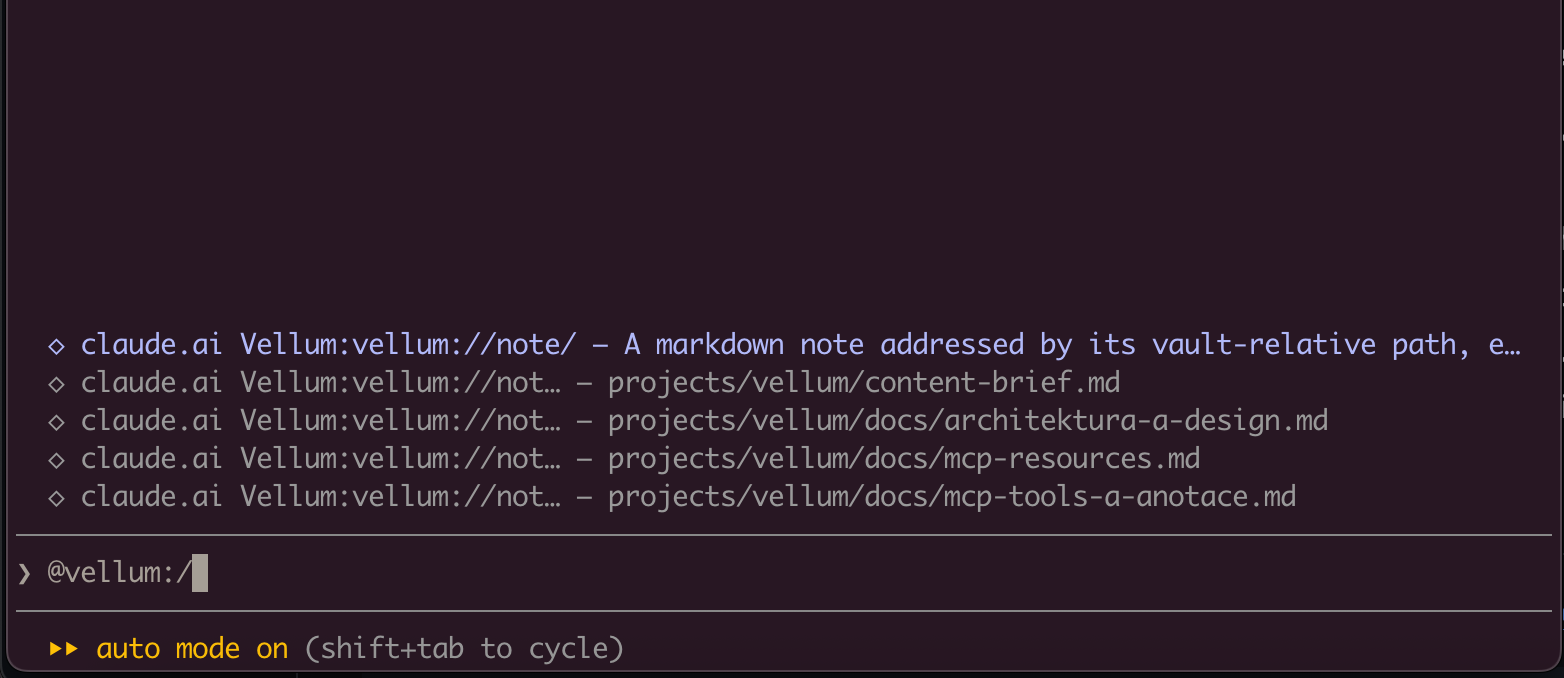
Every note is also a first-class MCP resource (vellum://note/{path}),
so your agent can attach a note as context straight from its resource
picker, no tool call needed:
Run locally
No server, no Docker, no Go: one binary and a folder of notes.
Install
The archives, mise and vellum mcp arrive together, with the first
release whose release page
lists vellum_* archives. Until then, use the Docker command under
Connect a client: it runs with every published image.
Release archive (Linux, macOS, Windows; amd64 and arm64). Pick the file
for your platform from the latest release:
vellum_{linux,darwin}_{amd64,arm64}.tar.gz or
vellum_windows_{amd64,arm64}.zip.
curl -LO https://github.com/freema/vellum/releases/latest/download/vellum_darwin_arm64.tar.gz
gh attestation verify vellum_darwin_arm64.tar.gz --repo freema/vellum   # optional: built by this repo's release workflow
tar xzf vellum_darwin_arm64.tar.gz vellum
mkdir -p ~/.local/bin && mv vellum ~/.local/bin/   # or any folder on your PATH
export PATH="$HOME/.local/bin:$PATH"   # also add this line to ~/.zshrc or ~/.bashrc
vellum -version
The archive names carry no version, so these links always point at the
newest stable release. If macOS refuses to start a binary you downloaded
with a browser, xattr -d com.apple.quarantine vellum clears the
quarantine flag (curl does not set it).
mise: mise use -g github:freema/vellum installs the same binary.
Homebrew (coming: the tap is not published yet): brew install freema/tap/vellum, update with brew upgrade vellum.
Go: go run github.com/freema/vellum/cmd/vellum@latest mcp ~/notes
works anywhere a command does, but builds without the web UI. It needs
the same release as the archives: an older version does not know mcp
and starts the HTTP server instead.
Connect a client
The folder must exist (-init creates it), and ~/ is expanded by
vellum, so it also works in JSON configs that no shell reads.
Claude Code:
claude mcp add --scope user vellum -- vellum mcp ~/notes
--scope user makes vellum available in every project; without it, only
in the folder where you ran the command.
Claude Desktop: open vellum.mcpb from the
latest release and pick
your notes folder; Desktop runs vellum for you. Or add it by hand under
Settings → Developer → Edit Config:
{
  "mcpServers": {
    "vellum": {
      "command": "/path/to/vellum",
      "args": ["mcp", "~/notes"]
    }
  }
}
Cursor: the same block in ~/.cursor/mcp.json (or .cursor/mcp.json
in a project).
Use the full path that which vellum prints: apps started from the Dock or
Start menu do not see your shell's PATH.
Docker, nothing installed:
claude mcp add --scope user vellum -- docker run -i --rm --user "$(id -u):$(id -g)" \
  -v "$HOME/notes:/vault" ghcr.io/freema/vellum -mcp-stdio
--user makes the container write as you. Without it the image's
non-root user (uid 65532) can read your notes but, on Linux, cannot write
to a folder you own.
Two local modes
-
stdio (
vellum mcp ~/notes): every client starts its own vellum process. The simplest setup: no port, no UI. -
Local HTTP (
vellum -vault ~/notes): one process serves the web UI at http://127.0.0.1:8080 and MCP at/mcp, and every client shares its index. Recommended when several clients use the vault at once:claude mcp add --scope user --transport http vellum http://localhost:8080/mcpA plain binary listens on
127.0.0.1only, so auth can stay off. To reach it from another machine setVELLUM_HOST=0.0.0.0and turn onAUTH_ENABLED(see Configuration).
Next to your editor
Edit the same folder in Obsidian or VS Code, git pull into it, or let two
clients each run their own vellum mcp: changes made outside vellum show up
in search, tags, backlinks and tasks within a few seconds, without a
restart. Before a call that reads the index, vellum checks the disk once
VELLUM_RESCAN (default 5s) has passed. There is no file watcher and no
background work, so it behaves the same on Docker bind mounts and network
drives. Known limits: a change shows at the next call after the interval,
not the moment you save; an edit that keeps both the file size and the
modification time is not noticed; the web UI shows outside changes on its
next load. Details: docs/search.md.
What vellum is, and is not
vellum is one binary that lets an agent read and write a folder of markdown. It runs no models, keeps no database and no index on disk, and makes no calls out: search is a BM25F-ranked scan in RAM that understands typos, accents and Czech word forms, not meaning. If you want semantic search over the same notes, run a tool built for it (for example qmd) next to vellum over the same folder. Both just read the files.
Self-host with Docker
Pre-built multi-arch images (amd64 + arm64) are published to GitHub Container Registry on every release:
docker pull ghcr.io/freema/vellum:latest
Try it in one command
mkdir -p vault
docker run --rm -p 8080:8080 -v "$PWD/vault:/vault" ghcr.io/freema/vellum
Open http://localhost:8080: that's your vault, served straight from
./vault. Auth is off by default, which is fine on localhost; enable it
before exposing anything (see below).
Linux bind mounts: the container runs as a non-root user (uid 65532, distroless), so the mounted directory must be writable by it:
sudo chown 65532 vault. Docker Desktop on macOS/Windows handles this for you.
Docker Compose (recommended)
Create a docker-compose.yml. This is the same file
the repo ships (curl -fsSLO https://raw.githubusercontent.com/freema/vellum/main/docker-compose.yml
grabs it if you'd rather not paste):
services:
  vellum:
    image: ${VELLUM_IMAGE:-ghcr.io/freema/vellum:latest}
    container_name: vellum
    restart: unless-stopped
    ports:
      - "${VELLUM_PORT:-8080}:8080"
    env_file:
      - path: .env
        required: false
    environment:
      PORT: "8080"
      VELLUM_VAULT_PATH: /vault
    volumes:
      - ./vault:/vault
    # hardening: the binary only ever writes into the mounted vault
    read_only: true
    security_opt:
      - no-new-privileges
    deploy:
      resources:
        limits:
          memory: 256M
Generate a secret and start:
cat > .env <<EOF
AUTH_ENABLED=true
VELLUM_CLIENT_SECRET=$(openssl rand -hex 32)
EOF
docker compose up -d
curl http://localhost:8080/healthz
Open http://localhost:8080, paste the client secret: that's your vault.
Everything else is tunable from the same .env: pin the image with
VELLUM_IMAGE=ghcr.io/freema/vellum:1.13.1 (recommended for production,
since latest moves), change the host port with VELLUM_PORT, plus any
variable from the configuration table. The image already
listens on all interfaces (VELLUM_HOST=0.0.0.0), so compose files need no
change.
Connect Claude
For a local vault see Connect a client. For a server,
the connector URL must end with /mcp:
claude mcp add --transport http vellum https://your-host/mcp
Claude runs the OAuth flow: a browser window opens vellum's consent screen,
you enter your VELLUM_CLIENT_SECRET and approve (authorization code +
PKCE; vellum is its own OAuth issuer — no external identity provider, no
calls out). The secret is what stops anyone else who can reach the server
from approving a connection of their own. The same works for a
claude.ai custom connector — either
leave the OAuth fields empty and enter the secret on the consent screen, or
enter vellum as client ID and your secret there and approve with one click.
MCP tools
list_notes, read_note, read_notes, write_note, patch_note,
replace_in_note, append_to_note, prepend_to_note, delete_note,
move_note, search_notes, list_tags, add_tags, remove_tags,
get_backlinks, set_status, list_tasks, plus, with
VELLUM_CURATOR=on: suggest_location, suggest_tags, suggest_links,
find_untagged, find_orphans, find_inbox_stale,
find_undescribed_folders, and with VELLUM_SHARING=on: share_note,
unshare_note.
Agents read only what they need:
search_notesranks with BM25F and returns pages of 20 notes, each with a relevancescorefrom 0 to 1 (min_score: 0.3keeps the clear matches), plustotal,truncatedand a hint where the next page (offset) starts.response_format: "concise"returns just the path, title and line of the first match: about 2 kB for 20 hits.read_notereads a whole note or just a part:outline: true(headings with line numbers),section(one heading and everything under it, also as a path such asProject A > Notes), orstart_line/max_lines. Line numbers are the onessearch_notesreports.read_notesreads up to 20 notes in one call, bypathsor a globpattern, within a byte budget; a note over the budget is skipped with its size, never cut.list_notesreturns at most 200 notes per call plusdirs, the subfolders with their note counts.sort: "modified"withsince: "7d"shows what changed recently.
Edits use the smallest tool that fits: replace_in_note swaps an exact
piece of text, patch_note replaces a section or adds to it (operation:
append, prepend, insert_before, insert_after), and write_note
rewrites a whole note. Writes are conflict-safe: every read returns a
content hash, write tools accept expected_hash and fail on mismatch
instead of clobbering. A section name that matches several headings is an
error listing them, never a guess.
On typical agent tasks (find and read the relevant part, read a long note's section, fix a sentence) the tools now send about 13 % of the bytes v1.12.1 did (docs/payload-baseline.md).
Every tool carries MCP annotations (readOnlyHint, destructiveHint,
idempotentHint), and the handshake ships short server instructions with
the vault conventions, so agents behave well out of the box. The full
tool/resource reference lives in docs/mcp.md.
MCP resources
Notes are also exposed as resources: vellum://note/{path} serves the raw
markdown (text/markdown), so clients with a resource picker can attach a
note as context without a tool call. Clients can resources/subscribe to a
note URI and receive notifications/resources/updated whenever that note
changes, whether the change came through MCP, the web editor or another
editor on the same folder.
Web workspace
The embedded UI is a three-pane workspace (tree, list, editor) that stays in sync with the vault on its own: MCP writes appear without a reload, a deleted note switches to a designed 410 state, and a deploy restart shows a reconnect overlay instead of a dead page. Filters (folder, tags, type/status) live in the URL so views are shareable and refresh-safe; theme and editor mode persist locally. Details (URL scheme, storage keys, autosave/conflict/flush semantics): docs/workspace.md.
Sharing a note
Any note can become a link somebody else can open without an account, for handing over a document your agent just wrote, without exporting it or giving anyone access to the vault:
VELLUM_SHARING=on     # links + the share_note/unshare_note MCP tools
VELLUM_SHARING=ui     # links, but only you can create them
VELLUM_SHARING=off    # default
Then Share in the note header hands you
https://your-host/s/<token>. The link is a pointer, not a copy: the
reader always sees the current note, an edit shows up immediately, and
revoking takes effect on the next request. It follows the note when you
rename or move it, and dies with it when you delete it. Frontmatter is
never served, and the page is one document: no tree, no search, no way
into the rest of the vault.
Links live in <vault>/.vellum/shares.json, so they survive a restart
(unlike the in-memory OAuth tokens) and travel with your vault backup.
Full reference (lifetimes, headers, rate limits, what a leaked link
costs): docs/sharing.md.
Vault structure, tasks, curator
- Structure: an empty vault is initialized with
inbox/,projects/,archive/(disable withVELLUM_INIT_STRUCTURE=false). Awrite_notewithout a path files the note into the inbox under a title slug. Pointing vellum at an existing vault changes nothing. - Folder descriptions: an
_index.mdnote in a folder says what the folder is for (frontmatterdescription:, or its first paragraph, up to 300 characters).search_notesreturns the descriptions of the result folders once per answer incontexts,list_notesshows them ondirs, andsuggest_locationmatches their words._index.mdin the vault root describes the whole vault and goes into the server instructions. Agents write them withwrite_note; the file name isVELLUM_CONTEXT_FILE. - Tasks: a note with
type: taskandstatus: backlog | in-progress | donein the frontmatter.set_statusedits just those lines; the UI andlist_tasksfilter by state and project. Notes without a type areknowledge. - Curator (
VELLUM_CURATOR=on, default off): deterministic context tools: folder suggestions by tag and description overlap, tag vocabulary for a note, link candidates, untagged/orphaned/stale-inbox lists, folders that still lack a description. No API keys, no LLM calls from the server, moves stay behind the regularmove_note.
Configuration
vellum [-vault DIR]           # web UI, REST API and MCP over HTTP
vellum mcp [-init] DIR        # MCP over stdio for one local client
vellum -healthcheck           # probe the running server (Docker HEALTHCHECK)
The vault comes from the DIR argument or -vault, then
VELLUM_VAULT_PATH. vellum -mcp-stdio with VELLUM_VAULT_PATH still
works the same as vellum mcp.
| Variable | Default | Description |
|---|---|---|
VELLUM_HOST |
127.0.0.1 (Docker: 0.0.0.0) |
HTTP listen address; set 0.0.0.0 to accept connections from the network, and turn on auth when you do |
PORT |
8080 |
HTTP listen port |
VELLUM_VAULT_PATH |
./vault |
Vault directory (Docker: /vault). Only HTTP mode falls back to ./vault |
VELLUM_RESCAN |
5s |
How often the index checks the disk for notes changed outside vellum (a duration or seconds; off disables) |
VELLUM_CONTEXT_FILE |
_index.md |
File name of folder description notes (in the vault root: the vault's description) |
AUTH_ENABLED |
false |
OAuth 2.1 with a single client secret, required for anything public |
VELLUM_CLIENT_ID |
vellum |
OAuth client id |
VELLUM_CLIENT_SECRET |
(none) | The access key (openssl rand -hex 32, min 32 chars) |
VELLUM_ISSUER_URL |
http://localhost:PORT |
Public HTTPS URL when behind a proxy; without it OAuth metadata advertises localhost and clients fail |
TRUST_PROXY |
false |
Set 1 behind Caddy/Traefik so rate limiting sees real client IPs |
CORS_ORIGINS |
claude.ai, claude.com | Origins receiving CORS headers (localhost always allowed) |
VELLUM_ALLOWED_ORIGINS |
claude.ai, claude.com | Browser origins allowed on /mcp + /api (same-origin and localhost always pass) |
VELLUM_REDIRECT_URIS |
any | Optional exact OAuth redirect allowlist |
VELLUM_INIT_STRUCTURE |
true |
Create inbox/projects/archive in an empty vault |
VELLUM_INBOX_DIR / VELLUM_PROJECTS_DIR / VELLUM_ARCHIVE_DIR |
inbox/projects/archive |
Conventional directory names |
VELLUM_CURATOR |
off |
Enable the suggest_/find_ context tools |
VELLUM_SHARING |
off |
Public read-only note links: off / ui (you mint them) / on (agents may too) |
VELLUM_RANKER |
bm25f |
Search ranking; legacy restores the pre-BM25F order for the transition |
Deployment
vellum stays on the internal network; only your reverse proxy is exposed.
Set VELLUM_ISSUER_URL=https://<domain>, TRUST_PROXY=1 and terminate TLS
in the proxy. A bare-metal install behind a proxy on another host also
needs VELLUM_HOST=0.0.0.0. Details and a smoke-test checklist:
docs/deployment.md.
One-click PaaS (Railway / Render / Fly.io)
The easiest path if you don't want to run a VPS: deploy the published image
on a platform that gives you TLS and a public URL for free. vellum honours
the PORT the platform injects, so the only three things that matter are the
same everywhere:
-
Image:
ghcr.io/freema/vellum:1.13.1(pin a version, not:latest). -
A persistent volume mounted at
/vault. This is not optional: vellum stores every note as a file; without a persistent disk your vault is wiped on the next redeploy. (Serverless hosts like Vercel/Netlify/Cloudflare Pages have no persistent writable disk and can't run vellum; use one of the platforms below.) -
Env (from the configuration table):
AUTH_ENABLED=true
VELLUM_CLIENT_SECRET=<openssl rand -hex 32>
VELLUM_ISSUER_URL=https://<your-public-url>   # the URL the platform gives you
TRUST_PROXY=1                                 # you're behind the platform's proxy
Set VELLUM_ISSUER_URL once you know the assigned URL, then redeploy: OAuth
metadata must advertise the real HTTPS host or Claude fails after the consent
step.
- Railway: New Project → Deploy from Docker image →
ghcr.io/freema/vellum:1.13.1. Add a Volume mounted at/vault, set the env above (Railway providesPORTand a*.up.railway.appdomain). - Render: New → Web Service → Deploy an existing image →
ghcr.io/freema/vellum:1.13.1. Add a Disk mounted at/vault, set the env. - Fly.io:
fly launch --image ghcr.io/freema/vellum:1.13.1, thenfly volume create vaultand mount it at/vaultinfly.toml; set the env withfly secrets set VELLUM_CLIENT_SECRET=… VELLUM_ISSUER_URL=… TRUST_PROXY=1 AUTH_ENABLED=true.
Then connect Claude to https://<your-public-url>/mcp (see
Connect Claude).
Coolify / Traefik: point Coolify at the repo or image
ghcr.io/freema/vellum:1.13.1 (pin a version, not :latest), mount a
volume at /vault, set the env from the table above. Running raw
compose behind Traefik, uncomment the labels in docker-compose.yml:
labels:
  - traefik.enable=true
  - traefik.http.routers.vellum.rule=Host(`vellum.example.com`)
  - traefik.http.services.vellum.loadbalancer.server.port=8080
Caddy is two lines:
vellum.example.com {
    reverse_proxy vellum:8080
}
Security posture (read-only container, threat model, what is never logged): SECURITY.md, docs/threat-model.md, docs/logging.md.
Development
Requires Go 1.25+, Task, and Node 22 for the SPA.
task build              # Go binary without the SPA (no node needed)
task build-full         # SPA + Go binary with the UI embedded
task test               # go test ./...
task lint               # golangci-lint
task e2e                # compose stack with the fixture vault (docs/e2e.md)
task payload            # bytes each MCP tool returns per agent scenario
task release-snapshot   # all release archives into dist/, nothing published
Start with CONTRIBUTING.md for the local setup and the ground rules, and ARCHITECTURE.md for the map of the code. Every page of documentation is listed in docs/.
Design decisions kept deliberately simple
- Search = ranked RAM scan, not bleve. The metadata index narrows by
tag/dir, content is matched from an in-memory cache invalidated precisely
by the index (modTime+size), and results are ranked with BM25F: a match
in the title, path, headings or tags counts more than one in the body,
and rare words more than common ones. Matching is case-, diacritics- and
typo-insensitive ("preklapy" finds "překlepy") and knows Czech word
forms. A query over a 2 000-note vault takes ~0.4 ms warm
(docs/search.md); ranking quality is measured on a
golden query set (docs/search-quality.md).
Zero heavy dependencies, no index to corrupt, no warm-up. The
Searcherinterface exists so bleve can slot in if it ever hurts. - Plain CSS custom properties, not Tailwind. The design system is a
fixed token sheet (
DESIGN.md); custom properties map to it 1:1 with no build-time dependency. - Opaque in-memory tokens, not JWTs. Tokens die with the process and clients silently re-authorize; no signing keys to manage.
- No database, ever (v1). Tags, backlinks and task states live in an in-RAM index rebuilt in ~50 ms at startup and kept in step with outside edits by a lazy rescan.
Why vellum and not …?
- Obsidian + plugins: vellum doesn't replace your editor; it happily serves the same vault folder to your agent while you keep editing anywhere. No sync, no plugin sandbox, no Electron on the server.
- Notion/Anytype-style apps: those own your data. vellum's "database"
is
lsandgrep-able markdown. - Heavier MCP note servers: vellum ships one binary or one 24 MB container, no vector DB, no API keys, and burns minimal agent context (17 tools).
vellum MCP questions
Can I use vellum with my existing markdown tools like Obsidian?
Yes, you can edit the same folder in Obsidian or VS Code while vellum is running, and changes will appear in vellum within a few seconds.
Is the server secure when self-hosting?
By default, auth is off for local use, but you can enable it using a client secret and OAuth flow for remote access.