
Enables AI agents to interact with Form.io forms by converting JSON schemas into understandable instructions and validating agent submissions.
Also known as formio/uag, uag, @formio/uag
- Stars
- 12
- Tools
- —
- Downloads, 30 days
- 2,437
- Latest version
- 2.0.0
- Last commit
- Nov 13, 2026
- License
- MIT
What is formio-uag MCP?
formio-uag enables AI agents to interact with Form.io forms by converting JSON schemas into understandable instructions and validating agent submissions.
Summary generated from the project's README
About formio-uag MCP server
The Universal Agent Gateway (UAG) acts as a bridge between AI agents and Form.io projects. It translates complex JSON schemas into instructions that models can process, allowing agents to interact with forms as if they were human users. The server sits in front of a Form.io project, automatically registering any form tagged with uag. It ensures that every piece of data sent by an agent is validated against the original form rules using core processors, maintaining data integrity and deterministic results.
Developers can deploy this via Docker or use the Form.io Agentic Coding Plugin to automate setup with tools like Claude Code or Cursor. The server provides three distinct entry points: an MCP endpoint for agents with their own models, an Agent API for running specific tasks with enabled model engines, and a standard project API. Security is managed through Form.io identities, where user tokens or OAuth 2.0 with PKCE determine the permissions and roles available to the agent during read and write operations.
What you can do with it
- 1Conversational Form FillingAn AI agent can assist a user in a chat interface to collect information and complete a form submission.
- 2Automated Agentic WorkflowsYou can trigger specific tasks that run automatically after a form is submitted to process the data.
- 3Dynamic Formflow GenerationAn agent can guide a user through a wizard-style experience where the form pages change based on natural language descriptions.
Written from the project's README. Every use case is checked against a quote from it.
How to install formio-uag MCP
Formats verified 10 Nov 2026Add to CursorAdd to GooseInstall formio-uag MCP in Claude Code
$ claude mcp add --env 'JWT_SECRET=<YOUR_JWT_SECRET>' --env 'PROJECT=<PROJECT>' --env 'ADMIN_KEY=<YOUR_ADMIN_KEY>' --env 'LICENSE_KEY=<YOUR_LICENSE_KEY>' --env 'MONGO=<YOUR_MONGO>' --env 'PORTAL_SECRET=<YOUR_PORTAL_SECRET>' --env 'PROJECT_KEY=<YOUR_PROJECT_KEY>' --env 'UAG_LICENSE=<YOUR_UAG_LICENSE>' uag -- npx -y @formio/uagInstall formio-uag MCP in Cursor
~/.cursor/mcp.json
{
  "mcpServers": {
    "uag": {
      "command": "npx",
      "args": [
        "-y",
        "@formio/uag"
      ],
      "env": {
        "JWT_SECRET": "<YOUR_JWT_SECRET>",
        "PROJECT": "<PROJECT>",
        "ADMIN_KEY": "<YOUR_ADMIN_KEY>",
        "LICENSE_KEY": "<YOUR_LICENSE_KEY>",
        "MONGO": "<YOUR_MONGO>",
        "PORTAL_SECRET": "<YOUR_PORTAL_SECRET>",
        "PROJECT_KEY": "<YOUR_PROJECT_KEY>",
        "UAG_LICENSE": "<YOUR_UAG_LICENSE>"
      }
    }
  }
}Install formio-uag MCP in VS Code
.vscode/mcp.json
{
  "servers": {
    "uag": {
      "type": "stdio",
      "command": "npx",
      "args": [
        "-y",
        "@formio/uag"
      ],
      "env": {
        "JWT_SECRET": "<YOUR_JWT_SECRET>",
        "PROJECT": "<PROJECT>",
        "ADMIN_KEY": "<YOUR_ADMIN_KEY>",
        "LICENSE_KEY": "<YOUR_LICENSE_KEY>",
        "MONGO": "<YOUR_MONGO>",
        "PORTAL_SECRET": "<YOUR_PORTAL_SECRET>",
        "PROJECT_KEY": "<YOUR_PROJECT_KEY>",
        "UAG_LICENSE": "<YOUR_UAG_LICENSE>"
      }
    }
  }
}Install formio-uag MCP in VS Code CLI
$ code --add-mcp '{"name":"uag","type":"stdio","command":"npx","args":["-y","@formio/uag"],"env":{"JWT_SECRET":"<YOUR_JWT_SECRET>","PROJECT":"<PROJECT>","ADMIN_KEY":"<YOUR_ADMIN_KEY>","LICENSE_KEY":"<YOUR_LICENSE_KEY>","MONGO":"<YOUR_MONGO>","PORTAL_SECRET":"<YOUR_PORTAL_SECRET>","PROJECT_KEY":"<YOUR_PROJECT_KEY>","UAG_LICENSE":"<YOUR_UAG_LICENSE>"}}'Install formio-uag MCP in Claude Desktop
claude_desktop_config.json
{
  "mcpServers": {
    "uag": {
      "command": "npx",
      "args": [
        "-y",
        "@formio/uag"
      ],
      "env": {
        "JWT_SECRET": "<YOUR_JWT_SECRET>",
        "PROJECT": "<PROJECT>",
        "ADMIN_KEY": "<YOUR_ADMIN_KEY>",
        "LICENSE_KEY": "<YOUR_LICENSE_KEY>",
        "MONGO": "<YOUR_MONGO>",
        "PORTAL_SECRET": "<YOUR_PORTAL_SECRET>",
        "PROJECT_KEY": "<YOUR_PROJECT_KEY>",
        "UAG_LICENSE": "<YOUR_UAG_LICENSE>"
      }
    }
  }
}Install formio-uag MCP in Codex
$ codex mcp add uag --env 'JWT_SECRET=<YOUR_JWT_SECRET>' --env 'PROJECT=<PROJECT>' --env 'ADMIN_KEY=<YOUR_ADMIN_KEY>' --env 'LICENSE_KEY=<YOUR_LICENSE_KEY>' --env 'MONGO=<YOUR_MONGO>' --env 'PORTAL_SECRET=<YOUR_PORTAL_SECRET>' --env 'PROJECT_KEY=<YOUR_PROJECT_KEY>' --env 'UAG_LICENSE=<YOUR_UAG_LICENSE>' -- npx -y @formio/uagInstall formio-uag MCP in Codex config.toml
~/.codex/config.toml
[mcp_servers.uag]
command = "npx"
args = ["-y", "@formio/uag"]

[mcp_servers.uag.env]
JWT_SECRET = "<YOUR_JWT_SECRET>"
PROJECT = "<PROJECT>"
ADMIN_KEY = "<YOUR_ADMIN_KEY>"
LICENSE_KEY = "<YOUR_LICENSE_KEY>"
MONGO = "<YOUR_MONGO>"
PORTAL_SECRET = "<YOUR_PORTAL_SECRET>"
PROJECT_KEY = "<YOUR_PROJECT_KEY>"
UAG_LICENSE = "<YOUR_UAG_LICENSE>"
Install formio-uag MCP in Gemini CLI
$ gemini mcp add -s user -e 'JWT_SECRET=<YOUR_JWT_SECRET>' -e 'PROJECT=<PROJECT>' -e 'ADMIN_KEY=<YOUR_ADMIN_KEY>' -e 'LICENSE_KEY=<YOUR_LICENSE_KEY>' -e 'MONGO=<YOUR_MONGO>' -e 'PORTAL_SECRET=<YOUR_PORTAL_SECRET>' -e 'PROJECT_KEY=<YOUR_PROJECT_KEY>' -e 'UAG_LICENSE=<YOUR_UAG_LICENSE>' uag npx -- -y @formio/uagInstall formio-uag MCP in Gemini settings.json
~/.gemini/settings.json
{
  "mcpServers": {
    "uag": {
      "command": "npx",
      "args": [
        "-y",
        "@formio/uag"
      ],
      "env": {
        "JWT_SECRET": "<YOUR_JWT_SECRET>",
        "PROJECT": "<PROJECT>",
        "ADMIN_KEY": "<YOUR_ADMIN_KEY>",
        "LICENSE_KEY": "<YOUR_LICENSE_KEY>",
        "MONGO": "<YOUR_MONGO>",
        "PORTAL_SECRET": "<YOUR_PORTAL_SECRET>",
        "PROJECT_KEY": "<YOUR_PROJECT_KEY>",
        "UAG_LICENSE": "<YOUR_UAG_LICENSE>"
      }
    }
  }
}Configuration
JWT_SECRETRequiredSecretSecret used to generate and validate JWT tokens
PROJECTRequiredAPI endpoint to Enterprise project or OSS server
ADMIN_KEYSecretServer admin key for Form.io Open Source. Not required for Enterprise deployment.
LICENSE_KEYSecretForm.io license for a self-hosted Enterprise deployment; when it includes the UAG it also enables the Agent API. Not required for Form.io Open Source, or for a project on Form.io's hosted service (https://*.form.io).
MONGOSecretOptional. The UAG's own database (only uag-* collections, never submissions): run records, runs that survive a restart, remote MCP sign-in. Needs a license that includes the UAG.
PORTAL_SECRETSecretEnterprise Portal connection secret
PROJECT_KEYSecretProject API Key (Enterprise) or ADMIN_KEY (OSS)
UAG_LICENSESecretDeprecated: use LICENSE_KEY. Still read until UAG 3.0.
BASE_URLOptional. The URL clients reach the UAG at, for the OAuth discovery documents remote MCP clients read. Derived from each request when unset.
CLAUDE_API_KEYCORStrue (the default) allows every origin, false turns CORS off, any other value is the allowed origin, or several separated by commas
DEBUGDebug logging filter (e.g. formio.*)
JWT_EXPIRE_TIMELifetime of the tokens the UAG issues, in minutes (default: 60)
LOGIN_FORMPublic URL to login form JSON endpoint
MCP_OAUTHtrue turns on OAuth sign-in for remote MCP clients. Needs MONGO.
MONGO_CONFIGMongoDB driver configuration (JSON)
PORTServer port (default: 3200)
PROJECT_TTLProject cache refresh interval in seconds (default: 900)
TASK_RUN_RETENTION_DAYSDays run records are kept. Default 90; 0 keeps them forever.
TEMPLATE_SYNCWhen a module's template is installed into the project: boot, refresh or off (default: boot)
TRUST_PROXYExpress's trust proxy (true, a number of hops, or addresses). Set it behind a reverse proxy, so the UAG reads its public URL from the forwarded headers.
TYPESAFE_API_KEYUAG_DATABASEThe database to use on the MONGO connection. Default uag.
UAG_ENGINESUAG_ENGINE_FAST_MODEL
| Name | Description | |
|---|---|---|
| JWT_SECRET | Secret used to generate and validate JWT tokens | RequiredSecret |
| PROJECT | API endpoint to Enterprise project or OSS server | Required |
| ADMIN_KEY | Server admin key for Form.io Open Source. Not required for Enterprise deployment. | Secret |
| LICENSE_KEY | Form.io license for a self-hosted Enterprise deployment; when it includes the UAG it also enables the Agent API. Not required for Form.io Open Source, or for a project on Form.io's hosted service (https://*.form.io). | Secret |
| MONGO | Optional. The UAG's own database (only uag-* collections, never submissions): run records, runs that survive a restart, remote MCP sign-in. Needs a license that includes the UAG. | Secret |
| PORTAL_SECRET | Enterprise Portal connection secret | Secret |
| PROJECT_KEY | Project API Key (Enterprise) or ADMIN_KEY (OSS) | Secret |
| UAG_LICENSE | Deprecated: use LICENSE_KEY. Still read until UAG 3.0. | Secret |
| BASE_URL | Optional. The URL clients reach the UAG at, for the OAuth discovery documents remote MCP clients read. Derived from each request when unset. | |
| CLAUDE_API_KEY | — | |
| CORS | true (the default) allows every origin, false turns CORS off, any other value is the allowed origin, or several separated by commas | |
| DEBUG | Debug logging filter (e.g. formio.*) | |
| JWT_EXPIRE_TIME | Lifetime of the tokens the UAG issues, in minutes (default: 60) | |
| LOGIN_FORM | Public URL to login form JSON endpoint | |
| MCP_OAUTH | true turns on OAuth sign-in for remote MCP clients. Needs MONGO. | |
| MONGO_CONFIG | MongoDB driver configuration (JSON) | |
| PORT | Server port (default: 3200) | |
| PROJECT_TTL | Project cache refresh interval in seconds (default: 900) | |
| TASK_RUN_RETENTION_DAYS | Days run records are kept. Default 90; 0 keeps them forever. | |
| TEMPLATE_SYNC | When a module's template is installed into the project: boot, refresh or off (default: boot) | |
| TRUST_PROXY | Express's trust proxy (true, a number of hops, or addresses). Set it behind a reverse proxy, so the UAG reads its public URL from the forwarded headers. | |
| TYPESAFE_API_KEY | — | |
| UAG_DATABASE | The database to use on the MONGO connection. Default uag. | |
| UAG_ENGINES | — | |
| UAG_ENGINE_FAST_MODEL | — |
Automated checks
Ran Nov 12, 2026Full report →Passed our automated checks. That is not a security audit: read the code and give the server the narrowest access it needs. How checks work

- Source repository linked and reachablePass
- Open source license (OSI)Pass
- Commit or release in the last yearPass
- Package name not close to a popular packagePass
- Remote endpoint uses HTTPSNot checked
- Destructive tools are labelledNot checked
- No hidden instructions to the modelPass
- No critical advisory in the package or its dependenciesPass
README
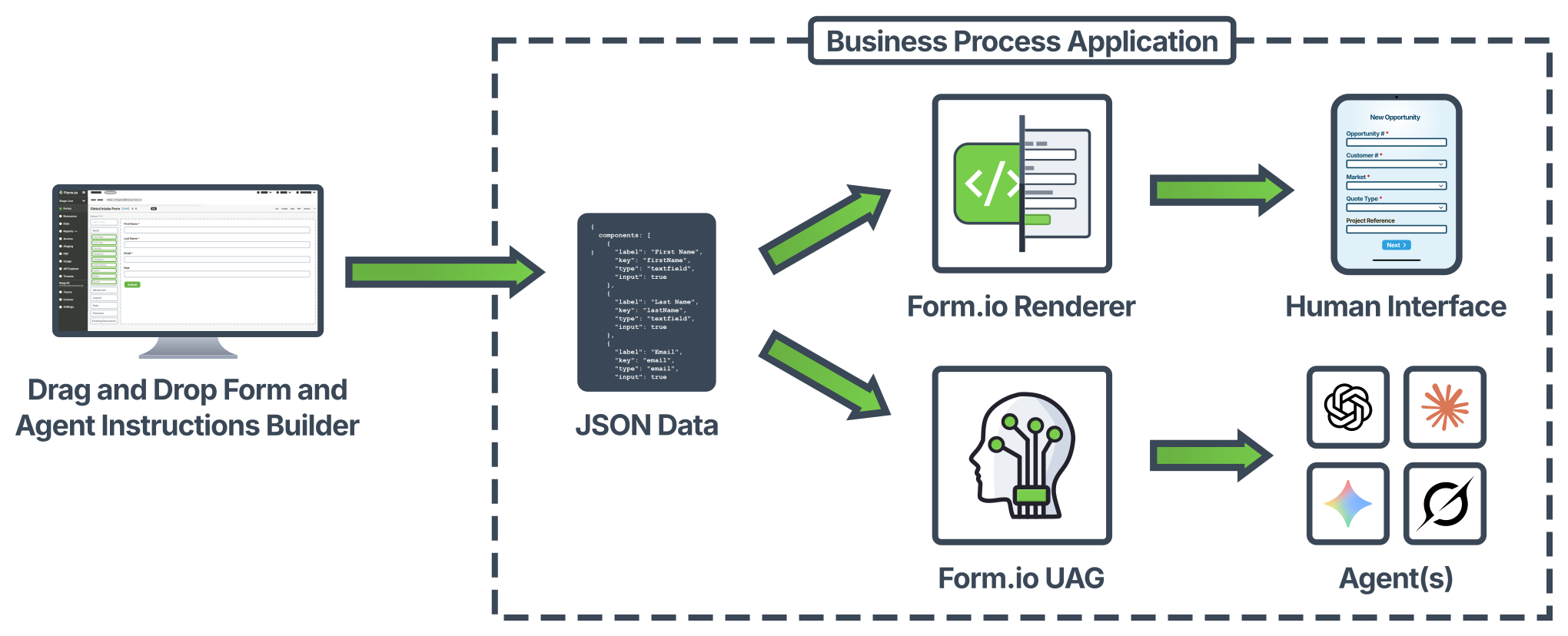
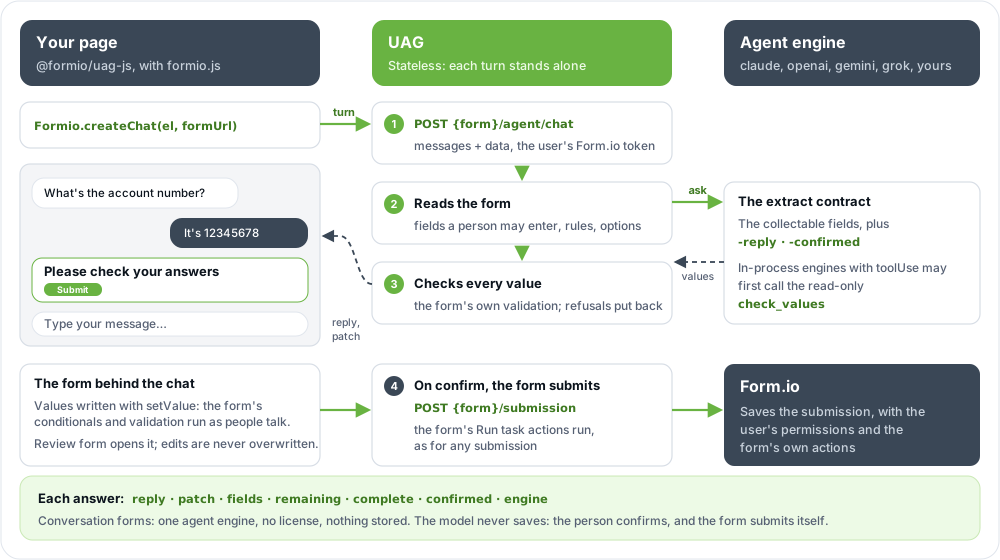
View on GitHubThe Universal Agent Gateway (UAG) is a server that lets AI agents work with your Form.io forms. It does for an agent what the JavaScript renderer does for a person: it turns Form JSON into something the agent can understand. Then it validates what the agent sends back with the form's own rules, and saves it with the user's own permissions.
The form is the contract. Add a field and agents ask for it; rewrite a task's instructions and the next submission is handled differently. Nothing is redeployed, no prompt changes, no model is retrained.
Build it with your coding agent. The Form.io Agentic Coding Plugin gives Claude Code, Cursor, Codex and other coding agents a formio-uag skill that tags your forms, designs their tasks, deploys the UAG and wires your application to it. Install it in your application's folder with npx skills add formio/ai.
How it works
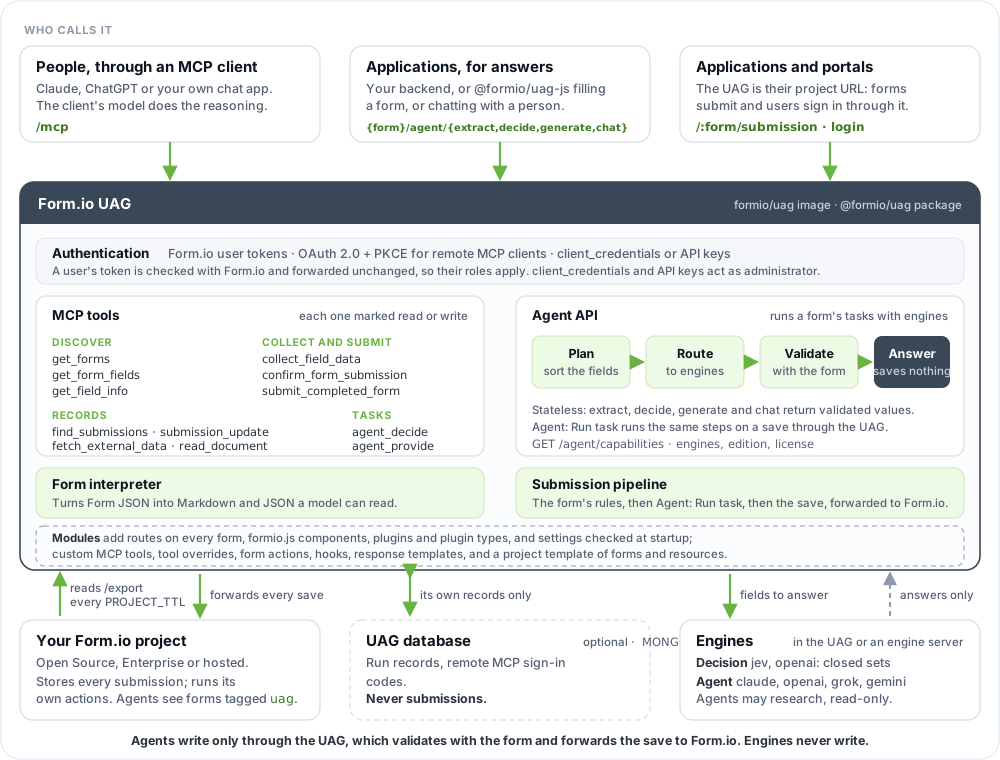
- It sits in front of one Form.io project. At startup the UAG reads the project's
/exportand registers every form taggeduag. It re-reads it everyPROJECT_TTLseconds (default 900). A form without the tag is invisible to agents. - It has three entry points.
/mcpserves MCP tools to agents that bring their own model.{form}/agent/*, the Agent API, runs a form's tasks inside the UAG with the model engines you enable, and saves nothing. The project's own API is served too, so an application can use the UAG's URL as its project URL. - It forwards every submission to Form.io. Form.io saves it and runs the form's own actions (Save Submission, Webhook, Email, Login, Role, Group). The UAG runs only its own actions, such as Agent: Run task, so nothing runs twice.
- Every call has a Form.io identity. A Form.io user token (
x-jwt-token) is verified with Form.io and forwarded unchanged. MCP clients sign in through OAuth 2.0 with PKCE (MCP_OAUTH), and their roles and permissions decide what the agent may read and write for them. Servers usingclient_credentialsor an API key act as the project administrator. - Every write goes through the form. An MCP client's model writes only through tools such as
submit_completed_form. Engines only answer, and are never given a write tool. The UAG validates every value with the form before it forwards the write.
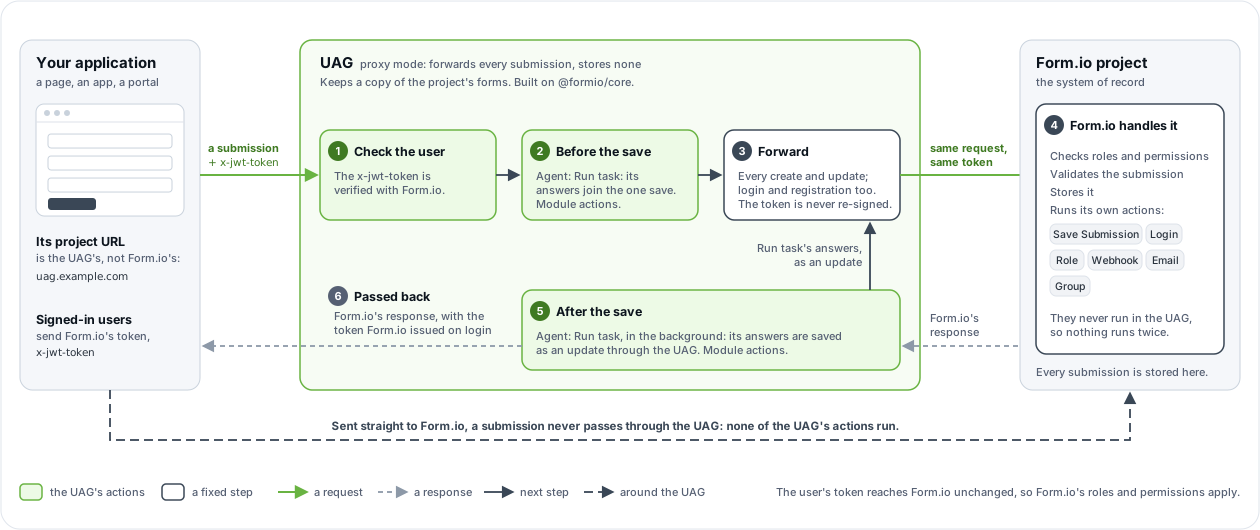
The UAG is built on Form.io's core logic. Every value an agent sends runs through the @formio/core processors, the same validation, conditional and calculation rules Form.io itself applies, so the data it saves is valid and deterministic. More detail: How the UAG works.
Three ways to use it
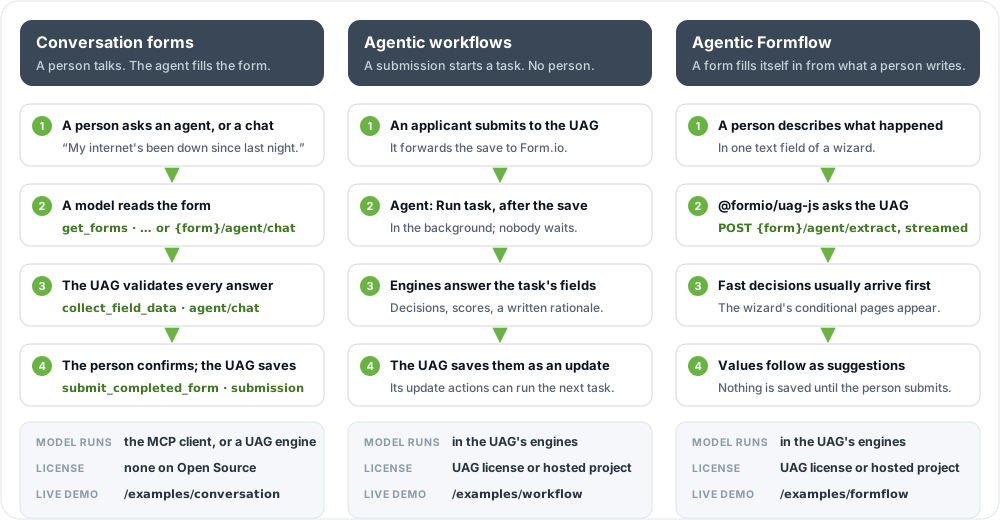
Conversation forms
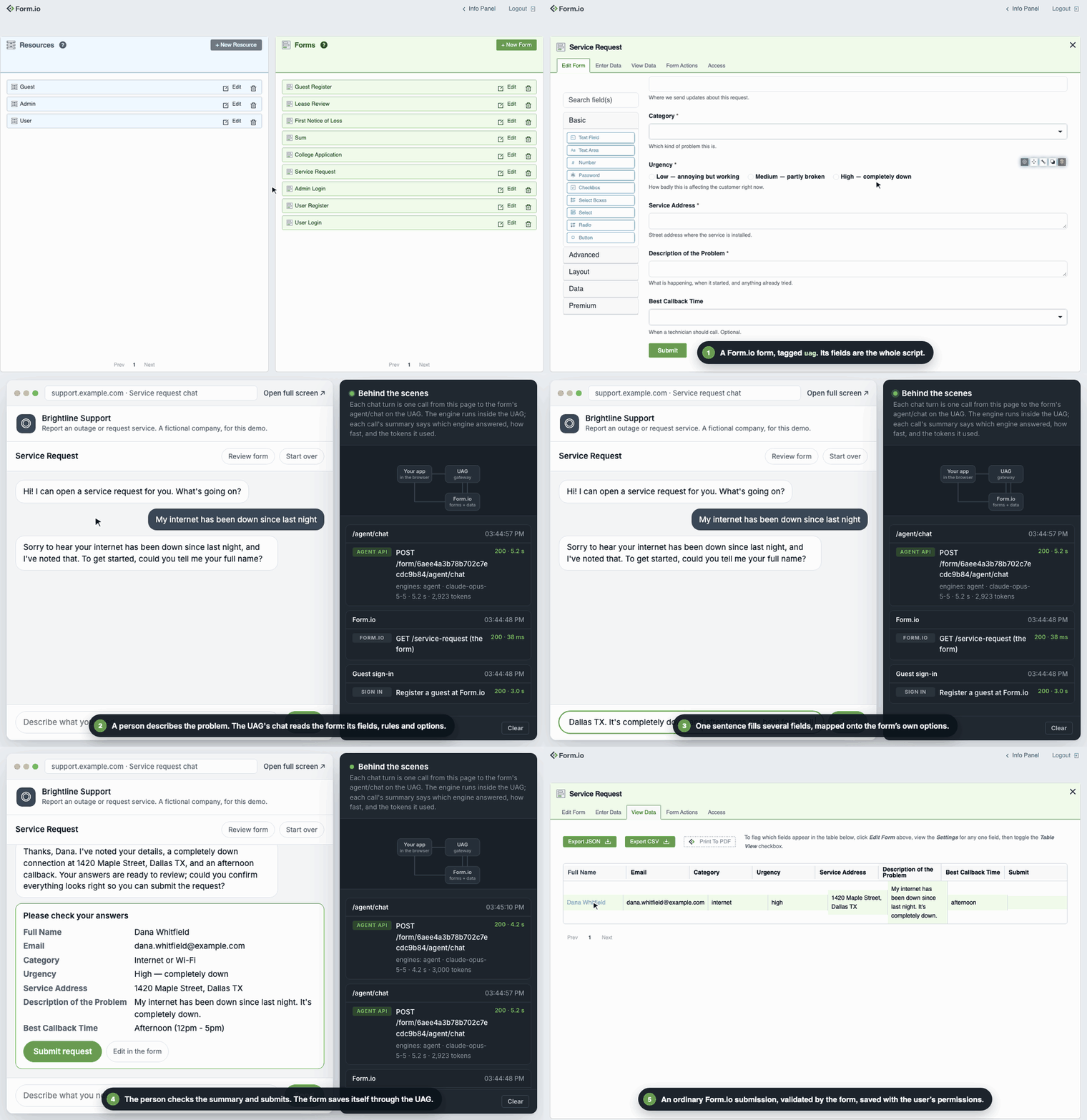
A person talks to Claude, ChatGPT or your own chat app, and the agent fills in a form for them. Build it with the MCP tools or Connect Claude, or embed a form as a chat in your own page with the chat widget: Formio.createChat(element, formUrl) from @formio/uag-js, with the UAG as the only backend. Try it · source · prompt for your coding agent.
Agentic workflows
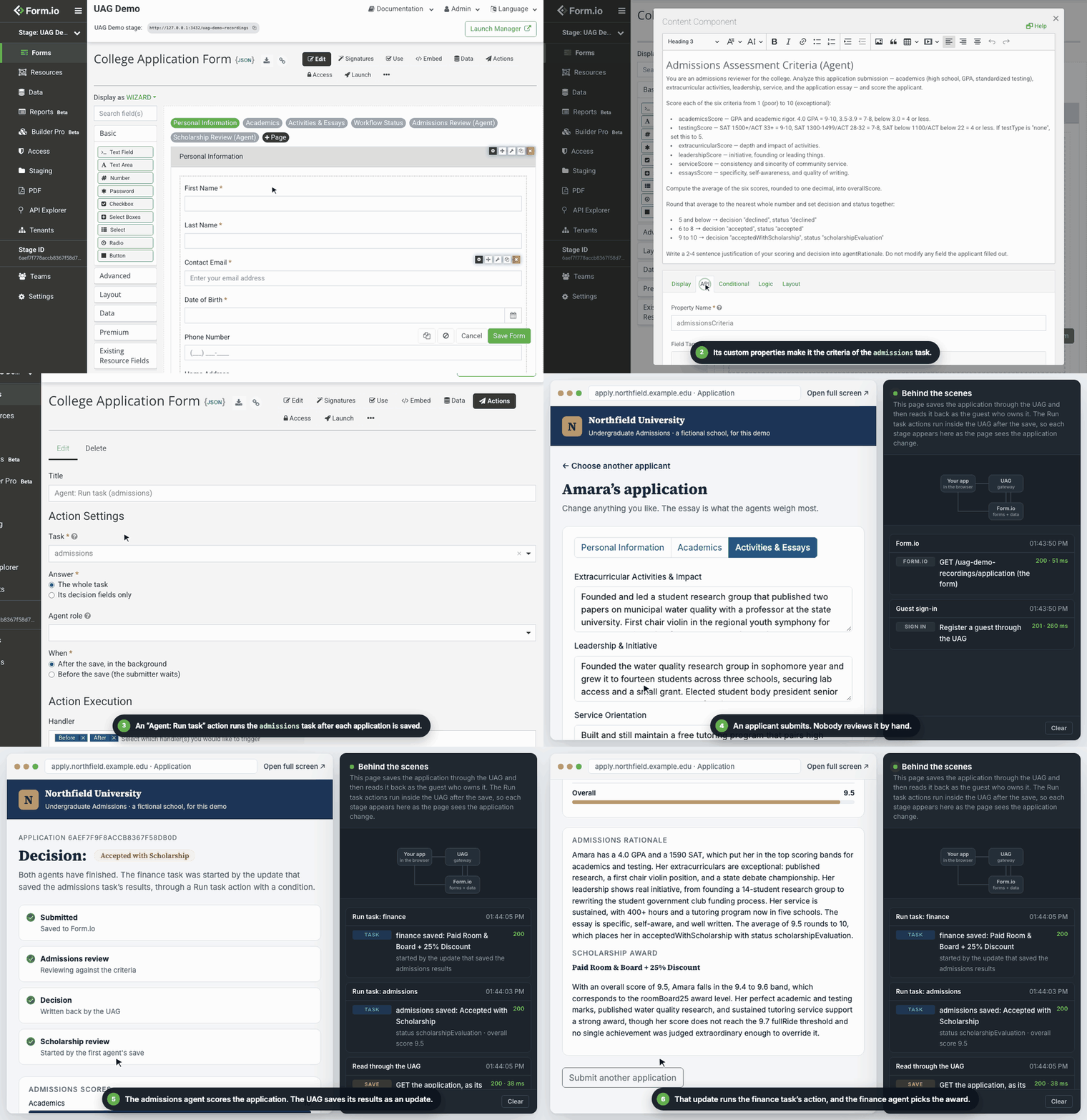
An application saves a submission through the UAG; an Agent: Run task action runs the form's task after the save and saves the result, which can start the next task. Try it · source · build it with Workflows · prompt for your coding agent.
Agentic Formflow
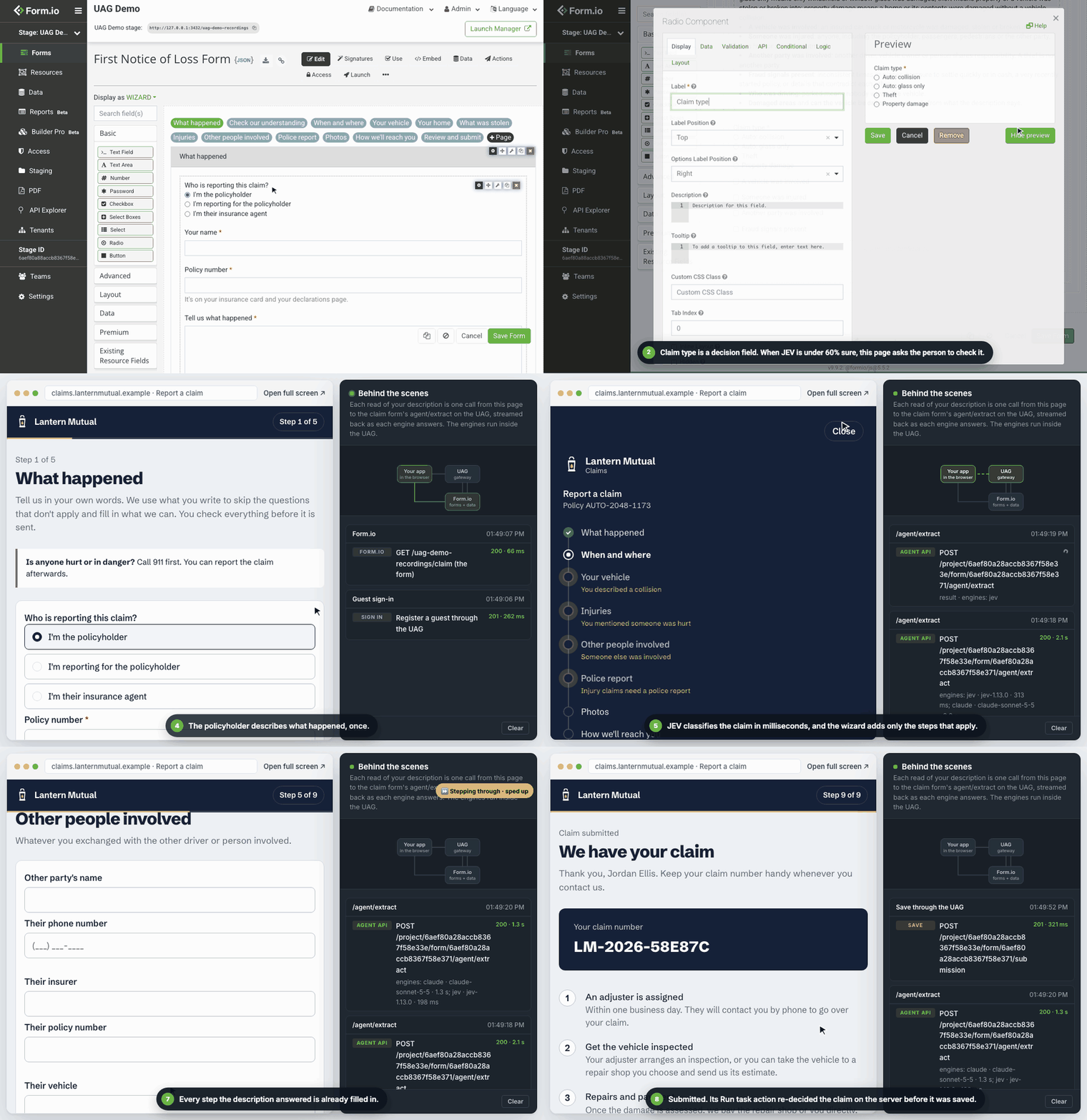
A person describes what happened, and the form fills itself in: decisions choose the wizard's pages, extraction prefills the rest. Try it · source · build it with the Agent API and @formio/uag-js · prompt for your coding agent.
One deployment can serve all three. Conversation forms run on Form.io Open Source with no license; the other two need a license or a hosted project (see License). The whole demo site, static pages that call the UAG straight from the browser, with a flow log of every call they make, is in demo/; these recordings are made from it by demo/recordings.
Quickstart
Form.io Open Source and the UAG in one Compose stack. Replace every CHANGEME; ADMIN_KEY must match on both services.
services:
  mongo:
    image: mongo:7
    volumes: [mongo-data:/data/db]

  formio:                         # Form.io Open Source, listening on 3001
    image: formio/formio
    depends_on: [mongo]
    ports: ["3000:3001"]
    environment:
      NODE_CONFIG: '{"mongo": "mongodb://mongo:27017/formio-oss", "jwt": {"secret": "CHANGEME"}, "mongoSecret": "CHANGEME"}'
      ROOT_EMAIL: admin@example.com
      ROOT_PASSWORD: CHANGEME
      ADMIN_KEY: CHANGEME
    healthcheck:
      test: ["CMD", "node", "-e", "fetch('http://localhost:3001/').then(r => process.exit(r.ok ? 0 : 1)).catch(() => process.exit(1))"]
      interval: 5s
      retries: 40

  formio-uag:
    image: formio/uag:rc
    depends_on:
      formio: { condition: service_healthy }
    ports: ["3200:3200"]
    environment:
      PROJECT: http://formio:3001     # how the UAG reaches Form.io
      ADMIN_KEY: CHANGEME
      JWT_SECRET: CHANGEME
      LOGIN_FORM: http://localhost:3000/user/login
      PROJECT_TTL: 10                 # re-read the project every 10 s while you experiment

volumes:
  mongo-data:
docker compose up -d

# Get a token, then list the MCP tools.
TOKEN=$(curl -s -X POST http://localhost:3200/auth/token -H 'Content-Type: application/json' \
  -d '{"grant_type":"client_credentials","client_id":"formio-oss-x-admin-key","client_secret":"CHANGEME"}' \
  | node -pe 'JSON.parse(require("fs").readFileSync(0)).access_token')

curl -s -X POST http://localhost:3200/mcp -H "Authorization: Bearer $TOKEN" \
  -H 'Content-Type: application/json' -H 'Accept: application/json, text/event-stream' \
  -d '{"jsonrpc":"2.0","id":1,"method":"tools/list"}'
Then tag a form uag (in the portal, Form Settings → Tags) and connect an agent. The Quickstart covers a hosted Form.io project, a first tool call and the Agent API, and Connect Claude connects Claude Desktop or claude.ai. Or have your coding agent do all of it with the Agentic Coding Plugin.
Run the whole demo locally
With Docker, a Form.io Enterprise license and a license that includes the UAG, one command runs the demo site with all four examples, Form.io Enterprise and its portal, and the UAG built from this checkout:
yarn install
npx playwright install chromium   # once: connecting the portal stage drives the portal in a browser
yarn demo:start 3430              # the site on :3430, Form.io and its portal on :3431, the UAG on :3432
It creates the demo project and its forms itself, and prints where everything is and how to sign in to the portal. It reads LICENSE_KEY and your model keys from the root .env; the portal password and the other secrets come from there too when you set them, and are random otherwise. See the demo's README.
Tasks
A task teaches an agent to fill part of a form, with instructions written in the form itself. It is defined entirely by custom properties on components (API → Custom Properties in the form builder), and a form can have several.
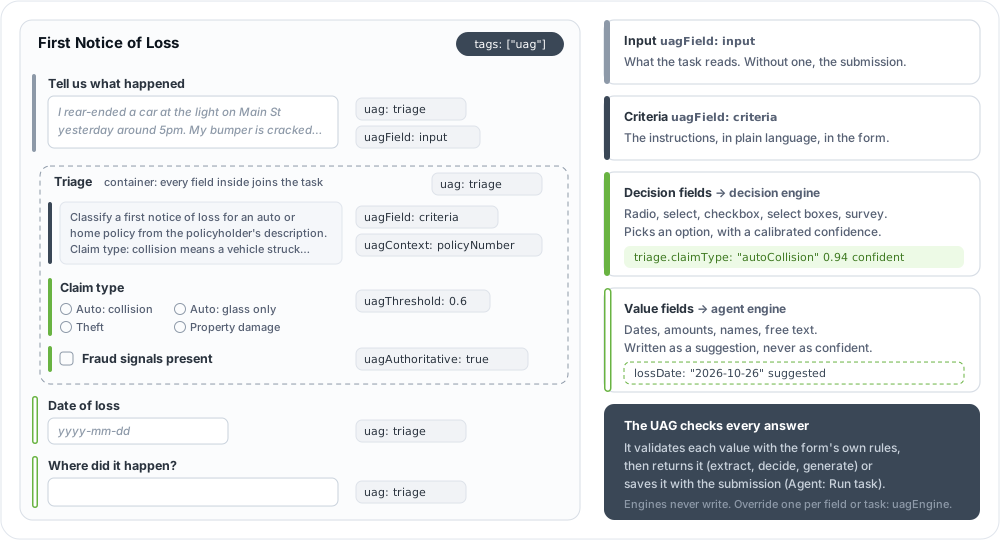
| Property | On | Meaning |
|---|---|---|
uag: <task> |
Any field, or a panel, container or fieldset | The field belongs to the task. On a container, every field inside it does too, except fields in data grids and edit grids. |
uagField: criteria |
A content component with uag: <task> |
The task's instructions. Write them like a brief for a new employee, including the role the agent acts in, exact option values and formats. |
uagField: input |
A field with uag: <task> |
The text the task reads. Without one, the task reads the submission, except its own fields; {form}/agent/extract then needs text. |
uagContext, uagTools |
The criteria component | Extra data paths sent to the engines; read-only MCP tools the agent may research with. |
uagEngine |
A task field, or the criteria component | Which engine answers that field, or the whole task. |
uagThreshold, uagAuthoritative, … |
A task field | How confident a decision must be; whether the server owns the value, so no client can set it. |
Every property, with its default: Form properties. How tasks, decision fields and value fields work: Concepts.
No form, no error. A form missing the
uagtag simply is not there for agents, and a new tag or criteria edit reaches them after the nextPROJECT_TTLrefresh. Restart the UAG to pick changes up at once.
Agentic workflows
A workflow is a task that the Agent: Run task action runs on a submission the UAG receives. The demo's college application runs two tasks, and the second is started by the first one's save:
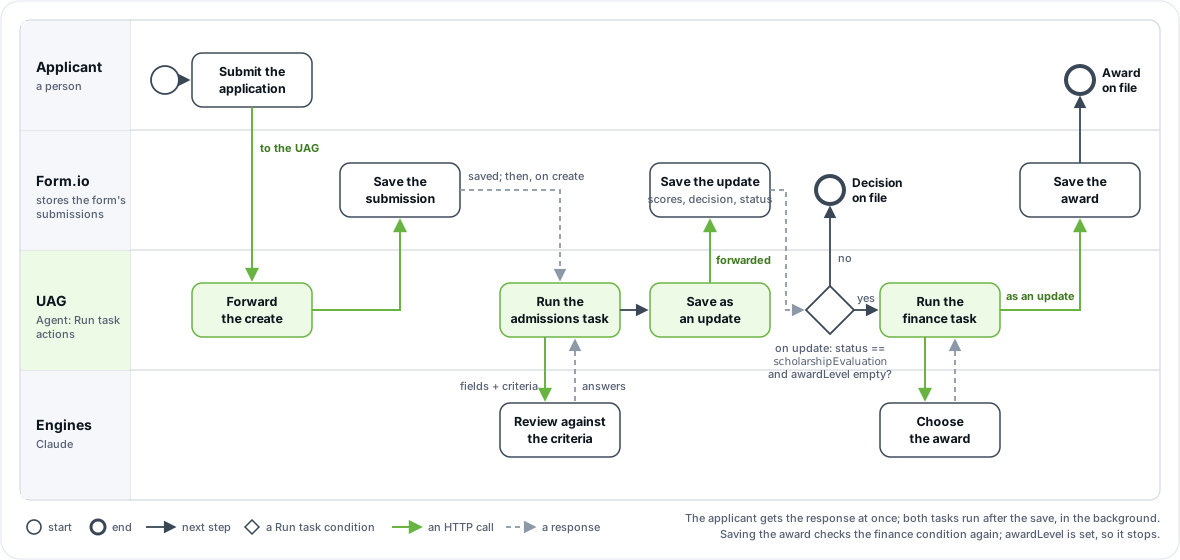
To set one up on Form.io Enterprise:
- Connect a portal stage to the UAG. Set
PORTAL_SECRETon the UAG, then in the portal connect a stage to it as an on-premise environment. In that stage the portal lists the UAG's own actions next to Form.io's. See Deployment → Connecting the Enterprise portal. - Add "Agent: Run task" to the form. Choose the Task, what to Answer (the whole task, or its decision fields only) and When (after the save, in the background, or before it, while the submitter waits), with Form.io's usual methods and conditions. Mark the fields the agent owns
uagAuthoritative, so no client can set them. - Point the application at the UAG. Use the UAG's URL as the project URL in the renderer or your API calls. Login and registration are forwarded to Form.io, and its tokens work unchanged.
On Form.io Open Source, which has no portal stages, add the same action with Form.io's action API (POST /form/{formId}/action) or in a module's project template, and point the application at the UAG. Run task is Agentic Formflow, so it needs a license that includes the UAG, or a project on Form.io's hosted service.
The demo's second action, from demo/module/project.json:
{
  "title": "Agent: Run task (finance)", "name": "agentRunTask",
  "handler": ["before", "after"], "method": ["update"],
  "condition": {
    "conjunction": "all",
    "conditions": [
      { "component": "status", "operator": "isEqual", "value": "scholarshipEvaluation" },
      { "component": "awardLevel", "operator": "isEmpty" }
    ]
  },
  "settings": { "task": "finance", "answer": "task", "when": "after" }
}
What one run after the save does:
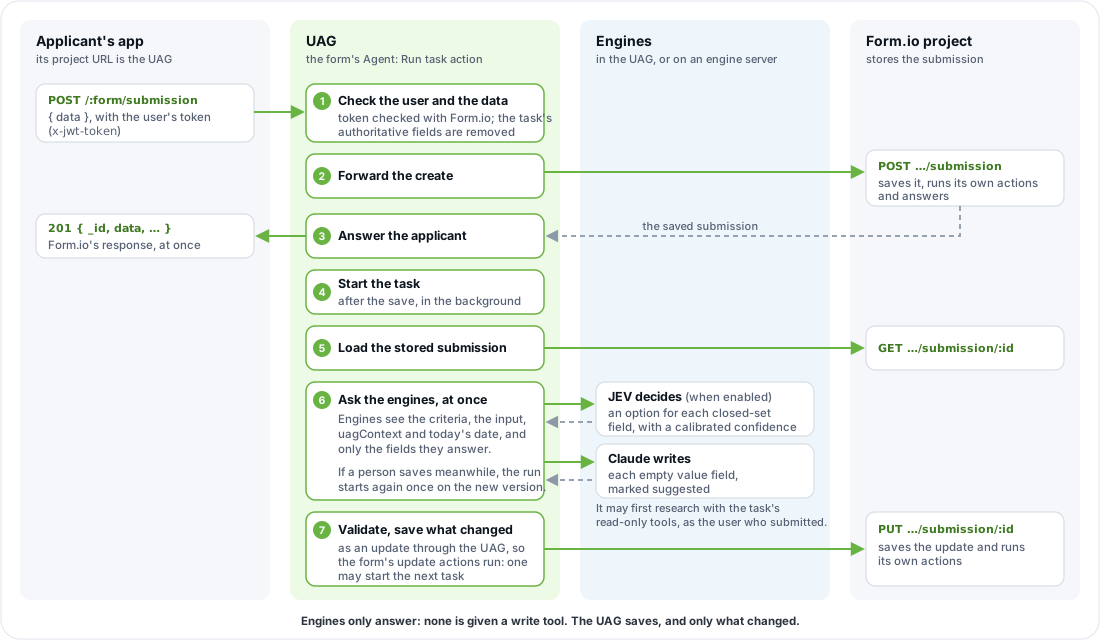
- Tasks run only for submissions sent to the UAG. A submission sent straight to Form.io runs no task.
- After the save, the submitter does not wait. The task's results are saved as an update through the UAG, so the form's update actions, including other Run task actions, run on it. A run that changes nothing saves nothing.
- Guard update actions with a condition on a field the task sets, as above. Check operator names: Form.io treats a clause with an unknown operator as always true.
- Who the agent acts as. With no Agent role, the task saves with the credential the submission was sent with. With one, and the same
JWT_SECRETas Form.io Enterprise, the UAG acts for the user with that role, so Form.io's permissions keep users off the agent's fields. See Project setup for agents.
Full guide: Workflows.
Agent API
The Agent API runs a form's tasks inside the UAG and returns validated values. It reads no stored submission and saves nothing; saving is the job of submissions sent to the UAG. Applications call the same endpoints whichever models are behind them.
A form's operations are under the form's URL on the UAG, {form}: the form's path, or form/{formId}, under the project's URL on the UAG (the UAG's root on Form.io Open Source; /{projectName} or /project/{projectId} on Enterprise and the hosted service).
| Endpoint | Does | Saves |
|---|---|---|
POST {form}/agent/extract |
Fills a task's fields from free text (text, or the task's input field in data). Streams results with Accept: text/event-stream, each engine group as it finishes, so fast decisions usually come first. |
No |
POST {form}/agent/decide |
Answers a task's closed-set fields from data, with a calibrated confidence when a decision engine answers. |
No |
POST {form}/agent/generate |
Writes a task's open values (dates, amounts, text) from data. |
No |
POST {form}/agent/chat |
One turn of a conversation that fills the form in: the next message, and the values taken from the person's words, checked against the form. What the chat widget calls. Conversation forms: no Agentic Formflow license. | No |
GET /agent/capabilities (at the UAG's root) |
Lists the enabled engines, the operations they serve, the edition, the license state, and whether durable runs (durableRuns) and remote MCP sign-in (mcpOAuth) are available. |
No |
curl -s -X POST https://uag.example.com/claim/agent/extract \
  -H "x-jwt-token: $FORMIO_TOKEN" -H 'Content-Type: application/json' \
  -d '{"task": "triage", "text": "I rear-ended a car at the light on Main St yesterday around 5pm."}'
Each field comes back with its value, a status (confident, uncertain, suggested or missing), the engine and model that answered, and a confidence where the engine gives one. Values are only answered for empty fields unless overwrite is true.
The operations take the same credentials as the form's submissions: the signed-in user's Form.io token (x-jwt-token), or a portal team member's remote token (x-remote-token), and Form.io permissions apply. A UAG bearer token (Authorization: Bearer) works too. Servers may send x-token: <PROJECT_KEY> or x-admin-key: <ADMIN_KEY> instead; the UAG refuses those on any request with an Origin or Sec-Fetch-Site header, so they never work from a browser. Visitors with no credential are answered only by a form that sets uagAnonymous: "true" and lets Anonymous create submissions, within per-address and total rate limits. To decide on the server whatever a browser sent, add Agent: Run task to the form with its decision fields only, before the save.
Every field, status code and setting: Agent API. Measure decision accuracy on your own forms before going live: Evaluation.
Engines and routing
An engine connects the UAG to a model provider. Each engine type is its own npm package, and the formio/uag image includes all of the official ones. None runs until you name it in UAG_ENGINES.
| Kind | Answers | Engines |
|---|---|---|
| Decision | Closed-set fields (radio, select, checkbox, select boxes, survey, single resource selects) within the engine's option limit, with a calibrated confidence | jev, openai with kind: decision |
| Agent | Everything else, marked suggested; may first research with read-only tools the task allows |
claude, openai, grok, gemini |
UAG_ENGINES=jev,fast:claude,deep:claude   # instances; <name>:<type> runs one type twice
UAG_ENGINE_FAST_MODEL=claude-haiku-5-5    # UAG_ENGINE_<NAME>_<SETTING> configures one instance
TYPESAFE_API_KEY=...                      # then each engine's own variables
CLAUDE_API_KEY=...
Decision fields go to a decision engine, and fall back to an agent engine (reported calibrated: false) when it fails, times out, is over its rate limit, or none is enabled. A radio, single select or survey with more options than the decision engine accepts (255 for Jev) goes to an agent engine. Override the choice per field, or per task on its criteria, with uagEngine.
Engines run inside the UAG, or on an engine server (formio/uag-engines) so model keys and model traffic stay out of the UAG: name the instance with the remote type. To write your own, see the Engine SDK. Full guide: Engines.
License
| You run | You need |
|---|---|
MCP and conversation forms (including a form's chat, {form}/agent/chat), on Form.io Open Source or a hosted project |
Nothing |
| MCP and conversation forms, on a self-hosted Form.io Enterprise project | A Form.io license that includes the UAG, in LICENSE_KEY, whose endpoint allowlist includes PROJECT's host. Otherwise the project does not load, and the UAG says why. |
Agentic workflows and Agentic Formflow (the Agent API's extract, decide and generate, the Agent: Run task action, the agent_decide and agent_provide tools, uag-eval) on a self-hosted project, Open Source or Enterprise |
A Form.io license that includes the UAG, in LICENSE_KEY |
The same on a project on Form.io's hosted service (https://*.form.io) |
Nothing, as the project runs under Form.io's license; except uag-eval, which runs offline and needs LICENSE_KEY. Leave LICENSE_KEY unset there unless the UAG has its own database. |
The UAG's own database (MONGO), and with it remote MCP sign-in (MCP_OAUTH), on any project |
A Form.io license that includes the UAG. Without one, the UAG starts with its database features off and says why. |
The Agent API, Run task and uag-eval with only the stub engines (UAG_ENGINES=stub-decision,stub-agent), to try them out |
Nothing. The agent_decide and agent_provide tools still need a license or a hosted project. |
A license that includes the UAG is an online license whose key has the uagServer scope (each project endpoint a UAG serves counts as one UAG server, replicas once), or an offline license with the uag option, issued for its project; set LICENSE_REMOTE=true for an offline license. Unlicensed requests get 403 with code: "license_required", and GET /agent/capabilities always reports the edition and formflow.reason. UAG_LICENSE is deprecated in favour of LICENSE_KEY, and still read until UAG 3.0. Contact support@form.io for a trial license. Details: Deployment → Licensing.
formio-uag MCP questions
How do I add formio-uag MCP to Claude Code?
Run claude mcp add --env 'JWT_SECRET=<YOUR_JWT_SECRET>' --env 'PROJECT=<PROJECT>' --env 'ADMIN_KEY=<YOUR_ADMIN_KEY>' --env 'LICENSE_KEY=<YOUR_LICENSE_KEY>' --env 'MONGO=<YOUR_MONGO>' --env 'PORTAL_SECRET=<YOUR_PORTAL_SECRET>' --env 'PROJECT_KEY=<YOUR_PROJECT_KEY>' --env 'UAG_LICENSE=<YOUR_UAG_LICENSE>' uag -- npx -y @formio/uag in your terminal. Add --scope user to make it available in every project.
How do I add formio-uag MCP to Cursor?
Open ~/.cursor/mcp.json and add the server under mcpServers, using the Cursor config shown in the install section above.
Does the UAG require redeploying forms when instructions change?
No, you can update tasks or fields within the form and the agent will adapt without needing redeployments, prompt changes, or model retraining.