
Flash MCP server
Commit Nov 4, 2026Allows AI clients to create spaced-repetition flashcards, manage decks, and quiz users using the FSRS scheduling algorithm.
Also known as flash-cards/flash
- Stars
- 8
- Tools
- —
- Downloads, 30 days
- —
- Latest version
- 0.1.0
- Last commit
- Nov 4, 2026
- License
- AGPL-3.0
What is Flash MCP?
Flash allows AI clients to create spaced-repetition flashcards, manage decks, and quiz users using the FSRS scheduling algorithm.
Summary generated from the project's README
About Flash MCP server
Creating and studying spaced-repetition flashcards through an AI chat interface is what Flash enables for learners. This self-hosted server allows clients like Claude, ChatGPT, or Gemini to write new cards into specific decks and conduct quizzes directly within the conversation. It uses the FSRS scheduling algorithm to manage review timings, ensuring efficient long-term memory retention.
Users deploy the server as a single Rust binary or via Docker, managing their data through a local volume. Once running, you connect your AI client by adding your host address as a custom connector using OAuth. The system supports importing and exporting Anki .apkg decks, making it easy to migrate existing study materials into your new AI-driven workflow.
What you can do with it
- 1Automated deck creationAsk your AI client to generate and add several new study cards to a specific topic deck.
- 2Interactive AI quizzingRequest that your AI assistant starts a study session to test your knowledge on a particular subject.
- 3Anki data migrationMove your existing study collections into the Flash system for AI-managed scheduling.
Written from the project's README. Every use case is checked against a quote from it.
How to install Flash MCP
Formats verified 10 Nov 2026Add to CursorAdd to GooseInstall Flash MCP in Claude Code
$ claude mcp add --transport http flash https://flashmemorize.com/mcpInstall Flash MCP in Cursor
~/.cursor/mcp.json
{
  "mcpServers": {
    "flash": {
      "url": "https://flashmemorize.com/mcp"
    }
  }
}Install Flash MCP in VS Code
.vscode/mcp.json
{
  "servers": {
    "flash": {
      "type": "http",
      "url": "https://flashmemorize.com/mcp"
    }
  }
}Install Flash MCP in VS Code CLI
$ code --add-mcp '{"name":"flash","type":"http","url":"https://flashmemorize.com/mcp"}'Install Flash MCP in Codex
$ codex mcp add flash --url https://flashmemorize.com/mcpInstall Flash MCP in Codex config.toml
~/.codex/config.toml
[mcp_servers.flash]
url = "https://flashmemorize.com/mcp"
Install Flash MCP in Gemini CLI
$ gemini mcp add -s user --transport http flash https://flashmemorize.com/mcpInstall Flash MCP in Gemini settings.json
~/.gemini/settings.json
{
  "mcpServers": {
    "flash": {
      "url": "https://flashmemorize.com/mcp",
      "type": "http"
    }
  }
}Automated checks
Ran Nov 14, 2026Full report →Not verified yet. A server needs a score of 80, no serious finding, and enough data for us to check. How checks work · What to fix for more points

- Source repository linked and reachableflash-cards/flash is public and reachablegithub.com/flash-cards/flash ↗Pass
- Package names this repository as its sourceNot checked
- Build provenance (Sigstore attestation)Not checked
- Open source license (OSI)AGPL-3.0spdx.org/licenses/AGPL-3.0.html ↗Pass
- Commit or release in the last yearLast commit or release 2026-11-04github.com/flash-cards/flash ↗Pass
- OpenSSF ScorecardNot checked
- Package name not close to a popular packageNot checked
- No critical advisory in the package or its dependenciesNot checked
- No hidden instructions to the model0 tool descriptions and the README read; no override phrases, credential paths or hidden charactersPass
- Destructive tools are labelledNot checked
- Remote endpoint answers the MCP handshakeHTTPS endpoint answered 401 (sign-in required)Pass
README
View on GitHub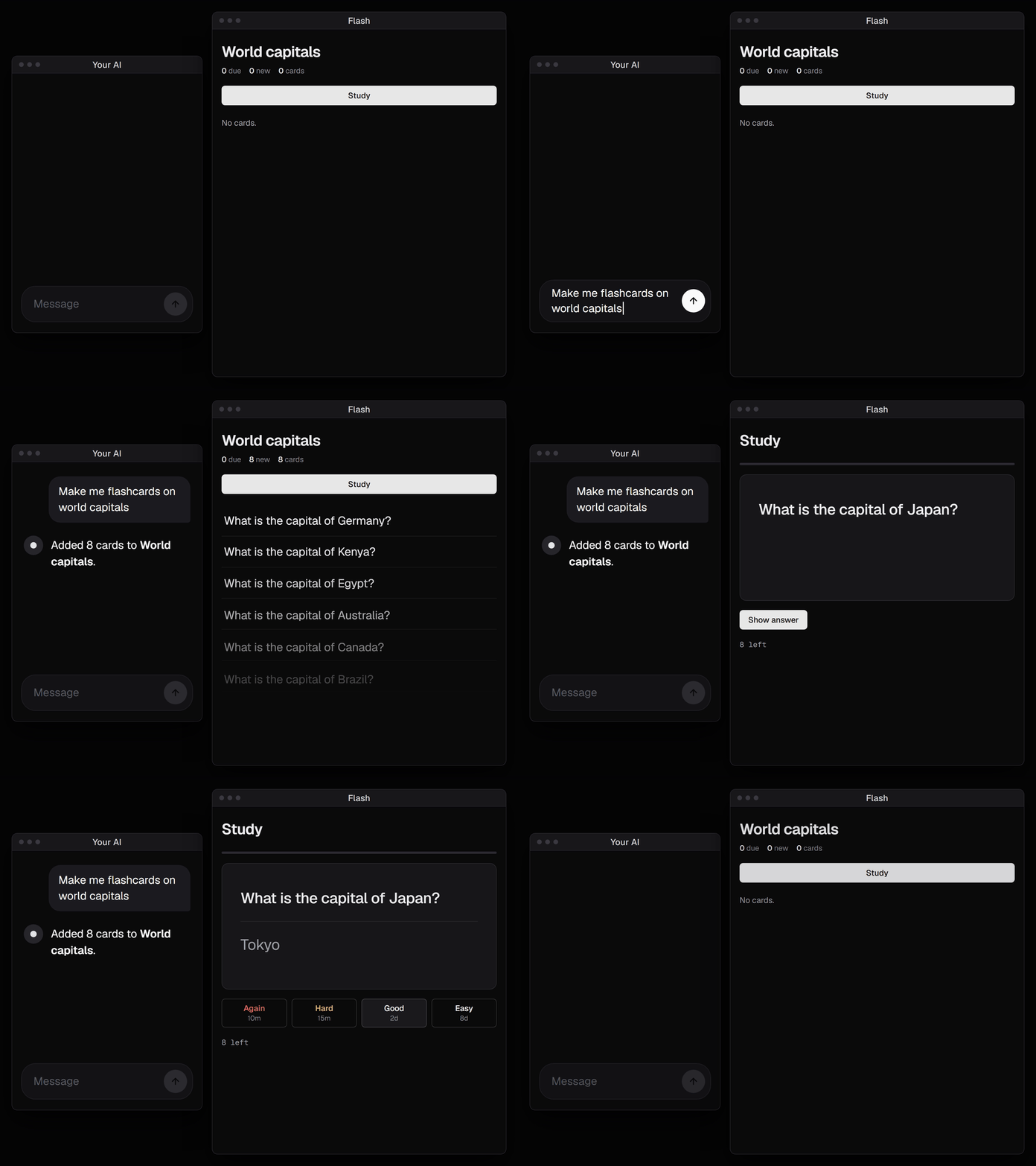
A self-hosted spaced-repetition server. Connect ChatGPT, Claude or any MCP
client: it writes cards into your decks and quizzes you, and Flash schedules
every review with FSRS.
One Rust binary, one data folder. Imports and exports Anki .apkg decks.
Run it
docker run -d --name flash -p 127.0.0.1:8437:8437 -v flash-data:/data ghcr.io/flash-cards/flash
docker logs flash | grep enroll
Open the enroll link at http://localhost:8437 and you are the admin; invite
everyone else from Settings. To serve it beyond your machine, put a TLS
reverse proxy in front and set FLASH_BASE_URL to its address
(docker-compose.yml is the hardened setup). Your data
is the flash-data volume: back it up, and upgrade by pulling a newer image
and recreating the container. Locked out?
docker exec flash flash-server reset-link you@example.com prints a link to
choose a new password (with compose: docker compose exec flash ...).
Installed with docker compose (as up to 0.3.0)? Your data is in that
folder's volume (docker volume ls, e.g. flash_flash-data), not in
flash-data. Upgrade from the same folder, backing up first, since
upgrades only go forward:
docker compose stop flash
docker run --rm -v flash_flash-data:/data -v "$PWD":/backup debian:bookworm-slim \
    tar czf /backup/flash-data.tgz -C /data .
docker compose pull && docker compose up -d
Connect your AI
Add https://<your host>/mcp as a custom connector in ChatGPT, Claude, Grok,
Le Chat or Gemini (OAuth, no keys to copy). In a terminal:
claude mcp add --transport http flash https://<your host>/mcp. Then say
"quiz me on my deck".
The hosted version adds card generation from your files and grading of spoken answers.
License
AGPL-3.0-only, with embedded assets in THIRD_PARTY.md. Contributions are accepted under the CLA.
Flash MCP questions
How do I add Flash MCP to Claude Code?
Run claude mcp add --transport http flash https://flashmemorize.com/mcp in your terminal. Add --scope user to make it available in every project.
How do I add Flash MCP to Cursor?
Open ~/.cursor/mcp.json and add the server under mcpServers, using the Cursor config shown in the install section above.
How do I connect my AI client to Flash?
You can add your host URL followed by /mcp as a custom connector in clients like ChatGPT or Claude using OAuth.
Can I import my existing Anki decks?
Yes, the server supports importing and exporting Anki .apkg decks.
How do I reset my password if I am locked out?
You can use the flash-server reset-link command via Docker to generate a link to choose a new password.