
Audio & Video to Text MCP server
Commit Nov 11, 2026Transcribes audio and video files, TikTok, and podcast links into text, SRT subtitles, Word, or PDF formats across 99 languages.
Also known as fernandoguiraud16-coder/data-tools, data-tools
- Stars
- 0
- Tools
- 5
- Downloads, 30 days
- —
- Latest version
- 1.0.1
- Last commit
- Nov 11, 2026
- License
- MIT
What is Audio & Video to Text MCP?
Audio & Video to Text transcribes audio and video files, TikTok, and podcast links into text, SRT subtitles, Word, or PDF formats across 99 languages. It exposes 5 tools, such as fguiraud--audio-video-transcriber, get-actor-run, get-dataset-items.
Summary generated from the project's README
About Audio & Video to Text MCP server
Transcribing spoken content from various media formats is what this server enables for developers and AI agents. It converts audio and video files into text or SRT subtitles across 99 different languages. Users can process diverse sources including TikTok, Instagram Reels, YouTube videos, and podcast episodes to generate readable transcripts.
This tool functions through Apify Actors and requires an Apify API token for authentication. It is designed to be used within MCP clients like Claude or Cursor, or via Claude Code plugins. The server operates on a pay-per-use model where costs are calculated per item or per minute of audio, ensuring you only pay for successful results.
Beyond simple transcription, the system supports specific outputs like Word, PDF, and broadcast-formatted SRT or VTT subtitles. It integrates with the broader data-tools ecosystem, allowing agents to pull clean data from social media and web sources directly into their workflows.
What you can do with it
- 1Convert social media videos to textExtract transcripts from TikTok or Instagram Reels to analyze content or create text-based archives.
- 2Generate subtitles for video filesCreate broadcast-formatted SRT or VTT subtitle files for video content.
- 3Transcribe podcast episodesAutomatically capture the text from new episodes of your favorite podcasts.
- 4Process YouTube content into MarkdownTurn YouTube videos, Shorts, or entire playlists into Markdown files with timestamps.
Written from the project's README. Every use case is checked against a quote from it.
How to install Audio & Video to Text MCP
Formats verified 10 Nov 2026Add to CursorAdd to GooseInstall Audio & Video to Text MCP in Claude Code
$ claude mcp add --transport http data-tools 'https://mcp.apify.com/?tools=fguiraud/audio-video-transcriber'Install Audio & Video to Text MCP in Cursor
~/.cursor/mcp.json
{
  "mcpServers": {
    "data-tools": {
      "url": "https://mcp.apify.com/?tools=fguiraud/audio-video-transcriber"
    }
  }
}Install Audio & Video to Text MCP in VS Code
.vscode/mcp.json
{
  "servers": {
    "data-tools": {
      "type": "http",
      "url": "https://mcp.apify.com/?tools=fguiraud/audio-video-transcriber"
    }
  }
}Install Audio & Video to Text MCP in VS Code CLI
$ code --add-mcp '{"name":"data-tools","type":"http","url":"https://mcp.apify.com/?tools=fguiraud/audio-video-transcriber"}'Install Audio & Video to Text MCP in Codex
$ codex mcp add data-tools --url 'https://mcp.apify.com/?tools=fguiraud/audio-video-transcriber'Install Audio & Video to Text MCP in Codex config.toml
~/.codex/config.toml
[mcp_servers.data-tools]
url = "https://mcp.apify.com/?tools=fguiraud/audio-video-transcriber"
Install Audio & Video to Text MCP in Gemini CLI
$ gemini mcp add -s user --transport http data-tools 'https://mcp.apify.com/?tools=fguiraud/audio-video-transcriber'Install Audio & Video to Text MCP in Gemini settings.json
~/.gemini/settings.json
{
  "mcpServers": {
    "data-tools": {
      "url": "https://mcp.apify.com/?tools=fguiraud/audio-video-transcriber",
      "type": "http"
    }
  }
}Audio & Video to Text MCP tools 5
Read from the server with tools/listfguiraud--audio-video-transcriberActionThis tool calls the Actor "fguiraud/audio-video-transcriber" and retrieves its output results. Actor description: Transcribe audio files, video, podcasts and meeting recordings to text: convert MP3, MP4, WAV or M4A to text with timestamps, speaker labels and SRT subtitles in 99 languages. Whisper speech to text API, no API key. Free cost estimate, AI meeting notes. Pay per minute.
get-actor-runRead-onlyGet detailed information about a specific Actor run. Returns run result: status, storages (datasets/keyValueStores alias map), stats, summary, nextStep. - summary describes the past (e.g. "SUCCEEDED in 22s. 47 items; 3 fields available."). - nextStep prescribes one primary follow-up action with identifiers interpolated (e.g. "Use get-dataset-items with datasetId=..."). - waitSecs (0–45, default 30) waits up to that many seconds for terminal status before returning. USAGE: - Use to check the status of a run started by any Actor-running tool. - Pass waitSecs > 0 to block until terminal (or until the cap elapses). USAGE EXAMPLES: - user_input: Show details of run y2h7sK3Wc - user_input: Wait for run y2h7sK3Wc to finish
get-dataset-itemsRead-onlyGet items (rows) from a dataset — the output/results produced by an Actor run. Returns the rows themselves, not dataset metadata, counts, or a schema. When the user provides a datasetId and asks to retrieve results, output, data, or rows, call this tool directly. Default limit is 20. Use clean=true to skip empty items and hidden fields. USAGE: - Use when you need to read data from a dataset (all items or only selected fields). USAGE EXAMPLES: - user_input: Retrieve results from dataset abc123 - user_input: Get only metadata.url and title from dataset username~my-dataset
get-key-value-store-recordRead-onlyGet the value stored under a specific key in a key-value store — a single record, not a listing of all keys. Requires the exact key name. The response preserves the original Content-Encoding; most clients handle decompression automatically. A record over 262144 bytes is returned as a link to download it, not as its value. USAGE: - Use when you need to retrieve a specific record (JSON, text, or binary) from a store. USAGE EXAMPLES: - user_input: Get record INPUT from store abc123 - user_input: Get record data.json from store username~my-store
abort-actor-runActionAbort an Actor run that is currently starting or running. For runs with status SUCCEEDED, FAILED, ABORTING, ABORTED, or TIMED-OUT, this call has no effect. The results will include the updated run details after the abort request. USAGE: - Use when you need to stop a run that is taking too long or misconfigured. USAGE EXAMPLES: - user_input: Abort run y2h7sK3Wc - user_input: Gracefully abort run y2h7sK3Wc
| fguiraud--audio-video-transcriber | This tool calls the Actor "fguiraud/audio-video-transcriber" and retrieves its output results. Actor description: Transcribe audio files, video, podcasts and meeting recordings to text: convert MP3, MP4, WAV or M4A to text with timestamps, speaker labels and SRT subtitles in 99 languages. Whisper speech to text API, no API key. Free cost estimate, AI meeting notes. Pay per minute. | Action |
| get-actor-run | Get detailed information about a specific Actor run. Returns run result: status, storages (datasets/keyValueStores alias map), stats, summary, nextStep. - summary describes the past (e.g. "SUCCEEDED in 22s. 47 items; 3 fields available."). - nextStep prescribes one primary follow-up action with identifiers interpolated (e.g. "Use get-dataset-items with datasetId=..."). - waitSecs (0–45, default 30) waits up to that many seconds for terminal status before returning. USAGE: - Use to check the status of a run started by any Actor-running tool. - Pass waitSecs > 0 to block until terminal (or until the cap elapses). USAGE EXAMPLES: - user_input: Show details of run y2h7sK3Wc - user_input: Wait for run y2h7sK3Wc to finish | Read-only |
| get-dataset-items | Get items (rows) from a dataset — the output/results produced by an Actor run. Returns the rows themselves, not dataset metadata, counts, or a schema. When the user provides a datasetId and asks to retrieve results, output, data, or rows, call this tool directly. Default limit is 20. Use clean=true to skip empty items and hidden fields. USAGE: - Use when you need to read data from a dataset (all items or only selected fields). USAGE EXAMPLES: - user_input: Retrieve results from dataset abc123 - user_input: Get only metadata.url and title from dataset username~my-dataset | Read-only |
| get-key-value-store-record | Get the value stored under a specific key in a key-value store — a single record, not a listing of all keys. Requires the exact key name. The response preserves the original Content-Encoding; most clients handle decompression automatically. A record over 262144 bytes is returned as a link to download it, not as its value. USAGE: - Use when you need to retrieve a specific record (JSON, text, or binary) from a store. USAGE EXAMPLES: - user_input: Get record INPUT from store abc123 - user_input: Get record data.json from store username~my-store | Read-only |
| abort-actor-run | Abort an Actor run that is currently starting or running. For runs with status SUCCEEDED, FAILED, ABORTING, ABORTED, or TIMED-OUT, this call has no effect. The results will include the updated run details after the abort request. USAGE: - Use when you need to stop a run that is taking too long or misconfigured. USAGE EXAMPLES: - user_input: Abort run y2h7sK3Wc - user_input: Gracefully abort run y2h7sK3Wc | Action |
Configuration
APIFY_TOKEN
| Name | Description | |
|---|---|---|
| APIFY_TOKEN | — |
Automated checks
Ran Nov 16, 2026Full report →Not verified yet. A server needs a score of 80, no serious finding, and enough data for us to check. How checks work · What to fix for more points

- Source repository linked and reachablefernandoguiraud16-coder/data-tools is public and reachablegithub.com/fernandoguiraud16-coder/data-tools ↗Pass
- Package names this repository as its sourceNot checked
- Build provenance (Sigstore attestation)Not checked
- Open source license (OSI)MITspdx.org/licenses/MIT.html ↗Pass
- Commit or release in the last yearLast commit or release 2026-11-11github.com/fernandoguiraud16-coder/data-tools ↗Pass
- OpenSSF ScorecardNot checked
- Package name not close to a popular packageNot checked
- No critical advisory in the package or its dependenciesNot checked
- No hidden instructions to the model5 tool descriptions and the README read; no override phrases, credential paths or hidden charactersPass
- Destructive tools are labelledNo tool named like delete, drop or execPass
- Remote endpoint answers the MCP handshakeinitialize answered with protocol 2025-11-25 in 1072 ms; tools/list returned 5 tools (HostedMCP test account)Pass
README
View on GitHubData Tools: clean web data for developers and AI agents
Ready-to-run Python examples for pay-per-use Apify Actors that turn search trends, news, competitor ads, documents, websites, YouTube, TikTok and Instagram videos and audio into clean JSON, Markdown, CSV and Excel.
🌐 Website: https://fernandoguiraud16-coder.github.io/data-tools/
Each example is a single short script plus a sample-output.json from a real cloud run, so you can see exactly what you get before running anything.
Examples
| Example | What it does | Actor |
|---|---|---|
| google-trends | Compare terms over time, export to CSV, see rising searches and what's trending now | Google Trends Scraper |
| google-news | Save news articles as Markdown files, or get alerts for new stories only | Google News Scraper |
| google-ads-transparency | Every Google Search, Display and YouTube ad of a competitor, longest-running first, and alerts for new ads | Google Ads Transparency Scraper |
| trends-to-news | Find the fastest rising searches on a topic and the news that explains them | Trends + News |
| pdf-to-markdown | PDF, Word, Excel, PowerPoint and scans to Markdown, or to RAG chunks in JSONL | PDF to Markdown Extractor |
| pdf-table-extractor | Every table in a PDF to an Excel workbook, one sheet per table | PDF Table Extractor |
| tech-stack-whois | Enrich a list of company domains: CMS, email provider, hosting, age, security grade | Tech Stack Detector & WHOIS |
| bulk-whois | Find available and soon-to-expire domains in a list | Bulk WHOIS Lookup |
| audio-transcription | Audio or video to text and SRT subtitles, 99 languages | Audio & Video Transcription |
| podcast-transcripts | Transcribe only the new episodes of your favourite podcasts | Podcast Transcript Scraper |
| youtube-transcripts | YouTube videos, Shorts, whole channels, playlists and keyword searches to Markdown with timestamps, SRT or text | YouTube Transcript Scraper |
| Google Hotels guide | Hotel prices per night and total stay for any city and dates, ratings, reviews, amenities; daily price monitor | Google Hotels Scraper |
| Google Jobs guide | Job listings from LinkedIn, Indeed and company sites with salary ranges and apply links; alerts for new jobs | Google Jobs Scraper |
| LinkedIn & Indeed jobs guide | Jobs listed on LinkedIn, Indeed, Monster and company career sites in one search, with every apply link | Job Postings Aggregator |
| Company contacts guide | Role emails, phones, address and social profiles of companies from their websites, one row per company | Website Contact Scraper |
| YouTube channel guide · YouTube search guide | Every video of a channel, or the top videos for a keyword, as transcripts | YouTube Channel Transcripts · YouTube Search Transcripts |
| mcp-agents | Use all of these as tools in Claude, Cursor or any MCP client | Apify MCP server |
Also in the family (same engine as Audio & Video Transcription, so the audio-transcription example works with them too):
| Actor | What it does |
|---|---|
| Instagram Reels Transcript Scraper | Instagram Reels to text with author, date, likes and comments ($0.01 per Reel) |
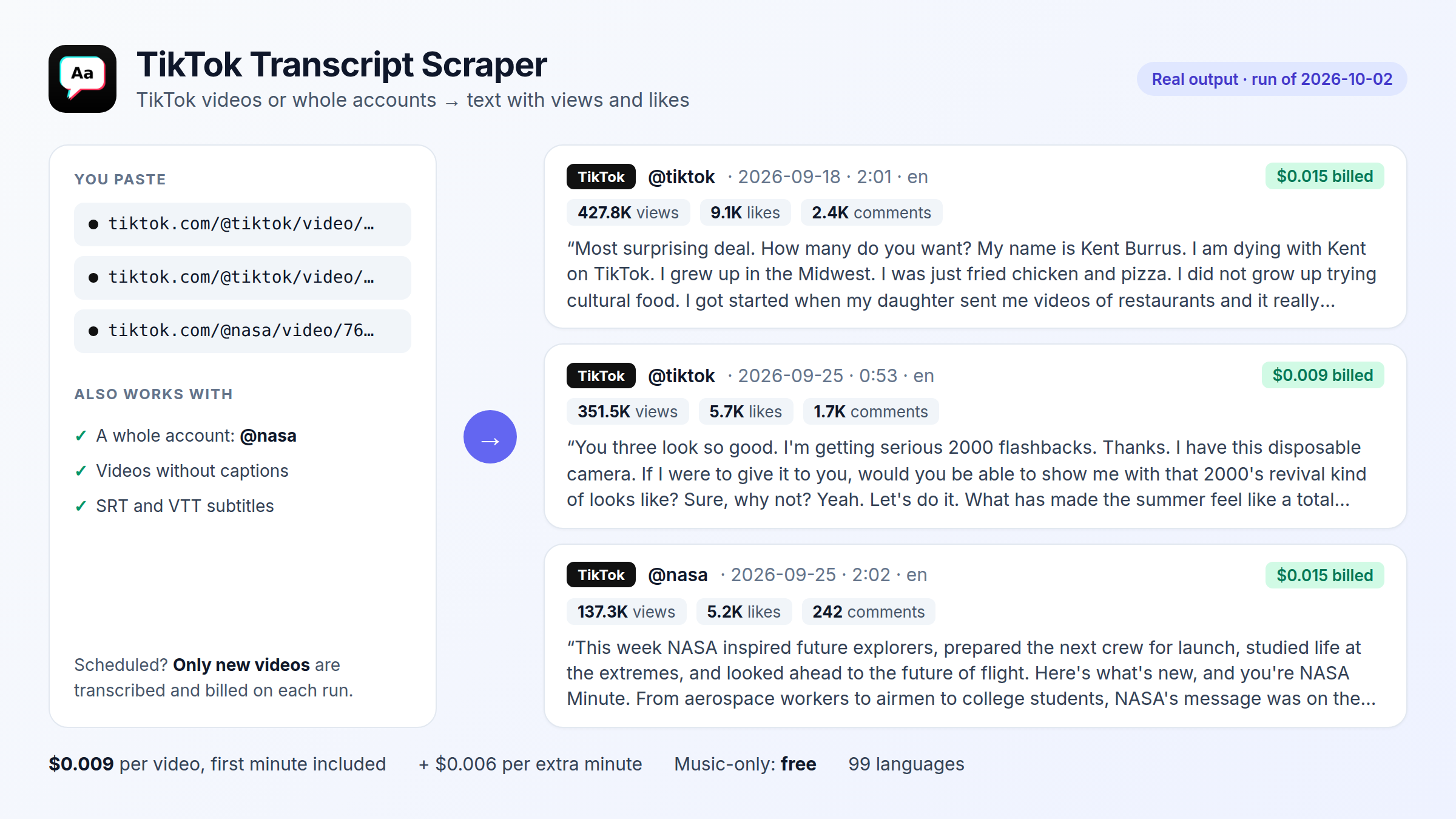
| TikTok Transcript Scraper | TikTok videos or whole accounts to text with views and likes ($0.009 per video) |
| Video to Text Transcriber | TikTok, Instagram, X, Facebook and MP4 links to transcripts and readable subtitles, per minute |
| SRT Subtitle Generator | Broadcast-formatted SRT/VTT subtitles (42 characters, 2 lines) |
For AI agents
- MCP: every tool is listed in the official MCP registry as
io.github.fernandoguiraud16-coder/<tool>and served athttps://mcp.apify.com/?tools=fguiraud/<tool>. Seeexamples/mcp-agents. - Claude Code plugin:
/plugin install data-tools --marketplace fernandoguiraud16-coder/data-toolsadds the 6 skills and the Apify MCP server with 14 tools; Claude Code asks for your Apify API token once (runs are billed to your Apify account at each tool's pay-per-use price). - Agent skills:
npx skills add fernandoguiraud16-coder/data-toolsinstalls 6 skills for Claude Code, Codex, Cursor and other coding agents. - llms.txt: a short index of all tools for LLMs.
Quick start
-
Create a free Apify account and copy your API token from Console → Settings → API & Integrations.
-
Install the client and set the token:
pip install -r requirements.txt export APIFY_TOKEN=your_token # Windows PowerShell: $env:APIFY_TOKEN="your_token" -
Run any example:
python examples/google-trends/compare_terms.py "chatgpt, gemini, claude" --geo US
Pricing
All Actors are pay per result: you pay a fraction of a cent per item (term, article, ad, document, domain, video or audio minute), and failed or empty items are not charged. Apify's free plan includes monthly credits, enough to try every example. Exact prices are on each Actor's page.
Support
Found a bug or need a feature? Open an issue on the Actor's page in the Apify Store (replies within 48 hours), or an issue in this repository for problems with the examples.
License
The example code is MIT licensed: copy it into your own projects.
Audio & Video to Text MCP questions
How do I add Audio & Video to Text MCP to Claude Code?
Run claude mcp add --transport http data-tools 'https://mcp.apify.com/?tools=fguiraud/audio-video-transcriber' in your terminal. Add --scope user to make it available in every project.
How do I add Audio & Video to Text MCP to Cursor?
Open ~/.cursor/mcp.json and add the server under mcpServers, using the Cursor config shown in the install section above.
What tools does Audio & Video to Text MCP provide?
It exposes 5 tools, including fguiraud--audio-video-transcriber, get-actor-run, get-dataset-items, get-key-value-store-record, abort-actor-run.
What languages does the transcription support?
The tool supports transcription for 99 different languages.
Can I transcribe social media content?
Yes, you can transcribe content from TikTok, Instagram Reels, and YouTube videos.