
Elastic Security MCP server
Commit Oct 15, 2026Enables interactive security operations, alert triage, and threat hunting through React-based dashboards directly within AI conversation interfaces.
Also known as elastic/example-mcp-app-security
- Stars
- 25
- Tools
- —
- Downloads, 30 days
- —
- Latest version
- —
- Last commit
- Oct 15, 2026
- License
- —
What is Elastic Security MCP?
Elastic Security enables interactive security operations, alert triage, and threat hunting through React-based dashboards directly within AI conversation interfaces.
Summary generated from the project's README
About Elastic Security MCP server
Security analysts performing blue-team operations can manage investigations through interactive React-based dashboards inside AI conversation interfaces like Claude, VS Code, or Cursor. This server extends the Model Context Protocol to render inline HTML interfaces, such as process trees and investigation graphs, directly alongside model responses. It allows users to move beyond text-only interactions by providing visual tools for complex security tasks.
To set up the server, users provide an Elasticsearch URL, a Kibana URL, and an API key. The system supports various installation methods, including a one-click .mcpb file for Claude Desktop or npx for other hosts. The server includes six specialized tools: Alert Triage for filtering security alerts, Attack Discovery for correlated chain analysis, Case Management for SOC investigations, Detection Rules for KQL search and tuning, Threat Hunt using an ES|QL workbench, and Sample Data for generating ECS security events.
By returning both a text summary and a rich UI, the server keeps the LLM context small while giving the interactive dashboard full data access. This architecture ensures that while the UI handles deep data exploration, the underlying tools remain available for the AI to call directly.
What you can do with it
- 1Triage security alertsAn analyst can fetch and filter security alerts using AI verdict cards and network investigation tools.
- 2Analyze attack chainsA developer can use AI-powered correlation to map attack chains to MITRE frameworks with confidence scoring.
- 3Manage SOC casesSecurity teams can create and search for investigation cases with assistance from the AI.
Written from the project's README. Every use case is checked against a quote from it.
Automated checks
Ran Nov 15, 2026Full report →Not verified yet. A server needs a score of 80, no serious finding, and enough data for us to check. How checks work · What to fix for more points

- Source repository linked and reachableelastic/example-mcp-app-security is public and reachablegithub.com/elastic/example-mcp-app-security ↗Pass
- Package names this repository as its sourceNot checked
- Build provenance (Sigstore attestation)Not checked
- Open source license (OSI)No licenseFinding
- Commit or release in the last yearLast commit or release 2026-10-15github.com/elastic/example-mcp-app-security ↗Pass
- OpenSSF ScorecardNot checked
- Package name not close to a popular packageNot checked
- No critical advisory in the package or its dependenciesNot checked
- No hidden instructions to the model0 tool descriptions and the README read; no override phrases, credential paths or hidden charactersPass
- Destructive tools are labelledNot checked
- Remote endpoint answers the MCP handshakeNot checked
README
View on GitHubElastic Security MCP App

Quick Demo
https://github.com/user-attachments/assets/cb62a569-1ef0-4fb0-90c7-587b98fb2049
An MCP App that brings interactive blue-team security operations directly into Claude, VS Code, and other MCP-compatible AI hosts. Built on the Model Context Protocol with interactive UI extensions that render inline in the conversation.
What are MCP Apps? MCP Apps extend the Model Context Protocol to let tool servers return interactive HTML interfaces — dashboards, forms, visualizations — that render inside the AI conversation. The LLM calls a tool, and instead of just returning text, an interactive UI appears alongside the response.
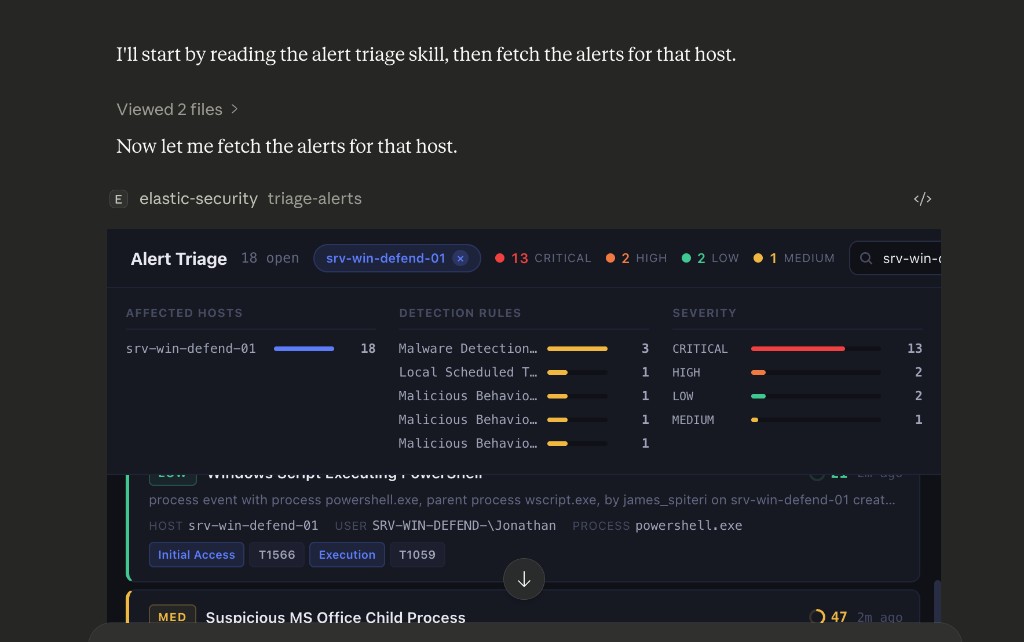
What This Does
This project provides six interactive security operations tools, each with a rich React-based UI that renders inline when Claude (or another MCP host) calls the tool:
| Tool | What It Does |
|---|---|
| Alert Triage | Fetch, filter, and triage security alerts with AI verdict cards, process tree, and network investigation |
| Attack Discovery | AI-powered correlated attack chain analysis with confidence scoring, entity risk, and MITRE mapping |
| Case Management | Create, search, and manage SOC investigation cases with AI-assisted actions |
| Detection Rules | Browse, tune, and manage detection rules with KQL search and noisy rules analysis |
| Threat Hunt | ES|QL workbench with clickable entities and a D3 investigation graph |
| Sample Data | Generate ECS security events for demos across 4 attack chain scenarios |
See docs/features.md for a full breakdown of each tool's capabilities.
Quick Start
[!TIP] Just want to try it? Download
example-mcp-app-security.mcpband double-click it. No Node.js, no cloning, no config files.Claude Desktop handles the rest — during install, fill in your Elasticsearch URL, Kibana URL, and API key. See Creating an API key if you need to generate one first.
For the API key's permissions, see Required permissions (stateful) or Serverless permissions (Elastic Cloud Serverless Security projects). The stateful Quickstart uses Kibana's built-in editor (full-featured) or viewer (read-only) role plus a small companion role for index access — fastest unless you need a fully scripted custom role.
For other hosts (Cursor, VS Code, Claude Code) or building from source, see Installation below.
How It Works
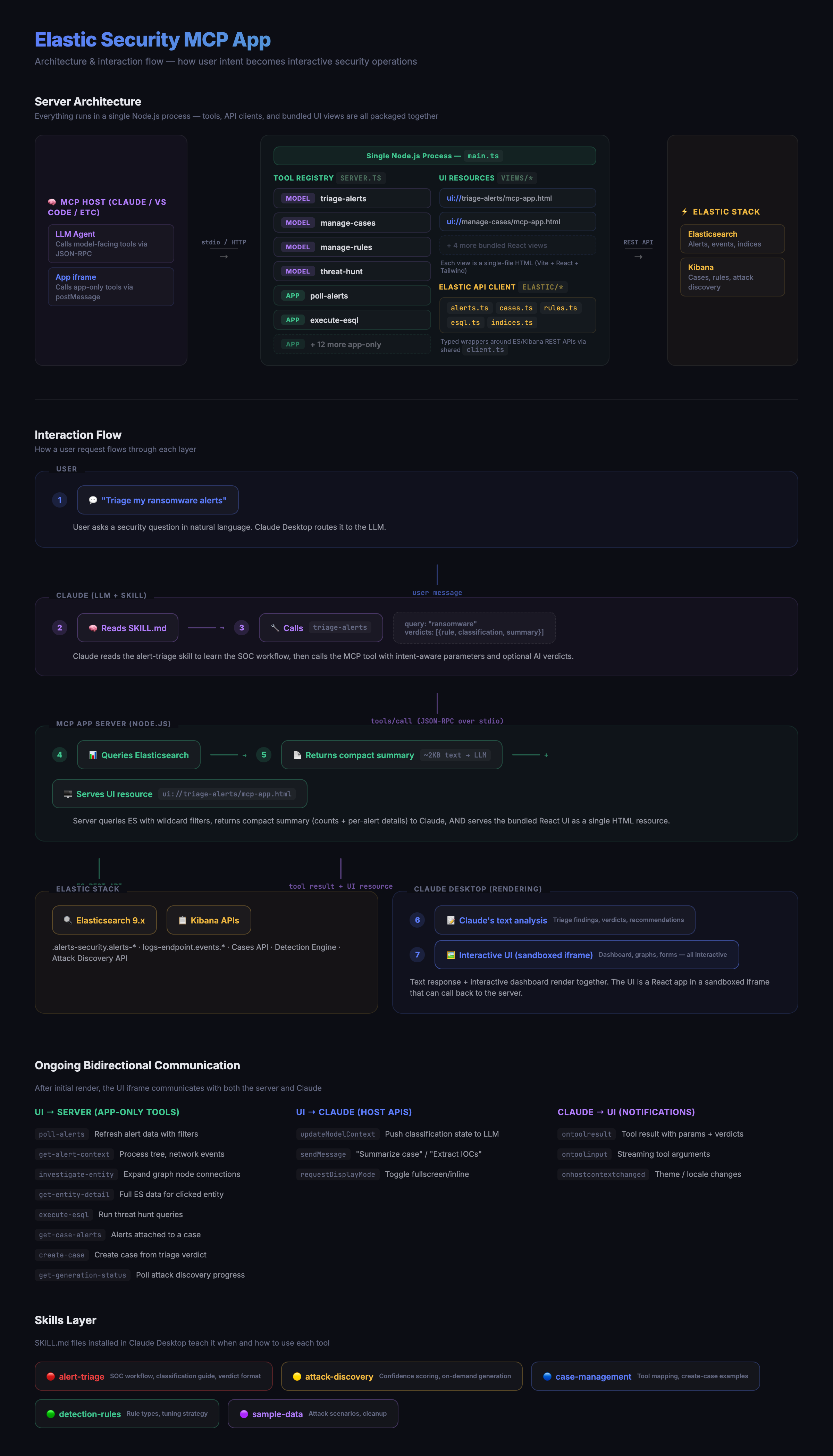
When a user asks Claude to triage alerts or run a threat hunt, Claude calls a model-facing tool on this server. The tool returns a compact text summary to Claude and an interactive React UI that renders inline in the conversation. The UI then calls the server's data and action tools directly for all subsequent interactions — keeping the LLM context small while the UI has full data access. Those tools are also visible to the model, so Claude Code and custom skills can call them without the UI.
See docs/architecture.md for details on how views are built, how the UI communicates with the server, and key design decisions.
Telemetry
The MCP App emits anonymised usage events via @elastic/ebt. Shipping is mirrored to the user's Kibana telemetry opt-in — nothing leaves the process unless Kibana reports optIn === true. See docs/telemetry.md for the event catalog, what's collected, and how to opt out.
Skills
The skills/ directory contains Claude Skills — SKILL.md files that teach Claude when and how to use the tools. See docs/setup-skills.md for installation instructions.
Installation
| Guide | Description |
|---|---|
| Add to Claude Desktop | Install the MCP app via one-click .mcpb or manual config |
| Add to Cursor | Connect the MCP app via npx or a locally running server |
| Add to VS Code | Connect the MCP app via npx or a locally running server |
| Add to Claude Code | Register the MCP app via the claude mcp add CLI |
| Add to Claude.ai | Expose the MCP app via a cloudflared tunnel |
| Build and run locally | Build the MCP server from source and run it on your machine |
| Install skills | Install skills via npx, local clone, or zip upload |
| Updating | How to update to a newer release |
Development
npm run dev          # Watch mode
npm run typecheck    # Type-check only
npm run build:views  # Build views only
npm run build:server # Build server only
Inspired By
- Elastic Agent Skills — SOC triage methodology and tool patterns
- MCP Apps Specification — Interactive UI extensions for MCP
License
Elastic-2.0
Elastic Security MCP questions
What kind of tools are included in this server?
The server provides six interactive tools including Alert Triage, Attack Discovery, Case Management, Detection Rules, Threat Hunt, and Sample Data generation.
Does the UI require the LLM to process all the data?
No, the interactive UI calls the server's data and action tools directly, which keeps the LLM context small while providing full data access to the UI.