
Duly MCP server
Commit Oct 22, 2026Turns household paperwork into actionable answers like deadlines, warranty statuses, and drafted replies for bills or letters.
Also known as devcaos/duly
- Stars
- 0
- Tools
- 8
- Downloads, 30 days
- —
- Latest version
- —
- Last commit
- Oct 22, 2026
- License
- MIT
What is Duly MCP?
Duly turns household paperwork into actionable answers like deadlines, warranty statuses, and drafted replies for bills or letters. It exposes 8 tools, such as add_document, list_deadlines, explain_document.
Summary generated from the project's README
About Duly MCP server
Managing household paperwork becomes automated by turning bills, letters, and warranties into actionable data. This remote MCP server allows users to extract deadlines, explain fine print, and draft replies to service providers. It is designed for use with AI clients like Claude via custom connectors or through an Alexa+ interface, providing short, spoken-style answers suitable for voice interaction.
The system utilizes Amazon Bedrock for document extraction and reasoning, with Amazon Polly for speech synthesis. It manages data using Amazon DynamoDB and S3, though it can also run with in-memory storage for local testing. Users can interact with specific tools such as list_deadlines to track upcoming payments, check_warranty to monitor product coverage, or compare_bills to analyze usage trends and price changes.
Developers can integrate this server into their workflows using the Streamable HTTP transport. The server includes specialized tools like add_document for processing photos or PDFs up to 3 MB and weekly_brief to summarize urgent tasks. While the production environment uses a shared demo household, a local setup allows for full document management and persistence.
What you can do with it
- 1Track upcoming household paymentsAsk the AI to identify all financial obligations due within the next month.
- 2Verify product warranty statusCheck if a specific appliance is still covered by its manufacturer warranty.
- 3Analyze utility bill fluctuationsDetermine if a recent energy bill is higher than the typical average.
- 4Draft formal correspondenceGenerate a polite email to a company requesting more time to pay a bill.
- 5Understand complex documentsGet a plain-language explanation of a legal notice and the consequences of ignoring it.
Written from the project's README. Every use case is checked against a quote from it.
Duly MCP tools 8
Detected from the READMEadd_documentlist_deadlinesexplain_documentcheck_warrantydraft_replysearch_documentscompare_billsweekly_brief
| add_document | — | |
| list_deadlines | — | |
| explain_document | — | |
| check_warranty | — | |
| draft_reply | — | |
| search_documents | — | |
| compare_bills | — | |
| weekly_brief | — |
Configuration
MOCK_POLLY
| Name | Description | |
|---|---|---|
| MOCK_POLLY | — |
Automated checks
Ran Nov 14, 2026Full report →Not verified yet. A server needs a score of 80, no serious finding, and enough data for us to check. How checks work · What to fix for more points

- Source repository linked and reachabledevcaos/duly is public and reachablegithub.com/devcaos/duly ↗Pass
- Package names this repository as its sourceNot checked
- Build provenance (Sigstore attestation)Not checked
- Open source license (OSI)MITspdx.org/licenses/MIT.html ↗Pass
- Commit or release in the last yearLast commit or release 2026-10-22github.com/devcaos/duly ↗Pass
- OpenSSF ScorecardNot checked
- Package name not close to a popular packageNot checked
- No critical advisory in the package or its dependenciesNot checked
- No hidden instructions to the model8 tool descriptions and the README read; no override phrases, credential paths or hidden charactersPass
- Destructive tools are labelledNo tool named like delete, drop or execPass
- Remote endpoint answers the MCP handshakeNot checked
README
View on GitHubDuly
Paperwork, duly handled.
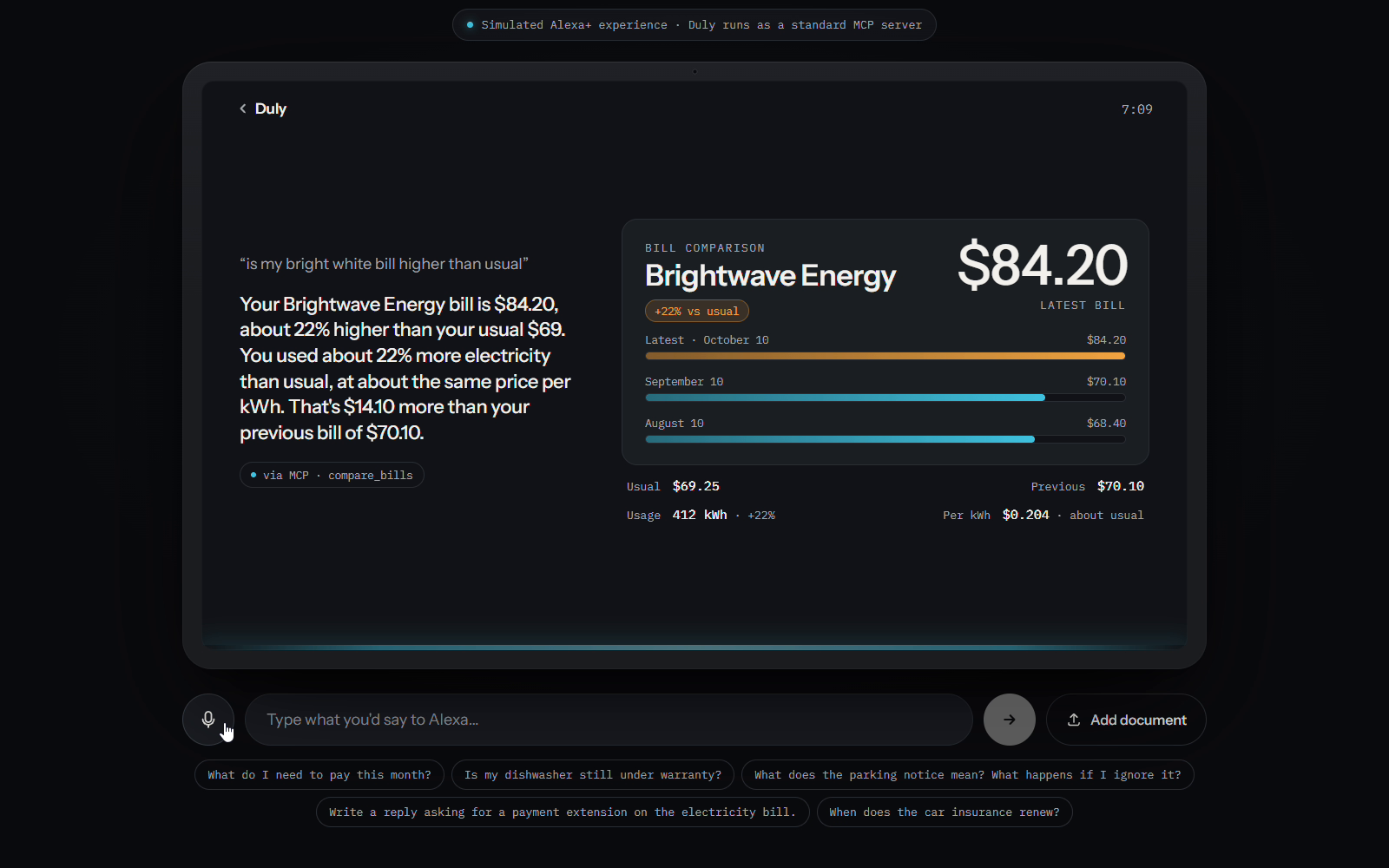
Built for the Alexa+ track of the Amazon Developer Hackathon "Build, Ship, Shape" (plus the AWS Builder and Open Source mini challenges; the latter via mcp-bedrock-bridge).
Duly is a remote MCP server that turns Alexa+ into a household paperwork manager. Give it a bill, a letter or a warranty and it remembers every deadline, explains the fine print in plain language and drafts replies, with short answers meant to be spoken. It runs on AWS (Amazon Bedrock, DynamoDB, S3 and Polly) and ships with fictional sample documents only.
Try it
| MCP endpoint (Streamable HTTP, no sign-in) | https://duly-home.vercel.app/api/mcp |
| Web demo (Echo Show-style web demo that runs in any browser) | https://duly-home.vercel.app |
The web demo simulates how Alexa+ would use Duly; it does not run on a real Echo Show device. Press the mic or type a question, or tap a suggestion chip. Voice input needs Chrome or Edge: Brave blocks the browser's speech service, and on Edge the Windows setting Online speech recognition (Settings > Privacy & security > Speech) must be on.
Add Duly to Claude as a custom connector
- In Claude, go to Customize > Connectors, click + Add, then Add custom connector.
- Name it
Duly, pastehttps://duly-home.vercel.app/api/mcpand click Continue. - Under Authentication, choose No sign in, then click Add.
- In a chat, click + at the lower left, open Connectors and turn on Duly.
Then ask: "What do I need to pay this month?", "Is my dishwasher still under warranty?", "Is my Brightwave bill higher than usual?" or "Write a polite email to Brightwave Energy asking for a two-week payment extension."
MCP Inspector
- Run
npx @modelcontextprotocol/inspector(it opens in your browser). - Set Transport Type to
Streamable HTTPand URL tohttps://duly-home.vercel.app/api/mcp. - Click Connect, open Tools, click List Tools and run any tool, for example
list_deadlineswith no arguments orcheck_warrantywithproduct: "dishwasher".
The production server holds one shared demo household. To call every tool from a terminal (including add_document, which saves a new document), use a local server instead: see Check that it works.
Architecture
flowchart LR
  alexa["Alexa+"] --> mcp
  claude["Claude (custom connector)"] --> mcp
  inspector["MCP Inspector"] --> mcp

  subgraph vercel["Next.js app on Vercel"]
    web["Web demo (/)"] --> chat["/api/chat agent"]
    web --> speak["/api/speak"]
    chat --> client["MCP client"]
    client --> mcp["/api/mcp (Streamable HTTP, MCP 2025-11-25)"]
    mcp --> tools["8 tools"]
    tools --> storage["Storage adapter (aws or memory)"]
    tools --> llm["LLM adapter"]
  end

  chat --> bedrock["Amazon Bedrock (Nova 2 Lite)"]
  llm --> bedrock
  llm -. "fallback" .-> gemini["Google Gemini"]
  storage --> dynamo["Amazon DynamoDB"]
  storage --> s3["Amazon S3"]
  speak --> polly["Amazon Polly"]
- MCP server (
app/api/mcp/route.ts):mcp-handler+ the official MCP TypeScript SDK, stateless Streamable HTTP. Every tool returns a short spoken sentence plusstructuredContentwith the full data for screens. Requests are rate-limited per IP. - Protocol versions: the server speaks both. Clients that start with the
initializehandshake (MCP Inspector,npm run tools) negotiate 2025-11-25, the SDK's latest handshake version. The web demo's own client uses the SDK'sversionNegotiation: { mode: "auto" }(lib/agent/mcpClient.ts), which speaks 2026-07-28 (server/discoverinstead ofinitialize). That is whyFRICTION.mdmentions both: thesubscriptions/listenentry is about 2026-07-28 clients. - Storage adapter (
lib/storage/):STORAGE=aws(DynamoDB + S3) orSTORAGE=memory(in-process). Both adapters store only uploaded documents and add the sample documents on every read (lib/storage/merge.ts). - LLM adapter (
lib/llm/):LLM_PROVIDER=bedrockorgemini, with an optionalLLM_FALLBACK. - Web demo:
app/api/chat/route.tsruns a Bedrock Converse agent (lib/agent/agent.ts) that is an MCP client of Duly's own/api/mcp(lib/agent/mcpClient.ts): it lists the tools over MCP, lets the model pick one and calls it over MCP, the same way Alexa+ would.
Tools
| Tool | What it does | Example question | LLM |
|---|---|---|---|
add_document |
Saves a bill, letter, warranty... from text or a photo/PDF (base64, max 3 MB) and extracts type, issuer, amounts, deadlines and action items. | "Save this letter." | yes |
list_deadlines |
Upcoming deadlines sorted by date, with amounts and days left (default: next 30 days). payable: true returns everything with an amount to pay; query answers about one item and says so if it isn't on file. |
"What do I need to pay this month?", "When does the car insurance renew?" | no |
explain_document |
Plain-language explanation, what happens if it's ignored and the recommended next step. Finds the document itself from keywords or the sender. | "What happens if I ignore the parking notice?" | yes |
check_warranty |
One product's warranty (end date, days left, how to claim), or every warranty with its status: active, expiring soon or expired. | "Is my dishwasher still under warranty?" | no |
draft_reply |
Short letter or email replying to a document, using its real numbers and dates (tone polite or firm). |
"Ask Brightwave Energy for a payment extension." | yes |
search_documents |
Finds stored documents by keywords (id, title, issuer, type). | "Find my car insurance documents." | no |
compare_bills |
Latest bill from a company vs the previous one and vs the usual (average) amount, with percentages. When the bills store usage in the same unit (kWh, gallons), it also tells "you used more" apart from "the price per unit went up". Only states the numbers, never a reason. | "Is my electricity bill higher than usual?" | no |
weekly_brief |
The next 7 days (or days), most urgent first: deadlines with amounts, renewals you can still cancel, warranties ending within 60 days and bills at least 15% above usual. |
"Give me my weekly brief." | no |
When a company has several bills, search, explanations and drafts always use the latest one. Duly explains documents; it does not give legal or financial advice.
Sample data
14 fictional documents (marked SAMPLE): an electricity bill, a car insurance renewal, a dishwasher receipt with warranty, a parking notice, a gym auto-renewal and a school field-trip form, plus four more warranties (a TV, a fridge that is about to run out, an expired washing machine and a laptop) and two earlier electricity and water bills each, so bills can be compared (the electricity bills also store their kWh usage). All dates are relative to today: the sample documents are never stored, the server rebuilds them from the date of each request (UTC) with both STORAGE=memory and STORAGE=aws, so their deadlines are always upcoming however long the deployment runs. A stored document with the same id as a sample document is ignored. The earlier bills are already paid and never show up as deadlines.
The PNG/PDF files in samples/ are different: the dates printed on them are fixed on the day they were generated, while the server's sample documents move with today's date. So if you upload a sample file whose printed due date has already passed, the saved document will not show an upcoming deadline. To get files whose dates match a given day, regenerate them with npm run samples (set SAMPLES_TODAY=YYYY-MM-DD for a fixed base date).
More
skills/duly/SKILL.md: Agent Skill that tells any agent when and how to use the Duly tools.FRICTION.md: friction log of the problems we hit with AWS and MCP tools.samples/README.md: the sample documents (PNG/PDF) and the expected extraction for each one.npm run samplesregenerates them with dates relative to today; setSAMPLES_TODAY=YYYY-MM-DDto use a fixed base date instead (e.g. the demo day, so the dates on paper match the seed that day).
Built with AWS
Duly runs on AWS when STORAGE=aws and LLM_PROVIDER=bedrock (region eu-west-1).
| AWS service | What it does in Duly | Files |
|---|---|---|
Amazon Bedrock (Converse API, Amazon Nova 2 Lite via the EU cross-region inference profile eu.amazon.nova-2-lite-v1:0) |
Reads photos (PNG/JPEG) and PDFs of household paperwork and extracts type, issuer, amounts, deadlines and action items as validated JSON (add_document). Writes plain-language explanations (explain_document) and reply drafts (draft_reply). Uses a forced tool call so the answer always matches the zod schema. In the web demo, it is also the agent that picks which Duly MCP tool to call (Converse tool use). |
lib/llm/bedrock.ts, lib/llm/index.ts, lib/llm/fallback.ts, lib/agent/agent.ts |
Amazon DynamoDB (on-demand table duly, keys pk = HOUSEHOLD#<id>, sk = DOC#<id>) |
Stores uploaded documents (the samples are built on every read). All tools read from it. | lib/storage/aws.ts, lib/aws.ts |
Amazon S3 (private bucket duly-devcaos-files, all public access blocked) |
Keeps the original uploaded file of each document (households/<id>/<doc-id>.pdf); its key is saved in Document.fileKey. |
lib/storage/aws.ts, lib/tools/addDocument.ts |
Amazon Polly (neural voice, Joanna en-US by default, POLLY_VOICE_ID to change it) |
Speaks the web demo's replies (MP3). If Polly fails, the page falls back to the browser's speechSynthesis. |
app/api/speak/route.ts, components/echo/voice.ts |
Setup scripts (AWS SDK for JavaScript v3):
scripts/setup-aws.ts:npm run setup:awscreates the DynamoDB table and the private S3 bucket. Safe to run again.scripts/seed-aws.ts:npm run seed:awsclears the demo household: it deletes every stored document (uploads, and sample copies written by older versions of the script). It writes nothing: the sample documents (lib/storage/seed.ts) are added by the server on every read. Deploy first, then runnpm run seed:aws(it only clears stored uploads; the samples are built on every read): an older deployment reads only from DynamoDB, so clearing the table before deploying leaves the demo with no documents.
If Bedrock is throttled, temporarily unavailable or times out, LLM_FALLBACK=gemini retries the same request with Google Gemini, and the server log says which provider answered ([llm] answered by bedrock). The fallback is not used for AccessDenied, validation or other client errors: those mean the AWS setup is wrong, so Duly logs AWS is misconfigured and returns a generic error. Logs only contain the error name, HTTP status and a short message (ARNs, account IDs and request IDs are masked), and tool callers never see configuration details.
IAM permissions
docs/iam-policy.json is the exact policy of the IAM user that Duly runs with. Replace ACCOUNT_ID with your AWS account ID. Every statement is scoped to Duly's own resources (one model, one table, one bucket), but the policy is not strictly minimal: it also allows some actions the code does not use today (see below).
| Statement | Allows | Used by |
|---|---|---|
BedrockInvokeNova2Lite |
InvokeModel / InvokeModelWithResponseStream on Nova 2 Lite: the eu inference profile in eu-west-1 and the foundation model in the EU regions that profile routes to |
lib/llm/bedrock.ts, lib/agent/agent.ts |
DynamoDbDulyTable |
Item access (GetItem, PutItem, UpdateItem, DeleteItem, Query, Scan) and DescribeTable on the duly table only |
lib/storage/aws.ts, scripts/seed-aws.ts |
S3DulyBucket / S3DulyObjects |
PutObject / GetObject on the objects of duly-devcaos-files, plus bucket-level ListBucket and GetBucketLocation |
lib/storage/aws.ts |
PollySpeech |
SynthesizeSpeech (Polly has no resource-level permissions, so Resource is *) |
app/api/speak/route.ts |
Three actions are only needed by npm run setup:aws: dynamodb:CreateTable, s3:CreateBucket and s3:PutBucketPublicAccessBlock. After the table and bucket exist you can remove them from the policy; the running server and npm run seed:aws don't use them.
The code does not currently call these either: bedrock:InvokeModelWithResponseStream (Duly uses Converse, not streaming), dynamodb:UpdateItem and dynamodb:Scan (it uses GetItem, PutItem, DeleteItem and Query), and s3:GetObject, s3:ListBucket and s3:GetBucketLocation (it only uploads with PutObject). They stay in the policy because it is the real IAM user's policy, unchanged.
The bucket must stay private.
setup:awsblocks all public access on every run. Never add a bucket policy, ACL or CloudFront rule that makesduly-devcaos-filespublic: it holds the original documents people upload.
Run it locally
Commands are the same on macOS, Linux and Windows; the npm scripts set no environment variables inline. Where a command sets a variable for one run, both the bash (macOS/Linux) and PowerShell (Windows) forms are shown.
1. Install
Prerequisites: Node.js 20.12 or later (with npm) and Git.
git clone https://github.com/devcaos/duly.git
cd duly
npm install
2. Configure
Copy .env.example to .env.local and fill in what you need (never commit .env.local):
cp .env.example .env.local            # macOS / Linux
Copy-Item .env.example .env.local     # Windows PowerShell
What works with which settings:
Settings in .env.local |
What works |
|---|---|
Nothing (defaults: STORAGE=memory, LLM_PROVIDER=gemini) |
npm run test:unit; the MCP server with the sample documents; the tools that don't use an LLM (list_deadlines, check_warranty, search_documents, compare_bills, weekly_brief); the web demo's "Coming up" list. |
+ GEMINI_API_KEY |
Also add_document, explain_document and draft_reply. |
+ AWS_REGION, AWS_ACCESS_KEY_ID, AWS_SECRET_ACCESS_KEY (IAM user with the policy above) |
Bedrock (LLM_PROVIDER=bedrock), DynamoDB + S3 (STORAGE=aws, after setup:aws), Polly, and the web demo's questions (the /api/chat agent always uses Bedrock). |
npm run mock:aws (no AWS account) |
The web demo with canned answers, see Test the web demo without AWS. |
With STORAGE=memory, documents you add can disappear when the server restarts; the sample documents always come back.
3. Set up AWS (optional)
Only with AWS credentials in .env.local:
npm run setup:aws    # creates the DynamoDB table and the private S3 bucket
npm run seed:aws     # clears uploaded documents (the sample documents are never stored)
Deploy first, then run npm run seed:aws (it only clears stored uploads; the samples are built on every read).
One manual step: in the AWS console, enable DynamoDB TTL on the attribute expiresAt (table duly, region eu-west-1, Additional settings > Time to Live (TTL)). Without it, expired uploads stay in the table but are always hidden.
Then set STORAGE=aws, LLM_PROVIDER=bedrock (and optionally LLM_FALLBACK=gemini) in .env.local.
4. Start
npm run dev
Open http://localhost:3000 for the web demo; the MCP endpoint is http://localhost:3000/api/mcp.
Check that it works
npm run test:unit
Unit tests, no server and no keys needed.
npm run tools (scripts/call-tools.mjs) calls every tool against a running server, including add_document, which saves a new document. Run it against a local server with in-memory storage, so it never writes into a real table. Start the server in one terminal:
STORAGE=memory npm run dev            # macOS / Linux
$env:STORAGE="memory"; npm run dev    # Windows PowerShell
Then, in another terminal:
npm run tools                                         # text-only calls
npm run tools -- samples/07-riverside-water-bill.pdf  # also add_document with a PDF
A variable set in the shell wins over .env.local, so this works even if .env.local says STORAGE=aws. The LLM tools need GEMINI_API_KEY or AWS credentials.
npm run smoke:bedrock (scripts/smoke-bedrock.mjs) sends the demo questions to /api/chat (Bedrock needed), one by one and as a conversation. It only asks questions and never saves documents. For each one it prints the tool chosen, the route (model: Nova picked it; forced-keyword / forced-any: asked again, requiring a tool; server-default: the server called the tool itself) and the spoken reply. Pass a base URL to test a deployment:
npm run smoke:bedrock -- https://duly-home.vercel.app
Test the web demo without AWS
scripts/mock-aws.mjs is a local stand-in for Bedrock and Polly with canned, keyword-based answers. The app code doesn't change: the AWS SDK sends its requests to the mock because of the AWS_ENDPOINT_URL_* variables.
- In one terminal:
npm run mock:aws. - In
.env.local, setLLM_PROVIDER=bedrock,AWS_ACCESS_KEY_ID=mock,AWS_SECRET_ACCESS_KEY=mock,AWS_ENDPOINT_URL_BEDROCK_RUNTIME=http://localhost:4010andAWS_ENDPOINT_URL_POLLY=http://localhost:4010(andSTORAGE=memory). - In another terminal:
npm run dev, then open http://localhost:3000.
Like real Bedrock, the mock answers in text when a tool result in the history mixes text and JSON (see FRICTION.md). Test hooks in the mock: put [text-first] in a question to make the model answer in text first (tests the forced-tool retry), [text-always] to answer in text even when a tool is required, [bad-input] to send arguments the server rejects (both test the server-side default call), [search-only] to make it call only search_documents (tests the explain fallback), and [bad-draft] / [bad-draft-twice] in a draft_reply intent to test the letter validator's retry and the template letter.
The mock Polly plays a short chime instead of speech. To test the browser voice fallback, start it with:
MOCK_POLLY=fail npm run mock:aws               # macOS / Linux
$env:MOCK_POLLY="fail"; npm run mock:aws       # Windows PowerShell
Remove the AWS_ENDPOINT_URL_* lines to use real AWS.
How the web demo works
- Press the mic and ask a question (Web Speech API,
en-US, Chrome or Edge), or type it. Brave blocks the speech service, so in Brave the mic shows "Voice input doesn't work in Brave" instead of listening. On Edge, turn on Online speech recognition in Windows (Settings > Privacy & security > Speech). The suggestion chips run the demo questions. - Add document uploads a photo or PDF (JPEG, PNG or PDF, max 3 MB) and saves it with
add_document. - The reply is spoken with Amazon Polly (neural voice). If Polly is unavailable, the browser's own voice reads it.
- The screen shows result cards: deadlines, the saved document, the warranty, or a letter draft with Copy and Make it firmer.
What the assistant says is the tool's own spoken sentence; the model never writes the reply, so it can't leak ids or JSON or claim actions it didn't take. If the model answers with text instead of choosing a tool, the app asks once more with toolChoice: any (a tool call is required) before giving a help sentence. A safety filter (lib/speech.ts) still removes ids and JSON and turns ISO dates into spoken dates. The home screen's "Coming up" list, uploads and the Make it firmer button call list_deadlines, add_document and draft_reply directly, without the model (a model can't copy a whole file into a tool call). Set MCP_URL to point the app at another Duly server.
Deploy to Vercel
- Import the repository in Vercel (framework preset: Next.js; no build settings to change).
- Go to Settings > Environments, open Production and add each variable from
.env.example(Key = the variable name, Value = its value). Then do the same in Preview, and redeploy so the new values are used. For the AWS setup:STORAGE=aws,LLM_PROVIDER=bedrock,LLM_FALLBACK=gemini,AWS_REGION,AWS_ACCESS_KEY_ID,AWS_SECRET_ACCESS_KEY,BEDROCK_MODEL_ID,DYNAMODB_TABLE,S3_BUCKET,POLLY_VOICE_ID,GEMINI_API_KEY,GEMINI_MODELandDULY_INTERNAL_TOKEN(a different random value per environment). SetMCP_ALLOWED_HOSTSto your production alias (e.g.duly-home.vercel.app, see below). LeaveMCP_URLand theAWS_ENDPOINT_URL_*variables unset. - After the redeploy, check it with
npm run smoke:bedrock -- https://<your-deployment>.vercel.app.
Rate limits: /api/mcp, /api/chat and /api/speak limit each client by IP (RATE_LIMIT_PER_MIN for requests and LLM_RATE_LIMIT_PER_MIN for LLM calls on /api/mcp and /api/chat; /api/speak has its own fixed limit). DULY_INTERNAL_TOKEN lets the web demo's own calls to /api/mcp skip the per-IP limit there; without it, every visitor shares the server's IP bucket on /api/mcp. The token is only sent when the MCP URL's host is this deployment's own (VERCEL_URL, VERCEL_BRANCH_URL or VERCEL_PROJECT_PRODUCTION_URL) or localhost, so setting MCP_URL never sends the secret to another server. The in-memory limiter tracks at most 10,000 keys; when it is full, expired keys go first and then the oldest.
Host check: /api/mcp answers only when the Host header is localhost, 127.0.0.1 or [::1] (any port), one of this deployment's own hosts (VERCEL_URL, VERCEL_BRANCH_URL, VERCEL_PROJECT_PRODUCTION_URL) or a host listed in MCP_ALLOWED_HOSTS (comma-separated). Anything else, including a missing Host, gets 403 before the body is read. This blocks DNS rebinding against a local server. Origin is not checked, so server-side clients like Alexa+ and Claude keep working. VERCEL_PROJECT_PRODUCTION_URL holds only one production domain (the shortest), so add any other alias to MCP_ALLOWED_HOSTS. Do the same for a custom domain, or a LAN IP when you test from another device (e.g. MCP_ALLOWED_HOSTS=192.168.1.20 in .env.local). Hosts in this list never receive DULY_INTERNAL_TOKEN.
Duly MCP questions
What tools does Duly MCP provide?
It exposes 8 tools, including add_document, list_deadlines, explain_document, check_warranty, draft_reply.
What can Duly do with my household paperwork?
It remembers deadlines, explains fine print in plain language, and drafts replies to bills or letters.
Does Duly provide legal or financial advice?
No, Duly is designed to explain documents but does not provide legal or financial advice.