
Lets an AI client read, edit, and generate Final Cut Pro XML timelines for tasks like cut detection, marker placement, and transcript-based editing.
Also known as DareDev256/fcp-mcp-server
- Stars
- 151
- Tools
- 15
- Downloads, 30 days
- —
- Latest version
- —
- Last commit
- Nov 14, 2026
- License
- MIT
What is fcp MCP?
fcp lets an AI client read, edit, and generate Final Cut Pro XML timelines for tasks like cut detection, marker placement, and transcript-based editing. It exposes 15 tools, such as inspect, diagnose, edit.
Summary generated from the project's README
About fcp MCP server
Video editors can automate tedious timeline management by using this server to manipulate Final Cut Pro XML files through an AI client. It allows users to perform batch operations like removing silence, detecting cuts, placing markers from transcripts, and managing speed ramps or keyframes without manual scrubbing. The server works by reading exported XML files, applying edits, and either saving a new file or using Live Mode to push changes directly into a running Final Cut Pro instance on macOS.
Setup requires a local environment with Python 3.10 or higher and an MCP-compatible client like Claude Desktop or Claude Code. Users must configure an environment variable for their project directory. For advanced features like beat detection or local transcription, the server can be installed with intelligence and transcribe extras. The system prioritizes precision by using rational-time math to prevent rounding errors during trims and splits, ensuring every frame remains accurate across different broadcast frame rates.
What you can do with it
- 1Automated Timeline Quality ControlAsk the AI to scan a wedding edit for technical errors like flash frames or unintentional gaps in the timeline.
- 2Transcript-Based Marker PlacementGenerate chapter markers automatically by analyzing the text from a video transcript.
- 3Rapid Rough Cut GenerationInstruct the client to build a preliminary edit from a collection of interview clips and push it into the editor.
- 4Batch Audio and Video AdjustmentsUse the tool to assign roles to clips or apply speed curves and animation actions across multiple segments.
Written from the project's README. Every use case is checked against a quote from it.
fcp MCP tools 15
Detected from the READMEinspectdiagnoseeditmarkgeneratetranscriptdeliverpreviewwatchindexscenesorganize
Show all 15 toolsShow fewer tools
findviewgen
Configuration
FCP_MCP_LEGACY_TOOLSFCP_PROJECTS_DIR
Automated checks
Ran Nov 13, 2026Full report →Passed our automated checks. That is not a security audit: read the code and give the server the narrowest access it needs. How checks work

- Source repository linked and reachablePass
- Open source license (OSI)Pass
- Commit or release in the last yearPass
- Package name not close to a popular packageNot checked
- Remote endpoint uses HTTPSNot checked
- Destructive tools are labelledPass
- No hidden instructions to the modelPass
- No critical advisory in the package or its dependenciesNot checked
README
View on GitHubFCPXML MCP
Edit Final Cut Pro by talking to Claude, and watch the cut change.





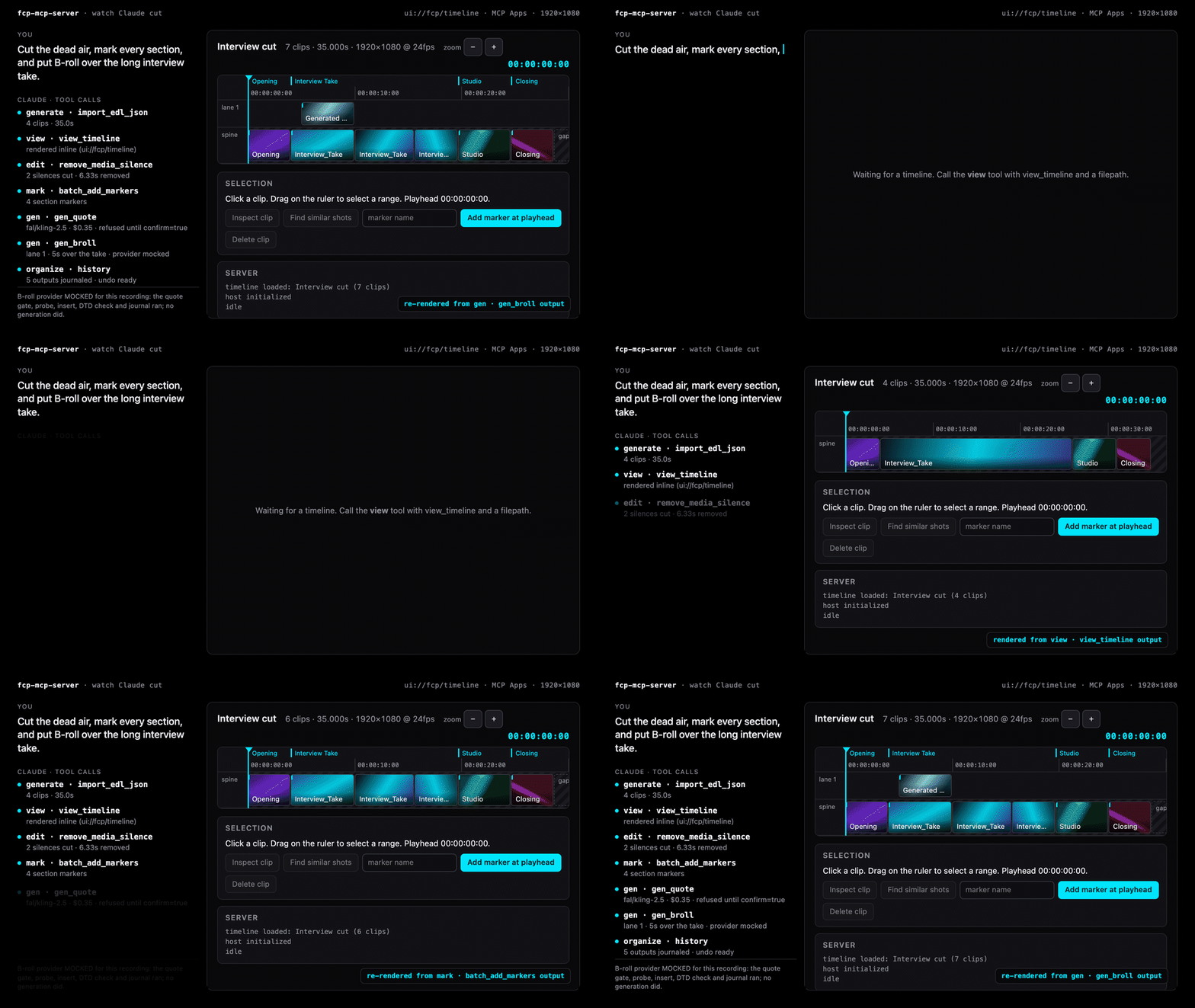
One prompt, seven tool calls, and the timeline re-rendered inline after each
write. Every frame is the real ui://fcp/timeline app drawing a real
view_timeline result; the B-roll provider is mocked and the recording says
so on screen. Full-size mp4, re-recorded
with demo/hero/build.py.
See it. view returns the timeline as exact rational-time JSON, and a
host with MCP Apps draws it inline: lanes, thumbnails, markers, transcript
words, a playhead, buttons that call the other tools.
Cut it. 15 grouped tools, 102 operations: trims, splits, silence removal, markers from transcripts and beats, rough cuts, keyframes and speed ramps, transcript edits, cross-NLE export, and a push into a running Final Cut Pro.
Trust it. Every write is journaled with its sha256 and can be undone.
deliver refuses an unreviewed cut, expected_sha256 refuses a file that
changed under the model, and generation is quote-then-confirm under a
per-call cap. 182 adversarial-input security tests, defusedxml everywhere,
sandboxed writes, no private APIs, and a disclosure channel.
claude mcp add fcpxml -e FCP_PROJECTS_DIR=~/Movies -- uvx fcp-mcp-server
Then File → Export XML… in Final Cut Pro, and ask Claude to work on the file.
Proof
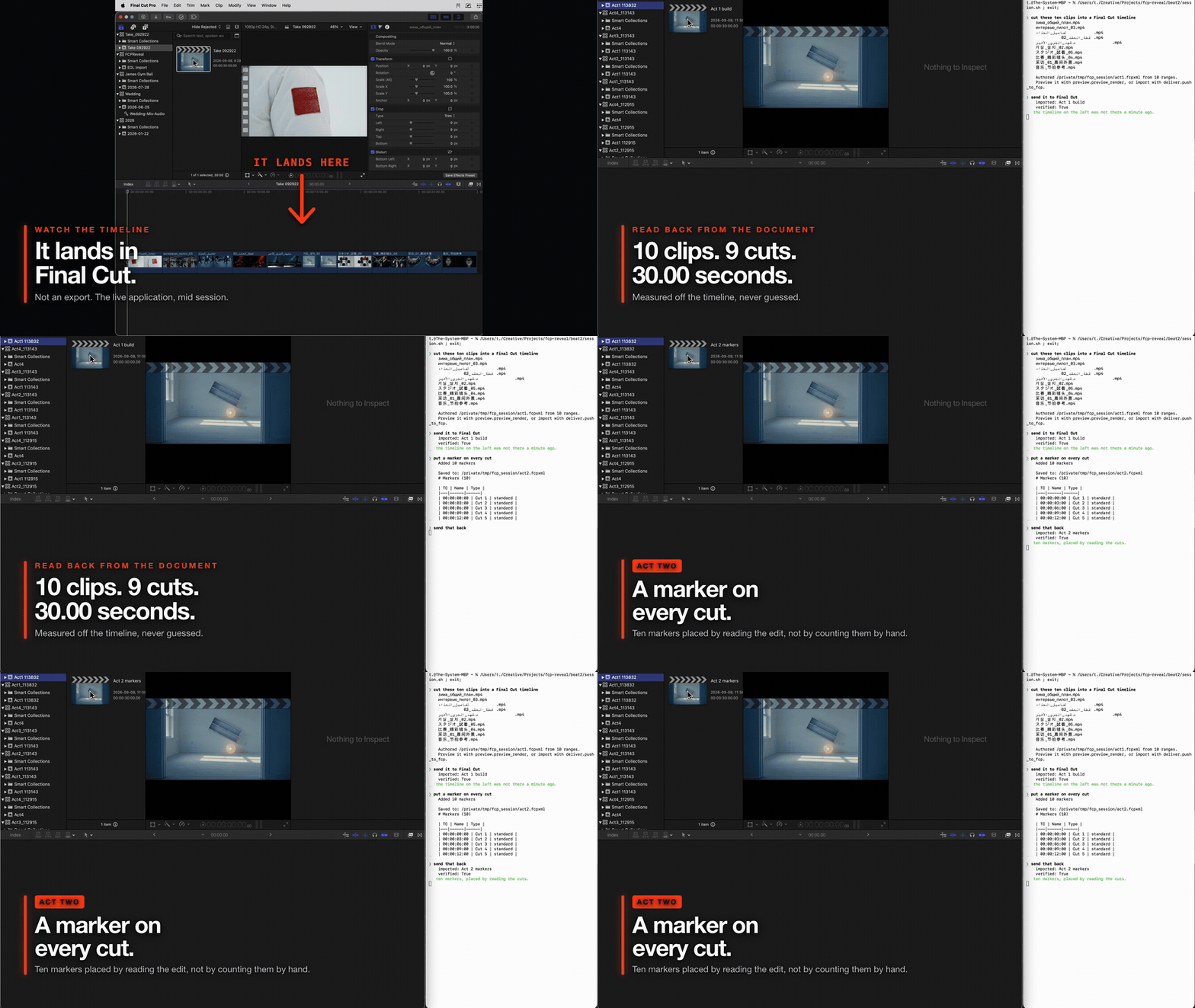
Real v0.25.0 output against a running copy of Final Cut Pro. A ten clip
timeline is read back off the document, a marker is placed on every cut, and
dialogue, music and effects roles are assigned across the clips. Final Cut is
open on the left the whole time and is never touched by hand. Screen recorded
from demo/session.sh, which calls the same handlers an MCP
client calls; each import is verified by polling Final Cut until the project
appears, so a delivered Apple event is never reported as a landed import.
The earlier terminal only demo is still at docs/assets/demo.gif.
Re-record it with vhs demo/demo.tape; the media is synthesised by ffmpeg at
run time, so there is no fixture to keep.
Keyframes and speed curves
Contributed by @travisoa in
#26: the inspect
and edit groups include five video/audio animation actions and three speed
curve actions, imported into Final Cut Pro 12.4 without warnings. See
keyframe usage for installation and animation, and
speed curves for holds, sampled ramps, ripple and reset.
Quick Start
Claude Code (fastest)
claude mcp add fcpxml -e FCP_PROJECTS_DIR=~/Movies -- uvx fcp-mcp-server
Or project-scoped — commit a .mcp.json so your whole team gets it:
{
  "mcpServers": {
    "fcpxml": {
      "command": "uvx",
      "args": ["fcp-mcp-server"],
      "env": { "FCP_PROJECTS_DIR": "/Users/you/Movies" }
    }
  }
}
With media intelligence (beat detection) and transcript editing (local Whisper):
claude mcp add fcpxml -e FCP_PROJECTS_DIR=~/Movies -- uvx --from "fcp-mcp-server[intelligence,transcribe]" fcp-mcp-server
Claude Desktop
Add to ~/Library/Application Support/Claude/claude_desktop_config.json:
{
  "mcpServers": {
    "fcpxml": {
      "command": "uvx",
      "args": ["fcp-mcp-server"],
      "env": { "FCP_PROJECTS_DIR": "/Users/you/Movies" }
    }
  }
}
From source (contributors)
git clone https://github.com/DareDev256/fcp-mcp-server.git
cd fcp-mcp-server
pip install -e .
# then point your MCP client at: python /path/to/fcp-mcp-server/server.py
Use It
Export XML from Final Cut Pro (File → Export XML…), open your MCP client, and ask it to work with your timeline.
Why This Exists
After a decade directing music videos (Chief Keef, Migos, Masicka), I noticed the same editing bottlenecks on every project: counting cuts manually, extracting chapter markers one by one, hunting flash frames by scrubbing, building rough cuts clip by clip.
These are batch operations that don't need visual feedback. Export the XML, let Claude handle the tedium, import the result. That's the entire philosophy.
See It In Action
You:    "Run a health check on my wedding edit"

Claude: ✓ Analyzed WeddingFinal.fcpxml
        ├─ 247 clips · 42:18 total · 24fps · 1920×1080
        ├─ 3 flash frames detected (clips 44, 112, 198)
        ├─ 2 unintentional gaps at 12:04 and 31:47
        ├─ 14 duplicate source clips
        └─ Health score: 72/100

You:    "Fix the flash frames and gaps, then add chapter markers from
         this transcript"

Claude: ✓ Extended adjacent clips to cover 3 flash frames
        ✓ Filled 2 gaps by extending previous clips
        ✓ Added 18 chapter markers from transcript
        → Saved: WeddingFinal_modified.fcpxml
Import the modified XML back into Final Cut Pro. Every change is non-destructive — your original file is never touched.
What Claude Actually Sees
This is the magic trick. When you export XML from Final Cut Pro, your timeline becomes structured data that Claude can reason about:
<!-- What FCP exports -->
<asset-clip ref="r2" offset="342/24s" name="Interview_A"
            start="120s" duration="720/24s" format="r1">
    <marker start="48/24s" duration="1/24s" value="Key quote"/>
    <keyword start="0s" duration="720/24s" value="Interview"/>
</asset-clip>
# What Claude works with (after parsing)
Clip(
    name="Interview_A",
    offset=TimeValue(342, 24),   # timeline position: 14.25s
    start=TimeValue(120, 1),     # source in-point: 2:00
    duration=TimeValue(720, 24), # 30 seconds
    markers=[Marker(value="Key quote", start=TimeValue(48, 24))],
    keywords=["Interview"]
)
Every time value stays as a rational fraction — 720/24s, not 30.0 — so trim, split, and speed operations have zero rounding error across any frame rate, including the NTSC-fractional ones. A broadcast rate is carried as the exact rational it is (23.976 is 24000/1001, not a decimal), never as a truncated integer. Comparisons use cross-multiplication (a/b < c/d → a*d < c*b) to stay in integer-land end to end. Denominators are always normalized to positive values at construction, so sign lives on the numerator and cross-multiplication is always correct. Addition and subtraction share a single _binop() code path that handles same-denominator fast paths and LCM alignment in one place.
How It Works
  ┌──────────┐      ┌──────────────────────────────┐      ┌──────────┐
  │ Final Cut│      │  parser.py   → Python objects │      │ Final Cut│
  │   Pro    │─XML─>│  writer.py   → Modify & save  │─XML─>│   Pro    │
  │          │      │  rough_cut.py→ Generate new   │      │          │
  └──────────┘      │  diff.py     → Compare        │      └──────────┘
                    │  export.py   → Resolve / FCP7 │
                    └──────────────────────────────┘
                              ▲
                     Claude Desktop / MCP client
- Export from FCP —
File → Export XML... - Ask Claude — analyze, edit, generate, QC, export
- Import back —
File → Import → XML
What This Is NOT
- Not a plugin — it doesn't run inside Final Cut Pro
- Not for creative calls — color, framing, motion still need your eyes
New in v0.9 — Live Mode. The server can now push an FCPXML straight into the running Final Cut Pro with zero clicks, using Apple's official Open Document event — no XML re-import step. See Live Mode below.
Live Mode (macOS)
XML mode is offline and portable; Live mode drives a running Final Cut Pro through Apple's sanctioned surfaces — no patched binary, no private APIs, no accessibility scripting. Two tools, both verified end-to-end against FCP 12.2:
| Tool | What it does |
|---|---|
push_to_fcp |
Sends an FCPXML file into FCP with zero clicks (Open Document Apple event). Injects <import-options> (library location, copy/link assets, suppress warnings), launches FCP if needed, and never mutates your original — flat files get an options-injected copy. |
list_fcp_libraries |
Enumerates FCP's open libraries → events → projects via the read-only AppleScript dictionary. |
You:    "Build a rough cut from my Interview clips and push it into Final Cut"

Claude: ✓ Generated RoughCut.fcpxml (8 clips, 0:54)
        ✓ Pushed into Final Cut Pro → library "ProjectX", event 2026-06-11
        → Open Final Cut Pro to keep editing
The asymmetry you must know: Apple makes import scriptable but offers no
programmatic export — to pull your current timeline back out for further AI
work, you still run File > Export XML yourself. Live mode pushes; round-trips
come back through the XML tools.
Notes (all live-verified): pass a library_location ending in .fcpbundle for
a true zero-click import (a new path is auto-created); omitting it makes FCP
show a modal library picker that blocks until you answer. First use triggers a
one-time macOS Automation permission prompt for your terminal/MCP host. The
capability audit maps the full surface and
the optional SpliceKit/CommandPost bridges planned for v1.0.
The Round Trip
Final Cut Pro has a fully scriptable import and no programmatic export — verified unchanged across FCP 11.0 → 12.2. So the loop closes on exactly one keystroke, and everything either side of it is automated:
watch_start                    ← once per session (or set FCP_WATCH_DIR)
   ↓
edit / generate / mark         ← the change
   ↓
preview_check                  ← SEE it. Reads the media, not the XML
   ↓
deliver.push_to_fcp            ← zero-click import (or FCP_MCP_AUTOPUSH=1)
   ↓
Cmd-E in Final Cut Pro         ← the one manual step Apple leaves you
   ↓
watch_pull                     ← detected and diffed against the last export
preview_check is the part that matters. The preview:// resource and
preview_timeline both draw from the XML — they show what was written, so a
fixed flash frame and a broken one read identically through them. preview_check
samples the source media into a filmstrip over an audio waveform. It is the
difference between a tool reporting success and you knowing the cut is right.
If you have SpliceKit or CommandPost installed, watch_start says so. This
server does not call either one — their RPC signatures have not been verified
against a live install, and it never patches or injects anything. That is why it
runs on a managed Mac and survives an FCP update.
When To Use This
| Good For | Not Ideal For |
|---|---|
| Batch marker insertion (100 chapters from a transcript) | Fine-tuning cuts (faster directly in FCP) |
| QC before delivery (flash frames, gaps, duplicates) | Colour, framing and motion (nothing here grades) |
| Data extraction (EDL, CSV, chapter markers) | Sound mixing beyond stems and role splits |
| Template generation (rough cuts from tagged clips) | Anything needing a scrub through the actual cut |
| Automated assembly (montages from keywords + pacing) | |
| Timeline health checks (validation, stats, scoring) | |
| Logging and search before the edit (scenes, transcript, shot search) |
How It Compares
Three projects have connected AI agents to Final Cut Pro. They make different trade-offs:
| FCPXML MCP (this) | SpliceKit | CommandPost | |
|---|---|---|---|
| Approach | Parses/writes FCPXML + official Apple events only | Patches FCP's binary to expose internal APIs | Accessibility scripting + Lua |
| Raw live control | Push-to-FCP, library inspection | Deepest (full internal API) | Deep (UI-level) |
| Survives FCP updates | Yes — no patching | Re-patch per FCP version | Mostly |
| Works on managed/corporate Macs | Yes | No (requires binary patching) | Varies (Accessibility perms) |
| Works without FCP installed | Yes (pure XML mode) | No | No |
| MCP server | Yes, active (this repo) | Yes (last release Apr 2026) | Planned, PR unmerged |
| Requires | Python 3.10+ | Patched FCP binary | CommandPost app |
SpliceKit's runtime depth is genuinely impressive — if you're on your own Mac and comfortable patching FCP, it can do things XML never will. This project stays on the no-patch side so it runs anywhere, survives every FCP update, and can be trusted with client libraries. Full ecosystem analysis: capability audit.
Prompt Cookbook
Copy-paste these into Claude Desktop. Each one maps to a real tool chain under the hood.
Analysis
"Give me a full breakdown of ProjectX.fcpxml — clips, duration, frame rate, markers, everything"
"Show me pacing analysis for my timeline — where are the slow sections?"
"Export an EDL and CSV of all clips with timecodes"
QC & Fixes
"Run a health check on my timeline and fix anything under 2 frames"
"Find all gaps and flash frames, then auto-fix them"
"Are there any duplicate source clips I can consolidate?"
Markers & Chapters
"Add chapter markers from this transcript: [paste transcript]"
"Import markers from my-subtitles.srt onto the timeline"
"List all markers and export them as YouTube chapter timestamps"
Generation
"Build a 60-second rough cut from clips tagged 'Interview' — medium pacing"
"Generate a montage from all B-roll clips with accelerating pacing"
"Create an A/B roll: Interview_A as primary, B-roll cuts every 8 seconds"
Cross-NLE & Reformat
"Export this timeline for DaVinci Resolve"
"Convert to FCP7 XML so I can open it in Premiere"
"Reformat my 16:9 timeline to 9:16 for Instagram Reels"
Under the Hood
When you say "Run a health check on my wedding edit", Claude chains these tools:
analyze_timeline  →  stats, frame rate, resolution
detect_flash_frames  →  clips under threshold duration
detect_gaps  →  unintentional silence/black
detect_duplicates  →  repeated source media
validate_timeline  →  structural health score (0-100)
Each tool returns structured text that Claude synthesizes into the summary you see. No magic — just batch XML queries that would take 20 minutes by hand.
Music videos and connected clips
A music video is usually built by laying an audio bed and hanging every visual
off it as a connected clip, so the spine holds one <gap> and the entire edit
lives on lanes. snap_to_beats and detect_flash_frames work on that shape:
snapping runs lane by lane, does not ripple the clips after the one it moves,
skips (and names) any move that would collide with a neighbour in the same
lane, and leaves the audio bed alone unless you pass include_audio_lanes.
It reports cuts considered, moved, already on a beat, out of reach, and
skipped — so "nothing moved" is something you are told rather than something
you discover in Final Cut.
reorder_clips, rapid_trim, fix_flash_frames and fill_gaps are still
primary-storyline only.
Pre-Built Prompts
Select these from Claude's prompt menu (⌘/) — they chain multiple tools automatically.
| Prompt | What It Does | Grouped calls it drives |
|---|---|---|
| qc-check | Full quality control — flash frames, gaps, duplicates, health score | diagnose → validate_timeline, detect_flash_frames, detect_gaps, detect_duplicates; then edit → fix_flash_frames, fill_gaps |
| youtube-chapters | Extract chapter markers formatted for YouTube descriptions | inspect → list_markers, analyze_pacing |
| rough-cut | Guided rough cut — shows clips, suggests structure, generates | inspect → list_library_clips, list_keywords; then generate → auto_rough_cut |
| timeline-summary | Quick overview — stats, pacing, keywords, markers, assessment | inspect → analyze_timeline, analyze_pacing, list_keywords, list_markers |
| cleanup | Find and auto-fix flash frames and gaps | diagnose → validate_timeline; then edit → fix_flash_frames, fill_gaps |
Every call takes the grouped form — the tool name is the group, and the
operation goes in action:
{ "action": "validate_timeline", "args": { "filepath": "/path/to/project.fcpxml" } }
Tools
As of v0.19.0, the MCP tool list Claude sees by default is 15 grouped verbs, not 102 flat tool names:
| Group | Covers |
|---|---|
inspect |
Read-only understanding — stats, clips, markers, keywords, EDL/CSV, pacing, keyframes |
diagnose |
Finding problems — flash frames, gaps, duplicates, health score |
edit |
Changing clips — markers, trim, reorder, transitions, speed, split, silence removal, keyframes |
mark |
Markers and chapters — batch add, SRT/VTT import, beat import |
generate |
Building new structure — rough cuts, montages, A/B roll, templates |
transcript |
Local Whisper transcription and transcript-driven cuts; transcript_pack puts the whole shoot on one page; backend: elevenlabs opts into speaker labels and audio events (audio leaves the machine) |
deliver |
Getting the timeline out — NLE export, reformat, relink, push-to-FCP |
preview |
Seeing the edit — ffmpeg proxy render, contact sheet, and a filmstrip+waveform check read from the SOURCE MEDIA |
watch |
Closing the round-trip — notice the operator's Cmd-E export and diff it against the last one |
index |
The analysis cache — status with its age, warm every source in a timeline, clear. Nothing depends on it; FCP_MCP_INDEX=off and every tool still answers, only slower |
scenes |
Shot boundaries from the pixels — list cuts per clip in source and timeline time, drop a marker on each, or split the clips there. PySceneDetect when installed, ffmpeg otherwise |
organize |
Library housekeeping — bulk keywords, ratings and roles over a clip selection; organize_auto proposes keywords from captions and transcripts; history reads the operation ledger and undo moves the last outputs aside (never deletes) |
find |
"Find the shot where…" — a router over transcript words, metadata and offline vision captions that names the tier on every hit; find_index warms every source; find_to_timeline assembles the hits into a selects reel |
view |
See the cut inline — view_timeline returns the timeline as an exact rational-time payload that MCP Apps hosts render as an interactive timeline (ui://fcp/timeline); view_clip is the inspect button. Read-only |
gen |
Generative fill behind a money gate — gen_quote prices a job (fal Kling/Wan, Gemini Omni Flash; Runway/Luma honest stubs); gen_fill_gap / gen_broll / gen_extend_clip refuse without quote_id + confirm=true, a key, and a price under FCP_MCP_GEN_MAX_USD; the result is ffprobed, attached as a generated lane clip with a marker, DTD-checked and journaled |
Each call has the same shape: {"action": "trim_clip", "args": {...}}. The
action is one of the 102 operation names below; args is whatever that
tool always took. The group dispatches straight into the same handler — the
behavior is identical, only the schema Claude sees up front is smaller. An
unknown or cross-group action returns an error listing the valid actions for
that group, so a wrong guess is recoverable in one turn.
Grouping is what's advertised, not what's callable. call_tool resolves
every one of the 102 operation names from a handler registry that doesn't care
what list_tools chose to show — an existing MCP config that calls trim_clip
directly keeps working with no changes. If you'd rather also see the flat tool
schemas (e.g. for debugging, or a client that doesn't like the grouped shape),
set:
FCP_MCP_LEGACY_TOOLS=1
This advertises the 71 flat schemas alongside the 15 groups — 86 tools in
total. The 31 operations that were born as group actions (preview, watch,
index, scenes, organize, find, plus import_edl_json) have no flat
schema and are reached through their group.
The flat tools will not be removed before a 1.0 release.
See the timeline before you touch it
Reading the preview://<path> MCP resource (any FCPXML path the server can
already reach) returns a self-contained HTML render of the timeline: clip
blocks sized proportionally to duration, connected clips on their own lane
rows above/below the primary storyline, and marker ticks — all values
HTML-escaped, served as text/html. Point your MCP client's resource viewer
at it, or fetch it directly, to see a cut without opening Final Cut Pro.
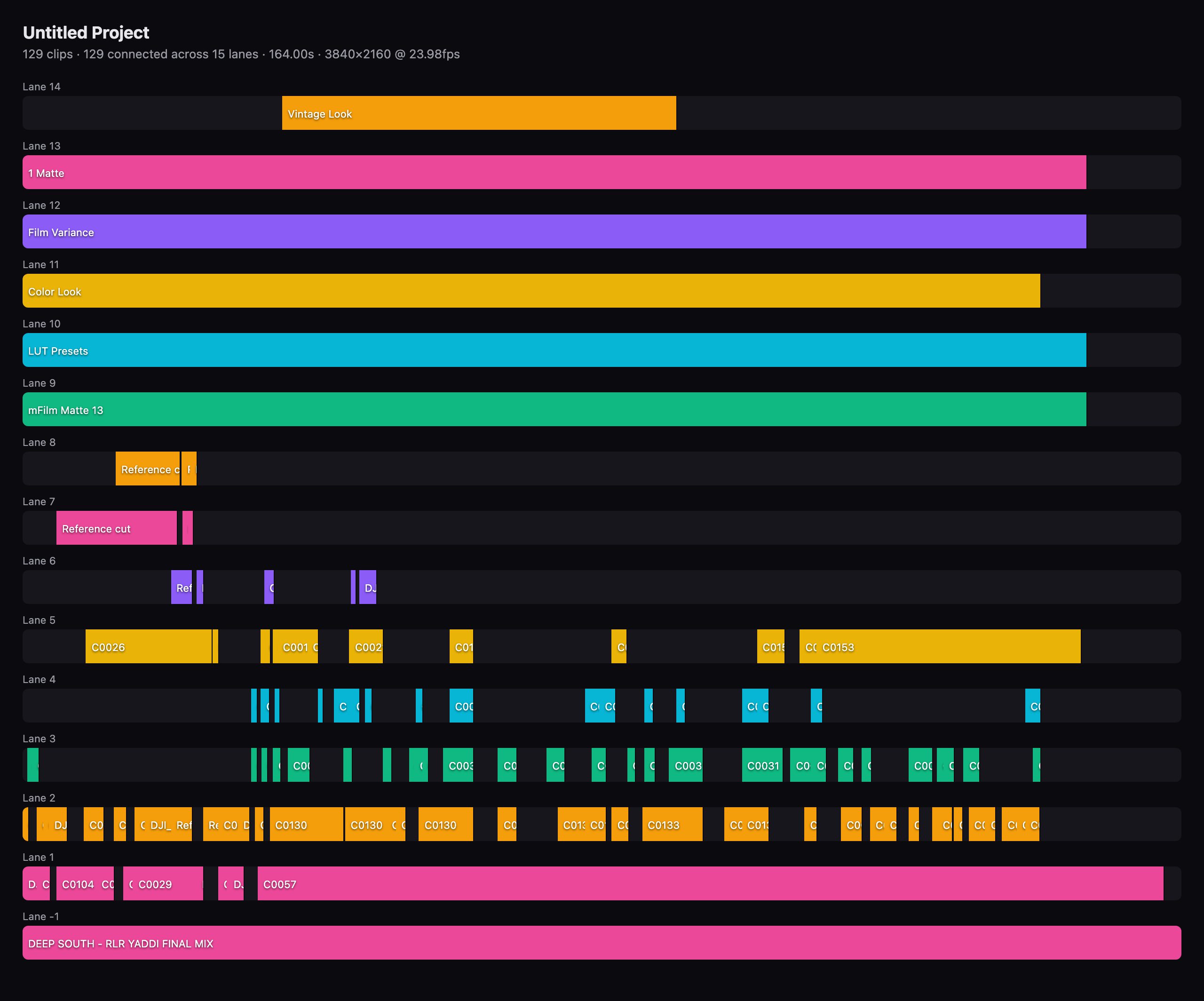
A real 164-second music video: 129 connected clips across 15 lanes, rendered from its FCPXML alone. Clip names on reference layers have been relabelled.
fcp MCP questions
What tools does fcp MCP provide?
It exposes 15 tools, including inspect, diagnose, edit, mark, generate.
How do I use this with Final Cut Pro?
Export your XML from Final Cut Pro using File → Export XML…, then ask Claude to work on that file.
Is this a plugin for Final Cut Pro?
No, it is not a plugin and does not run inside the Final Cut Pro application itself.
Can it push edits directly into a running Final Cut Pro session?
Yes, using Live Mode, the server can push an FCPXML directly into a running Final Cut Pro using Apple's official Open Document event.
Does editing the XML change my original files?
No, every change is non-destructive and your original file is never touched.