
Provides long-term persistent memory for AI agents using a local SQLite database with hybrid search capabilities.
Also known as Cloto-dev/cpersona
- Stars
- 9
- Tools
- 29
- Downloads, 30 days
- 3,478
- Latest version
- 2.5.3
- Last commit
- Nov 11, 2026
- License
- MIT
What is CPersona MCP?
CPersona provides long-term persistent memory for AI agents using a local SQLite database with hybrid search capabilities. It exposes 29 tools, such as pause_persistence, resume_persistence, persistence_status.
Summary generated from the project's README
About CPersona MCP server
CPersona provides long-term persistent memory for AI agents by storing information in a local SQLite database that you own. It is designed for use with MCP clients such as Claude Desktop, Cursor, VS Code, Claude Code, and Codex. Instead of relying on cloud services, all data remains on your machine in a single file that can be easily backed up using standard sqlite3 commands.
The server uses a hybrid search approach, combining vector search with full-text and keyword search to ensure that exact identifiers, error strings, and names are accurately retrieved. While it works with keyword search alone, running a local embedding server like cembedding is recommended to enable vector capabilities. The system does not use a generative model internally to manage storage; instead, your agent writes the summaries and CPersona handles the retrieval.
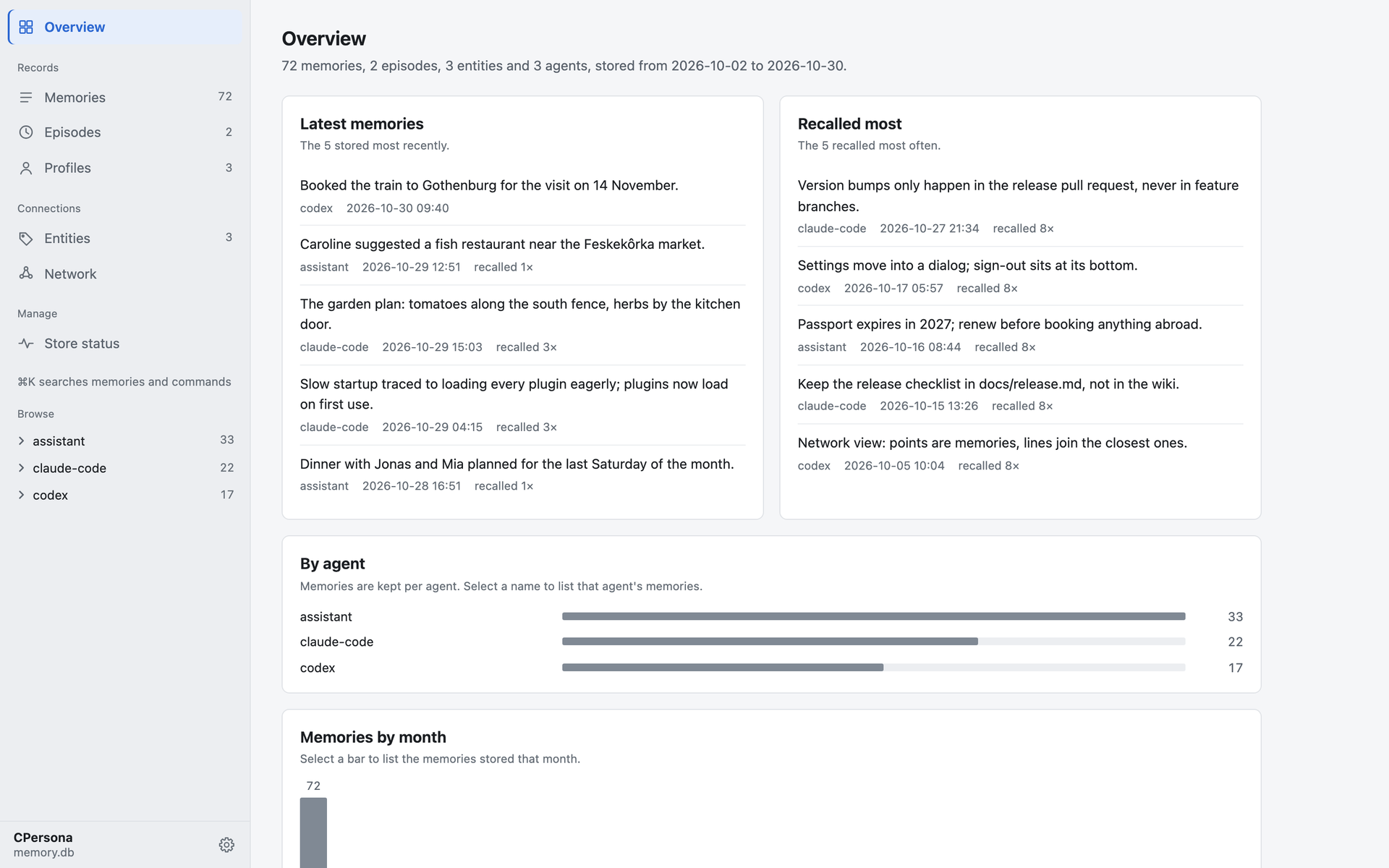
Users can monitor their memory store through a built-in dashboard that visualizes the memory network and shows recently stored or recalled items. The reconstruct tool allows agents to provide answers backed by specific stored records, making the source of every memory traceable.
What you can do with it
- 1Retrieve exact technical identifiersDevelopers can use hybrid search to find specific error strings or variable names that vector search might miss.
- 2Visualize the memory networkUsers can open a web-based dashboard to inspect the relationships between different stored memories.
Written from the project's README. Every use case is checked against a quote from it.
How to install CPersona MCP
Formats verified 10 Nov 2026Add to CursorAdd to GooseInstall CPersona MCP in Claude Code
$ claude mcp add cpersona -- uvx cpersonaInstall CPersona MCP in Cursor
~/.cursor/mcp.json
{
  "mcpServers": {
    "cpersona": {
      "command": "uvx",
      "args": [
        "cpersona"
      ]
    }
  }
}Install CPersona MCP in VS Code
.vscode/mcp.json
{
  "servers": {
    "cpersona": {
      "type": "stdio",
      "command": "uvx",
      "args": [
        "cpersona"
      ]
    }
  }
}Install CPersona MCP in VS Code CLI
$ code --add-mcp '{"name":"cpersona","type":"stdio","command":"uvx","args":["cpersona"]}'Install CPersona MCP in Claude Desktop
claude_desktop_config.json
{
  "mcpServers": {
    "cpersona": {
      "command": "uvx",
      "args": [
        "cpersona"
      ]
    }
  }
}Install CPersona MCP in Codex
$ codex mcp add cpersona -- uvx cpersonaInstall CPersona MCP in Codex config.toml
~/.codex/config.toml
[mcp_servers.cpersona]
command = "uvx"
args = ["cpersona"]
Install CPersona MCP in Gemini CLI
$ gemini mcp add -s user cpersona uvx -- cpersonaInstall CPersona MCP in Gemini settings.json
~/.gemini/settings.json
{
  "mcpServers": {
    "cpersona": {
      "command": "uvx",
      "args": [
        "cpersona"
      ]
    }
  }
}Started by HostedMCP on 16 Nov 2026
We ran this command for cpersona 2.5.3 in an isolated container with no network and no keys. It answered and listed 29 tools.
CPersona MCP tools 29
Read from the server with tools/listpause_persistenceActionPause write operations on this MCP server for an opt-in TTL window. While paused, every write tool — store, archive_episode, update_memory, delete_memory, delete_episode, delete_agent_data, lock_memory, unlock_memory, update_profile, import_memories, merge_memories, calibrate_threshold, set_recall_precision — returns a no-op response carrying `persisted: false`, `dry_run: true` and a `reason` (with the TTL remaining) instead of writing to the database. `persisted: false` is the authoritative signal: branch on it, not on an id. Where the success shape has an `id`, it reads `"no-persist"` (store, archive_episode); action-specific id keys (deleted_id / updated_id / locked_id / unlocked_id / episode_id) are blanked to null so a truthy echo cannot read as success. migrate_channel_axis is gated differently — it is forced to dry_run and reports repairs_skipped rather than returning a skipped-response, so it carries no `persisted` key. check_health and deep_check are not blocked but downgrade to fix=false (they answer with repairs_skipped: true). Read tools (recall, list_*, get_profile, etc.) still answer normally, except that recall suppresses its recall_count / last_recalled_at bump — a write that would otherwise move ranking state during a paused session. **The pause is PROCESS-WIDE, not per-session (response `scope`: "process"): the flag is one module-global on the server process. On a streamable-HTTP deployment a single process serves every connected client, so pausing here silences writes for ALL connected sessions until resume or TTL elapse — and the other sessions get no signal. Under stdio (one process per client) it is effectively session-scoped.** This affects only this MCP server (cpersona); call cscheduler's pause_persistence too if you want both paused. Use for benchmarking, AB testing, or ephemeral exploration where memory contamination must be avoided. Default TTL: 1800 seconds (30 minutes); upper bound: 86400 seconds (1 day).
resume_persistenceActionRe-enable persistence immediately, clearing any active no-persist TTL. Returns was_active=true if persistence was paused before this call. **The flag is PROCESS-WIDE (response `scope`: "process"): on a streamable-HTTP deployment this re-enables writes for every connected session sharing the process, not just the caller's.**
persistence_statusRead-onlyReport whether persistence is currently paused and the TTL remaining (in seconds). The reported state is PROCESS-WIDE (response `scope`: "process"): on a streamable-HTTP deployment it reflects the one flag shared by every connected session, so `paused: true` may have been set by a different session.
get_operating_contextRead-onlyRead the server-served operating context (v2.5.1): the operator-owned doctrine distributed to every connected client. Without arguments returns the preview tier — context_revision, instructions_summary, project_id registry (+ enforce mode), @auto defaults, and doctrine section names. Pass section to fetch one section's full body. Read-only: the context is edited by the operator on the filesystem (~/.cpersona/operating-context.toml), never via MCP.
storeActionStore a message in agent memory for future recall. Every response carries result — the one field to branch on: 'stored' (a new row was written; {ok:true, result:'stored', id:<row-id>, embedded:<bool>}, embedded true iff a local blob was persisted or the remote index push succeeded — false under EMBEDDING_MODE=none; the response also carries truncated:true when content exceeded the length cap and was shortened), 'skipped' (nothing written and nothing wrong: {ok:true, result:'skipped', reason:...}; the msg_id / content dedup branches echo the pre-existing row's id, the OR IGNORE fallback reason='duplicate (unique index)' omits id by design — TOCTOU seam), or 'rejected' (nothing written because the request was refused: {ok:false, result:'rejected', reason:...} — empty content, content that sanitizes to empty, or an operating-context project_id refusal, which also carries error). Note for pre-2.5.2b1 callers: ok is no longer unconditionally true, and skipped:true is gone — a rejection used to look like a success. reason is human-readable, not a stable machine token. Under pause_persistence the write is skipped (result:'skipped') and the response carries persisted:false (id:'no-persist', embedded:false) — branch on persisted to tell a paused write apart from a dedup hit.
recallRead-onlyRecall relevant memories using multi-strategy search (vector + FTS5 + keyword). Message content is returned as a preview tier by default — expand selected rows with get_contents(refs), or opt out wholesale with full_content=true. v2.5.2 additive: each scored message carries match_reason={signal, score, ...} where signal is the branch the ranking / quality gate keyed on (confidence > rsf > cosine > rrf) and the remaining keys (cosine / rrf / rsf) surface the internal per-retriever contributions present on that row. Unscored rows (cascade FTS/keyword) omit match_reason. A response carrying gate_fallback=true (absent otherwise) means every candidate fell below the quality gate and the below-gate lexical matches were returned instead of an empty result — treat them as low-confidence.
recall_with_contextRead-onlyRecall memories and merge with external conversation context. Automatically deduplicates, sorts chronologically, and returns a unified list. Replaces separate recall + manual merge in the caller. Content is preview-tiered by default — see recall's full_content / get_contents. Every external_context entry's content filters the recall (the caller already holds that text), but only role=user / role=assistant entries are merged into messages. When entries of other roles are present the response carries context_filter_only={roles:[...]} — those entries filtered the recall without appearing in the output, whether or not they dropped a memory this time. gate_fallback=true (absent otherwise) is forwarded from the underlying recall: every candidate fell below the quality gate and the below-gate lexical matches were returned instead of an empty result — treat them as low-confidence.
get_contentsRead-onlyFetch full, untrimmed content for recall preview refs. Use after a preview-tier recall to expand only the rows that matter instead of opting the whole recall out with full_content=true.
get_profileRead-onlyGet the current profile for an agent.
update_profileActionSave a pre-computed agent profile to the database.
archive_episodeActionArchive a conversation episode with pre-computed summary, keywords, and resolved status. All LLM processing is performed by the caller.
list_memoriesRead-onlyList recent memories for an agent (for dashboard display).
Show all 29 toolsShow fewer tools
list_episodesRead-onlyList archived episodes for an agent (for dashboard display).
delete_agent_dataActionDelete ALL data (memories, profiles, episodes) for a specific agent. Used by kernel during agent deletion.
calibrate_thresholdAuto-calibrate the vector search threshold from the null (random-pair) cosine distribution. Samples random memory pairs and places the threshold ABOVE the null mean so unrelated pairs are rejected. method='separation' (default) learns the operating point from two populations — null pairs vs temporally-adjacent same-session positives (nearest-neighbour fallback when too few exist); method='percentile' uses a quantile of the null distribution (robust to anisotropic models such as bge-m3); method='zscore' uses mean + z*std. No labels used, purely statistical. Adapts to both embedding model and corpus characteristics.
set_recall_precisionSet an agent's recall precision (knob 3) and recalibrate its quality gate. precision = strict | balanced | lenient maps to a specificity weight beta of 2.0 / 1.0 / 0.5 in the gate separation objective (sensitivity + beta*specificity): strict sits the gate higher (fewer contaminants, more misses), lenient lower (fewer misses, more contaminants). A raw beta > 0 overrides the named level; an empty precision with beta <= 0 clears the per-agent override and returns the agent to the global CPERSONA_RECALL_PRECISION default. The gate is recalibrated at the new beta immediately and persisted, so the change is live without a restart. Precision is a per-agent setting, not a per-recall argument: the gate threshold is precomputed on the separation curve at a fixed beta, so this tool recalibrates once instead.
get_recall_precisionRead-onlyRead an agent's effective recall precision (knob 3) — the read-back companion to set_recall_precision. Returns the resolved specificity weight (beta) and its named precision level (strict / balanced / lenient, or 'custom' for a raw beta), and flags whether the value is a per-agent override or the global CPERSONA_RECALL_PRECISION default (overridden + global_precision / global_beta). Read-only: it never recalibrates and never persists, so a UI can load the current setting, let the user edit it, and write it back instead of the control being write-only.
delete_memoryActionDelete a single memory by ID. Ownership is enforced when agent_id is provided.
delete_episodeActionDelete a single episode by ID. Ownership is enforced when agent_id is provided.
update_memoryActionUpdate memory content by ID. Rejects if memory is locked. Ownership enforced when agent_id provided. The new content passes through the same sanitizer as store: it is capped at the content length limit (the response carries truncated:true when the cap bit) and [Memory from ...] annotations are stripped, so content consisting only of those is refused rather than written as an empty row.
lock_memoryActionLock a memory to prevent deletion and editing. Ownership enforced when agent_id provided.
unlock_memoryActionUnlock a memory to allow deletion and editing. Ownership enforced when agent_id provided.
get_queue_statusRead-onlyGet the status of the background task queue (pending tasks, retry config).
export_memoriesActionExport memories, episodes, and profiles to a JSONL file for backup or portability.
import_memoriesActionImport memories, episodes, and profiles from a JSONL file. Idempotent via msg_id deduplication.
merge_memoriesActionMerge memories, episodes, and profiles from one agent into another. Atomic one-shot equivalent of export→import without intermediate files. Strategy 'skip' deduplicates by msg_id (memories) and summary (episodes).
check_healthActionCheck memory database health (25-check registry, each issue tagged with severity critical/warn/info). Detects contamination, duplicates, oversized content, embedding issues, FTS integrity (count + content-level), schema version/object drift (missing UNIQUE indexes or FTS triggers), SQLite file integrity, project_id naming drift, invalid JSON/timestamps, timestamp format drift, stale tasks, missing profiles, empty content, invalid/anonymous sources. Returns storage stats incl. project_id/channel distributions. Set fix=true to auto-repair (agent-scoped, locked-safe); critical file-integrity findings are report-only. Two repairs are lossy and irreversible: oversized memories AND the agent's profile row are cut to CPERSONA_MAX_CONTENT_LENGTH (default 2000 characters), keeping the start. Lower that cap and a fix run shortens rows that were within the old one. Use checks parameter to run a subset. The verdict is `status`: healthy / degraded / unhealthy, derived from severity counts (info never degrades). The pre-2.5.2b1 `healthy` boolean (len(issues) == 0) is gone — it reported False for an info-only database that `status` called healthy; read `issues` / `severity_summary` for the underlying counts.
deep_checkActionDeep heuristic analysis of memory data quality. Detects issues requiring recovery or judgment (anonymous sources, short/trivial content, stale profiles, orphaned episodes, stale threshold calibration, embedding-space near-duplicate pairs as merge candidates). fix=true applies repairs for: anonymous_source, short_content. Report-only (fix is accepted and ignored): stale_profile, orphaned_episodes, calibration_staleness, near_duplicate — apply those decisions via merge_memories / delete_memory / calibrate_threshold / update_profile. Use checks parameter to select specific checks.
migrate_channel_axisActionRe-channel bridge-type memories to their concrete channel (knob2 v2 default flip prep). Memories the kernel filed under the bridge type ('discord') are rewritten to the concrete channel recovered from the stored session_id ('{channel_id}:{user_id}:{chunk}' | '{channel_id}:shared' → channel_id), so per-channel recall can match them. Non-destructive (only the channel column changes) and idempotent (re-running is a no-op once moved). dry_run=true (default) reports the recoverable count, the channels that would be recovered, and an unrecoverable bucket (channel='discord' rows with no snowflake session_id) without mutating. globalize_unrecoverable=true moves the unrecoverable bucket to channel='' (global, matched by every channel-scoped recall) so the flip orphans nothing; default false (report only).
Configuration
CPERSONA_DB_PATHSQLite database path. Defaults to data/cpersona.db, which follows the client's working directory — set it to an absolute path to keep one memory across sessions.
CPERSONA_EMBEDDING_MODEEmbedding mode: 'http' to use an embedding server for vector search, 'none' for lexical layers only.
CPERSONA_EMBEDDING_URLEmbedding server endpoint, e.g. http://127.0.0.1:8401/embed. Required when CPERSONA_EMBEDDING_MODE=http.
CPERSONA_RECALL_MODERecall fusion strategy: 'rrf' (default), 'rsf', or 'cascade'.
EMBEDDING_HTTP_URLEMBEDDING_MODEEMBEDDING_PROVIDER
Automated checks
Ran Nov 16, 2026Full report →Passed our automated checks. That is not a security audit: read the code and give the server the narrowest access it needs. How checks work

- Source repository linked and reachablecloto-dev/cpersona is public and reachablegithub.com/cloto-dev/cpersona ↗Pass
- Package names this repository as its sourcecpersona names cloto-dev/cpersona as sourcepypi.org/project/cpersona/ ↗Pass
- Build provenance (Sigstore attestation)Sigstore attestation for cpersonapypi.org/project/cpersona/ ↗Pass
- Open source license (OSI)MITspdx.org/licenses/MIT.html ↗Pass
- Commit or release in the last yearLast commit or release 2026-11-11github.com/cloto-dev/cpersona ↗Pass
- OpenSSF ScorecardNot checked
- Package name not close to a popular packageNo popular package one edit away from cpersonaPass
- No critical advisory in the package or its dependencies32 resolved dependencies checked; no critical advisoryosv.dev ↗Pass
- No hidden instructions to the model29 tool descriptions and the README read; no override phrases, credential paths or hidden charactersPass
- Destructive tools are labelledDestructive tools carry destructiveHintPass
- Remote endpoint answers the MCP handshakeNot checked
README
View on GitHubCPersona
Long-term memory for AI agents, in one SQLite file you own.
CPersona is an MCP server that lets Claude Code, Codex, Claude Desktop, Cursor, VS Code or any other MCP client remember what you decided, why, and what happened last time — across sessions.


Documentation · Getting Started · Tools · Discussions
The built-in dashboard, showing a made-up store of 72 memories.
Why CPersona
Every new session with a coding agent starts from zero. CPersona gives the agent a memory it can write to as it works and read from before it acts.
- Yours, on your machine. Everything lives in a single SQLite file. No account, no cloud,
no external database;
sqlite3 .backupcopies it. - No language model inside. CPersona never calls a generative model to store or recall. Your agent writes the summary; CPersona keeps it and finds it again.
- Answers you can trace.
reconstruct, the recommended way to answer from memory, quotes the stored records behind each item, so you can see where an answer came from. - Search that catches what vectors miss. Vector search runs beside full-text and keyword search, so exact names, identifiers and error strings are found too, in Japanese and other scripts without spaces as well.
- See what it remembers.
cpersona dashboardopens a read-only page of the store: what was stored last, what is recalled most, every memory in full, and the network above. - Honest when it degrades. Without an embedding server it still runs on keyword search, and says so on every recall instead of quietly returning less.
Quick start
With Claude Code or Codex, install the agent plugin and let the agent do the rest:
/plugin install cpersona --marketplace Cloto-dev/cpersona
Then say "Set up CPersona." The plugin carries the setup skill and the hooks that remind the
agent to recall before it acts and to store as it goes. (Claude Code 2.1.275 or later. In Codex:
codex plugin marketplace add Cloto-dev/cpersona, then codex plugin add cpersona@cpersona.)
By hand, in three steps:
# 1. Run an embedding server (recommended; it powers vector search)
uvx --from "cembedding[onnx]" cembedding-download-model --model bge-m3
EMBEDDING_PROVIDER=onnx_bge_m3 uvx --from "cembedding[onnx]" cembedding

# 2. Register CPersona with your client (Claude Code shown)
claude mcp add-json cpersona '{"type":"stdio","command":"uvx","args":["cpersona"],"env":{"CPERSONA_DB_PATH":"/home/you/.claude/cpersona.db","EMBEDDING_MODE":"http","EMBEDDING_HTTP_URL":"http://127.0.0.1:8401/embed"}}' -s user

# 3. In a new session, ask the agent to store something, then recall it in another new session

# 4. See what it remembers, in the browser
cpersona dashboard
Getting Started covers the other clients, Windows, containers, and the short policy block that makes every future session use the memory.
Upgrading an existing install? Read the When you upgrade section of the release notes and SUPPORT.md first.
A look inside
| Overview | A memory, opened |
|---|---|
 |
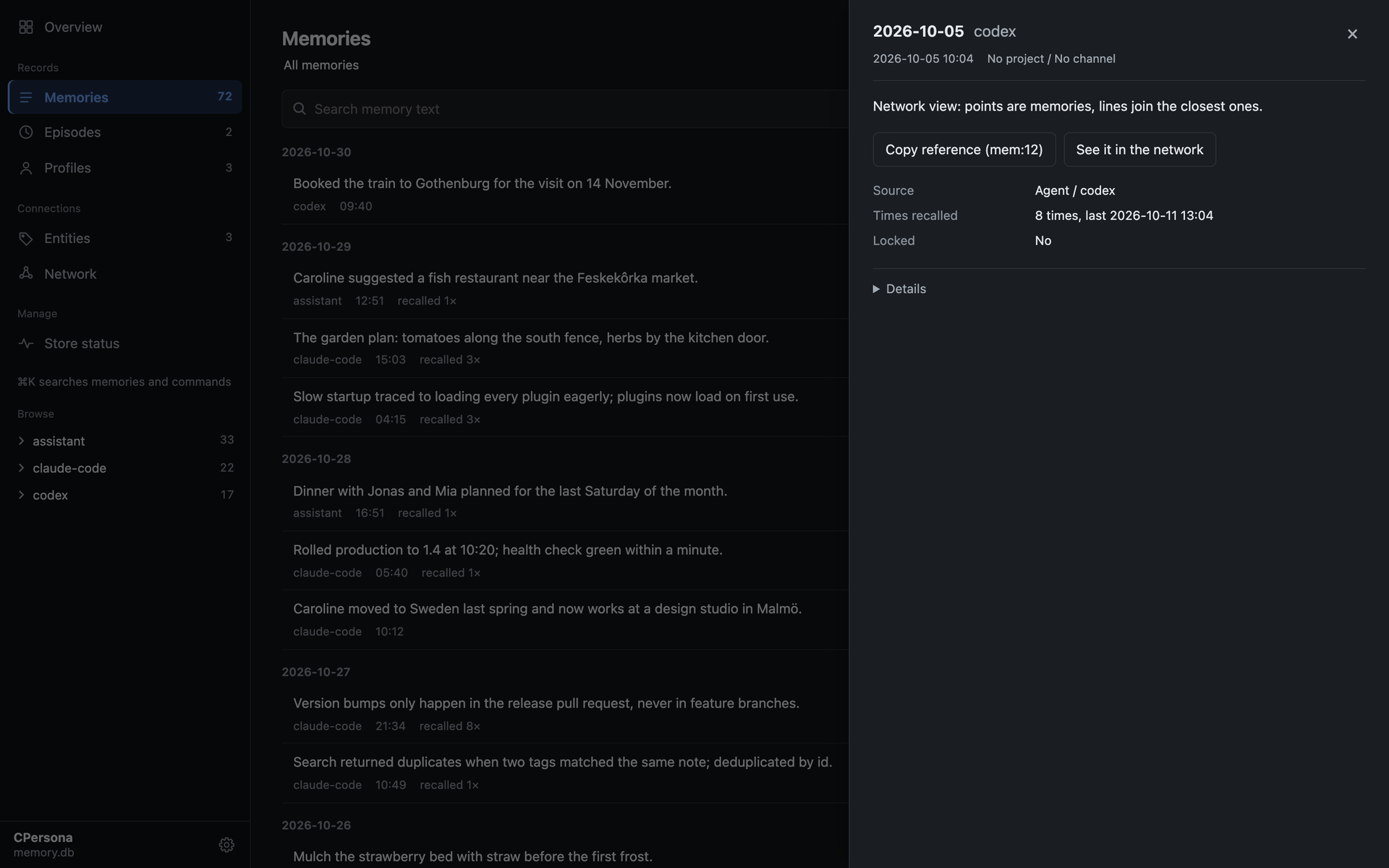 |
Memories are kept per agent, and project_id and channel let several agents and projects share
one database without mixing.
Benchmarks
On OmniMemEval's LongMemEval-S pipeline (500 questions,
answered by gpt-4.1-mini, judged by gpt-4o-mini), in this project's own run. Overall is the
share of questions judged correct; Context Tokens is the average sent to the answer model per question:
| Backend | Deployment | SS-User | SS-Asst | SS-Pref | Temp. Reas | Multi-S | Know. Upd | Overall | Context Tokens |
|---|---|---|---|---|---|---|---|---|---|
| CPersona 2.6.11 (pro mode) | local | 97.14 | 94.64 | 96.67 | 86.47 | 85.71 | 88.46 | 89.60 | 4,262.5 |
| CPersona 2.6.11 (lite mode) | local | 95.71 | 83.93 | 90.00 | 80.45 | 74.44 | 82.05 | 82.20 | 993.3 |
| MemOS | cloud | 100.00 | 100.00 | 100.00 | 89.47 | 78.95 | 84.62 | 89.20 | 4,151 |
Pro mode is level with MemOS within sampling error, and on LoCoMo it answers 84.03%. Setups, the registered rules and every departure from a clean run are in the results.
Documentation
cloto-dev.github.io/CPersona is the full reference, also in Japanese:
| Guide | What it covers |
|---|---|
| Getting Started | Install, embedding server, client registration, verification |
| Behavior Contracts | What you may rely on: recall ordering, dedup, scan window, response shapes |
| Tools | Every tool, grouped by what you reach for it for |
| Architecture | Storage, the retrieval pipeline, isolation axes |
| Roadmap | What each release line is for and may break; planned retrieval features and the scale ladder |
| Operations Runbook | Backup, degradation detection, tuning, CJK guidance, corpus sync |
| Configuration | Every environment variable and its default |
| Quality Assurance | How a release is gated: audits, the bug ledger, structural and mutation gates |
| FAQ | Short answers to the questions operators actually ask |
Contributing
Bug fixes, tests and documentation can be sent as a pull request straight away. For changes to the database schema, the tool contracts or the tool list, open an issue first. CONTRIBUTING.md has the setup — no embedding server is needed to run the ~4,150 test functions — and the three checks CI runs.
Questions and ideas are welcome in Discussions. A sentence in the docs that confused you is worth reporting too: it is a defect of its own.
Support
- Bugs and requests: open an issue.
- Security: report privately, as SECURITY.md describes.
- Which version to run: SUPPORT.md.
- In Japanese: the docs have a language selector, and a book on Zenn covers the design and setup.
If CPersona has earned a place in your workflow, you can sponsor the work on GitHub. It buys no feature and no place in the issue queue; starring the repository, filing a clear issue or fixing a sentence in the docs helps too.
License
MIT — see LICENSE.
CPersona MCP questions
How do I add CPersona MCP to Claude Code?
Run claude mcp add cpersona -- uvx cpersona in your terminal. Add --scope user to make it available in every project.
How do I add CPersona MCP to Cursor?
Open ~/.cursor/mcp.json and add the server under mcpServers, using the Cursor config shown in the install section above.
What tools does CPersona MCP provide?
It exposes 29 tools, including pause_persistence, resume_persistence, persistence_status, get_operating_context, store.
Where is my data stored?
Everything is stored locally in a single SQLite file that you own on your own machine.
Does CPersona use a language model to manage memory?
No, CPersona does not call a generative model to store or recall information; it relies on your agent to write summaries.
Can I see what the agent remembers?
Yes, you can use the built-in dashboard to view stored memories, recall frequency, and the memory network.
What happens if I don't have an embedding server?
The server will still function using keyword search and will explicitly notify you during recall that it is operating without embeddings.