
aliasflare MCP server
Commit Nov 13, 2026Lets an AI agent create email aliases, read verification codes, and manage email forwarding through Cloudflare Workers.
Also known as charleswei118/aliasflare
- Stars
- 37
- Tools
- —
- Downloads, 30 days
- —
- Latest version
- —
- Last commit
- Nov 13, 2026
- License
- MIT
What is aliasflare MCP?
aliasflare lets an AI agent create email aliases, read verification codes, and manage email forwarding through Cloudflare Workers.
Summary generated from the project's README
About aliasflare MCP server
Managing privacy by using unique email addresses for every website is what aliasflare enables through a self-hosted setup on your own Cloudflare account. This tool allows you to create unlimited aliases on your own domains, ensuring that your real inbox remains private while still receiving all forwarded messages. It is designed for developers and privacy-conscious users who want to avoid paid alias services and keep their data on their own infrastructure.
AI agents can interact with your email system using the MCP server to automate registrations and verifications. By connecting via a remote URL or a local stdio bridge, an agent can use tools like create_alias, get_latest_code, and list_aliases to manage your digital identity. The system also handles security by stripping tracking pixels and extracting verification codes directly into the subject line for easy reading. To send replies from an alias, you can integrate a Resend API key or use Brevo.
What you can do with it
- 1Automated account registrationAn AI agent can create a new email alias and use it to sign up for a service automatically.
- 2Privacy-preserving email repliesYou can respond to senders using an alias so that your actual email address is never revealed.
- 3Spam managementYou can instantly stop receiving mail from a specific source by disabling a single alias.
Written from the project's README. Every use case is checked against a quote from it.
Configuration
ALIASFLARE_TOKENALIASFLARE_URL
Automated checks
Ran Nov 14, 2026Full report →Not verified yet. A server needs a score of 80, no serious finding, and enough data for us to check. How checks work · What to fix for more points

- Source repository linked and reachablecharleswei118/aliasflare is public and reachablegithub.com/charleswei118/aliasflare ↗Pass
- Package names this repository as its sourceNot checked
- Build provenance (Sigstore attestation)Not checked
- Open source license (OSI)MITspdx.org/licenses/MIT.html ↗Pass
- Commit or release in the last yearLast commit or release 2026-11-13github.com/charleswei118/aliasflare ↗Pass
- OpenSSF ScorecardNot checked
- Package name not close to a popular packageNot checked
- No critical advisory in the package or its dependenciesNot checked
- No hidden instructions to the model0 tool descriptions and the README read; no override phrases, credential paths or hidden charactersPass
- Destructive tools are labelledNot checked
- Remote endpoint answers the MCP handshakeNot checked
README
View on GitHubaliasflare
Don't want to hand your real email to every website, and don't want to pay for an alias service? aliasflare is a self-hosted alias mailbox that runs on your own Cloudflare account's free tier.
Unlike SimpleLogin or addy.io, aliases are unlimited, you keep your own domain for free, and nothing lives on someone else's server. A different address for every website, all landing in your real inbox. Turn any of them off in one click when the spam starts. Reply as the alias, so your real address never leaks. Verification codes are pulled into the subject line, tracking pixels are stripped, and AI agents can create aliases and read codes through MCP.
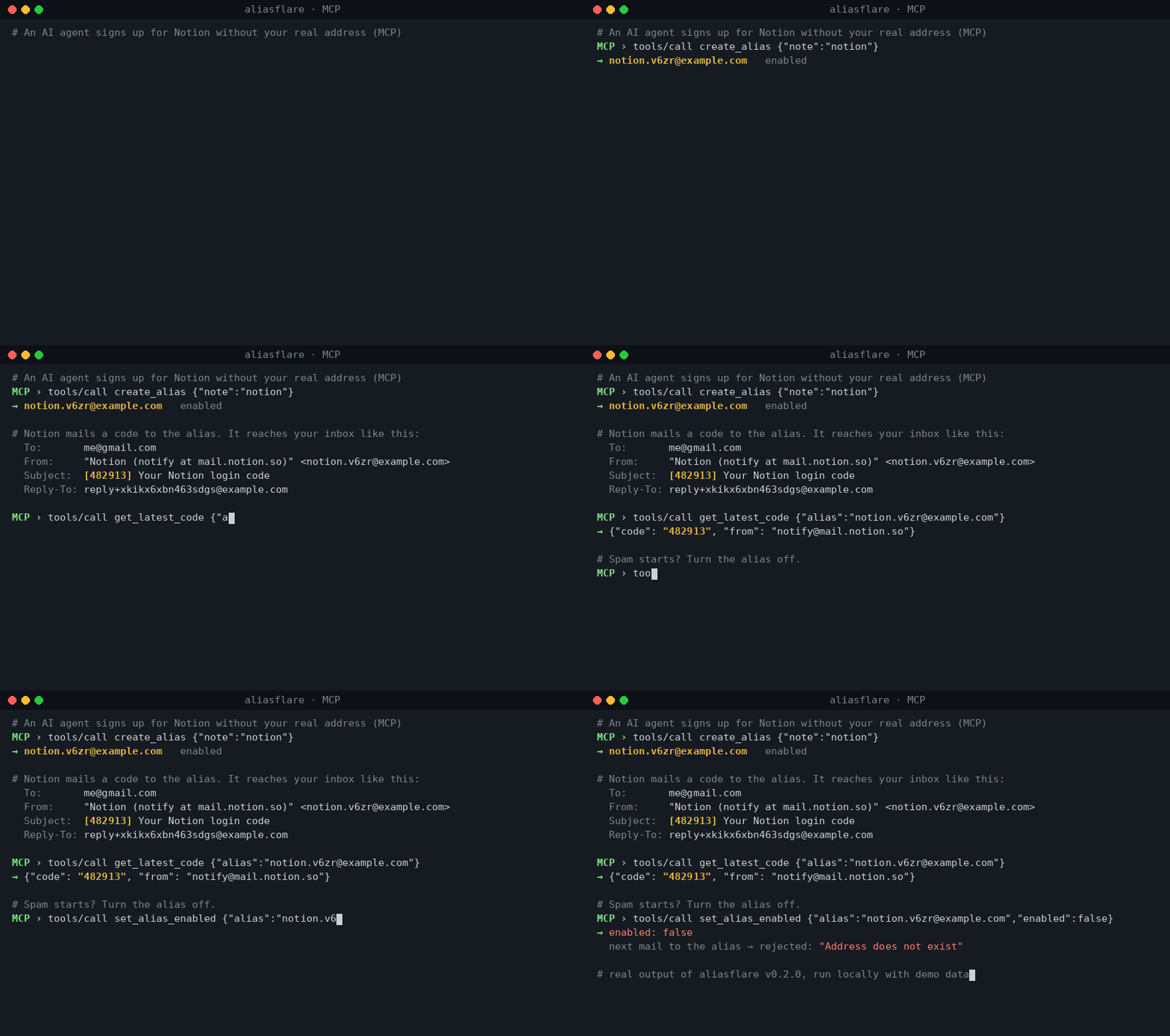
Real output of aliasflare v0.2.0 run locally with demo data (example.com).
Why
| SimpleLogin free | addy.io free | aliasflare | |
|---|---|---|---|
| Aliases | 10 | unlimited on username, 10 shared | unlimited |
| Your own domain | paid | paid | yes |
| Bandwidth | unlimited | 10 MB / month | unlimited inbound |
| Reply from alias | yes | paid | yes (optional: free Resend account, or Workers Paid) |
| Your data | their servers | their servers | your Cloudflare account |
| Cost | $0, then $36/yr | $0, then $12–36/yr | $0 |
Features
- Unlimited aliases on one or more of your domains. Create them in the dashboard, or just make one up when signing up —
anything@yourdomain.comis created on first mail (turn off withAUTO_CREATE=false). - One-click disable. A disabled alias rejects mail as if it never existed.
- Sender hidden, reply as alias. Each message arrives
From: "Shop (news at shop.com)" <shop.k3f9@yourdomain.com>with a privateReply-To. Hit reply in Gmail and the answer goes out from the alias; your real address is scrubbed from the body too. - Send new mail from any alias (dashboard, API or MCP).
- Verification codes detected in Chinese, English, Japanese, Korean and more, and put into the subject:
[482913] Your login code. - Tracking pixels removed (1×1 images, hidden images, known trackers).
- MCP server at
/mcp:create_alias,get_latest_code,list_aliases,set_alias_enabled,recent_messages,send_from_alias. Let your agent sign up for things without your inbox. - Never loses mail. If rewriting fails for any reason the original is forwarded as-is.
- Small and auditable. ~1,000 lines of plain JavaScript, one dependency (
postal-mime), D1 stores only metadata (no message bodies).
Deploy (about 5 minutes)
You need a domain on Cloudflare.
- Email Routing on. Cloudflare Dashboard → your domain → Email → Email Routing → enable it (Cloudflare adds the MX records). Under Destination addresses, add your real inbox and click the verification link.
- Click the button above. Cloudflare copies this repo to your GitHub, creates the D1 database and asks for:
DOMAIN— e.g.example.com(comma-separate several)DESTINATION— your verified real inboxADMIN_TOKEN— a long random password (openssl rand -hex 24)RESEND_API_KEY— optional, see below;noneto skip
- Route mail to the Worker. Email Routing → Routing rules → Catch-all address → action Send to a Worker →
aliasflare→ enable.
Open your Worker's URL, log in with ADMIN_TOKEN, and create your first alias.
Replying for free
Receiving and forwarding to your own verified inbox is free on every Cloudflare plan. Sending to other people (replies, new mail) needs one of:
- Resend (recommended, free 3,000 emails/month, 100/day): sign up at resend.com, add and verify your domain, create an API key, set it as
RESEND_API_KEY. - Brevo (free, 300 emails/day): sign up at brevo.com, verify your sending domain (add the DNS records it gives you), create an API key, set it as
BREVO_API_KEY(optional, no need to fillnone). Used whenRESEND_API_KEYisn't set. Deliverability depends on your domain's reputation: a brand-new Brevo free account sending from a free subdomain (e.g.*.dpdns.org) may land in Outlook's junk folder or be rejected by Gmail. A domain you own and real, low-volume replies help. - Cloudflare Email Sending on Workers Paid ($5/month, 3,000 emails included): onboard your domain under Email Sending and leave
RESEND_API_KEY=none.
Without either, everything except replying and sending works.
Manual deploy
git clone https://github.com/charleswei118/aliasflare && cd aliasflare
npm install
npx wrangler d1 create aliasflare        # wrangler can also create it on first deploy
for s in DOMAIN DESTINATION ADMIN_TOKEN RESEND_API_KEY; do npx wrangler secret put $s; done
npm run deploy                            # applies migrations, then deploys
Then do step 3 above.
Settings
Secrets: DOMAIN, DESTINATION, ADMIN_TOKEN, RESEND_API_KEY.
Variables in wrangler.toml:
| Variable | Default | What it does |
|---|---|---|
AUTO_CREATE |
true |
Create aliases on first incoming mail |
FORWARD_MODE |
rewrite |
forward = plain forwarding, no sender hiding or replies |
BLOCK_TRACKERS |
true |
Strip tracking pixels |
CODE_IN_SUBJECT |
true |
Prefix the subject with a detected code |
BANNER |
true |
One-line header showing alias and real sender |
Use with AI agents (MCP)
{
  "mcpServers": {
    "aliasflare": {
      "url": "https://aliasflare.<you>.workers.dev/mcp",
      "headers": { "Authorization": "Bearer <ADMIN_TOKEN>" }
    }
  }
}
Then: "Sign me up for the Notion newsletter with a new alias and confirm it." The agent calls create_alias(note="notion"), uses the address, then get_latest_code.
Local stdio MCP (Claude Desktop, Cursor, …)
If your client only speaks stdio, run the bundled bridge. It answers tools/list locally and forwards tool calls to your own Worker:
{
  "mcpServers": {
    "aliasflare": {
      "command": "npx",
      "args": ["-y", "github:charleswei118/aliasflare"],
      "env": { "ALIASFLARE_URL": "https://aliasflare.<you>.workers.dev", "ALIASFLARE_TOKEN": "<ADMIN_TOKEN>" }
    }
  }
}
A Dockerfile for the same bridge is included.
REST API
All endpoints need Authorization: Bearer <ADMIN_TOKEN>.
| Method | Path | Body / query |
|---|---|---|
| GET | /api/config |
|
| GET | /api/aliases |
?q= |
| POST | /api/aliases |
{note} or {local, domain} or {address} |
| PATCH | /api/aliases/:id |
{enabled, note} |
| DELETE | /api/aliases/:id |
|
| GET | /api/messages |
?alias_id=&limit= |
| GET | /api/code |
?alias=&since= (minutes) |
| POST | /api/send |
{alias, to, subject, text} |
How it works
stranger ──▶ shop.k3f9@you.com ──▶ Worker ──▶ you@gmail.com
                                   From: "Shop (news at shop.com)" <shop.k3f9@you.com>
                                   Reply-To: reply+<token>@you.com

you@gmail.com ──▶ reply+<token>@you.com ──▶ Worker ──▶ stranger
                                            From: shop.k3f9@you.com
Only mail from your DESTINATION (and not failing SPF/DMARC) may use a reply+ address.
Limits
- Cloudflare Email Routing: 25 MiB per message. The catch-all rule means the 200-rule limit does not apply.
- Free Workers plan: 100,000 requests/day and 10 ms CPU per invocation; very large messages with many attachments may exceed CPU on the free plan and fall back to plain forwarding.
- Cloudflare Email Sending is in beta.
Development
npm test     # node:test, uses node:sqlite as a D1 stand-in
npm run dev
Troubleshooting
- Mail isn't arriving. Check Email Routing → Routing rules: the catch-all must be set to Send to a Worker →
aliasflareand enabled. - Nothing is forwarded.
DESTINATIONmust be a verified address under Email Routing → Destination addresses. - Replies fail or land in spam. Check
/api/config:outboundshould beresend,brevoorcloudflare. A brand-new sending domain has little reputation; use a domain you own and keep volume low. - Alias rejected. It may be disabled, or
AUTO_CREATE=falseand the alias doesn't exist yet. - Still stuck? Open an issue with what
/healthand/api/configreturn (never paste yourADMIN_TOKEN).
Hardening
Incoming mail never touches HTTP: Email Routing hands each message straight to the Worker's email() handler. The HTTP side only serves the admin UI, REST API and MCP, so you can lock it down without breaking mail:
- Set
workers_dev = falseinwrangler.tomland serve the admin side only on a Custom Domain of yours (redeploy after the change). Preview/version URLs are a separate setting. - Put that hostname behind Cloudflare Access (Zero Trust free tier), or add a WAF rate limiting rule on it. Both act before the Worker runs; requests blocked by WAF, DDoS protection or other security features don't count as Worker requests.
- Worst case on the free plan: past 100,000 requests/day the Worker returns error 1027 until the counter resets at 00:00 UTC. It stops, it doesn't bill you.
License
MIT
Looking for an MCP gateway for Chinese public data? See web2mcp.
aliasflare MCP questions
Can AI agents use this to sign up for services?
Yes, AI agents can use the MCP server to create aliases, read login codes from subjects, and manage aliases.
How much does it cost to run?
It runs on your own Cloudflare account's free tier, making it essentially free for unlimited aliases and inbound bandwidth.
Does it hide my real email address when I reply?
Yes, it allows you to reply as the alias so your real address is never leaked and is scrubbed from the body.
What happens if a verification code is sent to an alias?
The system detects verification codes in multiple languages and places them directly into the email subject line.