
CallForMe MCP server
Commit Nov 14, 2026Lets an AI agent make phone calls to US and Canadian businesses for quotes, bookings, cancellations, and waiting on hold.
Also known as callforme-tel/callforme
- Stars
- 1
- Tools
- —
- Downloads, 30 days
- —
- Latest version
- 1.0.2
- Last commit
- Nov 14, 2026
- License
- MIT
What is CallForMe MCP?
CallForMe lets an AI agent make phone calls to US and Canadian businesses for quotes, bookings, cancellations, and waiting on hold.
Summary generated from the project's README
About CallForMe MCP server
Automating phone calls to US and Canadian businesses for tasks like getting quotes or making reservations is what CallForMe enables. This remote MCP server allows an AI agent to act as a voice assistant that places calls, asks for information, and returns transcripts to the user. It is designed for developers using various AI clients including Claude, ChatGPT, Cursor, Windsurf, and Goose, or any agent capable of connecting to a remote MCP server via OAuth.
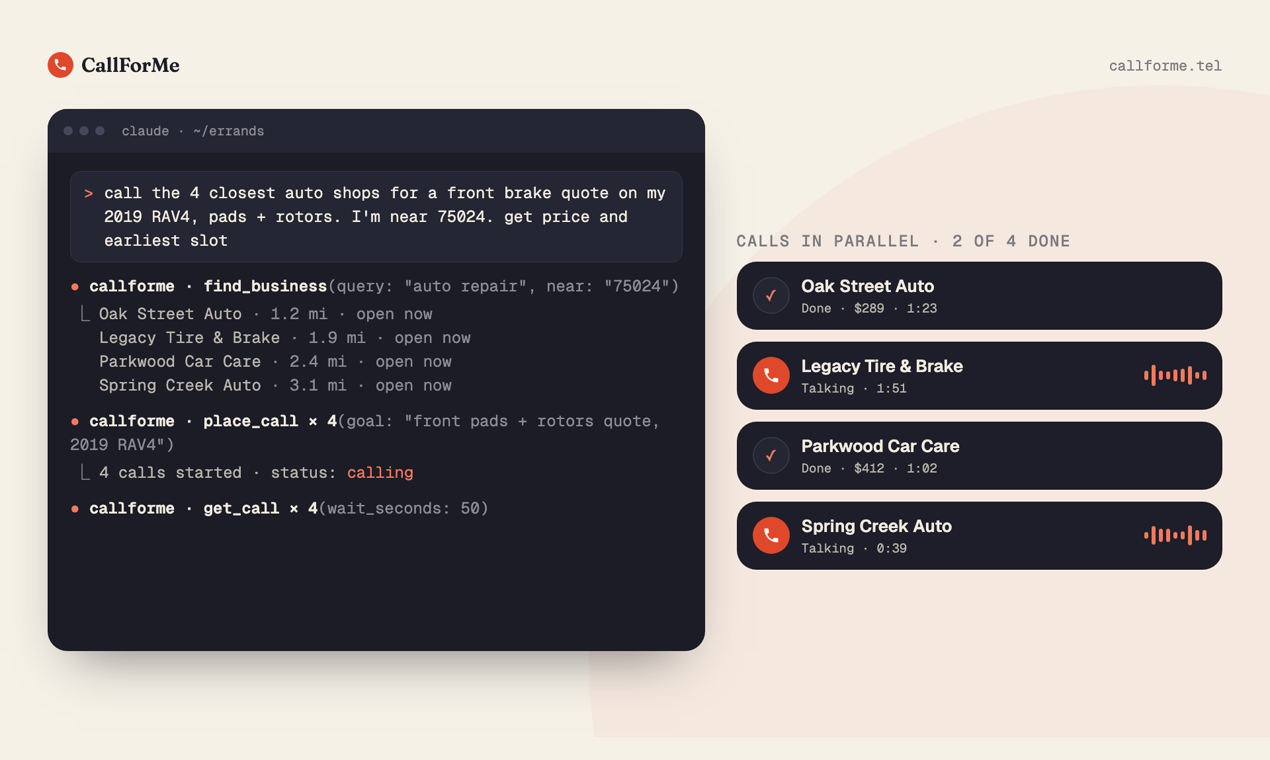
Users can perform complex tasks such as checking stock at multiple pharmacies, booking tables, or waiting on hold with airlines. The system handles language switching automatically if a business speaks a different language, such as Spanish. While the service costs $1 per answered call, it provides a way to batch requests like calling several auto shops in parallel to compare prices. The server is compatible with a wide range of environments, from desktop applications to command-line tools like Claude Code and Gemini CLI.
What you can do with it
- 1Comparing service quotesAsk an agent to contact several local businesses simultaneously to find the best price for a specific repair.
- 2Managing appointments and membershipsHave an AI agent handle the logistics of booking a table or canceling a subscription.
- 3Handling long hold timesDelegate the task of waiting on a phone line until a human representative becomes available.
- 4Checking product availabilityRequest that an agent calls multiple locations to see if a specific item is in stock.
Written from the project's README. Every use case is checked against a quote from it.
How to install CallForMe MCP
Formats verified 10 Nov 2026Add to CursorAdd to GooseInstall CallForMe MCP in Claude Code
$ claude mcp add --transport http callforme https://callforme.tel/mcpInstall CallForMe MCP in Cursor
~/.cursor/mcp.json
{
  "mcpServers": {
    "callforme": {
      "url": "https://callforme.tel/mcp"
    }
  }
}Install CallForMe MCP in VS Code
.vscode/mcp.json
{
  "servers": {
    "callforme": {
      "type": "http",
      "url": "https://callforme.tel/mcp"
    }
  }
}Install CallForMe MCP in VS Code CLI
$ code --add-mcp '{"name":"callforme","type":"http","url":"https://callforme.tel/mcp"}'Install CallForMe MCP in Codex
$ codex mcp add callforme --url https://callforme.tel/mcpInstall CallForMe MCP in Codex config.toml
~/.codex/config.toml
[mcp_servers.callforme]
url = "https://callforme.tel/mcp"
Install CallForMe MCP in Gemini CLI
$ gemini mcp add -s user --transport http callforme https://callforme.tel/mcpInstall CallForMe MCP in Gemini settings.json
~/.gemini/settings.json
{
  "mcpServers": {
    "callforme": {
      "url": "https://callforme.tel/mcp",
      "type": "http"
    }
  }
}Automated checks
Ran Nov 14, 2026Full report →Not verified yet. A server needs a score of 80, no serious finding, and enough data for us to check. How checks work · What to fix for more points

- Source repository linked and reachablecallforme-tel/callforme is public and reachablegithub.com/callforme-tel/callforme ↗Pass
- Package names this repository as its sourceNot checked
- Build provenance (Sigstore attestation)Not checked
- Open source license (OSI)MITspdx.org/licenses/MIT.html ↗Pass
- Commit or release in the last yearLast commit or release 2026-11-14github.com/callforme-tel/callforme ↗Pass
- OpenSSF ScorecardNot checked
- Package name not close to a popular packageNot checked
- No critical advisory in the package or its dependenciesNot checked
- No hidden instructions to the model0 tool descriptions and the README read; no override phrases, credential paths or hidden charactersPass
- Destructive tools are labelledNot checked
- Remote endpoint answers the MCP handshakeinitialize answered with protocol 2025-06-18 in 67 msPass
README
View on GitHubCallForMe
CallForMe is a remote MCP server that lets your AI agent phone US and Canadian businesses for you: quotes, reservations, appointments, cancellations, stock checks and waiting on hold. A voice assistant places the call, asks your agent mid-call when the business needs something, and returns the answers plus a transcript. $1 per answered call.
Install in Claude Code: /plugin install callforme --marketplace callforme-tel/callforme (Claude Code 2.1.275 or later; on older versions run /plugin marketplace add callforme-tel/callforme first, then /plugin install callforme).
Works with: Claude (claude.ai, Desktop, mobile), Claude Code, ChatGPT, Codex, Cursor, Gemini CLI, Grok, Windsurf, VS Code, Cline, Goose and any MCP client. Agents without MCP use the skill with the REST API.
- Website: https://callforme.tel
- MCP server:
https://callforme.tel/mcp(OAuth that asks for nothing) - Agent Skill:
skills/callforme/SKILL.md(also at https://callforme.tel/skill.md) - REST API: https://callforme.tel/docs/rest-api
- Official MCP Registry:
tel.callforme/callforme
What you can ask
- "Call the 3 closest auto shops and get brake quotes for my 2019 RAV4." (finds them and calls in parallel)
- "Book a table for 4 at 7:30 on Friday."
- "Cancel my gym membership and get the confirmation number."
- "Sit on hold with the airline and patch me in when a person answers."
- "Call 10 pharmacies near me and ask who has my prescription in stock."
- "Ask the body shop if my car is ready and what's due at pickup."
- "Call 8 tree services near Houston and ask if they're free for our event on the 14th, with a rough price."
- "Ask the county clerk how to get a certified copy of an old court record, and the fee."
Every call opens with "Hi, this is an assistant calling for [your name], on a recorded line." If anyone asks, it says it's an AI, and it never claims to be a person. It switches to Spanish on its own and calls back in other languages when the business speaks one.
Install
| Agent | How |
|---|---|
| Claude (claude.ai, desktop, mobile) | Customize → Connectors → Add custom connector → https://callforme.tel/mcp |
| Claude Code | claude mcp add --transport http callforme https://callforme.tel/mcp |
| Claude Code plugin (skill + connector) | /plugin install callforme --marketplace callforme-tel/callforme (this repository is the plugin and its marketplace) |
| ChatGPT | Open CallForMe in ChatGPT's plugin directory and click Connect. (Or add it yourself: Plugins > + > Add custom MCP server, URL https://callforme.tel/mcp, OAuth.) |
| Codex | codex mcp add callforme --url https://callforme.tel/mcp |
| Gemini CLI | gemini mcp add --transport http callforme https://callforme.tel/mcp |
| Grok | grok.com/connectors → New Connector → Custom → https://callforme.tel/mcp |
| Cursor, Windsurf, VS Code, Cline, Goose, others | Add a remote MCP server with URL https://callforme.tel/mcp |
| Agents with a shell but no MCP | Use the skill in skills/callforme/ with the REST API |
More: https://callforme.tel/agents
Install the skill in any agent

npx skills add callforme-tel/callforme        # this project (asks which agents)
npx skills add callforme-tel/callforme -g     # user-level, every project
Where the skill lands (to install by hand, copy skills/callforme/ there):
| Agent | Project folder | User folder (-g) |
|---|---|---|
| Claude Code | .claude/skills/callforme/ |
~/.claude/skills/callforme/ |
| Codex | .agents/skills/callforme/ |
~/.codex/skills/callforme/ |
| Cursor | .agents/skills/callforme/ |
~/.cursor/skills/callforme/ |
| GitHub Copilot | .agents/skills/callforme/ |
~/.copilot/skills/callforme/ |
| Gemini CLI | .agents/skills/callforme/ |
~/.gemini/skills/callforme/ |
| OpenCode | .agents/skills/callforme/ |
~/.config/opencode/skills/callforme/ |
| Cline | .agents/skills/callforme/ |
~/.agents/skills/callforme/ |
| Windsurf | .windsurf/skills/callforme/ |
~/.codeium/windsurf/skills/callforme/ |
| Goose | .goose/skills/callforme/ |
~/.config/goose/skills/callforme/ |
| OpenClaw | skills/callforme/ |
~/.openclaw/skills/callforme/ |
The skill tells your agent when and how to use CallForMe; the MCP server does the work, so connect that too (see Install above).
Try it free
Five fictional businesses (a pizza place, three auto shops and a gym) can be called for free with no setup: https://callforme.tel/demo
Pricing
$1 per answered call, including the first 2 minutes, then $0.40 a minute. No charge if nobody answers or the line is busy, and voicemail is free when the call goes straight to it. Prepaid: the first real call shows a one-time link to add $5 through Stripe; auto-reload (adds $10 when you drop under $2) is on by default and adjustable. Details: https://callforme.tel/docs/pricing
Safety
- Calls only go to businesses in the US and Canada. Emergency and premium-rate numbers are blocked.
- A single call goes out when you ask. Between 10pm and 7am at the business, the result warns that it may be closed;
call_aroundbatches wait for 7am. - Card numbers, security codes, one-time codes and passwords are never read to a business. When a business sends a one-time code to the account holder, pass
transfer_toand the assistant connects you to read it yourself. - Businesses can opt out at https://callforme.tel/for-businesses or by asking on a call.
Support
hello@greatwork.company. CallForMe is made by Great Work LLC.
License
The skill and the files in this repository are MIT licensed. The CallForMe service itself is hosted and is not open source.
Last updated: 2026-10-09
CallForMe MCP questions
How do I add CallForMe MCP to Claude Code?
Run claude mcp add --transport http callforme https://callforme.tel/mcp in your terminal. Add --scope user to make it available in every project.
How do I add CallForMe MCP to Cursor?
Open ~/.cursor/mcp.json and add the server under mcpServers, using the Cursor config shown in the install section above.
How much does it cost to use CallForMe?
$1 per answered call, which includes the first 2 minutes, followed by $0.40 per minute. There is no charge if the call is not answered or the line is busy.
Can the AI agent handle different languages?
Yes, the assistant automatically switches to Spanish and can call back in other languages if the business speaks them.
Is it safe to use for sensitive information?
The service ensures that card numbers, security codes, and passwords are never read to a business.
What happens if a business requires a one-time code?
You can use the transfer_to command to have the assistant connect you directly so you can read the code yourself.