
OpenStack Ops MCP server
Commit Nov 14, 2026Lets an AI client inspect and manage an OpenStack project's compute, network, storage, and telemetry resources, read-only by default.
Also known as call518/MCP-OpenStack-Ops
- Stars
- 50
- Tools
- —
- Downloads, 30 days
- —
- Latest version
- —
- Last commit
- Nov 14, 2026
- License
- MIT
What is OpenStack Ops MCP?
OpenStack Ops lets an AI client inspect and manage an OpenStack project's compute, network, storage, and telemetry resources, read-only by default.
Summary generated from the project's README
About OpenStack Ops MCP server
Managing cloud infrastructure through natural language is possible with this server, which connects AI assistants like Claude or OpenWebUI to OpenStack projects. It allows users to inspect and operate resources across compute, network, storage, and telemetry services. By default, the server operates in a read-only mode, meaning tools for creating or deleting resources are only available if you explicitly enable them via specific configuration settings.
To get started, you must provide OpenStack credentials including a Keystone host, project name, username, and password. The server is designed to work within a single project scope to ensure resource ownership is respected. It provides 111 distinct tools covering Nova, Neutron, Cinder, Glance, Keystone, Heat, Octavia, and Gnocchi telemetry. Users can deploy it locally using a Claude Desktop extension bundle or via Docker Compose for integration with OpenWebUI.
What you can do with it
- 1Monitor cloud resource statusAsk your AI assistant to identify which virtual machine instances are currently in a shutoff state.
- 2Audit project quotasRequest a summary of the vCPUs and memory currently allocated to your project compared to your remaining limits.
- 3Perform bulk resource managementInstruct the AI to stop all running instances that contain a specific string in their name.
- 4Analyze telemetry dataRetrieve CPU usage metrics for a specific web server over a defined one-hour period.
Written from the project's README. Every use case is checked against a quote from it.
Configuration
DEFAULT_MODEL_PARAMS
| Name | Description | |
|---|---|---|
| DEFAULT_MODEL_PARAMS | — |
Automated checks
Ran Nov 14, 2026Full report →Not verified yet. A server needs a score of 80, no serious finding, and enough data for us to check. How checks work · What to fix for more points

- Source repository linked and reachablecall518/mcp-openstack-ops is public and reachablegithub.com/call518/mcp-openstack-ops ↗Pass
- Package names this repository as its sourceNot checked
- Build provenance (Sigstore attestation)Not checked
- Open source license (OSI)MITspdx.org/licenses/MIT.html ↗Pass
- Commit or release in the last yearLast commit or release 2026-11-13github.com/call518/mcp-openstack-ops ↗Pass
- OpenSSF ScorecardNot checked
- Package name not close to a popular packageNot checked
- No critical advisory in the package or its dependenciesNot checked
- No hidden instructions to the model0 tool descriptions and the README read; no override phrases, credential paths or hidden charactersPass
- Destructive tools are labelledNot checked
- Remote endpoint answers the MCP handshakeNot checked
README
View on GitHubEnglish | Korean
MCP-OpenStack-Ops
MCP OpenStack Operations Server: A comprehensive MCP (Model Context Protocol) server providing OpenStack project management and monitoring capabilities with built-in safety controls and single-project scope.








What is MCP-OpenStack-Ops?
MCP-OpenStack-Ops lets an AI assistant such as Claude or a model in OpenWebUI inspect and operate an OpenStack project in plain language. It is an MCP server that turns requests like "which instances are stopped?" into OpenStack API calls and returns the results.
- Read-only by default: tools that create, change or delete resources are not even registered unless you enable them.
- One project at a time: each server works inside one OpenStack project and checks resource ownership.
- Broad coverage: 111 tools (55 read-only, 56 management) for Nova, Neutron, Cinder, Glance, Keystone, Heat, Octavia, and Gnocchi/Aodh telemetry.
For an AI-generated walkthrough of the code, see

What can you do with it?
Ask questions and give instructions in natural language, for example:
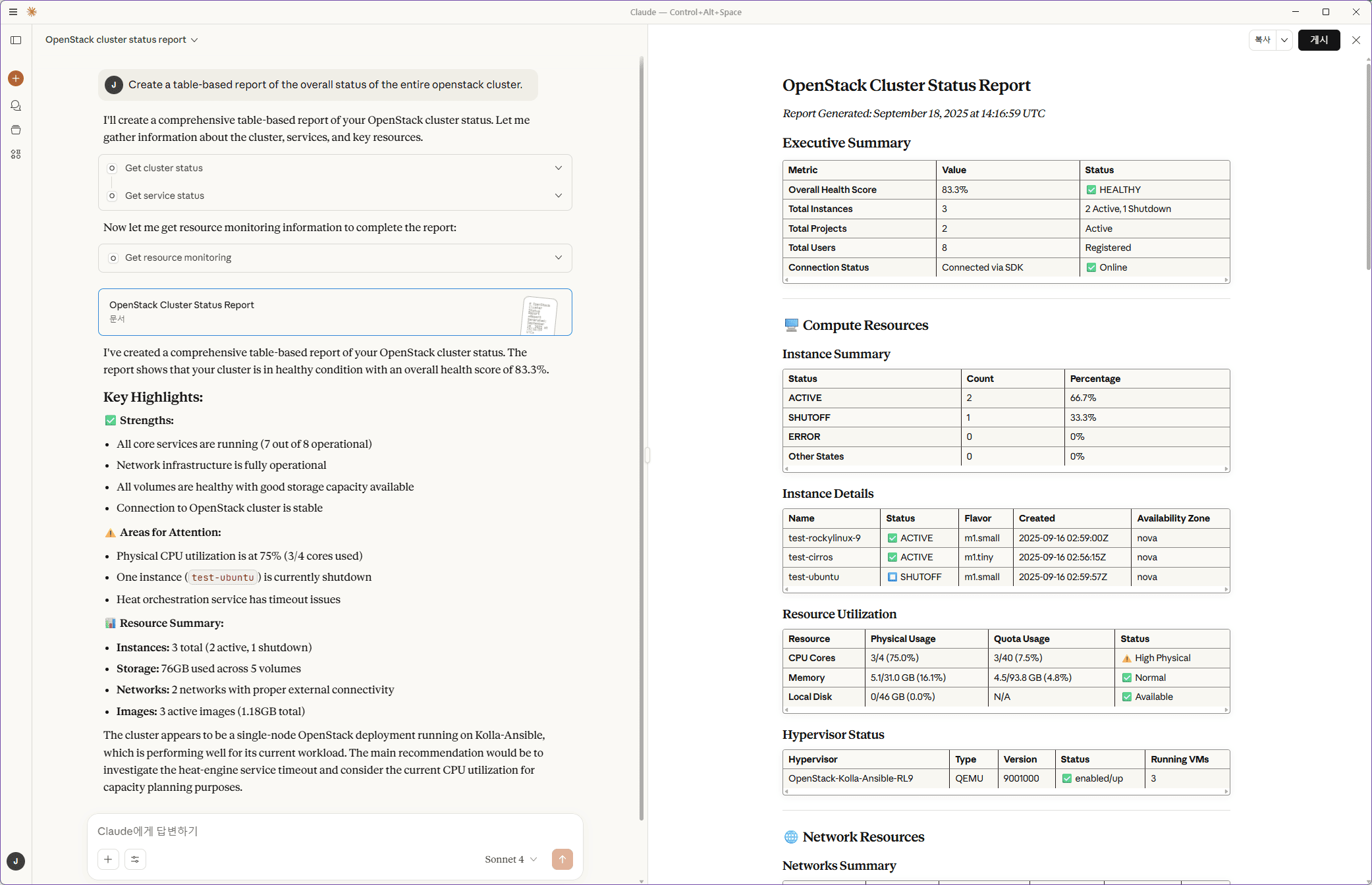
Show me the overall cluster status
Find instances in SHUTOFF state
Show all networks and their subnets
List all volumes and their status
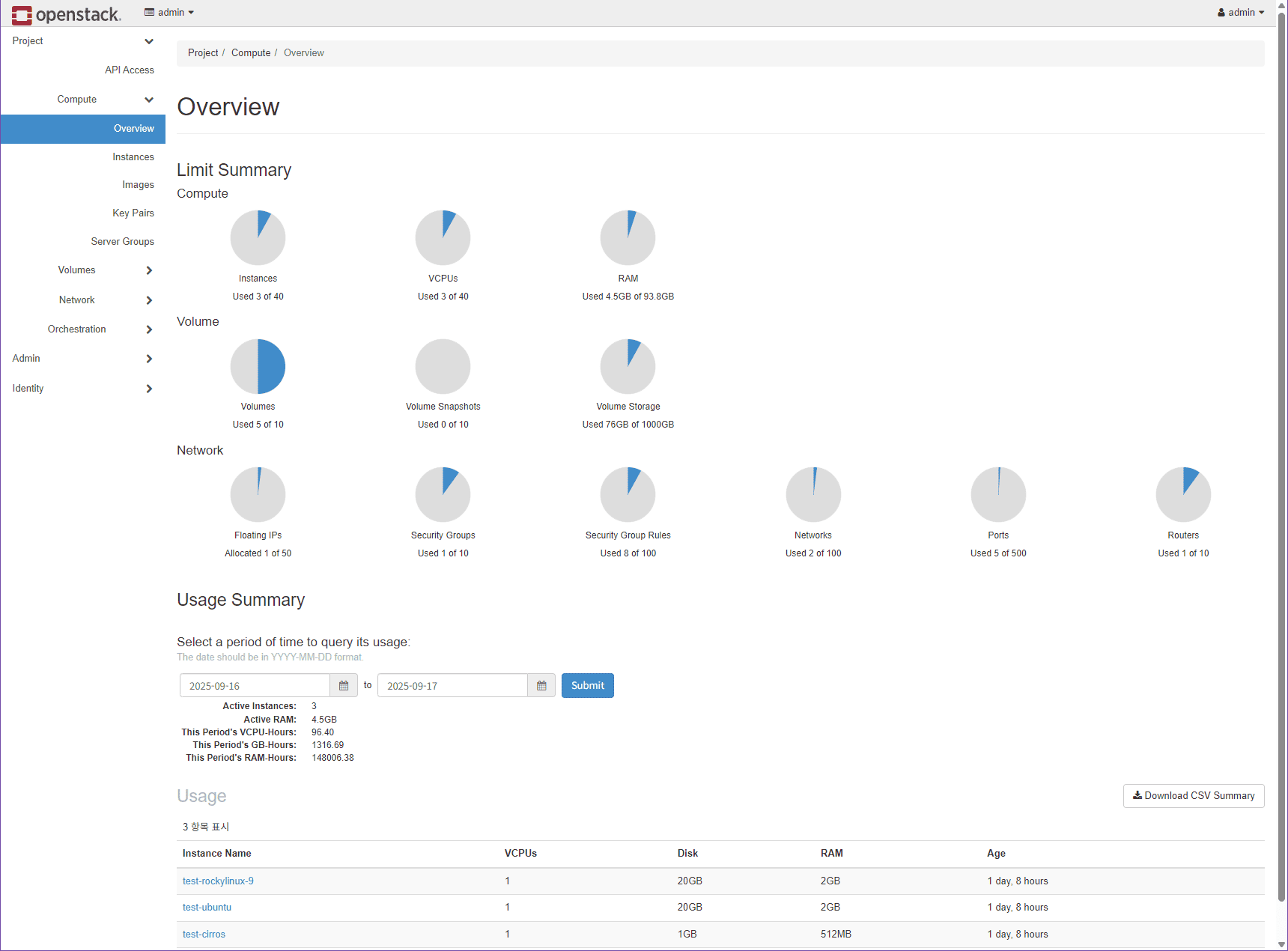
Show the vCPUs and memory allocated to my project and the remaining quota
Show CPU usage of web-01 over the last hour
Stop all instances with name containing 'test'
The last request changes resources, so it works only after you enable modification tools. Telemetry requests need Ceilometer and Gnocchi in the cloud. More examples are in the usage guide.
Example: cluster status in Claude Desktop
The same project in the OpenStack Dashboard (Epoxy 2025.1)
Quick Start
You need an OpenStack account (Keystone host, project, user name, password) whose APIs are reachable from the computer that runs the server. Pick one of the two paths below; both start read-only.
Option A: Claude Desktop with the extension bundle (fastest)
- Download
mcp-openstack-ops-<version>.mcpbfrom the latest GitHub Release. - In Claude Desktop, open Settings > Extensions > Advanced settings > Install Extension… and select the file.
- Fill in the settings form: Keystone host, project, user name and password are required; ports, domains and region are prefilled. Leave Allow modify operations off.
- Ask Claude:
List the instances in my OpenStack project.
Other Claude Desktop setups (uvx, a source checkout, the Docker server
through mcp-remote, a remote connector) are in the
Claude Desktop guide.
Option B: OpenWebUI with Docker Compose
Requirements: Git, Docker with the Compose plugin, and a model provider for OpenWebUI whose model supports tool calling.
1. Configure
git clone https://github.com/call518/MCP-OpenStack-Ops.git
cd MCP-OpenStack-Ops
cp .env.example .env
cp mcp-config.json.http mcp-config.json.http.local
chmod 600 mcp-config.json.http.local
openssl rand -hex 32   # use the output as WEBUI_SECRET_KEY
vi .env                # set WEBUI_SECRET_KEY and the OS_* values for your cloud
2. Start
docker compose up -d
docker compose ps      # wait until mcp-server is healthy
This starts OpenWebUI (http://localhost:3000), the MCP server
(http://localhost:8000/mcp) and MCPO (http://localhost:8080).
3. Connect OpenWebUI to the MCP server
-
Open
http://localhost:3000, create the administrator account, and add a model provider under Settings → Admin → Connections. -
The Quick Start enables tool calling through Chat Completions by default with this setting already present in
.env.example:DEFAULT_MODEL_PARAMS={"reasoning_effort":"none"}This applies to every model and disables model reasoning. If the
open-webui-datavolume already exists, set the same value under Settings → Admin → Models → Model Defaults → Model Parameters because its saved database value takes precedence. To use reasoning through the Responses API, setDEFAULT_MODEL_PARAMS={}before the first start and leave Reasoning Effort at Default; see the OpenWebUI guide. -
Under Settings → Admin → Tools → Integrations → External Tool Servers, add a connection of type
MCP (Streamable HTTP)with URLhttp://mcp-server:8000/mcpand authenticationNone. -
Under Settings → Admin → System → Interface → Chat, turn on Tool Search and Defer Built-in Tools, and set Deferral Threshold to
0so that the full tool list fits the model's limits. -
In a new chat, enable the connection under Integrations → Tools and ask:
Use mcp-openstack-ops to list the instances in my OpenStack project.
MCPO is optional. MCPO is a proxy that exposes the MCP tools as an OpenAPI (REST) server; OpenWebUI does not need it to use this server. The Compose file starts it so that you can choose either connection. To run without it, start only
docker compose up -d mcp-server open-webui.
The OpenWebUI guide explains the direct and MCPO connections, every OpenWebUI setting, OpenAI reasoning models, and troubleshooting.
Other ways to install
| Setup | Guide |
|---|---|
Claude Desktop with uvx, a source checkout, mcp-remote, or a remote connector |
Claude Desktop guide |
| Claude Code | Claude Code guide |
| OpenWebUI through MCPO (OpenAPI) | OpenWebUI guide |
| Each user signs in with their own OpenStack Application Credential (experimental) | Multi-user guide |
| Several projects, HTTPS and private CAs, custom endpoints and ports | Configuration guide |
To let the assistant create, change or delete resources, set
ALLOW_MODIFY_OPERATIONS=true (or turn on Allow modify operations in the
Claude Desktop form) and restart the server. OpenStack policy still decides
what the account may do.
Features
- ✅ Project-Scoped Operations: Every tool enforces the configured
OS_PROJECT_NAME, validating resource ownership so actions stay inside a single tenant. - ✅ Safety-Gated Writes: Modify (
set_*) tooling only registers whenALLOW_MODIFY_OPERATIONS=true, keeping default deployments read-only and auditable. - ✅ Broad Tool Coverage: 111 tools across compute, networking, storage, images, identity, Heat, Octavia load balancing and telemetry. Project resources are scoped to the active project; cloud-wide administrative APIs remain subject to OpenStack policy.
- ✅ Bulk & Filtered Actions: Instance, volume, network, image, snapshot, and keypair managers accept comma-delimited targets or filter criteria to orchestrate bulk changes intentionally.
- ✅ Post-Action Feedback & Async Guidance: Management tools report per-resource results, the status read back after the action, and timing notes for asynchronous operations.
- ✅ Monitoring & Usage Insights:
get_service_status,get_resource_monitoring,get_usage_statistics, and quota tools report service probes, project allocations, separate quota limits, and API-backed compute allocation-hours. These tools do not collect live utilization or trends; read-onlyget_gnocchi_*tools return telemetry time series when Ceilometer and Gnocchi are deployed. - ✅ Unified Instance Queries: The
get_instancetool consolidates name, ID, status, and free-form search paths with pagination plus summary/detailed modes. - ✅ Server Insight & Audit Trail: Dedicated tools expose server events, hypervisor details, availability zones, quotas, and resource ownership to speed diagnostics.
- ✅ Load Balancer Management: Octavia tools cover listeners, pools, members, health monitors, flavors, quotas, and amphora operations with the same safety gates.
- ✅ Connection & Deployment Flexibility: Connection caching, configurable service endpoints, Docker packaging, a Claude Desktop extension, and both
stdio/streamable-httptransports support proxy/bastion and multi-project setups.
Safety and security
- Read-only by default. Management tools are registered only with
ALLOW_MODIFY_OPERATIONS=true. - One project per server. Resources are filtered by the current project and checked for ownership; run one server per project to manage several.
- Protect HTTP access. Over
streamable-http, enable Bearer token authentication (REMOTE_AUTH_ENABLE=true) and HTTPS before exposing the server beyond localhost.
Details: security guide and multi-user guide.
Compatibility
⚠️ Compatibility Notice: This MCP server is developed and optimized for OpenStack Epoxy (2025.1) as the primary target environment. However, it is compatible with most modern OpenStack releases (Dalmatian, Caracal, Bobcat, etc.) as the majority of APIs remain consistent across versions. Only a few specific API endpoints may require adaptation for full compatibility with older releases.
🚧 Coming Soon: Dynamic multi-version OpenStack API compatibility is actively under development and will be available in upcoming releases, providing seamless support for all major OpenStack deployments automatically.
Officially Supported Releases:
- ✅ OpenStack Epoxy (2025.1) - Fully tested
- ✅ OpenStack Dalmatian (2024.2) - Fully tested
OpenStackSDK Version Reference:
| OpenStack Release | Recommended SDK Version | Notes |
|---|---|---|
| Epoxy (2025.1) | >=4.1.0,<=4.22.0 |
Current default range; uv.lock pins 4.22.0. Unit tests pass with 4.1.0, 4.9.0 and 4.22.0 |
| Dalmatian (2024.2) | >=3.2.0 |
Fully compatible |
| Caracal (2024.1) | >=3.1.0 |
May require testing |
| Bobcat (2023.2) | >=3.0.0 |
May require testing |
| Wallaby (2021.1) | ==3.1.1 |
Downgrade required |
To change the SDK version for an older release, see OpenStack SDK version for older releases.
Documentation
| Guide | Contents |
|---|---|
| Usage guide | Example requests, bulk and filtered actions, post-action status, pagination |
| OpenWebUI guide | Docker Compose stack, direct MCP versus MCPO, OpenWebUI settings, troubleshooting |
| Claude Desktop guide | Extension bundle, uvx, source checkout, mcp-remote, remote connector |
| Claude Code guide | Registering the HTTP server in Claude Code |
| Configuration guide | Command-line options, environment variables, endpoints, HTTPS, multiple projects, SDK version |
| Security guide | Project isolation, read-only default, Bearer authentication |
| Multi-user guide | Per-user Application Credential authentication (experimental) |
| Development guide | Tests, live tool checks, adding tools, contributing |
| TODO | Outstanding implementation and live-validation work |
| OpenStack CLI vs MCP tools mapping | Every tool, its CLI equivalent, and its validation status |
| Validation evidence | Dates, revisions, conditions and counts of the live and unit-test checks |
📊 OpenStack CLI vs MCP Tools Mapping
✅ denotes an implemented API path, not certification of every action or OpenStack deployment. ⚠️ Live unverified identifies paths without successful live validation; ❌ Not implemented identifies unavailable capabilities. Service availability, permissions, and asynchronous completion affect results. See API prerequisites and result semantics and the multi-user setup guide.
Validation evidence: the live checks, Claude Code prompt checks and unit-test results behind the Status values below are recorded in docs/validation.md.
Detailed Mapping by Category
OpenStack Ops MCP questions
Can the AI change or delete OpenStack resources?
Only if modification tools are enabled. By default the server is read-only and create, change, or delete tools are not registered.
Which OpenStack services does this MCP server cover?
It covers Nova, Neutron, Cinder, Glance, Keystone, Heat, Octavia, and Gnocchi/Aodh telemetry across 111 tools.
Does it work across multiple OpenStack projects?
No, each server instance works inside one OpenStack project and checks resource ownership. Run one server per project to manage several.
Which OpenStack release is supported?
It is optimized for OpenStack Epoxy (2025.1) and Dalmatian (2024.2) are fully tested, with most modern releases broadly compatible.
What credentials do I need to run it?
You need a Keystone host, project, user name, and password for an OpenStack account whose APIs the server can reach.