
Loopback Training MCP server
Commit Nov 13, 2026Provides a self-hosted backend for workout tracking, training plans, and health metrics with an MCP server for AI-driven coaching.
Also known as aderaaij/loopback-training-server
- Stars
- 9
- Tools
- —
- Downloads, 30 days
- —
- Latest version
- —
- Last commit
- Nov 13, 2026
- License
- MIT
What is Loopback Training MCP?
Loopback Training provides a self-hosted backend for workout tracking, training plans, and health metrics with an MCP server for AI-driven coaching.
Summary generated from the project's README
About Loopback Training MCP server
Loopback training server provides a self-hosted backend designed for athletes and coaches to manage fitness data. It serves as the central repository for workout history, training plans, and daily health metrics like sleep, heart rate, and nutrition. The system is built using FastAPI and PostgreSQL and is intended to be used alongside the Loopback iOS app, which syncs Apple HealthKit data and delivers scheduled workouts to an Apple Watch via WorkoutKit.
Users interact with the data through an authenticated React web dashboard or via an optional MCP server. This MCP integration allows an AI assistant to act as a running coach by querying training history, creating new workouts, and correlating health trends through natural language. The server supports multi-user environments where an administrator manages accounts and monitors system health, while individual athletes access their own scoped data using username, password, and per-device API tokens.
What you can do with it
- 1AI-driven fitness coachingAn AI assistant can analyze your training history and health metrics to provide personalized coaching advice.
- 2Automated workout schedulingYou can queue structured interval sessions and pace alerts to be automatically synced to an Apple Watch.
- 3Training plan validationThe system can check your upcoming schedule for potential issues like excessive training load or missing recovery weeks.
- 4Comprehensive health trackingDevelopers can use the API to bulk upload daily metrics including sleep, weight, and nutritional intake.
Written from the project's README. Every use case is checked against a quote from it.
Configuration
AUTH_HEADERIMAGE_TAGTRAINING_API_KEYTRAINING_API_URL
| Name | Description | |
|---|---|---|
| AUTH_HEADER | — | |
| IMAGE_TAG | — | |
| TRAINING_API_KEY | — | |
| TRAINING_API_URL | — |
Automated checks
Ran Nov 14, 2026Full report →Not verified yet. A server needs a score of 80, no serious finding, and enough data for us to check. How checks work · What to fix for more points

- Source repository linked and reachableaderaaij/loopback-training-server is public and reachablegithub.com/aderaaij/loopback-training-server ↗Pass
- Package names this repository as its sourceNot checked
- Build provenance (Sigstore attestation)Not checked
- Open source license (OSI)MITspdx.org/licenses/MIT.html ↗Pass
- Commit or release in the last yearLast commit or release 2026-11-13github.com/aderaaij/loopback-training-server ↗Pass
- OpenSSF ScorecardNot checked
- Package name not close to a popular packageNot checked
- No critical advisory in the package or its dependenciesNot checked
- No hidden instructions to the model0 tool descriptions and the README read; no override phrases, credential paths or hidden charactersPass
- Destructive tools are labelledNot checked
- Remote endpoint answers the MCP handshakeNot checked
README
View on GitHubLoopback Server


The self-hosted backend behind Loopback – Run Coach, an iOS running app. It stores workout history, queues structured workouts for delivery to Apple Watch via WorkoutKit, manages training plans and daily health metrics, and serves an authenticated web dashboard for athletes and admins.
Website: loopback.ardenlab.dev
Built with FastAPI, PostgreSQL, SQLAlchemy, and React. Includes an optional MCP (Model Context Protocol) server so an AI assistant can act as your running coach over the same data.
This is the server half of a two-part system — you also need the Loopback iOS app. The app is what feeds the server: it syncs Apple HealthKit workouts and daily health metrics to it, and installs queued workouts on Apple Watch. The server runs fine on its own (API, dashboard, MCP), but without the app nothing puts data in or gets workouts onto your watch.
Naming note: this is the companion server for the Loopback running app — no relation to the LoopBack Node.js framework or Rogue Amoeba's Loopback audio tool. The technical name used throughout the codebase (packages, containers, DB) is
training-api.
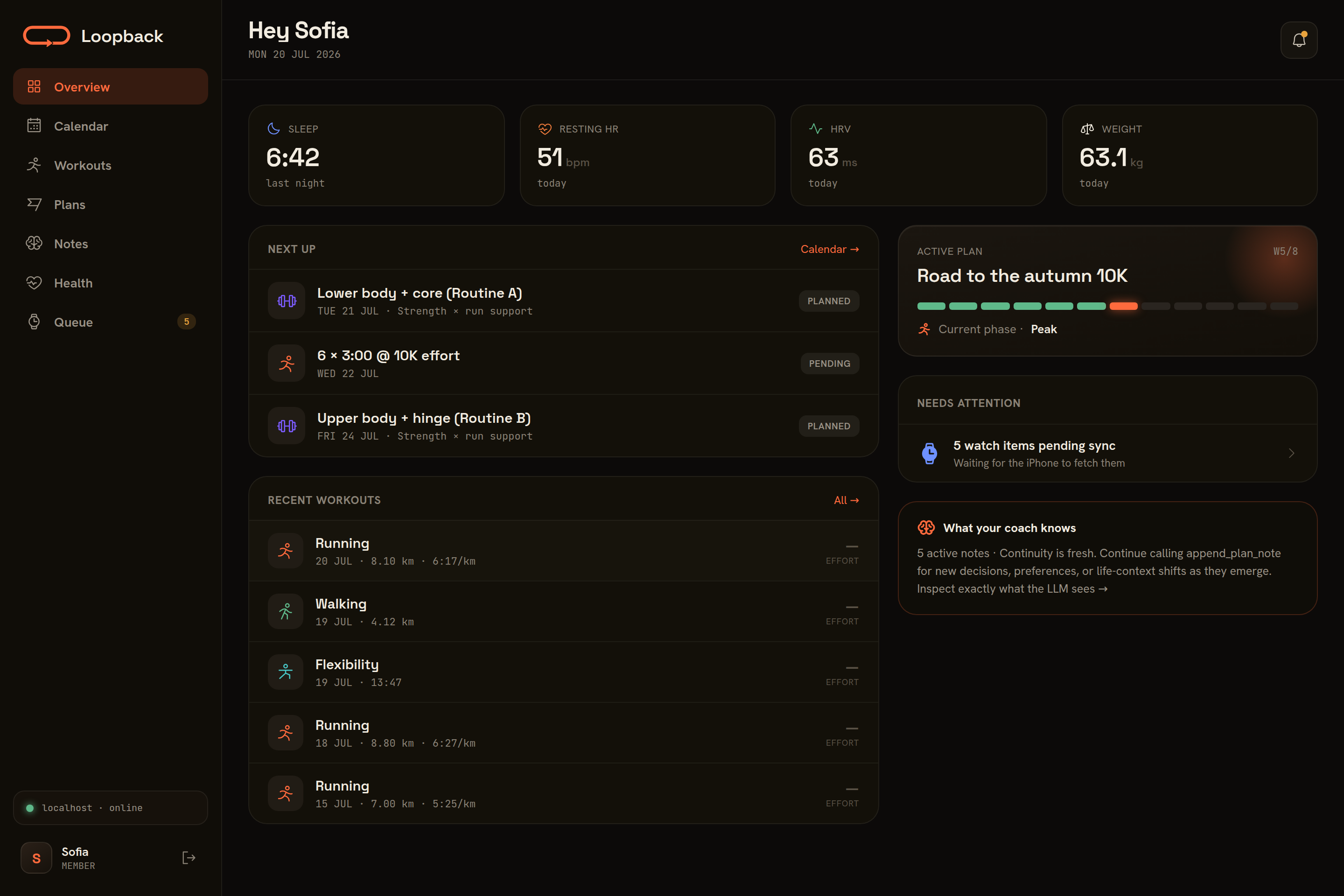
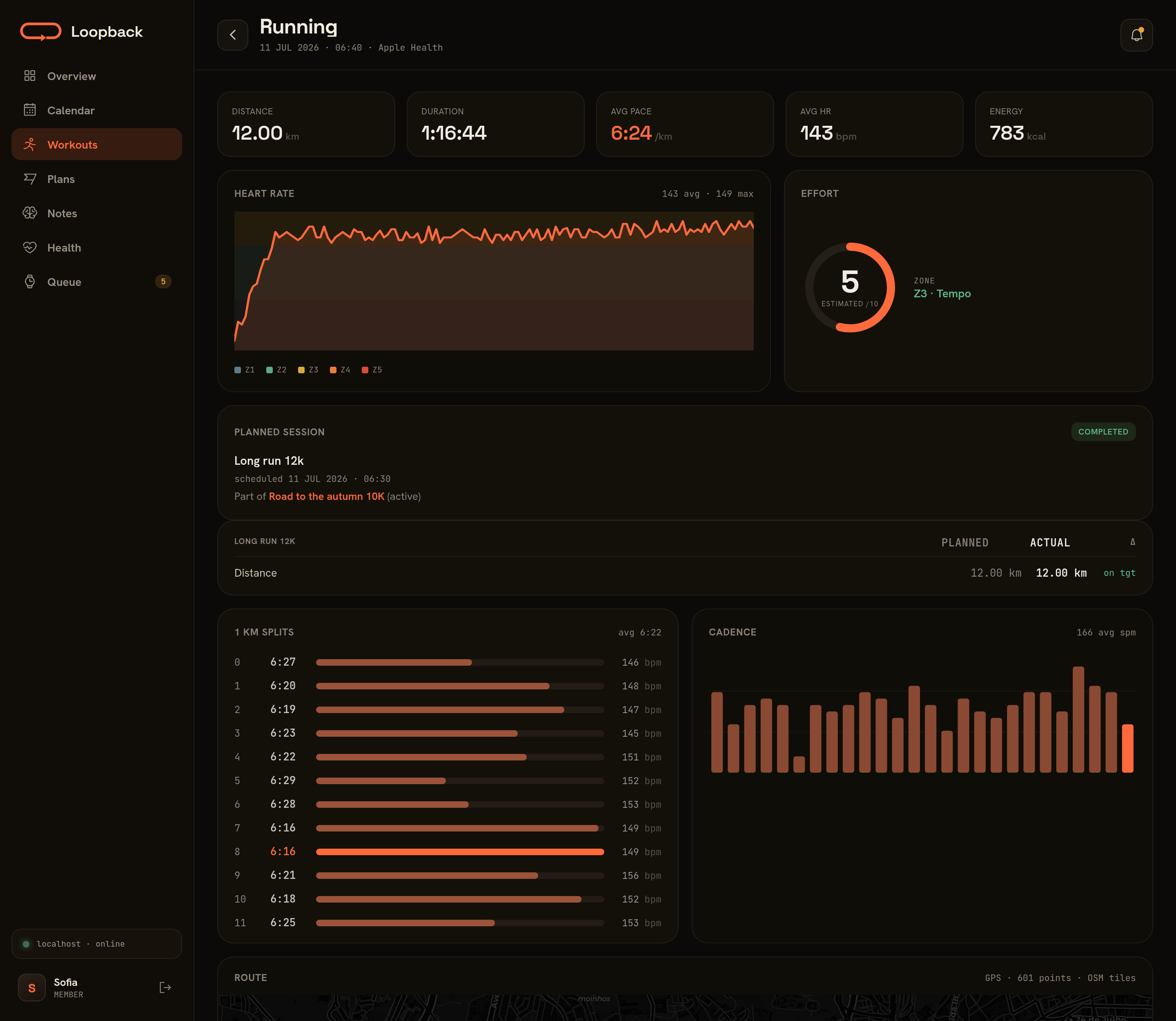
| Workout detail | Health trends |
|---|---|
 |
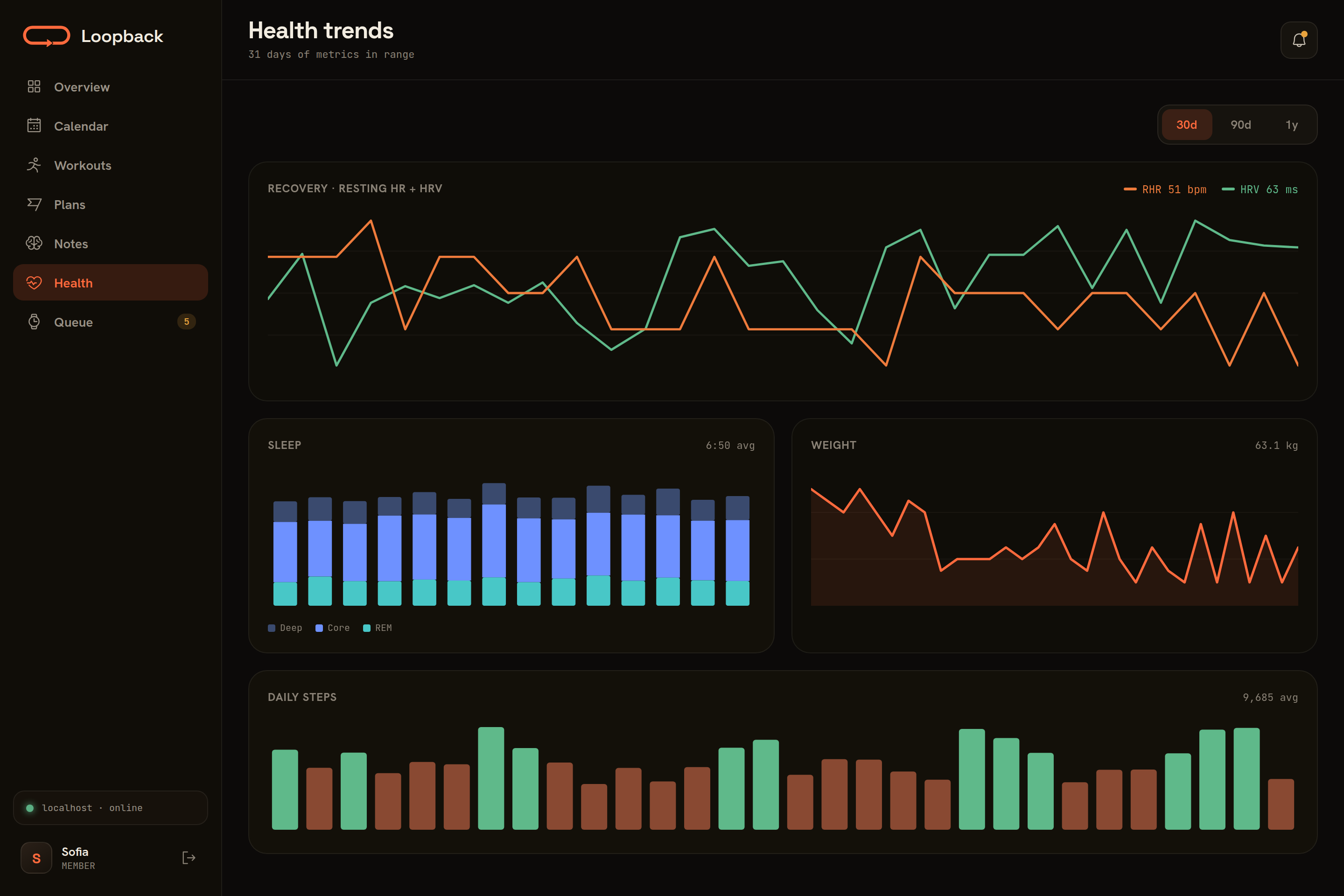 |
Demo data shown; every screen is scoped to the signed-in athlete.
Features
- Workout storage — CRUD API for workouts with activity type, distance, duration, heart rate, splits, and arbitrary JSONB data
- Analytics — Summary endpoints with aggregation by week, month, or year
- Training queue — Queue structured workouts (intervals, warmup/cooldown, pace alerts) for sync to Apple Watch via an iOS companion app
- Workout actions — Edit or delete workouts already synced to Apple Watch via pending action queue
- Device inventory — Track what workouts are currently on the user's Apple Watch
- Missed workout feedback — Record and query feedback when users miss scheduled workouts, with pattern detection for coaching
- Training plans — Create and manage training plans with goals, guardrails, phases, and athlete context stored as flexible JSONB metadata, plus an explicit completion flow (rating + feedback fed back to the coaching context)
- Scheduling & calendar — Attach a recurring weekly cadence to a plan and query a unified calendar that merges queued runs with scheduled strength sessions, flagging conflicts
- Plan validation — A deterministic "linter" for upcoming schedules: weekly-ramp and taper checks, missing down weeks, back-to-back hard days, guardrail breaches, strength-day collisions — warnings, never blocks (
POST /api/plans/{id}/validate, also returned when queueing) - Health metrics — Bulk upsert daily HealthKit metrics (sleep, HR, HRV, weight, VO2Max, steps, body composition) with date-based upsert
- Nutrition — Daily dietary totals from HealthKit (energy, macros, fiber, sodium, water, caffeine + open-ended micronutrients), and a summary endpoint that aligns intake with body weight and training load per week or month, including protein g/kg — so diet can be read against performance in one query. Only energy and the macros are true daily totals; the rest are lower bounds, because food databases record them on a fraction of entries — the MCP tells the coach so it can't read a sparse sum as a deficiency
- Plan-workout linking — Link queued workouts to plans (
plan_id) and recorded workouts to their planned counterpart (plan_workout_id) for planned-vs-actual analysis - Multi-user — Username/password accounts with per-device API tokens (
POST /api/auth/login); all data is scoped per user - Web dashboard — Authenticated React SPA served same-origin by the API: overview, calendar, workouts, plans, health charts, and queue for athletes; user management and system monitoring for admins
- Admin & monitoring — Per-user token inspection/revoke (cut off one stolen device), sync-freshness per athlete, an auth audit trail (logins, password/token/user changes), and a system screen reporting DB size and backup freshness
- MCP server — Let AI assistants query your training data, create workouts and plans, and correlate health metrics via natural language
Quick Start
Prerequisites
- Docker with Docker Compose v2.24 or newer
1. Clone and configure
git clone https://github.com/aderaaij/loopback-training-server.git
cd loopback-training-server
cp .env.example .env
Everything in .env has a sensible default (the comments in the file explain each one) — for a first install you don't need to edit anything.
2. Start
docker compose up -d # or: make up
The first start pulls a prebuilt multi-arch image from GHCR (amd64/arm64; if the pull fails it builds from source instead, which takes a few minutes — docker compose build forces that) and runs the database migrations. The API and dashboard are then at http://localhost:8001 (verify with curl http://localhost:8001/api/health).
3. Create your admin account
Open http://localhost:8001 — a fresh install greets you with a setup screen. Create the admin account there and you land signed in. Admins get the management console (Users + System); regular accounts get the training dashboard.
For headless or scripted installs, set BOOTSTRAP_ADMIN_PASSWORD in .env before the first start instead — the account is created at boot and the setup screen never appears. Either way, setup closes permanently once the admin has a password; if you ever lock yourself out, recovery is the CLI (docker compose exec app python -m app.cli set-password admin).
4. Add your household
One instance serves a household: a handful of accounts, all data scoped per user, and no open registration — the admin creates every account.
- As
admin, open Users and create an account for each athlete (roleuser). - Each athlete signs into the dashboard with their username + password.
- In the iOS app, each athlete enters the server URL plus their username + password; the app logs in and stores a per-device token.
- Optional AI-coach access: each athlete mints a token in the dashboard (Settings → Create token) for their own MCP client (see MCP Server).
Passwords, per-device tokens (revoke one stolen device without touching the rest), and deactivation are all managed in the dashboard. The same operations exist as a CLI fallback:
docker compose exec app python -m app.cli --help
Try it with demo data
Want to see a filled-in dashboard before wiring up your own data? A disposable demo stack ships with the repo — its own compose project, database volume, and port, fully isolated from a real deployment:
docker compose -f docker-compose.demo.yml up -d
python3 scripts/seed_demo.py        # stdlib only, no dependencies
The seeder creates a synthetic athlete and ~16 weeks of realistic training through the public API: runs with splits, heart rate, cadence and GPS routes along the Lisbon riverfront, Hevy-style strength sessions, daily health metrics, nutrition logs (deliberately imperfect: a fifth of days unlogged, one week missed, today still in progress), a completed and an active training plan with a strength schedule, queued watch sessions (one skipped, with feedback), and coaching notes. The screenshots above are this data.
Then open http://localhost:8011 and sign in as athlete sofia / sofia-demo (or admin admin / demo-admin for the management console). The seeder also prints an API token you can point an MCP client at.
Tear it down (wipes the demo database, touches nothing else):
docker compose -f docker-compose.demo.yml down -v
Exposing the server
The iOS app and dashboard just need to reach port 8001 — over HTTPS, or over HTTP on a network you trust. Options, safest first:
- Tailscale (recommended): install Tailscale on the server and each phone; clients use
http://<machine-name>:8001inside the tailnet and nothing is exposed to the internet. If the app must also work for people outside your tailnet, Tailscale Funnel can publish the port (e.g.tailscale funnel --bg --https 8443 8001). - Reverse proxy: put Caddy / nginx / Traefik with a real certificate in front and forward to
127.0.0.1:8001. - LAN only: fine for trying it out, but the app syncs in the background, so a phone that leaves the house needs one of the options above.
If the server ends up publicly reachable: login is rate-limited (5/min/IP), there is no registration endpoint (the first-run setup endpoint closes permanently once the admin account exists), and the admin System screen shows an auth audit trail — but public exposure still means strong passwords on every account.
Backups
The server backs itself up. A nightly pg_dump (03:30 container time by default) is written into the BACKUP_HOST_DIR mount (default ./backups), keeping the newest 30 dumps; if the server was off at backup time it catches up shortly after starting. Upgrades that include database migrations take an extra dump right before migrating. The admin System screen reports backup freshness (green < 26 h old) and has a Back up now button. Tune with BACKUP_TIME, BACKUP_KEEP, and TZ in .env.
The dumps are plain pg_dump | gzip files — point BACKUP_HOST_DIR at (or sync it to) somewhere off-machine and you're covered. One caveat for NAS setups: the database volume itself must live on local disk — Postgres data over NFS/SMB is the classic self-hoster corruption trap; syncing the dump directory to the NAS is the safe way to get backups off-machine. Restore with:
gunzip -c <dump>.sql.gz | docker exec -i postgres__training-api psql -U training-api training-api
Prefer to manage backups yourself? Set BACKUP_ENABLED=false, mount the directory read-only (:ro in an override file), and run something like this on the host — the System screen reports freshness on whatever training-api-*.sql.gz files it finds either way:
# crontab -e
30 3 * * * docker exec postgres__training-api pg_dump -U training-api training-api | gzip > /path/to/backups/training-api-$(date +\%F).sql.gz
Releases & upgrading
Releases are git tags (vX.Y.Z) with notes in CHANGELOG.md; each one publishes multi-arch Docker images to GHCR. Three kinds of image tags exist:
| Image tag | Meaning |
|---|---|
0.1.0 |
An exact release — immutable |
0.1 |
The latest patch release of a minor line |
latest |
Every push to main — may be ahead of any release |
Compose runs latest by default. Once you depend on the server day-to-day, pin a release in .env — especially if something like Watchtower auto-pulls your containers, since latest tracks unreleased main:
IMAGE_TAG=0.1
To upgrade: skim the changelog, then
docker compose pull && docker compose up -d
Database migrations run automatically on startup, and an upgrade with pending migrations dumps the database first (see Backups). The running version is reported by GET /api/health and on the admin System screen. Versioning is semantic, with the usual 0.x caveat: breaking changes bump the minor version until 1.0, so 0.1 → 0.2 deserves a changelog read while 0.1.x → 0.1.y is always safe.
Configuration
Everything is configured through environment variables in the root .env (read by Docker Compose):
| Variable | Default | Purpose |
|---|---|---|
BOOTSTRAP_ADMIN_PASSWORD |
(unset) | Headless alternative to the browser setup screen: pre-sets the first-run admin password. Applied only while the admin has none, so rotating it later is a no-op |
BOOTSTRAP_ADMIN_USERNAME |
admin |
First-run admin username |
POSTGRES_PASSWORD / POSTGRES_USER / POSTGRES_DB |
training-api |
Database credentials (not published outside the compose network; also fed to the app as DATABASE_URL) |
API_PORT |
8001 |
Host port for the API + dashboard |
BACKUP_HOST_DIR |
./backups |
Host directory the server writes its pg_dump backups to (and reports freshness from) |
BACKUP_ENABLED |
true |
Server-managed backups: nightly dump, catch-up after downtime, pre-migration dump. false = bring your own (see Backups) |
BACKUP_TIME |
03:30 |
Nightly backup time, container-local (set TZ to make it your local time) |
BACKUP_KEEP |
30 |
How many dumps to keep — older training-api-*.sql.gz files in the backup dir are pruned |
TZ |
UTC | Container timezone (e.g. Europe/Lisbon), used by BACKUP_TIME |
CARTO_API_KEY |
(unset) | Route maps use CARTO's dark tiles, which now require a free API key (non-commercial, up to 5M requests/month, from CARTO); without one the map shows an "API key required" watermark. Setting this switches to the keyed CARTO URL |
MAP_TILE_URL |
(unset) | Use any other tile provider: a Leaflet URL template ({s} {z} {x} {y} {r} and a ?key=… query are fine). Overrides CARTO_API_KEY |
MAP_TILE_ATTRIBUTION |
© OpenStreetMap © CARTO |
Attribution line shown on the map (HTML allowed); set it to match your provider |
MAP_TILE_SUBDOMAINS |
abcd |
Only used when MAP_TILE_URL contains {s} |
IMAGE_TAG |
latest |
Docker image tag for the app service — pin a release like 0.1 or 0.1.0 (see Releases & upgrading) |
Running the backend outside Docker reads backend/config/.env instead (template: backend/config/.env.example).
Upgrading from a pre-auth version: keep your old API_KEY set in backend/config/.env — the migration seeds it as a token owned by the admin account, so existing clients keep working while you move them to per-user tokens.
Web dashboard
The frontend/ directory holds the React 19 + TypeScript SPA (Vite, TanStack Query, hand-rolled SVG charts, Leaflet route maps). The Docker build bakes frontend/dist into the image and FastAPI serves it at / with an SPA fallback — same origin, no CORS.
Signing in as a regular user shows the athlete screens (overview, calendar, workouts, plans, notes, health, queue). Admins get a management console instead: Users (account CRUD, per-device token revoke, sync freshness) and System (backup freshness, DB size, auth activity feed).
cd frontend
npm run dev        # Vite dev server on :5173, proxies /api → localhost:8001
npx tsc -b         # typecheck
npm run build      # production build (also run inside the Docker build)
API
All endpoints except /api/health and /api/auth/login require a Bearer token in the Authorization header. Tokens are issued per device by POST /api/auth/login (username + password, rate-limited 5/min/IP); /api/admin/* additionally requires the admin role.
Wire casing: JSON casing varies by resource — auth, admin, feedback, and calendar are camelCase; workouts, queue, plans, and health metrics are snake_case.
Auth
| Method | Endpoint | Description |
|---|---|---|
GET |
/api/auth/setup |
Whether first-run setup is open ({"required": bool}; unauthenticated) |
POST |
/api/auth/setup |
Create the first admin account (returns a signed-in session; 409 once an admin exists) |
POST |
/api/auth/login |
Log in, mint a per-device token (bad credentials → 401) |
GET |
/api/auth/me |
Current user + their tokens |
POST |
/api/auth/password |
Change own password (revokes every other token) |
POST |
/api/auth/tokens |
Mint a named token (shown once; optional expiresAt) |
DELETE |
/api/auth/tokens/{id} |
Revoke one of your own tokens |
Admin
| Method | Endpoint | Description |
|---|---|---|
GET |
/api/admin/users |
List users with token stats + sync freshness |
POST |
/api/admin/users |
Create a user |
PATCH |
/api/admin/users/{id} |
Activate/deactivate (deactivation revokes all tokens) |
POST |
/api/admin/users/{id}/password |
Reset a user's password |
GET |
/api/admin/users/{id}/tokens |
List a user's tokens |
DELETE |
/api/admin/users/{id}/tokens/{tid} |
Revoke a single token (one stolen device) |
GET |
/api/admin/events |
Auth audit trail (logins, password/token/user changes; prunes >365d on read) |
GET |
/api/admin/system |
Backup freshness, DB size, row counts, migration head |
Workouts
| Method | Endpoint | Description |
|---|---|---|
POST |
/api/workouts |
Create or upsert a workout |
GET |
/api/workouts |
List workouts (filters: activity_type, start_after, start_before, plan_workout_id, limit, offset) |
GET |
/api/workouts/summary |
Aggregated stats by period (week/month/year) and activity type |
GET |
/api/workouts/{id} |
Get workout detail |
GET |
/api/workouts/{id}/splits |
Get per-split breakdown |
GET |
/api/workouts/{id}/heartrate |
Get heart rate samples |
DELETE |
/api/workouts/{id} |
Delete a workout |
Training Queue
| Method | Endpoint | Description |
|---|---|---|
POST |
/api/queue |
Queue a structured workout (response carries an additive validation key with schedule warnings) |
POST |
/api/queue/batch |
Queue several workouts at once → {items, validation} envelope |
GET |
/api/queue |
List queue items (filter by status) |
GET |
/api/queue/pending |
List pending items |
PATCH |
/api/queue/{id} |
Edit a queue item's fields |
PATCH |
/api/queue/{id}/status |
Update item status (pending / fetched / synced / completed / skipped) |
DELETE |
/api/queue/{id} |
Delete a queue item |
GET |
/api/workouts/queue |
App-facing: get pending workouts as WorkoutKit compositions |
GET |
/api/workouts/queue/scheduled?from= |
App-facing: delivered, still-due workouts as compositions; the app restores missing ones onto a new or reinstalled phone's watch |
PATCH |
/api/workouts/queue/{id} |
App-facing: confirm install → synced (never downgrades completed/skipped) |
DELETE |
/api/workouts/queue/{id} |
App-facing: mark item as synced (persists the record) |
Workout Actions
| Method | Endpoint | Description |
|---|---|---|
GET |
/api/workouts/actions |
List pending edit/delete actions |
POST |
/api/workouts/actions |
Create an edit or delete action |
POST |
/api/workouts/actions/batch |
Create multiple actions at once |
DELETE |
/api/workouts/actions/{id} |
Acknowledge a processed action |
Device Inventory
| Method | Endpoint | Description |
|---|---|---|
PUT |
/api/workouts/inventory |
Sync full on-device workout snapshot (idempotent replace) |
GET |
/api/workouts/inventory |
Get stored inventory |
Missed Workout Feedback
| Method | Endpoint | Description |
|---|---|---|
POST |
/api/workouts/feedback |
Record feedback for a missed workout (upsert by workoutId; action: "skip" retires the queue item) |
GET |
/api/workouts/feedback |
Retrieve feedback history (filters: since, limit, action) |
Training Plans
| Method | Endpoint | Description |
|---|---|---|
POST |
/api/plans |
Create a training plan |
GET |
/api/plans |
List plans (filters: status, activity_type; includes computed progress + finishable) |
GET |
/api/plans/{id} |
Get plan with metadata |
PATCH |
/api/plans/{id} |
Update plan fields |
POST |
/api/plans/{id}/complete |
Complete an active plan (rating/feedback stored as a coaching note) |
POST |
/api/plans/{id}/validate |
Deterministic schedule check → {plan_id, warnings, weeks} (ramp, taper, collisions, guardrails) |
DELETE |
/api/plans/{id} |
Delete a plan (queue items keep plan_id set to null) |
GET |
/api/plans/{id}/workouts |
Get all queued workouts for a plan |
GET |
/api/plans/{id}/schedule |
Read the plan's recurring weekly cadence, resolved to dated sessions |
PUT |
/api/plans/{id}/schedule |
Set the cadence (collisions with queued runs are warned, not blocked) |
DELETE |
/api/plans/{id}/schedule |
Clear the cadence |
Calendar
| Method | Endpoint | Description |
|---|---|---|
GET |
/api/schedule/calendar?from=&to= |
Unified timeline merging queued runs + scheduled strength sessions, each with a conflict flag |
Plan Notes
| Method | Endpoint | Description |
|---|---|---|
POST |
/api/plan-notes |
Add a cross-conversation coaching note |
GET |
/api/plan-notes |
List notes (filters: plan_id, kind, conversation_id, since_days, limit) |
GET |
/api/plan-notes/context |
Condensed coaching context (plans + notes) for LLM consumption |
GET |
/api/plan-notes/{id} |
Get a note |
PATCH |
/api/plan-notes/{id} |
Update a note |
DELETE |
/api/plan-notes/{id} |
Delete a note |
Health Metrics
| Method | Endpoint | Description |
|---|---|---|
POST |
/api/health/metrics |
Bulk upsert daily health metrics (null fields preserved) |
GET |
/api/health/metrics |
Query metrics (required: start_date, optional: end_date) |
Nutrition
| Method | Endpoint | Description |
|---|---|---|
POST |
/api/nutrition |
Bulk upsert daily dietary totals (null fields preserved) |
GET |
/api/nutrition |
Query daily rows (required: start_date; optional: end_date, limit) |
GET |
/api/nutrition/summary |
Intake, body weight and training load per period (optional: period=week|month, timezone) |
DELETE |
/api/nutrition/{date} |
Remove a whole day's row |
MCP Server (optional)
The mcp/ directory contains a FastMCP server that exposes training data to AI assistants (e.g., Claude).
Setup
cd mcp
cp config/.env.example config/.env
Edit mcp/config/.env — set TRAINING_API_KEY to a token for the account the MCP should act as (mint one in the dashboard: Settings → Create token):
TRAINING_API_URL=http://localhost:8001
TRAINING_API_KEY=your-api-token-here
Run
uv run start
The default transport is stdio (for direct MCP clients like Claude Desktop). Set MCP_TRANSPORT=http (with optional MCP_HOST / MCP_PORT) to serve streamable HTTP at /mcp instead — useful behind a reverse proxy or on a home server.
Multi-user: an Authorization header on an incoming HTTP MCP request is forwarded to the backend as-is, so each caller acts as their own user. Set REQUIRE_AUTH_HEADER=true to disable the TRAINING_API_KEY fallback entirely.
Loopback Training MCP questions
How can I use an AI assistant as a running coach?
You can use the optional MCP server to let AI assistants query your training data, create workouts and plans, and correlate health metrics via natural language.
Can I use this for multiple people?
Yes, one instance can serve a household where the admin creates individual accounts for each athlete, and all data is scoped per user.