
Reduces cloud LLM token costs by using local small language models to distill and shrink tool outputs before they are sent to the provider.
Also known as zenithfoundry/slm-gate, @zenithfoundry/slm-gate
- Stars
- 3
- Tools
- —
- Downloads, 30 days
- —
- Latest version
- —
- Last commit
- Nov 14, 2026
- License
- MIT
What is slm-gate MCP?
slm-gate reduces cloud LLM token costs by using local small language models to distill and shrink tool outputs before they are sent to the provider.
Summary generated from the project's README
About slm-gate MCP server
Developers looking to extend their AI coding plan usage or reduce pay-per-token costs can use slm-gate to compress large tool outputs. By running two small local models via Ollama, this system shrinks sprawling command outputs, long logs, and massive files before they are sent to cloud providers. This ensures that only the most relevant information reaches your paid LLM, helping your subscription window last longer.
The setup involves running the server locally on macOS or Linux with at least 16 GB of RAM and Node.js. It functions through two distinct components: an MCP gate that sits in front of your existing tools and a model gate that acts as a local address for AI requests. It is compatible with various clients including Claude Code, Cursor, Codex, Gemini CLI, and Cline. While it manages the data flow, all actual AI requests still use your own provider login and credentials.
What you can do with it
- 1Reduce token consumptionShrink large files and long logs before they are sent to a cloud AI provider.
- 2Recover elided informationRetrieve lines of code that were removed during the compression process using the expand_elision tool.
- 3Query compressed data locallyAsk questions about the content of shrunk text without sending the full text to the cloud.
- 4Track cost savingsMonitor how many tokens are saved and estimate remaining usage minutes through a local ledger.
Written from the project's README. Every use case is checked against a quote from it.
How to install slm-gate MCP
Formats verified 10 Nov 2026Add to CursorAdd to GooseInstall slm-gate MCP in Claude Code
$ claude mcp add slm-gate -- npx -y @zenithfoundry/slm-gateInstall slm-gate MCP in Cursor
~/.cursor/mcp.json
{
  "mcpServers": {
    "slm-gate": {
      "command": "npx",
      "args": [
        "-y",
        "@zenithfoundry/slm-gate"
      ]
    }
  }
}Install slm-gate MCP in VS Code
.vscode/mcp.json
{
  "servers": {
    "slm-gate": {
      "type": "stdio",
      "command": "npx",
      "args": [
        "-y",
        "@zenithfoundry/slm-gate"
      ]
    }
  }
}Install slm-gate MCP in VS Code CLI
$ code --add-mcp '{"name":"slm-gate","type":"stdio","command":"npx","args":["-y","@zenithfoundry/slm-gate"]}'Install slm-gate MCP in Claude Desktop
claude_desktop_config.json
{
  "mcpServers": {
    "slm-gate": {
      "command": "npx",
      "args": [
        "-y",
        "@zenithfoundry/slm-gate"
      ]
    }
  }
}Install slm-gate MCP in Codex
$ codex mcp add slm-gate -- npx -y @zenithfoundry/slm-gateInstall slm-gate MCP in Codex config.toml
~/.codex/config.toml
[mcp_servers.slm-gate]
command = "npx"
args = ["-y", "@zenithfoundry/slm-gate"]
Install slm-gate MCP in Gemini CLI
$ gemini mcp add -s user slm-gate npx -- -y @zenithfoundry/slm-gateInstall slm-gate MCP in Gemini settings.json
~/.gemini/settings.json
{
  "mcpServers": {
    "slm-gate": {
      "command": "npx",
      "args": [
        "-y",
        "@zenithfoundry/slm-gate"
      ]
    }
  }
}Automated checks
Ran Nov 14, 2026Full report →Passed our automated checks. That is not a security audit: read the code and give the server the narrowest access it needs. How checks work · What to fix for more points

- Source repository linked and reachablezenithfoundry/slm-gate is public and reachablegithub.com/zenithfoundry/slm-gate ↗Pass
- Package names this repository as its source@zenithfoundry/slm-gate names zenithfoundry/slm-gate as sourcenpmjs.com/package/@zenithfoundry/slm-gate ↗Pass
- Build provenance (Sigstore attestation)Sigstore attestation for @zenithfoundry/slm-gatenpmjs.com/package/@zenithfoundry/slm-gate/v/1.5.0#provenance ↗Pass
- Open source license (OSI)MITspdx.org/licenses/MIT.html ↗Pass
- Commit or release in the last yearLast commit or release 2026-11-07github.com/zenithfoundry/slm-gate ↗Pass
- OpenSSF ScorecardOpenSSF Scorecard 6.7 / 10; weakest: Maintained 0, Code-Review 0, Vulnerabilities 0scorecard.dev/viewer/?uri=github.com/zenithfoundry/slm-gate ↗Partial 10/15
- Package name not close to a popular packageNo popular package one edit away from @zenithfoundry/slm-gatePass
- No critical advisory in the package or its dependenciesNot checked
- No hidden instructions to the model0 tool descriptions and the README read; no override phrases, credential paths or hidden charactersPass
- Destructive tools are labelledNot checked
- Remote endpoint answers the MCP handshakeNot checked
README
View on GitHubslm-gate
Make your AI coding plan last longer. Two small local models shrink the large tool output your coding assistant sends to the paid cloud, and keep a short memory of each conversation. Works with Claude Code, Codex, Cursor, Gemini CLI, Cline and any MCP client. Runs on Ollama. Free and MIT-licensed.
See the live savings dashboard → Measured from real daily use.














What is slm-gate?
Your coding tool sends huge files, long logs and sprawling command output to the cloud AI with every message, and most of it is content the AI skims past. slm-gate (the CLI short name of small-language-model-gate) runs two small, free AI models on your own computer and shrinks that text before it leaves your machine. It never answers a prompt itself: every request still goes to the provider your tool uses, with your own login. Less is sent, so your plan's usage window lasts longer, and on a pay-per-token key you pay less for the same work.
It is two small servers, started for you:
- The MCP gate sits in front of your tools (optionally a whole toolbox such as Tech-Lead-Stack) and shrinks what they return before your coding tool sees it. It adds a few tools of its own:
expand_elisiongets cut lines back,ask_elisionanswers a question about them locally, andfind_existinglists code your repository already has. - The model gate is a local address your coding tool sends its AI requests to. It shrinks the new tool output in each request, forwards it to the provider with your tool's own login, and keeps a short memory of the conversation so its local steps answer with the conversation in view.
Both record what they saved in a local ledger, which slm-gate metrics, the built-in dashboard and (optionally) Langfuse read. Nothing is billed differently, and less of your code leaves your machine.
How it works
If a local model fails or runs out of time, the text it was working on goes on as it was.
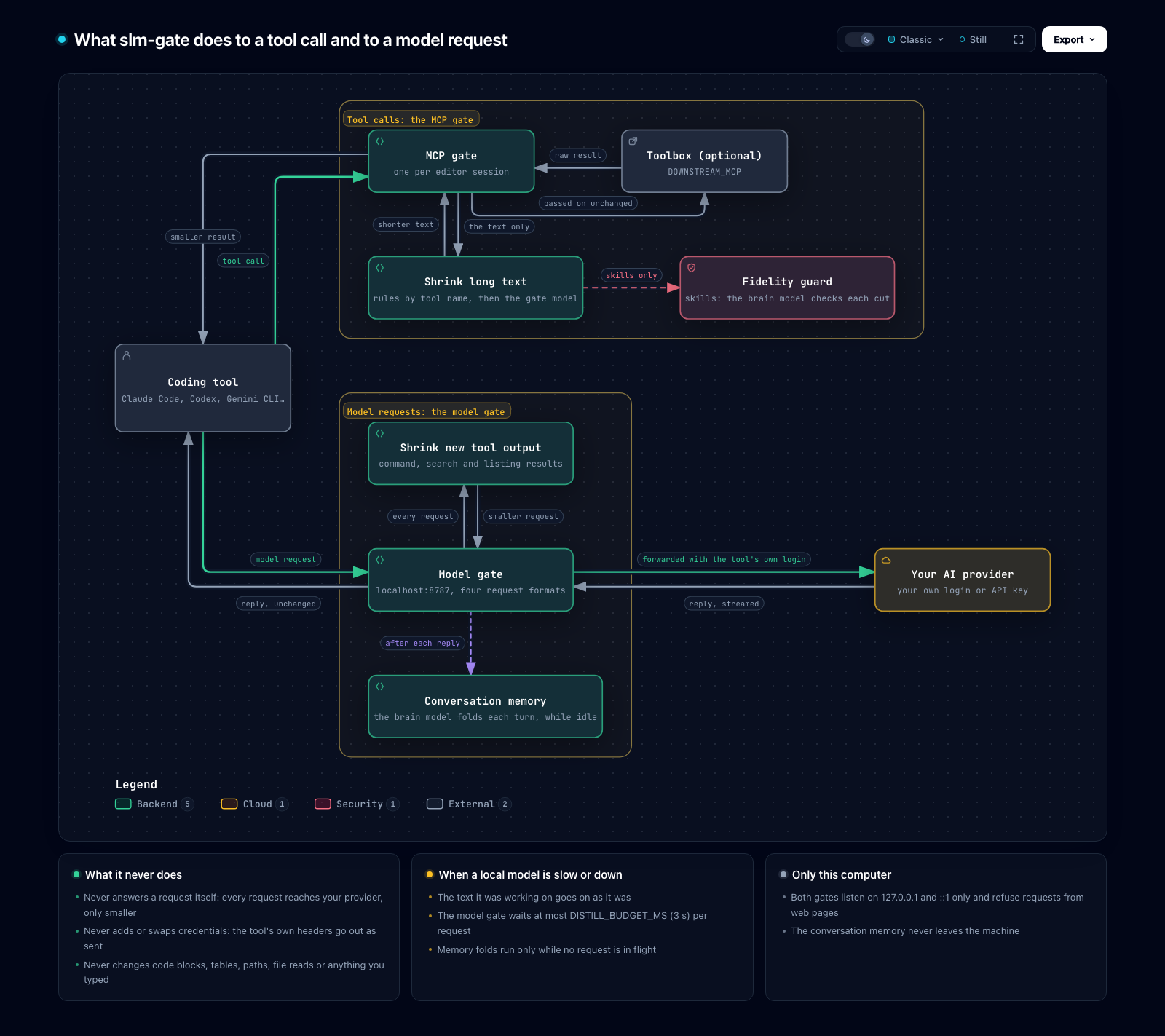
Explore it: request-path.html (open in a browser; nodes expand, paths can be traced).
Both gates write one row per request to the local ledger: token counts before and after, the route taken and timings, never the text. Minutes of your usage window are estimated from your plan.
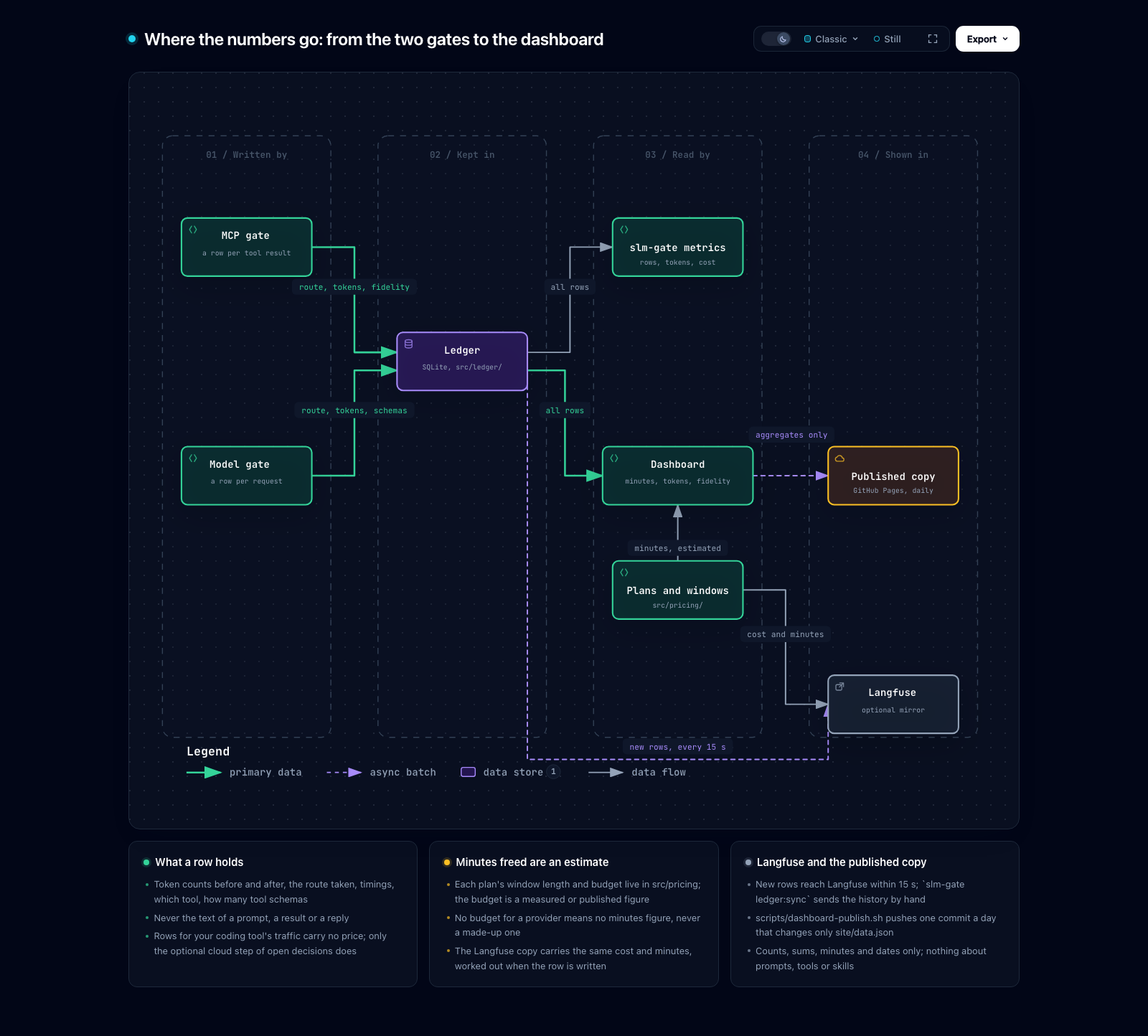
Explore it: where-the-data-goes.html (open in a browser; nodes expand, paths can be traced).
Step by step, with the diagrams for one tool call, one model request and the start-up: How it works.
Quick Start
You need a Mac or Linux computer with 16 GB of RAM or more, Node.js 22+ and Ollama running.
npm install -g @zenithfoundry/slm-gate
slm-gate init        # creates ~/.slm-gate/.env for this computer's RAM; --profile starter|proven|toolbox
slm-gate doctor      # after the `ollama pull` line init printed; ends with READY
Then add an MCP server to your coding tool that runs slm-gate with the argument mcp. For Claude Code: claude mcp add --scope user slm-gate -- slm-gate mcp. doctor also prints the one line that sends the tool's own AI requests through the gate. Every step, every tool: Install.
Rather have an AI assistant set it up? After the install line, paste the AI setup prompt into Claude Code, Codex, Gemini CLI or any other assistant. It checks your computer, asks a few questions, and connects everything.
From source (to change slm-gate itself): Set up from source.
Documentation
All pages, in reading order, with a glossary: docs/README.md.
| Section | Pages |
|---|---|
| Installed from npm | Install · Profiles · Connect your tool · Daily use · Measure your savings · AI-assisted setup |
| From source (contributors) | Set up from source · Switch to npm · Diagrams · Architecture · AGENTS.md |
| Reference (both) | Settings · Hardware · How it works · Analytics |
Contributing & Security
Pull requests are welcome; read the contributing guide first. For help, and what is supported, see support. Please report security problems privately, as the security policy describes, not in a public issue.
Related Project
[!NOTE] Tech-Lead-Stack: An agent-agnostic library of Markdown "skills" plus an MCP server that turns Claude, Gemini, or GPT into a full software-delivery team (planning, building, review, security, release), organized around a nine-phase lifecycle.
slm-gatecan sit in front of it and shrink its skill payloads:slm-gate init --profile toolbox.Explore tech-lead-stack on GitHub →
Intended Use
This software runs locally and drives third-party AI tools and models that you install and authenticate. You are responsible for complying with the terms of any tool, model, or subscription you connect to it. It is designed for single-user, local use with your own accounts; it does not proxy or share third-party credentials between users. Provided "as is" under the MIT License, without warranty of any kind.
License
slm-gate MCP questions
How do I add slm-gate MCP to Claude Code?
Run claude mcp add slm-gate -- npx -y @zenithfoundry/slm-gate in your terminal. Add --scope user to make it available in every project.
How do I add slm-gate MCP to Cursor?
Open ~/.cursor/mcp.json and add the server under mcpServers, using the Cursor config shown in the install section above.
Does slm-gate answer prompts itself?
No, it never answers a prompt itself; every request still goes to the provider your tool uses with your own login.
What happens if the local model fails?
If a local model fails or runs out of time, the text it was working on is sent as it was without being shrunk.
Does it store my conversation text?
No, the local ledger only records token counts, routes, and timings, but never the actual text.