
fbrcm MCP server
Commit Nov 13, 2026Manage Firebase Remote Config through an interactive TUI or a CLI designed for automation and multi-project workflows.
Also known as yumauri/fbrcm
- Stars
- 1
- Tools
- —
- Downloads, 30 days
- —
- Latest version
- —
- Last commit
- Nov 13, 2026
- License
- MIT
What is fbrcm MCP?
fbrcm manages Firebase Remote Config through an interactive TUI or a CLI designed for automation and multi-project workflows.
Summary generated from the project's README
About fbrcm MCP server
fbrcm provides a specialized management interface for Firebase Remote Config through a terminal user interface or a command line interface. It is designed for developers and automation engineers who need to manage configurations across multiple Firebase projects simultaneously. Users can interact with the tool locally via a TUI for visual exploration or use the CLI for scripted, repeatable operations in CI runners or LLM agent workflows.
The tool supports several authentication methods including Google OAuth, service account JSON keys, and existing Google Cloud CLI credentials. It enables complex workflows such as comparing configurations between projects, staging changes as local drafts before publishing, and tracing parameter selection using the explain command. For automation, the CLI offers machine-readable JSON output and command discovery through specific capabilities commands. This makes it a versatile choice for managing both client and server templates within a single workspace.
What you can do with it
- 1Automated configuration deploymentAn AI agent or CI runner can execute repeatable operations using the CLI with machine-readable JSON output.
- 2Multi-project configuration comparisonA developer can compare and promote specific configurations between different Firebase projects or template types.
- 3Safe configuration stagingUsers can stage related changes as local drafts to review them before they are published to Firebase.
Written from the project's README. Every use case is checked against a quote from it.
Configuration
FBRCM_GOOGLE_OAUTH_CLIENT_IDFBRCM_GOOGLE_OAUTH_CLIENT_SECRETINSTALL_DIR
| Name | Description | |
|---|---|---|
| FBRCM_GOOGLE_OAUTH_CLIENT_ID | — | |
| FBRCM_GOOGLE_OAUTH_CLIENT_SECRET | — | |
| INSTALL_DIR | — |
Automated checks
Ran Nov 15, 2026Full report →Not verified yet. A server needs a score of 80, no serious finding, and enough data for us to check. How checks work · What to fix for more points

- Source repository linked and reachableyumauri/fbrcm is public and reachablegithub.com/yumauri/fbrcm ↗Pass
- Package names this repository as its sourceNot checked
- Build provenance (Sigstore attestation)Not checked
- Open source license (OSI)MITspdx.org/licenses/MIT.html ↗Pass
- Commit or release in the last yearLast commit or release 2026-11-13github.com/yumauri/fbrcm ↗Pass
- OpenSSF ScorecardNot checked
- Package name not close to a popular packageNot checked
- No critical advisory in the package or its dependenciesNot checked
- No hidden instructions to the model0 tool descriptions and the README read; no override phrases, credential paths or hidden charactersPass
- Destructive tools are labelledNot checked
- Remote endpoint answers the MCP handshakeNot checked
README
View on GitHubfbrcm
fbrcm is a terminal manager for Firebase Remote Config. Use its interactive
TUI to explore and edit projects, or use the CLI for scripts, repeatable
operations, and machine-readable output.
Starting with 1.0.0, documented CLI behavior, JSON contracts, MCP tools, and durable persisted data have compatibility guarantees. Human table layouts, default TUI bindings, and exported Go packages are outside that stability promise.
[!TIP] Using
fbrcmfrom an LLM agent, script, or CI runner? Start with the agent quickstart. Machine-readable command discovery is also available throughfbrcm capabilities --json.
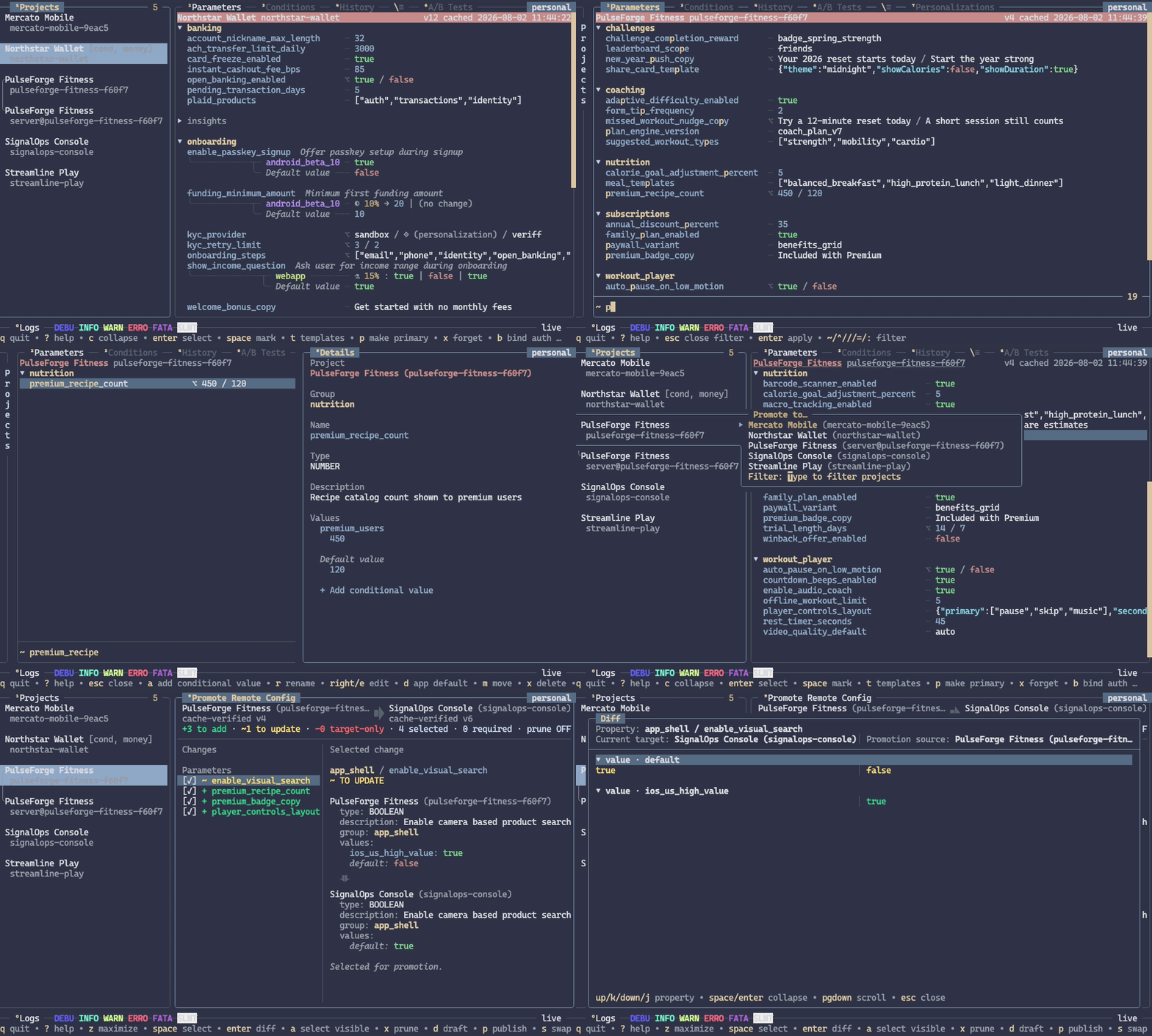
[!CAUTION] This project is almost completely vibe-coded.
[!TIP] Already using the official Firebase CLI? See fbrcm vs. Firebase CLI for feature parity, command equivalents, and the Remote Config workflows fbrcm adds.
fbrcm is most useful when work spans more than one Firebase project:
- inspect parameters, groups, conditions, and version history;
- trace parameter selection with CLI
explainor preview requests interactively with TUI Context, both available since 1.1.0; - compare and promote configuration between projects or template types;
- stage related changes as local drafts before publishing;
- import, export, validate, roll back, and restore Remote Config templates;
- manage client and server templates from the same workspace.
Installation
macOS and Linux
Install the latest release:
curl -sSfL https://raw.githubusercontent.com/yumauri/fbrcm/main/install.sh | sh
The installer verifies the release archive against checksums.txt before
extracting it, using sha256sum or shasum.
The installer places fbrcm in /usr/local/bin by default. To use another
directory:
curl -sSfL https://raw.githubusercontent.com/yumauri/fbrcm/main/install.sh |
  INSTALL_DIR="$HOME/.local/bin" sh
With Homebrew 7.0.11 or newer:
brew tap yumauri/tap
brew install --cask fbrcm
Windows
Install the latest release from PowerShell:
irm https://raw.githubusercontent.com/yumauri/fbrcm/main/install.ps1 | iex
The installer places fbrcm.exe in
%LOCALAPPDATA%\Programs\fbrcm\bin by default and adds that directory to your
user PATH. To use another directory:
$env:INSTALL_DIR = 'C:\Tools\fbrcm'
irm https://raw.githubusercontent.com/yumauri/fbrcm/main/install.ps1 | iex
With Scoop:
scoop bucket add yumauri https://github.com/yumauri/scoop-bucket
scoop install fbrcm
Other options
Download an archive from GitHub Releases, or install from source with Go 1.27.3 or newer:
go install github.com/yumauri/fbrcm@latest
Official release binaries include fbrcm's Google OAuth Desktop client. A plain
source build leaves it out. In that build, the google authentication method
reports that the built-in client is unavailable. The oauth,
service-account, and gcloud methods continue to work.
For local development, build with a Desktop client from values in the current shell. This does not add the client JSON to the repository or runtime configuration:
export FBRCM_GOOGLE_OAUTH_CLIENT_ID="$(jq -r '.installed.client_id' /path/to/client-secret.json)"
export FBRCM_GOOGLE_OAUTH_CLIENT_SECRET="$(jq -r '.installed.client_secret' /path/to/client-secret.json)"
go run ./cmd/genoauthclient
go build -tags=fbrcm_google_auth .
go run ./cmd/genoauthclient -clean
Use a local development client unless you have access to the official release credentials.
When both OAuth environment variables are unset, the generator produces an uncredentialed local build in which Google sign-in is unavailable. Setting only one variable is an error. The official release workflow requires both secrets and stops before building if either is missing, empty, or whitespace-only.
First run
Start the TUI:
fbrcm
For guided setup in the command-line interface instead, run:
fbrcm setup
On a new profile, fbrcm opens guided TUI setup. Both guided setup paths support:
- Google sign-in using fbrcm's built-in shared OAuth client;
- an OAuth Desktop app client;
- a service-account JSON key;
- existing Google Cloud CLI Application Default Credentials.
The identity needs access to the projects you want to manage. Project discovery
uses the Cloud Resource Manager API. Template reads, validation, publication,
defaults, and history use the Firebase Remote Config API. The apps commands
use the Firebase Management API to list registered apps, inspect them, and
download their SDK configuration.
fbrcm requests the broad cloud-platform OAuth scope because Google's
interactive consent flow rejects the narrower firebase.remoteconfig scope,
while the grantable firebase scope is insufficient for Remote Config. This
Firebase discussion
reports the same limitation. The Firebase Management API accepts
cloud-platform for the read-only apps commands, so those commands do not
need another scope. Its read-only scopes would not cover Remote Config writes.
fbrcm limits its Google API calls to Cloud Resource Manager, Firebase Remote
Config, and Firebase Management. See the privacy policy for the
data-access, local-storage, and deletion details.
After setup, run the built-in diagnostic whenever you need to check credentials, connectivity, API access, permissions, or local storage:
fbrcm doctor
See TUI setup and workflows for the full-screen path, or guided CLI setup for the line-oriented path.
A quick tour
Run fbrcm with no arguments for the TUI. Press ? anywhere to open the
searchable action palette; it shows the shortcuts that are relevant to the
current panel.
Any argument selects CLI mode:
# Refresh and list accessible projects.
fbrcm projects list --update

# List the Firebase apps that conditions can target.
fbrcm apps list my-app

# Inspect one parameter across matching projects.
fbrcm get feature_enabled --project '^prod'

# Preview a change without writing it.
fbrcm update feature_enabled --project '=my-app' --type boolean --value true --dry-run

# Stage the same change in a local draft.
fbrcm update feature_enabled --project '=my-app' --type boolean --value true --draft

# Review and publish the draft.
fbrcm draft diff my-app --against current
fbrcm draft publish my-app
Repositories can give stable environment names to physical Firebase projects:
fbrcm projects aliases import --from .firebaserc --dry-run
fbrcm projects aliases set staging acme-staging-42
fbrcm projects aliases set prod acme-production-42
fbrcm projects diff staging prod
fbrcm projects promote client@staging server@prod --dry-run
fbrcm reads Firebase CLI aliases from .firebaserc and native aliases from the
nearest .fbrcm.toml. Both are repository-scoped, profile-independent, and
normally committed for the team and CI. Conflicting definitions are rejected;
identical definitions are shared. Canonical project IDs remain in Firebase
requests, caches, drafts, and automation output.
Every CLI command supports a shared versioned automation contract. Add
--json to receive one envelope on success or failure, with typed data,
structured errors, semantic exit status, and execution context:
fbrcm update feature_enabled --project '=my-app' --type boolean --value true --yes --json
Use --type json --value '<json>' when the parameter value is JSON. Agents can
discover commands with fbrcm capabilities --json and embedded schemas with
fbrcm schema list --json. See the CLI machine contract
for the envelope, errors, exit statuses, non-interactive rules, and schemas.
Project and parameter filters support fuzzy, prefix, contains, and exact modes. Expression filters can also inspect typed values and complete Remote Config context:
fbrcm get --expr 'value == true'
fbrcm projects list --expr '"feature_enabled" in keys(parameters)'
Drafts and safe writes
Remote Config publication replaces a complete template, so fbrcm treats review as part of the write workflow:
- write commands show a diff and normally ask for confirmation;
- publication
--dry-runuses Firebase's validation endpoint, then suppresses publication and local writes; --draftstages supported mutations in the active profile;- draft publication rebases local intent onto current Firebase state and stops on conflicts;
- multi-project publication is non-atomic: each project succeeds or fails independently, and fbrcm reports every result.
Client and server templates have independent drafts, caches, and histories.
Use an explicit target such as client@my-project or
server@my-project when the configured default is not the one you want.
Configuration
The TUI key map, theme, and active-profile preference can be stored in the global
config.toml or a repository .fbrcm.toml. fbrcm searches from the current
directory to the filesystem root, then deeply overlays the nearest local file
on the global configuration. Inspect the effective configuration and its
sources with:
Profile-specific configuration and cache state is stored under
profiles/<name> within the corresponding application root.
fbrcm config show
fbrcm config path
fbrcm config path --scope local
For example:
fbrcm config set powerline_glyphs false
fbrcm config set nerd_font_glyphs true
fbrcm config set theme nord
fbrcm config set keys.projects.refresh u ctrl+r
fbrcm config set network.max_concurrent_requests 3
fbrcm config set network.requests_per_minute 30
fbrcm config set network.rate_limit_cooldown 30s
fbrcm config set network.retry.max_attempts 5
fbrcm config validate
fbrcm config edit --scope local
nerd_font_glyphs is disabled by default. Enable it when the terminal uses a
Nerd Font to add platform icons to human apps list and apps show output.
Native repository project aliases use a local-only table and can also be edited directly:
[projects.aliases]
staging = "acme-staging-42"
prod = "acme-production-42"
Firebase CLI aliases under the top-level .firebaserc projects object are
also resolved automatically. Use fbrcm projects aliases import --from .firebaserc to copy them into the native table.
Network requests share a configurable concurrency limit and Firebase 429
cooldowns across workers. A positive
network.requests_per_minute paces requests by API and quota consumer when set
to a positive value. Its default of zero disables proactive pacing. Retry
attempts, exponential delays, and jitter are configurable under
network.retry. Configuration files stay sparse. fbrcm applies built-in values
in memory and does not write them during startup. Use fbrcm config show keys
as the authoritative key-name reference, or fbrcm config edit --full to stage
a complete generated template.
Themes are shareable TOML files stored under the user-wide themes directory.
See Theming for installation, inheritance, fallback rules,
and the complete color-token reference.
Profiles keep authentication, project selection, drafts, and caches separate.
Use Ctrl+P in the TUI or fbrcm profile --help in the CLI.
Documentation
| Guide | Use it for |
|---|---|
| Agent quickstart | Noninteractive discovery, safe mutation, structured recovery, and automation pitfalls |
| TUI guide | Setup, panels, shortcuts, editing, drafts, history, promotion, and key configuration |
| Theming | Shared CLI/TUI themes, inheritance, color tokens, and fallback behavior |
| CLI reference | Complete command tree, flags, output contracts, template targets, and write behavior |
| Expression filters | Expression contexts, typed values, helper functions, and jq queries |
| Architecture | Package boundaries and maintainer invariants |
| Root group keys | Internal root-parameter representations |
| Privacy policy | Google API data access, OAuth scope rationale, local storage, sharing, and deletion |
| Terms of Service | Rules and responsibilities for using the official application and website |
Every CLI command also has focused help:
fbrcm --help
fbrcm projects promote --help
Build from source
The module currently requires Go 1.27.3 or newer:
git clone https://github.com/yumauri/fbrcm.git
cd fbrcm
go build -o fbrcm .
go test ./...
Documentation site
The VitePress site uses curated Markdown under docs/site/. It also generates
the website's command index and per-command reference pages from docs/CLI.md
and schemas/capabilities.json.
cd docs
npm ci
npm run dev
Use npm run build to create a production build locally.
Edit the matching command section in docs/CLI.md to update its website
reference page. Put workflow walkthroughs in the curated site guides.
The development and production commands generate the human-readable
/privacy-policy page from the repository-root PRIVACY.md and copy the
repository-root llms.txt and LICENSE byte-for-byte to /llms.txt and
/LICENSE.txt. Production builds also generate /THIRD_PARTY_NOTICES.txt from
the packages bundled into the site. Edit only the root source files,
docs/licenses/, and the notice generator; their generated website copies are
ignored by Git.
Security notes
Treat OAuth client files, OAuth tokens, and service-account keys as secrets.
Use fbrcm auth path <auth-id> to locate identity files.
Do not store secrets in Remote Config values. Applications can receive and inspect the parameters available to them.
Cached historical templates may outlive Firebase's retained history. Clearing the fbrcm cache can therefore remove the only remaining local copy of an old template. Drafts are separate and are deleted only through explicit draft or project cleanup operations.
Acknowledgments
fbrcm was inspired by Dmitrii Andriianov's RemoteConfigModifier. I discovered it while looking for a tool that could batch-update Firebase Remote Config across several projects, and it gave me the motivation to build fbrcm.
RemoteConfigModifier is a smaller Rust project with a more focused feature set. fbrcm is an independent implementation and does not reuse any of its code.
License
fbrcm is licensed under the MIT License. Third-party components keep their own licenses, reproduced in THIRD_PARTY_NOTICES.
fbrcm MCP questions
How can I use fbrcm with an LLM agent?
You can use the agent quickstart guide and leverage machine-readable command discovery via the capabilities command.
What authentication methods are supported?
Supported methods include Google sign-in via a built-in OAuth client, OAuth Desktop apps, service-account JSON keys, and existing Google Cloud CLI Application Default Credentials.
Can I preview changes before they are published to Firebase?
Yes, you can use the --dry-run flag to validate changes using Firebase's validation endpoint without actually publishing them.