
gitpro MCP server
Commit Nov 6, 2026Lets an AI client inspect Git identities, SSH keys, and repository configurations to ensure correct commit signatures and user details.
Also known as Yantrakar/gitpro
- Stars
- 0
- Tools
- —
- Downloads, 30 days
- —
- Latest version
- 0.4.6
- Last commit
- Nov 6, 2026
- License
- MIT
What is gitpro MCP?
gitpro lets an AI client inspect Git identities, SSH keys, and repository configurations to ensure correct commit signatures and user details.
Summary generated from the project's README
About gitpro MCP server
Gitpro provides a way for AI clients and developers to manage multiple Git identities, SSH keys, and commit signatures across different repositories. It functions by analyzing remote URLs to determine whether to use work or personal credentials, ensuring that the correct email and signing keys are applied to every project. This tool is designed for users who manage separate GitHub or GitLab accounts and want to avoid accidental commits with the wrong user details.
The server runs locally on Linux or macOS and requires Git 2.36+, Python 3.9+, and OpenSSH. It works by inspecting existing Git and SSH configurations, repository settings, and SSH keys. Users can set up the environment using the gitpro setup command, which proposes identities based on a scan of existing repositories. Once configured, an AI agent can use the MCP server to inspect identities and repository configurations to maintain strict separation between professional and personal work.
What you can do with it
- 1Verify repository identityAsk the AI to explain why a specific repository is using a certain email or SSH key.
- 2Identify configuration mismatchesRequest a list of all repositories that currently have incorrect identity settings.
- 3Prevent incorrect commitsUse a safety mechanism to block commits that use the wrong identity for a specific host.
Written from the project's README. Every use case is checked against a quote from it.
How to install gitpro MCP
Formats verified 10 Nov 2026Install gitpro MCP in Claude Code
$ claude mcp add gitpro -- uvx gitproInstall gitpro MCP in Cursor
~/.cursor/mcp.json
{
  "mcpServers": {
    "gitpro": {
      "command": "uvx",
      "args": [
        "gitpro"
      ]
    }
  }
}Install gitpro MCP in VS Code
.vscode/mcp.json
{
  "servers": {
    "gitpro": {
      "type": "stdio",
      "command": "uvx",
      "args": [
        "gitpro"
      ]
    }
  }
}Install gitpro MCP in Claude Desktop
claude_desktop_config.json
{
  "mcpServers": {
    "gitpro": {
      "command": "uvx",
      "args": [
        "gitpro"
      ]
    }
  }
}Install gitpro MCP in Codex
~/.codex/config.toml
[mcp_servers.gitpro]
command = "uvx"
args = ["gitpro"]
Install gitpro MCP in Gemini CLI
~/.gemini/settings.json
{
  "mcpServers": {
    "gitpro": {
      "command": "uvx",
      "args": [
        "gitpro"
      ]
    }
  }
}README
View on GitHubgitpro
The right Git identity, SSH key and signature for every repository.
gitpro.dev · PyPI · VS Code · made by Yantrakar
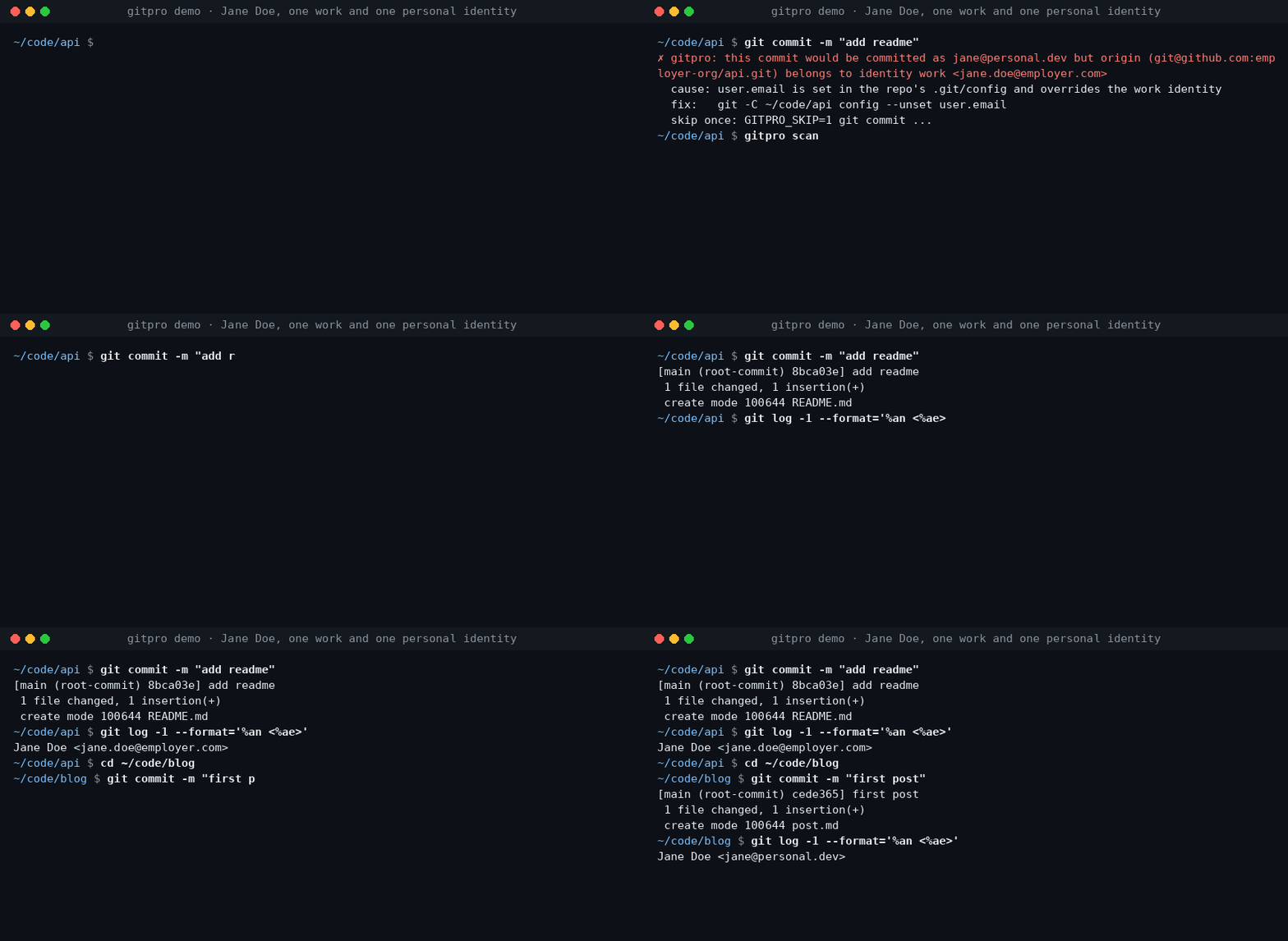
Work on a company repository, commit with your work email. Switch to a personal project, use your personal identity. Gitpro chooses by remote URL, not by where you happened to clone the repository.
Useful when you have more than one GitHub/GitLab account, separate work and personal keys, or keep finding the wrong email on your commits.
Try it
Requires Linux or macOS, Git 2.36+, Python 3.9+ and OpenSSH. Install from PyPI with pipx.
pipx install gitpro
gitpro setup
Setup offers to look through your repos and proposes your identities. Accept, edit or answer the questions yourself; no TOML editing is needed. One preview shows everything, including the commit guard and, with Claude Code, its hook and MCP server. One yes applies it all. Setup never changes your repos.
flowchart LR
  S["gitpro setup"] --> HC{"Config <br/>exists?"}
  HC -->|no| L["Read your repos, <br/>SSH config and <br/>editor recents, <br/>if you agree"]
  L --> Q["Propose <br/>identities; you <br/>accept or edit"]
  Q --> I
  HC -->|yes| I["Inspect config, <br/>Git and SSH files, <br/>keys, guard, <br/>agent hook, MCP"]
  I -->|all current| OK["Nothing <br/>to do"]
  I -->|something to do| PV["One preview, <br/>each part with <br/>its undo"]
  PV --> ASK{"Apply <br/>all?"}
  ASK -->|no| NONE["Nothing <br/>written"]
  ASK -->|yes| AP["Write it, print <br/>the public keys <br/>to register"]
  AP --> NX["Next: <br/>gitpro scan"]
Then:
gitpro why               # inside a repository: the expected identity and anything overriding it
gitpro scan              # repos that need a fix, with the command for each
Already have a config? gitpro setup brings this machine up to date with it.
gitpro setup -n only shows what is left to do. Prefer editing files? The
user guide covers the full TOML format.
What you get
- Work/personal separation: names, emails, SSH keys and signing per host/owner.
- Answers, not guesswork:
gitpro whyexplains mismatches and suggests a fix. - A safety net: optional hooks can block wrong-identity commits and pushes.
- Editor and container support: see your identity in VS Code and carry it into dev containers.
Gitpro generates ordinary Git and SSH configuration; it needs no background service. Changes can be previewed, existing hand-written files are backed up, and key uploads are never part of setup.
Using VS Code?
The extension shows the current identity and helps find repository-level overrides. It runs the same commands as the terminal. Install the extension.
Go further when you need to
AI agents get the same answers through the MCP server and the Claude Code hook: see agent workflows.
| I want to… | Start here |
|---|---|
| Understand matching, SSH keys or signing | Configuration |
| Find wrong identities or forgotten work | Daily use · Finding things |
| Use dev containers | Container setup |
| Configure team policy, CI or AI assistants | Teams and CI · AI assistants |
| Look up a command or undo changes | Command reference · Undo |
| Troubleshoot or contribute | Troubleshooting · Development |
Problems and questions
Run gitpro report to draft an issue with the versions and a redacted gitpro why; it shows
you the draft and opens nothing until you say yes. Or open an issue at github.com/Yantrakar/gitpro/issues.
Report a security problem privately with gitpro report --security, as the
security policy describes, not in a public issue.
License
gitpro MCP questions
How do I add gitpro MCP to Claude Code?
Run claude mcp add gitpro -- uvx gitpro in your terminal. Add --scope user to make it available in every project.
How do I add gitpro MCP to Cursor?
Open ~/.cursor/mcp.json and add the server under mcpServers, using the Cursor config shown in the install section above.
How does gitpro choose which identity to use?
Gitpro selects identities based on the remote URL rather than the local directory where the repository was cloned.
Can gitpro prevent me from making commits with the wrong email?
Yes, it provides an optional safety net through hooks that can block commits and pushes using the wrong identity.
Does gitpro require a background service to run?
No, it generates standard Git and SSH configurations and does not need a running background process.