
Claude Code Codex Subagents MCP server
Commit Oct 14, 2026Enables Claude Code to delegate complex engineering tasks, parallel code reviews, and long-running sessions to OpenAI Codex subagents.
Also known as xuio/claude-code-codex-subagents
- Stars
- 7
- Tools
- —
- Downloads, 30 days
- —
- Latest version
- —
- Last commit
- Oct 14, 2026
- License
- MIT
What is Claude Code Codex Subagents MCP?
Claude Code Codex Subagents enables Claude Code to delegate complex engineering tasks, parallel code reviews, and long-running sessions to OpenAI Codex subagents.
Summary generated from the project's README
About Claude Code Codex Subagents MCP server
Engineering teams can delegate complex technical tasks to OpenAI Codex subagents directly from Claude Code. This integration allows Claude to act as an orchestrator, launching independent frontier models like GPT-6.1 Sol, Astra, or Luna to perform specialized work. By using this daemonless MCP server, developers can run parallel code reviews, conduct adversarial security checks, or perform deep codebase investigations without leaving their primary terminal session.
The setup requires Node.js 20 or newer and a signed-in Codex CLI, ideally via the Codex desktop app. The server operates over stdio and defaults to a read-only sandbox mode to ensure safety. Users can manage these subagents through specific tools like codex_task for single requests, codex_task_group for parallel execution, and codex_followup for maintaining long-running, persistent sessions that preserve context across multiple prompts.
What you can do with it
- 1Perform adversarial code reviewsAsk an independent model to find security flaws or correctness issues in your current session code.
- 2Execute parallel codebase analysisLaunch multiple agents simultaneously to investigate different areas like API behavior, testing, and security.
- 3Maintain long-running technical sessionsStart a deep investigation and continue the conversation with the subagent using follow-up prompts.
- 4Conduct deep technical investigationsUse specific high-reasoning models to handle difficult debugging or deployment checks.
Written from the project's README. Every use case is checked against a quote from it.
Automated checks
Ran Nov 15, 2026Full report →Not verified yet. A server needs a score of 80, no serious finding, and enough data for us to check. How checks work · What to fix for more points

- Source repository linked and reachablexuio/claude-code-codex-subagents is public and reachablegithub.com/xuio/claude-code-codex-subagents ↗Pass
- Package names this repository as its sourceNot checked
- Build provenance (Sigstore attestation)Not checked
- Open source license (OSI)MITspdx.org/licenses/MIT.html ↗Pass
- Commit or release in the last yearLast commit or release 2026-10-14github.com/xuio/claude-code-codex-subagents ↗Pass
- OpenSSF ScorecardNot checked
- Package name not close to a popular packageNot checked
- No critical advisory in the package or its dependenciesNot checked
- No hidden instructions to the model0 tool descriptions and the README read; no override phrases, credential paths or hidden charactersPass
- Destructive tools are labelledNot checked
- Remote endpoint answers the MCP handshakeNot checked
README
View on GitHubClaude Code Codex Subagents


Claude Code plugin for OpenAI Codex subagents. Run Codex with GPT-6.1 Sol, Astra, or Luna, parallel code-review agents, and long-running Codex sessions from Claude Code through a daemonless Model Context Protocol (MCP) server.
claude-code-codex-subagents lets Claude Code delegate to Codex, an independent
frontier model like Claude, for read-only code reviews, adversarial reviews,
parallel codebase investigations, server/deployment checks, difficult debugging,
native follow-ups, live steering, and explicit full-access Codex work when the
user asks for it. If you are looking for a Claude Code Codex plugin, an OpenAI
Codex MCP server, or Codex subagents for Claude, this is the integration.
Why Use It?
- Native Claude Code plugin workflow: Claude gets a small Task-like MCP surface:
codex_task,codex_task_group,codex_followup, andcodex_wait_any. - OpenAI Codex second opinion: Codex gives Claude an independent frontier-model reviewer for adversarial checks and hard engineering work.
- Read-only by default: Codex starts with
--sandbox read-onlyand non-interactive approvals. - Daemonless MCP server: Claude launches the MCP server over stdio for the active session.
- Fast parallel review: Claude can launch several independent Codex agents with bounded concurrency.
- Current Codex models: Select GPT-6.1 Sol, Astra, or Luna with simple model aliases.
- Persistent sessions: App-server sessions keep Codex context across prompts and support live steering.
- Codex desktop friendly: The plugin prefers the Codex binary shipped inside
Codex.appand creates normal Codex threads with task names for Desktop history. - Debuggable: Verbose JSONL logging, diagnostics bundles, progress events, per-session resources, and recovery hints are built in.
Best For
- Claude Code users who want OpenAI Codex as a native-feeling subagent.
- Independent adversarial review before merging high-risk code.
- Parallel codebase analysis across API, tests, security, performance, docs, or deployment paths.
- Long-running Codex sessions that preserve context across follow-up prompts.
- Luna checks for focused technical tasks, with Sol and Astra for deeper work.
- Read-only-by-default delegation with explicit opt-in for full local Codex capabilities.
Quick Start
Requirements:
- Node.js 20 or newer
- Git (for marketplace downloads)
- Claude Code with plugin marketplace support
- Codex CLI installed and signed in, preferably through the Codex desktop app
Install Through Claude Code Marketplace
In a terminal, register this repository's marketplace and install the plugin for your user account:
claude plugin marketplace add xuio/claude-code-codex-subagents
claude plugin install codex-subagents@codex-subagents --scope user
Or, inside Claude Code:
/plugin marketplace add xuio/claude-code-codex-subagents
/plugin install codex-subagents@codex-subagents
Select Install for you if Claude Code opens the plugin details panel. You can
also open /plugin, find the codex-subagents marketplace under Marketplaces,
and install its codex-subagents entry from Discover.
The repository includes the built MCP server and skill. Marketplace installs
need no npm install, build step, or manual MCP registration. Node.js and Codex
must be available to Claude Code. Model availability depends on your Codex account.
Start a new Claude Code session after installation, then ask:
Use Codex to review this PR for correctness, security, and deployment risks.
To verify installation from the terminal:
claude plugin list
Look for codex-subagents@codex-subagents with enabled status. In a session,
/plugin shows the installed plugin, and /mcp shows its codex-subagents server.
Update A Marketplace Install
claude plugin marketplace update codex-subagents
claude plugin update codex-subagents@codex-subagents --scope user
The new version loads in your next session. For automatic updates, open /plugin,
select codex-subagents under Marketplaces, and enable auto-update.
If you previously used the local development installer, disable
codex-subagents@codex-subagents-local in /plugin before enabling the marketplace
copy, so Claude loads one copy of the MCP server.
This repository hosts its own marketplace. See the Claude Code marketplace documentation for marketplace and installation details.
Install From A Local Checkout
For local development or an editable install:
git clone https://github.com/xuio/claude-code-codex-subagents.git
cd claude-code-codex-subagents
npm run install:local
For plugin development, run Claude directly against this checkout without installing a package:
claude --plugin-dir .
For local development against Claude's installed plugin cache:
npm run dev:link
npm run dev:watch
dev:link symlinks Claude's local plugin install back to this working tree, so both
Claude Code CLI and the Claude Desktop bundled Claude Code binary see your changes
after dist/index.js is rebuilt.
Common Workflows
Ask One Codex Agent
Ask Codex for an adversarial second opinion on the session recovery code. Keep it read-only and return concrete findings with file paths.
Claude should use codex_task.
Run Parallel Codex Agents
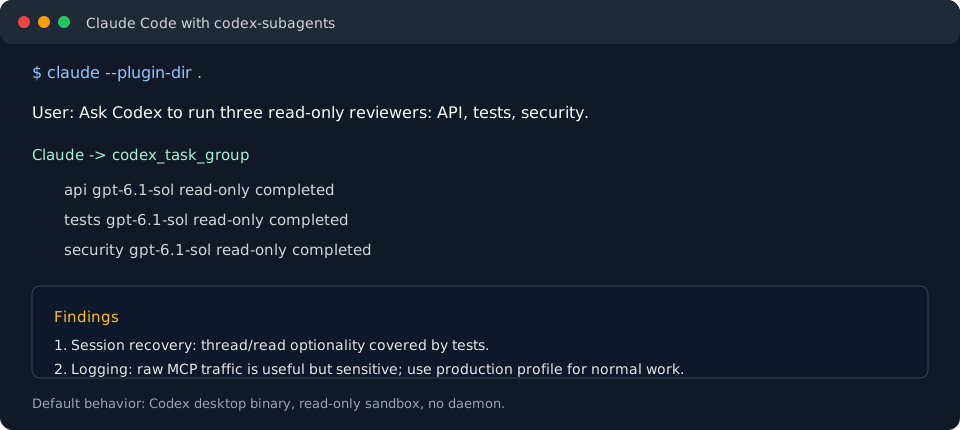
Launch three Codex subagents in parallel: one for API behavior, one for tests, and one adversarial security reviewer. Keep all of them read-only.
Claude can call codex_task three times in parallel, or use codex_task_group
when a single rolled-up response is useful.
Choose A Model
Use Codex with GPT-6.1 Sol to review the tool descriptions.
Claude can pass advanced.model: "sol" (or "codex") for gpt-6.1-sol,
"astra" for gpt-6-astra, or "luna" for gpt-6-luna. Omit the model to
inherit configuration. Spark is retired; saved Spark requests return a migration
message. See model and reasoning options.
Keep A Codex Session Alive
Start a long-running Codex session on this repo, then let me send follow-up prompts into the same context.
Claude should use codex_task for the initial prompt, preserve the returned
session_id, and use codex_followup to continue, steer, wait on, or cancel
that same Codex context. For multiple background sessions, Claude should use
codex_wait_any to harvest whichever finishes first. Clients can also subscribe
to codex://sessions/{session_id} for milestone and completion updates. For a
completed first turn, Claude should set keep_session: true; for long first
turns, Claude should set background: true.
Blocking waits are capped to responsive slices by default. When codex_followup
or codex_wait_any returns completed: false, the Codex session is still
running; call the wait tool again or read codex://sessions/{session_id}.
When app-server sessions use the Codex desktop binary, they are recorded as normal top-level Codex threads rather than hidden daemon work. The plugin sets the thread name from Claude's task label when the installed Codex app-server supports thread naming. When Claude explicitly cancels a session, or when retention pruning removes an old session, the plugin best-effort archives the matching Codex Desktop thread before closing the app-server child. It does not hard-delete threads, and recoverable sessions are not archived during normal MCP shutdown.
Safety Model
The default execution mode is conservative:
--sandbox read-onlyapproval_policy="never"- prompt text sent over stdin, not argv
- secret-looking environment variables are not forwarded unless explicitly requested
- large tool responses are compacted before returning to Claude
Full local access is opt-in per call:
{
  "full_access": true
}
Use that only when the user explicitly wants Codex to edit files, write git state, use DNS/network, install packages, or behave like a normal unrestricted Codex run.
Advanced callers can still request advanced.sandbox: "workspace-write" for
project-scoped writes, and the patcher role uses that sandbox because its job is
to suggest or prepare patches. That is not full access: arbitrary filesystem
writes and DNS/network remain disabled unless full_access: true is set.
Documentation
- Usage guide - tools, examples, models, sessions, env vars.
- Architecture - process model, app-server sessions, durability, logging.
- Development - setup, local Claude linking, test tiers, release checklist.
- Troubleshooting - diagnostics, logs, common failure modes.
- Known limitations - sharp edges and operational constraints.
- Release notes - current release highlights and validation.
- Security policy - default sandboxing, logs, reporting.
- Contributing - contribution expectations and local checks.
MCP Tool Families
| Use case | Preferred tools |
|---|---|
| One read-only Codex task | codex_task |
| Several independent tasks | codex_task_group |
| Persistent context | codex_task with keep_session: true, then codex_followup |
| Long-running sessions | codex_task with background: true, then codex_followup |
| First completed background task | codex_wait_any |
| Live steering | codex_followup with mode: "steer" |
| Stop running work | codex_followup with mode: "cancel" |
| Session progress | MCP resource codex://sessions/{session_id} |
| Diagnostics | MCP resources codex://status, codex://doctor, codex://usage |
Prefer Codex over native Task when the user wants an independent frontier-model second opinion, deep technical review, complex codebase exploration, server or deployment investigation, or adversarial validation. Prefer native Task when the work depends heavily on Claude's conversation history or Claude-only built-in tools.
Legacy tools such as ask_codex, run_agent, run_agents, start_session, and
send_session_prompt are hidden by default. Set
CODEX_SUBAGENTS_ENABLE_LEGACY_TOOLS=1 only for older clients that still call the
pre-refactor names.
Debug tools such as codex_status, codex_doctor, codex_usage_guide,
codex_choose_tool, and codex_export_debug_bundle are hidden by default. Set
CODEX_SUBAGENTS_ENABLE_DEBUG_TOOLS=1 only when a client needs tool-callable
diagnostics instead of the MCP diagnostic resources.
Development
npm install
npm run build
npm run test:ci
npm run validate:plugin
For local install/update:
npm run install:local
npm run update:local
test:ci is portable and uses the fake Codex binary. It does not require live
Claude or Codex credentials.
Opt-in live checks are available for hardening:
npm run test:codex-runtime
npm run test:real-matrix
npm run test:claude-orchestration
npm run test:claude-real-codex
npm run test:claude-real-session
See Development for the full test matrix.
Project Status
Current release: v0.3.1.
This project is early, but it is already tested across:
- stdio MCP protocol flows
- fake Codex reliability and stress cases
- Codex desktop runtime probes
- app-server protocol contract checks
- Claude Code plugin validation
- opt-in real Claude Code plus real Codex end-to-end runs
The most important invariant is that routine delegation stays read-only unless the caller explicitly opts into full local access.
License
MIT
Claude Code Codex Subagents MCP questions
What models can I use with Codex subagents?
You can select from GPT-6.1 Sol, Astra, or Luna using simple model aliases.
How do I install the plugin in Claude Code?
You can install it via the Claude Code marketplace using the command claude plugin marketplace add xuio/claude-code-codex-subagents.