
Create and edit flowcharts, mind maps, wireframes, and documentation directly within your Whimsical workspace using an AI client.
Also known as WhimsicalCode/mcp-server-guide, mcp-server-guide
- Stars
- 11
- Tools
- 14
- Downloads, 30 days
- —
- Latest version
- 1.1.0
- Last commit
- Oct 14, 2026
- License
- MIT
What is Whimsical MCP?
Whimsical creates and edit flowcharts, mind maps, wireframes, and documentation directly within your Whimsical workspace using an AI client. It exposes 14 tools, such as search, fetch, file_tree.
Summary generated from the project's README
About Whimsical MCP server
Generating editable flowcharts, mind maps, and wireframes from natural language prompts is what this official Whimsical MCP server enables. Instead of receiving static images, users get real, interactive files within their Whimsical workspace that team members can open, edit, and comment on. This tool works with various AI clients including Claude, ChatGPT, Cursor, and VS Code with GitHub Copilot by connecting to a remote endpoint hosted by Whimsical.
Developers and designers can use it to build complex architecture diagrams, sequence diagrams, and technical documentation. Beyond creation, the server can search existing workspaces, read boards, move files between folders, and manage comment threads. It uses OAuth 2.1 with PKCE for authentication, meaning no manual API key management is required. While the free plan allows for up to 50 board objects per month, paid plans offer unlimited object creation.
What you can do with it
- 1Visualize user authentication flowsAsk your AI client to generate a detailed flowchart representing a login process with decision nodes and labeled connectors.
- 2Design interactive UI wireframesInstruct an agent to build a settings page layout using containers, inputs, and buttons that follow a flexbox structure.
- 3Brainstorm project featuresUse the server to create a structured mind map for organizing mobile app features into specific branches.
- 4Manage existing workspace contentRequest the AI to find specific information within your current boards and summarize the findings.
Written from the project's README. Every use case is checked against a quote from it.
How to install Whimsical MCP
Formats verified 10 Nov 2026Add to CursorAdd to GooseInstall Whimsical MCP in Claude Code
$ claude mcp add --transport http mcp-server-guide https://mcp.whimsical.com/mcpInstall Whimsical MCP in Cursor
~/.cursor/mcp.json
{
  "mcpServers": {
    "mcp-server-guide": {
      "url": "https://mcp.whimsical.com/mcp"
    }
  }
}Install Whimsical MCP in VS Code
.vscode/mcp.json
{
  "servers": {
    "mcp-server-guide": {
      "type": "http",
      "url": "https://mcp.whimsical.com/mcp"
    }
  }
}Install Whimsical MCP in VS Code CLI
$ code --add-mcp '{"name":"mcp-server-guide","type":"http","url":"https://mcp.whimsical.com/mcp"}'Install Whimsical MCP in Codex
$ codex mcp add mcp-server-guide --url https://mcp.whimsical.com/mcpInstall Whimsical MCP in Codex config.toml
~/.codex/config.toml
[mcp_servers.mcp-server-guide]
url = "https://mcp.whimsical.com/mcp"
Install Whimsical MCP in Gemini CLI
$ gemini mcp add -s user --transport http mcp-server-guide https://mcp.whimsical.com/mcpInstall Whimsical MCP in Gemini settings.json
~/.gemini/settings.json
{
  "mcpServers": {
    "mcp-server-guide": {
      "url": "https://mcp.whimsical.com/mcp",
      "type": "http"
    }
  }
}Whimsical MCP tools 14
Detected from the READMEsearchfetchfile_treehow_tocreate_fileadd_board_contentadd_doc_contenteditwireframe_editauto_layoutdeletemove
| search | — | |
| fetch | — | |
| file_tree | — | |
| how_to | — | |
| create_file | — | |
| add_board_content | — | |
| add_doc_content | — | |
| edit | — | |
| wireframe_edit | — | |
| auto_layout | — | |
| delete | — | |
| move | — |
Show all 14 toolsShow fewer tools
comment_readcomment_edit
| comment_read | — | |
| comment_edit | — |
Automated checks
Ran Nov 13, 2026Full report →Passed our automated checks. That is not a security audit: read the code and give the server the narrowest access it needs. How checks work

- Source repository linked and reachablePass
- Open source license (OSI)Pass
- Commit or release in the last yearPass
- Package name not close to a popular packageNot checked
- Remote endpoint uses HTTPSPass
- Destructive tools are labelledNot checked
- No hidden instructions to the modelPass
- No critical advisory in the package or its dependenciesNot checked
README
View on GitHubWhimsical MCP Server
The official Whimsical MCP server. Ask Claude, ChatGPT, Cursor or any MCP client for a flowchart, mind map, sequence diagram, wireframe or architecture diagram, and it builds an editable Whimsical board in your workspace. You get a real file your team can open, edit and comment on, not a static image. The server can also search, read, edit and comment on the boards and docs you already have.
- Endpoint:
https://mcp.whimsical.com/mcp(hosted by Whimsical, Streamable HTTP, nothing to install) - Authentication: OAuth 2.1 with PKCE. There's no API key to manage.
- Plan: every tool works on the free plan, which includes up to 50 board objects a month. Paid plans have no object limit.
- Clients: Claude, Claude Code, ChatGPT, Cursor, VS Code with GitHub Copilot, Grok, Codex, and any client that supports remote MCP servers.

Quick start
In Claude Code:
claude mcp add --transport http whimsical https://mcp.whimsical.com/mcp
In other clients that support remote MCP servers, add a server with this URL and sign in to Whimsical when prompted:
https://mcp.whimsical.com/mcp
Then try: "Create a flowchart in Whimsical of our user signup flow." Setup steps for each client are below.
What you can build
Each example below is a prompt you can try. The agent creates the file in your Whimsical workspace and replies with a link. Clients that support it also show a preview in the chat.
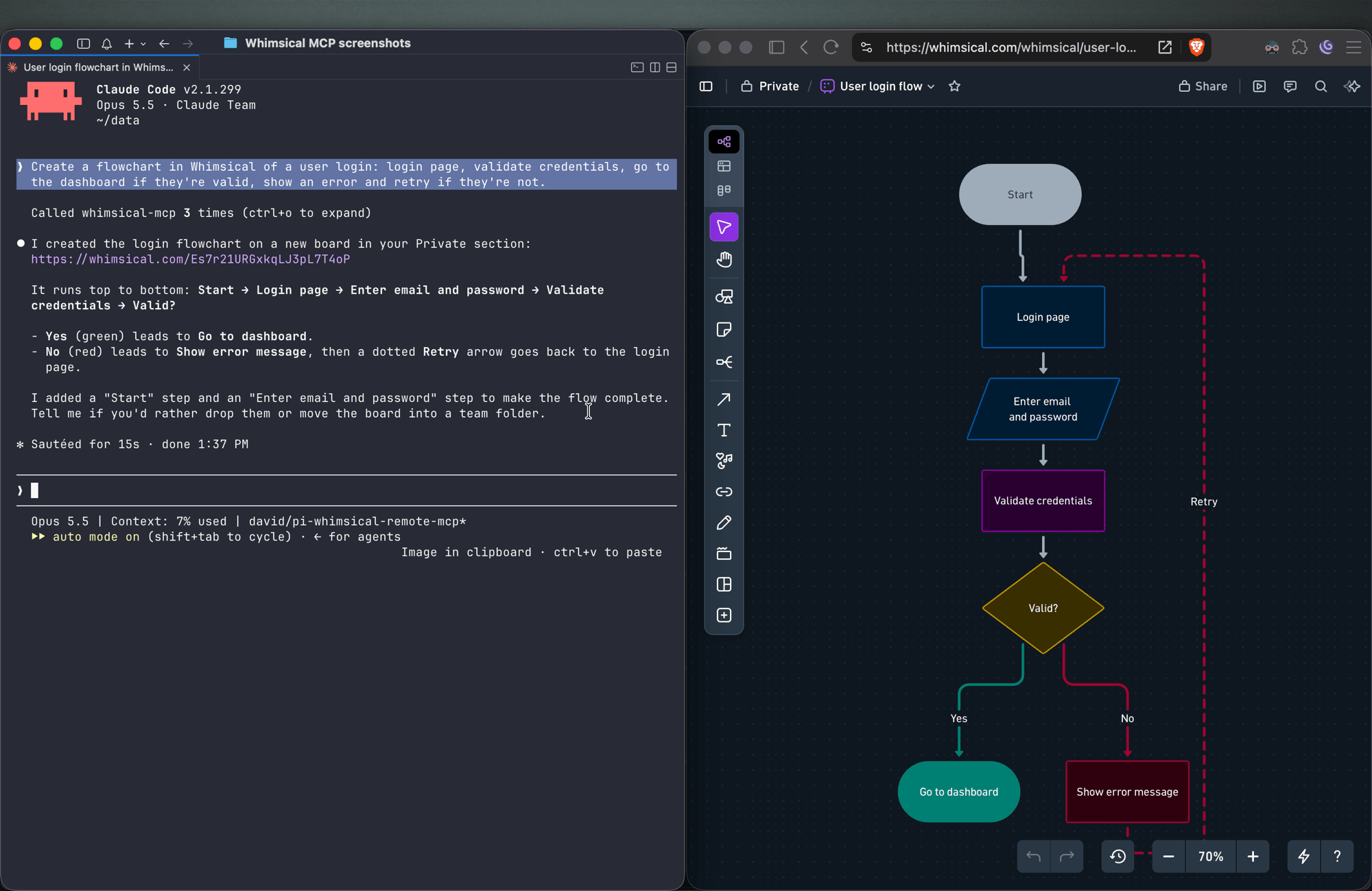
Flowcharts
Create a flowchart in Whimsical of a user login: login page, validate credentials, go to the dashboard if they're valid, show an error and retry if they're not.
You get an auto-laid-out flowchart with decision nodes, labeled connectors and a clean top-to-bottom layout. Ask for left-to-right and the agent re-runs the layout.
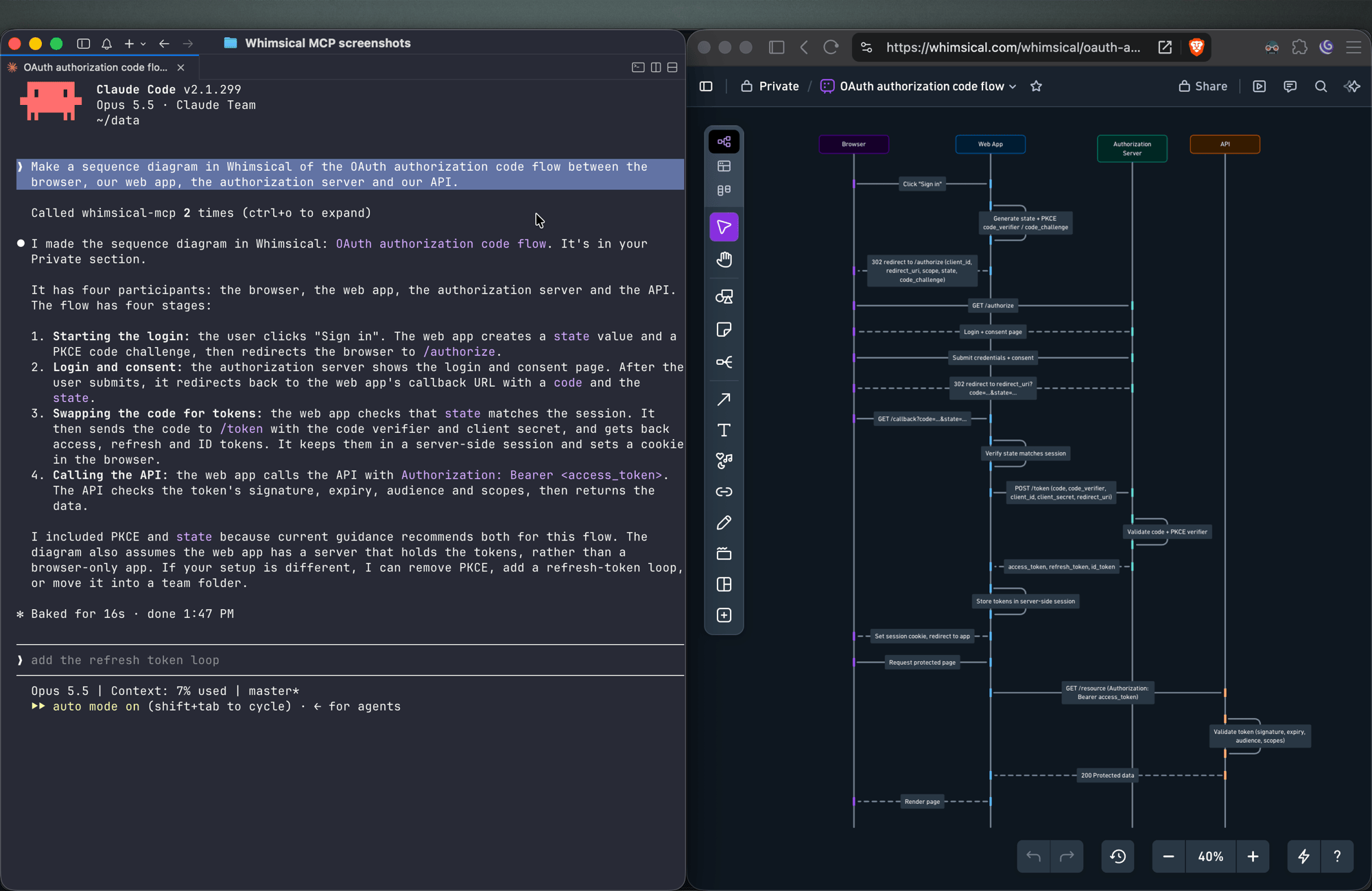
Sequence diagrams
Make a sequence diagram in Whimsical of the OAuth authorization code flow between the browser, our web app, the authorization server and our API.
The agent creates a sequence diagram with one lifeline per actor and the messages between them in order.
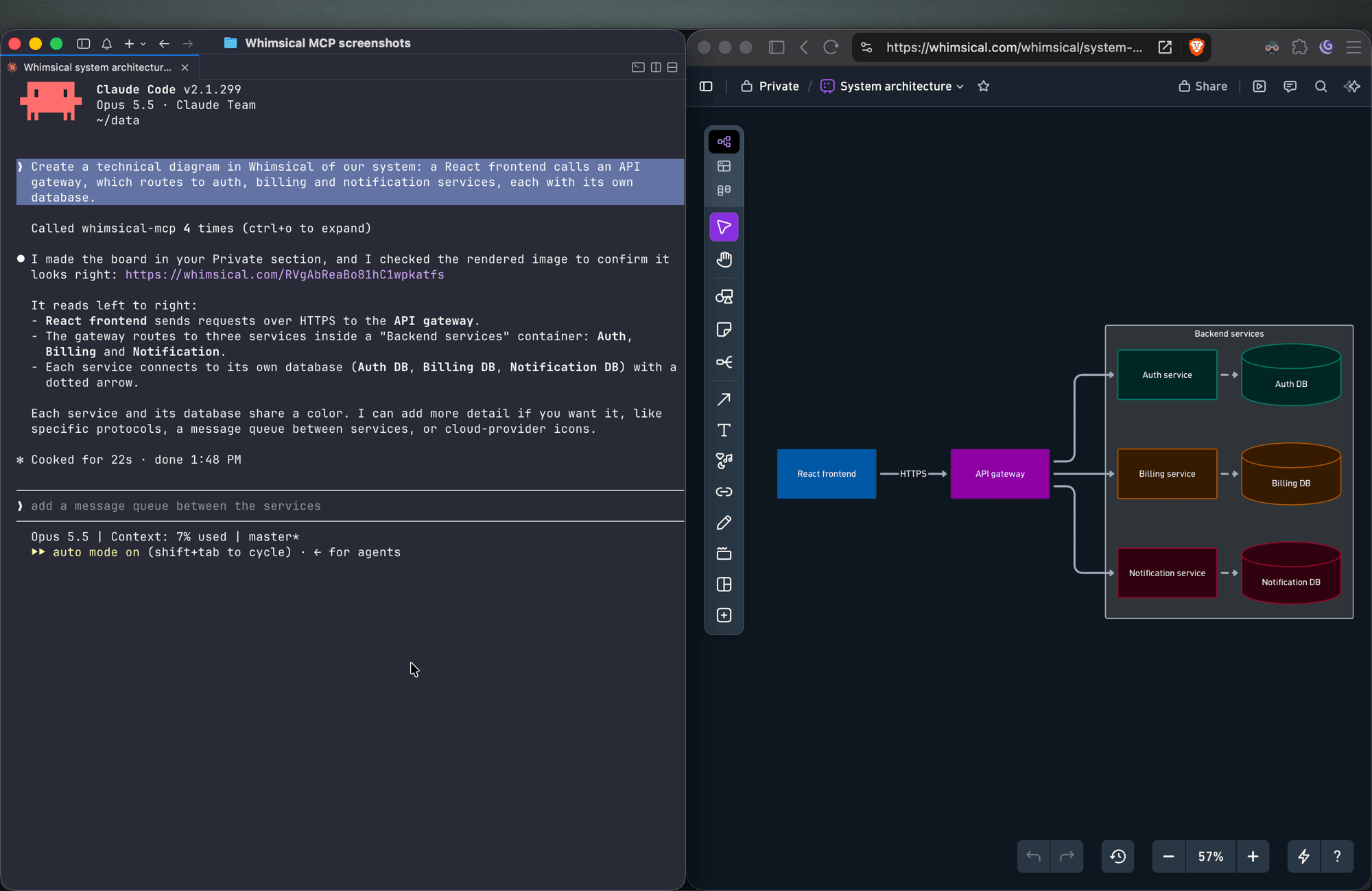
Architecture diagrams
Create a technical diagram in Whimsical of our system: a React frontend calls an API gateway, which routes to auth, billing and notification services, each with its own database.
The agent lays out the components on a board with service boundaries and connectors showing how requests and data move between them.
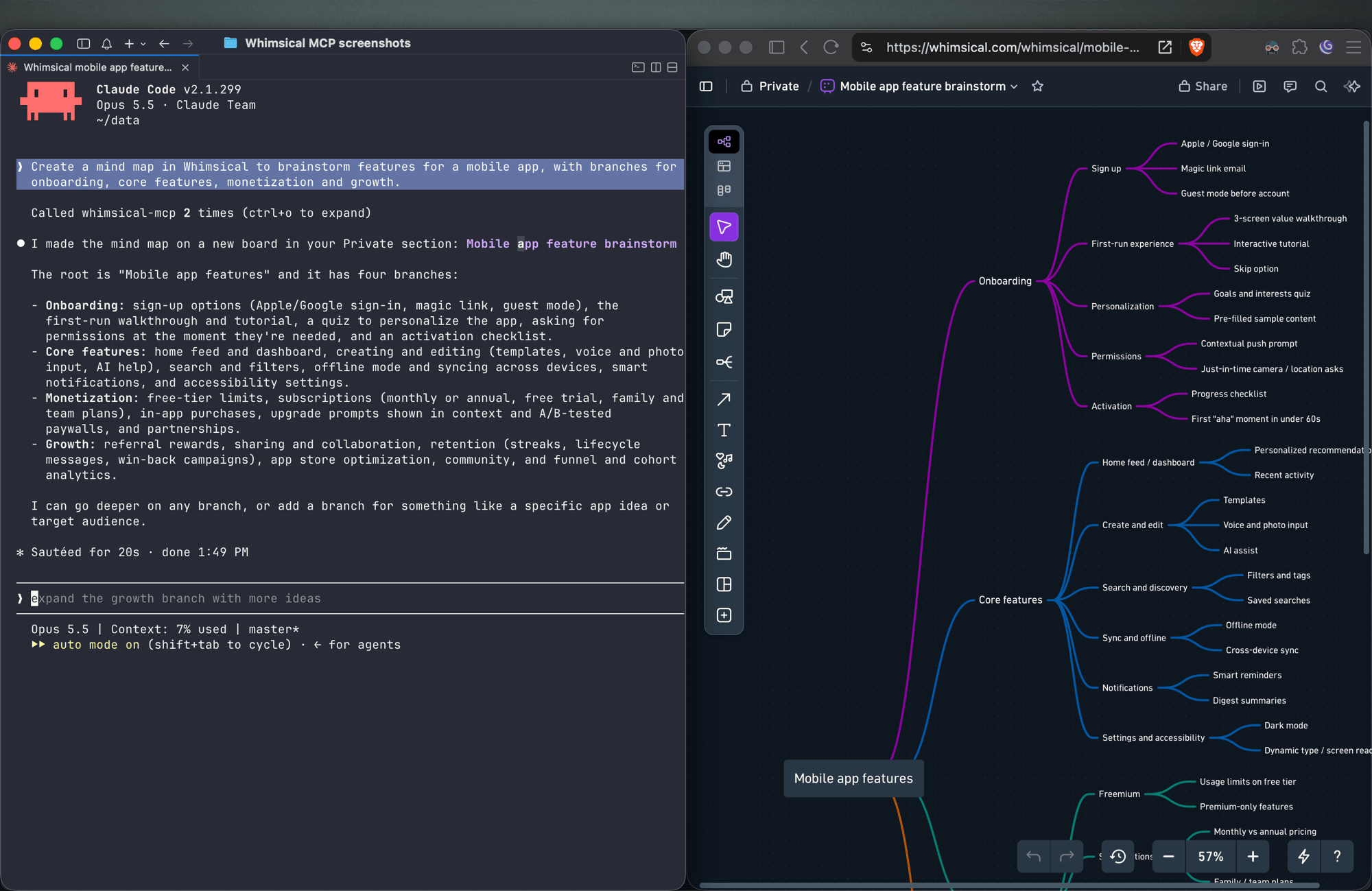
Mind maps
Create a mind map in Whimsical to brainstorm features for a mobile app, with branches for onboarding, core features, monetization and growth.
You get a mind map with the central topic and its branches, laid out horizontally. Ask for a vertical layout to get a top-down tree.
Wireframes
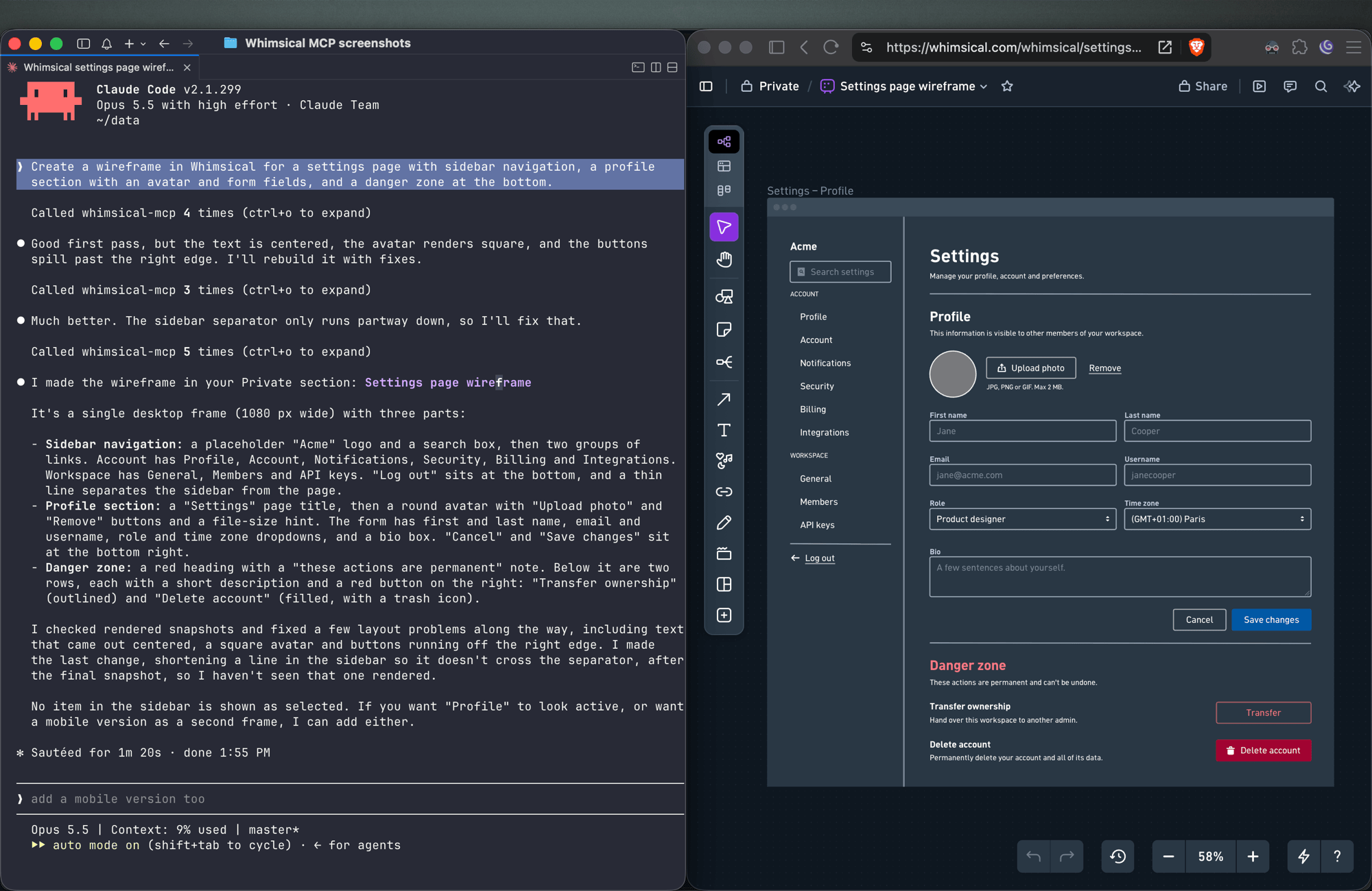
Create a wireframe in Whimsical for a settings page with sidebar navigation, a profile section with an avatar and form fields, and a danger zone at the bottom.
The agent builds the screen from wireframe elements (containers, inputs, buttons, icons) with a flexbox layout, so follow-ups like "make the primary button full width" keep everything aligned.
Sticky notes
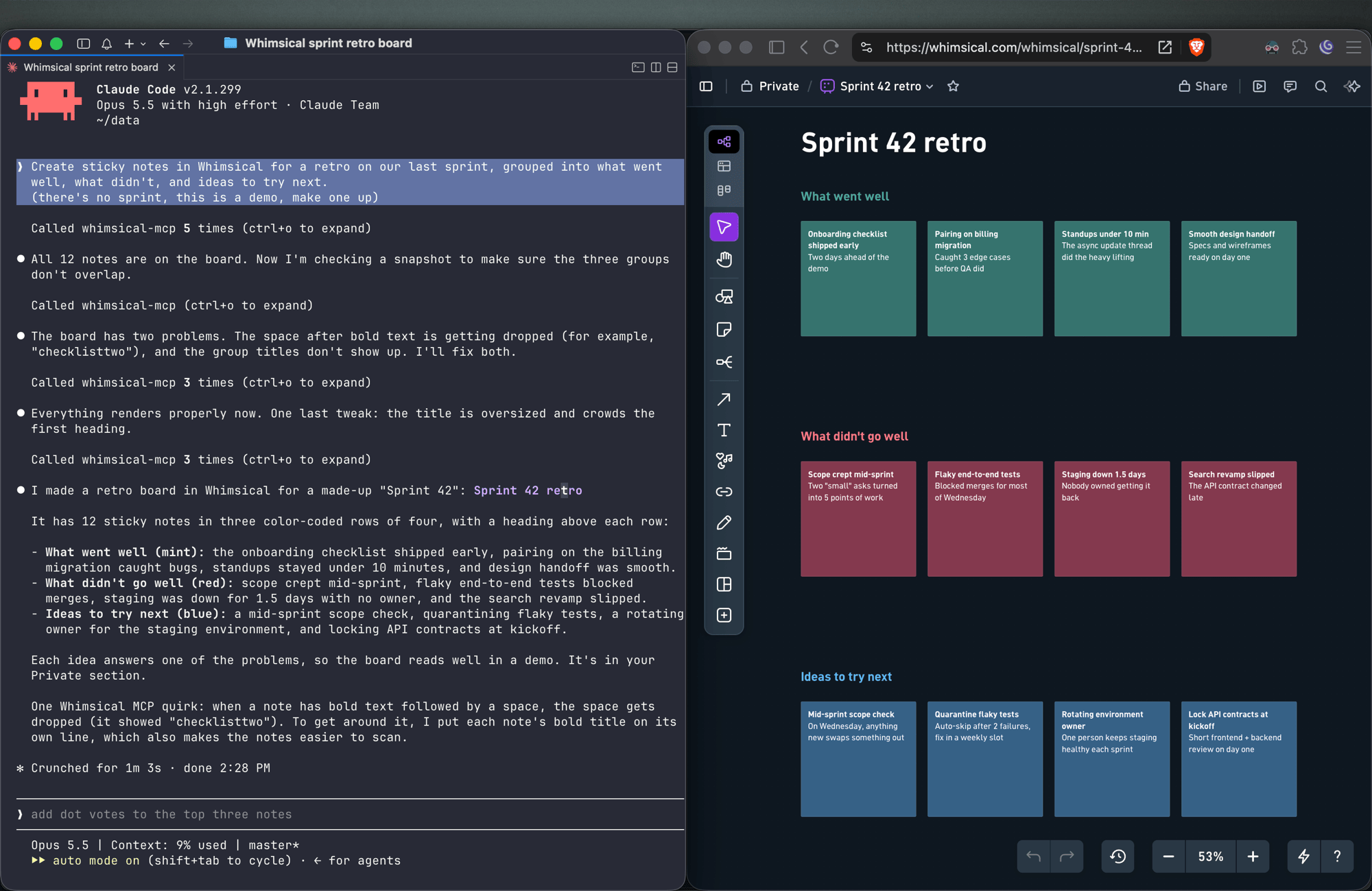
Create sticky notes in Whimsical for a retro on our last sprint, grouped into what went well, what didn't, and ideas to try next.
You get sticky notes on a board, grouped into the clusters you asked for and laid out automatically, ready for your team to add to and vote on.
Docs and tables
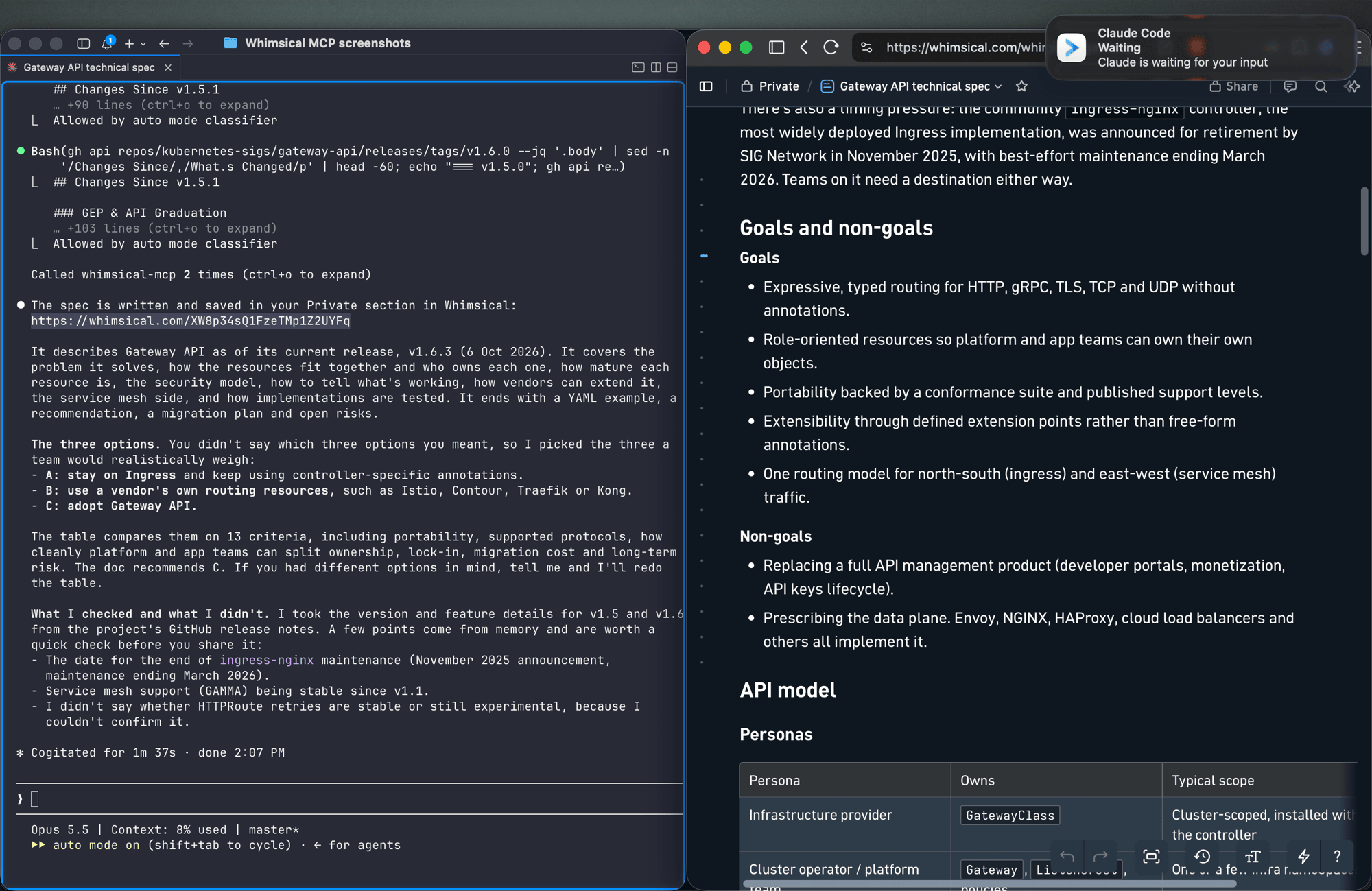
Write up the technical spec for the new API as a Whimsical doc, with a table comparing the three options we discussed.
Docs support headings, lists, links, code blocks and tables. Tables can also go on a board.
Work with what's already in your workspace
Search my Whimsical workspace for anything about "API design" and summarize what you find.
Add a rate limiting step to the API flow diagram, then leave a comment asking the team to review it.
The agent can search your workspace, read boards and docs (including a PNG snapshot of a board), edit existing diagrams, move files between folders, and read, write and resolve comment threads.
Tools
| Tool | What it does |
|---|---|
search |
Search the workspace by text, creation date or update date |
fetch |
Read a board, doc or folder by ID, or get a PNG snapshot of a board |
file_tree |
Browse the Private, Shared and team sections and the folders inside them |
how_to |
Look up Whimsical syntax guides before creating flowcharts or wireframes (agents call this on their own) |
create_file |
Create a board, doc or folder, in your Private section unless you choose a folder |
add_board_content |
Add a flowchart, mind map, sequence diagram, sticky notes, table or wireframe to a board |
add_doc_content |
Append markdown to a doc |
edit |
Add, update or delete shapes, text and connectors on a board, edit mind map and sequence diagram nodes, or change blocks in a doc |
wireframe_edit |
Reflow or edit the elements of a wireframe |
auto_layout |
Re-run automatic layout on a flowchart, top to bottom, left to right or other directions |
delete |
Move a file, folder or doc to the trash |
move |
Move a file, folder or doc into another folder |
comment_read |
Read comment threads on a board or doc |
comment_edit |
Create, reply to, edit, resolve, reopen or delete comments |
See the tool reference for details and more example prompts.
Setup
Claude
Whimsical is a verified connector in Claude's connector directory. Open the Whimsical connector, click Connect and sign in to Whimsical.
Claude Code
claude mcp add --transport http whimsical https://mcp.whimsical.com/mcp
Run /mcp in Claude Code to sign in.
ChatGPT
Use the Whimsical app for ChatGPT:
- In ChatGPT, open Settings → Plugins.
- Search for Whimsical, or use the link above.
- Click Connect and complete the authorization.
Then type @Whimsical in any chat. See the ChatGPT guide for more.
Cursor
Or install the Whimsical plugin from Cursor's plugin directory, or add it by hand: open Cursor → Settings → Cursor Settings → Tools & MCP, add a new MCP server, and save this configuration:
{
  "mcpServers": {
    "whimsical": {
      "url": "https://mcp.whimsical.com/mcp"
    }
  }
}
See Cursor's MCP documentation for more.
VS Code (GitHub Copilot)
- Press
⌘ Shift P(orCtrl Shift P) and runMCP: Add Server. - Select
HTTP. - Paste
https://mcp.whimsical.com/mcpand pressEnter. - When prompted for a server ID, enter
whimsical. - Choose whether to add the server globally or only for the current workspace.
Grok
- Go to grok.com/connectors.
- Click New Connector, then select Custom.
- Enter
https://mcp.whimsical.com/mcpand sign in to Whimsical.
See the Grok guide for more.
Other clients
Any client that supports remote MCP servers over Streamable HTTP can connect with this configuration:
{
  "mcpServers": {
    "whimsical": {
      "url": "https://mcp.whimsical.com/mcp"
    }
  }
}
Authentication
The server uses OAuth 2.1 with PKCE. The first time you connect, your client opens a browser window where you sign in to Whimsical and approve access to your workspace. The agent then works in Whimsical as you, using the access you approved.
Remote and desktop MCP
This repository covers the remote MCP server, which Whimsical hosts and recommends for most people. Whimsical also offers a desktop MCP server that runs inside the Whimsical desktop app and works on the file you have open. To set it up, contact support.
FAQ
Is this the official Whimsical MCP server?
Yes. Whimsical builds, hosts and maintains it, and it's listed in the official MCP Registry as com.whimsical/mcp. Community-built Whimsical MCP servers also exist; this is the one maintained by Whimsical.
Do I need to install or run anything?
No. The server runs at https://mcp.whimsical.com/mcp. You add the URL to your client and sign in.
Do I need an API key? No. Sign-in uses OAuth, so there are no keys to create, store or rotate.
Does it make images or editable diagrams?
Editable diagrams. Everything the agent creates is a normal Whimsical file in your workspace that you and your team can open, change and comment on. The fetch tool can also return a PNG snapshot of a board.
Can it read and update diagrams I already have? Yes. It can search your workspace, read boards and docs, edit them, re-run the layout and work with comments.
Troubleshooting
- Sign-in doesn't open or fails. Run
/mcpin Claude Code, or use your client's reconnect action, to sign in again. The browser redirects back to your client once you've signed in to Whimsical. - Tools don't appear after install. Run
/reload-pluginsin Claude Code, or restart your editor in other clients. 401or "Missing Bearer token". Your session has expired. Sign in again via/mcpor your client's reconnect action.- No Whimsical account. Create one for free at https://whimsical.com. The server signs you in to your existing workspace.
Links
- Overview: https://whimsical.com/mcp
- Setup guide: https://whimsical.com/learn/integrations/mcp
- Tool reference: https://whimsical.com/learn/ai/mcp-tools
- Support: help@whimsical.com
- Privacy policy: https://whimsical.com/terms/privacy
Whimsical MCP questions
How do I add Whimsical MCP to Claude Code?
Run claude mcp add --transport http mcp-server-guide https://mcp.whimsical.com/mcp in your terminal. Add --scope user to make it available in every project.
How do I add Whimsical MCP to Cursor?
Open ~/.cursor/mcp.json and add the server under mcpServers, using the Cursor config shown in the install section above.
What tools does Whimsical MCP provide?
It exposes 14 tools, including search, fetch, file_tree, how_to, create_file.
Is this the official Whimsical MCP server?
Yes, this is the official server built, hosted, and maintained by Whimsical.
Do I need to install or run anything?
No, the server is hosted by Whimsical and you simply add the URL to your MCP client.
Do I need an API key?
No, the server uses OAuth for authentication, so there are no API keys to manage.
Does it make images or editable diagrams?
It creates editable diagrams that your team can open, edit, and comment on, rather than static images.
Can it read and update diagrams I already have?
Yes, the server can search your workspace, read existing boards and docs, edit them, and manage comments.