
Voidless MCP server
Commit Nov 9, 2026Generates game assets including sprites, animations, tilesets, sound effects, music, and 3D models directly through an AI coding agent.
Also known as voidless-03/voidless-mcp
- Stars
- 0
- Tools
- —
- Downloads, 30 days
- —
- Latest version
- —
- Last commit
- Nov 9, 2026
- License
- MIT
What is Voidless MCP?
Voidless generates game assets including sprites, animations, tilesets, sound effects, music, and 3D models directly through an AI coding agent.
Summary generated from the project's README
About Voidless MCP server
Creating game assets like sprites, animations, and sound effects from within an AI coding agent is what voidless-mcp enables. Developers using Claude Code, Cursor, or other MCP clients can generate pixel art, 3D models, tilesets, and music loops through natural language commands. The server ensures consistency by keeping clips within a set at the same size and palette, which allows assets to be used in a game without manual cleanup.
Users can connect to a hosted version of the server or install it locally via npm using a Voidless API key. For those using Claude Code, a specific plugin is available to handle complex tasks like building full character sets or importing assets directly into Godot. The system requires a Voidless account, and generations consume credits based on the specific tool used. It supports various workflows, including cleaning up existing art to fit a pixel art grid or generating 30 to 120 second music loops for different game levels.
What you can do with it
- 1Generate complete character animation setsAsk the agent to create a pixel-art character with 8-direction turns and a full set of movement animations.
- 2Create game soundtracks and sound effectsRequest a specific chiptune loop for a title screen along with sound effects for coin pickups.
- 3Automate Godot engine asset integrationHave the AI download generated clips and automatically write the necessary SpriteFrames files for a Godot project.
- 4Convert existing video to pixel artProvide a link to an mp4 file to transform a walk cycle into 64px pixel-art frames.
Written from the project's README. Every use case is checked against a quote from it.
How to install Voidless MCP
Formats verified 10 Nov 2026Add to CursorAdd to GooseInstall Voidless MCP in Claude Code
$ claude mcp add voidless-mcp -- npx -y voidless-mcpInstall Voidless MCP in Cursor
~/.cursor/mcp.json
{
  "mcpServers": {
    "voidless-mcp": {
      "command": "npx",
      "args": [
        "-y",
        "voidless-mcp"
      ]
    }
  }
}Install Voidless MCP in VS Code
.vscode/mcp.json
{
  "servers": {
    "voidless-mcp": {
      "type": "stdio",
      "command": "npx",
      "args": [
        "-y",
        "voidless-mcp"
      ]
    }
  }
}Install Voidless MCP in VS Code CLI
$ code --add-mcp '{"name":"voidless-mcp","type":"stdio","command":"npx","args":["-y","voidless-mcp"]}'Install Voidless MCP in Claude Desktop
claude_desktop_config.json
{
  "mcpServers": {
    "voidless-mcp": {
      "command": "npx",
      "args": [
        "-y",
        "voidless-mcp"
      ]
    }
  }
}Install Voidless MCP in Codex
$ codex mcp add voidless-mcp -- npx -y voidless-mcpInstall Voidless MCP in Codex config.toml
~/.codex/config.toml
[mcp_servers.voidless-mcp]
command = "npx"
args = ["-y", "voidless-mcp"]
Install Voidless MCP in Gemini CLI
$ gemini mcp add -s user voidless-mcp npx -- -y voidless-mcpInstall Voidless MCP in Gemini settings.json
~/.gemini/settings.json
{
  "mcpServers": {
    "voidless-mcp": {
      "command": "npx",
      "args": [
        "-y",
        "voidless-mcp"
      ]
    }
  }
}Configuration
VOIDLESS_API_KEY
| Name | Description | |
|---|---|---|
| VOIDLESS_API_KEY | — |
Automated checks
Ran Nov 14, 2026Full report →Not verified yet. A server needs a score of 80, no serious finding, and enough data for us to check. How checks work · What to fix for more points

- Source repository linked and reachablevoidless-03/voidless-mcp is public and reachablegithub.com/voidless-03/voidless-mcp ↗Pass
- Package names this repository as its sourcevoidless-mcp names voidless-03/voidless-mcp as sourcenpmjs.com/package/voidless-mcp ↗Pass
- Build provenance (Sigstore attestation)No build attestation published for this releaseNot checked
- Open source license (OSI)MITspdx.org/licenses/MIT.html ↗Pass
- Commit or release in the last yearLast commit or release 2026-11-09github.com/voidless-03/voidless-mcp ↗Pass
- OpenSSF ScorecardNot checked
- Package name not close to a popular packageNo popular package one edit away from voidless-mcpPass
- No critical advisory in the package or its dependenciesNot checked
- No hidden instructions to the model0 tool descriptions and the README read; no override phrases, credential paths or hidden charactersPass
- Destructive tools are labelledNot checked
- Remote endpoint answers the MCP handshakeNot checked
README
View on GitHubVoidless for coding agents
Art, animation, sound effects and music for your game, made from Claude Code, Cursor, Codex or any MCP client:
- Art: sprites, characters, props, tilesets, UI and backdrops, pixel art or painted
- Animation: 8-direction turns and whole animation sets (walk, run, attack, idle, jump, hurt, death)
- Sound: sound effects from a description (coin, jump, hit, footsteps, UI clicks)
- Music: loops of 30–120 seconds with tempo and key, for title screens, levels and battles
- 3D: models you can rig and animate
Every clip in a set keeps the same size and palette, with the feet on the same line, so it drops into a game without cleanup.
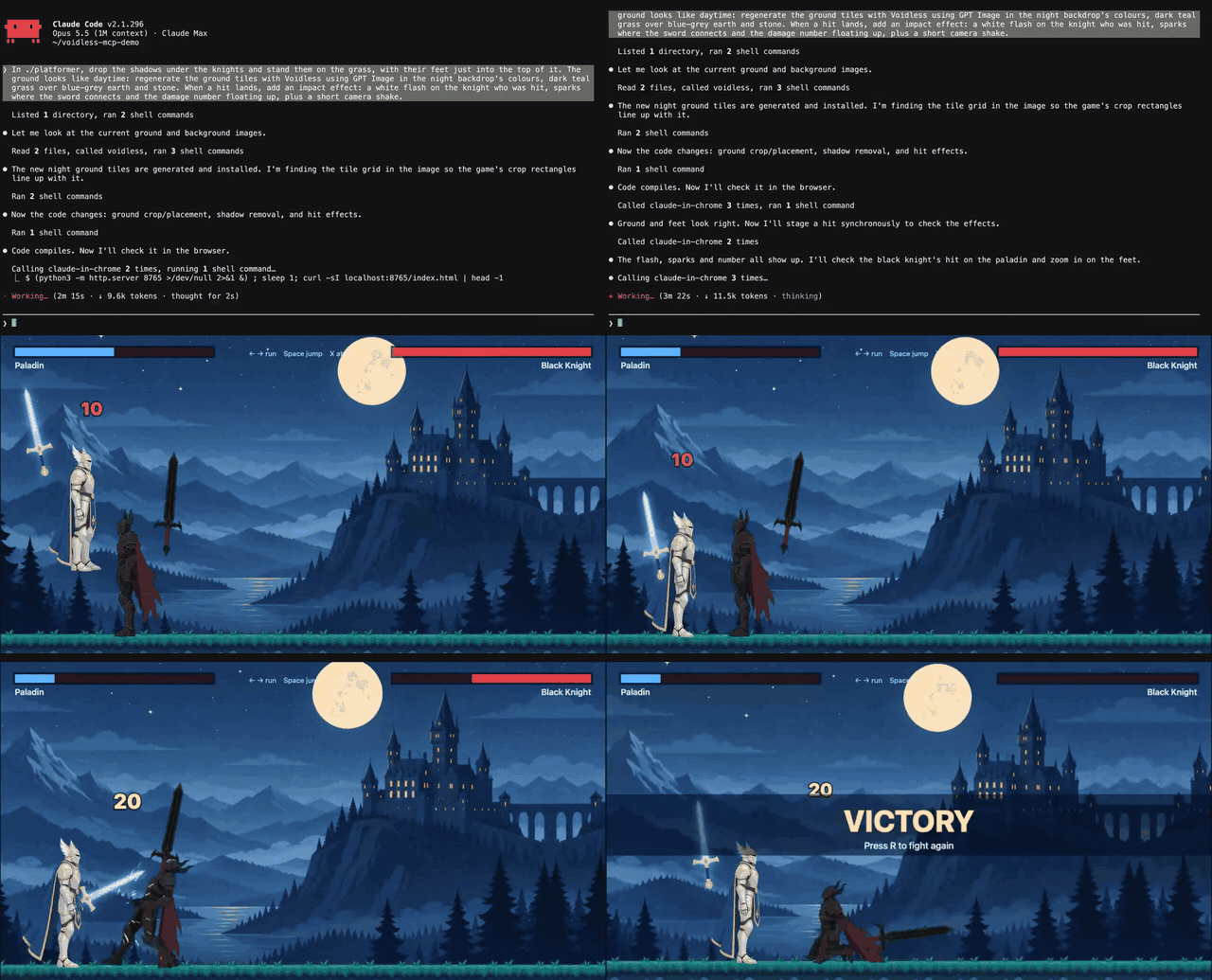
Claude Code made both knights, their idle/run/jump/attack/hurt/death clips, the swords, the backdrop and the sound through this server, then wrote the game. About $3.50 CAD of assets.
This repo has two parts:
server/: the MCP server, published to npm asvoidless-mcpand listed in the official MCP registry asdev.voidless/voidless. A hosted copy runs athttps://mcp.voidless.dev/mcp.- A Claude Code plugin: the hosted server plus skills that teach the agent how to build a full character set, make tilesets, and import the result into Godot.
You need a Voidless account. Generations spend credits from it, and each tool's description lists its cost.
Claude Code plugin
/plugin marketplace add voidless-03/voidless-mcp
/plugin install voidless@voidless
The first tool call opens a browser to sign in to Voidless. No API key needed.
Then ask for what you need:
- "Make a 64px pixel-art knight for a top-down game, turn it to 8 directions and give it a walk."
- "Import asset 115918 into this Godot project and set up the player."
- "Make a grass-and-dirt-path wang tileset in the same palette."
- "A coin pickup sound and a 60-second chiptune loop for the title screen."
- "Clean up this walk cycle from another tool and give me 64px pixel-art frames: ."
| Skill | What it does |
|---|---|
game-art |
Which settings to use for sprites, props, backdrops and UI; credit rules |
character-set |
One sprite → 8-way turn → animation sets (top-down or platformer) |
tileset |
Platformer, wang and blob tilesets, and setting them up in Godot |
sound |
Sound effects and music loops, and wiring them into Godot or Phaser |
godot-import |
Downloads every clip and writes a SpriteFrames .tres for AnimatedSprite2D (script) |
game-ready |
Cleans up art made elsewhere: background removed, pixel art on a real grid, a 1-5 s clip to 16 frames (clean_up_sprite, pixelate_image) |
Other clients
Hosted (no install): add https://mcp.voidless.dev/mcp as a remote MCP server and sign in.
- Claude (claude.ai, desktop, mobile): Settings → Connectors → Add custom connector.
- Claude Code without the plugin:
claude mcp add --transport http voidless https://mcp.voidless.dev/mcp - ChatGPT: Settings → Apps & Connectors → Advanced → Developer mode → Create → OAuth.
- Cursor, VS Code, Windsurf: add it as a remote server in their MCP settings.
Local (npm): for clients that run a local server, with an API key from voidless.dev/account:
{
  "mcpServers": {
    "voidless": {
      "command": "npx",
      "args": ["-y", "voidless-mcp"],
      "env": { "VOIDLESS_API_KEY": "void_..." }
    }
  }
}
The full tool list is in server/README.md.
Godot import without the plugin
VOIDLESS_API_KEY=void_... node skills/godot-import/scripts/voidless-godot.mjs --asset <id> --project path/to/game
Writes res://art/<name>/<clip>/NN.png and res://art/<name>/<name>.tres, with one animation per
clip (walk_down, walk_down_right, attack_1…) and an idle_<facing> frame for each turn image.
Tested with Godot 4.7.
Links
voidless.dev · MCP setup guide · API docs · Privacy · contact@voidless.dev
MIT licensed.
Voidless MCP questions
How do I add Voidless MCP to Claude Code?
Run claude mcp add voidless-mcp -- npx -y voidless-mcp in your terminal. Add --scope user to make it available in every project.
How do I add Voidless MCP to Cursor?
Open ~/.cursor/mcp.json and add the server under mcpServers, using the Cursor config shown in the install section above.
What kind of assets can Voidless create?
It can generate sprites, characters, props, tilesets, UI, backdrops, animation sets, sound effects, music loops, and 3D models.
How do I use Voidless with Claude Code?
You can add the Claude Code plugin using the marketplace command: /plugin marketplace add voidless-03/voidless-mcp.
Does it support Godot integration?
Yes, it includes a plugin that can import assets and write SpriteFrames .tres files for AnimatedSprite2D in Godot projects.
Do I need an API key to use the hosted version?
No, the first tool call opens a browser to sign in to Voidless, so no API key is needed for the hosted version.