
Scans repositories for end-of-life runtimes, deprecated packages, and retired APIs, providing exact file locations and migration steps.
Also known as velella-sh/offing, @velella/offing
- Stars
- 0
- Tools
- —
- Downloads, 30 days
- —
- Latest version
- 0.1.1
- Last commit
- Nov 14, 2026
- License
- Apache-2.0
What is Offing MCP?
Offing scans repositories for end-of-life runtimes, deprecated packages, and retired APIs, providing exact file locations and migration steps.
Summary generated from the project's README
About Offing MCP server
Scanning repositories for end-of-life runtimes, deprecated packages, and retired APIs is what Offing enables for developers and coding agents. This local-first tool identifies specific lifecycle risks within your codebase, providing the exact file and line number for every finding. It works offline to ensure privacy, requiring no accounts or repository uploads to function.
Users can run the tool via a CLI or as a local MCP server over stdio. It supports a wide range of ecosystems including Node.js, Python, Go, Rust, and GitHub Actions. The server provides migration steps and authoritative sources for every issue found, helping you understand exactly what needs to change. It also offers a baseline feature to record existing issues so you can focus only on new regressions.
Developers can integrate this into their workflow using the setup command for agents like Claude Code or Cursor. For automated environments, it functions as a GitHub Action that can fail builds based on a chosen severity level. It is designed to be deterministic, ensuring that if a package has no rule, it reports no-data rather than assuming it is safe.
What you can do with it
- 1Identify deprecated code locationsFind the exact file and line where a deprecated package or runtime is being used in your project.
- 2Verify dependencies before installationCheck if a specific npm package is deprecated before adding it to your project dependencies.
- 3Manage legacy repository technical debtAdopt lifecycle scanning in an old codebase by only reporting new problems through a baseline.
- 4Provide migration context to AI agentsGenerate a machine-readable migration packet to help a coding agent perform a specific upgrade.
Written from the project's README. Every use case is checked against a quote from it.
How to install Offing MCP
Formats verified 10 Nov 2026Add to CursorAdd to GooseInstall Offing MCP in Claude Code
$ claude mcp add offing -- npx -y @velella/offingInstall Offing MCP in Cursor
~/.cursor/mcp.json
{
  "mcpServers": {
    "offing": {
      "command": "npx",
      "args": [
        "-y",
        "@velella/offing"
      ]
    }
  }
}Install Offing MCP in VS Code
.vscode/mcp.json
{
  "servers": {
    "offing": {
      "type": "stdio",
      "command": "npx",
      "args": [
        "-y",
        "@velella/offing"
      ]
    }
  }
}Install Offing MCP in VS Code CLI
$ code --add-mcp '{"name":"offing","type":"stdio","command":"npx","args":["-y","@velella/offing"]}'Install Offing MCP in Claude Desktop
claude_desktop_config.json
{
  "mcpServers": {
    "offing": {
      "command": "npx",
      "args": [
        "-y",
        "@velella/offing"
      ]
    }
  }
}Install Offing MCP in Codex
$ codex mcp add offing -- npx -y @velella/offingInstall Offing MCP in Codex config.toml
~/.codex/config.toml
[mcp_servers.offing]
command = "npx"
args = ["-y", "@velella/offing"]
Install Offing MCP in Gemini CLI
$ gemini mcp add -s user offing npx -- -y @velella/offingInstall Offing MCP in Gemini settings.json
~/.gemini/settings.json
{
  "mcpServers": {
    "offing": {
      "command": "npx",
      "args": [
        "-y",
        "@velella/offing"
      ]
    }
  }
}Automated checks
Ran Nov 14, 2026Full report →Passed our automated checks. That is not a security audit: read the code and give the server the narrowest access it needs. How checks work

- Source repository linked and reachablevelella-sh/offing is public and reachablegithub.com/velella-sh/offing ↗Pass
- Package names this repository as its source@velella/offing names velella-sh/offing as sourcenpmjs.com/package/@velella/offing ↗Pass
- Build provenance (Sigstore attestation)Sigstore attestation for @velella/offingnpmjs.com/package/@velella/offing/v/0.1.1#provenance ↗Pass
- Open source license (OSI)Apache-2.0spdx.org/licenses/Apache-2.0.html ↗Pass
- Commit or release in the last yearLast commit or release 2026-11-12github.com/velella-sh/offing ↗Pass
- OpenSSF ScorecardOpenSSF Scorecard 8.1 / 10; weakest: Code-Review 0, Maintained 0scorecard.dev/viewer/?uri=github.com/velella-sh/offing ↗Pass
- Package name not close to a popular packageNo popular package one edit away from @velella/offingPass
- No critical advisory in the package or its dependenciesthe package checked; no critical advisoryosv.dev ↗Pass
- No hidden instructions to the model0 tool descriptions and the README read; no override phrases, credential paths or hidden charactersPass
- Destructive tools are labelledNot checked
- Remote endpoint answers the MCP handshakeNot checked
README
View on GitHubOffing finds end-of-life and deprecated runtimes, packages, and GitHub Actions in your repository, at the exact file and line, each with an authoritative source, a replacement, and migration steps. It is deterministic, offline, and needs no account.
npx @velella/offing scan .
Offing: 1 finding
github-actions.checkout.node20:.github/workflows/ci.yml:9 .github/workflows/ci.yml:9 high actions/checkout@v5 or later
That is scan --format compact on the bundled demo project (examples/demo). Ask for the evidence behind one finding with npx @velella/offing explain '<finding-id>' ., or check a dependency before you add it:
npx @velella/offing check pkg:npm/request@2.88.2 # exits 1: deprecated, with the replacement and its source
Requirements: Node.js 22 or newer. Read this in: English · فارسی.
What you get
- Exact location, real source. Every finding names the file and line, links the authoritative source for the rule, and gives the replacement and migration steps. Nothing is guessed: a package with no rule reports
no-data, never "safe". - Check before you add.
check pkg:npm/request@2.88.2answers for one dependency without scanning anything, and exits1when a rule at or above--fail-onapplies. - Only new problems.
baselinerecords accepted findings;scan --baselinethen reports only regressions, so a legacy repository can adopt Offing on day one. - Migration packets.
context '<finding-id>' --jsonhands a person or a coding agent the constraints, the affected files and usages, the sources, and suggested verification commands. Offing never runs them for you. - Usage, not just declarations. For npm and Ruby it finds the imports and calls that use a deprecated package, so you see what a migration has to touch.
- Fresh data, still offline. Scans never touch the network.
data updaterefreshes lifecycle rules from signed bundles when you ask, and refuses anything it cannot verify. - Works where you work. CLI, local MCP server, GitHub Action with SARIF for code scanning, and an Agent Skill. Setup for Claude Code, Codex, Cursor, Gemini CLI, GitHub Copilot and Kilo Code is one command:
setup. - Private by design. No account needed, and no repository upload.
See it run
What it covers
Runtimes, package manifests and lockfiles, CI and infrastructure files across:
Node.js, npm, Deno and Bun · Python · Go · Rust · Java and Kotlin · .NET · Ruby · PHP · Swift · Android · Dart and Flutter · Elixir · Scala · C and C++ · GitHub Actions · CI runner images · Container base images · Kubernetes APIs · Terraform · Serverless runtimes · Database runtimes · PowerShell.
The full table, with the files read and what is reported for each, is in Ecosystem coverage. Maturity per detector is in the compatibility matrix.
For coding agents
npx skills add velella-sh/offing        # the Agent Skill, listed on skills.sh
npx @velella/offing setup               # tell each coding agent in the repo to check before adding
npx @velella/offing context '<finding-id>' . --json   # migration packet for an agent
npx --yes @velella/offing mcp           # local MCP server over stdio
Every report has a machine-readable form. The docs are also published as llms.txt and llms-full.txt. See Agent Skills and the local MCP guide.
In CI
steps:
  - uses: actions/checkout@v7
  - uses: velella-sh/offing@v0.1.1
    with:
      fail-on-severity: high
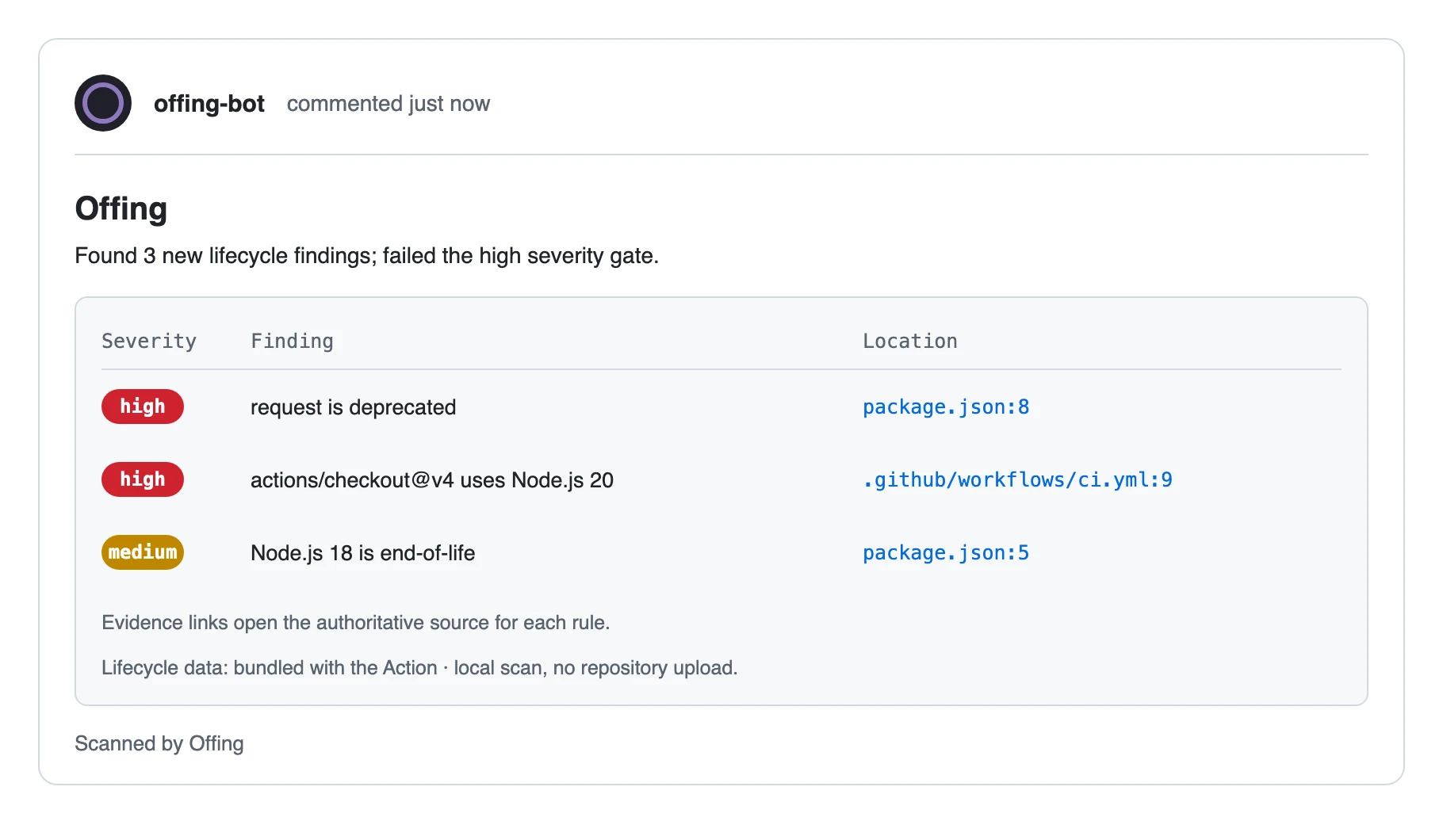
Offing annotates the pull request at the exact line, posts one summary comment with the evidence, suppresses accepted findings with a baseline, fails on the severity you choose, and uploads the complete JSON report or SARIF. Scans run on the runner, so repository contents never leave it. Pin a full commit SHA instead of a tag when you need an immutable reference. Setup, inputs, permissions and artifacts are in the GitHub Action guide.
Why not just Renovate?
Renovate, Dependabot, and endoflife.date each answer a question Offing does not, and Offing answers one none of them does: what is ending in this repository, and where is it used. Most repositories gain from running one of them with Offing, so the table states what each covers and what it does better, and links the source of every claim. Details and sources per tool are in Offing compared with other tools.
| Tool | What it covers | What it does better | Evidence |
|---|---|---|---|
| Renovate | Dependency updates across the package managers it supports, as automated pull requests | Opens the update pull requests Offing never writes, and reports npm deprecation notices for packages this registry has no rule for | Compared with Renovate; the differential report measures both directions on pinned repositories and links the evidence for every disagreement |
| Dependabot | Version updates and security updates on GitHub, each as a pull request | Version updates keep dependencies current even when nothing is vulnerable; security pull requests and alerts draw on the GitHub Advisory Database | Compared with Dependabot |
| endoflife.date | EOL dates and support lifecycles for many products, served through a public API | Product breadth beyond one reviewed rule set, and a date you can check without installing anything | Compared with endoflife.date |
| Offing | The lifecycle status of what the repository's files declare and use — end-of-life runtimes, deprecated packages, retired APIs — at file and line, offline | Reports that a version is out of support, not only that a newer one exists, and names the usage a migration has to touch | What it covers, validation, compatibility matrix |
Learn more
- Quickstart: five copy-paste steps, first scan to CI.
- Using Offing: baselines, data updates, migration packets, agent setup, the detector SDK.
- What it covers: every ecosystem, the files read, and what is reported.
- CLI reference, validation report, 90-second demo, roadmap, architecture.
- Questions and ideas: GitHub Discussions. Bugs and rule requests: issues. Security: SECURITY.md. Contributing: CONTRIBUTING.md.
License and brand
Offing source code is licensed under the Apache License 2.0. The lifecycle data it reads comes from Ebb (@velella/ebb): code under the MIT License, dataset under CC BY 4.0, attribution in ATTRIBUTION.md. The Offing name, logo, and files in brand/ are proprietary brand assets under separate brand asset terms.
Offing MCP questions
How do I add Offing MCP to Claude Code?
Run claude mcp add offing -- npx -y @velella/offing in your terminal. Add --scope user to make it available in every project.
How do I add Offing MCP to Cursor?
Open ~/.cursor/mcp.json and add the server under mcpServers, using the Cursor config shown in the install section above.
What does Offing find in a repository?
It identifies end-of-life and deprecated runtimes, packages, and GitHub Actions, providing the exact file and line number, an authoritative source, a replacement, and migration steps.
How does Offing handle existing issues in legacy repositories?
You can use the baseline feature to record currently accepted findings, allowing subsequent scans to report only new regressions.