
uidx MCP server
Commit Nov 14, 2026Allows AI agents and humans to collaboratively design and edit visual workspaces using diffable JSX files stored directly in a project repository.
Also known as uidxkit/uidx
- Stars
- 13
- Tools
- —
- Downloads, 30 days
- —
- Latest version
- —
- Last commit
- Nov 14, 2026
- License
- MIT
What is uidx MCP?
uidx allows AI agents and humans to collaboratively design and edit visual workspaces using diffable JSX files stored directly in a project repository.
Summary generated from the project's README
About uidx MCP server
Designing visual workspaces directly within your application repository is what uidx enables for developers and AI agents. By installing @uidxkit/uidx as a local development dependency, you can manage designs through diffable JSX files stored in a .uidx folder. This approach allows you to version your design assets, fonts, and layouts alongside your application code using Git.
Users interact with the system through a local viewer and a canvas that synchronizes with files in the project. The setup runs on your machine and does not require a hosted design service or an LLM for canvas synchronization. To connect an AI client, you use the generated .mcp.json file to launch the uidx:mcp script, which acts as a stdio bridge to the running project server. This setup allows external tools to inspect and edit the same design files that humans use in the visual inspector.
What you can do with it
- 1Collaborative design editingAn AI agent can modify design files in your repository to update layouts or styles.
- 2Version controlled design systemsDevelopers can manage components, variants, and design tokens using standard Git workflows.
- 3Visual workspace managementYou can create new pages and adjust layouts using a visual canvas and inspector.
Written from the project's README. Every use case is checked against a quote from it.
Automated checks
Ran Nov 14, 2026Full report →Not verified yet. A server needs a score of 80, no serious finding, and enough data for us to check. How checks work · What to fix for more points

- Source repository linked and reachableuidxkit/uidx is public and reachablegithub.com/uidxkit/uidx ↗Pass
- Package names this repository as its sourceNot checked
- Build provenance (Sigstore attestation)Not checked
- Open source license (OSI)MITspdx.org/licenses/MIT.html ↗Pass
- Commit or release in the last yearLast commit or release 2026-11-14github.com/uidxkit/uidx ↗Pass
- OpenSSF ScorecardNot checked
- Package name not close to a popular packageNot checked
- No critical advisory in the package or its dependenciesNot checked
- No hidden instructions to the model0 tool descriptions and the README read; no override phrases, credential paths or hidden charactersPass
- Destructive tools are labelledNot checked
- Remote endpoint answers the MCP handshakeNot checked
README
View on GitHub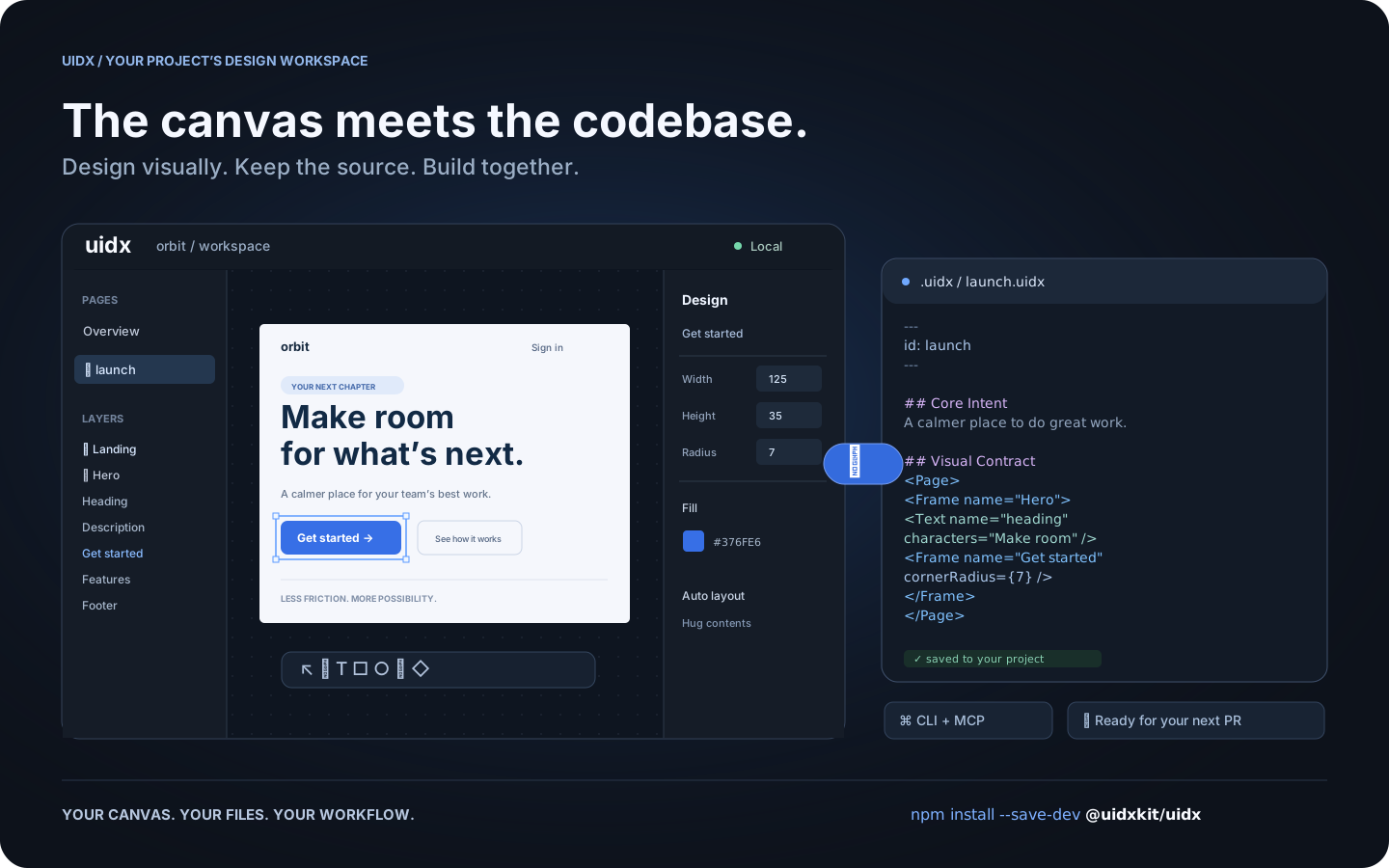
Workflow illustration: one design, shared by the canvas, your files, and your tools.
What is UIDX?
UIDX brings a design canvas into your application's repository. Install
@uidxkit/uidx as a local development dependency, run npm run uidx, and
work on designs stored in your project's .uidx/ folder.
A .uidx file combines Markdown describing a design's purpose with a declarative
node tree describing its appearance. Edit the canvas and the file updates. Edit
the file and the canvas follows. Changes produce focused text diffs you can
review in a pull request.
- A visual workspace. Create pages, draw shapes, edit text, and adjust layout and styling from the canvas and inspector.
- Reusable design systems. Components, instances, variants, slots, and design tokens share a document namespace.
- Your project owns the files. Keep designs, assets, and fonts next to your application and version them with Git.
- A shared workflow for people and agents. The CLI and MCP bridge let external tools inspect and edit the same files the viewer uses.
- Local by default. The viewer and project server run on your machine. Canvas synchronization does not require an LLM or a hosted design service.
UIDX is an early release. The file format and APIs may change before 1.0. It is a design workspace; it does not render your application's existing UI components as Storybook stories.
Install
Requires Node.js 22.19 or newer. Node 24 is recommended.
Run these commands inside your application's repository:
npm install --save-dev @uidxkit/uidx
npm run uidx
Installation adds the uidx and uidx:mcp scripts and creates .uidx/ when it
doesn't exist. Existing scripts, configuration, and designs are preserved.
The CLI, server, viewer, WASM, and bundled fonts live in your project's
node_modules; a global UIDX installation is not required.
Recent npm versions do not run a package's install script until you approve
it, and warn with install scripts not yet covered by allowScripts. Nothing is
lost: the first npx uidx dev performs the same setup itself and says so, or
approve the script with npm install-scripts approve @uidxkit/uidx and
reinstall. To set up explicitly, run npx --no-install uidx init. If your
project already uses a script named uidx, choose another with
npx --no-install uidx init --script design, then run npm run design.
Your design workspace
your-project/
├── package.json          # @uidxkit/uidx devDependency and npm scripts
├── .mcp.json             # connection for MCP clients
├── src/
└── .uidx/
    ├── config.json       # project settings
    ├── uidx.json         # document name, page patterns, and asset patterns
    ├── welcome.uidx      # initial page for a new workspace
    ├── assets/
    └── fonts/
Open the viewer, click New page, give it a name, and start designing. New
pages are saved in your design folder and appear in the overview. Commit your
project's .uidx/ files alongside application code.
Configuration
Set the shared viewer and MCP port in .uidx/config.json:
{
  "port": 4400
}
Restart npm run uidx after changing it. Use npm run uidx -- --port 4500 for a
one-time override. If the requested port is busy, UIDX tries the next available
one and reports its actual address. Configuration currently uses JSON.
The separate .uidx/uidx.json manifest controls which files belong to the document:
{
  "id": "my-project",
  "files": ["**/*.uidx"],
  "assets": ["assets/**"]
}
CLI and MCP
npm run uidx starts the local viewer, file synchronization server, and MCP HTTP
endpoint on one port. MCP clients use the generated .mcp.json to launch
npm run --silent uidx:mcp, a stdio bridge to that running project server.
npx --no-install uidx status
npx --no-install uidx check
npx --no-install uidx fmt --check
The CLI also supports reading, creating, editing, and rendering pages. See the CLI guide and agent architecture.
Documentation
- Drawing icons and custom graphics
- Fonts
- Property vocabulary
- Architecture decisions
- Release guide
- Changelog
Contributing and license
Bug reports, documentation improvements, and pull requests are welcome.
See Contributing for development setup and checks.
Follow the Code of Conduct and report vulnerabilities through
the security policy. Changes to main are merged by the owner.
UIDX is MIT licensed. Third-party code and fonts retain their respective licenses.
uidx MCP questions
How do I install UIDX in my project?
Install it as a local development dependency using npm install --save-dev @uidxkit/uidx and then run npm run uidx.
Does UIDX require a hosted design service or LLM for synchronization?
No, the viewer and project server run locally on your machine and do not require an LLM or hosted service for canvas synchronization.
Can I use UIDX with AI agents?
Yes, the MCP bridge allows external tools and agents to inspect and edit the same design files used by the visual canvas.
What are the system requirements for UIDX?
You need Node.js version 22.19 or newer, though Node 24 is recommended.