
An AI-native, browser-based RDF knowledge graph editor that performs OWL 2 DL reasoning and graph repairs entirely client-side.
Also known as ThHanke/ontosphere
- Stars
- 265
- Tools
- 2
- Downloads, 30 days
- —
- Latest version
- —
- Last commit
- Nov 12, 2026
- License
- —
What is Ontosphere MCP?
Ontosphere is an AI-native, browser-based RDF knowledge graph editor that performs OWL 2 DL reasoning and graph repairs entirely client-side. It exposes 2 tools, such as explainEntailment, explainDiagnostics.
Summary generated from the project's README
About Ontosphere MCP server
Knowledge graph engineers and AI developers can manage, reason over, and repair RDF datasets directly within a browser tab. Ontosphere provides a visual canvas for authoring nodes and edges while performing complete OWL 2 DL reasoning using a WebAssembly-compiled Konclude engine. Because all computation happens client-side via Web Workers, no backend server or installation is required to process your data.
Users can load RDF from local files, remote URLs, or SPARQL endpoints and perform complex tasks like SHACL validation and graph clustering. The platform distinguishes itself by offering reasoner-verified repairs, which suggest specific deletions or axiom weakenings to resolve logical inconsistencies. It also includes a Model Context Protocol server that exposes 42 specialized tools to AI agents, allowing them to query graphs, manage namespaces, and execute reasoning tasks through the browser's native WebMCP API.
What you can do with it
- 1Fixing logical inconsistenciesAn AI agent can identify contradictions in a knowledge graph and apply verified repairs to restore consistency.
- 2Generating reproducible graph snapshotsUsers can create content-addressable identities for their graphs to ensure deterministic diffs and equality checks.
Written from the project's README. Every use case is checked against a quote from it.
Ontosphere MCP tools 2
Detected from the READMEexplainEntailmentexplainDiagnostics
Automated checks
Ran Nov 13, 2026Full report →Passed our automated checks. That is not a security audit: read the code and give the server the narrowest access it needs. How checks work · What to fix for more points

- Source repository linked and reachablePass
- Open source license (OSI)No licenseFinding
- Commit or release in the last yearPass
- Package name not close to a popular packageNot checked
- Remote endpoint uses HTTPSNot checked
- Destructive tools are labelledPass
- No hidden instructions to the modelPass
- No critical advisory in the package or its dependenciesNot checked
README
View on GitHubOntosphere
Browser-based RDF knowledge-graph editor with client-side OWL 2 DL reasoning, reasoner-verified repair, and a Model Context Protocol server for AI agents.







Author, reason over, and repair RDF/OWL knowledge graphs entirely in your browser. Ontosphere loads RDF from files, URLs, or SPARQL endpoints; lets you author nodes and edges on a live canvas; runs a complete OWL 2 DL reasoner (Konclude, compiled to WebAssembly) with inferred triples shown inline; proposes reasoner-verified repairs for inconsistencies; and exposes everything to AI agents through a Model Context Protocol server. No backend, no install — just a browser tab.
| I want to… | Start here |
|---|---|
| 🚀 Try the live demo | Open Ontosphere ↗ |
| 🎬 Watch feature tutorials | Video tutorials |
| 🤖 Connect an AI agent | AI / MCP integration |
| 💻 Run it locally | Quick start |
| 📂 Load my own data | Startup / URL parameters |
| 🛠️ Contribute | Contributing |
Table of Contents
- Overview
- Key capabilities
- Video tutorials
- Using the UI
- Reasoning
- SHACL validation
- Startup / URL parameters
- AI / MCP Integration
- Developer
- Acknowledgements
- Reproducibility and data availability
- License & authors
Overview
Ontosphere is a browser-based RDF/ontology knowledge graph editor. It loads RDF from local files, remote URLs, or SPARQL/Fuseki endpoints; lets users author nodes and edges directly on the canvas; runs complete OWL 2 DL reasoning (via Konclude) with visual differentiation of inferred triples; and applies multi-algorithm layout (Dagre, ELK) and automatic clustering for large graphs. Additional features include namespace management with live URI renaming, a drag-and-drop workflow template catalog, and a Model Context Protocol (MCP) server for AI-agent integration. All computation runs entirely client-side in the browser against an in-memory RDF store backed by Web Workers — no backend required.
flowchart LR
  Agent["LLM agent"]
  subgraph B["Browser tab — 100% client-side, no backend"]
    direction TB
    UI["Reactodia canvas<br/>author · layout · cluster"]
    Store["RDF store<br/>named graphs · Web Workers"]
    Reason["OWL 2 DL reasoner<br/>Konclude · WebAssembly"]
    Check["OWL 2 profile + SHACL"]
    Repair["Repair engine<br/>deletion · weakening"]
    Diag["Diagnosis object<br/>verdict · justifications · verified repairs"]
    Prov["PROV-O provenance + reversal"]
    MCP["MCP server · 42 tools"]
  end
  Agent -->|"author / select a verified repair"| MCP
  MCP --> Store
  UI <--> Store
  Store --> Reason
  Store --> Check
  Reason --> Repair
  Check --> Repair
  Reason --> Diag
  Check --> Diag
  Repair --> Diag
  Diag -->|"verified, never-hidden feedback"| MCP
  Store --> Prov
Key capabilities
Everything below runs in the browser tab, against an in-memory RDF store backed by Web Workers. The capabilities group around what you do with a knowledge graph — load, author, reason, repair, validate, and share — plus first-class AI-agent access.
📥 Load & interoperate
- Import RDF / Turtle / JSON-LD / RDF-XML / N-Triples from local files or remote URLs, including SPARQL endpoints and Fuseki datasets; auto-load on startup via a URL query parameter.
- Export single-graph Turtle / RDF-XML / JSON-LD, or dataset-faithful N-Quads / TriG that preserve the named-graph partition (data, inferred, shapes, ontologies, workflows) so a dataset round-trips on re-import.
- W3C RDFC-1.0 canonicalization (RDF Dataset Canonicalization, W3C Recommendation 2024): produce the canonical N-Quads form and a SHA-256 content hash entirely in the browser. Deterministic blank-node labelling means two isomorphic graphs yield a byte-identical form and the same hash — a content-addressable identity for reproducible snapshots, deterministic diffs, and standards-compliant graph equality (
canonicalizeGraphMCP tool).
✍️ Author & explore
- Always-on authoring on a Reactodia canvas (pan, zoom, minimap, fit-view, clustering, smooth animations): add nodes via search, draw edges from the halo "Establish Link" handle, and edit annotations and predicates inline, with full undo/redo. Auto-complete is scored by domain/range tiers derived from the loaded ontologies.
- Search entities by label or IRI (Enter cycles matches on the canvas); toggle TBox / ABox views between ontology-level classes/properties and data-level individuals.
- Layout at scale: Dagre (horizontal/vertical) and ELK (layered, force, stress, radial) plus the Reactodia default, all in Web Workers with adjustable spacing. Hierarchical fold levels load with structural folding pre-applied (L2 subclass/collection collapse, L1 annotation hiding) and a depth badge; community-detection clustering (Label Propagation, Louvain, K-Means) applies automatically above a configurable node threshold (default 100). Each view tracks its fold state independently.
- Namespace management: rename namespace URIs in the legend (propagates across all stored triples), with colour-coded badges on nodes and edges. Workflow catalog: drag reusable template cards onto the canvas to instantiate connected subgraphs.
🧠 Reason
- Complete OWL 2 DL inference in the browser via Konclude (WebAssembly); inferred triples render as amber dashed edges and inferred types/annotations in amber italic, with a full inference report and one-click clearing that never touches asserted data.
- Automatic consistency checking with per-entity clash details in the Errors tab, justifications (MIPS), and OWL 2 profile detection (EL/QL/RL/DL).
🔧 Repair — reasoner-verified
- When the reasoner finds a contradiction (or SHACL reports a violation), a Repairs tab shows reasoner-computed, ranked, verified fixes — the same repairs the
explainDiagnosticsMCP tool hands an agent. - Minimal hitting-set deletion plus, for
rdfs:subClassOfculprits, axiom weakening that replacesA ⊑ Dwith a logically weakerA ⊑ D′to preserve more knowledge than deletion (Troquard et al. AAAI 2018; Li & Lambrix ISWC 2024). Each suggestion shows its rationale and the exact triples it adds/removes, with a "verified consistent" badge and the reasoner's minimality verdict. The reasoner (rdf-reasoner-koncluderepair()andweaken()) finds and verifies the repair sets; weakenings are offered only when removing the culprit alone restores consistency, i.e. with a single independent contradiction. Apply a single deletion, Apply weakening as one undoable remove+add batch, or Apply all verified in one batch — then re-run reasoning to confirm.
✅ Validate & track
- SHACL validation with focus node / path / constraint / severity reporting.
- PROV-O provenance of every agent edit, with diff and one-click reversal of a batch (faithful to typed and language-tagged literals), and a warning when retention truncates reversible history.
🤖 AI / MCP integration — 42 tools
Exposes a Model Context Protocol tool surface via the browser's document.modelContext WebMCP API (W3C CG, native in Chrome 153+; polyfill included for all other browsers), across nine categories (manifest at /.well-known/mcp.json):
| Category | Tools |
|---|---|
| Graph management | loadRdf · loadOntology · suggestOntologiesForTask · queryGraph · exportGraph · canonicalizeGraph · exportImage · setViewMode · getCapabilities · getGraphState · help |
| Node operations | addNode · removeNode · expandNode · getNodes · getNodeDetails · updateNode · searchTerms |
| Link operations | addTriple · removeLink · getLinks |
| Layout & navigation | runLayout · clusterNodes · layoutNodes · focusNode · fitCanvas · getNeighbors · findPath |
| Reasoning | runReasoning · clearInferred · explainDiagnostics · explainEntailment |
| Namespaces | setNamespace · removeNamespace · listNamespaces |
| SHACL validation | loadShacl · validateGraph · loadShaclFromUrl |
| Edit provenance / undo | listAgentEdits · diffAgentEdits · revertAgentBatch |
| Dataset metadata | generateDatasetMetadata (VoID + DCAT with triple/class/property counts, partitions and vocabularies, for FAIR publishing) |
Notes for agents
- Startup: every tool call is rejected ("still loading…") until startup loading (ontologies,
?rdfUrl=data, shapes) has finished. In a browser consolewindow.__startupComplete()turnstrue; retry after a few seconds. - IRIs: tools accept full IRIs or prefixed names resolved through the namespace map (
listNamespaces); an unknown prefix or a bare name is an error. Text in results (briefs, rationales, summaries, error messages) names IRIs as prefixed names, or as full IRIs when no prefix is registered, never as bare local names. Structured fields are full IRIs.queryGraphrows use prefixed names. - Blank nodes: the tools, SPARQL and the canvas address a blank node (a restriction, a list cell, an
owl:AllDisjointClassesnode) asurn:vg:bnode:<label>; it works as an ordinary IRI inqueryGraphpatterns,INSERT DATAandDELETE DATA. SPARQL results never contain blank-node terms. An inline-Turtle@prefixof your own, even forex:,schema:,dc:and the other built-in names, is kept as written. explainEntailment: the defaultjustificationMode: "exact"returns guaranteed-minimal justifications and can take seconds on a large ontology (limit 60 s). If it finds none, the answer falls back to"fast"(one verified candidate, not necessarily minimal), and if that has none either,justificationUnavailable: truewith areason. An emptyjustificationslist never means "asserted": a directly asserted axiom is its own one-axiom justification.justificationModein the result names the search that produced it.explainDiagnostics:justificationsare the axiom sets from the reasoner's repair search (declarations are not part of them). Deletion repairs havekind: "delete", weakeningskind: "weaken". For an inconsistent ontologyunsatisfiableClassesis not computed (every class is unsatisfiable there) andunsatisfiableClassesSkipped: "ontology-inconsistent"says so.includeTimings: trueaddstimingsMs(stage and reasoner-call durations) for diagnosing slow runs.
Video tutorials
Short video walkthroughs for each core feature — click to play directly from the live deployment.
Feature tutorials
Each video is a focused 60–90 second walkthrough using the bundled reasoning-demo ontology.
| Feature | Video | What you'll see |
|---|---|---|
| RDF Loading | ▶ feat-loading.mp4 | URL parameter load, file upload, SPARQL endpoint fetch |
| Visual Exploration | ▶ feat-exploration.mp4 | TBox/ABox toggle, search, zoom/pan, minimap |
| Canvas Authoring | ▶ feat-authoring.mp4 | Add class, draw edge, edit annotations, undo/redo |
| Hierarchical Clustering | ▶ feat-clustering.mp4 | L2 structural fold/unfold, L3 Louvain community detection |
| OWL 2 DL Reasoning | ▶ feat-reasoning.mp4 | Konclude WASM inference, inferred triples, ABox inspection |
| SHACL Validation | ▶ feat-shacl.mp4 | Load shapes, validate data, reasoning interplay |
| MCP + AI Relay | ▶ feat-ai-relay.mp4 | Bookmarklet injection, AI tool calls, relay round trip |
Workflow demos
Longer end-to-end sessions showing AI-driven ontology building.
| Demo | Video | Description |
|---|---|---|
| Full walkthrough | ▶ iswc2026-comprehensive.mp4 | 3-minute tour of all features |
| FOAF social network | ▶ foaf-social-network.mp4 | AI builds a social graph with DL reasoning |
| Scene ontology | ▶ scene-ontology.mp4 | Film scene ontology on BFO/RO upper ontology |
| Pizza tutorial | ▶ pizza-tutorial.mp4 | Manchester Pizza — class hierarchy, disjointness, DL reasoning |
| Pizza tutorial (chat) | ▶ pizza-tutorial-chat.mp4 | OWL pizza tutorial as AI tutor lesson, side-by-side chat |
Using the UI
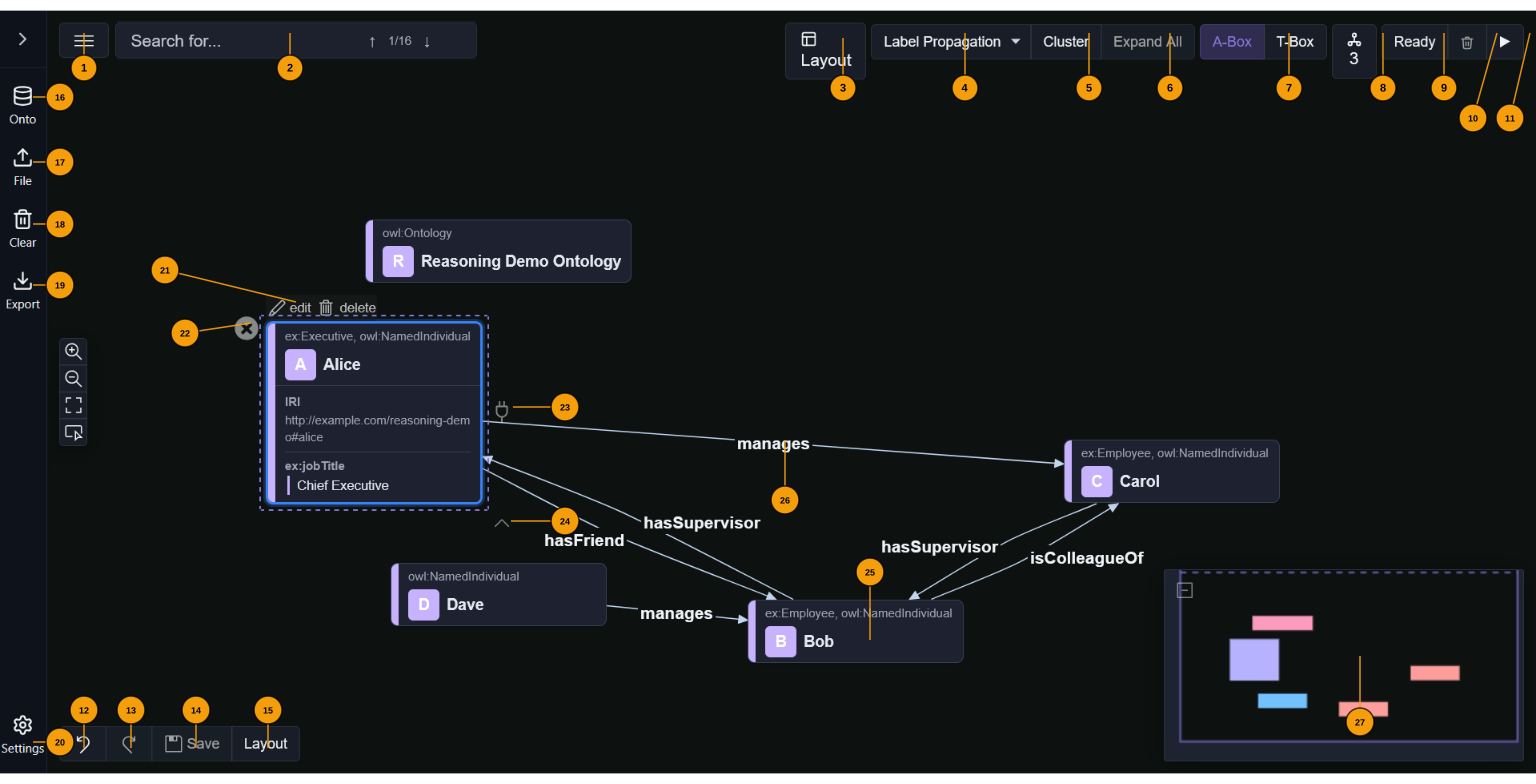
The annotated diagram below identifies the numbered UI elements described in this section.
Top bar — left group
1 ☰ View menu — dropdown: Export canvas as PNG, Export as SVG, Print, Show/Hide Legend (toggles the namespace colour key panel).
2 Search — type to find entities by label or IRI. ↑↓ arrows or Enter cycle through matches on the canvas. The badge shows current match / total count.
Top bar — right group (action toolbar)
3 Layout — opens the layout popover: choose algorithm (Dagre horizontal/vertical, ELK layered/force/stress/radial, Reactodia-default), adjust spacing via a slider, toggle auto-layout (re-runs after every graph update).
4 Clustering algorithm selector — choose between None, Label Propagation, Louvain, or K-Means. The large-graph threshold (default 100 nodes, configurable in Settings) controls when auto-clustering runs on load.
5 Cluster level navigation (◄ 1/3 ►) — step through fold levels. The badge shows the current level and total count: L3 (community-detection clusters), L2 (structural fold — subclass chains and OWL collections), L1 (annotation properties hidden), ∅ (fully expanded). The ◄/► arrows fold or unfold one level at a time.
6 A-Box — switch to instance-level individuals (A-Box, highlighted when active).
7 T-Box — switch to ontology-level classes/properties (T-Box).
8 Ontologies — shows the count of loaded ontologies. Click to open a popover listing each ontology with options to add/remove from autoload.
9 Reasoning status — shows the current DL reasoning state: Ready / ✓ Valid / ⚠ Warnings / Errors / spinner while running. Click to open the reasoning report (inferred triples grouped by rule).
10 Clear inferred (🗑) — removes all inferred triples without touching asserted data.
11 SHACL toggle (☑) — enable or disable SHACL validation as part of the reasoning pipeline. When checked, running reasoning also validates data against loaded SHACL shapes.
12 Run reasoning (▶) — triggers DL reasoning (Konclude) and optionally SHACL validation. Inferred triples appear as amber dashed edges. Idempotent. While reasoning runs the button turns into a stop button (■) that terminates the run; the graph is unaffected and the next run starts a fresh reasoner.
Left sidebar (collapsed icon rail)
13 Onto — open the ontology loader. Enter any HTTP(S) URL or pick from pre-configured sources in Settings.
14 File — open a file picker for local RDF files. Supported: Turtle (.ttl), JSON-LD (.jsonld), RDF/XML (.rdf/.owl), N-Triples (.nt).
15 Clear — remove all loaded graphs and reset the canvas.
16 Export — export as Turtle, JSON-LD, RDF/XML (single-graph), or N-Quads / TriG (dataset-faithful, preserves named graphs) via the dropdown. Generated entirely in the browser.
17 SHACL — open the SHACL shapes panel to load, inspect, and manage SHACL shapes for data validation.
18 Agent Edits — open the provenance inspector (see Agent edit provenance). Lists edit batches, shows diffs, and offers one-click revert.
19 SPARQL — open the SPARQL query editor (the same engine the queryGraph MCP tool uses). A SPARQL UPDATE without a GRAPH clause writes to urn:vg:data; an explicit GRAPH <…> clause is honoured, including urn:vg:ontologies and urn:vg:inferred, so be deliberate when writing into those graphs. Prefills registered namespace PREFIX declarations, runs on Run or Ctrl/⌘+Enter, and renders results by type: SELECT bindings as a table, CONSTRUCT/DESCRIBE as triples, ASK as true/false, INSERT/DELETE with a success toast.
20 Metrics — open the ontology metrics dashboard. Structural counts (triples, subjects, classes, properties, individuals) as stat cards, subjects-by-namespace breakdown, and OQuaRE-flavoured quality heuristics (properties per class, label coverage, inferred:asserted ratio).
21 AI Relay — open the AI Relay Bridge panel. Drag the bookmarklet to your browser bar to connect any AI chat (ChatGPT, Gemini, Claude.ai) to Ontosphere.
22 Zoom controls — zoom in/out, fit view (reset the viewport to show all nodes), and screenshot (export the current canvas view).
23 Docs — open the built-in documentation and help panel.
24 Settings — open the settings panel for default layout, clustering algorithm, large-graph threshold, ontology autoload URLs, workflow catalog, reasoner backend, and other preferences.
Sidebar content (expanded)
When the sidebar is expanded (click the › toggle), the action buttons are shown in a compact grid. Below them the same sections appear as collapsible accordion panels with full content: Workflows (drag a template card onto the canvas to instantiate a connected subgraph), SHACL Shapes, Agent Edits, SPARQL, Metrics, AI Relay, and Documentation.
Authoring toolbar (bottom left)
25 Undo — undo last authoring change.
26 Redo — redo last undone change.
27 Save — commit all pending authoring edits to the RDF store in a single batch.
28 Re-layout — re-apply the current layout algorithm in-place.
Node authoring halo (visible on selected node)
Hover over any node to reveal the authoring halo with these controls:
- Edit / Delete — buttons that appear above a selected node. Edit opens the property editor (IRI, annotation properties, custom fields). Delete permanently removes the entity from the RDF store.
- Remove (✕) — removes the node from the canvas view without deleting it from the RDF store.
- Establish Link (plug icon, right side) — drag to another node to create a new edge. A dialog confirms the predicate with scored autocomplete from loaded ontologies.
- Expand neighbours (∧, bottom) — load and show all RDF neighbours of the node on the canvas.
Canvas elements
29 Individual node — represents an RDF subject. The header shows the local name, a coloured namespace badge, and the OWL class. Properties (IRI, annotations, custom fields) are shown in an editable table on selection.
30 Edge / predicate — labelled arrow between two nodes. Amber dashed edges are inferred triples. Double-click to open the link property editor (scored autocomplete from ontologies). On large canvases (more than 300 links) the relation label of a link is shown only while the link is selected; unselected links stay clickable.
31 Minimap — overview panel at bottom-right. Click to jump to a region, drag to pan.
Ontosphere MCP questions
What tools does Ontosphere MCP provide?
It exposes 2 tools, including explainEntailment, explainDiagnostics.
Does Ontosphere require a backend server?
No, the application is fully client-side and runs entirely in your browser using Web Workers and WebAssembly.
Can I use AI agents to edit my knowledge graph?
Yes, Ontosphere exposes 42 tools through a Model Context Protocol (MCP) server, allowing AI agents to manage graphs, nodes, links, and reasoning.
How does the tool handle logical inconsistencies in the graph?
It uses a complete OWL 2 DL reasoner to find contradictions and proposes reasoner-verified repairs, such as axiom weakening or deletion.
What formats can I import into Ontosphere?
You can load RDF, Turtle, JSON-LD, RDF-XML, and N-Triples from local files, remote URLs, or SPARQL endpoints.