
Retulo MCP server
Commit Nov 9, 2026Provides local workspaces for AI agents to preserve file versions, track task progress, and resume workflows across different conversations.
Also known as TheStack-ai/retulo
- Stars
- 1
- Tools
- —
- Downloads, 30 days
- —
- Latest version
- —
- Last commit
- Nov 9, 2026
- License
- MIT
What is Retulo MCP?
Retulo provides local workspaces for AI agents to preserve file versions, track task progress, and resume workflows across different conversations.
Summary generated from the project's README
About Retulo MCP server
Developers working with AI agents can use Retulo to maintain continuity across different chat sessions by creating local workspaces. It allows agents to preserve file versions, track task progress, and store decisions so that a workflow can be resumed in a new conversation using a specific task ID or workspace path. This tool is designed for document, file, and code work where keeping track of revisions and remaining tasks is essential.
Retulo operates locally on macOS or Linux and connects to agents through MCP. It is specifically built to work with Codex and Claude Code, though it can also be used via a CLI or other MCP clients using stdio. Users set up the connection by pointing the tool to an existing project directory, which allows the agent to manage source material and output versions without losing previous drafts.
What sets this tool apart is its ability to manage complex workflows, such as identifying which steps in a recurring report need updating when inputs change. It can also connect tasks to Git worktrees to isolate code changes in separate folders. By recording saved files, checks, and approvals, it provides a structured way for agents to organize their workspace and history.
What you can do with it
- 1Resume interrupted workflowsAn AI agent can pick up a task in a brand new conversation by referencing a previously saved task ID.
- 2Manage document revisionsDevelopers can update specific sections of a document while ensuring all previous versions remain intact for review.
- 3Automate recurring report updatesWhen input data changes, the agent can identify and redo only the specific steps affected by the new information.
- 4Isolate code changesUsers can direct an agent to work on a specific feature within its own Git worktree to keep the main repository clean.
Written from the project's README. Every use case is checked against a quote from it.
README
View on GitHubRetulo
Keep AI work ready to continue.
Retulo is an open-source local tool for document, file and code work with AI agents. It keeps source material, output versions, decisions and remaining work together, so you can see what changed and pick up the task in another conversation.
Use it through Codex, Claude Code or the CLI. When continuing, give the agent the task ID or workspace path; it can read the saved state and files before working. Retulo stores task records on your computer and connects to agents through MCP.




macOS local preview · CLI and MCP · English, 简体中文, 한국어
Documentation site · When to use it · Install · Codex · Claude Code · Demo · Docs · Get help
See a task continue in 60 seconds
https://github.com/user-attachments/assets/a183b497-ceab-4ceb-a00b-9c9406b3d376
Create a first draft, resume the same task in a new Codex conversation, and save a revision while the earlier version stays intact. Open the captioned version on the documentation site.
A proposal revision across two real Codex conversations, edited into 60 seconds. The video includes a recorded Retulo command replay on the same fictional demo task. The run record and both file versions are available to inspect. View the run record and files.
When Retulo helps
Keep earlier drafts while revising a proposal
Update the pricing section and keep the previous version.
Retulo keeps registered output versions alongside the source material and decisions. You can review an earlier draft and use the same task ID to continue the revision in another conversation.
Refresh a recurring report when inputs change
Use this month's data to update the report.
For a workflow with declared inputs and steps, Retulo identifies which steps are affected by the changed data. The agent can use that plan to redo the affected work. Save a reusable recipe when you want to start the same process with new inputs and fresh checks. See workflows and recipes.
Work on code changes in separate folders
Work on this feature in its own Git worktree, then show what changed.
Connect a task to a worktree or explicitly create one, inspect its Git state, and preserve selected files as a snapshot. Prepare fast-forward integration and cleanup as separate actions. Managed creation requires an explicitly allowed worktree directory; worktrees do not isolate running processes or databases. See Git workspaces.
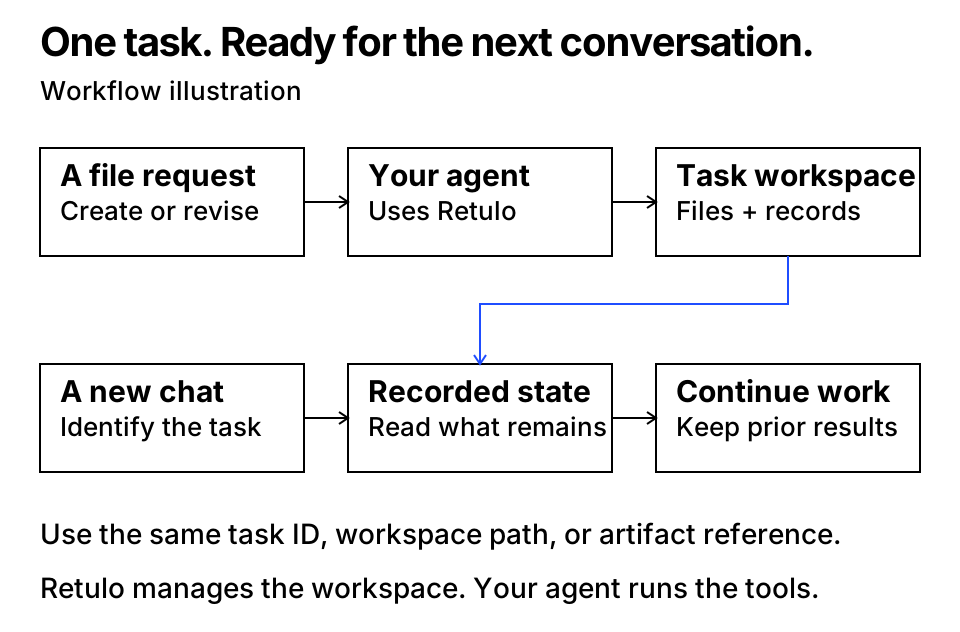
Continue with the task ID or workspace path, using the same Retulo configuration and file access. Retulo reads recorded task state; it does not automatically remember every conversation.
The connected agent interprets your request and creates or edits the content. Retulo organizes the workspace and records what happened: saved files, checks, approvals and remaining work. Those are separate records—a saved file is not automatically a reviewed or approved result. Questions and planning alone do not create a workspace.
Install Retulo
Run this in a terminal on macOS or Linux:
curl -fsSL https://thestack-ai.github.io/retulo/install.sh | sh
retulo --version
Expect retulo 0.6.0rc1. The installer downloads the release wheel, verifies it against the release's SHA256SUMS, and installs Retulo in a persistent uv tool environment. It uses an existing uv or installs a private copy, and downloads a suitable Python when needed. No source checkout or self-managed virtual environment is needed. Document tasks do not require Git; optional worktree features do. This preview is distributed through GitHub Releases, not PyPI or npm.
If the installer reports that the command directory is missing from PATH, run its printed command. With the default location:
export PATH="$HOME/.local/bin:$PATH"
The installer does not edit your shell profile. Local testing uses macOS with a local filesystem. For 0.6.0rc1, GitHub CI passed on macOS and Ubuntu with Python 3.11 and 3.14. See the installation guide for script review, an existing-uv alternative, custom paths, and development setup.
To connect an agent, first install and sign in to Codex or Claude Code as usual. Retulo does not install either client or supply a model account. Choose one connection below and replace /absolute/path/to/project with an existing project directory. Existing code stays in its original repository.
Connect Codex
Preview the changes, then apply the same options:
retulo setup codex --project /absolute/path/to/project
retulo setup codex --project /absolute/path/to/project --apply
retulo doctor codex --project /absolute/path/to/project --connect
Setup creates or updates the Retulo configuration, adds the selected project to its source-root allowlist, and connects the packaged runtime through your user-level Codex MCP settings. It also installs one skill, a managed AGENTS.md block, and context hooks. Unrelated settings are preserved and restoration snapshots are saved. Run setup for each project you want to allow.
Restart Codex and start a new chat in that project. Review and trust the installed hooks as requested by your client. In the Codex CLI, codex mcp get retulo shows the launcher and /mcp shows active servers. Ask the agent to call Retulo's capabilities and check workspace_home, then try the first task.
Connect Claude Code
Use the local Claude Code client, with an existing project:
retulo setup claude --project /absolute/path/to/project
retulo setup claude --project /absolute/path/to/project --apply
retulo doctor claude --project /absolute/path/to/project --connect
Setup manages the retulo entry in that project's .mcp.json and a Retulo instruction block in CLAUDE.md, preserves unrelated entries and instructions, and saves restoration snapshots. It also creates or updates the shared Retulo configuration and allows the selected project. You do not need to paste MCP JSON or project instructions yourself. The packaged context hooks are for Codex.
Start Claude Code in that project, trust the project, approve the MCP server if prompted, and check /mcp. Ask Claude to call Retulo's capabilities, then try the first task. This connects Claude Code, not the claude.ai website.
For both clients, doctor checks local settings; --connect additionally starts the configured Retulo server and tests an actual MCP handshake and capabilities call. It makes no AI/model call. A healthy transport does not establish that a chat follows the file workflow; confirm that with the first task.
Use the CLI or another MCP client
Agent setup creates the configuration for you. For CLI-only use, explicitly create it once:
retulo init-config --workspace-home "$HOME/Documents/RetuloWorkspaces" \
  --allow-source-root /absolute/path/to/project
retulo capabilities --json
Another MCP client can launch the absolute path reported by command -v retulo with arguments --config, the absolute configuration path, and mcp, using stdio. Other clients need their own connection and file-access checks.
| Local item | Default location |
|---|---|
| Retulo executable | ~/.local/bin/retulo |
| Retulo configuration | ~/.config/retulo/config.json |
| Managed task workspaces | ~/Documents/RetuloWorkspaces |
| Codex skill | ~/.agents/skills/retulo/SKILL.md |
| Installation snapshots | ~/.local/state/retulo/install (Claude: claude/ below it) |
Existing configurations keep their workspace location. Setup, doctor, and disconnect accept --config, --workspace-home, and --snapshot-home; Codex also uses --codex-home and --skills-home. See custom paths.
Run your first task and continue it
In your connected agent, request:
Use Retulo to create a Markdown welcome guide for this project. Keep the source material and result together, check the result, and give me the file plus its task ID or workspace path so I can continue later.
You should get a real file, a task ID and workspace path, a recorded artifact version and actual check results. Retulo's verify should return ok: true with no mismatches for registered bytes. Review the content yourself as well.
Then request a revision:
Add a contact section to that guide. Keep the earlier version and record fresh checks.
Open another conversation with the same Retulo configuration and file access, and provide the actual task ID or workspace path:
Continue Retulo task TASK_UUID in WORKSPACE_PATH. Read its recorded state first, then add an opening-hours section and keep the previous versions.
The task identity and workspace should stay the same while the output gains a new version. Once you confirm the procedure is being followed, Codex's installed guidance or your Claude project instructions can apply it to ordinary file requests without naming Retulo each time. Retulo stores the task records; it does not infer which unrelated chat you meant.
Setup help
| What you see | What to check |
|---|---|
retulo: command not found |
Run the PATH command printed by the installer; the default is export PATH="$HOME/.local/bin:$PATH". |
| Download or checksum failure | Retry the installer on a working connection. Do not bypass a checksum mismatch; report the release asset and error. |
| Missing configuration | Run retulo setup codex or retulo setup claude with --project and --apply, or use init-config for CLI-only use. |
| Project is not allowed | Preview and apply setup with that project's exact path. Existing source-root entries are preserved. |
| Setup reports a conflict | Review the reported file and options. Keep identical paths for preview/apply; existing user edits are not silently replaced. |
| MCP is absent or disconnected | Run retulo doctor codex --project /absolute/path/to/project --connect (or claude), restart the client, and check its server approval. |
| Tools exist but ordinary requests skip Retulo | Check Codex hook trust and its installed skill, or Claude's loaded CLAUDE.md. Ask for the first task explicitly and inspect real records. |
| Agent cannot write the returned workspace path | Review the client's file-access prompt for the intended workspace folder. Retulo's configured roots do not replace client permissions. |
| Project path is rejected | Choose an existing, specific directory; setup rejects your whole home, filesystem root, and symlinked paths. |
See installation and diagnosis, integration details, and the preview-first restore guide.
Client references: OpenAI Docs: Codex MCP · Claude Code MCP · Claude project instructions.
See it work
The optional source-checkout demos require the development setup; they are not needed to install or connect Retulo. Run these commands from that checkout.
Start with a small file task. This example creates a visitor guide, then uses a fresh coordinator to find the same task by ID and add a section. It checks that the workspace stays the same, the source and first output remain intact, and the new output has fresh checks.
.venv/bin/python scripts/demo_continuity.py --output-dir /tmp/retulo-continuity-demo
Read the actual first guide, continued guide, and recorded result. The example runs separate CLI processes and writes its own synthetic guide text. It makes no model calls and leaves global settings alone. It verifies CLI task continuity; adoption by a new Codex conversation is not tested by this script.
Then try an update across several production steps:
The report example uses this checkout's real file inventory. It creates an HTML report, updates the affected steps, preserves the earlier report, saves a recipe, and starts a new report task with different inputs.
.venv/bin/python scripts/demo_incremental.py --output-dir /tmp/retulo-report-demo
Choose a new, empty output directory for each example. The report example uses separate CLI and producer processes. It requires no model account or network service and does not change global installation settings. Its JSON result includes the generated report paths and the steps that were rebuilt or reused.
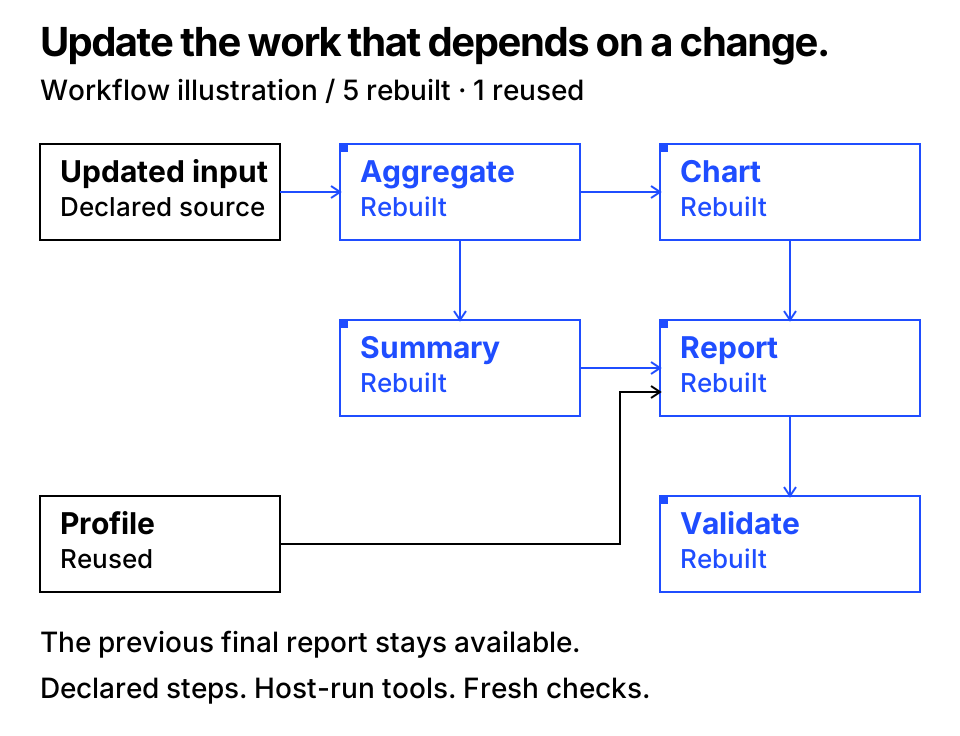
The qualified example rebuilt five affected stages and reused one independent stage after an input update. This is an observed example, not a general saving guarantee. See the qualification record.
Update and repeat work
The data changed. Update this report and preserve the previous version.
For a declared workflow, Retulo connects inputs, steps, and exact output versions. It identifies which steps need work and supplies fixed input snapshots and reserved output paths. The host agent runs the producer tools. Previous completed results remain available while an update is in progress.
Use the same process with this month's data.
A recipe pins a workflow, typed parameters, and completion requirements. New inputs create a new task with fresh checks; previous approvals and passed results are not inherited. Retulo does not execute commands from a recipe. Read the workflow and recipe contract for the supported file/step granularity and reuse rules.
CLI and MCP
retulo --config "$HOME/.config/retulo/config.json" call capabilities --arguments '{}'
retulo --config "$HOME/.config/retulo/config.json" get-context --task-id TASK_UUID --json
retulo --config "$HOME/.config/retulo/config.json" verify --task-id TASK_UUID --json
RETULO_CONFIG can supply the configuration path. Configuration is created only by an explicit init-config or installer operation. JSON is the state contract; WORKSPACE.md is a readable view of current state. Request IDs make retries idempotent, and mutations check the last observed revision.
Retulo keeps task and file records locally. An existing agent or CLI client uses the core; no separate service is needed.
Support and scope
| Area | Current scope |
|---|---|
| Release | 0.6.0rc1, preview |
| Runtime | Python 3.11+; the installer obtains Python when needed |
| Local verification | macOS, local filesystem |
| Release CI | macOS and Ubuntu × Python 3.11 and 3.14 passed for 0.6.0rc1 |
| Interfaces | CLI and MCP; packaged Codex and Claude Code setup, diagnosis, and disconnection |
| Other environments | Windows manual Python setup, NAS, multiple hosts, and other clients need separate validation |
Retulo operates on the files and tasks registered through its workflow. It does not intercept all writes made by unrelated host tools. File integrity checks do not establish content quality or user approval. The core does not call models, launch agents, watch folders, or publish results.
Update or remove
Run the install command again to install this release. If the runtime or integration version changes, preview and apply setup again with the same project and custom-path options, then restart the client.
To disconnect a client, preview and apply the removal:
retulo disconnect codex --project /absolute/path/to/project
retulo disconnect codex --project /absolute/path/to/project --apply
Use claude instead of codex for that project's Claude Code connection. Disconnect preserves task workspaces, artifacts, and the core Retulo configuration. Keep the returned installation snapshots for guarded rollback; see installation and restore.
The public name, paths, and MCP key differ from the earlier development prototype. Prototype installations are not migrated automatically. Review overlapping automatic file-work instructions before installing both in the same environment.
Documentation
- Installation, connection, and diagnosis
- Local documentation site
- Frequently asked questions
- 한국어 사용 안내
- Workflows and recipes
- Git workspaces, snapshots and integration
- Agent integration
- Task history and managed upgrades
- Format and safety contract · Architecture
- Qualification · Release notes · Changelog
Get help and contribute
Use the repository's Issues tab to report a reproducible bug, propose a feature, or point out a documentation problem. Start with the FAQ, include your version and environment, and use a small example with synthetic data. Share only redacted error details.
For sensitive findings, follow Security reporting. For development setup, focused checks, and contribution expectations, see Contributing.
To verify an optional source checkout prepared with the development setup:
.venv/bin/python -m unittest discover -s tests -v
.venv/bin/python scripts/check_release.py
Tests use temporary synthetic fixtures and require no model account. Local checks and GitHub-hosted CI results are reported separately in the qualification record.
License
Retulo is MIT licensed. See dependency notices for third-party software and included license files.
Retulo MCP questions
Can Retulo help with recurring reports?
Yes, for workflows with declared inputs and steps, it identifies which steps are affected by changed data so the agent can redo only the necessary work.
Does Retulo isolate running processes or databases?
No, while it can connect tasks to Git worktrees, managed worktrees do not isolate running processes or databases.