
Provides persistent semantic memory for AI agents with an intelligent decision layer to replay, restore, verify, or skip context injection.
Also known as TheProdSDE/agent-memory-sdk, agent-memory-sdk
- Stars
- 0
- Tools
- 7
- Downloads, 30 days
- 241
- Latest version
- 0.1.5
- Last commit
- Oct 24, 2026
- License
- —
What is agent-memory MCP?
agent-memory provides persistent semantic memory for AI agents with an intelligent decision layer to replay, restore, verify, or skip context injection. It exposes 7 tools, such as remember_memory, resolve_memory, list_memories.
Summary generated from the project's README
About agent-memory MCP server
Agent Memory provides a persistent semantic memory layer designed to prevent context rot in AI agentic systems. Instead of blindly injecting all past history into every prompt, this server uses a decision engine to determine the most efficient way to handle retrieved information. It operates locally using SQLite and local ONNX embeddings, meaning it can function with zero API keys and no external LLM calls for memory operations. This makes it a highly efficient choice for developers building long-running agents that need to maintain consistency without wasting tokens.
The system categorizes memory retrieval into four distinct actions: REPLAY, which returns a stored answer to skip the LLM call entirely; RESTORE, which injects paraphrased context; VERIFY, which triggers validation for uncertain data; and NONE, which refuses to inject irrelevant information. It also includes PagedMemory to manage unbounded session histories by paging old turns into storage. This architecture is particularly useful for support bots, coding assistants, and research agents that require cross-session knowledge and cost-effective context management.
What you can do with it
- 1Reduce LLM operational costsA developer can use the REPLAY action to serve frequent FAQ queries without triggering expensive model calls.
- 2Maintain coding project conventionsAn AI coding assistant can retrieve and re-inject specific project rules to prevent instruction drift during long sessions.
- 3Ensure factual accuracy and safetyA compliance agent can be configured to validate potentially stale facts before using them in a response.
- 4Manage long conversation historiesDevelopers can use tiered memory to keep the active context window small and relevant by paging out old turns.
Written from the project's README. Every use case is checked against a quote from it.
How to install agent-memory MCP
Formats verified 10 Nov 2026Add to CursorAdd to GooseInstall agent-memory MCP in Claude Code
$ claude mcp add agent-memory-sdk -- uvx agent-memory-sdkInstall agent-memory MCP in Cursor
~/.cursor/mcp.json
{
  "mcpServers": {
    "agent-memory-sdk": {
      "command": "uvx",
      "args": [
        "agent-memory-sdk"
      ]
    }
  }
}Install agent-memory MCP in VS Code
.vscode/mcp.json
{
  "servers": {
    "agent-memory-sdk": {
      "type": "stdio",
      "command": "uvx",
      "args": [
        "agent-memory-sdk"
      ]
    }
  }
}Install agent-memory MCP in VS Code CLI
$ code --add-mcp '{"name":"agent-memory-sdk","type":"stdio","command":"uvx","args":["agent-memory-sdk"]}'Install agent-memory MCP in Claude Desktop
claude_desktop_config.json
{
  "mcpServers": {
    "agent-memory-sdk": {
      "command": "uvx",
      "args": [
        "agent-memory-sdk"
      ]
    }
  }
}Install agent-memory MCP in Codex
$ codex mcp add agent-memory-sdk -- uvx agent-memory-sdkInstall agent-memory MCP in Codex config.toml
~/.codex/config.toml
[mcp_servers.agent-memory-sdk]
command = "uvx"
args = ["agent-memory-sdk"]
Install agent-memory MCP in Gemini CLI
$ gemini mcp add -s user agent-memory-sdk uvx -- agent-memory-sdkInstall agent-memory MCP in Gemini settings.json
~/.gemini/settings.json
{
  "mcpServers": {
    "agent-memory-sdk": {
      "command": "uvx",
      "args": [
        "agent-memory-sdk"
      ]
    }
  }
}Started by HostedMCP on 16 Nov 2026
We ran this command for agent-memory-sdk 0.1.5 in an isolated container with no network and no keys. It answered and listed 7 tools.
agent-memory MCP tools 7
Read from the server with tools/listremember_memoryStore a query/response pair in persistent agent memory. ttl accepts formats like "30d", "24h", "60m", "3600s".
resolve_memoryRetrieve memory and decide how the agent should respond. Actions: replay, restore, verify, none Modes: auto (default), replay, restore, verify
list_memoriesList stored memories with pagination and optional scope filter.
get_memory_by_idFetch a single memory by ID.
forget_memoryDelete a memory by ID.
archive_memoryArchive a memory so it is excluded from retrieval.
consolidate_memoriesMerge near-duplicate memories into summary entries.
Configuration
AGENT_MEMORY_COLLECTIONCollection (database) name within the memory directory
AGENT_MEMORY_DIRDirectory for the persistent memory store (default: ~/.agent_memory)
Automated checks
Ran Nov 13, 2026Full report →Passed our automated checks. That is not a security audit: read the code and give the server the narrowest access it needs. How checks work · What to fix for more points

- Source repository linked and reachablePass
- Open source license (OSI)No licenseFinding
- Commit or release in the last yearPass
- Package name not close to a popular packagePass
- Remote endpoint uses HTTPSNot checked
- Destructive tools are labelledPass
- No hidden instructions to the modelPass
- No critical advisory in the package or its dependenciesPass
README
View on GitHubAgent Memory


Persistent semantic memory for AI agents with intelligent decision-making.

🚀 Created by: TheProdSDE
The problem
Most AI memory systems retrieve and inject past context into every prompt. This leads to wasted tokens, inconsistent responses, and agents that blindly replay stale or wrong answers.
Agent Memory adds a decision layer:
flowchart TD
    A[User Query] --> B[Resolve Memory]
    B --> C[Decision Engine]
    C -->|High confidence match| D[🔄 Replay — return stored answer]
    C -->|Moderate match| E[📋 Restore — inject as context]
    C -->|Needs validation| F[✅ Verify — validate before reuse]
    C -->|No match| G[❌ None — answer from scratch]

    style D fill:#0d47a1,color:#fff
    style E fill:#e65100,color:#fff
    style F fill:#1b5e20,color:#fff
    style G fill:#b71c1c,color:#fff
Every resolve() returns an explicit action with a scored, explainable rationale —
not just a retrieved chunk.
Adversarial eval: 34/36 (94%) on trap queries — the 2 misses return VERIFY (cautious), never a wrong REPLAY — see benchmarks.
Context rot — what this solves (and what it can't)
Context rot is the measured degradation of LLM accuracy as the context window fills — long before the token limit. Stale chunks, irrelevant retrievals, and unbounded conversation history don't just waste tokens; they actively degrade answers ("lost in the middle", instruction drift, distractor sensitivity).
Context rot has two causes. Agent Memory addresses the first; nothing outside the model itself can address the second.
1. What goes into the context — controllable, and this SDK's job:
| Rot source | Mechanism in Agent Memory |
|---|---|
| Irrelevant memory injected into every prompt | Decision layer — NONE refuses to inject when nothing truly matches (34/36 on adversarial trap queries; the 2 misses fail safe to VERIFY) |
| Unbounded in-session history | PagedMemory — fixed in-context buffer; old turns page out to recall storage and return per-query (MemGPT-style tiers) |
| Instruction drift in long coding sessions | RESTORE re-injects the relevant convention fresh, near the end of context, exactly when a query needs it |
| Stale facts silently reused | VERIFY + custom verifier callbacks + TTL expiry + half-life temporal decay |
| Reminders that never adapt | mark_correct() / mark_wrong() — confidence learning promotes memories that keep helping, demotes corrected ones |
| Knowledge lost when the session ends | from_conversation() distills durable facts from conversation turns into the store |
2. How the model attends over tokens already in its context — not controllable from outside. Attention degradation over long context is a property of the model. No memory layer changes that. What Agent Memory does is keep the context small and relevant enough that the model rarely enters the degraded regime in the first place.
The honest claim: Agent Memory prevents context pollution — the dominant
controllable cause of context rot in agentic systems. It doesn't change model attention
behavior, and it only helps if your agent routes context through resolve() /
PagedMemory instead of concatenating history by hand.
How it compares
Today you need three tools wired together to get what resolve() does in one call:
a semantic cache (GPTCache) for replay, a memory layer (Mem0 / Zep) for context, and
custom staleness logic for verification. No existing tool decides — at read time —
whether and how a memory should be used.
Cells about other projects are capability checks against their own source or
docs (mem0 checked on 2026-09-27), not measured behaviour; ❔ means we have not
tested it rather than that it is absent. Corrections welcome — see
docs/comparison.md for sourcing and the
benchmark RFC for the review process.
| Capability | Mem0 | Zep / Graphiti | Letta (MemGPT) | GPTCache | Agent Memory |
|---|---|---|---|---|---|
| Read-time decision (replay / inject / verify / skip) | ❌ always injects | ❌ always injects | ⚠️ LLM self-manages | ⚠️ replay only | ✅ REPLAY / RESTORE / VERIFY / NONE |
| Explainable per-decision scores | ❌ | ❌ | ❌ | ❌ | ✅ decision.explain() |
| Semantic answer cache (skip the LLM call) | ❌ | ❌ | ❌ | ✅ | ✅ |
| Staleness protection at read time | ⚠️ write-side updates + expiration_date |
✅ temporal graph | ❌ | ⚠️ eviction only | ✅ VERIFY + TTL + confidence decay |
| Adversarial trap-query eval published | ❔ none found | ❔ none found | ❔ none found | ❔ none found | ✅ 34/36 (94%) |
| LLM / API calls per memory op | 1+ | 1+ | 1+ | 0 | 0 |
| Local after model assets are installed/cached, zero API keys | ⚠️ self-hostable; needs an LLM for extraction | ⚠️ needs server + LLM | ⚠️ LLM per op | ✅ | ✅ SQLite + local ONNX |
| Paged context tiers (MemGPT-style) | ❌ | ❌ | ✅ | ❌ | ✅ memory.paged() |
Because hosted or model-backed configurations can add an LLM or embedding API round-trip per memory operation, their latency includes provider, model, and network costs. Exact latency depends on each project's configuration; this repository does not publish a universal 100ms–2s floor. Agent Memory resolves in-process in SQLite-only mode; measured latency depends on corpus shape and cache state (see performance and stress-testing details).
On retrieval, we publish a cleaned-release retrieval-proxy measurement below. On end-to-end accuracy (LLM answering + judge, where Mem0 and Zep publish), we don't quote numbers we haven't measured yet — that stage is next on the roadmap. → Full feature matrix and trade-offs (including where they're better): docs/comparison.md
Benchmarked on LongMemEval (ICLR 2025)
LongMemEval is a benchmark for conversational-history retrieval. These results measure Agent Memory's RESTORE/retrieval tier, not REPLAY, VERIFY, TTL, or end-to-end answer correctness. Each question runs against a separate SQLite store containing that question's haystack; aggregate ingestion totals are not the size of one queried store. All ingestion uses zero LLM calls and $0 in API charges:
-
LongMemEval_S (500 independent ~48-session haystacks; 124K turn-pair entries across all runs): 98.1% session Recall@5 with local ONNX embeddings, 96.0% lexical-only, 10.04ms lexical / 19.56ms semantic p50 retrieval. The report includes p90/p95/p99 and run-resource measurements.
-
LongMemEval_M (500 independent ~500-session haystacks; ~2,500 turn-pair entries per queried store): 87.0% session Recall@5 with lexical retrieval, 12.05ms p50. This uses the official cleaned re-release and turn-pair indexing; it is not directly comparable with the paper's original-release session-index baselines.
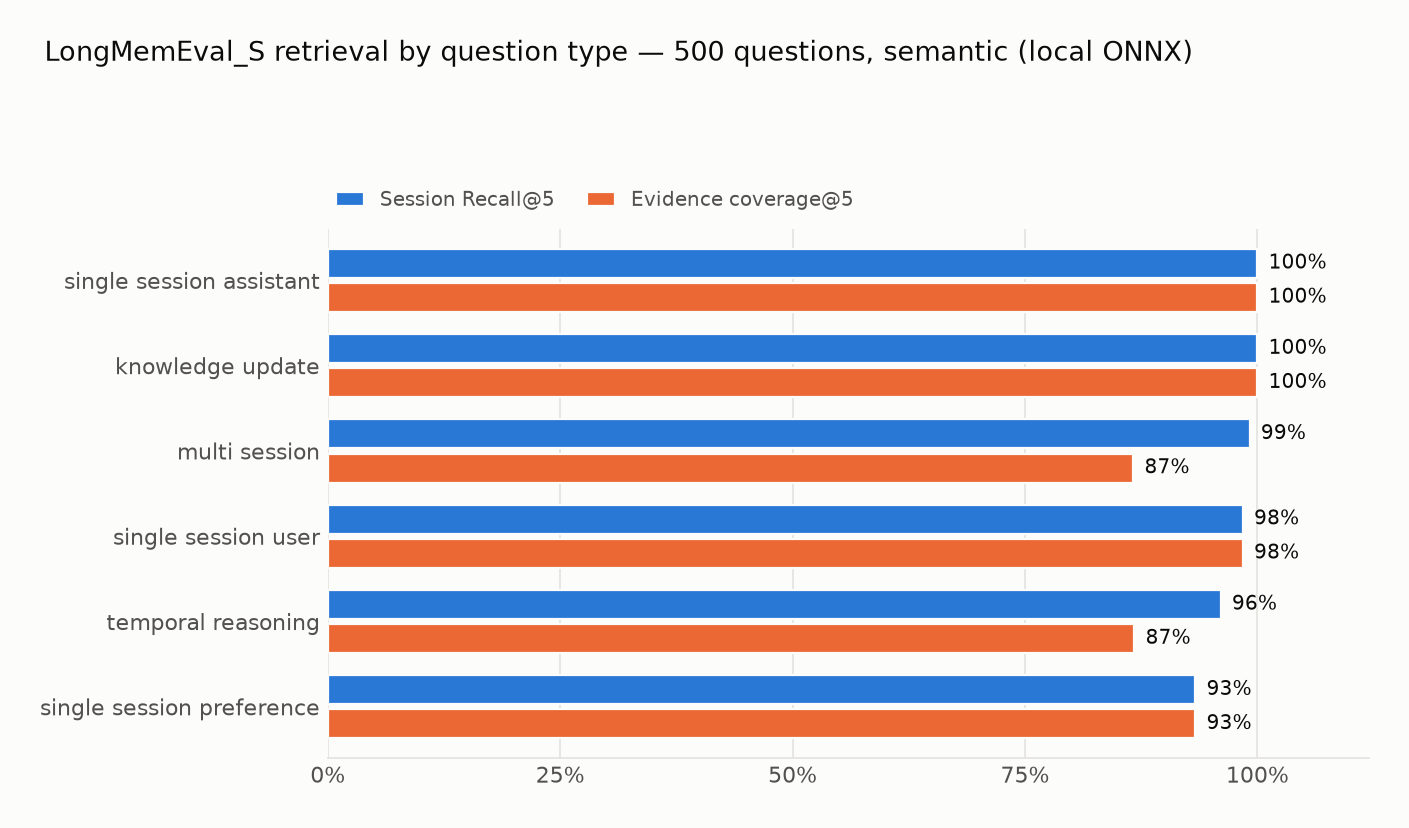
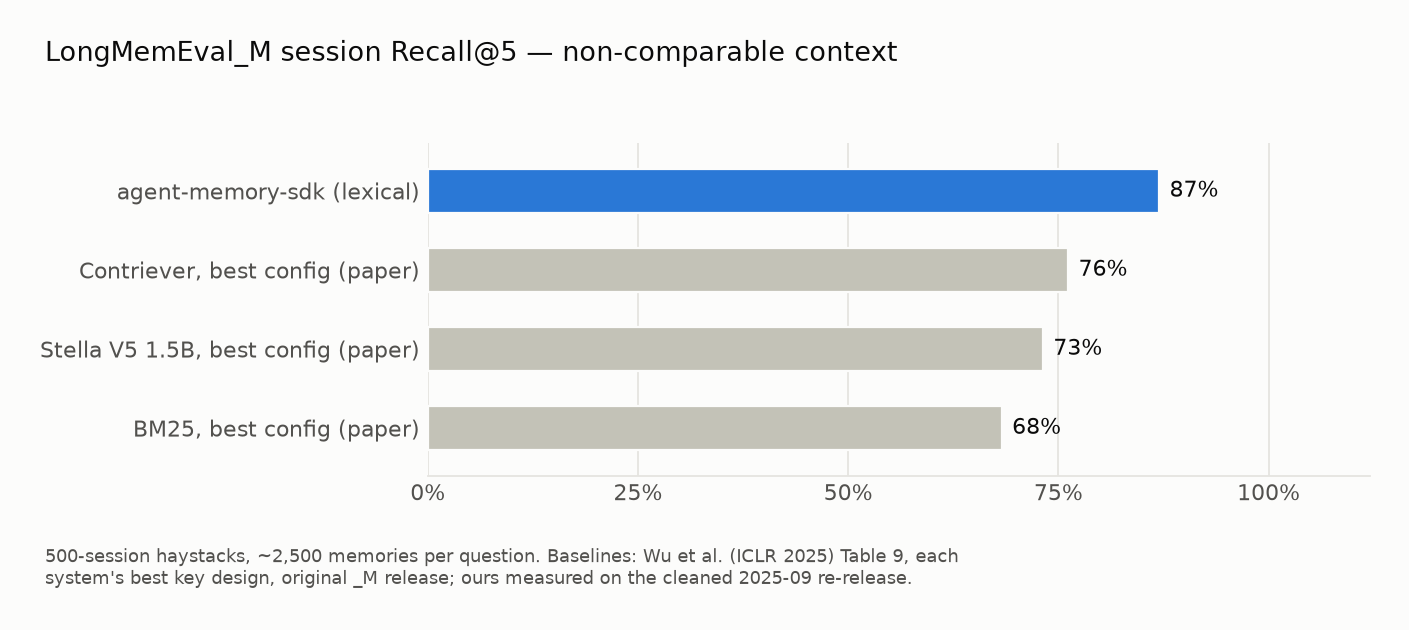
Full methodology, per-type tables, scope notes (what this benchmark does and
doesn't test), and negative results are in the
benchmark report. Reproduce the semantic
_S result with uv run python benchmarks/longmemeval/run_retrieval.py --semantic.
Real software, not a prototype
Every claim below is reproducible from this repo:
- 34/36 (94%) on adversarial decision-quality eval, and the 2 misses fail safe (VERIFY, never wrong REPLAY) —
agent-memory eval(methodology) - LongMemEval retrieval proxy: 98.1% Recall@5 (_S, semantic) · 87.0% (_M, lexical) — 500 independent haystacks; not an end-to-end or paper-baseline head-to-head, full report
- Reproducible stress harness for synthetically seeded workloads up to 1,000,000 entries; archive the JSON output before publishing a performance claim (methodology)
- Stress-test benchmark charts: latency percentiles, seed throughput, resource use, action mix, and cache/decision rates for lexical FTS5 runs at 10K, 100K, and 1M entries, with workload and archived result JSON documented in stress-testing
- 412 collected tests across 25 test modules — decision quality, concurrency, all 4 backends, MCP server, adapters — run in CI on every push
- Published on PyPI and the official MCP Registry
- Ships with a REST API, Streamlit dashboard, CLI, LangChain/LlamaIndex adapters, and async counterparts for memory read/write and decision operations
When to use it — real use cases
| Use case | Without memory | With Agent Memory | Saving |
|---|---|---|---|
| Support bot handling 10k identical FAQ queries/day | Every query costs 1 LLM call | If roughly 75% of requests match reusable memories, those matches can REPLAY without an LLM call | Potentially lower LLM cost; measure your workload |
| Coding agent that re-derives project conventions each session | Wastes 2–5 LLM calls per session to "remember" conventions | Conventions stored once are REPLAYED/RESTORED from the first query of every later session | No re-derivation overhead |
| Research agent building knowledge over multiple sessions | Each session starts cold; re-reads the same sources | Facts and summaries are RESTORED as context | Persistent cross-session knowledge |
| Customer onboarding bot answering the same steps repeatedly | Always generates a response | High-confidence workflows are REPLAYED verbatim | Consistent identical answers |
| Tool-output caching for expensive API calls | Calls the external API every time | Results stored with TTL; REPLAY within TTL, re-call after | Reduced external API cost |
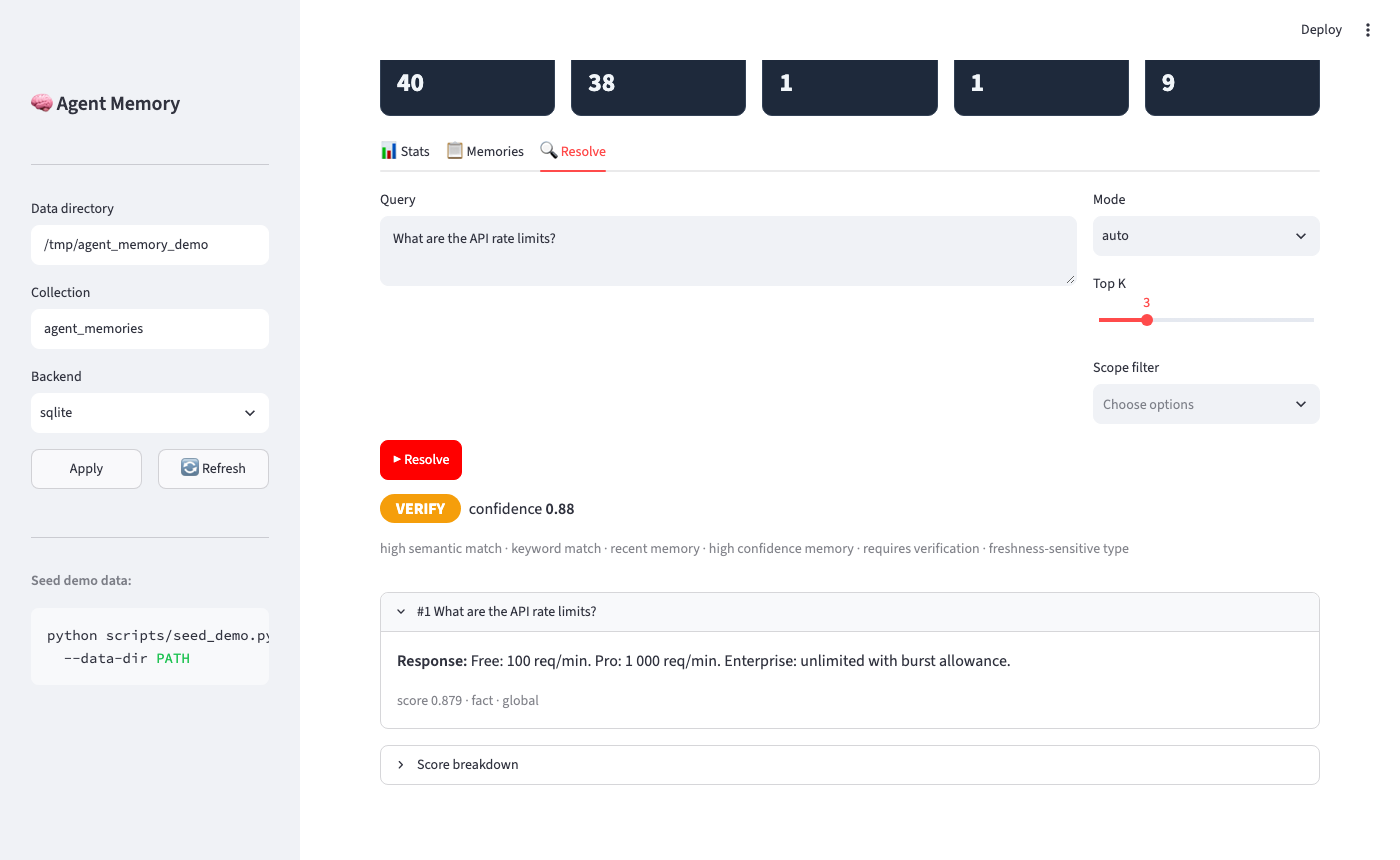
| Policy-compliance agent that must verify facts before replaying | Silent hallucination risk on stale data | requires_verification=True routes relevant matches to VERIFY; low-scoring matches return NONE |
Auditability + safety |
Where Agent Memory saves real money
A GPT-4o call costs ~$0.005. A support agent handling 50,000 queries/day with 70% repeat rate:
- Without memory: 50,000 × $0.005 = $250/day
- With Agent Memory: 15,000 LLM calls + cache misses = $75/day
- Saving: ~ $175/day (~$64k/year)
- Savings depend on your repeat rate and how similar incoming queries are to previously stored ones — measure in your own pipeline.
REPLAY avoids an LLM call when policy permits it. The latency and cost difference depends on the local workload, provider, model, and network; measure both paths in your own pipeline.
Is it right for your use case?
Good fit:
- Agent answers the same or similar questions across sessions
- You have fact-sensitive answers that can go stale (prices, limits, policies)
- Multiple agents or services share a knowledge base
- You need audit trails — knowing which memory answered and why
Not the right tool:
- Document RAG over a corpus of files → use a vector database for that
- Replacing your application's source-of-truth database
- Agents that never repeat similar queries
Features at a glance
| Feature | What it does |
|---|---|
| Decision engine | Every resolve() returns REPLAY / RESTORE / VERIFY / NONE — never silent injection |
| Explainability | decision.explain() shows per-component scores: semantic, recency, confidence, usage |
| Hybrid retrieval | BM25 FTS5 + optional vector KNN + RRF fusion — fast and accurate |
| 4 backends | SQLite (default, zero-setup) · ChromaDB · Redis · PostgreSQL |
| Framework adapters | Drop-in BaseMemory for LangChain and LlamaIndex |
| MCP server | Works with Cursor, Claude Code, VS Code via Model Context Protocol |
| REST API | FastAPI server with 9 endpoints + Swagger UI |
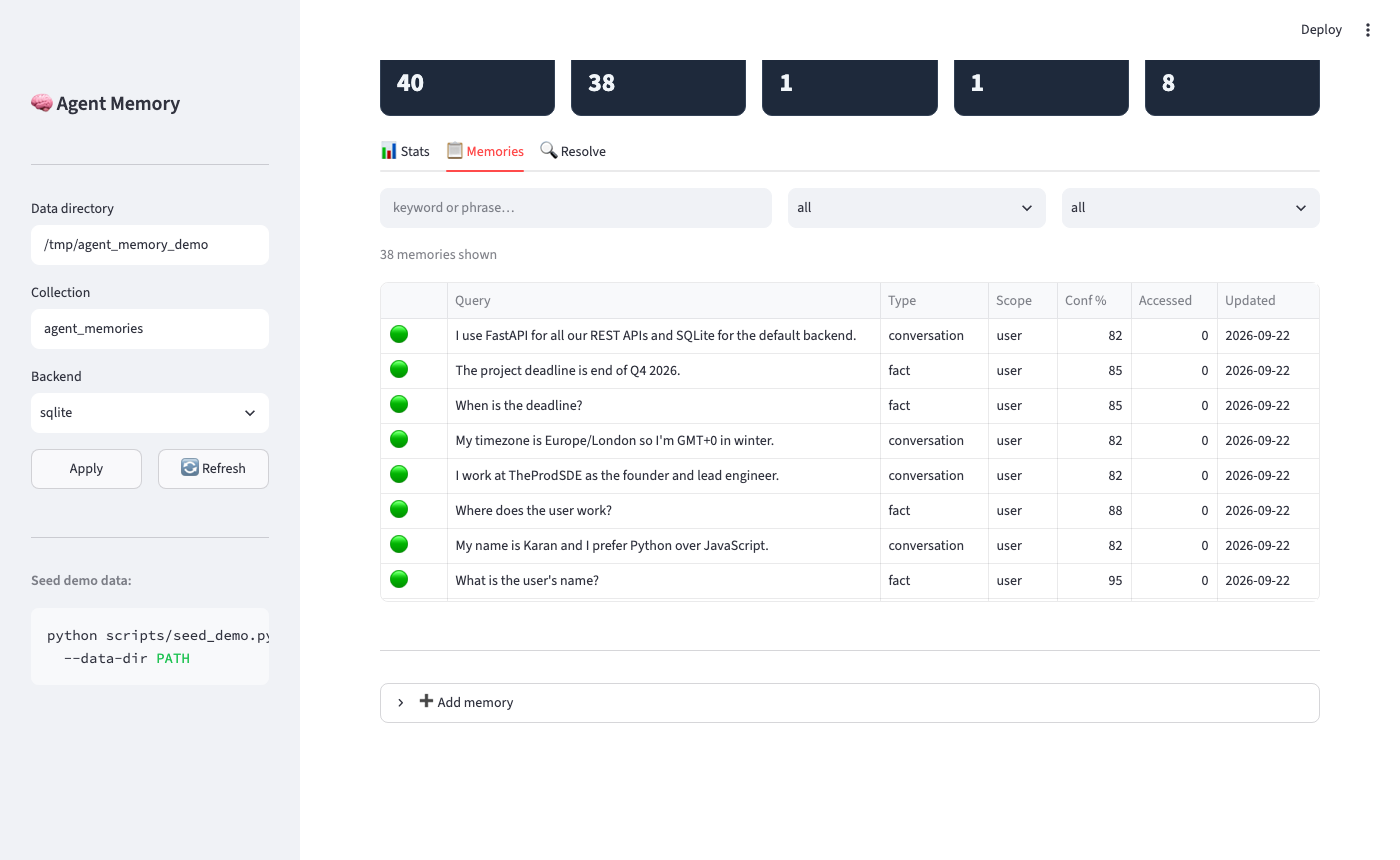
| Dashboard | Streamlit UI — stats, memory browser, live resolve sandbox |
| Multi-agent | SHARED / NAMESPACED / ISOLATED memory across multiple agents |
| Confidence learning | Event-driven confidence updates + half-life temporal decay |
| Memory graph | Relationship edges, path-finding, clusters, PageRank importance |
| Paged context | MemGPT-style tiers: in-context buffer → recall → archival; bounded working set per query |
| Conversation distillation | from_conversation() auto-extracts facts, preferences, and entities from turns |
| Async API | aremember, aresolve, alist, … — memory read/write and decision operations have async counterparts |
| TTL & states | Automatic expiry, archiving, near-duplicate consolidation |
→ Full feature reference: docs/features.md
Performance
Latency, CPU, and memory use depend on the corpus, query distribution, cache state, embedding mode, machine, and operating system. The bundled harness uses a repeatable synthetic workload; it does not establish a production SLA.
The current lexical FTS5 benchmark results and charts are archived with their source JSON in the stress-test methodology. See that document for commands, workload scope, and guidance on interpreting results.
When to use it
Use Agent Memory when:
- You want an agent to remember past interactions without injecting all of them into every prompt
- You need explicit control over when memory is used (replay exact answers vs inject as context vs verify first)
- You have different memory trust levels (user preferences vs potentially-stale facts vs tool outputs)
- Multiple processes, services, or agents share the same memory store
- You need audit trails — every replay is traceable to a specific stored entry with a score breakdown
Don't use it for:
- Document RAG (search over a corpus of files) — use a vector database for that; Agent Memory stores query→answer experiences
- A replacement for your database — it stores transient agent knowledge, not your application's source-of-truth data
Quick Start
pip install agent-memory-sdk
from agent_memory import Memory, MemoryAction

memory = Memory(persist_dir=".agent_memory")

# Store once after a good answer
memory.remember(
    "How do I reset my password?",
    "Go to Settings → Security → Reset Password.",
    type="conversation", tags=["auth"],
)

# Decide before every LLM call
decision = memory.resolve("How do I reset my password?")

if decision.action == MemoryAction.REPLAY:
    return decision.response          # exact match — no LLM call needed

if decision.action == MemoryAction.RESTORE:
    context = memory.format_restore_context(decision)
    return call_llm(query, system_extra=context)

# VERIFY or NONE — validate or answer fresh
→ Full integration pattern and API reference: docs/usage.md
Local Setup
Option 1 — SQLite (zero dependencies, recommended to start)
pip install agent-memory-sdk

# Store something
agent-memory remember "How do I reset my password?" \
  "Go to Settings → Security → Reset Password." \
  --type conversation --tags auth,faq

# Ask the exact question back → REPLAY (no LLM call needed)
agent-memory resolve "How do I reset my password?"
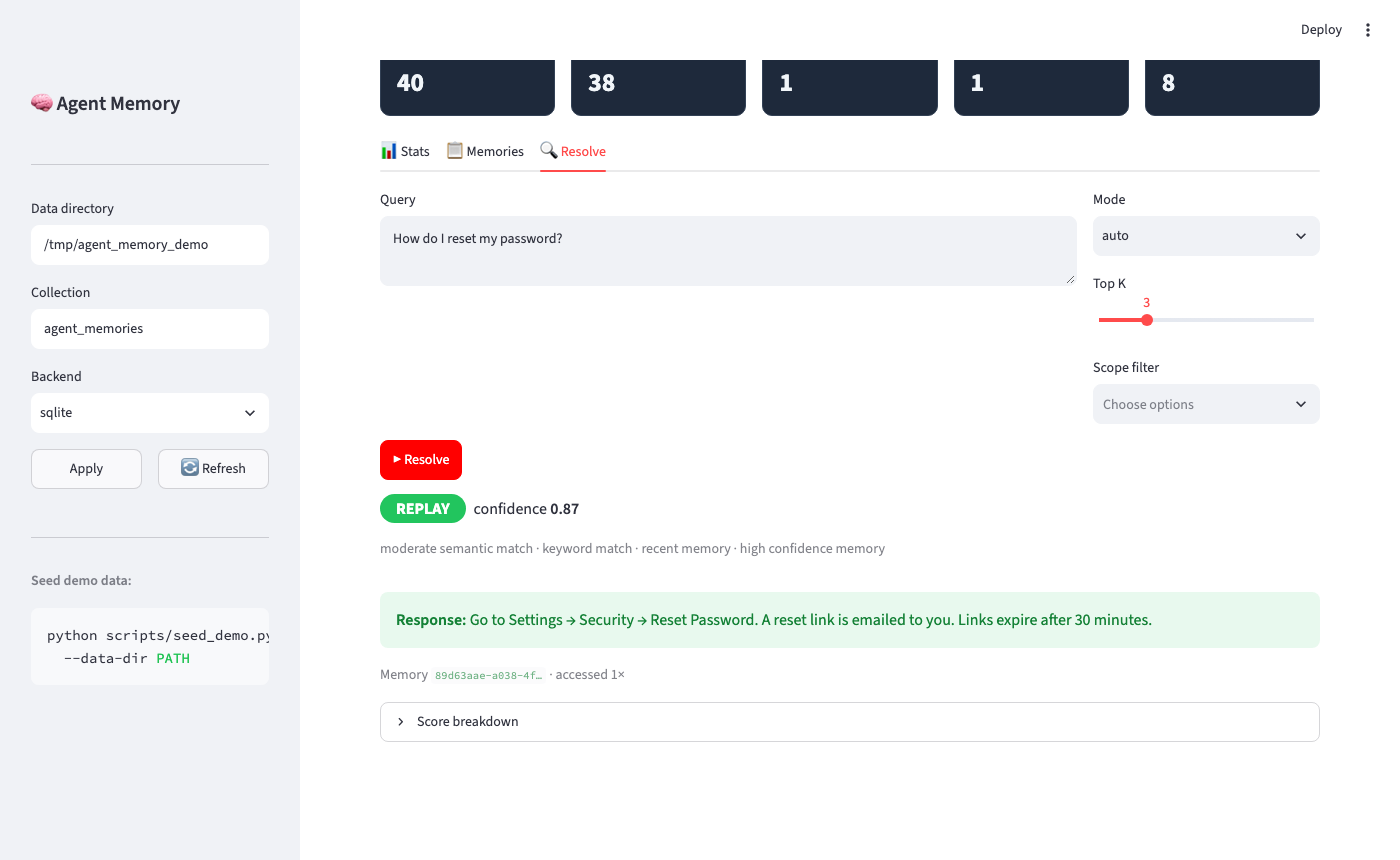
# ✅ REPLAY   confidence: 0.88
# response: Go to Settings → Security → Reset Password.

# Ask a paraphrase → RESTORE (inject as context, don't answer verbatim)
agent-memory resolve "I forgot my password"
# 📋 RESTORE  confidence: 0.77
# [1] score=0.77  How do I reset my password? → Go to Settings → …

# See what's stored
agent-memory stats
Option 2 — Redis or Postgres backend
# Spin up the services
docker compose -f docker-compose.dev.yml up -d

# Install the backend extra
pip install "agent-memory-sdk[redis]"      # or [postgres]

# Use it
agent-memory --backend redis remember "API limit" "1000 req/min" --type fact
agent-memory --backend redis resolve "What is the rate limit?"
Option 3 — Streamlit dashboard (visual exploration)
pip install "agent-memory-sdk[dashboard]"

# Seed demo data (optional)
python scripts/seed_demo.py --data-dir .agent_memory

# Open the dashboard
AGENT_MEMORY_DIR=.agent_memory agent-memory-dashboard
# → http://localhost:8501
Option 4 — Development / from source
git clone https://github.com/TheProdSDE/agent-memory-sdk.git
cd agent-memory-sdk
python -m venv .venv && source .venv/bin/activate
pip install -e ".[dev]"
make test          # run all tests
make check         # lint + type check
Dashboard
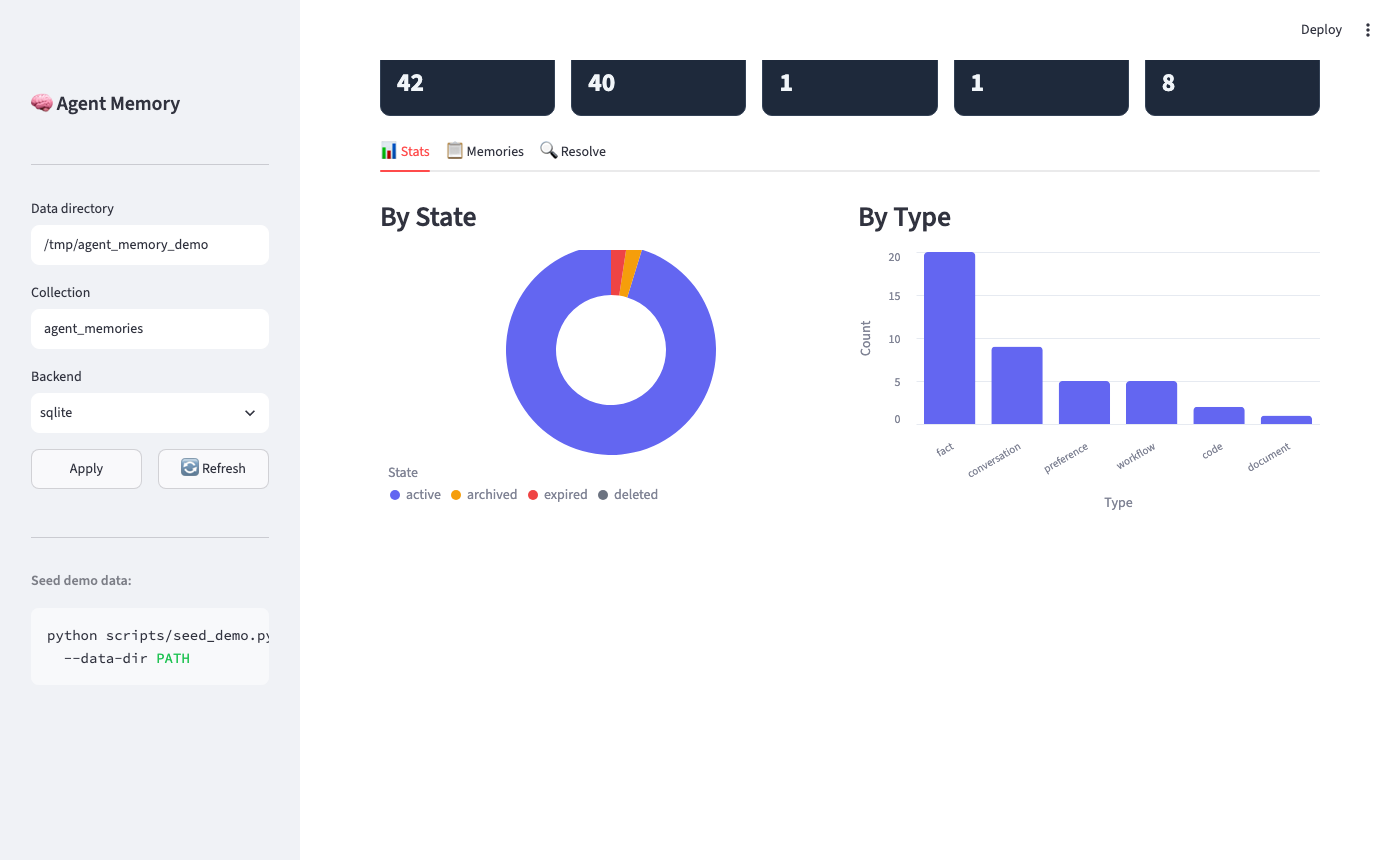
An interactive Streamlit dashboard for exploring memories, testing the resolve sandbox, and monitoring stats.
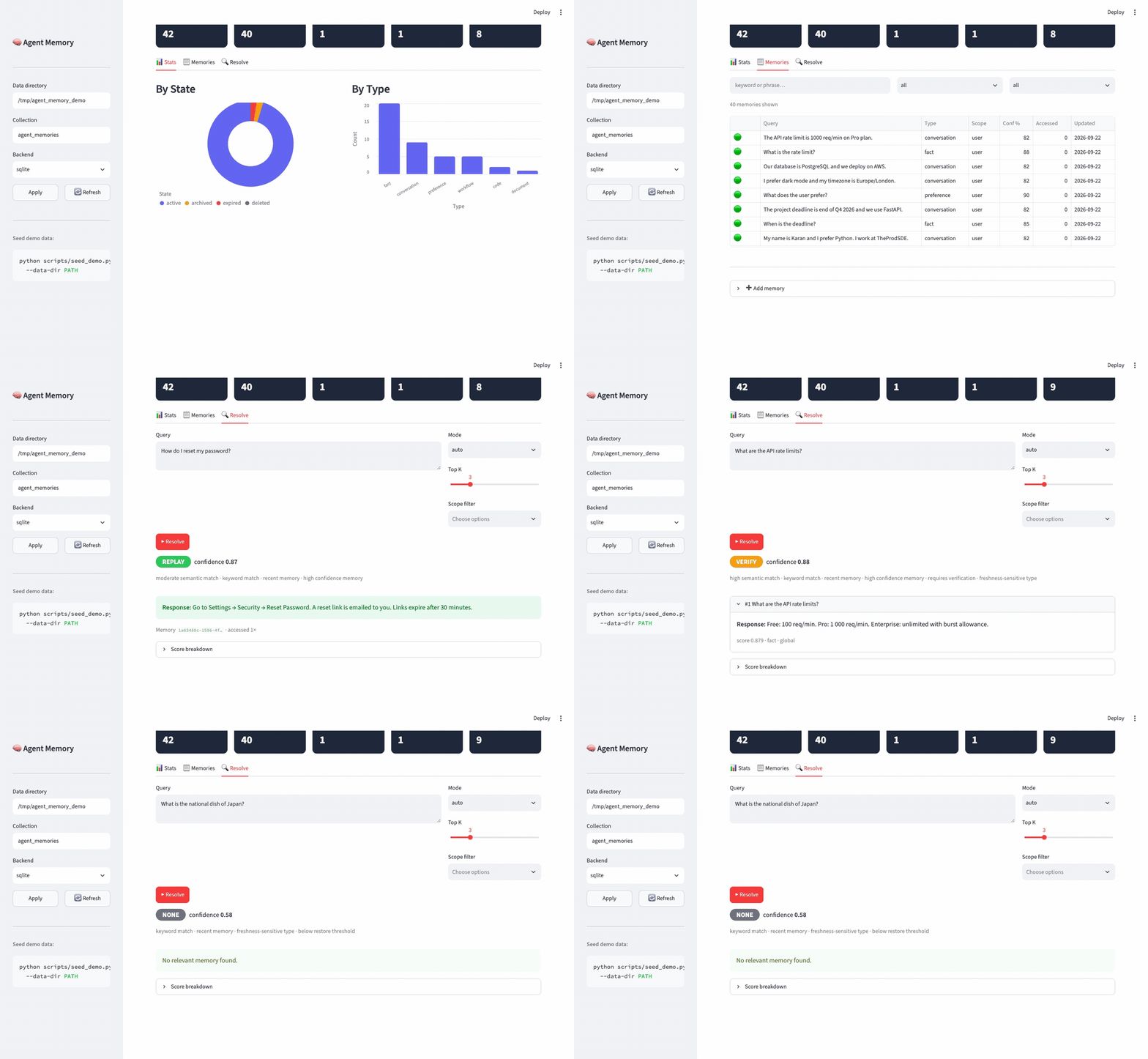
| Stats — KPIs + charts | Memories — searchable table |
|---|---|
 |
 |
| Resolve → REPLAY | Resolve → VERIFY |
|---|---|
 |
 |
pip install "agent-memory-sdk[dashboard]"
AGENT_MEMORY_DIR=.agent_memory agent-memory-dashboard   # → http://localhost:8501

# Seed demo data (optional — run only when you want it)
python scripts/seed_demo.py --data-dir .agent_memory
MCP Server
Agent Memory is published on the MCP Registry — install it in any MCP-compatible client with zero manual setup.
Add to your MCP client
Cursor — add to .cursor/mcp.json in your project, or ~/.cursor/mcp.json globally:
{
  "mcpServers": {
    "agent-memory": {
      "command": "uvx",
      "args": ["agent-memory-sdk"]
    }
  }
}
Claude Desktop — add to ~/Library/Application Support/Claude/claude_desktop_config.json (macOS) or %APPDATA%\Claude\claude_desktop_config.json (Windows):
{
  "mcpServers": {
    "agent-memory": {
      "command": "uvx",
      "args": ["agent-memory-sdk"]
    }
  }
}
Claude Code — add to .claude/settings.json in your project:
{
  "mcpServers": {
    "agent-memory": {
      "command": "uvx",
      "args": ["agent-memory-sdk"]
    }
  }
}
uvx installs the package on first run — no pip install needed.
Custom storage location
{
  "mcpServers": {
    "agent-memory": {
      "command": "uvx",
      "args": ["agent-memory-sdk"],
      "env": {
        "AGENT_MEMORY_DIR": "/path/to/your/memory",
        "AGENT_MEMORY_COLLECTION": "my_project"
      }
    }
  }
}
| Variable | Default | Description |
|---|---|---|
AGENT_MEMORY_DIR |
~/.agent_memory |
Directory for the persistent SQLite store |
AGENT_MEMORY_COLLECTION |
agent_memories |
Collection name (one DB per collection) |
Tools exposed
| Tool | What it does |
|---|---|
resolve_memory |
Retrieve memory and get an explicit decision: replay / restore / verify / none — with confidence score and reasoning |
remember_memory |
Store a query/response pair with optional tags, type, scope, confidence, TTL |
list_memories |
Paginated list of stored memories with scope and archive filters |
get_memory_by_id |
Fetch a single memory entry by ID |
forget_memory |
Permanently delete a memory |
archive_memory |
Archive a memory (excluded from retrieval, not deleted) |
consolidate_memories |
Merge near-duplicate memories into summary entries |
→ Full MCP setup guide and Docker config: docs/mcp.md
Integrations
agent-memory-sdk is the core — every integration delegates to Memory.
| Integration | Install extra | Example |
|---|---|---|
| Core SDK (SQLite) | (none) | basic_usage.py |
LangChain BaseMemory |
[langchain] |
langchain_integration.py |
LlamaIndex BaseMemory |
[llamaindex] |
llamaindex_integration.py |
| Redis backend | [redis] |
redis_backend.py |
| PostgreSQL backend | [postgres] |
postgres_backend.py |
| Multi-agent isolation | (none) | multi_agent.py |
| FastAPI REST server | [api] |
rest_api.py |
| Confidence + Graph | (none) | confidence_and_graph.py |
| Benchmark harness | (none) | benchmark_harness.py |
→ Setup instructions and code snippets for each: examples/README.md
Tech Stack
| Component | Technology |
|---|---|
| Language | Python 3.10+ |
| Storage | SQLite · ChromaDB · Redis · PostgreSQL |
| Retrieval | BM25 FTS5 + Vector KNN + RRF fusion |
| Interfaces | MCP · FastAPI · Streamlit · CLI |
| Adapters | LangChain BaseMemory · LlamaIndex BaseMemory |
| Search DSA | Bloom filter (NONE fast-path) · Dynamic IDF stop words · RRF fusion |
| Testing | pytest (412 collected tests) · ruff · mypy |
| CI/CD | GitHub Actions — test matrix 3.10–3.13 → release gate → PyPI |
No API keys required — everything runs locally.
agent-memory MCP questions
How do I add agent-memory MCP to Claude Code?
Run claude mcp add agent-memory-sdk -- uvx agent-memory-sdk in your terminal. Add --scope user to make it available in every project.
How do I add agent-memory MCP to Cursor?
Open ~/.cursor/mcp.json and add the server under mcpServers, using the Cursor config shown in the install section above.
What tools does agent-memory MCP provide?
It exposes 7 tools, including remember_memory, resolve_memory, list_memories, get_memory_by_id, forget_memory.
Can it save money on LLM costs?
Yes, by using the REPLAY action to return stored answers instead of making new LLM calls for repetitive queries.