
Vogt MCP server
Commit Nov 14, 2026Provides a self-hosted development environment that allows AI agents to manage work items, access terminals, and interact with repositories via MCP.
Also known as TheDancingDeveloper-org/vogt
- Stars
- 1
- Tools
- —
- Downloads, 30 days
- —
- Latest version
- —
- Last commit
- Nov 14, 2026
- License
- AGPL-3.0
What is Vogt MCP?
Vogt provides a self-hosted development environment that allows AI agents to manage work items, access terminals, and interact with repositories via MCP.
Summary generated from the project's README
About Vogt MCP server
Managing product backlogs and repository states alongside AI agents is what Vogt enables for solo developers and small teams. This self-hosted development environment provides a unified space where humans and agents view the same work history, task queues, and repository contents. It functions as a development pod that includes a real shell, a writable home, and pre-installed tools like the claude and codex CLIs.
Users deploy the system locally using Docker Compose and connect to it via a web app, a REST API, or an MCP server. Agents access the environment using scoped tokens to perform actions such as opening terminal sessions for specific work items or running scheduled tasks. The system integrates with GitHub by using tokens or a GitHub App to collect issues and pull requests, allowing it to report drift between declared work and observed repository states.
Unlike standard dashboards, Vogt provides an audit trail for every change and includes a built-in voice sidecar for transcription and speech. It is designed to be customized through Compose overlays and custom images, ensuring that the development environment remains a single source of truth for both people and automated agents.
What you can do with it
- 1Synchronize agent and human workflowsAn AI agent can pick up a specific work item and perform tasks within the same context as a human developer.
- 2Execute code in terminal sessionsDevelopers can open a real shell with pre-installed CLIs directly from a work item to perform coding tasks.
- 3Monitor repository and task driftThe system compares what is declared in the backlog against what is actually found in the repository branches and issues.
- 4Automate repository data collectionThe environment automatically reads branches, dependencies, and GitHub pull requests to keep the project state current.
Written from the project's README. Every use case is checked against a quote from it.
README
View on GitHubVogt
Vogt is a self-hosted product development environment for teams and the agents that work with them. It keeps your projects, work items, backlogs and what your repositories actually contain in one place, and it gives the coding agents you already use a terminal, a task queue and a voice inside that same place — so a person and an agent are looking at the same work, with the same history, and every answer says where it came from and how fresh it is.
It is for small teams and solo developers who run their own tools, want their agents to work through a product rather than around it, and would rather read "verified four minutes ago from GitHub" than trust a dashboard.
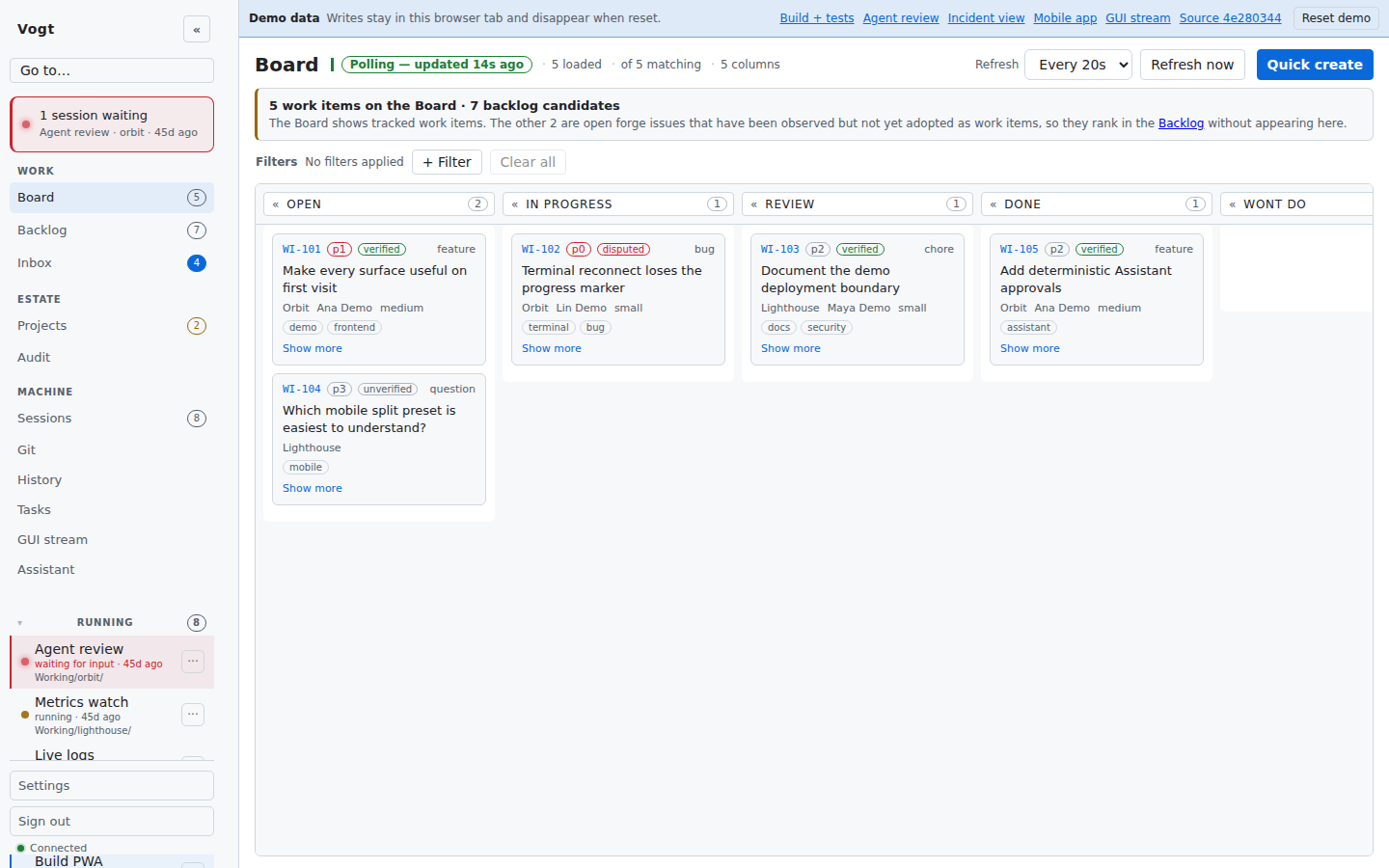
Live demo
Two public demo sites run the current build against seeded, read-only data. Nothing there persists and no sign-in is needed:
- vogt-demo.thedancingdeveloper.com — the desktop app.
- vogt-mobile-demo.thedancingdeveloper.com — the same app in a phone frame, as the Android shell wraps it.
Run it
One published image pair, no build. Copy the settings file, mint two secrets, start it:
git clone https://github.com/TheDancingDeveloper-org/vogt.git
cd vogt
cp deploy/stack.env.example deploy/.env      # optional: port, bind
openssl rand -hex 32 > deploy/vogt-core-token
docker compose -f deploy/stack.compose.yml up -d --wait
Open http://localhost:8910/: the first-run wizard asks for your name, a
username and a password and signs you in as the first (admin) operator.
If the page offers only Sign in, create that operator inside the
container instead and sign in with it — the command prompts for the
password:
docker compose -f deploy/stack.compose.yml exec vogt \
  vogt user create --username <name> --scopes admin --reason "Create first operator"
Voice is on out of the box — the bundled sidecar transcribes the microphone and speaks replies with no account. From there, Getting started covers the first project, tokens for agents, backup and upgrade, and Deployment covers running it somewhere real: digest pinning, a reverse proxy, TLS, data.
What you get
- Projects and work. Register a folder or a repository, and Vogt keeps its work items, a ranked backlog, boards, an inbox and an audit trail of every change — who did it, and why.
- What is actually there. Collectors read your repositories — branches, TODO markers, dependencies, sessions — and GitHub issues and pull requests when you give it a token. Found work is visible by default; declaring it raises its trust, never gates it.
- Declared and observed, kept apart. Where the two disagree, Vogt shows the drift and lets you decide. It reports; it never enforces.
- Terminals for the work. Every work item can open a session — a real
shell, in a real checkout, with the
claudeandcodexCLIs installed — from the browser or the phone. - One API, three ways in. The CLI, the REST API and the MCP server are thin adapters over one operation registry, and the web app is a client of that same API.
Agents
An agent connects to Vogt the way a person does: with a scoped token, through MCP or the REST API. It can pick up a work item, open a session for it, run a scheduled task, ask for a push notification when it needs a human, and link the branch and pull request back to the item — every write attributed and audited. The agent guide is written for the agent, and includes a drop-in block for your own repository.
Make it yours
The published image is never edited; your deployment states only its
difference from it. Settings go in deploy/.env, extra services and mounts go
in a Compose overlay of your own, and extra tools go in an image of your own
that starts FROM the published digest.
Customisation names every supported extension point.
Know what you are running
The stack image is a development pod, not a hardened service: a writable
home, passwordless sudo, an SSH server and the agent CLIs, because an agent
session needs a machine and this is the machine. It publishes on loopback until
you say otherwise. Put it where you would put a dev box, put something that
terminates TLS in front of it, and read SECURITY.md first.
Documentation
- Getting started — install, run, configure, and make the first project visible.
- Deployment — the image, Compose, environment, reverse proxy, backups, upgrades, releases.
- User guide — daily use of the web app, CLI, REST and the agent surfaces.
- API, MCP & permissions — the access surfaces (core HTTP API with OpenAPI/Swagger, MCP, the engine front door), which token each accepts, and the scope model.
- Agent guide — for an agent working through Vogt.
- Configuration reference — every setting, generated from the schema.
- GitHub App — connecting to GitHub as an App instead of a personal token: permissions, installation, config.
- Customisation — the supported extension points.
- Engine — the session engine and web app: what it owns, its wire contract, the assistant, agent tasks.
- Architecture — how the product is put together.
- Roadmap — what is released, what is being built (the Rust core, sessions as Kubernetes pods), and the order of the work.
- Contributing — workflow, checks, and the two-container developer stack. For how changes land, see How changes land.
- AI policy — how this product is built, and what that means for contributions.
Licence
AGPL-3.0-only, Copyright (c) 2026 TheDancingDeveloper (see NOTICE). You can run, change and redistribute Vogt freely; if you offer a modified Vogt to others as a network service, the AGPL requires you to offer them its source too.
The terminal's bundled symbol-glyph fallback fonts under web/public/fonts/
are subsets of Noto Sans Symbols, Noto Sans Symbols 2 and Noto Sans Math,
licensed under the SIL Open Font License 1.1
(web/public/fonts/OFL-NotoSans.txt).
Vogt MCP questions
How do agents connect to Vogt?
Agents can connect using a scoped token through the MCP interface, the REST API, or the CLI.
Can agents run code or commands?
Yes, every work item can open a session providing a real shell with the claude and codex CLIs installed.
Does Vogt enforce repository state?
No, Vogt reports on the drift between declared work and observed repository content but does not enforce changes.
Is there voice support?
Yes, voice is available out of the box via a bundled sidecar that transcribes the microphone and speaks replies.