
Lets coding agents build and edit real websites in Swebsy Studio without per-token AI fees.
Also known as swebsy/MCP, @swebsy/mcp
- Stars
- 0
- Tools
- 45
- Downloads, 30 days
- —
- Latest version
- 0.16.3
- Last commit
- Nov 9, 2026
- License
- MIT
What is Swebsy MCP?
Swebsy lets coding agents build and edit real websites in Swebsy Studio without per-token AI fees. It exposes 45 tools, such as swebsy_replace_page_content, swebsy_create_page, swebsy_link_page.
Summary generated from the project's README
About Swebsy MCP server
Developers using coding agents like Claude Code, Cursor, Windsurf, or GitHub Copilot can build and edit functional websites through Swebsy Studio. Instead of paying extra per-token fees to a specialized AI builder, this server allows your existing AI subscription to drive a visual editor directly. The connection works over a local WebSocket relay on 127.0.0.1, ensuring that your prompts and content are not proxied through external servers for metering.
Once connected, your agent can perform a wide range of web development tasks including discovering templates, creating new sites, adding sections, and editing content. It can also manage technical site settings like SEO, favicons, fonts, and analytics, or capture screenshots of the progress. Because the output consists of real HTML, CSS, and JS files, you can export the finished project and host it anywhere without being locked into a specific provider. The setup is managed via a local command that registers the server with your preferred agent.
What you can do with it
- 1Configure technical SEO and site settingsInstruct your AI to set up the metadata and technical configurations required for a professional website.
- 2Exporting production-ready codeDirect your agent to package the completed website into portable files for independent hosting.
Written from the project's README. Every use case is checked against a quote from it.
How to install Swebsy MCP
Formats verified 10 Nov 2026Add to CursorAdd to GooseInstall Swebsy MCP in Claude Code
$ claude mcp add mcp -- npx -y @swebsy/mcpInstall Swebsy MCP in Cursor
~/.cursor/mcp.json
{
  "mcpServers": {
    "mcp": {
      "command": "npx",
      "args": [
        "-y",
        "@swebsy/mcp"
      ]
    }
  }
}Install Swebsy MCP in VS Code
.vscode/mcp.json
{
  "servers": {
    "mcp": {
      "type": "stdio",
      "command": "npx",
      "args": [
        "-y",
        "@swebsy/mcp"
      ]
    }
  }
}Install Swebsy MCP in VS Code CLI
$ code --add-mcp '{"name":"mcp","type":"stdio","command":"npx","args":["-y","@swebsy/mcp"]}'Install Swebsy MCP in Claude Desktop
claude_desktop_config.json
{
  "mcpServers": {
    "mcp": {
      "command": "npx",
      "args": [
        "-y",
        "@swebsy/mcp"
      ]
    }
  }
}Install Swebsy MCP in Codex
$ codex mcp add mcp -- npx -y @swebsy/mcpInstall Swebsy MCP in Codex config.toml
~/.codex/config.toml
[mcp_servers.mcp]
command = "npx"
args = ["-y", "@swebsy/mcp"]
Install Swebsy MCP in Gemini CLI
$ gemini mcp add -s user mcp npx -- -y @swebsy/mcpInstall Swebsy MCP in Gemini settings.json
~/.gemini/settings.json
{
  "mcpServers": {
    "mcp": {
      "command": "npx",
      "args": [
        "-y",
        "@swebsy/mcp"
      ]
    }
  }
}Started by HostedMCP on 16 Nov 2026
We ran this command for @swebsy/mcp 0.16.3 in an isolated container with no network and no keys. It answered and listed 45 tools.
Swebsy MCP tools 45
Read from the server with tools/listswebsy_replace_page_contentActionReplace ALL top-level sections of the CURRENTLY SELECTED page with a generated list of components. This OVERWRITES the page — it does NOT create a new page (use `create_page`) and does NOT append a single section (use `add_section`). Use when the user asks to build/replace/redesign an entire page. Each top-level component should be wrapped in a container.
swebsy_create_pageActionCreate a NEW blank page in the project and (by default) select it. Returns the new page's id and fileName. The page starts nearly empty — fill it with `replace_page_content` or `add_section`, and point a navbar/link at it with `link_page`. Use THIS to add an additional page; use `replace_page_content` (NOT this) to overwrite the current page's content.
swebsy_link_pageActionPoint an existing link at a project page — the same wiring the UI's 'Link to' picker does. Pass the link's `targetId` or `targetPath` (from `read_page`) and the target `page` (id or name). For a navbar link this sets its page target so the href and active state stay in sync; for a plain link or button it sets href to the page's ./slug.html. Use after `create_page` to wire a navbar to the new page.
swebsy_update_pageActionRename a page and/or change its URL slug — the Pages panel's rename. Links that pointed at the old `./slug.html` on every page follow the new slug. The home page's `index` slug is locked (its display name can still change).
swebsy_duplicate_pageActionCopy a page (content, classes and styles) into a new page and select the copy. Returns the new page's id and fileName. Use it to start a page from an existing layout instead of rebuilding it.
swebsy_delete_pageActionDelete a page. The home page (index) and a site's last page can't be deleted. Links to the deleted page are left in place — repoint them with `link_page` or delete them.
swebsy_add_sectionActionInsert a new section into the current page. Use for adding discrete sections (hero, features, pricing, CTA) to an existing page. Supply exactly one of `component` (a component tree) or `html` (one root element). Appends to the end by default; to place it somewhere specific, pass `position` plus the `targetPath` of the component to place it next to.
swebsy_edit_sectionActionModify an existing component. By default this edits the selected component. To edit a component identified by `read_page`, provide its `targetId` (preferred — survives other edits) or `targetPath`; an explicit target overrides the canvas selection. Preferred: provide `component` — the full replacement component tree (compact DSL OK), best for structural changes. Alternative: provide `html` — the complete modified HTML string. Fallback: provide `patch` — JSON Patch (RFC 6902) for tiny single-property tweaks. Supply exactly one. Preserve existing IDs: an id kept in the edit keeps the styles attached to it; an id you drop loses them. The result's `id` is the component's id after the edit (a replacing edit can give it a new one). `changed: false` means the page's HTML/CSS/JS came out identical, so the edit did not show up; `success: false` means a patched attribute is not what the page exports.
swebsy_delete_sectionActionRemove a component from the current page entirely. Use this instead of emptying a section's contents — an emptied section leaves a stray blank div on the page. Deletes the selected component by default; pass `targetId` or `targetPath` (from `read_page`) to delete a component you did not select.
swebsy_move_sectionActionMove a component to just before or after another component on the current page — reorder sections, swap columns, lift a CTA above the footer. The component keeps its id, classes and id-styles. ALWAYS use this to reorder; delete + re-add loses the component's styles. Name each side by id (`targetId`/`anchorId`) or by path (`targetPath`/`anchorPath`).
swebsy_wrap_sectionActionWrap a run of sibling components in one new element, optionally with a semantic tag — e.g. put everything between the navbar and footer in `<main>`, or a footer symbol in `<footer>`. The wrapped components keep their ids, id-styles and symbol links. ALWAYS use this to add a wrapper; re-sending the components through `edit_section`/`replace_page_content` loses their styles. Paths shift — call `read_page` before the next path-based edit.
swebsy_duplicate_sectionActionCopy a component (with its classes and styles) and insert the copy right after it. Paths after it shift by one — call `read_page` before the next path-based edit (ids don't shift).
Show all 45 toolsShow fewer tools
swebsy_insert_blockActionInsert a pre-built block from the catalog and optionally customize its content. STRONGLY preferred over generating from scratch when a matching block exists. The block re-themes on insert — its colour and font classes resolve against THIS site's theme, so the result is meant to differ from the catalog thumbnail (a screenshot of the block in the template it came from).
swebsy_update_settingsActionUpdate site settings — SEO title/description, site URL, structured data (JSON-LD), per-page SEO overrides, language/direction, theme tokens (light + dark), type scale, animation defaults, Google and uploaded fonts, dark mode toggle, site-wide custom CSS for component-level restyling (globalTheme.customTailwindConfig), favicon, robots.txt/sitemap/service worker/security headers/image optimization (performance), analytics ids, custom head/body code (advanced), the "Made with Swebsy" badge (branding) and the deploy target (deploy). Provide ONLY the fields that change. `general`/`seo` are SITE-WIDE; use `page` to change ONE page. Also used to match the theme to a reference IMAGE's vibe: sample its palette into brand/surface tokens and ALWAYS set BOTH light and dark variants.
swebsy_commit_design_directionActionCommit this site to a specific visual direction, and apply it (fonts, type roles, palette swatches). Call this ONCE, BEFORE generating a new site's first page — a site with no committed direction has nothing for later edits to stay consistent with, and the result drifts to generic. Prefer a `directionId` from the sampled menu; supply the `custom` fields only when the user's brief clearly calls for something the menu doesn't cover. Not needed when editing a site that already has a direction.
swebsy_animate_pageActionApply Swebsy's built-in scroll-reveal animation in one step — a smart, per-section staggered entrance on headings, text, images, buttons, and cards (navbars/footers skipped). Prefer this over hand-placing animate-* classes whenever the user asks to animate the page or site, or wants a consistent reveal.
swebsy_read_pageRead-onlyRead the current page structure: each line shows a component's target path and its `#id`. edit_section, delete_section, move_section, duplicate_section and link_page take either — prefer the id (`targetId`), which survives moves and inserts; other tools take the path. Use the id only to target; don't copy auto ids into markup. Call this BEFORE editing a named or relative page component that is not the current selection. The default `sections` read lists every top-level section with its target path — enough to pick the one to edit. To find a nested element (a link, button, card) pass that section's `targetPath` plus `depth` — one call instead of drilling down level by level. When copying content between components, use `detail: full` WITH the `targetPath` of the one section you're copying, not a whole-page read. Also call it AFTER applying edits to verify the result.
swebsy_get_skillRead-onlyLoad deep, on-demand guidance for a specific area before acting on it (e.g. before adding animations, composing a new page, writing copy, building forms, editing the nav, or reusing components with symbols). Returns the full instructions for that skill.
swebsy_publishActionPublish the open site to Swebsy Hosting, free, at its own swebsy.site address, and return the live URL. Call it ONLY after the user has said yes to publishing in this conversation, and ask again before every publish, a republish included: an earlier yes doesn't carry over. If it can't go live straight away (no account yet, a plan limit, something to check), nothing goes out yet: Studio opens its Publish screen and the result says what to tell the user. When it says Studio finishes publishing from there, don't call publish again; the site goes live once the user is done.
swebsy_start_pairingActionStart a pairing session. Returns a single-use `pairUrl` — give it to the user to click; opening it connects their Studio tab automatically. (Also returns the raw `code`/`port` for manual entry.)
swebsy_statusRead-onlyReport bridge status, siteName, selected page, and editorReady, plus a short theme summary (fonts, default color mode, brand colors). After creating or opening a site, wait until editorReady is true and siteId matches the expected site before editing.
swebsy_list_pagesRead-onlyList the project's pages (id, name, fileName, section count, which one is selected). Call this instead of guessing a page name for select_page or link_page.
swebsy_list_templatesRead-onlyRefresh and list installed site templates with names, descriptions, tags, fonts, preview URLs, and thumbnail URLs. Works from Home or Studio.
swebsy_create_siteActionCreate a site and open it in Studio. Pass name to set its internal Studio/Home name (default "My Website"). Omit templateId for Swebsy's standard blank site; provide an installed template ID to import that template unchanged. Then poll swebsy_status until editorReady is true and siteId matches before editing.
swebsy_list_sitesRead-onlyList saved sites newest-first as metadata only: IDs, internal names, status, timestamps, template ID, page count, and whether each site is open.
swebsy_open_siteActionOpen a saved site by ID in the paired tab and return its metadata. Idempotent if it is already open. Poll swebsy_status for the expected siteId and editorReady before editing.
swebsy_rename_siteActionRename a saved site's internal Studio/Home name. This does not change its SEO or public title settings.
swebsy_select_pageActionSelect a page in the connected Studio project.
swebsy_read_selectionRead-onlyRead the currently selected component (type, classes, attributes, text). Secrets are never surfaced.
swebsy_list_symbolsRead-onlyList the project's SYMBOLS (reusable components that stay in sync across every page). Returns each symbol's id, name, component type, instance count, and how many pages use it, plus a `health` report of BROKEN linkage: `orphans` (copies whose main was deleted — editing them changes nothing elsewhere), `unregistered` (instances the main doesn't list back, so edits propagate one way only) and `ghosts`. Repair any of it by calling promote_to_symbol on one affected section. Use before add_symbol_instance to find the symbol id.
swebsy_promote_to_symbolActionPromote an existing component into a reusable SYMBOL so it can be shared, in sync, across pages. Pass its `targetPath` from read_page (e.g. the navbar or the CTA band). Also REPAIRS broken linkage (see list_symbols → health): re-promoting an orphaned copy rebuilds its main and re-links every other copy of it, and re-promoting a symbol registers instances it had lost. Returns the symbol id (for add_symbol_instance) and a `repaired` count; copies whose structure has diverged too far are reported as `detached` — delete_section + add_symbol_instance those instead.
swebsy_add_symbol_instanceActionAdd a linked INSTANCE of an existing symbol (see list_symbols) to the CURRENT page. The instance stays in sync with the symbol main and every other instance — the way to reuse one navbar/footer/CTA across pages. Select the target page with select_page first.
swebsy_detach_symbolActionTurn ONE symbol instance on the current page back into a plain component, so it can be edited on its own. The symbol and its other instances stay linked. Use it when one page needs a variant of the shared navbar/footer.
swebsy_rename_symbolActionRename a symbol (the name shown in the Symbols panel).
swebsy_delete_symbolActionDelete a symbol. Every instance is DETACHED first and stays on its page as a plain component — nothing disappears from the site. To also remove the copies, delete_section them.
swebsy_undoActionRevert your own last editing tool call(s) this session (add/edit/delete/move/duplicate_section, insert_block, update_settings, page tools…), newest first. Does NOT undo symbol or asset tools. Refuses (returns `blocked`) when a page, CSS or settings it would restore has been edited since, so hand edits are never overwritten. Paths may shift — call read_page afterwards.
swebsy_redoActionRe-apply tool calls reverted by swebsy_undo, oldest-undone last. Cleared by any new edit.
swebsy_get_builder_guideRead-onlyLoad the static Swebsy builder guidance (component system, theme classes, conventions) that the in-app AI Builder is primed with.
swebsy_list_skillsRead-onlyList the available deep-guidance skills (animation, page-composition, copywriting, forms, nav) with one-line summaries.
swebsy_list_blocksRead-onlyList the pre-built block catalog (ids + labels) available to insert_block.
swebsy_captureRead-onlyCapture a styled screenshot of the current page at a fixed viewport, written under .swebsy-agent/screenshots/. Returns the file path. Scope it with `targetPath` when verifying ONE section — a whole-page PNG downscales so far that component detail is unreadable.
swebsy_list_assetsRead-onlyList managed assets in the open site with whole-project usage counts. References are checked across every page, shared symbols, styles, and site settings. Use imagesOnly:true and unusedOnly:true before deleting unused gallery images.
swebsy_upload_assetActionUpload a local image, font, video, audio or PDF file into the open site and return its `assetId`, `src` and a `usage` snippet. Images go in the asset library for `image` components, video for `video` components (`attributes.src`), audio for `audio`, PDFs as a link `href`; fonts are stored for `update_settings` fonts.custom. This is the ONLY way to get your own imagery (screenshots, logos, textures, mockups) into a site — an `image` with an empty src gets a random stock photo instead. Reads the file from the agent's own filesystem, so pass a path you can see (for example a screenshot you just captured). The asset is stored in the project and travels with static export and project JSON. Pass `path` or `paths` (exactly one). Several files: pass `paths` (up to 25) instead of `path` for one call that returns a compact `{assets: {basename: src}, failed: {basename: reason}}` map.
swebsy_delete_assetActionDelete one managed asset from the open site's asset gallery. By default this refuses assets referenced by any page, shared symbol, style, or site setting; call swebsy_list_assets first. force:true also clears live component references and should be used only when that is explicitly intended.
swebsy_exportActionExport the site to .swebsy-agent/exports/. Static files via the site exporter and/or the project JSON (with assets). Returns `outDir`, the exported page paths, and per-kind file counts — verify a build by grepping those HTML files.
Configuration
SWEBSY_AGENT_DIRWhere screenshots and exports land (default: .swebsy-agent in the workspace)
SWEBSY_AGENT_PORTPort the local relay listens on (default 37373)
SWEBSY_APP_URLStudio origin used for the pairing link (default https://studio.swebsy.com; set this for local or self-hosted Studio)
SWEBSY_NO_OPENSet to skip auto-opening the pairing link in the browser
Automated checks
Ran Nov 14, 2026Full report →Passed our automated checks. That is not a security audit: read the code and give the server the narrowest access it needs. How checks work

- Source repository linked and reachableswebsy/mcp is public and reachablegithub.com/swebsy/mcp ↗Pass
- Package names this repository as its source@swebsy/mcp names swebsy/mcp as sourcenpmjs.com/package/@swebsy/mcp ↗Pass
- Build provenance (Sigstore attestation)Sigstore attestation for @swebsy/mcpnpmjs.com/package/@swebsy/mcp/v/0.16.3#provenance ↗Pass
- Open source license (OSI)MITspdx.org/licenses/MIT.html ↗Pass
- Commit or release in the last yearLast commit or release 2026-11-09github.com/swebsy/mcp ↗Pass
- OpenSSF ScorecardNot checked
- Package name not close to a popular packageNo popular package one edit away from @swebsy/mcpPass
- No critical advisory in the package or its dependencies1 resolved dependencies checked; no critical advisoryosv.dev ↗Pass
- No hidden instructions to the model0 tool descriptions and the README read; no override phrases, credential paths or hidden charactersPass
- Destructive tools are labelledNot checked
- Remote endpoint answers the MCP handshakeHTTPS endpoint answered 401 (sign-in required)Pass
README
View on GitHub@swebsy/mcp — connect your coding agent to Swebsy
Build and edit real websites with the coding agent you already pay for — no per-token AI fees.


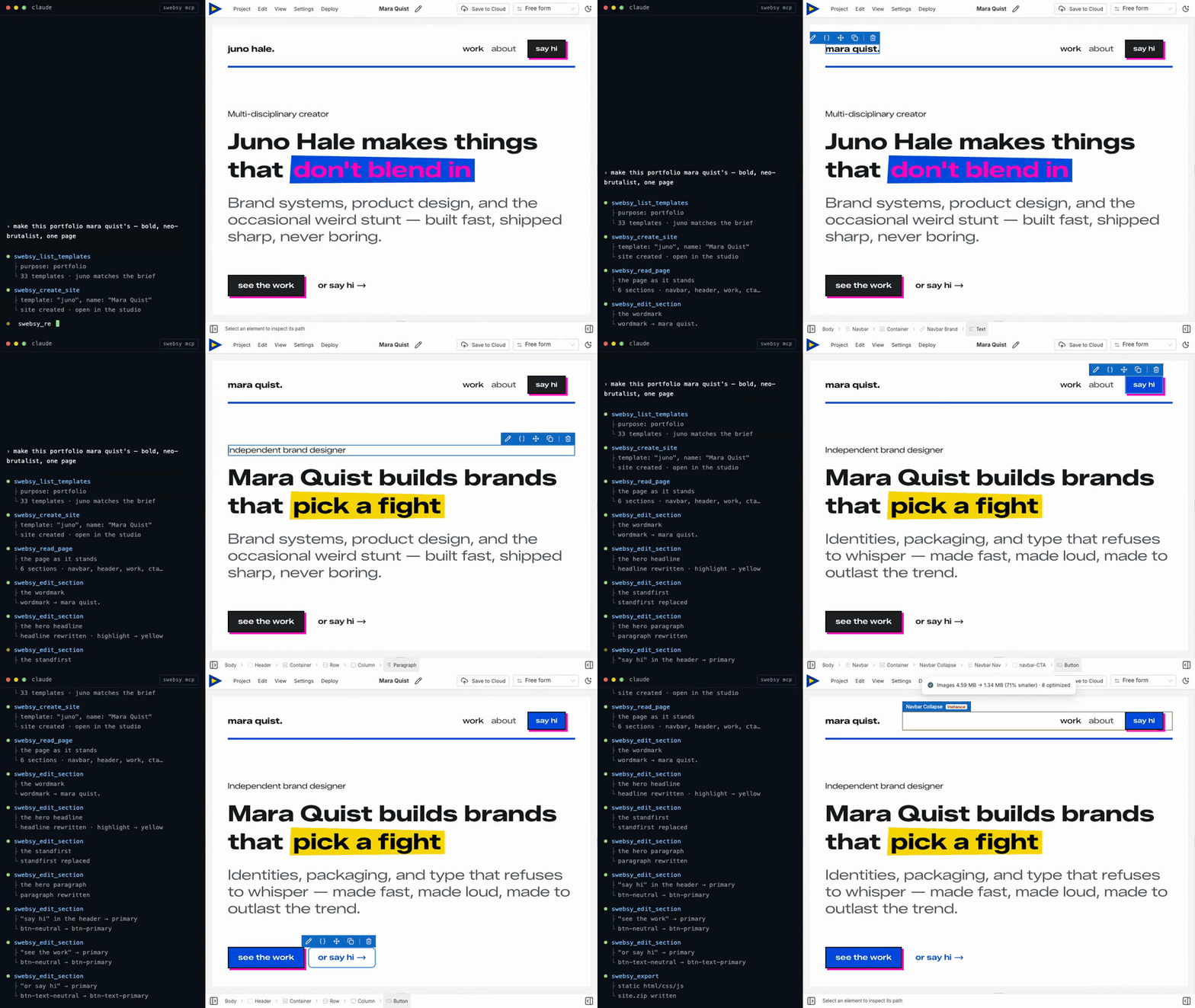
@swebsy/mcp is an MCP server that lets
Claude Code, Codex, Cursor, Windsurf, Cline, GitHub Copilot — or any agent that
speaks the Model Context Protocol — drive an open Swebsy
Studio tab. Your agent discovers templates, creates and opens sites, renames projects,
adds sections, edits content, switches pages, sets every site setting (SEO,
favicon, fonts, analytics, robots.txt, deploy target), captures screenshots, and
exports the finished site, all over a local 127.0.0.1 WebSocket relay. Nothing is proxied through our servers, and Studio redacts
secrets (API keys, deploy tokens, chat history) before anything crosses the
bridge. Your coding agent's own service and privacy policy still apply to the
non-secret content it receives.
Using ChatGPT or Claude (the apps)? You don't need this package. Add
https://mcp.swebsy.com/mcpas a custom app in ChatGPT or a custom connector in Claude, sign in to Swebsy and click Allow — setup steps. This package is for coding agents that run on your machine.
What is Swebsy?
Swebsy is a visual website builder with a real ownership model: you build visually, export real files (HTML/CSS/JS), and publish wherever you want — no lock-in, no proprietary hosting requirement. The free plan runs fully local; no account required.
Why use an MCP instead of a built-in AI panel?
Most "AI website builders" bolt on a chat panel and bill you per token on top of the model you're already subscribed to. Swebsy takes the opposite approach — it exposes the editor as a tool your own agent can drive:
- No per-token API billing. Swebsy isn't in the loop on model costs. You use the Claude, Cursor, Codex, or Copilot plan you already pay for.
- Runs on your machine. The agent talks to your open Studio tab over a local
127.0.0.1bridge — prompts and content aren't shipped off to be metered. - Bring your own agent. Your model, your custom instructions, your workflow — not a locked-down wrapper. Any MCP-capable agent works.
- You own the output. Everything the agent builds exports as real, portable files you can host anywhere.
Setup
One command registers Swebsy with every supported agent it finds (Claude Code, Codex, Cursor, Windsurf, VS Code, Cline):
npx -y @swebsy/mcp setup
It never changes an existing swebsy entry and never rewrites a config file it
can't parse; it reports each agent's result. Or register it by hand:
Claude Code
claude mcp add swebsy -- npx -y @swebsy/mcp
Codex
codex mcp add swebsy -- npx -y @swebsy/mcp
Cursor — add to ~/.cursor/mcp.json (or a project's .cursor/mcp.json):
{
  "mcpServers": {
    "swebsy": { "command": "npx", "args": ["-y", "@swebsy/mcp"] }
  }
}
GitHub Copilot (VS Code)
code --add-mcp '{"name":"swebsy","command":"npx","args":["-y","@swebsy/mcp"]}'
Windsurf — add the same JSON block to ~/.codeium/windsurf/mcp_config.json.
Cline — add the same JSON block to cline_mcp_settings.json, or use the
extension's MCP Servers → Configure button, which opens it:
- macOS
~/Library/Application Support/Code/User/globalStorage/saoudrizwan.claude-dev/settings/cline_mcp_settings.json - Linux
~/.config/Code/User/globalStorage/saoudrizwan.claude-dev/settings/cline_mcp_settings.json - Windows
%APPDATA%\Code\User\globalStorage\saoudrizwan.claude-dev\settings\cline_mcp_settings.json
Cline CLI (npm i -g cline) is a separate install from the extension, with
its own config at ~/.cline/data/settings/cline_mcp_settings.json and a nested
transport block:
{
  "mcpServers": {
    "swebsy": {
      "transport": { "type": "stdio", "command": "npx", "args": ["-y", "@swebsy/mcp"] }
    }
  }
}
Or let its own CLI write it: cline mcp add swebsy --yes -- npx -y @swebsy/mcp.
Pairing
- Run
npx -y @swebsy/mcp setup - Restart your agent.
- Ask it: "Build me a landing page with Swebsy." The first request opens Studio and connects it.
You connect once per browser. Whenever no Studio tab is connected, the next tool
call opens Studio and reconnects it by itself (it waits up to 20 seconds). The
session is saved in ~/.swebsy/agent-<port>.session, so it survives the bridge
restarting.
Claude Code also lists a /swebsy:swebsy (MCP) prompt that walks the agent
through connecting and opening a site. Other agents show MCP prompts their own
way, if at all.
To pair by hand (the browser didn't open, Swebsy runs in a different browser,
or SWEBSY_NO_OPEN=1 is set):
- Ask your agent to run the
swebsy_start_pairingtool. It opens the pairing link in your default browser automatically, and also returns the link, raw code, and relay port. - Swebsy connects automatically and strips the code from the address bar after
it is used. (Set
SWEBSY_NO_OPEN=1to skip the auto-open and just get the link back.) - If the browser didn't open — or Swebsy is running in a different browser —
open the returned link there yourself, or use the fallback fields under
Global settings → Coding agents → Didn't connect? Pair by hand: paste the raw code, leave the port at 37373
unless you changed
SWEBSY_AGENT_PORT, and click Connect. - Prompt your agent as usual — it drives the tab through the
swebsy_*tools.
Keep the Studio tab open. If the browser puts it to sleep, tools return
tab_unresponsive until you click the tab. Pinning it may help, or add Studio
under Chrome's Settings → Performance → "Always keep these sites active".
Full guide: https://docs.swebsy.com/settings/ai-coding-agent/
Multiple agents
Several coding agents can share one paired Studio tab. Register
@swebsy/mcp in each agent and use the same SWEBSY_AGENT_PORT (default
37373) for every server. The first MCP process starts the local broker; later
processes join it automatically, so Studio only needs to be paired once.
Studio shows the connected-agent roster and activity. The broker serializes commands across agents so the editor handles one command at a time, and routes each result, screenshot, and export back to the agent that requested it. One Studio tab can be paired to a broker at a time; pairing another tab revokes the previous tab.
What your agent can do
Once paired, your agent can work from Home or Studio. It can refresh and list installed templates, create the standard blank site or import a template unchanged, list saved-site metadata, open sites by ID, and rename their internal Swebsy names. Duplicate names are allowed; IDs are authoritative.
After swebsy_create_site or swebsy_open_site, poll swebsy_status until the
expected siteId appears and editorReady is true. The agent can then read
the page tree, add and edit sections, create and link pages, insert blocks,
manage reusable symbols — including repeating one with different content per
instance while its styling stays in sync — capture screenshots at any viewport,
and export the project.
swebsy_list_sites returns metadata only — never page content, thumbnails,
assets, revisions, or settings. Agent-driven create/rename analytics contain
only source/template/site IDs, never internal names or site content.
Configuration
| Env var | Default | Purpose |
|---|---|---|
SWEBSY_AGENT_PORT |
37373 |
Port the local relay listens on |
SWEBSY_AGENT_DIR |
workspace .swebsy-agent |
Where screenshots/exports land |
SWEBSY_APP_URL |
https://studio.swebsy.com |
Studio origin for the swebsy_start_pairing link (set for local/self-host) |
SWEBSY_NO_OPEN |
(unset) | Set to skip auto-opening the pairing link in the browser |
Build from source
The published package is all you need to use this; the source is here to read, audit, or hack on.
git clone https://github.com/swebsy/MCP.git
cd MCP
npm install
npm test
npm run build      # -> dist/server.js
Point an agent at your local build instead of npm:
claude mcp add swebsy -- node /absolute/path/to/MCP/dist/server.js
This repo is a generated mirror, snapshotted from the
mcp/directory of Swebsy's main repository on every release. Every file here is overwritten on the next sync, so a pull request against it would be erased rather than merged — please open an issue instead and we'll apply the change upstream.
Links
- Website: https://swebsy.com
- Setup guide: https://docs.swebsy.com/settings/ai-coding-agent/
- npm: https://www.npmjs.com/package/@swebsy/mcp
- Source: https://github.com/swebsy/MCP
License
MIT
Swebsy MCP questions
How do I add Swebsy MCP to Claude Code?
Run claude mcp add mcp -- npx -y @swebsy/mcp in your terminal. Add --scope user to make it available in every project.
How do I add Swebsy MCP to Cursor?
Open ~/.cursor/mcp.json and add the server under mcpServers, using the Cursor config shown in the install section above.
What tools does Swebsy MCP provide?
It exposes 45 tools, including swebsy_replace_page_content, swebsy_create_page, swebsy_link_page, swebsy_update_page, swebsy_duplicate_page.
Does this require extra AI fees?
No, you use the existing subscription for the coding agent you already pay for, such as Claude, Cursor, or Copilot.
Can I host the exported websites anywhere?
Yes, the tool exports real HTML, CSS, and JS files that you can host on any provider without proprietary lock-in.
How do I connect my agent to Swebsy?
You can run 'npx -y @swebsy/mcp setup' to automatically register it with supported agents, or add it manually to your agent's configuration.
Is my data sent to Swebsy servers?
No, the agent communicates with the Studio tab over a local WebSocket relay on 127.0.0.1, and secrets are redacted before crossing the bridge.