
Fetchproof MCP server
Commit Nov 8, 2026Provides AI agents with a workflow for collecting primary sources, verifying provenance, and generating traceable research briefs.
Also known as StepenkoAnatoli/Fetchproof
- Stars
- 4
- Tools
- —
- Downloads, 30 days
- —
- Latest version
- —
- Last commit
- Nov 8, 2026
- License
- —
What is Fetchproof MCP?
Fetchproof provides AI agents with a workflow for collecting primary sources, verifying provenance, and generating traceable research briefs.
Summary generated from the project's README
About Fetchproof MCP server
Providing AI agents with a structured workflow for primary source collection and provenance verification is what Fetchproof enables. It is designed for developers and AI agents who need to move from vague topics to traceable research briefs without relying on agent guesswork regarding API limits, pricing, or licensing. The system operates locally within a project folder using Node.js and Git, ensuring that research artifacts remain organized and verifiable.
Users can choose between a free keyless transport or a metered collection method using Firecrawl with a dedicated account. The workflow utilizes specific tools like decompose.mjs for topic splitting, research.mjs for collection, and preflight.mjs to act as a gate. This gate ensures that research is documented in a hash-chained ledger, preventing manual tampering with evidence. For those using Claude Code, the server can also implement an edit hook to manage gated edits during the development phase.
What you can do with it
- 1Verifying technical constraintsAn agent can research specific API limits or pricing details to ensure a design is feasible.
- 2Enforcing research integrityThe system prevents agents from bypassing the research phase by blocking commits that contain code outside of approved directories.
- 3Generating traceable research briefsA developer can hand off a structured document containing verified claims and quotes to a builder agent.
- 4Ensuring source provenanceThe tool maintains a tamper-evident record of every webpage collected to ensure the evidence has not been altered.
Written from the project's README. Every use case is checked against a quote from it.
Configuration
FETCHPROOF_GITHUB_TOKEN
| Name | Description | |
|---|---|---|
| FETCHPROOF_GITHUB_TOKEN | — |
README
View on GitHub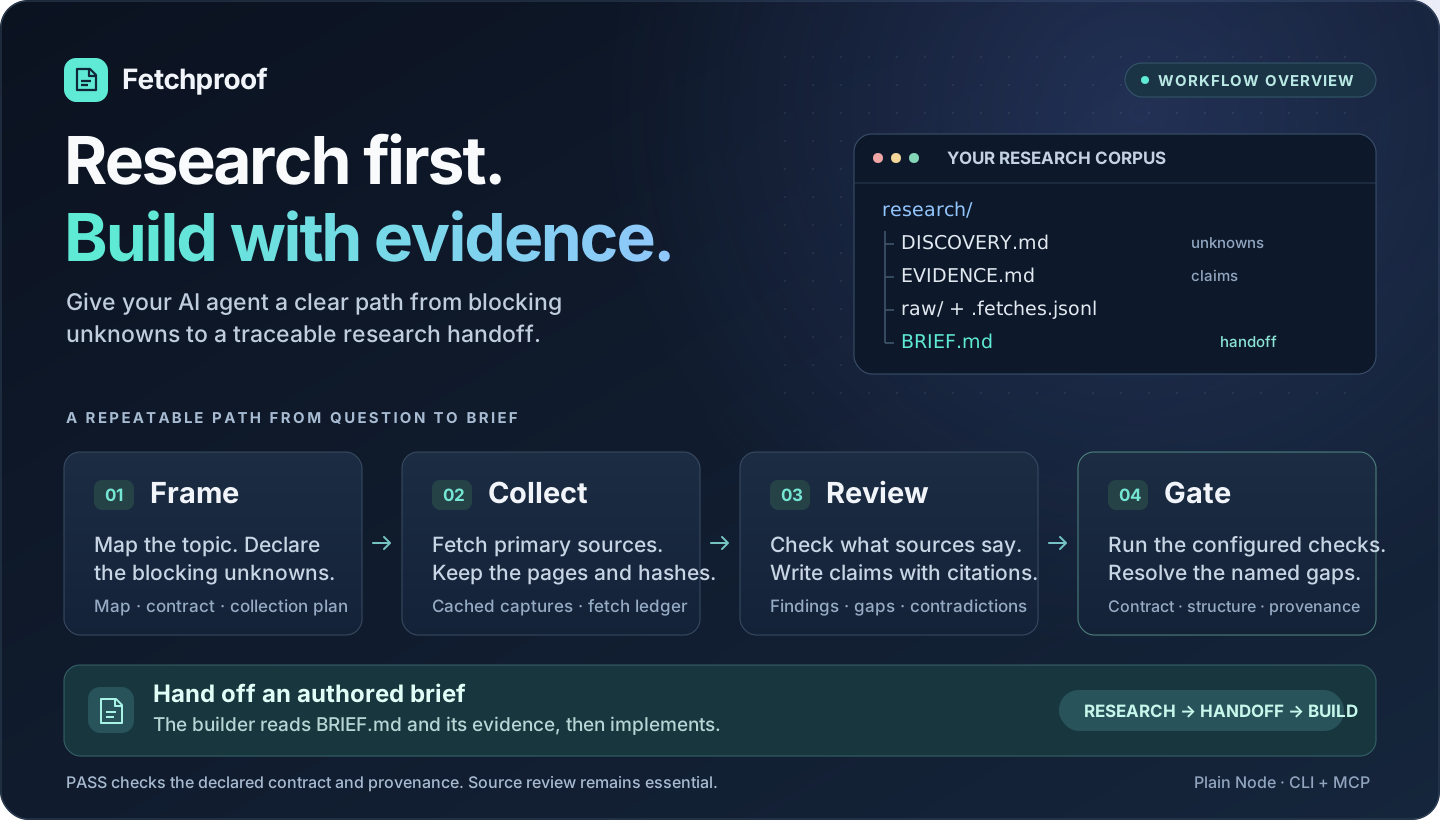
Fetchproof




Quickstart · Command reference · Contributing · Good first issues
Research first, build second. Fetchproof gives AI agents a workflow for collecting
sources, declaring blocking unknowns, and handing traceable research artifacts to a builder.
It keeps cached pages and a tamper-evident fetch record. With the commit hook operating
and no override in effect, a gated project's commit is blocked while preflight fails if
it stages paths outside research/ and the permitted project scaffolding.
It exists for the facts an agent would otherwise guess: API limits, pricing, what a licence
permits, whether a platform can do the thing the design depends on. Plain Node, no
dependencies, no package.json. Everything except the collection itself runs offline.
What PASS means. The configured checks passed for the declared research contract. The agent also writes the contract and unknowns list: an omitted blocking question is not checked, and a contract with a trivially easy unknown can pass. PASS does not prove that the unknowns cover the intended build or that the claims are true. A pass can retain disclosed known unknowns and warnings. Generated briefs, audits and package reading guides preserve those warnings and their reasons. The gate checks provenance and research structure; an agent still has to check whether a source supports a claim and whether an implementation behaves correctly. No controlled evaluation has yet measured how much this kit reduces mistakes in research, code or writing.
For daily research, coding and writing, see the optional Work with evidence guide.
In a hurry? QUICKSTART.md is the two-minute setup: the agent collects
through GitHub with one token, and you only read the brief.
Formerly Research-Kit. The kit was renamed Fetchproof (ADR-0186), and the old names are no longer read: a machine installed under the old name keeps running its old copy until it is migrated. See Upgrading from Research-Kit.
Contents
- How it works
- Requirements
- Install
- Try it in five minutes
- Run it on a real project
- Working with an AI agent
- Hand the research to a builder
- Keys and cost
- Run the collector on GitHub
- Command reference
- Machine configuration
- Troubleshooting
- Supported platforms
- Repository layout
- Documentation
- Contributing
- License
How it works
One loop, run inside the project folder:
 topic ──► decompose ──► contract ──► collect ──► gate ──► brief ──► build
           (the map)    (unknowns)   (pages +    (PASS or  (handoff)  (phase 2)
                                      ledger)     FAIL)
| Step | Command | Who does it | What it leaves behind |
|---|---|---|---|
| Decompose | decompose.mjs |
the agent | research/MAP.md: the topic split into subtopics, statuses blank |
| Contract | by hand | the agent | research/DISCOVERY.md: the blocking unknowns, U-1, U-2, ... |
| Plan | by hand | the agent | research/plan.json: the searches and pages that close them |
| Collect | research.mjs |
the kit | cached pages under research/raw/, each with the text it was converted from beside it, rows in research/EVIDENCE.md, a hash-chained ledger |
| Review | by hand | the agent | every finding rewritten into a claim, with a quote from the page |
| Gate | preflight.mjs |
the kit | PASS, or the name of the unknown that is still unproven |
| Brief | brief.mjs |
the agent | research/BRIEF.md: the one file a builder has to read |
Two ideas carry the whole design:
- Evidence is fetched, never typed. Every cited page is on disk, and the ledger
(
research/raw/.fetches.jsonl) records its hash and the transport that fetched it. A hand-written capture, or a page edited after the fact, fails the gate. - The gate has executable hooks. In gated projects, the operating commit hook blocks
staged changes outside
research/and permitted project scaffolding while preflight fails, unless overridden. It classifies paths, not whether their contents are product code. Claude Code also has an edit hook: its defaultaskmode requests permission for gated edits;hard-blockdenies them.
The work splits into two phases, usually done by different agents. Phase 1 is research: it ends with a passing gate and a brief, and never writes product code. Phase 2 is the build: a builder reads the brief and implements, and should never need to re-research.
The gate stops forgetful agents, not adversarial ones. It is a workflow check, not a
security boundary. The edit hook matches Edit|Write|MultiEdit|NotebookEdit; shell writes
such as >, sed -i and tee do not reach it. For those writes, the commit hook is the
backstop when it runs. Its default failOpen: true permits a commit when the gate cannot
run or fails internally; an ordinary failing research verdict still blocks the commit.
The active edit hook denies creating research/GATE_OFF, like edits into research/raw/,
but an agent with shell or configuration access can still create an override or bypass a
hook. The existing editGate.mode=off and present GATE_OFF overrides remain deliberate
operator controls.
What the gate does not stop, so you know where to look. Three overrides exist. git commit --no-verify skips the hook, and a hook git did not run cannot record anything, so that one
leaves no trace beyond the commit itself. The other two are recorded in a local log that
doctor counts: a research/GATE_OFF file, and a repository-local core.hooksPath, which tools such as
husky set and which displaces the machine-wide hook in that repository: install-hooks.mjs
reports it when run inside such a repository, and doctor reports and records it. The gate's
default posture is fail-open: a broken installation lets a commit through with one line
on stderr rather than locking you out, and install-hooks.mjs --fail-closed inverts that.
The ledger is self-attested: it proves nobody edited a capture by accident, and a chain
recomputed consistently by someone with write access passes, which is why CI runs
preflight on every commit and a forged chain has to survive review. The edit-time gate
exists for Claude Code only; every other agent gets the commit gate.
Requirements
| Needed for | Notes | |
|---|---|---|
| Node 22.22.1+ or 24+ | everything | Node 22, 24 and 26 are each tested on every commit; 22.13.0 to 22.22.0 decode windows-1252 pages as Latin-1 (ADR-0159), and doctor says so |
| Git | everything | projects are git repositories; the commit gate is a git hook |
| Python 3.11+ | the test suite only | the cross-language conformance runners; without it the suite blocks rather than passing |
| Firecrawl CLI 1.25.3 and a Firecrawl account | metered collection | npm install -g firecrawl-cli@1.25.3, then firecrawl login. Free tier: 1,000 credits a month, no card |
| Chromium or Chrome | the browser transport |
free; reads pages built by JavaScript |
| SerpAPI key or a SearXNG instance | searching, optional | a second meter, so search stops competing with fetching |
Nothing is required beyond Node and Git to run the kit with the free keyless transport.
Install
1. Clone and deploy. The kit is copied to ~/.agents/fetchproof once, and every
project on the machine runs it from there.
git clone https://github.com/StepenkoAnatoli/Fetchproof.git
cd Fetchproof
node fetchproof/bin/install.mjs
node fetchproof/bin/install-hooks.mjs
node fetchproof/bin/doctor.mjs
doctor must end with READY. Anything else names the problem and prints its fix. Run it,
fix what it says, run it again.
2. Choose the transport. With a Firecrawl login, nothing more to do. Without one, tell
the machine to use the free route, and doctor stops asking for a key:
{ "transport": "http-keyless" }
That file is ~/.agents/fetchproof.config.json. The other keys it takes are under
Machine configuration.
What the install touches
| Path | What it is |
|---|---|
~/.agents/fetchproof/ |
the deployed kit; install.mjs overwrites it on every run |
~/.agents/fetchproof.config.json |
this machine's settings: transport, role, evidence policy |
~/.claude/skills/ |
research-first and the shipped skill set, including skill-router, as siblings |
~/.claude/settings.json |
the edit-time gate, a Claude Code hook |
git core.hooksPath |
the commit gate, machine-wide, every agent and every human |
<project>/.claude/skills/ |
only for a project bound with --into: research-first and the skill set; every later install.mjs refreshes them |
Pass --into <project> to install.mjs to also bind research-first and the skill set into
that project's skill directory. The install records each bound project, and every later run
writes into each one that is still there: a copy the project edited is left as it is and
named, a set skill it deleted is written again, and a project deleted, or whose skill folder
was removed by hand, is forgotten; one on a drive that is not there is kept and skipped.
Update. Pull and deploy again; that also refreshes every bound project. doctor reports
when the deployed copy no longer matches the checkout - and, run inside a bound project,
when that project's copy does not - and its last line names the version this machine runs
(kit 0.9.5).
Each release is tagged v<version> and has its entry in CHANGELOG.md.
git pull origin main
node fetchproof/bin/install.mjs
Uninstall. node fetchproof/bin/install-hooks.mjs --uninstall restores the hooks
and the git setting; the folder under ~/.agents can then be deleted.
Windows. The commands in this file work in PowerShell and Git Bash as written, with
$HOME expanding to C:\Users\<you>. In cmd.exe write %USERPROFILE% instead. Windows
PowerShell 5.1 does not accept && between commands: run them one per line.
Upgrading from Research-Kit
Pulling is not enough. The kit's folder, its deployed copy (~/.agents/research-kit), its
files beside it and the RESEARCH_KIT_* variables were all renamed, and the new kit reads
none of the old names. Follow the migration steps in CHANGELOG.md
once, in order. The first step removes the old gates with the old kit, before the new one
is installed. A clone made under the old name can point at the new address with
git remote set-url origin https://github.com/StepenkoAnatoli/Fetchproof.git.
Try it in five minutes
No account, no key. This runs the whole loop once: collect one page, say what it proves, and get a verdict from the gate.
mkdir try-it
cd try-it
git init -q
node "$HOME/.agents/fetchproof/bin/new-project.mjs" . --topic "Is fetch a global in Node.js?"
Name the page to read. Open research/plan.json and set its urls:
"urls": [{ "url": "https://nodejs.org/api/globals.html", "type": "P", "why": "U-01" }]
Collect it. This writes the page under research/raw/, a row E-01 in
research/EVIDENCE.md, and an entry in the ledger that proves it was fetched.
node "$HOME/.agents/fetchproof/bin/research.mjs" --transport http-keyless
Ask the gate.
node "$HOME/.agents/fetchproof/bin/preflight.mjs"
It prints FAIL with discovery-contract/no-unknowns: the contract does not yet say what
you need to know. Add one row under the table in research/DISCOVERY.md:
| U-01 | Is `fetch` a global in Node.js? | Decides whether the code needs a dependency | CLOSED | E-01 |
Run preflight again. It prints PASS, with three honest warnings: the page came through
the keyless transport, there is no subtopic map yet, and one source carries the claim.
That is the whole loop. Decide what you need to know, fetch the page that owns it, and let the gate check that the claim points at a real capture.
PASS checks the claim against the page as it was fetched, not as it reads today.
Hand the research to a builder says where the fetch date is
and who re-checks a page that may have changed.
Run it on a real project
A project is its own folder, and it is the current working directory. The kit takes no
project argument. cd into the project first, every time.
1. Scaffold. From inside the project folder (a git repository):
node "$HOME/.agents/fetchproof/bin/new-project.mjs" . --topic "<what is being researched>"
This writes AGENTS.md (the rules every agent follows here), START_HERE.md (notes for
you), research/ with the contract, plan and evidence files, and docs/ARCHITECTURE.md.
If the project will be read on another machine, add --kit '$HOME/.agents/fetchproof'
so its files spell the kit's location portably, single-quoted so your shell leaves it alone.
2. Decompose the topic. The map is seeded with nine universal dimensions: access model, auth, rate limits, terms and legality, schema stability, freshness, cost at volume, runtime limits, and whether the output can be obtained at all.
node "$HOME/.agents/fetchproof/bin/decompose.mjs"
Then open research/MAP.md and mark every row COVERED (naming the unknowns that cover
it), DISMISSED (with a reason) or GAP. This judgement is the one step the kit never
automates.
3. Write the contract and the plan. In research/DISCOVERY.md, state the build intent
and list the blocking unknowns, each tracing back to a map row. In research/plan.json,
list the searches and pages that close them. Prefer the page that owns the fact: official
docs, the repository, the pricing page, the statute.
{
  "topic": "<what is being researched>",
  "queries": [{ "q": "<what to search for>", "why": "U-1", "prefer": ["<the domain that owns the fact>"] }],
  "urls": [{ "url": "https://<a page you already know>", "why": "U-1", "type": "P" }]
}
4. Collect. The only step that spends credits. Preview first.
node "$HOME/.agents/fetchproof/bin/research.mjs" --dry-run
node "$HOME/.agents/fetchproof/bin/research.mjs"
A page already in the cache is never fetched twice, so re-running a finished project costs
nothing. --status shows the budget and what the corpus holds.
5. Review the findings. Rewrite each auto-extracted Finding cell in
research/EVIDENCE.md into the claim the page supports. Where a claim rests on one
sentence, add [quote: the sentence], copied word for word; the gate checks the sentence
is really in the capture. A fact that is genuinely unreachable gets the status
KNOWN-UNKNOWN and a day-one verification step, never silence.
6. Ask the gate.
node "$HOME/.agents/fetchproof/bin/preflight.mjs"
PASS means the configured checks passed for the declared research contract. Read any
remaining warnings and known unknowns. A failure names the blocking findings and a
remedy. Do not build before PASS.
7. Write the brief and commit.
node "$HOME/.agents/fetchproof/bin/brief.mjs"
git add research/
git add -f research/raw/.fetches.jsonl
git commit -m "research: <topic>"
research/BRIEF.md is the handoff: intent, verified claims with sources, contradictions
and how they were resolved, known unknowns with their verification steps, and the first
build step. The ledger is added by name because it is a dotfile, and a dotfile rule can
hide it; it is evidence, not a byproduct.
Cost. About one Firecrawl credit per page and two per search. Decompose runs four searches. A project of twenty pages costs roughly thirty credits; the free tier is 1,000 a month and stops at zero rather than billing.
Working with an AI agent
The kit is agent-agnostic. What an agent needs is in the project: AGENTS.md carries the
rules and the sequence, the commands are plain node invocations, and the commit gate is
a git hook that applies to every tool alike. The differences between agents are only in
how each one finds AGENTS.md, and whether it gets the edit-time gate.
Claude Code
Nothing to configure. The install puts the research-first skill under
~/.claude/skills, so Claude Code starts the protocol on its own when a task depends on
external facts, reads AGENTS.md in the project, and is interrupted by the edit-time gate
if it tries to write product code while the gate fails. Open the project folder and ask:
Research this before we design anything:
<the question>. Follow AGENTS.md. Ask me at most three questions about intent, fetch every fact, and stop at a passing preflight and a written brief. Do not write product code.
Gemini CLI
Gemini CLI reads GEMINI.md, not AGENTS.md, so tell it where the rules are. Either is
enough:
-
Point Gemini at
AGENTS.md. In the project's.gemini/settings.json(or in~/.gemini/settings.jsonfor every project on the machine):{ "context": { "fileName": ["AGENTS.md", "GEMINI.md"] } } -
Or leave a pointer. A one-line
GEMINI.mdin the project folder:Read AGENTS.md in this folder and follow it exactly.
Then install the kit on that machine as in Install. The commit gate works for Gemini as it does for everyone. The edit-time gate is a Claude Code hook and does not apply, and there is no skill to trigger the protocol, so say it in the prompt:
Read AGENTS.md. Run phase 1 of the research-first protocol for the topic in
research/plan.json: decompose, classify the map, write the contract and the plan, collect, rewrite every finding with a quote, pass preflight, write the brief. Ask me at most three questions about intent first. Do not write product code.
If the machine should only build from a corpus someone else collected, declare it a builder, and collection refuses there by design:
node "$HOME/.agents/fetchproof/bin/install-hooks.mjs" --role builder
Codex, Cursor and others
Codex reads AGENTS.md natively. For a tool that reads a differently named file
(CLAUDE.md, .cursorrules, a custom instructions setting), the one-line pointer above
works everywhere: a file in its name that says to read AGENTS.md and follow it.
Example: a research project inside MoonAliza
MoonAliza keeps its research under docs/research/<date>-<topic>/, one project per
question, each with its own AGENTS.md and corpus. To research a new question there with
Gemini:
cd MoonAliza
node "$HOME/.agents/fetchproof/bin/new-project.mjs" docs/research/2026-10-03-payment-provider --topic "Which payment provider fits MoonAliza's checkout" --kit '$HOME/.agents/fetchproof'
cd docs/research/2026-10-03-payment-provider
gemini
Give it the Gemini prompt above. When it reports a passing preflight and a brief, read
research/BRIEF.md, then commit the project including the ledger:
git add docs/research/2026-10-03-payment-provider
git add -f docs/research/2026-10-03-payment-provider/research/raw/.fetches.jsonl
git commit -m "research: payment provider"
The project folder is the working directory for every kit command, so cd into it before
running doctor, preflight or research. From MoonAliza's root they would describe the
root, which has no corpus.
Give an agent the GitHub collector as a tool
If collection runs on GitHub (below), an agent that speaks
the Model Context Protocol can have it as a tool. Claude Code reads this from .mcp.json
in the project; Gemini CLI from mcpServers in ~/.gemini/settings.json.
{
  "mcpServers": {
    "fetchproof": {
      "command": "node",
      "args": ["/home/you/.agents/fetchproof/bin/mcp-server.mjs"],
      "env": { "FETCHPROOF_GITHUB_TOKEN": "github_pat_..." }
    }
  }
}
Write the absolute path of the deployed kit: ~/.agents/fetchproof on Linux and macOS,
C:\\Users\\you\\.agents\\fetchproof inside JSON on Windows. MCP clients do not expand
~ or $HOME in args. Two tools: collect starts a run and returns its id,
fetch_corpus returns a link to the validated package. The token is described in the
GitHub section.
What every agent must do with a result: read buildAuthorized and stop if it is
false. It is false for every freshly collected corpus, because nobody has reviewed it
yet. Exit 0 means the package is intact, never that building may start.
Fetchproof MCP questions
Can I use Fetchproof without a Firecrawl account?
Yes, you can configure the machine to use a free, keyless transport route.