
Provides local, private memory for coding agents to persist facts, skills, and tasks across sessions.
Also known as sslugic/amem, @iamem/amem
- Stars
- 0
- Tools
- —
- Downloads, 30 days
- —
- Latest version
- 0.7.5
- Last commit
- Oct 31, 2026
- License
- MIT
What is amem MCP?
amem provides local, private memory for coding agents to persist facts, skills, and tasks across sessions.
Summary generated from the project's README
About amem MCP server
amem provides a private, local memory layer for coding agents to retain information across different sessions. It prevents agents from repeatedly rediscovering the same constraints or re-reading files by storing facts, skills, and tasks directly on your machine. This server works with various MCP clients including Claude Desktop, Cursor, Windsurf, Aider, and Zed on macOS, Linux, and Windows.
Users manage the system through a local SQLite database located in the home directory. The tool includes a dashboard accessible via amem ui to review or delete stored information. It features specialized capabilities like memory for specific files, skills for repeatable procedures, and a task board to track progress from backlog to completion. Data remains private as the system binds to localhost and does not use cloud embeddings or external synchronization.
What you can do with it
- 1Persist project constraintsAn AI agent can store specific technical requirements or gotchas tied to particular source files.
- 2Automate context deliveryThe system can automatically provide relevant project information to an agent at the start of a session.
- 3Track agent progressDevelopers can use the built-in task board to ensure follow-up actions survive between chat sessions.
- 4Standardize repeatable proceduresYou can save deployment or testing steps as skills that the agent loads only when necessary.
Written from the project's README. Every use case is checked against a quote from it.
How to install amem MCP
Formats verified 10 Nov 2026Install amem MCP in Claude Code
$ claude mcp add amem -- npx -y @iamem/amemInstall amem MCP in Cursor
~/.cursor/mcp.json
{
  "mcpServers": {
    "amem": {
      "command": "npx",
      "args": [
        "-y",
        "@iamem/amem"
      ]
    }
  }
}Install amem MCP in VS Code
.vscode/mcp.json
{
  "servers": {
    "amem": {
      "type": "stdio",
      "command": "npx",
      "args": [
        "-y",
        "@iamem/amem"
      ]
    }
  }
}Install amem MCP in Claude Desktop
claude_desktop_config.json
{
  "mcpServers": {
    "amem": {
      "command": "npx",
      "args": [
        "-y",
        "@iamem/amem"
      ]
    }
  }
}Install amem MCP in Codex
~/.codex/config.toml
[mcp_servers.amem]
command = "npx"
args = ["-y", "@iamem/amem"]
Install amem MCP in Gemini CLI
~/.gemini/settings.json
{
  "mcpServers": {
    "amem": {
      "command": "npx",
      "args": [
        "-y",
        "@iamem/amem"
      ]
    }
  }
}Automated checks
Ran Nov 14, 2026Full report →Passed our automated checks. That is not a security audit: read the code and give the server the narrowest access it needs. How checks work

- Source repository linked and reachablesslugic/amem is public and reachablegithub.com/sslugic/amem ↗Pass
- Package names this repository as its source@iamem/amem names sslugic/amem as sourcenpmjs.com/package/@iamem/amem ↗Pass
- Build provenance (Sigstore attestation)No build attestation published for this releaseNot checked
- Open source license (OSI)MITspdx.org/licenses/MIT.html ↗Pass
- Commit or release in the last yearLast commit or release 2026-10-31github.com/sslugic/amem ↗Pass
- OpenSSF ScorecardNot checked
- Package name not close to a popular packageNo popular package one edit away from @iamem/amemPass
- No critical advisory in the package or its dependencies39 resolved dependencies checked; no critical advisoryosv.dev ↗Pass
- No hidden instructions to the model0 tool descriptions and the README read; no override phrases, credential paths or hidden charactersPass
- Destructive tools are labelledNot checked
- Remote endpoint answers the MCP handshakeNot checked
README
View on GitHubamem






Personal agent memory that stays on your machine. Works with Claude Code, Cursor, Claude Desktop, Copilot, Codex, Gemini CLI, Windsurf, Continue, Aider and Zed, on macOS, Linux and Windows.
npx @iamem/amem setup --platform claude # or cursor, codex, copilot …
Website · Features · Why amem · How it works Coding agents forget between sessions. They re-read the same files, re-learn the same constraints and spend tokens rediscovering decisions you already made.
amem gives them a private memory that lives on your machine. The next session starts with what the last one learned.
What you get
- Memory: short facts (constraints, gotchas, decisions, owners) tied to the files they describe. Facts are flagged stale when those files change.
- Context on autopilot: hooks hand your agent a small, ranked packet at session start and with each prompt. No pasting a project brief.
- Skills: repeatable procedures (release steps, deploy order, test setup), loaded only when they apply.
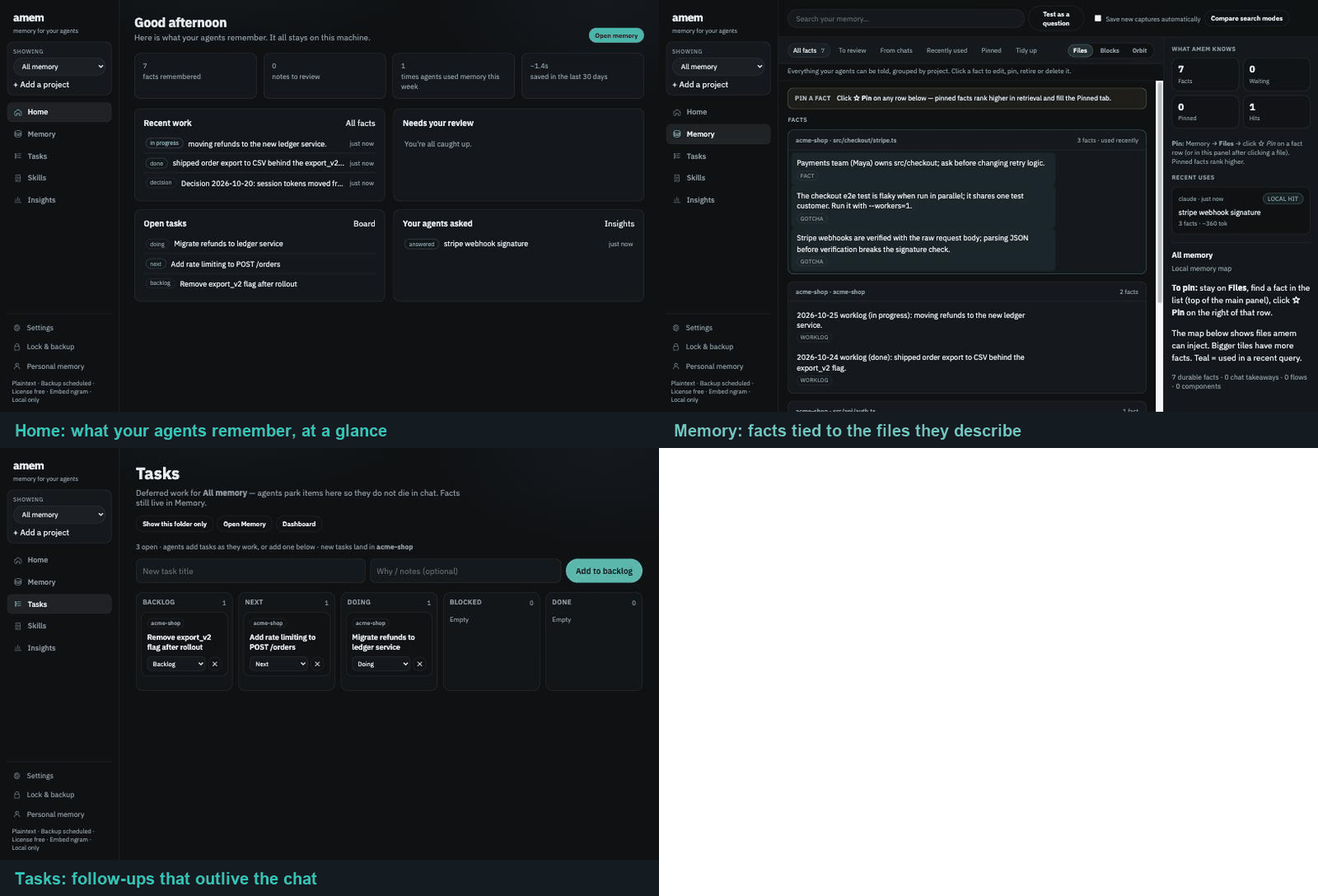
- Tasks: a Backlog → Next → Doing → Done board your agents update, so follow-ups survive the chat.
- A dashboard:
amem uishows what your agents remember, what needs review and open tasks. Retire or delete a fact in one click. - Private by design: one SQLite file in
~/.amem, a localhost-only UI, optional encryption and local backups.
Works with Claude Code, Cursor, Claude Desktop, Copilot, Codex, Gemini CLI, Windsurf, Continue, Aider, Zed and any other MCP client.
Quick start
cd ~/code/your-project
npx @iamem/amem setup --platform claude   # or: cursor, codex, copilot, windsurf … (amem platforms)
amem ui                                   # open the dashboard at http://127.0.0.1:7843
Setup installs the amem CLI, adds the hooks, registers the amem MCP server (restart your client once) and seeds the repo with build, test and CI facts from its manifests, so the first question already has an answer. From then on your agent checks memory before exploring and saves what it learns. You can also do it by hand:
amem remember "Stripe webhooks must be verified with the raw body" --kind gotcha --anchor src/webhooks/stripe.ts
amem context "stripe webhook signature"
### claim.remember_2f41c0c9e1ff
Kind: `gotcha`
Why: `keyword+12`, `fts+4.2`, `embed+5.4`, `kind:gotcha`, `fresh`

Stripe webhooks must be verified with the raw body.
Anchors: `src/webhooks/stripe.ts`
Any MCP client can use the same memory: amem mcp --print-config prints a ready-to-paste config.
Something off? amem doctor --fix rewires the current repo's client. To remove amem, run amem uninstall to see what it added, then amem uninstall --yes. Your memory stays unless you add --purge.
How well it finds things
npm run bench loads 36 memories from a sample web shop and asks 32 questions phrased the way people ask, often without the memory's words. It also sends 8 vague prompts ("ok sounds good, go ahead") that name no topic. CI fails if these numbers drop.
| Path | Right memory first | Right memory in top 3 | Vague prompts given memory |
|---|---|---|---|
| Prompt hook (automatic) | 88% | 97% | 0% |
amem_context (agent asks) |
81% | 94% | n/a |
The data is in bench/retrieval.json. Add your own cases and run npm run bench -- --misses to see what it gets wrong.
Privacy (non-negotiable)
- Memory never leaves your machine: no sync, no cloud embeddings, no "share with org" mode.
- The UI and HTTP MCP endpoint bind to
127.0.0.1only, and~/.amemis created with mode0700. - Credentials and tokens are blocked from being saved. Personal notes stay out of work projects unless you ask about them.
- Optional AES-256-GCM lock (
amem lock) and encrypted local backups (amem backup schedule). - No network calls by default. If you opt in (
amem setupasks once, oramem telemetry on), amem sends an anonymous ping at install and first run, then at most one a day with the version, OS and which parts ran (MCP, hooks, UI, CLI). No memory, repos, paths or names.amem telemetry offstops it; managed (IT policy) installs never send it.
Learn more
- Full guide: setup, the day-to-day loop, what gets stored, skills, savings, other clients, every command
- Security & architecture FAQ
- IT-managed installs
- Website · Issues and ideas
License
MIT, see LICENSE.
amem MCP questions
How do I add amem MCP to Claude Code?
Run claude mcp add amem -- npx -y @iamem/amem in your terminal. Add --scope user to make it available in every project.
How do I add amem MCP to Cursor?
Open ~/.cursor/mcp.json and add the server under mcpServers, using the Cursor config shown in the install section above.
Where is my data stored?
All data is stored locally on your machine in a single SQLite file located in ~/.amem.
Does my memory leave my machine?
No, the memory is private by design and never leaves your machine; there is no cloud sync or cloud embeddings.
Which AI clients can use amem?
It works with a wide range of clients including Claude Code, Cursor, Claude Desktop, Copilot, Windsurf, Aider, and Zed.
Can I review or delete what the agent remembers?
Yes, you can use the amem UI dashboard to see what is remembered, review information, or delete facts with one click.