
Toadstone MCP server
Commit Oct 24, 2026A self-hosted SEO crawler that allows AI agents to query technical site audits, accessibility checks, and crawl diffs via an MCP server.
Also known as spcaeo/toadstone
- Stars
- 11
- Tools
- —
- Downloads, 30 days
- —
- Latest version
- —
- Last commit
- Oct 24, 2026
- License
- —
What is Toadstone MCP?
Toadstone is a self-hosted SEO crawler that allows AI agents to query technical site audits, accessibility checks, and crawl diffs via an MCP server.
Summary generated from the project's README
About Toadstone MCP server
SEO teams and developers can perform technical site audits and accessibility checks through a self-hosted crawler that integrates directly with AI agents. By using the MCP server, tools like Claude Code can query crawl results to identify specific issues, such as broken links or sitemap errors, and receive actionable fixes. This setup allows an agent to transform a technical crawl into a structured list of tickets without manual CSV processing.
The server runs locally on your own machine or via Docker, ensuring that crawls are unmetered and private. It provides ten read-only tools that allow an AI client to inspect findings grouped by machine-readable slugs. Unlike many other crawlers, it focuses on verified checks that actually fire on real pages, covering areas like technical SEO, sitemaps, duplication, dates, accessibility via axe-core, and security headers. Because it renders JavaScript, it can compare rendered content against raw server responses to find hidden errors.
What you can do with it
- 1Automated technical issue ticketingAsk an AI agent to crawl a website and generate a list of specific technical issues that need to be fixed.
- 2Detecting content duplicationIdentify pages that share identical body content by stripping away site chrome like headers and footers.
- 3Comparing rendered and raw HTMLAnalyze the differences between what a server sends and what a browser actually produces after JavaScript execution.
Written from the project's README. Every use case is checked against a quote from it.
Configuration
TOADSTONE_MCP_URL
Automated checks
Ran Nov 14, 2026Full report →Not verified yet. A server needs a score of 80, no serious finding, and enough data for us to check. How checks work · What to fix for more points

- Source repository linked and reachablespcaeo/toadstone is public and reachablegithub.com/spcaeo/toadstone ↗Pass
- Package names this repository as its sourceNot checked
- Build provenance (Sigstore attestation)Not checked
- Open source license (OSI)No licenseFinding
- Commit or release in the last yearLast commit or release 2026-10-24github.com/spcaeo/toadstone ↗Pass
- OpenSSF ScorecardNot checked
- Package name not close to a popular packageNot checked
- No critical advisory in the package or its dependenciesNot checked
- No hidden instructions to the model0 tool descriptions and the README read; no override phrases, credential paths or hidden charactersPass
- Destructive tools are labelledNot checked
- Remote endpoint answers the MCP handshakeNot checked
README
View on GitHubToadstone
A toadstone was a gem people wore to detect poison. It never detected anything. This one is named after that, on purpose.






▶ Open the live demo
The real interface, frozen over a real crawl. Click the tabs. Open a finding. No sign-up.
🎬 Watch the tour
Two minutes. Why it exists, what it found, and every view in the app.
Why this exists · Quick start · What it finds · Screenshots · How it compares · For agents · Architecture · Security · FAQ
Why this exists
I run an SEO team of 22 people. Screaming Frog is licensed per machine.
That is not a complaint about the price — it is a good tool and worth its licence. It is that the shape is wrong for how we work. We are in Ahrefs every day. We need a full technical crawl maybe five or six times a month. Paying a seat for every executive so each of them can run a crawl a handful of times a month is paying for the wrong thing.
What I wanted was one instance I host myself, on my own Mac, that the whole team can reach — and that Claude Code can talk to directly over MCP, so a crawl comes back as a list of issues to fix rather than a CSV someone has to open, read and turn into tickets.
Nothing available had that shape. So I forked an open-source crawler and started building.
claude mcp add toadstone -- python -m src.mcp
That is the whole integration. Ten tools, read-only by default, unmetered — because they are your crawls, on your machine. "Crawl freshlycited.com and tell me what to fix" comes back as findings grouped by check, each with its evidence and a one-line fix, ready to become tickets. No credits, no units, no per-seat anything. See the tools →
Then I found something I was not looking for
Most SEO crawlers advertise how many checks they have. That number is almost meaningless, and here is why.
I counted how many of the ones I had inherited had ever been observed to fire on a real page. There were about 225. Eighty-four of them had ever fired. The rest passed their unit tests and sat inert:
- eight AMP checks that could not fire on any site, because the markup they read was discarded before they ran;
- every PDF check, dead from the moment JavaScript rendering was switched on;
- a raw-versus-rendered comparison that had been comparing a document against itself;
- a failed PageSpeed run that reported as a clean bill of performance — the API returned a quota error, the integration swallowed it, and the report came back with no performance issues at all;
- three "checks" that were not checks, only sample data left in a test file.
None of that looked broken. Every report came back clean and confident, and clean was the wrong answer.
So the project built a site that is wrong in as many ways as possible, crawls it with the real crawler, and records which check slugs actually appear.
The last sweep, run while this README was being written, fired 180 distinct checks across the fixture's six modes — 162 in the default run alone, on 77 crawled pages. Here is that sweep, in full:
python tools/coverage_sweep.py
--- default                 77 pages crawled, 162 checks fired
--- sitemap-limits-1         3 pages crawled,  76 checks fired   50,001 URLs, 51 children
--- sitemap-limits-2         3 pages crawled,  70 checks fired   a sitemap listing nothing
--- sitemap-limits-3         3 pages crawled,  75 checks fired   52MB of sitemap
--- silent-image            85 pages crawled, 166 checks fired   a handler that answers nothing
--- https                    4 pages crawled,  30 checks fired   the checks that need TLS

180 distinct checks fired across 6 mode(s)
Each mode needs a crawl of its own — a sitemap of 50,001 URLs cannot share a run with one that works — and the sweep keeps a separate slug log per mode, because the harness truncates its log at the start of every run. (Six runs pointed at one file gives you the sixth mode's slugs and a confidently wrong total. That mistake was made while writing this, and it reported 30.)
BUILD-LOG.md carries the rest of the accounting day by day —
including the thirteen checks that rest on a stubbed transport with real
parsing either side, the one that rests on a model's verdict being supplied
rather than asked for, the two that cannot honestly be reached at all, and
every wrong turn taken on the way. It is written in the first person and it
does not flatter the work.
Those commands are the whole argument. Run them before you trust anything above.
What it is
A self-hosted SEO site crawler with a browser UI, an HTTP API, and an MCP server so an AI agent can query crawls directly. It renders JavaScript, keeps crawls so it can tell you what changed since the last one, and reports findings with evidence a developer can act on without re-fetching the page.
It is a fork of LibreCrawl by Phiality, with roughly a hundred commits of checks, integrations, API, agent support and UI work on top. See FORK.md for exactly what the fork adds.
No per-URL pricing, no seats, no cloud. Point it at a site you have permission to crawl and it runs on your machine.
What a finding looks like
Every finding, wherever it surfaces — UI, API, export, MCP — carries the same shape. This one is real, from the crawl in the screenshot above:
{
  "id": "69230cd05f9f7ca9ec7a66ee0f91a85ccf9f0d90",
  "check": "links_to_broken_urls",
  "type": "error",
  "category": "Technical",
  "issue": "Page Links to Broken URLs",
  "url": "http://toadstone-demo.localtest.me:8977/",
  "details": "1 link(s) on this page are broken: http://toadstone-demo.localtest.me:8977/missing-entirely.png (404)",
  "evidence": {
    "found": "1 broken links",
    "related_urls": ["http://toadstone-demo.localtest.me:8977/missing-entirely.png"]
  },
  "how_to_fix": "Update or remove the link; a visitor following it hits an error.",
  "docs_url": "/checks#links_to_broken_urls",
  "status": "open",
  "first_seen_crawl": 2
}
Two things in there do more work than they look like they do:
idissha1(url + check + offending value). The same defect keeps the same identity between crawls. A fixed issue never comes back as "new", an accepted one stays accepted, andfirst_seen_crawltells you when it appeared. Most tools re-number their findings every run, which makes "what changed?" unanswerable.checkis a slug, never free text. You can filter on it, alert on it, and diff on it.docs_urlpoints at the generated reference page for it.
Watch it work
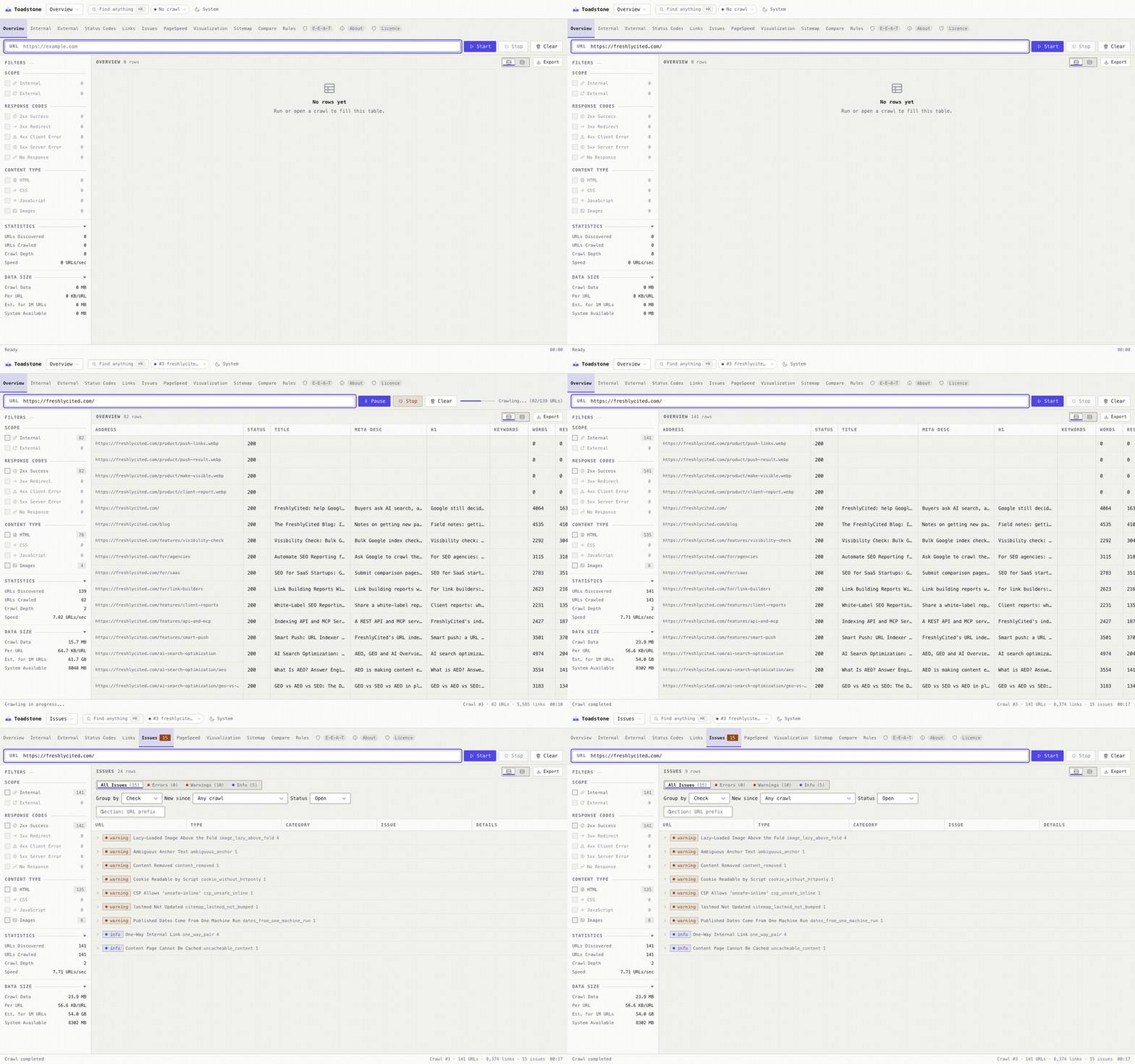
Open this crawl in the live demo → — the
real interface, not a report. Click anything; starting a new crawl is the one
thing it cannot do.
It is the actual interface, frozen over a real crawl — the same templates,
stylesheet and JavaScript, with every API response captured and replayed. Tabs
switch, filters filter, findings expand, the command palette opens. Starting a
new crawl is the one thing it cannot do. Built by tools/build_demo_app.py.
What it finds
222 checks, 180 of them observed firing in the last sweep. Every one has a
slug, a severity, a category, an evidence block and a one-line fix. The running install generates its own
reference page at /checks, built from what it has actually reported rather
than from a hand-kept list that drifts.
| Area | What it looks at |
|---|---|
| Technical | Canonicals (relative, cross-domain, chained, pointing at a redirect or a noindex page), redirect chains and loops, noindex and nofollow, hreflang, headings, images, response times, page weight, mixed host and protocol links, tracking parameters on internal links |
| Sitemaps | robots.txt → index → children; URLs that 404, redirect, are noindex, canonicalise elsewhere or are blocked; crawled pages missing from the sitemap; lastmod missing, malformed, in the future or never bumped; the 50,000-URL and 50MB limits; duplicates across children; http/https and www drift |
| Duplication | Scored on the page body with header, nav, footer and sidebar stripped, by exact hash or 64-bit simhash, reporting the shared passage rather than a percentage. Pages that share a layout no longer read as duplicates because of their chrome, and URLs that canonicalise to each other never do |
| Dates and freshness | Missing, unparseable or timezone-less dates; JSON-LD, article:modified_time, HTTP Last-Modified, sitemap lastmod and the visible "Updated on…" disagreeing; stale pages; future dates; modified before published; dates that are two reads of one clock rather than two events |
| Accessibility | axe-core 4.10.2, around 200 rules, each becoming its own check with its own slug (a11y_color-contrast, a11y_image-alt, …) so you can filter and diff on them |
| Rendered vs raw | What the browser produced against what the server sent: content only JavaScript creates, links only JavaScript creates, text hidden after render, console errors, layout shift sources |
| Security headers | HSTS and its max-age, CSP, X-Frame-Options, X-Content-Type-Options, Referrer-Policy, Permissions-Policy, cookie flags, insecure form actions, active and passive mixed content |
| Server logs | Your own access log against the crawl: Googlebot user agents whose reverse DNS does not confirm, crawl budget spent on pages that only 404, pages nothing links to that are requested anyway, pages search engines have never requested, unreadable log lines |
| Structured data | JSON-LD parse errors, microdata and RDFa, FAQ markup, breadcrumbs, reviews |
| AMP | Thirteen checks, including the ones that only mean anything when you compare the AMP page with its canonical |
| Content | Thin content, spelling, grammar, punctuation, casing and style via LanguageTool, E-E-A-T signals, optional LLM analyst verdicts |
| Performance | PageSpeed Insights and Chrome UX Report field data: LCP, CLS, INP, FCP, TTI, Speed Index, performance score, desktop against mobile — and an explicit finding when PageSpeed could not be reached, because silence used to read as health |
| CMS | A read-only WordPress audit: the SEO plugin's own fields, placeholder values left in them, stray whitespace, expected author |
| Between crawls | Text removed since the last crawl, internal links lost, and a new / fixed / still-open report keyed on stable issue ids |
Full reference, slug by slug, with the ✅ against every one that has been
watched to fire: docs/checks.md. It is generated from the
running app's own catalogue by tools/generate_checks_doc.py, so it cannot
drift from the wording the code uses — and it lists the 59 that fired in the
harness but have no description yet, rather than quietly leaving them out.
See it
Every screenshot below is the real app on a clean install, crawling a real site — freshlycited.com, which we own, so the URLs and the findings are genuine rather than staged. They are regenerated by a script, and each one is checked for personal data before it is written.
What is wrong
Every check that fired, with its slug and how many pages it hit. Collapse the groups and the whole shape of a site's problems fits on one screen.
This one is the bundled fixture — the site in tests/ built to be wrong in
as many ways as possible — because a healthy site makes a dull screenshot and
an honest one. 66 pages, 488 findings. The hero above is the same screen on a
real site that is in good shape; this is the same screen on one that is not.
Grouped by check, because forty pages missing a canonical is one job, not forty. Filter by severity, response code, content type, section of the site, or what is new since any previous crawl.
What was found
How it fits together
Getting around
And one tab that is not about your site
About sits at the end of the strip and tells the story — what a toadstone was, why a crawler is named after a gem that detected nothing, and what the audit found on the day this fork got its name. The last panel is live: it asks your install how many distinct checks it has actually reported, so the claim on screen is about your crawls rather than about somebody's marketing.
It is a plugin (web/static/plugins/about.js, ~180 lines) — the shortest
worked example of the plugin API, which is documented in
docs/plugins.md if you want a tab of your own.
And the licence, in plain words
A source-available licence has terms people need to know before they build on
it, and "it's in LICENSE in the repo" is not where somebody running the app
will look. Licence sits next to About: what you may do, what you may not,
why the upstream MIT grant is what makes the relicence possible, and every
third-party licence that travels with the software — with the two copyleft ones
marked, because one of them surprised us.
Dark mode, properly
Quick start
Docker Compose (recommended)
git clone https://github.com/spcaeo/toadstone
cd toadstone
cp .env.example .env            # set SECRET_KEY, and a port if 5000 is taken
docker compose up -d
open http://localhost:5000
Docker, without Compose
docker build -t toadstone .
docker run -d --name toadstone -p 5000:5000 \
  -v "$PWD/data:/app/data" \
  -e SECRET_KEY="$(python3 -c 'import secrets;print(secrets.token_hex(32))')" \
  -e LOCAL_MODE=true \
  --shm-size=2g toadstone
--shm-size=2g matters: Chromium crashes in a container with the default 64MB
of shared memory, and the crawl fails in ways that look like network problems.
Python, no container
git clone https://github.com/spcaeo/toadstone
cd toadstone
pip install -r requirements.txt
playwright install chromium
python main.py --local --port 5057
On a Mac, pass
--port. macOS gives port 5000 to AirPlay Receiver, which answers every request with403 AirTunes. Everything looks like it started and nothing works. Either pass another port or turn off System Settings → General → AirDrop & Handoff → AirPlay Receiver.
One command, no UI (for CI)
python main.py --crawl https://example.com --fail-on error --report issues.json
Exits non-zero when the crawl finds an open issue at that severity or worse, so a pipeline can block a deploy on it.
What you need
| Python | 3.11 or later (the Docker image is python:3.11-slim) |
| Chromium | installed by playwright install chromium; already in the image |
| Memory | ~1GB for a small crawl; a crawl stores page bodies, roughly 5–30KB per page |
| A key, for some things | Nothing is required. Google, PageSpeed, CrUX and the link-metrics vendors each add checks if you configure them, and say so plainly if you do not |
Integrations
Every one of these is optional, off by default, and says when it could not run rather than returning nothing and letting that read as health.
| Integration | What it adds | What it needs |
|---|---|---|
| Google Search Console | Impressions, clicks, CTR and position per crawled page; the indexing verdict from the URL Inspection API; a finding when Google picked a different canonical than the page declares | A Google account, connected with one button in Settings → Google. Read-only |
| Google Analytics 4 | Sessions and engagement per page; pages with traffic the crawl never found; high-bounce pages | The same connection, same button |
| PageSpeed Insights | Lab Core Web Vitals for the homepage and two top-level pages, mobile and desktop | Nothing, but an API key avoids the shared anonymous quota |
| Chrome UX Report | Real-user field data for the origin and its pages | A free, read-only GOOGLE_API_KEY |
| LanguageTool | Spelling, grammar, punctuation, casing and style, as five separate checks | A LanguageTool endpoint; the public one is free and rate-limited, or run your own |
| Moz / Majestic / Ahrefs | Domain authority, spam score, external link counts, and pages with authority that nothing links to | A paid key from one of them. Without one, the checks report that the provider refused rather than reporting zero backlinks |
| WordPress | A read-only audit of the SEO plugin's own fields: over-long descriptions, placeholder values, stray whitespace, expected author | The REST API being reachable |
| Your access log | Bot spoofing by reverse DNS, crawl budget waste, pages never requested by search, requests for pages the crawl never found | An access log file. Nothing leaves the machine |
| An LLM | Analyst verdicts on page experience and E-E-A-T | A Claude CLI on the host. Off by default, because a crawler that silently spends money or sends a client's page text to a third party has broken someone's trust |
For agents: MCP, API and webhooks
Toadstone was built to be read by software as well as people.
MCP server
// Claude Code, Cursor, or any MCP client
{
  "mcpServers": {
    "toadstone": {
      "command": "python",
      "args": ["-m", "src.mcp", "--url", "http://localhost:5000"],
      "env": { "TOADSTONE_MCP_URL": "http://localhost:5000" }
    }
  }
}
It is read-only by default, restricted to hosts this install has already crawled, and capped at 2,000 URLs per crawl — defaults chosen on the assumption that nobody will ever re-read the config file they pasted it into. Writes need an explicit opt-in. See docs/mcp.md.
Toadstone MCP questions
How do I add Toadstone to Claude?
You can integrate it using the command: claude mcp add toadstone -- python -m src.mcp.
Does it support JavaScript rendering?
Yes, the crawler includes JavaScript rendering capabilities to compare rendered content against raw server responses.