
visio-to-drawio MCP server
Commit Nov 12, 2026Converts Microsoft Visio .vsdx and .vstx diagrams into editable, multi-page draw.io files locally.
Also known as skhell/visio-to-drawio
- Stars
- 1
- Tools
- —
- Downloads, 30 days
- —
- Latest version
- —
- Last commit
- Nov 12, 2026
- License
- MIT
What is visio-to-drawio MCP?
visio-to-drawio converts Microsoft Visio .vsdx and .vstx diagrams into editable, multi-page draw.io files locally.
Summary generated from the project's README
About visio-to-drawio MCP server
Converting Microsoft Visio diagrams into editable draw.io files is the primary function of this tool. It transforms .vsdx and .vstx files into native draw.io formats where shapes, text, and layers remain fully editable rather than appearing as flat images. Every page in a Visio document is converted into a separate tab within a single multi-page draw.io file, though individual pages can also be exported separately.
Developers can use this as a standalone Go binary via the command line or as an MCP server for AI assistants like Claude Desktop, Claude Code, and GitHub Copilot. The server runs locally over stdio, ensuring that files are processed on your own machine without any network calls or data uploads. It provides specific tools to list the foreground pages of a file or to perform the conversion itself. Because it runs locally, it is compatible with desktop-based clients but not with browser-based assistants like the web version of Claude or ChatGPT.
What you can do with it
- 1Convert entire Visio documentsTransform a multi-page Visio file into a single draw.io file where each page becomes a new tab.
- 2Automate diagram conversion with AIInstruct an AI assistant to convert a specific Visio file to draw.io using the built-in MCP tools.
- 3Extract specific diagram pagesConvert only a single named page from a larger Visio document instead of the whole file.
- 4Verify conversion accuracyReview a CSV report to see which shapes were approximated during the conversion process.
Written from the project's README. Every use case is checked against a quote from it.
Configuration
VISIODRAWIO_ROOT
Automated checks
Ran Nov 15, 2026Full report →Not verified yet. A server needs a score of 80, no serious finding, and enough data for us to check. How checks work · What to fix for more points

- Source repository linked and reachableskhell/visio-to-drawio is public and reachablegithub.com/skhell/visio-to-drawio ↗Pass
- Package names this repository as its sourceNot checked
- Build provenance (Sigstore attestation)Not checked
- Open source license (OSI)MITspdx.org/licenses/MIT.html ↗Pass
- Commit or release in the last yearLast commit or release 2026-11-12github.com/skhell/visio-to-drawio ↗Pass
- OpenSSF ScorecardNot checked
- Package name not close to a popular packageNot checked
- No critical advisory in the package or its dependenciesNot checked
- No hidden instructions to the model0 tool descriptions and the README read; no override phrases, credential paths or hidden charactersPass
- Destructive tools are labelledNot checked
- Remote endpoint answers the MCP handshakeNot checked
README
View on GitHubMicrosoft Visio to draw.io converter


Turn a whole Visio document into one editable, multi-page draw.io file with a single command.
visiodrawio converts Microsoft Visio drawings (.vsdx) and templates
(.vstx) into native draw.io / diagrams.net
diagrams. Every Visio page becomes a tab in the same .drawio file.
Shapes stay real draw.io shapes you can move, restyle and edit, not a
flat picture of the page.
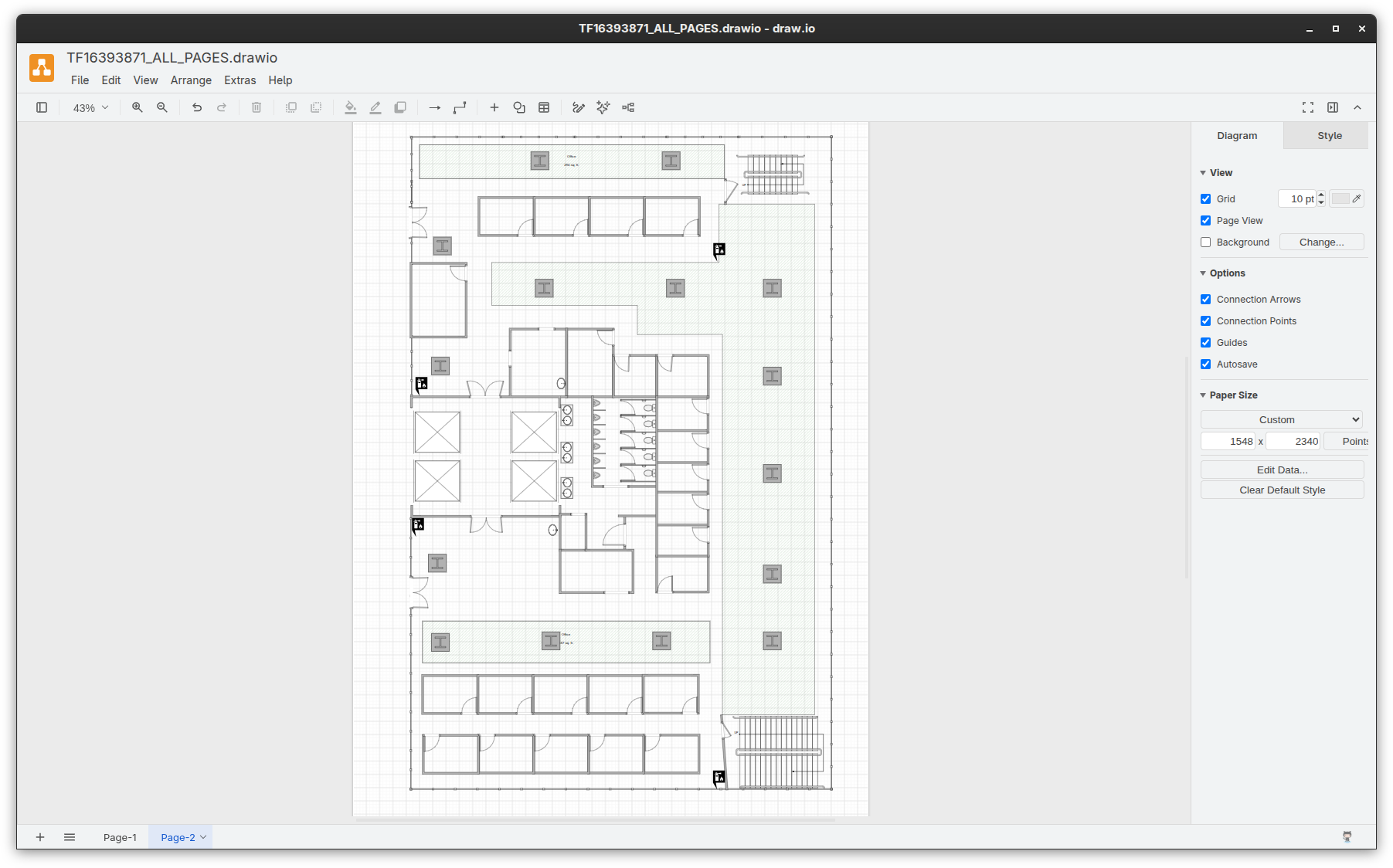
[!NOTE] A two-page office floor plan template (
testdata/tf16393871.vstx) from Microsoft's featured Visio templates and diagrams page converted to draw-io withvisiodrawio tf16393871.vstx.
Why use it
- Whole documents, not single pages. One run converts every
foreground page and writes them into a single multi-page
.drawiofile. Each page also gets its own file, in case you only need one diagram. - Editable output. Geometry, text formatting, fills and gradients, fill patterns, line styles, arrowheads, rotation, flips, groups and images become native draw.io cells.
- Layers and backgrounds kept. Visio layers map to draw.io layers, and hidden layers stay hidden but can be switched on. Background pages are merged in as locked layers.
- Shows what was approximated. Each page gets a CSV report of the converted shapes, and warnings go to stderr so you know what to check.
- Local and private. A single static Go binary. It needs neither Visio nor draw.io, and makes no network calls.
- Works for AI assistants too. It ships a built-in MCP server and a Claude Code plugin.
[!NOTE] Legacy binary
.vsdfiles are not supported. Open them in Visio and use Save As -> .vsdx first.
Quick start
go install github.com/skhell/visio-to-drawio/cmd/visiodrawio@latest
visiodrawio yourfile.vsdx # or yourfile.vstx or even *.vsdx *.vstx
What you get
An organized directory per single file with one draw.io file containing
all the pages exactly as appear your Visio file (in case of multi-page
document), single-pages directory containing single pages export and
a report directory making easy to understand the conversion report.
yourfile/
├── YOURFILE_ALL_PAGES.drawio    # every page in one multi-page file (one tab per Visio page)
├── single-pages/
│   ├── PAGE_1.drawio            # one file per page named like your Visio file
│   └── PAGE_2.drawio
└── report/
    ├── PAGE_1.csv               # conversion report
    └── PAGE_2.csv
Install
Prebuilt binaries for Linux, macOS and Windows are attached to every GitHub release.
With Go:
If you don't have Go installed please follow the instructions here.
# if you have Go installed in your OS
go install github.com/skhell/visio-to-drawio/cmd/visiodrawio@latest
From source:
git clone https://github.com/skhell/visio-to-drawio
cd visio-to-drawio
go install ./cmd/visiodrawio
CLI usage
visiodrawio yourfile.vsdx                 # all pages, output in ./yourfile/
visiodrawio -o out network.vsdx           # choose the output folder
visiodrawio -list yourfile.vsdx           # list pages and exit
visiodrawio -page "Core" yourfile.vsdx    # convert a single page
visiodrawio a.vsdx b.vstx -o out -force   # several files, overwrite existing output
visiodrawio support the following flags:
| Flag | Description |
|---|---|
-o DIR |
Output folder (default: folder named after the input file) |
-force |
Overwrite existing output files |
-page NAME |
Convert only this page (name, unique name or ID) |
-list |
List pages and exit |
-nofit |
Do not shrink text that would overflow its box |
-splitlayers |
Keep every visible Visio layer as its own draw.io layer |
-hidelayer A,B |
Keep the named Visio layers as separate, hidden draw.io layers |
-bgeditable |
Leave background layers unlocked |
-nobg |
Do not include BackPage background layers |
-version |
Print the version |
Use it from AI assistants
visiodrawio mcp starts a local MCP server over stdio that exposes
two tools:
| Tool | Purpose |
|---|---|
list_pages |
List the foreground pages of a .vsdx file |
convert |
Convert a .vsdx/.vstx file (all pages or one) to .drawio and return the written files |
Everything runs locally, and files are never uploaded anywhere.
Ask your assistant something like convert my microsoft-visio-diagram.vsdx to draw.io.
Every setup below needs the visiodrawio binary on your PATH
(see Install). If your client can't find it, use the
binary's full path as the command.
| Assistant | Supported | Setup |
|---|---|---|
| Claude Code, Cowork | Yes | Plugin |
| Claude Desktop | Yes | Config file |
| GitHub Copilot in VS Code | Yes | code --add-mcp |
| GitHub Copilot CLI | Yes | copilot mcp add |
| OpenAI Codex | Yes | config.toml |
| Cursor and other MCP clients | Yes | Generic config |
| ChatGPT, claude.ai in the browser, Microsoft 365 Copilot / Copilot Studio | Not yet | Remote clients |
Claude Code
/plugin marketplace add skhell/visio-to-drawio
/plugin install visiodrawio@visiodrawio
The plugin registers the MCP server and a skill that teaches Claude when and how to convert diagrams.
Claude Desktop
Open Settings -> Developer -> Edit Config and add the server to
claude_desktop_config.json, then restart Claude Desktop:
{
  "mcpServers": {
    "visiodrawio": {
      "command": "visiodrawio",
      "args": ["mcp"]
    }
  }
}
GitHub Copilot (VS Code)
Add the server to your VS Code user profile from a terminal:
code --add-mcp '{"name":"visiodrawio","type":"stdio","command":"visiodrawio","args":["mcp"]}'
Or add it to a workspace's .vscode/mcp.json (VS Code uses servers,
not mcpServers):
{
  "servers": {
    "visiodrawio": {
      "type": "stdio",
      "command": "visiodrawio",
      "args": ["mcp"]
    }
  }
}
The tools are then available in Copilot Chat in agent mode.
GitHub Copilot CLI
copilot mcp add visiodrawio -- visiodrawio mcp
This writes the server to ~/.copilot/mcp-config.json. Inside an
interactive session, /mcp add opens the same setup as a form.
OpenAI Codex
Add to ~/.codex/config.toml:
[mcp_servers.visiodrawio]
command = "visiodrawio"
args = ["mcp"]
Other MCP clients
Cursor and most other clients that run local (stdio) MCP servers accept this format in their MCP configuration file:
{
  "mcpServers": {
    "visiodrawio": {
      "command": "visiodrawio",
      "args": ["mcp"]
    }
  }
}
Remote-only clients
ChatGPT, claude.ai in the browser and mobile apps, and Microsoft 365
Copilot agents built in Copilot Studio only connect to remote MCP
servers over HTTPS. visiodrawio runs on your own computer and is not
hosted anywhere, so these clients can't use it.
With OpenAI, use Codex instead.
Restricting file access
To confine the server to a directory tree, set VISIODRAWIO_ROOT.
Input and output paths outside it are rejected:
{ "command": "visiodrawio", "args": ["mcp"], "env": { "VISIODRAWIO_ROOT": "/home/youruser/diagrams" } }
Limitations
- Only the Open Packaging formats
.vsdxand.vstxare supported, not.vsd, and not.vsdmwith macros. - Some Visio features have no draw.io equivalent and are approximated. For example, Visio fill patterns become a draw.io hatch fill. Check the per-page CSV report and the warnings printed on stderr.
- Visio shape formulas are not evaluated. The converter uses the values Visio saved in the file, which match what Visio last displayed.
- Text auto-fitting is heuristic.
Use
-nofitif you prefer unscaled text.
Contributing
If you improve the code test before release:
go test ./...
go vet ./...
go build ./cmd/visiodrawio
See CONTRIBUTING.md. Report vulnerabilities as described in SECURITY.md.
Privacy
visiodrawio runs locally, makes no network connections and collects no data. See the Privacy Policy.
License
MIT. The MIT license covers this project's source code only. It does not cover third-party sample diagrams or images derived from them.
Visio is a trademark of Microsoft Corporation; draw.io is a trademark of JGraph Ltd. This project is not affiliated with or endorsed by either.
visio-to-drawio MCP questions
Does this support legacy .vsd files?
No, legacy .vsd files are not supported. You should open them in Visio and use Save As to .vsdx first.
Are my files uploaded to a server during conversion?
No, the tool runs locally and makes no network calls, ensuring your files remain private.
Can I convert just a single page from a Visio document?
Yes, you can use the -page flag to convert a specific page by name, unique name, or ID.
How can I restrict the server to a specific directory?
You can set the VISIODRAWIO_ROOT environment variable to confine the server to a specific directory tree.