
breakhound MCP server
Commit Oct 22, 2026Identifies responsive layout issues across different viewport widths and provides actionable fixes for coding agents.
Also known as Seybel/breakhound
- Stars
- 6
- Tools
- —
- Downloads, 30 days
- —
- Latest version
- —
- Last commit
- Oct 22, 2026
- License
- MIT
What is breakhound MCP?
breakhound identifies responsive layout issues across different viewport widths and provides actionable fixes for coding agents.
Summary generated from the project's README
About breakhound MCP server
Detecting responsive layout failures across various screen sizes is what breakhound enables for web developers and coding agents. By scanning pages from 320px to 1920px in a real browser, it identifies specific issues like horizontal scrolling, overlapping content, or text that is too small for mobile devices. It automatically detects your framework, such as Next.js, Nuxt, or SvelteKit, and can even start your local development server to perform the sweep.
Developers can use this tool via the terminal, a Chrome extension, or by installing it as an MCP server for agents like Claude Code, Cursor, or Windsurf. When used with an agent, it provides the exact pixel width where a layout breaks, the specific element causing the problem, and a suggested code fix. This allows an AI to scan for errors, verify that a fix works across all viewports, and commit the changes automatically.
What you can do with it
- 1Automate responsive layout testingAsk your coding agent to scan your entire application to find where elements overflow or wrap incorrectly across different widths.
- 2Verify AI-generated CSS fixesHave an AI agent check its own work to ensure a layout fix for one screen size does not break another.
- 3Identify specific CSS culpritsProvide an agent with the exact element and suggested replacement code to fix a horizontal scroll issue.
- 4Integrate layout checks into CISet up your continuous integration pipeline to fail if responsive errors are detected in a preview deployment.
Written from the project's README. Every use case is checked against a quote from it.
Automated checks
Ran Nov 15, 2026Full report →Not verified yet. A server needs a score of 80, no serious finding, and enough data for us to check. How checks work · What to fix for more points

- Source repository linked and reachableseybel/breakhound is public and reachablegithub.com/seybel/breakhound ↗Pass
- Package names this repository as its sourceNot checked
- Build provenance (Sigstore attestation)Not checked
- Open source license (OSI)MITspdx.org/licenses/MIT.html ↗Pass
- Commit or release in the last yearLast commit or release 2026-10-22github.com/seybel/breakhound ↗Pass
- OpenSSF ScorecardNot checked
- Package name not close to a popular packageNot checked
- No critical advisory in the package or its dependenciesNot checked
- No hidden instructions to the model0 tool descriptions and the README read; no override phrases, credential paths or hidden charactersPass
- Destructive tools are labelledNot checked
- Remote endpoint answers the MCP handshakeNot checked
README
View on GitHubbreakhound



Find where your layout breaks across every viewport width, then hand the fix to your coding agent.
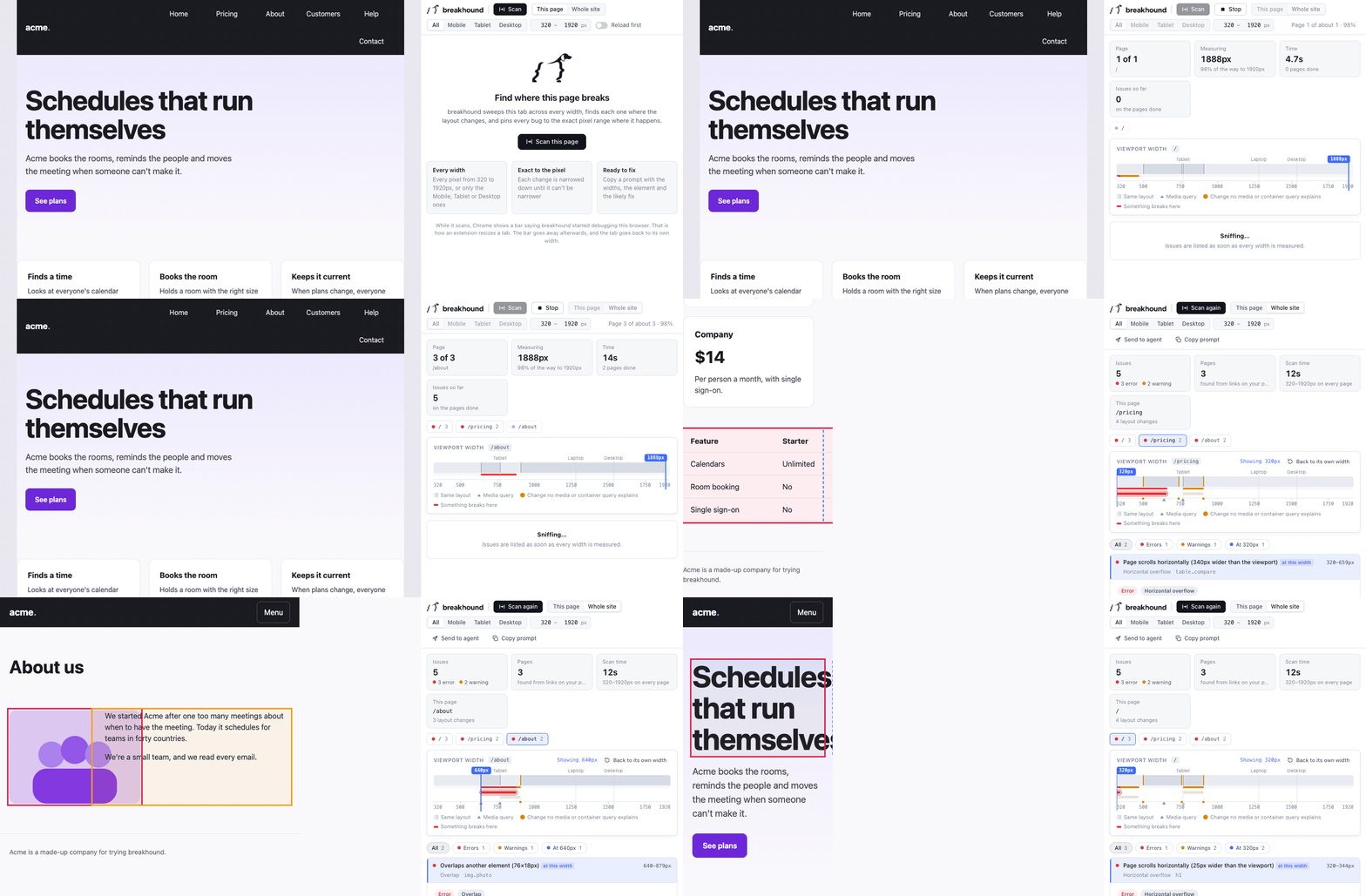
Instead of dragging the browser or clicking through device presets, run one command in your project. breakhound finds your framework and dev server (and starts it if needed), discovers every route, sweeps each page from 320px to 1920px in a real browser, finds the exact pixel where things go wrong, and tells you why:
✔ Next.js running at http://localhost:3000
✔ 14 routes from src/app (2 dynamic, filled in from links on your pages)
breakhound 1.0.0 · 14 pages · 320–1920px

  ✖ /pricing        2 issues · layout changes at 768, 1024   4.1s
  ✔ /about          clean · layout changes at 640, 1024      3.2s
  ✖ /blog/[slug]    1 issue · layout changes at 768          3.8s  as /blog/hello-world
  ...

  ✖ error    320–599px      Page scrolls horizontally (280px wider than the viewport)
              div.pricing-table · /pricing
              → It stays 600px wide no matter the screen size. Replace the fixed width
                with max-width: 100% (or a fluid width) so it can shrink.
  ⚠ warning  768–919px      Row of 6 items wraps onto 2 lines
              header nav ul · /pricing, /blog/[slug]
              → Collapse this row into a menu below this width, tighten its spacing, or
                let it scroll sideways.

  Report  .breakhound/report.html  (npx @seybel/breakhound report to open it)
  Fix it  npx @seybel/breakhound mcp install  so your agent can scan, verify and undo by itself
Quick start
In your project folder:
npx @seybel/breakhound
No config needed. It works with Next.js, Nuxt, SvelteKit, Astro, Remix, React Router, TanStack Router, Vue, Angular and plain Vite apps, at the root of a monorepo too, and follows links on anything else. Chromium downloads the first time (about 150 MB).
To type breakhound on its own, install it globally with npm i -g @seybel/breakhound, or add it to your project with npm i -D @seybel/breakhound.
What it finds
Pages that scroll sideways, content spilling out of its box, media that doesn't shrink, overlapping content, nav rows and labels that wrap, clipped and squished text, text too small or too big for phones, small tap targets, distorted images, text against the screen edge, and a missing viewport tag.
Every issue comes with the exact widths where it happens, the element to blame, the numbers behind it, a screenshot, and a likely fix. It also opens menus, dialogs, tabs and accordions and checks them open, can check Safari's and Firefox's engines too, and is built to stay quiet on carousels, off-canvas menus and other patterns that only look wrong. All the checks →
Three ways to use it
In the terminal, as above. Pages behind a login, dynamic routes, staging servers and big apps are all covered in recipes.
In Chrome, with the breakhound extension: right-click any page, from localhost to production, and choose Scan with breakhound. A timeline fills in live as the page grows from 320px to 1920px. More →
With your coding agent. breakhound doesn't edit your code: your agent does, and breakhound checks its work at every width.
npx @seybel/breakhound mcp install
That sets it up for Claude Code, Cursor, VS Code, Antigravity, Windsurf and Codex. Then ask your agent to fix the responsive issues: it can scan, verify that each fix didn't break another width or page, commit each fix on its own, and undo it. No MCP? npx @seybel/breakhound prompt --copy gives you instructions to paste into any agent. More →
In CI
- uses: Seybel/breakhound@v1
  with:
    fail-on: error
It starts your dev server (or scans a preview deployment), turns each issue into an annotation, and uploads the report as an artifact. More →
Docs
- Getting started and your first scan
- Recipes for common jobs
- Configuration and the CLI
Contributing
Found a false positive, or a bug breakhound missed? That's the most useful thing to report. See CONTRIBUTING.md for that and for working on the code.
License
MIT
breakhound MCP questions
How do I use breakhound with my coding agent?
You can install it using npx @seybel/breakhound mcp install to set it up for agents like Claude Code, Cursor, or VS Code, allowing them to scan and verify fixes.
What kind of layout issues does breakhound detect?
It detects horizontal scrolling, content spilling, media that won't shrink, overlapping content, wrapping nav rows, and small tap targets.
Does breakhound require any configuration to start?
No configuration is required; it automatically detects your framework and dev server.