
Monitor, meter, and budget the token usage and costs of multiple coding agents like Claude Code and GitHub Copilot CLI from a single interface.
Also known as sblattj/agentic-coding-harness
- Stars
- 2
- Tools
- —
- Downloads, 30 days
- —
- Latest version
- —
- Last commit
- Nov 16, 2026
- License
- MIT
What is agentic-coding-harness MCP?
agentic-coding-harness is an MCP server. Monitor, meter, and budget the token usage and costs of multiple coding agents like Claude Code and GitHub Copilot CLI from a single interface.
Summary generated from the project's README
About agentic-coding-harness MCP server
Monitoring token usage and expenses for multiple coding agents from a single interface is what agentic-coding-harness enables. It provides a local-first way for developers to run, watch, and meter tools like Claude Code, GitHub Copilot CLI, Gemini CLI, Codex CLI, OpenCode, Kiro, Prime Agent, and Cursor CLI. By normalizing different transcript formats into a single event stream, it allows for accurate accounting of input, output, cache reads, cache writes, and reasoning tokens.
Users interact with the system through a CLI that can launch runs, enforce budgets to abort runaway processes, and provide live terminal dashboards. It supports local-first operation using flat files for a run registry, meaning no account or ingestion step is required. For those needing deeper observability, it can export data to Langfuse or OpenTelemetry via OTLP. The tool is designed for developers who want to A/B test different agents on the same task or maintain strict control over the costs of running autonomous coding agents locally.
What you can do with it
- 1Compare agent performance and costA developer can run the same coding task across six different agents to generate a single comparison table and HTML report.
- 2Prevent runaway agent expensesYou can set budget caps that automatically abort an agent run if it exceeds a specific spending threshold.
- 3Verify agent billing accuracyEnsure that the token and cost numbers reported by your CLI match the actual provider records.
- 4Monitor live agent activityWatch real-time agent execution through a terminal dashboard or an interactive web interface with browser-based terminals.
Written from the project's README. Every use case is checked against a quote from it.
How to install agentic-coding-harness MCP
Formats verified 10 Nov 2026Add to CursorAdd to GooseInstall agentic-coding-harness MCP in Claude Code
$ claude mcp add agentic-coding-harness -- npx -y agentic-coding-harnessInstall agentic-coding-harness MCP in Cursor
~/.cursor/mcp.json
{
  "mcpServers": {
    "agentic-coding-harness": {
      "command": "npx",
      "args": [
        "-y",
        "agentic-coding-harness"
      ]
    }
  }
}Install agentic-coding-harness MCP in VS Code
.vscode/mcp.json
{
  "servers": {
    "agentic-coding-harness": {
      "type": "stdio",
      "command": "npx",
      "args": [
        "-y",
        "agentic-coding-harness"
      ]
    }
  }
}Install agentic-coding-harness MCP in VS Code CLI
$ code --add-mcp '{"name":"agentic-coding-harness","type":"stdio","command":"npx","args":["-y","agentic-coding-harness"]}'Install agentic-coding-harness MCP in Claude Desktop
claude_desktop_config.json
{
  "mcpServers": {
    "agentic-coding-harness": {
      "command": "npx",
      "args": [
        "-y",
        "agentic-coding-harness"
      ]
    }
  }
}Install agentic-coding-harness MCP in Codex
$ codex mcp add agentic-coding-harness -- npx -y agentic-coding-harnessInstall agentic-coding-harness MCP in Codex config.toml
~/.codex/config.toml
[mcp_servers.agentic-coding-harness]
command = "npx"
args = ["-y", "agentic-coding-harness"]
Install agentic-coding-harness MCP in Gemini CLI
$ gemini mcp add -s user agentic-coding-harness npx -- -y agentic-coding-harnessInstall agentic-coding-harness MCP in Gemini settings.json
~/.gemini/settings.json
{
  "mcpServers": {
    "agentic-coding-harness": {
      "command": "npx",
      "args": [
        "-y",
        "agentic-coding-harness"
      ]
    }
  }
}Automated checks
Ran Nov 14, 2026Full report →Passed our automated checks. That is not a security audit: read the code and give the server the narrowest access it needs. How checks work

- Source repository linked and reachablesblattj/agentic-coding-harness is public and reachablegithub.com/sblattj/agentic-coding-harness ↗Pass
- Package names this repository as its sourceagentic-coding-harness names sblattj/agentic-coding-harness as sourcenpmjs.com/package/agentic-coding-harness ↗Pass
- Build provenance (Sigstore attestation)Sigstore attestation for agentic-coding-harnessnpmjs.com/package/agentic-coding-harness/v/0.28.3#provenance ↗Pass
- Open source license (OSI)MITspdx.org/licenses/MIT.html ↗Pass
- Commit or release in the last yearLast commit or release 2026-11-11github.com/sblattj/agentic-coding-harness ↗Pass
- OpenSSF ScorecardNot checked
- Package name not close to a popular packageNo popular package one edit away from agentic-coding-harnessPass
- No critical advisory in the package or its dependenciesNot checked
- No hidden instructions to the model0 tool descriptions and the README read; no override phrases, credential paths or hidden charactersPass
- Destructive tools are labelledNot checked
- Remote endpoint answers the MCP handshakeNot checked
README
View on GitHubagentic-coding-harness — cost tracking and observability for Claude Code, Codex CLI, Gemini CLI, OpenCode, Kiro, Prime Agent, and GitHub Copilot CLI
Agents hide the burn. ach runs, watches, and meters Claude Code, Codex CLI, Gemini CLI, OpenCode, Kiro, Prime Agent, and GitHub Copilot CLI from one CLI — agent cost tracking whose numbers verify against each CLI's own records.
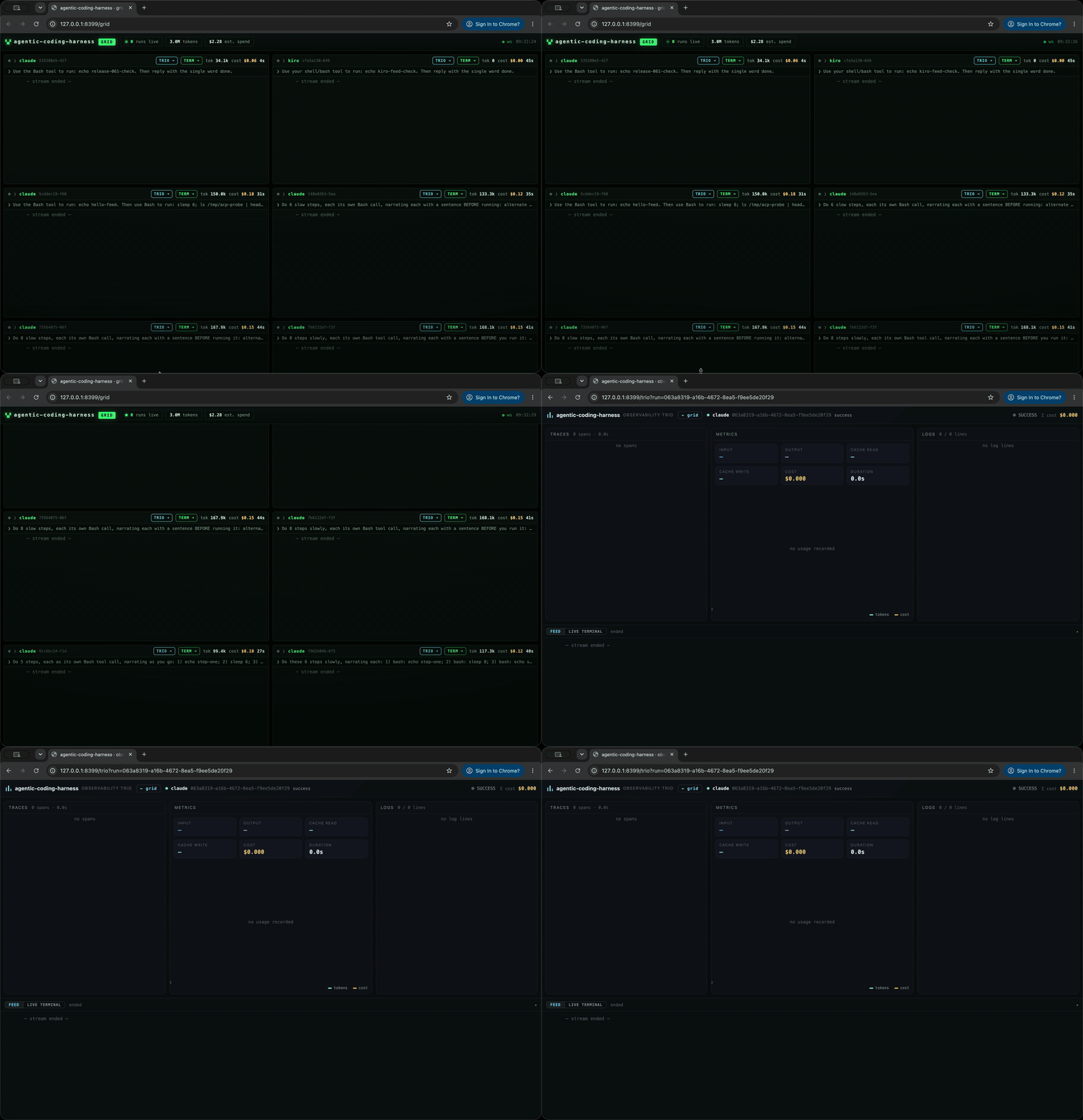
Highlights
- One CLI, six agents (plus the Kiro IDE) —
claude,opencode,kiro,codex,gemini,primeadapters (pluscopilotfor GitHub Copilot CLI,cursorfor the Cursor CLI agent, andkiro-ide, which drives the Kiro desktop app over CDP) normalize six different transcript formats into oneAgentEventstream and one canonical token record (input, output, cache read, cache write, reasoning). - Cost math you can defend — cache-aware accounting verified against each CLI's own ground truth (Claude session JSONL, Kiro session files, provider-reported
costUSD); LiteLLM pricing, and unpriced models are marked unavailable rather than silently assigned a price. - Live agent runs dashboard —
ach dashredraws 2×/s in the terminal;ach web(port 8399) grids every run with a browser terminal you can type into — PTY per run, vendored xterm.js, zero CDN. - Terminal replay — every run renders to an asciinema-format
.cast, so you can scrub what the agent did and when. - Run registry — every run persists to
<stateDir>/runs/<runId>.jsonwith atomic writes; survives kills, dumps as--jsonfor tools. - 10 MCP tools — launch runs and read usage from any MCP client over stdio, or streamable HTTP on port 8398 (
ach serve). - Artifacts out — ATIF v1.7 trajectories, OpenTelemetry
gen_aispans, Langfuse via OTLP, and single-file HTML comparison reports. - Usage you can act on — timezone-aware stats, model/project breakdowns, cache efficiency, rolling billing blocks, quota headroom, context pressure, and persisted threshold alerts.
- Verified trials —
--verify, fresh-session repeats, pass@k and Wilson intervals, and score history fromach regrade. - More ways to run — custom command templates,
agents.ddescriptors, an offlinenulladapter, and standalone macOS/Linux executables.
How it compares
| Compared with | Runs and budgets | Events and cost | Registry and output |
|---|---|---|---|
| usage CLIs (ccusage etc.) | ach launches, aborts, and budget-caps the runs it meters |
normalized token events across 6 agent CLIs | per-run registry keyed by runId + live web grid |
| observability platforms (Langfuse etc.) | ach launches and meters the runs itself |
local-first flat files — no account, no ingest step | exports to them via OTLP when you want their charts |
| tmux + grep | one launcher for all six agents | normalized event schema + cost math | run registry + single-file HTML report |
Is this for you?
- For you if you run coding agents locally and want per-run tokens, cost, and credits from one place — including opt-in budget enforcement that aborts a runaway run mid-flight.
- For you if you A/B compare coding agents: same task, six agents, one comparison table, one local registry.
- Not for you if you need hosted team features (SSO, retention, org-wide dashboards).
achis local-first by design and exports to Langfuse and other OTLP backends when you outgrow it.
Install
Homebrew installs the Node-based CLI; Bun is not required:
brew tap sblattj/agentic-coding-harness https://github.com/sblattj/agentic-coding-harness
brew install sblattj/agentic-coding-harness/ach
ach --version
| Install path | Command or download | Requirements |
|---|---|---|
| Homebrew | Commands above | Homebrew; Node is installed as a dependency |
| npm | npm install -g agentic-coding-harness |
Node.js 22+ |
| Standalone | GitHub release binaries and SHA256SUMS | macOS or Linux, arm64 or x64; no Node/Bun runtime |
| Python wrapper | uv tool install agentic-coding-harness or pipx install agentic-coding-harness |
Python 3.9+ and Node.js 22+ or Bun; PyPI currently provides the older 0.7.4 release |
npm releases are published by the release workflow after the binaries build. GitHub Release binaries are always available; npm may lag if publishing failed, so compare npm view agentic-coding-harness version with the latest release. See packaging for publishing.
From a source checkout (fresh clone or worktree), ach is not on PATH until you build it:
bun install && bun run build:node && bun link
package.json declares bin.ach = dist/cli/ach.js, and dist/ is a gitignored build
output that build:node writes. Without the build there is nothing for bun link to
point at. To skip the build, run the source entry directly: bun run src/cli/ach.ts run ....
Standalone binaries embed the web dashboard. The interactive browser terminal requires
bun-pty and is unavailable in standalone builds; CLI runs, stats, terminal dashboard,
and the rest of the web dashboard remain available. See packaging
for checksum verification and release automation.
Quickstart
You need Node.js 22+ and at least one agent CLI that is installed and signed in: ach runs
the agent, it does not install it. The examples use Claude Code:
npm install -g @anthropic-ai/claude-code
Then run claude once and sign in. ach doctor shows which agents ach can find. Run the
commands below inside the repository you want the agent to change.
Each ach run gives Claude Code a fresh config dir, which cannot see the session from
claude's own sign-in. --claude-default-config uses your normal Claude config and login;
alternatively set CLAUDE_CODE_OAUTH_TOKEN (from claude setup-token) or ANTHROPIC_API_KEY.
# without installing ach:
npx -y --package=agentic-coding-harness ach run --agent claude --claude-default-config "add a --dry-run flag to scripts/lint.sh"

# or install it globally:
npm install -g agentic-coding-harness
ach run --agent claude --claude-default-config "add a --dry-run flag to scripts/lint.sh"
Dashboard: ach web keeps running, so start it in its own terminal. It opens
http://localhost:8399 in your browser (--no-open skips that):
ach web # live dashboard on :8399; leave it running
Then, from any other terminal, run an agent. This one uses the Codex CLI (sign in by running
codex once after installing it):
npm install -g @openai/codex
ach run --agent codex "fix the failing test"   # shows up in the dashboard grid; LIVE opens a terminal pane
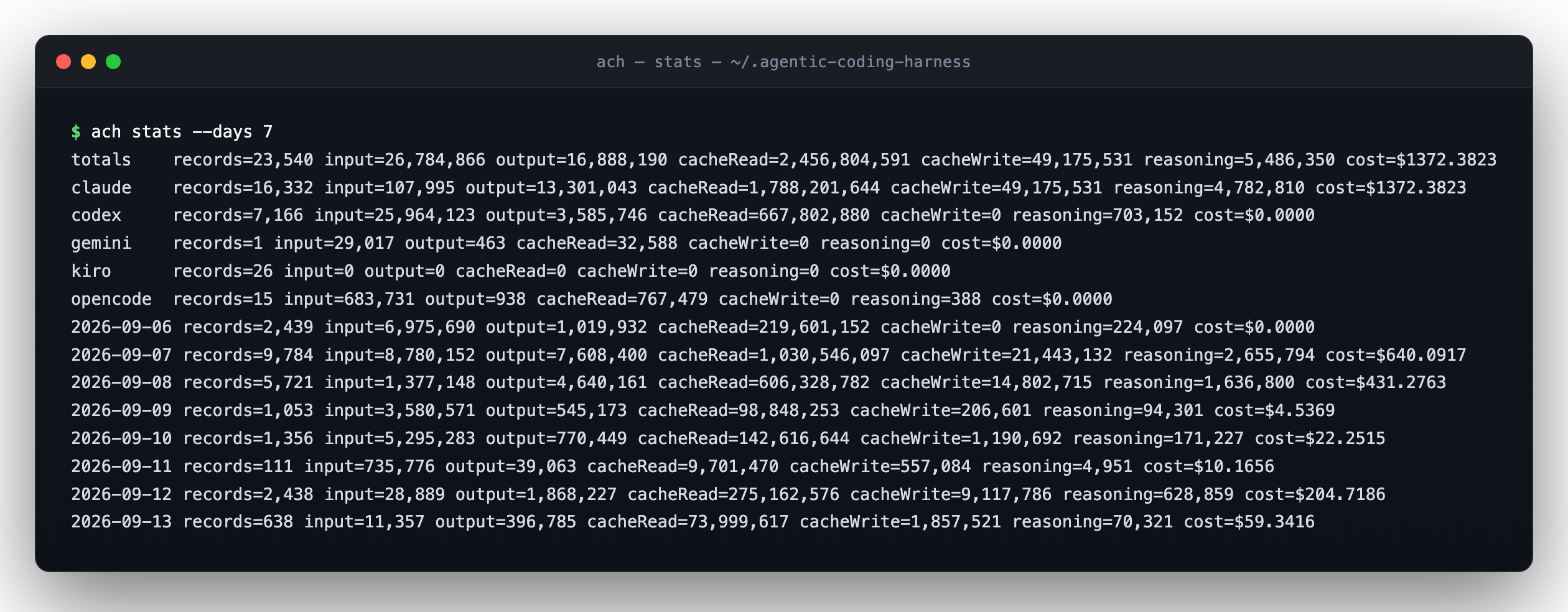
Demo: one task, six agents, one cost table
Real token and cost accounting across every installed agent — output shapes are the real
ones (formatSummary in src/cli/lib.ts, the table in src/cli/dash.ts); values from
actual runs:
$ ach run --agent claude --max-turns 40 "add a --dry-run flag to scripts/lint.sh"
[14:03:11] step
[14:03:13] tool    Read
[14:03:19] tool    Edit
[14:03:24] step
sessionId  7c1f0a2e-4b9d-4e1a-9c33-8f2a1d5b6e70
tokens     input=4,812 output=933 cacheRead=38,204 cacheWrite=1,120 reasoning=640
cost       $0.0612
duration   31.4s
exit       success

$ ach dash
STATUS AGENT    RUNID    SESSION  ELAPSED       IN      OUT     CACHE     COST  CREDITS LAST EVENT
+      claude   7c1f0a2e 7c1f0a2e     31s     4.8k     933    39.3k  $0.0612          step
●      kiro     91b3ce11 91b3ce11     12s       0       0        0  $0.0000   0.05cr tool    Bash

2 runs  in 4.8k  out 933  cost $0.0612  credits 0.05cr  ? help  q quit

$ ach report trials/20260911-141210          # single-file HTML comparison
$ ach emit --format langfuse --input …       # post spans to Langfuse / OTel / ATIF
The problem: coding agents hide token usage and cost
- Agents hide burn. Kiro exposes metering credits, not tokens; Claude mixes models inside one session, so any single blended price is wrong — real Claude Code cost needs per-(model, cache-tier) math. Each adapter taps usage at its source and prices it that way. Kiro credits stay on their own summary line — never merged into USD.
- Every CLI speaks a different format. JSONL transcripts, NDJSON stdout, ACP, SQLite — six
adapters normalize all of it into one event model and one
CanonicalTokenRecord(with cache-read/write/reasoning split), so dash, stats, emitters, and the MCP server are written once. - Nothing correlated runs across agents — until now. Runs land in a registry keyed by
runId;
examples/trial-all.shside-by-sides, HTML comparison reports, and cross-agent stats are first-class, not shell archaeology. - Numbers you can defend. Token/cost columns are checked against ground truth: cache columns exact vs each CLI's own session JSONL; Kiro MITM credits bit-for-bit vs Kiro's session files.
What it does: token metering, verified cost tracking, and run artifacts for six agents
- Eight CLI adapters —
claude,opencode,kiro,codex,gemini,prime(headless / ACP lanes) — pluscopilot(GitHub Copilot CLI, below),cursor(Cursor CLI agent, below) andkiro-ide, which drives the Kiro IDE desktop app over CDP (see "Kiro IDE (desktop app)"). - Prime Agent —
ach run --agent primedrivesprime-agent -p --mode json;--modelpasses through verbatim (<provider>/<model>). Usage is counted per assistant message plus the subagent (rlm.spawn) sessions read from~/.prime/agent/session-artifacts/; a provider-reported cost of 0 is shown asn/a, not$0.ach doctor --agent primechecks the binary and auth (PRIME_API_KEY,~/.prime/agent/auth.json, or a provider key in~/.prime/agent/models.json). No vendor quota source. - GitHub Copilot CLI —
ach run --agent copilotdrivescopilot --prompt=<text> --output-format json --allow-all-tools(binary override:COPILOT_CLI_BIN). Auth prerequisite: a GitHub login that has Copilot access, bycopilot login, aCOPILOT_GITHUB_TOKEN/GH_TOKEN/GITHUB_TOKENenv var, orgh auth login; without one the run fails fast with a specificcopilot: not authenticated(oraccess denied by policy) error and is recordedunavailable. Copilot bills in AI credits (AIU), not tokens: the cost is the CLI's owntotalNanoAiutelemetry at 1 AIU = $0.01, shown in the normal cost column and ascredits. If that telemetry is missing the cost isn/awith a warning and tokens still show: ach never estimates a Copilot cost from token math.--resume SIDbills only the resumed run's share of the cumulative session. See docs/transcript-adapters.md for where the telemetry lives and what is verified. No vendor quota source. - Cursor CLI agent —
ach run --agent cursordrivescursor-agent --print --output-format stream-json --trust --force -- <prompt>(binary override:CURSOR_AGENT_BIN;--resume <chatId>continues a chat). Auth prerequisite:cursor-agent loginorCURSOR_API_KEY. Before launching, ach runscursor-agent status; an unauthenticated CLI fails fast with a specificcursor: not authenticatederror and the run is recordedunavailable(the CLI itself reports "Authentication required" on a run and "Not logged in" onstatus, both with no token spent). Cost follows the usual honesty rule: the CLI's own stated cost when its result carries one (reported), else computed from the tokens its result reports (computed, with a warning), elsen/awith a warning: ach never estimates a Cursor cost from text length.cursoris also the name of the read-only Cursor IDE monitor, whichach stats --agent cursorkeeps reading (separate store, no double count). Supports cursor-agent 2026.10.x: its result reports tokens (net input, cache read, cache write, output) but no cost, so a Cursor run's cost iscomputedfrom--model. The default model,Auto, does not say which model served the run, so its tokens are recorded and its cost is unavailable (one warning). Recent Cursor IDE builds keep no per-message token counts on disk, soach stats --agent cursorreports them unavailable (one warning) rather than estimating; useach run --agent cursoror the Cursor dashboard export for exact usage. To keep a dashboard export, runach import --agent cursor --usage-export <file>(CSV or JSON from the Cursor dashboard): the file is validated and a copy stored under<stateDir>/cursor-dashboard/; re-importing the same file isunchanged, and no run records are written.ach statscounts the stored exports (billed cost, also with--state-only): a dashboard row replaces theach runcursor record of the same session (JSON) or with identical tokens within 10 minutes (CSV), and replaces Cursor IDE rows inside the export's time span. Stream shapes were read from the 2026.10.01 CLI bundle and verified on a live logged-in run; see docs/transcript-adapters.md. No vendor quota source. - Unified events, cache-aware tokens — one
AgentEventstream, one canonical token record; per-agent double-counting traps handled (docs/TOKEN-COUNTING.md). - LiteLLM multi-model pricing — bundled LiteLLM extract, external cost-map override;
unpriced models carry an explicit unavailable price, never a silent estimate. Pricing is fully
offline: the snapshot is date-stamped (
ach stats --jsonpricingblock, stale notice after 180 days,AGENTIC_CODING_HARNESS_PRICING_STALE_DAYS) and--offlineon stats/watch/dash/web makes any outbound network call fail loudly (docs/TOKEN-COUNTING.md). - Kiro MITM credit tap — auto-starts on
ach run --agent kirowhenmitmdumpis on the PATH; captures metering credits (extra.credits) and the nativekiroSessionid for grep correlation; degrades to a warning when absent. - Kiro ACP transport + preflight —
--kiro-transport acpdriveskiro-cli acpover JSON-RPC and records the proven mode/model (result.kiro.modelAck); the default headless lane forwards the same--model/--kiro-*config and records what it passed, with no implicit--trust-all-tools;ach preflight --agent kiroandharness_kiro_preflightverify binary, auth, agent, model and MCP state without sending a prompt. Token counts are reportedn/awhen no source carries them (kiro-cli 2.21.x) — never fabricated zeros; credits and derived context tokens are shown instead. See docs/KIRO.md. - Run registry +
ach dash— live TUI over<stateDir>/runs(redraws 2×/s, ANSI status glyphs, totals footer);--jsondumps RunRecords for tools,--allwidens past the last hour. - Run queue —
ach queue run plan.txt --max-concurrent 4launches plan-file slices as detachedach runprocesses, capped by the live runs on the whole machine, withpre/posthooks, per-slice logs and a state file; see docs/QUEUE.md. - MCP server —
ach mcp(stdio JSON-RPC;ach servefor streamable HTTP), 10 tools (harness_run{,_async,_status,_events,_cancel},harness_kiro_preflight,report/emit/stats/agents) so any MCP client launches runs and reads usage; see docs/MCP.md. - Emitters — ATIF v1.7 trajectories (self-validating), OpenTelemetry
gen_aispans, Langfuse via OTLP. - Single-file HTML reports — charts + timelines comparing every agent in a trial dir.
watch/stats— live per-session token deltas across claude/codex/gemini/prime transcript dirs plus the opencode SQLite store;statsaggregates totals/byAgent/byDay over machine transcripts and harness state (--state-onlyto skip transcript scans).
A/B compare coding agents side by side — tokens, cost, credits, duration
Run the same task on every installed agent and get a single comparison: tokens in/out/cache,
cost, wall-clock duration, and status per agent. No manual log diffing. For lightweight
experiment tracking, the web dashboard's /compare view rolls runs up by experiment×variant
or workflow×agent straight from the local registry.
For a full sweep, declare the grid once and let ach trial --matrix run it:
ach trial --matrix examples/trial-matrix.json --dry-run   # list the 9 cells, launch nothing
ach trial --matrix examples/trial-matrix.json             # run them; Ctrl-C and re-run to resume
Each cell (agent:task:model:trialN) becomes one run labelled with the plan's
experiment and a variant, so /compare groups the results with no extra setup.
The runner appends one row to examples/trial-matrix.ledger.jsonl only after that
cell's run has finalized. A re-run skips cells that already have a verdict (passed or
verify-failed) and runs the rest. Infrastructure error cells are reported and re-run
only with --retry-failed; a verify failure is never retried. A cell that died on a provider
usage or rate limit (429, overloaded, hit your session limit) is skipped-provider-limit: no
verdict, not a failure, and run again next time, like an unavailable CLI. The plan schema, task
directories (task.md, setup.sh, verify.sh), and ledger format are in
docs/TRIALS.md.
To compare agents without writing tasks, run the bundled suite: 12 self-verifying shell, JavaScript and Python tasks, with every installed agent by default.
ach trial --suite core --dry-run                      # agents x tasks, launch nothing
ach trial --suite core --agent claude --task py-slugify --repeat 3
Agents whose CLI is not installed are skipped with a printed reason. The suite writes an HTML report next to its ledger in the state dir. See docs/TRIALS.md.
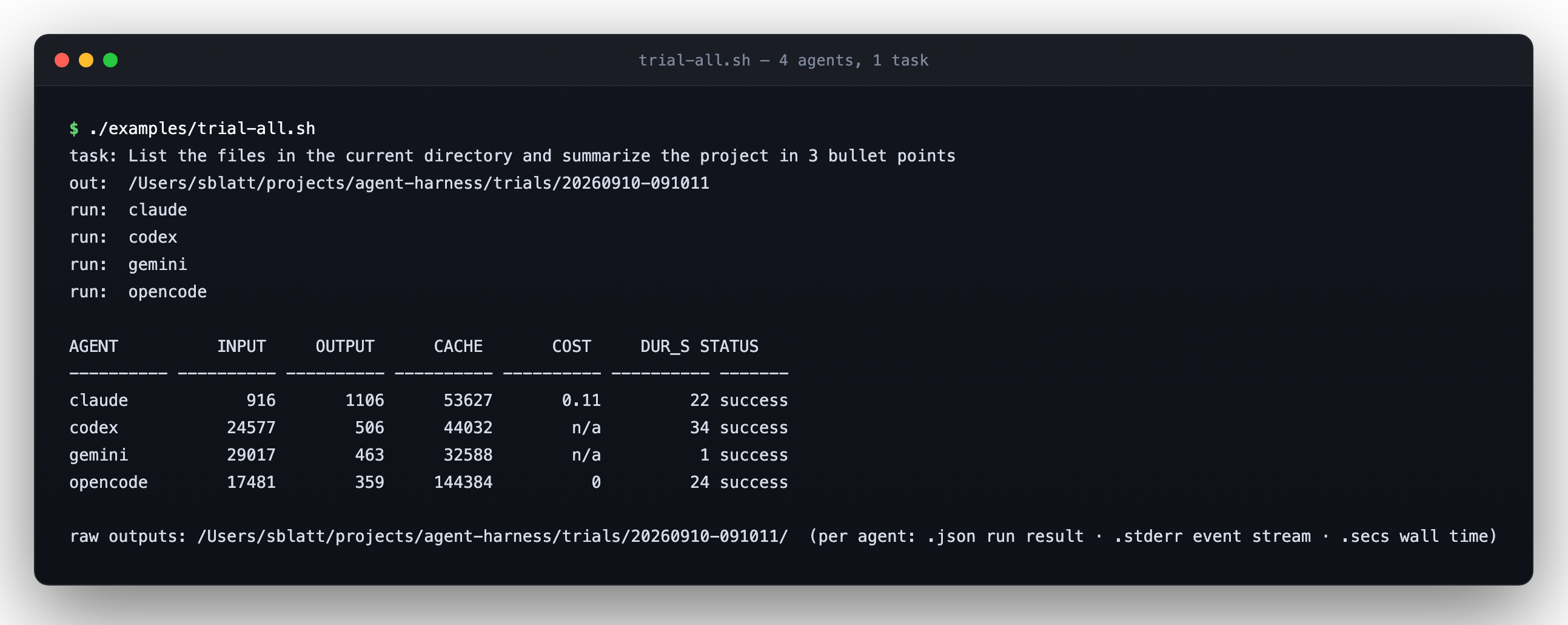
Live dashboards: terminal (ach dash) and web (ach web)
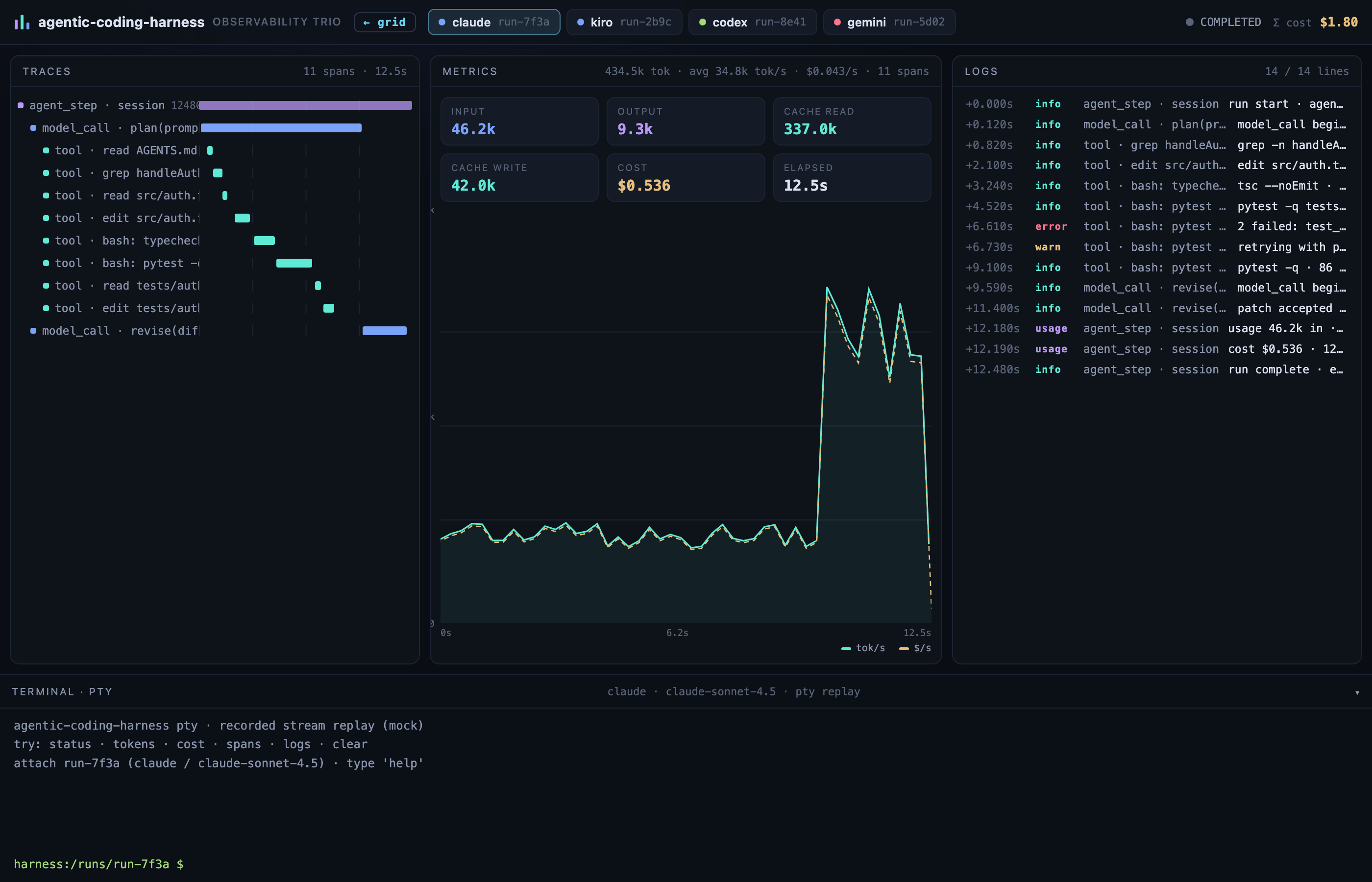
One registry, two live agent runs dashboards.
Web — a tmux-like grid of every run, plus an observability view per run. A LIVE button spawns an interactive PTY for the run's agent and expands the tile to a full xterm.js browser terminal you can type into.
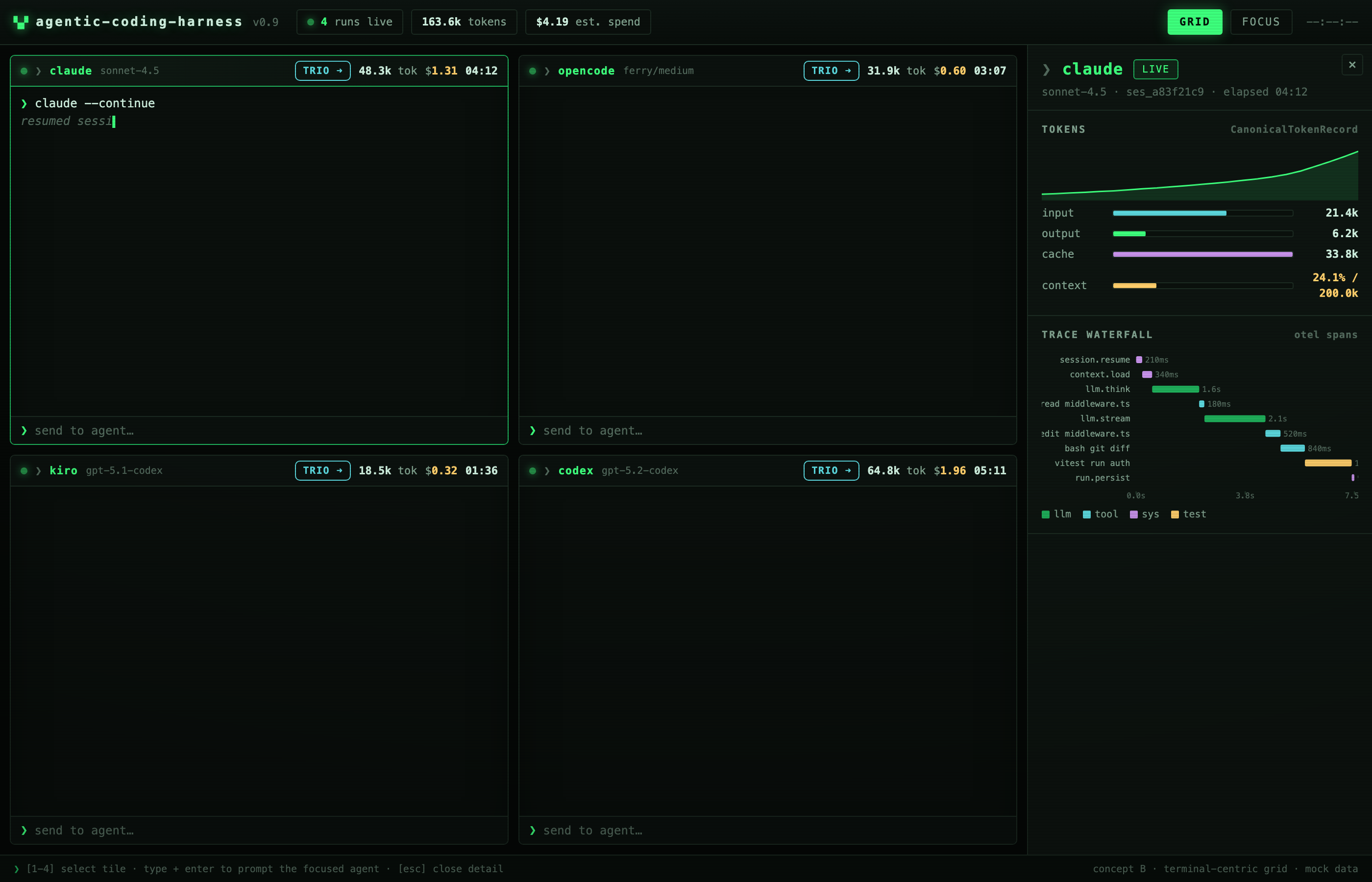
Observability trio — traces, metrics, and logs for a single run, with a live terminal
drawer: the span waterfall, cumulative token/cost charts, and the leveled event log. The
metrics pane also shows latency — time to first token, output tokens/s, time per output token,
and a per-tool duration table (calls, avg, p95, total); a metric the event log cannot support
reads n/a. Time to first token is measured for claude, gemini, codex (first request of each
turn) and headless kiro (first request); output tokens/s and time per output token for claude
only; opencode's stream carries no request timing. See ARCHITECTURE.md
("Latency metrics") for definitions, precision and which agents emit what.
Terminal — ach dash is a live TUI over the run registry (redraws 2×/s, ANSI status
glyphs, totals footer); --json dumps RunRecords for tools. Press ? for key help (keys, status
glyph legend, flags). The first launch shows it once (seen-flag <stateDir>/dash-help-seen);
--help-keys forces it, --no-help suppresses the auto-show for scripts. NO_COLOR or a non-TTY gives plain text.
--set-terminal-title[=FORMAT] keeps the run state in the terminal tab title, refreshed with the table
(default {active} running · {done}/{total}; tokens {active}, {done}, {total}, {pct}, {spend} = today's
USD; an unknown token stays as written). Quitting leaves a final summary title. Off by default, and never written
to a non-TTY or --json output.
Per-model cost chips — a run that used two or more models (for example Claude mixing an opus
main loop with haiku sub-agent calls) records totals.byModel (cost and tokens per model, highest
cost first). The web run header shows one chip per model (claude-opus-5 $0.40 · 18.2k) and ach dash
prints a models <runid> opus $0.4000 + haiku $0.0200 line under the table. An unpriced model shows
n/a plus the usual unknown-model warning, never an invented cost; single-model runs, and runs recorded
before this field existed, keep the plain aggregate.
Spend by git branch
ach run records the git branch (and short commit) of the run's working directory on
its run record at start. ach stats --by branch (composable with --by model,project)
prints a per-branch table and adds byBranch to --json. Runs with no recorded branch
(older records, non-git directories, transcript-only rows) show as (no branch);
a detached HEAD shows as (detached <sha>). Attribution is by start branch: a
mid-run git checkout is not re-attributed.
The same labels drive two more views. /api/compare?by=branch (alias by=git.branch,
composable with the other keys, e.g. by=branch,agent) groups the web rollup by branch.
ach report adds a "spend by git branch" table (branch, runs, cost, tokens) whenever a
trial's run records carry a branch; runs without one fall in (no branch).
agentic-coding-harness MCP questions
How do I add agentic-coding-harness MCP to Claude Code?
Run claude mcp add agentic-coding-harness -- npx -y agentic-coding-harness in your terminal. Add --scope user to make it available in every project.
How do I add agentic-coding-harness MCP to Cursor?
Open ~/.cursor/mcp.json and add the server under mcpServers, using the Cursor config shown in the install section above.
How does it handle cost accounting?
It uses cache-aware accounting that is verified against each agent's own ground truth records, such as session JSONL files or provider-reported costs.
Can I view my agent runs in a web browser?
Yes, you can use the 'ach web' command to open a live dashboard with a terminal grid for every run.