
Allows an AI client to interact with live Altium Designer, KiCad, or EasyEDA sessions to design schematics, PCBs, and manage libraries.
Also known as salitronic/eda-agent
- Stars
- 366
- Tools
- 3
- Downloads, 30 days
- —
- Latest version
- 0.8.1
- Last commit
- Nov 15, 2026
- License
- Apache-2.0
What is eda-agent MCP?
eda-agent allows an AI client to interact with live Altium Designer, KiCad, or EasyEDA sessions to design schematics, PCBs, and manage libraries. It exposes 3 tools, such as tool_catalog, tool_guide, tool_invoke.
Summary generated from the project's README
About eda-agent MCP server
Hardware engineers can automate electronic design workflows by connecting AI clients to live Altium Designer, KiCad, or EasyEDA Pro sessions. This server establishes a persistent connection to your active design environment, allowing an AI to read current schematics, modify PCB layouts, and manage component libraries in real time. Unlike batch processing tools, it operates while you watch, executing commands through a DelphiScript bridge for Altium or via other backend drivers.
The system provides approximately 600 tools for schematic capture, PCB routing, and project management. It includes specialized capabilities for designing canonical circuit blocks like voltage dividers or decoupling networks, performing SPICE simulations, and running design-lint sweeps to catch errors. Users can manage complex physical attributes such as rigid-flex layer stacks, impedance profiles, and drill types. A local web dashboard and an in-application status window provide live visibility into request counts, command logs, and design health metrics.
What you can do with it
- 1Automated PCB Layout GenerationAn AI can design a multi-layer board from a written specification, including component placement, differential pair routing, and Gerber file generation.
- 2Rapid Schematic PrototypingYou can instruct an AI to build a specific power supply circuit by fetching datasheets and sizing passive components automatically.
- 3Automated Design Rule AuditingDevelopers can run a comprehensive sweep of schematic and PCB violations to identify issues like floating ports or improper via placement.
- 4Circuit Block IntegrationThe agent can instantly wire up standard functional blocks like pull-up resistors or RC filters into an existing design.
Written from the project's README. Every use case is checked against a quote from it.
How to install eda-agent MCP
Formats verified 10 Nov 2026Add to CursorAdd to GooseInstall eda-agent MCP in Claude Code
$ claude mcp add eda-agent -- uvx eda-agentInstall eda-agent MCP in Cursor
~/.cursor/mcp.json
{
  "mcpServers": {
    "eda-agent": {
      "command": "uvx",
      "args": [
        "eda-agent"
      ]
    }
  }
}Install eda-agent MCP in VS Code
.vscode/mcp.json
{
  "servers": {
    "eda-agent": {
      "type": "stdio",
      "command": "uvx",
      "args": [
        "eda-agent"
      ]
    }
  }
}Install eda-agent MCP in VS Code CLI
$ code --add-mcp '{"name":"eda-agent","type":"stdio","command":"uvx","args":["eda-agent"]}'Install eda-agent MCP in Claude Desktop
claude_desktop_config.json
{
  "mcpServers": {
    "eda-agent": {
      "command": "uvx",
      "args": [
        "eda-agent"
      ]
    }
  }
}Install eda-agent MCP in Codex
$ codex mcp add eda-agent -- uvx eda-agentInstall eda-agent MCP in Codex config.toml
~/.codex/config.toml
[mcp_servers.eda-agent]
command = "uvx"
args = ["eda-agent"]
Install eda-agent MCP in Gemini CLI
$ gemini mcp add -s user eda-agent uvx -- eda-agentInstall eda-agent MCP in Gemini settings.json
~/.gemini/settings.json
{
  "mcpServers": {
    "eda-agent": {
      "command": "uvx",
      "args": [
        "eda-agent"
      ]
    }
  }
}eda-agent MCP tools 3
Detected from the READMEtool_catalogtool_guidetool_invoke
| tool_catalog | — | |
| tool_guide | — | |
| tool_invoke | — |
Configuration
EDA_AGENT_BACKENDThe EDA tool to drive; both = Altium and KiCad
EDA_AGENT_TOOLSETfull lists every tool; minimal lists two meta-tools that reach them all
EDA_AGENT_UI_AUTOMATION
| Name | Description | |
|---|---|---|
| EDA_AGENT_BACKEND | The EDA tool to drive; both = Altium and KiCad | |
| EDA_AGENT_TOOLSET | full lists every tool; minimal lists two meta-tools that reach them all | |
| EDA_AGENT_UI_AUTOMATION | — |
Automated checks
Ran Nov 12, 2026Full report →Passed our automated checks. That is not a security audit: read the code and give the server the narrowest access it needs. How checks work

- Source repository linked and reachablePass
- Open source license (OSI)Pass
- Commit or release in the last yearPass
- Package name not close to a popular packagePass
- Remote endpoint uses HTTPSNot checked
- Destructive tools are labelledPass
- No hidden instructions to the modelPass
- No critical advisory in the package or its dependenciesPass
README
View on GitHubeda-agent
MCP server that lets an AI (or any MCP-compatible client) interact with a live Altium Designer session, with KiCad and EasyEDA Pro available as additional backends. It exposes around 600 tools on Altium, covering schematic, PCB, library, project, and design-agent operations, over a persistent DelphiScript bridge. The AI reads the design you currently have open, asks questions about it, and can modify it in place while you watch. The backend is selected at startup, so each user sees only their own tool set.
⚠️ Experimental. Not all tools are extensively tested. Some can crash the Altium DelphiScript engine. See Known limitations before using on any design you haven't backed up.
Demo
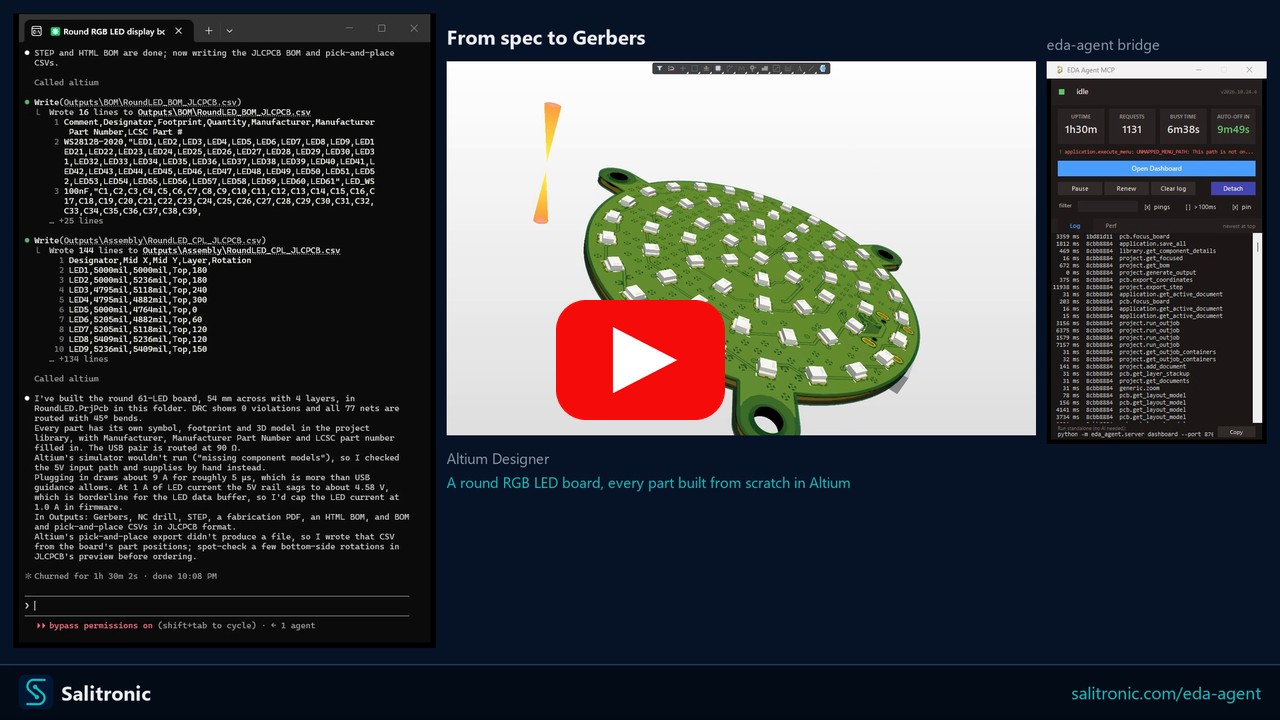
Claude Code with eda-agent designs a round 54 mm, 4-layer RGB LED display board in Altium Designer from a written spec to manufacturing files. It builds a project library from scratch, with a symbol, footprint, 3D model and part numbers for every part. It then draws the schematic, places 61 LEDs in rings, routes the USB pair at 90 ohms, pours stitched ground, gets DRC clean and writes the Gerbers, drill, BOM, pick-and-place and STEP files. A correction round follows: a review prompt lists issues from the first pass, and Claude reroutes the whole USB pair as a coupled differential pair, gives every part a realistic 3D model from its datasheet drawing and finishes the schematics with title blocks. The result would still get a manual tweaking pass before prototyping, but it is already at a very good stage.
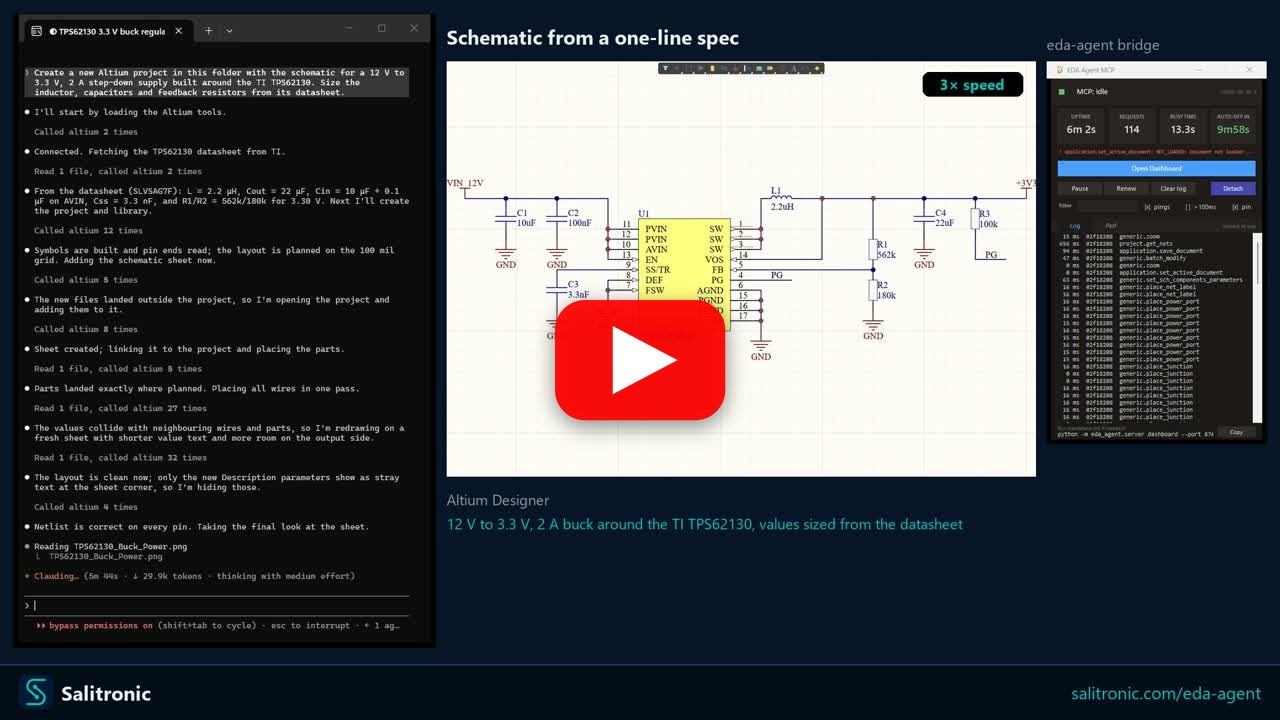
Claude Code with eda-agent draws a 12 V to 3.3 V, 2 A step-down supply around the TI TPS62130 in Altium Designer from one sentence. It fetches the datasheet, sizes the inductor, capacitors and feedback divider from it, builds the symbols, draws the schematic and verifies the netlist.
Support the project
Developing eda-agent and testing it against Altium's scripting engine takes a significant amount of work. If you find eda-agent useful in your work, sponsorship keeps it free and maintained. Questions and bug reports get an answer whether you sponsor or not.

Sponsors
Professional and Company sponsors appear here with their logo, and Backer and Big thanks sponsors by name. Be the first: github.com/sponsors/salitronic.
Dashboard
Two dashboards ship with eda-agent:
- In-Altium status window - a floating Altium-side window showing live status, request count, cumulative Altium-side time, auto-shutdown countdown, and a per-command log with durations.
Hide pingsfilters the 30 s keep-alive traffic;Slow onlyisolates slow calls. The Config tab (right) sets what the AI may do: edit designs, delete, close documents, and drive menus and dialogs, plus view options. Changes apply live. The Detach button exits the polling loop cleanly; it saves nothing, so unsaved edits stay in the editor. - Web dashboard - a local browser dashboard at
http://127.0.0.1:8766, focused on design review. A Review tab surfaces datasheet / MPN / manufacturer / footprint coverage gauges and an actionable issue queue (missing datasheet, missing MPN, orphan nets, ...); Project, Components, Nets, Libraries and Plan tabs give live structured views. Click any component or net to drill into a detail drawer; one click cross-probes it into Altium. Light / dark theme, server-sent-events live feed. It is auto-started by the MCP server - the Open Dashboard button on the in-Altium status window launches the browser.
How it works
- Altium Designer stays open and in full control of your design
- A DelphiScript polling loop runs inside Altium's scripting engine
eda-agent(Python, launched by your MCP client) sends commands via file-based IPC- Altium executes, writes a response, and returns to polling
- You see the changes happen live in Altium
This is not a batch tool that opens a project, runs a script, and exits. It's a live connection for as long as you want it (conversational design review, guided refactoring, ad-hoc BOM queries, "what nets does this resistor connect to?"), all on the project you currently have open.
Features
- ~600 tools on the default Altium backend (600+ with both registered) across application, project, library, schematic/general, PCB, and design-agent categories
- Generic primitives (
obj_query,obj_modify,obj_create,obj_delete,obj_run_process) that work on almost any schematic or PCB object type via late-binding, avoiding per-type handler proliferation - Every tool takes a list: give nearly any tool
items, a list of its own arguments, and the whole list is one call, one request to Altium and one undo step (pcb_place_arc(items=[...])places twenty arcs that one Undo takes back). The reply gives each item's result in order. Some tools take their list directly:pcb_place_tracks,pcb_place_vias,pcb_move_components,sch_place_wires,sch_place_components,sch_set_components_parameters,lib_add_pins,proj_get_connectivity_many,sim_attach_primitives. Typical wall-time savings: 10 to 100x on multi-item edits - Design review snapshot:
design_review_snapshotbundles 8 to 12 review reads (project info, components, nets, rules, diff, messages, stats, unrouted, BOM) into a single call. One LLM turn instead of a dozen - Design-lint sweep:
design_lint_reportruns 31 audit checks in one IPC pass and returns a structured violation list - schematic-side (component-parameter visibility per class, power-port orientation, floating ports, multi-output / no-driver nets, duplicate designators, off-grid components) and PCB-side (DNP variant components, tented-via ratio, near-miss track endpoints, signal vias without nearby return via, via antennas, removed pad shapes, components outside outline, pads too close to board edge, invalid polygon regions, optional DRC). Each check is also exposed as a standaloneaudit_*MCP tool; the dashboard's Status → Health subtab has a one-click Lint panel that calls/api/lintand groups results by Schematic / PCB - Canonical circuit blocks:
design_add_circuit_blockfolds a whole block into aDesignPlanin one call, allocating refdes, wiring every pin to the right net and tagging power / ground and roles. Twelve of them:decoupling,pullup,pulldown,series_resistor,voltage_divider,rc_lowpass,rc_highpass,led_indicator,crystal,pi_filter,mosfet_low_side,mosfet_high_side. Naming-agnostic: you supply the part identities, it owns only the wiring pattern.design_list_circuit_blocksreturns each one's parameter contract, so the planner never guesses a parameter name - Datasheet-first discipline: every component-surfacing response (
pcb_get_components,proj_get_bom,proj_get_component_info_many,proj_find_component,lib_search,design_review_snapshot,sim_get_readiness) carries a_datasheet_guidanceblock with per-part vendor search queries.app_attach/app_pingcarry a_system_reminderon their first call and every 10th after it (EDA_AGENT_REMINDER_EVERYsets the interval), so every MCP client that connects sees the rule at session start and again later. LLM-fabricated datasheet values are forbidden; WebFetch/WebSearch are called out by name - Sch <-> PCB netlist crossref:
obj_crossref_net(net_name)compares the schematic pin list against the PCB pad list for the same net. Catches ECO drift, stale post-fabrication routing, phantom nets from port/sheet-entry rename conflicts.in_syncflag +sch_only/pcb_onlydiff - SPICE simulation workflow:
sim_get_readinessaudits every component and partitions into ready / needs-primitive / needs-file.sim_attach_primitivessets SpicePrefix + Value on passives.sim_attach_modellinks a vendor.mdl/.ckt.sim_rundispatches the simulator. Built-in guardrail: never fabricate a SPICE model file, fetch the vendor one - Focus-independent PCB access: every PCB handler falls back to
GetPCBBoardByPathwhenGetCurrentPCBBoardreturns nil (user has a sch tab focused). No more misleading "No PCB document is active" when the PCB is right there - Fast and compile-cached: persistent polling loop; ~10 ms per call in active mode.
SmartCompilecachesDM_Compilewith a 2 s TTL so a multi-read review pays for one compile instead of a dozen. Explicitproj_force_recompile+proj_get_compile_freshnessprobes for cases that need a guaranteed-fresh netlist (e.g. after user edits) - Editor and project settings, read back: board grids and the sheet's electrical grid, board and schematic editor preferences, auto-save, and project options (net identifier scope, output path, pin swapping). Every value written is read back, and one that did not take is reported in
not_applied - Rigid-flex and route clean-up: split a board into layer stack regions, give each region its own stack (a flex stack with fewer copper layers), add and edit bend lines with radius, angle and fold order, and run Altium's Gloss or Retrace on chosen nets with the track count and length reported before and after
- Layer stack manager: the whole physical stack with Z heights and finished thickness, dielectric and solder mask settings (Dk, Df, thickness, stiffener), layers inserted above or below a chosen layer, impedance profiles created and set per layer, and each via's protection structure and back drilling
- Board output and editor settings: the Gerber and print setup saved in a board, Testpoint Style rules, the coarse visible grid factor and each grid's unit, what pasting keeps and the paste array, confirmations, auto-pan and netlist-load behaviour, display fonts and colours, more schematic preferences, a pad's drill type, and sheet reference zones for every part, label and port
- Net colour highlighting: give board nets a colour and draw them in it, or copy each net's project (schematic) colour onto the board so both highlight alike
- Annotation runs silently:
proj_annotatedesignates components without popping the annotate dialog - Drives the GUI where there is no API: a great deal of Altium exists only as menus and dialogs.
app_menuclicks through the real menu bar by name (and lists what a menu holds, so paths are discovered rather than guessed);app_list_open_dialogsreports what is on screen, what it says and whether Altium is stuck;app_uisets checkboxes, fields, dropdowns and grid rows;app_press_dialog_buttonpresses one button;app_drive_dialogsanswers a whole sequence reactively. None of it uses the bridge, only Win32 and the accessible layer, so it keeps working while a modal has the scripting engine blocked, which is exactly when you need it.app_menuwithhow="drive"fires a menu command and answers its dialogs in the same call, because a command that opens a modal blocks the bridge and a second call would never arrive. The driver decides from what is on screen rather than from a script, stops on any dialog it cannot classify, and gates the press that changes the design behindallow_commit. Dialog text that Altium paints into handle-less controls is recovered by OCR and labelled as read from pixels, not text - Deferred save for speed: mutations mark documents as modified in memory; disk writes happen on explicit
app_save_all, andapp_detachsaves the documents that were edited. A clean document is never rewritten, and edits are not slowed by a save each - Two dashboards: an in-Altium floating status window (status, request count, per-command performance, command log, Detach button) and a browser-based web dashboard (
127.0.0.1:8766) for design review - datasheet / MPN / footprint coverage gauges, an actionable issue queue, component / net drill-in, one-click cross-probe into Altium, light / dark theme. The whole project view loads in one bundled IPC round-trip (project.dashboard_snapshot); the web dashboard auto-starts with the MCP server - DelphiScript trap linter:
scripts/altium/lint.py(wired intobuild.py) scans the Pascal sources for known parser hazards -Cardinal()casts, malformed hex literals, empty.Add('')arguments, braces inside comments, fixed-size arrays as function locals, reserved-word identifiers - and fails the build before a bad deploy - Activity logs: every command is appended to
workspace/activity.log(one CSV line per command: timestamp, duration, command name, status, response size and the full response). The bridge also writesbridge_trace.logfor IPC-level diagnostics - Bulk-tool nudge: when a singular tool is hit 2 to 3 times in 10 s, the response carries a
_hint_bulkfield pointing at the batch variant. Clients that missed the bulk tool in the docstring learn about it at runtime - Design agent surface: MCP tools (
design_get_discipline,design_snapshot_inventory,design_validate_plan,design_audit_schematic,design_validate) that let an MCP-client LLM produce a structuredDesignPlanJSON, audit the drawn sheet for layout problems, and validate ERC + connectivity. Datasheet-first, NDA-isolated by construction - Schematics drawn from a hand template: the LLM plans the sheet the way an engineer draws it, every coordinate on the grid (rails as straight wires, capacitors hanging to ground, a divider whose midpoint runs straight to its pin), writing wires through pin anchors such as
U1.EN.sch_preview_templatechecks the template and draws it to a PNG without touching the sheet;sch_draw_templateplaces the parts, reads their pins back, checks the wiring against those pins and the plan's nets, refuses a short or a misplaced part before the first wire, then draws the wires, power ports and labels and stamps the part data. On EasyEDA,easyeda_emit_templateandeasyeda_emit_template_connectionsdo the same in two passes - Atomic-parts contract: every existing-status Part must carry
mpn,footprint,datasheet_url; the inventory snapshot exposes those fields per component;design_validateemitsatomic_partswarnings when the contract is missed. Aligns with the KiCad Atomic / Digi-Key Library / atopile / JITX convention - Schematic audit:
design_audit_schematicreturns structured{overlaps, wire_crossings, stacked_ports}for the active schematic - pairs of components whose bboxes intersect, wire segments crossing a non-endpoint component body (real Pascal-sideVertex.*+BoundingRectangle.*accessors), and clusters of 3+ rail glyphs of the same net. Each violation carries enough geometry for the planner to compute a corrective move. Programmatic feedback loop without needing a visual snapshot - Health and doctor preflight:
eda-agent health(offline checks: workspace dir, pointer file, bundled scripts) andeda-agent doctor(full preflight talking to Altium: process running, script polling responsive, version match, a read-only command canary, optional--librarylib-path checks).--jsonfor machine-readable output - pip-installable: no admin, no installer, no touching Altium's config
Requirements
- Python 3.11+
- An EDA tool, one of:
- Altium Designer (recent versions, AD20+ preferred) - Windows only
- KiCad 10 with its API enabled (Preferences → Plugins → Enable KiCad API) and the board open in the PCB editor; nothing extra to install
- EasyEDA Pro with the bundled extension installed (see
extensions/easyeda/README.md)
The server picks a backend at startup (EDA_AGENT_BACKEND, default altium), so one install drives any of them. See EDA backends.
Installation
git clone https://github.com/salitronic/eda-agent
cd eda-agent
python -m pip install -e .
or, from PyPI:
python -m pip install eda-agent
A clone gets every commit as it lands and is updated with server_update; a PyPI install gets tagged releases and is updated with python -m pip install --upgrade eda-agent. Each looks for updates where it came from.
Use python -m pip rather than a bare pip. It works even when pip's Scripts folder is not on your PATH, which is common when Python was installed for you by IT, and it guarantees the package goes into the same Python you will run it with.
Register the server with your MCP client. The binary is eda-agent and runs on stdio; consult your client's docs for how to add a local stdio-based server. Everywhere this README says eda-agent, python -m eda_agent does exactly the same thing and does not depend on PATH.
Claude Code
claude mcp add altium eda-agent
Adds eda-agent as an MCP server named altium to your Claude Code project config. Use -s user to register it at the user level (available across every project):
claude mcp add -s user altium eda-agent
If eda-agent isn't on your PATH ("'eda-agent' is not recognized"), register it through Python instead. This needs no path at all:
claude mcp add -s user altium -- python -m eda_agent
The -- matters: it tells claude mcp add that everything after it is the command to run, rather than options for claude itself.
To verify the connection: /mcp in a Claude Code session should list altium as connected.
Other MCP clients
The server speaks standard MCP over stdio; any client that accepts a local stdio command will work. Invoke eda-agent (or eda-agent serve) as the subprocess, or python -m eda_agent if it is not on your PATH.
Altium-side scripts
Drop the Altium script project somewhere you can find it:
eda-agent install-scripts
or, if eda-agent is not recognised:
python -m eda_agent install-scripts
Default destination: wherever Altium already loads the script project from (its Global Projects list, for every Altium version installed), or %USERPROFILE%\EDA Agent\scripts\ the first time. Use --dest PATH to put it elsewhere; Altium still talks to the same workspace either way. eda-agent health reports a registration that points at a missing file.
Register the script as a Global Project in Altium (once):
- Preferences (the gear icon at the top right; DXP → Preferences before AD18) → Scripting System → Global Projects → Install from file
- Select the
Altium_API.PrjScryou just installed
From then on, every Altium startup compiles the script project and the polling loop is one click away:
- File → Run Script...
- Expand
Altium_API→Dispatcher.pas, select StartMCPServer, click Run
The polling loop starts and your MCP client can drive Altium.
Updating
For as long as it runs, the server looks once an hour, in the background, whether this repository has new commits; the look is a cheap check that the branch has moved, and a full check follows only when it has. When there are new commits, the next tool reply says so and lists them, app_ping and app_context repeat it, and the assistant asks you before installing anything. A check that fails is reported once too. A copy installed with pip from this repository compares the commit it was installed from with the latest one; any other pip install compares its version with the one here. Either says how to upgrade. If you agree, server_update(apply=True) fast-forwards your clone, reinstalls when the dependencies changed, copies the Altium scripts again when they changed and restarts the polling loop. Then reconnect the server (/mcp in Claude Code) to run the new Python. From a terminal, the same thing is:
eda-agent update          # shows what is new, then asks
eda-agent update --check  # only shows what is new
A clone with uncommitted changes, commits of its own or another branch checked out is never touched; the update says why and stops. Set EDA_AGENT_UPDATE_CHECK=0 to stop the background check from reaching the network.
EDA backends
One tool surface, chosen at startup by EDA_AGENT_BACKEND (or --backend).
| Backend | Reached through | Status |
|---|---|---|
altium |
a persistent DelphiScript bridge | default, most complete |
kicad |
KiCad's IPC API and kicad-cli |
optional |
easyeda |
a browser extension you import into EasyEDA Pro | optional |
The EasyEDA connection runs the other way round: the editor dials out to this server, so nothing here can start it or make it connect.
Full detail, including what differs between them and what each one
cannot do, is in docs/BACKENDS.md.
Finding the right tool
Tools are grouped by the document they act on, and mixing them up is the
most common mistake: lib_ acts on a .PcbLib or .SchLib, pcb_ on an open
.PcbDoc, sch_ on an open .SchDoc, and obj_ on either, by the object
type it is given (eTrackObject acts on the active board). A board tool aimed at a
library does not reliably fail. With no board focused it can resolve some other
open board and report success for work you never asked for.
Two tools answer different questions about the surface:
tool_catalog- search by name, category, maturity or interaction. Use it when you know roughly what the operation is called.tool_guide- ask in plain words what you are trying to do. It answers the tool and what it needs first, the tool you were probably reaching for and why it acts on a different document, and the short list of things that are genuinely impossible with the reason.
That last answer is the one worth knowing about. Without it there is no way to
tell "you missed it" from "it does not exist", so the same dead ends get
investigated repeatedly. An empty result from tool_guide means the guide has
nothing on the subject, not that the server cannot do it.
The same split is stated in the server instructions your MCP client receives at startup, so a client that reads them starts out knowing it.
eda-agent MCP questions
How do I add eda-agent MCP to Claude Code?
Run claude mcp add eda-agent -- uvx eda-agent in your terminal. Add --scope user to make it available in every project.
How do I add eda-agent MCP to Cursor?
Open ~/.cursor/mcp.json and add the server under mcpServers, using the Cursor config shown in the install section above.
What tools does eda-agent MCP provide?
It exposes 3 tools, including tool_catalog, tool_guide, tool_invoke.
Is this a batch processing tool?
No, it provides a live connection to your currently open project, allowing for conversational design reviews and real-time modifications.
Can the AI modify my design while I watch?
Yes, the AI can read your open design, ask questions, and modify it in place in real-time.