
Lets an AI client orchestrate swarms of specialized agents, coordinate workflows, and retain self-learning memory across sessions.
Also known as ruvnet/ruflo, @claude-flow/cli-core, @claude-flow/codex, @claude-flow/hooks, @claude-flow/mcp
- Stars
- 81,829
- Tools
- —
- Downloads, 30 days
- 991,072
- Latest version
- —
- Last commit
- Nov 16, 2026
- License
- MIT
What is Ruflo MCP?
Ruflo lets an AI client orchestrate swarms of specialized agents, coordinate workflows, and retain self-learning memory across sessions.
Summary generated from the project's README
About Ruflo MCP server
Developers using Claude Code or Codex can orchestrate complex agentic workflows through this meta-harness. It acts as an execution layer that transforms standard AI models into coordinated swarms of specialized agents capable of self-organizing to complete multi-step missions. By running a simple initialization command, users add a nervous system to their project that includes over 100 specialized agents and persistent memory.
This system allows AI clients to retain self-learning memory across different sessions, using local vector retrieval to learn from successful patterns. It can be set up locally within a project folder or connected to other MCP clients using a specific start command. Users can monitor agent activity, token usage, and costs through a dedicated terminal UI or a visual console. The harness provides security guardrails by allowing users to define permission levels for how much control the AI has over the console and system actions.
What you can do with it
- 1Automated repository auditingDirect an AI swarm to identify high-risk code modules and generate corresponding tests.
- 2Visualizing agent workflowsMonitor the real-time progress of agent swarms and mission status through a terminal interface.
- 3Persistent learning across sessionsEnable agents to remember past task outcomes and improve their performance over time.
Written from the project's README. Every use case is checked against a quote from it.
How to install Ruflo MCP
Formats verified 10 Nov 2026Add to CursorAdd to GooseInstall Ruflo MCP in Claude Code
$ claude mcp add ruflo -- npx -y @claude-flow/cli-coreInstall Ruflo MCP in Cursor
~/.cursor/mcp.json
{
  "mcpServers": {
    "ruflo": {
      "command": "npx",
      "args": [
        "-y",
        "@claude-flow/cli-core"
      ]
    }
  }
}Install Ruflo MCP in VS Code
.vscode/mcp.json
{
  "servers": {
    "ruflo": {
      "type": "stdio",
      "command": "npx",
      "args": [
        "-y",
        "@claude-flow/cli-core"
      ]
    }
  }
}Install Ruflo MCP in VS Code CLI
$ code --add-mcp '{"name":"ruflo","type":"stdio","command":"npx","args":["-y","@claude-flow/cli-core"]}'Install Ruflo MCP in Claude Desktop
claude_desktop_config.json
{
  "mcpServers": {
    "ruflo": {
      "command": "npx",
      "args": [
        "-y",
        "@claude-flow/cli-core"
      ]
    }
  }
}Install Ruflo MCP in Codex
$ codex mcp add ruflo -- npx -y @claude-flow/cli-coreInstall Ruflo MCP in Codex config.toml
~/.codex/config.toml
[mcp_servers.ruflo]
command = "npx"
args = ["-y", "@claude-flow/cli-core"]
Install Ruflo MCP in Gemini CLI
$ gemini mcp add -s user ruflo npx -- -y @claude-flow/cli-coreInstall Ruflo MCP in Gemini settings.json
~/.gemini/settings.json
{
  "mcpServers": {
    "ruflo": {
      "command": "npx",
      "args": [
        "-y",
        "@claude-flow/cli-core"
      ]
    }
  }
}Automated checks
Ran Nov 11, 2026Full report →Passed our automated checks. That is not a security audit: read the code and give the server the narrowest access it needs. How checks work

- Source repository linked and reachablePass
- Open source license (OSI)Pass
- Commit or release in the last yearPass
- Package name not close to a popular packagePass
- Remote endpoint uses HTTPSNot checked
- Destructive tools are labelledNot checked
- No hidden instructions to the modelPass
- No critical advisory in the package or its dependenciesNot checked
README
View on GitHubAn agent meta-harness for Claude Code and Codex.




Get started in one command
Run this in your project folder:
npx ruflo@latest init
Then open Claude Code in the same folder and give it a real task, for example:
Use a ruflo swarm to review this repo: find the riskiest module, write tests for it, and summarise what you changed.
init adds ruflo's agents, hooks, memory and MCP server to the project, and Claude Code picks them up on its next start. Codex and other MCP clients work too: point them at npx -y ruflo@latest mcp start.
First useful task, step by step · User guide · Compare install paths
Claude Code plugins only. This route installs core tools, the visual console and runtime mods, with no files added to your project. It needs Claude Code 2.1.287 or later. Run inside Claude Code:
/plugin marketplace add ruvnet/ruflo
/plugin install ruflo-core@ruflo
/plugin install ruflo-console@ruflo
/plugin install ruflo-mods@ruflo
/reload-plugins
/ruflo
From a terminal, on Claude Code 2.1.292 or later: claude plugin install ruflo-core@ruflo --marketplace ruvnet/ruflo. Mods run with your account's permissions, so review their code before installing.
Codex or another MCP client, without project setup. Configure the command npx with the arguments ["-y", "ruflo@latest", "mcp", "start"]. To set up a project interactively, run npx ruflo@latest init wizard.
Plain terminal. The console also runs on its own, without Claude Code: npx ruflo tui. Add --plain to print one frame for scripts. See the terminal UI guide.
Optional: ruOS Desktop
Connect ruOS to ChatGPT or Claude via MCP:
https://ruos.cognitum.one/mcp
npx ruvector
Ruflo

📖 RuFlo Explained — Build an AI Team That Plans, Remembers, Tests, and Improves A 14-chapter guide: from the basic idea to a first useful task, then memory, agent teams, plugins, cost and verification.
Agent = Model + Harness. The model writes; the harness gives it tools, memory, loops, sandboxes, and controls so it can actually work. Ruflo is the harness — the execution layer around Claude Code and Codex that adds 100+ specialized agents, coordinated swarms, self-learning memory, federated comms across machines, and enterprise security guardrails. So agents don't just run, they collaborate.
One npx ruflo init gives Claude Code a nervous system: agents self-organize into swarms, learn from every task, remember across sessions, and — with federation — securely talk to agents on other machines without leaking data. You keep writing code. Ruflo handles the coordination.
Conceptual learning loop. Local vector retrieval and contrastive updates can run without an LLM; embeddings and configured learning modules are still required. See the RuVector training integration and trajectory contrastive learning.
User → Ruflo (CLI/MCP) → Router → Swarm → Agents → Memory → LLM providers. Memory feeds useful experience back into routing. This is a conceptual flow, not a live execution trace.
New to Ruflo? You don't need to learn 406 MCP tools or 61 CLI commands. After
init, just use Claude Code normally — the hooks system automatically routes tasks, learns from successful patterns, and coordinates agents in the background.
An origin you can inspect
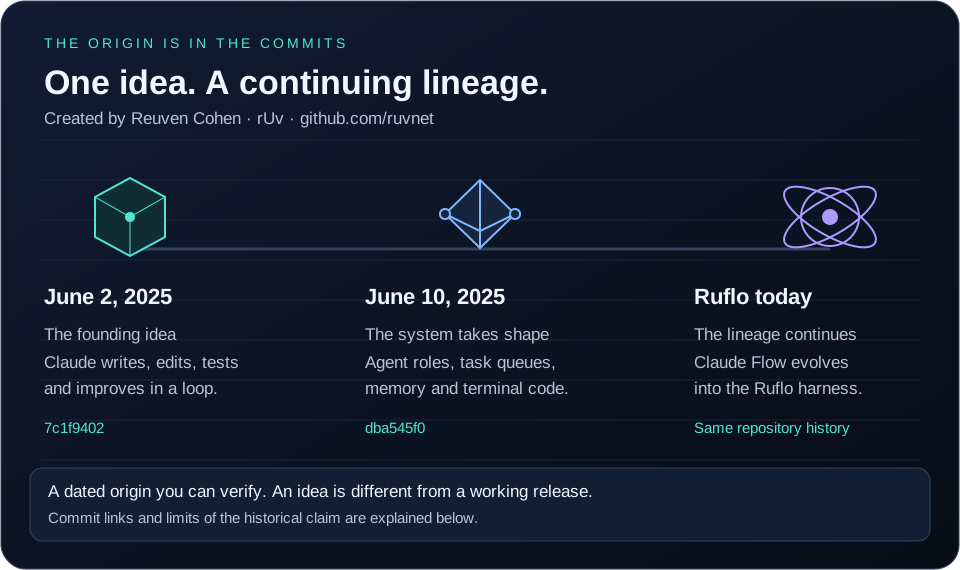
Built by Reuven Cohen (rUv), originally as Claude Flow. The first commit, June 2, 2025, describes a code orchestration layer for recursive agent cycles: Claude writes, edits, tests and improves. The June 10 source snapshot adds orchestration, task scheduling, memory and terminal modules.
A harness is the workbench around the model: it organizes tasks, carries context between steps and helps check results. This establishes Ruflo's lineage, not a universal first across every Claude Code tool. See the illustrated explainer, exact commits and earlier ecosystem context.
Grok Build: npx ruflo init --grok writes the project host surface (.grok/, the team bus, and the operator guide) and nothing outside the project; add --dry-run to preview. Setup, the spawn_subagent contract, the optional status row, and what to re-check when Grok updates: the Grok operator guide.
Claude Flow is now Ruflo — named by
rUv, who loves Rust, flow states, and building things that feel inevitable. The "Ru" is the rUv. The "flo" is working until 3am. Underneath, powered byCognitum.Oneagentic architecture, running a supercharged Rust-based AI engine, embeddings, memory, and plugin system.
Open animated demo · Theme Studio guide · Workflow demo
Your agent cockpit. Track workflows, agents, models, tokens and cost beside Claude Code. The 38 second animation shows Orbital and Theme Studio through actual renderer frames, including boot checks, six palettes, customization, saved themes, JSON import and resizing. This compact 3.84 MB SVG retains all 456 frames. Native host and AI provider execution are not demonstrated.
Inspect any run. Open agent logs and results, search, triage failures, replay and compare. Start with npx ruflo init, restart Claude Code, then /ruflo. Full console tour.
Let Claude drive. You set the limits. Enable Settings → Claude control to navigate and run console actions. Choose read, write, manage or full, with ask or auto approval. The current default is read + ask; raising the level is your choice. Actions above your permission level are refused, and network, spending and destructive actions require confirmation even in auto. Review the live action log or press Take back control to stop Claude control. Details.
One task: create a mission with Claude
Watch the recorded console session below. Claude creates a mission, opens the Learning and Security pages, and reports its actions in Overview.
- Set the boundary. Install the console using the commands below, open
/ruflo, then choose Settings → Claude control → write + ask. - Give a concrete request. Try: “Create a mission to add a dark mode toggle. Show me the mission and its status.”
- Approve creation. Claude opens Missions and sets the goal. Confirm the pending create action in the console.
- Verify the result. Check that Missions contains the goal and Overview records the action. Creating a mission does not mean the feature has been implemented.
- Keep control. Take back control pauses Claude's console tools. A later call should be refused until you restore control.
What the recording demonstrates: a real Claude Haiku session with write + auto, mission creation, page navigation, a refused swarm stop, and control being taken back. The steps above use ask so you approve creation yourself. The linked workflow animation uses sample data, while the theme demo replays renderer frames. Neither is evidence of completed swarm work or memory recall.
Implementation and recorded test findings · Reproduction script
Install the mods from the ruflo marketplace (Claude Code 2.1.287 or later; mods run with your account's permissions and are not sandboxed, so read the code first):
/plugin marketplace add ruvnet/ruflo
/plugin install ruflo-console@ruflo
/plugin install ruflo-mods@ruflo
/reload-plugins
ruflo-console is the cockpit above, ruflo-mods routes prompts and enforces policy in-process, ruflo-swarm shows the swarm in a pane, and ruflo-ruos adds the ruOS status segment. Open /plugin to confirm they appear in the active mods line. Inside the console, /ruflo market is the Plugin Catalog: every ruflo plugin, mod and skill with what it ships, and buttons to install, enable, disable and update (each asks first).
Quick Start
There are two different install paths with very different surface areas. Pick based on what you need (#1744):
| Claude Code Plugin | CLI install (npx ruflo init) |
|
|---|---|---|
| What it gives you | Slash commands + a few skills + agent definitions per-plugin | Full Ruflo loop — 98 agents, 60+ commands, 30 skills, MCP server, hooks, daemon |
| Files in your workspace | Zero | .claude/, .claude-flow/, CLAUDE.md, helpers, settings |
| MCP server registered | Only if ruflo-core is installed (it ships its own .mcp.json) — most other plugins don't |
Yes |
| Hooks installed | No | Yes |
| Best for | Try a single plugin's commands without committing to the full install | Production use — everything works as documented |
Path A — Claude Code Plugins (lite, slash commands only)
# Add the marketplace
/plugin marketplace add ruvnet/ruflo

# Install core + any plugins you need
/plugin install ruflo-core@ruflo
/plugin install ruflo-swarm@ruflo
/plugin install ruflo-rag-memory@ruflo
/plugin install ruflo-neural-trader@ruflo
This adds slash commands and agent definitions. ruflo-core (installed above) does register its own MCP server on install — its tools are callable as mcp__plugin_ruflo-core_ruflo__* (e.g. mcp__plugin_ruflo-core_ruflo__memory_store), not the bare memory_store/swarm_init/agent_spawn names the CLI-track scaffold uses. Other plugins generally don't ship their own MCP server. For the full loop with the CLI-track tool names, use Path B below.
Core & Orchestration
| Plugin | What it does |
|---|---|
| ruflo-core | Foundation — server, health checks, plugin discovery |
| ruflo-swarm | Coordinate multiple agents as a team |
| ruflo-autopilot | Let agents run autonomously in a loop |
| ruflo-loop-workers | Schedule background tasks on a timer |
| ruflo-workflows | Reusable multi-step task templates |
| ruflo-federation | Agents on different machines collaborate securely |
| ruflo-console | Cockpit inside Claude Code, and the /ruflo command for ruflo mods |
| ruflo-mods | In-process Claude Code mod — routing, learning signals, and policy checks |
| ruflo-ai-team | Tenant-isolated team that divides work and returns evidence |
| ruflo-agntcy | AGNTCY/Outshift transport and intent-scoped tool authorization |
| ruflo-bbs-federation | AgentBBS rooms so agents on different hosts can coordinate |
| ruflo-chatgpt-federation | ChatGPT federation publisher with its own signing keys |
| ruflo-x-gateway | Signed federation messages, channels, and work claims |
| ruflo-business-pods | Business-domain pod templates and a dry-run tick runner |
Memory & Knowledge
| Plugin | What it does |
|---|---|
| ruflo-agentdb | Fast vector database for agent memory |
| ruflo-rag-memory | Smart retrieval — hybrid search, graph hops, diversity ranking |
| ruflo-rvf | Save and restore agent memory across sessions |
| ruflo-ruvector | ruvector — GPU-accelerated search, Graph RAG, 103 tools |
| ruflo-knowledge-graph | Build and traverse entity relationship maps |
Intelligence & Learning
| Plugin | What it does |
|---|---|
| ruflo-intelligence | Agents learn from past successes and get smarter |
| ruflo-graph-intelligence | Sublinear graph reasoning — PageRank, delta updates, complexity-aware execution (ADR-123) |
| ruflo-daa | Dynamic agent behavior and cognitive patterns |
| ruflo-ruvllm | Run local LLMs (Ollama, etc.) with smart routing |
| ruflo-goals | Break big goals into plans and track progress |
| ruflo-deepseek-harness | Agents, commands, and skills for DeepSeek-backed workflows |
Code Quality & Testing
| Plugin | What it does |
|---|---|
| ruflo-testgen | Find missing tests and generate them automatically |
| ruflo-browser | Automate browser testing with Playwright |
| ruflo-jujutsu | Analyze git diffs, score risk, suggest reviewers |
| ruflo-rure | Static analysis of a local JS/Electron app you are authorized to study, with file and line evidence |
| ruflo-docs | Generate and maintain documentation automatically |
| agentic-qe-fleet | External, maintained by Agentic QE: 11 QE agents, test generation, coverage, chaos and TDD skills, the agentic-qe MCP server, and a guard for AQE learning data (/plugin install agentic-qe-fleet@ruflo). Install it from one marketplace only, agentic-qe or ruflo: enabled from both, its mod and commands load twice |
| agentdb | External, maintained in ruvnet/agentdb: agentdb's own MCP server (pinned agentdb@3.2.0: hybrid keyword + vector search, opt-in cross-encoder rerank), a memory-specialist agent, vector-memory / learning / diagnostics skills, /agentdb-status, and a guard that keeps secrets out of memory and refuses delete/reset unless allowed (/plugin install agentdb@ruflo). Use ruflo-agentdb instead if you want AgentDB through ruflo's server; the two can coexist. Install it from one marketplace only, agentdb or ruflo |
| agentic-flow | External, maintained in ruvnet/agentic-flow: the agentic-flow MCP server (pinned agentic-flow@3.1.0, readonly profile by default, nothing pre-approved), ReasoningBank and model-router agents, routing / learning / autopilot skills, /agentic-flow-status, and a guard on agentic_flow_agent (/plugin install agentic-flow@ruflo). Install it from one marketplace only, agentic-flow or ruflo |
Security & Compliance
| Plugin | What it does |
|---|---|
| ruflo-security-audit | Scan for vulnerabilities and CVEs |
| ruflo-aidefence | Block prompt injection, detect PII, safety scanning |
| ruflo-protector | Optional watchdog for unattended agents — learn, notify, or enforce |
Architecture & Methodology
| Plugin | What it does |
|---|---|
| ruflo-adr | Track architecture decisions with a living record |
| ruflo-ddd | Scaffold domain-driven design — contexts, aggregates, events |
| ruflo-sparc | Guided 5-phase development methodology with quality gates |
| ruflo-metaharness | Grade your agent setup, scan tool configs for security risks, and track changes over time (guide) |
| ruflo-arena | Competitive ruliology — pit agent strategies against each other in tournaments, hill-climb and co-evolve the winners (ADR-147/148) |
DevOps & Observability
| Plugin | What it does |
|---|---|
| ruflo-migrations | Manage database schema changes safely |
| ruflo-observability | Structured logs, traces, and metrics in one place |
| ruflo-cost-tracker | Track token usage, set budgets, get cost alerts |
| ruflo-ruos | Run swarm agents on your own ruOS cloud desktops |
Extensibility
| Plugin | What it does |
|---|---|
| ruflo-agent | Run agents — local WASM sandbox (rvagent) + Anthropic Claude Managed Agents (cloud), with opt-in bounded dynamic workflows, gated session controls and verified advisory learning |
| ruflo-plugin-creator | Scaffold, validate, and publish your own plugins |
Ruflo MCP questions
How do I add Ruflo MCP to Claude Code?
Run claude mcp add ruflo -- npx -y @claude-flow/cli-core in your terminal. Add --scope user to make it available in every project.
How do I add Ruflo MCP to Cursor?
Open ~/.cursor/mcp.json and add the server under mcpServers, using the Cursor config shown in the install section above.
How do I get started with Ruflo?
Run npx ruflo@latest init in your project folder, then open Claude Code and give it a task. init adds Ruflo's agents, hooks, memory and MCP server to the project.
How do I connect an MCP client like Codex to Ruflo?
Configure the command npx with the arguments ["-y", "ruflo@latest", "mcp", "start"]. Claude Code and other MCP clients pick it up that way, or via the init command.
What does Ruflo add to Claude Code?
It adds over 100 specialized agents, coordinated swarms, self-learning memory, federation across machines and security guardrails. It acts as the execution layer around Claude Code and Codex.
Does Ruflo require an LLM for memory and learning?
Local vector retrieval and contrastive updates can run without an LLM, but embeddings and configured learning modules are still required. Agent execution may still use an LLM.