
Allows AI assistants to diagnose and resolve port conflicts by identifying processes using specific ports and stopping them safely.
Also known as roystondwork-dev/portcheck, portcheck-cli
- Stars
- 2
- Tools
- —
- Downloads, 30 days
- —
- Latest version
- 0.14.0
- Last commit
- Nov 11, 2026
- License
- MIT
What is portcheck MCP?
portcheck allows AI assistants to diagnose and resolve port conflicts by identifying processes using specific ports and stopping them safely.
Summary generated from the project's README
About portcheck MCP server
Portcheck provides a way for AI assistants to manage network ports on macOS, Linux, and Windows. It allows tools like Claude Code, Cursor, or Copilot to identify which processes are occupying specific ports and resolve conflicts by stopping those processes safely. The server is designed to be a safer alternative to standard kill commands, as it refuses to touch system processes, your shell, or PID 1.
Developers can use this to automate the diagnosis of address already in use errors. The server can list all listening sockets with their associated PIDs and users, find available ports by verifying them through actual binding, and even scan remote hosts using rate-limited TCP connect checks. It is particularly useful for managing forgotten development servers or ensuring a specific port is free before starting a new command via the run tool.
What you can do with it
- 1Resolve port conflictsAn AI assistant can identify the process holding a port and terminate it to allow a new service to start.
- 2Find available portsA developer can request a specific number of verified free ports for a new project.
- 3Monitor service uptimeYou can set up monitors to track the availability of specific URLs or ports from your local device.
- 4Clean up old serversIdentify and stop development servers that have been running for a long time to free up resources.
Written from the project's README. Every use case is checked against a quote from it.
How to install portcheck MCP
Formats verified 10 Nov 2026Add to CursorAdd to GooseInstall portcheck MCP in Claude Code
$ claude mcp add portcheck -- npx -y portcheck-cliInstall portcheck MCP in Cursor
~/.cursor/mcp.json
{
  "mcpServers": {
    "portcheck": {
      "command": "npx",
      "args": [
        "-y",
        "portcheck-cli"
      ]
    }
  }
}Install portcheck MCP in VS Code
.vscode/mcp.json
{
  "servers": {
    "portcheck": {
      "type": "stdio",
      "command": "npx",
      "args": [
        "-y",
        "portcheck-cli"
      ]
    }
  }
}Install portcheck MCP in VS Code CLI
$ code --add-mcp '{"name":"portcheck","type":"stdio","command":"npx","args":["-y","portcheck-cli"]}'Install portcheck MCP in Claude Desktop
claude_desktop_config.json
{
  "mcpServers": {
    "portcheck": {
      "command": "npx",
      "args": [
        "-y",
        "portcheck-cli"
      ]
    }
  }
}Install portcheck MCP in Codex
$ codex mcp add portcheck -- npx -y portcheck-cliInstall portcheck MCP in Codex config.toml
~/.codex/config.toml
[mcp_servers.portcheck]
command = "npx"
args = ["-y", "portcheck-cli"]
Install portcheck MCP in Gemini CLI
$ gemini mcp add -s user portcheck npx -- -y portcheck-cliInstall portcheck MCP in Gemini settings.json
~/.gemini/settings.json
{
  "mcpServers": {
    "portcheck": {
      "command": "npx",
      "args": [
        "-y",
        "portcheck-cli"
      ]
    }
  }
}Automated checks
Ran Nov 14, 2026Full report →Passed our automated checks. That is not a security audit: read the code and give the server the narrowest access it needs. How checks work

- Source repository linked and reachableroystondwork-dev/portcheck is public and reachablegithub.com/roystondwork-dev/portcheck ↗Pass
- Package names this repository as its sourceportcheck-cli names roystondwork-dev/portcheck as sourcenpmjs.com/package/portcheck-cli ↗Pass
- Build provenance (Sigstore attestation)Sigstore attestation for portcheck-clinpmjs.com/package/portcheck-cli/v/0.14.0#provenance ↗Pass
- Open source license (OSI)MITspdx.org/licenses/MIT.html ↗Pass
- Commit or release in the last yearLast commit or release 2026-11-11github.com/roystondwork-dev/portcheck ↗Pass
- OpenSSF ScorecardOpenSSF Scorecard 8.2 / 10; weakest: Maintained 0, Code-Review 0, Contributors 3scorecard.dev/viewer/?uri=github.com/roystondwork-dev/portch ↗Pass
- Package name not close to a popular packageNo popular package one edit away from portcheck-cliPass
- No critical advisory in the package or its dependenciesthe package checked; no critical advisoryosv.dev ↗Pass
- No hidden instructions to the model0 tool descriptions and the README read; no override phrases, credential paths or hidden charactersPass
- Destructive tools are labelledNot checked
- Remote endpoint answers the MCP handshakeNot checked
README
View on GitHubPort already in use?
npx portcheck-cli kill 3000
portcheck shows what holds the port and who started it, asks, then stops it gently
(and never touches system processes). It's a safer kill-port, with
nothing to install first.
Fixes for the error you're seeing: Node.js, Next.js, Vite · Python, Django, Flask · Docker · Rails, Spring Boot, Go, .NET, PHP · macOS · Windows · Linux
Features
| Command | ||
|---|---|---|
| 🔍 | portcheck list -l |
Every listening socket with its process, PID and user |
| ✅ | portcheck 3000 |
Is the port free? If not, who holds it? Exit code 0 or 1 for scripts |
| 🆓 | portcheck free 3000-3999 -n 3 |
Free ports, verified by actually binding them |
| 🛑 | portcheck kill 8080 |
Graceful SIGTERM, then SIGKILL; refuses PID 1, your shell and system processes |
| 🐚 | eval "$(portcheck init zsh)" |
After any command fails with "address already in use", your terminal says who holds the port and how to free it; bash, fish and PowerShell too (guide) |
| 🧹 | portcheck servers --older-than 1d |
The dev servers you forgot: your listening processes with their project and uptime, oldest first; --stop to clean up |
| 📡 | portcheck scan db.internal -p 5432 |
Rate-limited TCP connect checks of remote hosts. No root needed |
| 🌍 | portcheck net · net devices · net lookup |
Your IP addresses, gateway and DNS; the devices on your network, with vendor hints; DNS facts about a name or address (guide) |
| ⏳ | portcheck wait db:5432 -t 60s |
Block until services accept connections, or until a port is free. Built for CI, also as a GitHub Action |
| 📡 | portcheck monitor add https://example.com/health |
Uptime monitors for URLs and ports, checked from your device; monitor run, the tray app or VS Code warn you when one goes down and when it's back. More |
| ▶️ | portcheck run --port 3000 --next -- npm run dev |
Start a command on a free port ($PORT, {port}); take the next one or stop the holder |
| 📌 | PORT=$(portcheck port) npm run dev |
Every project gets its own remembered port, so two projects never fight over 3000 (guide) |
| 🩺 | portcheck doctor |
Check the ports listed in .portcheck.yaml and get a fix for each problem |
| 🖥️ | portcheck |
Live, sortable, filterable TUI. Stop processes without leaving it |
| 🌐 | Browser extension | Edge (and Chrome): which process serves a localhost tab, off when nothing listens, stop it from the popup (guide) |
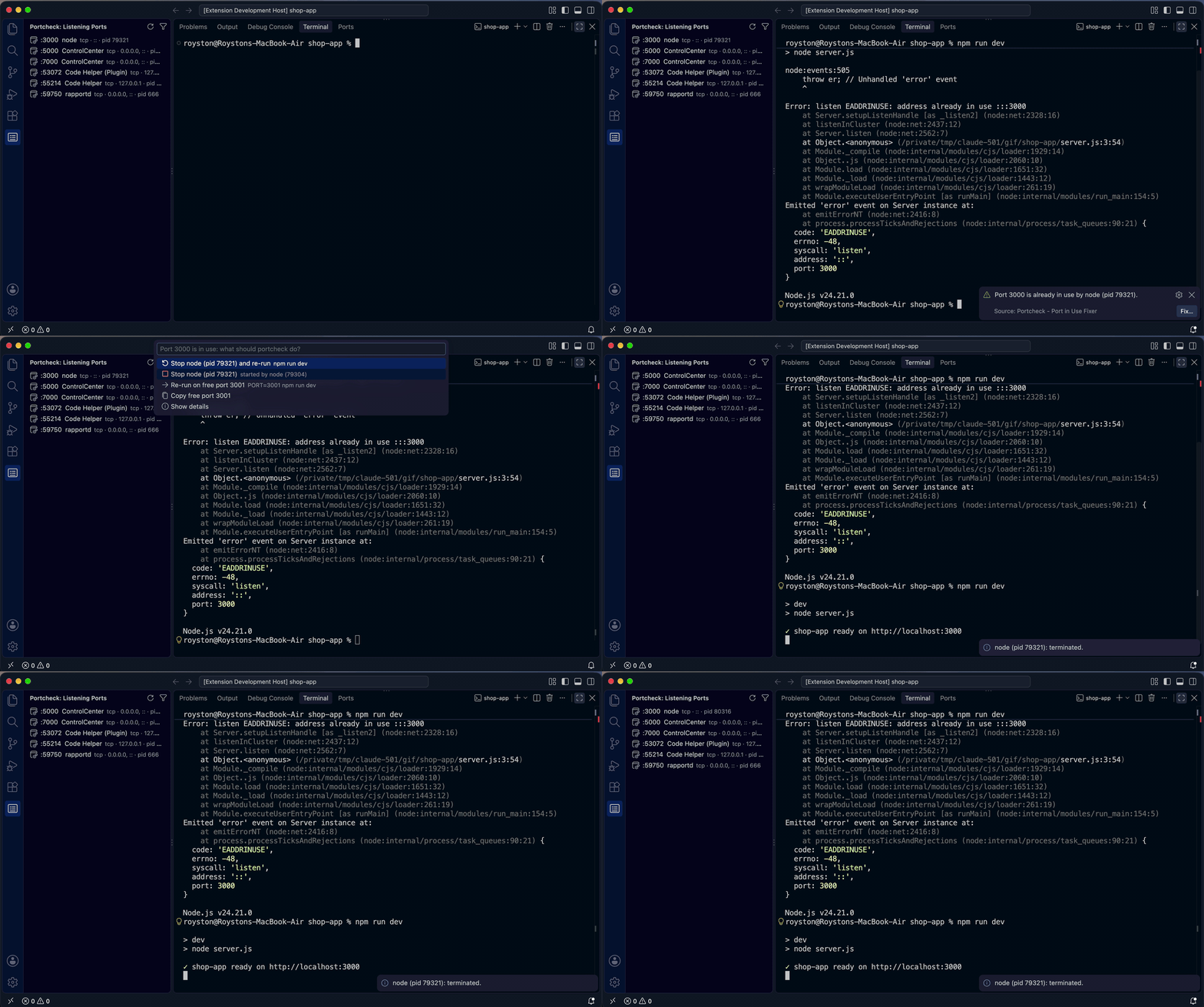
| 🧩 | VS Code extension | "Port in use" errors in the terminal become one-click fixes; listening ports in the sidebar (guide) |
| 🤖 | portcheck mcp |
AI assistants (Claude Code, Cursor, Copilot…) check and free ports themselves (guide) |
| ⌨️ | Raycast | Search Ports, Check Port, Kill Port and Find Free Port from the Mac launcher |
| ✍️ | Neovim | :Portcheck picker, check/kill/free, and "port in use" in :terminal → stop it |
| 🔌 | Menu bar / tray app | Your listening ports in the macOS menu bar or Windows/Linux tray: stop, open, copy in two clicks |
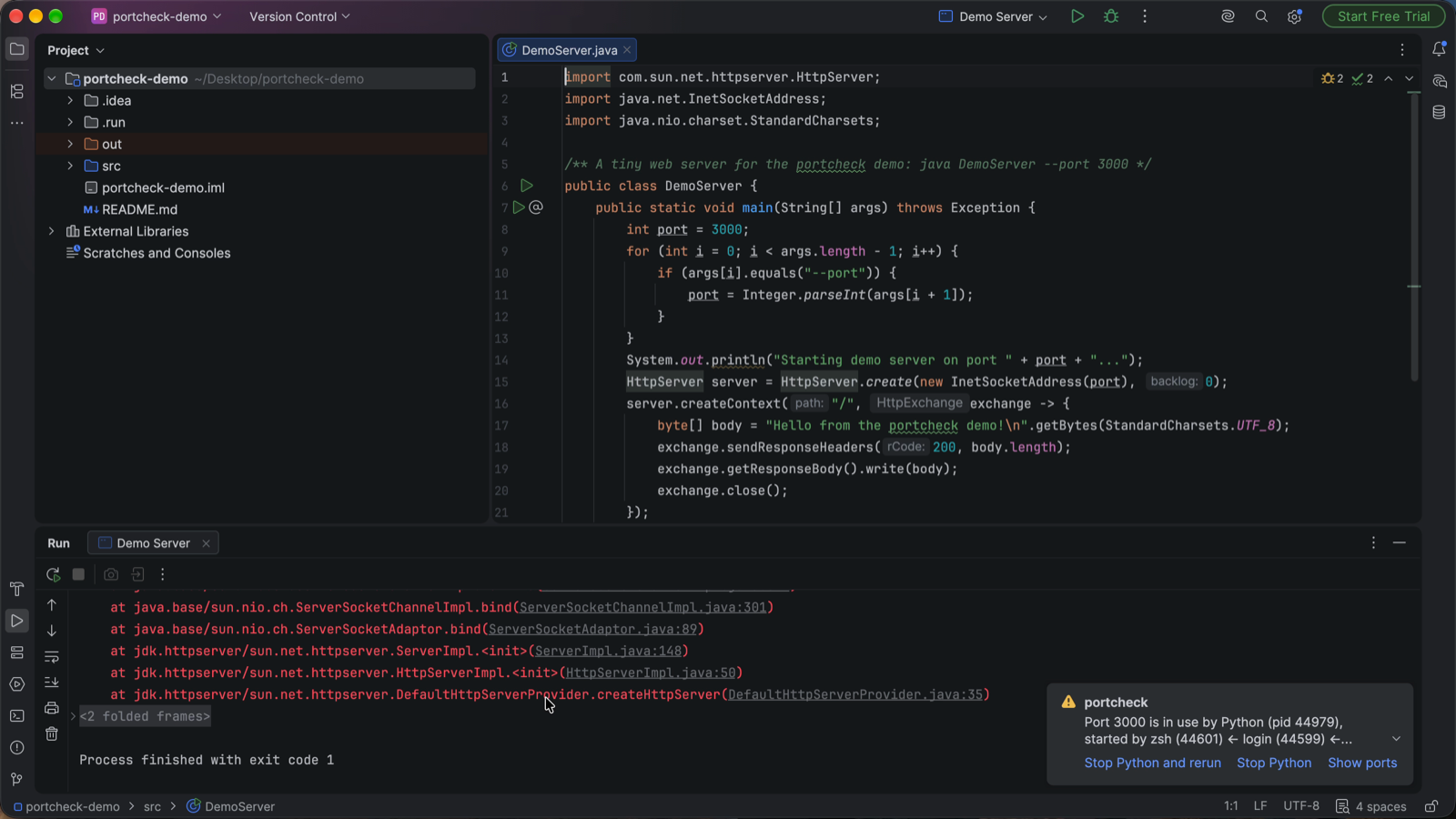
| 🧠 | JetBrains plugin | IntelliJ IDEA, WebStorm, PyCharm, GoLand…: "port in use" in Run/Debug → Stop it and rerun; a Ports tool window |
VS Code extension
When a dev server fails because its port is taken, the extension says who holds it and fixes it: stop it and re-run, or re-run on the next free port.
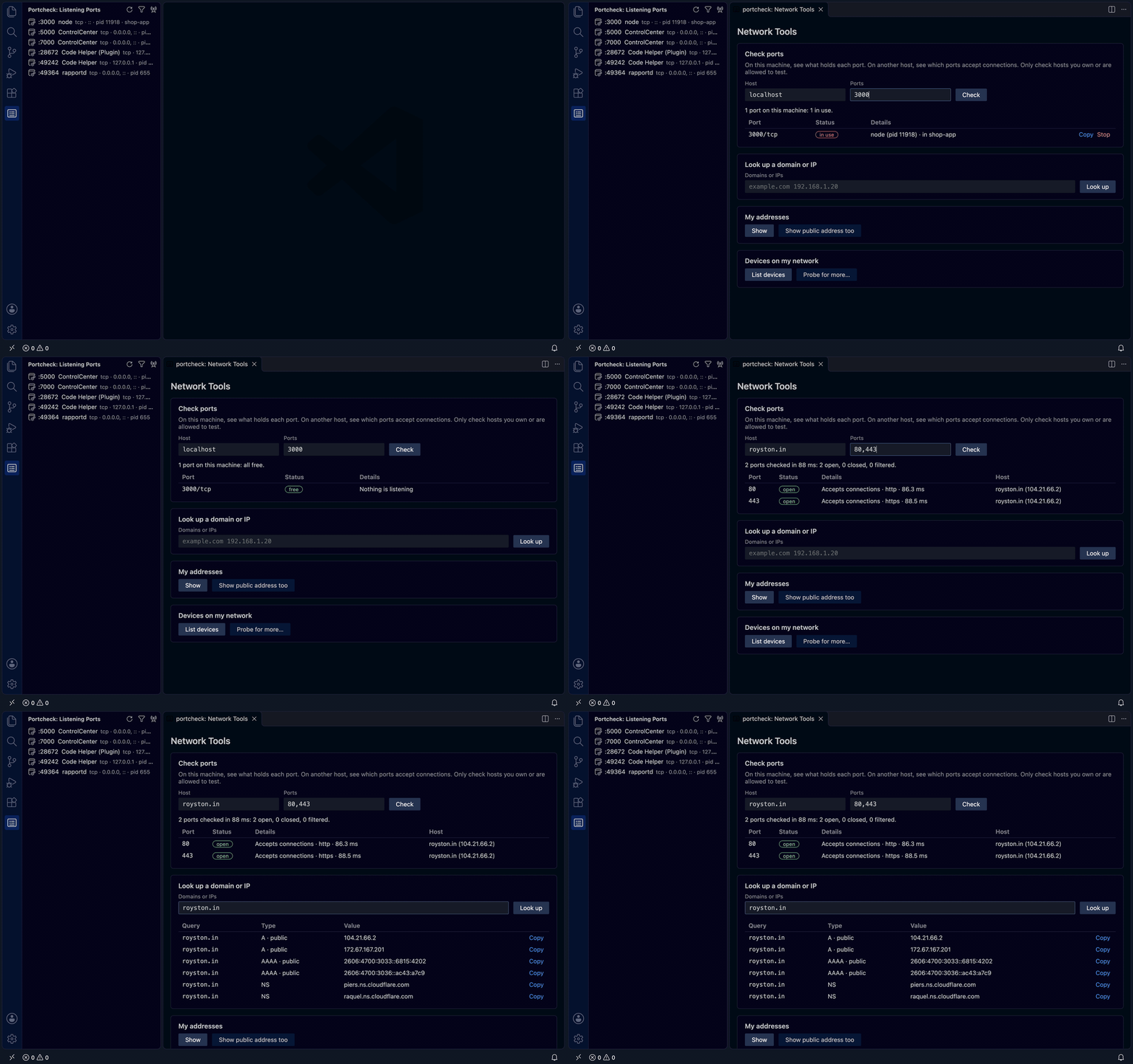
The Network Tools panel checks ports on this machine or another host, looks up domains and IPs, and lists your addresses and the devices on your network:
Install Portcheck - Port in Use Fixer from the VS Code Marketplace (search "portcheck" in VS Code) or Open VSX (VSCodium, Cursor, Windsurf). portcheck is built in.
JetBrains plugin
In IntelliJ IDEA, WebStorm, PyCharm, GoLand and the other JetBrains IDEs, when a run configuration fails because its port is taken, a notification names the process and offers Stop it and rerun; the Ports tool window lists every listening port.
Install portcheck from JetBrains Marketplace
(Settings → Plugins → Marketplace, search "portcheck"), or install
portcheck-jetbrains-<version>.zip from the
latest release
(Settings → Plugins → ⚙ → Install Plugin from Disk…) (guide).
Browser extension
On every localhost tab, a badge names the process serving it, or says off when nothing
is listening; the popup shows who started it and stops it safely.
Install Portcheck - Localhost Port Inspector from
Microsoft Edge Add-ons, then run portcheck browser install once.
For Chrome, Brave and Chromium, load the zip from the
latest release
(guide).
Claude Code plugin
One install adds portcheck's MCP tools and a skill that tells Claude when to use them, so "port 3000 is already in use" gets diagnosed and fixed in the conversation, asking before anything is stopped:
/plugin install portcheck --marketplace roystondwork-dev/portcheck
Or from your shell: claude plugin marketplace add roystondwork-dev/portcheck, then
claude plugin install portcheck@portcheck (guide).
Highlights
- Same commands and output on every OS. It replaces
lsof -i,netstat -ano,ss -ltnpandkill. - Built for scripts.
--jsonfollows a versioned schema, exit codes are stable, and results go to stdout while messages go to stderr. - Container- and WSL-aware. Ports published by Docker/Podman or forwarded from WSL show the container or distro, and
killtells you how to stop it there instead of killing the proxy. - Honest about permissions. Hidden owners are shown as hidden, with a hint on how to see them.
- A Go library too. See
pkg/.
Install
# Homebrew (macOS, Linux)
brew install roystondwork-dev/tap/portcheck

# winget (Windows; the package is waiting for Microsoft's review)
winget install roystondwork-dev.portcheck

# Scoop (Windows)
scoop bucket add portcheck https://github.com/roystondwork-dev/scoop-bucket
scoop install portcheck

# npm (any OS): run it without installing
npx portcheck-cli 3000

# PyPI (any OS)
pipx install portcheck-tool

# Go 1.26+
go install github.com/roystondwork-dev/portcheck/cmd/portcheck@latest
.deb, .rpm, .apk and archives for amd64/arm64 are on the
releases page. The
checksum file covering every artifact is signed with cosign (keyless), and
releases ship SBOMs and SLSA provenance; see
verifying downloads.
Quickstart
$ portcheck 3000
PORT  PROTO  STATUS  PID    PROCESS  USER
3000  tcp    in-use  42379  node     alice

$ portcheck kill 3000
About to terminate:
  PID 42379  node  (port 3000)
Proceed? [y/N] y
PID    PROCESS  RESULT      DETAIL
42379  node     terminated

$ portcheck free 3000-3999 -n 2 -o plain
PORT
3000
3001

$ portcheck list -l --json | jq '.data.sockets[] | {port: .localPort, name: .process.name}'
📖 Documentation: https://roystondwork-dev.github.io/portcheck/ (quickstart · guides · CLI reference · permissions by OS · FAQ)
Use as a Go library
res, err := inspect.NewSystem().List(ctx, inspect.Filter{Ports: portspec.Single(3000), ListeningOnly: true})
if err != nil {
	log.Fatal(err)
}
for _, s := range res.Sockets {
	if s.Process != nil { // nil when the owner is hidden from your user
		fmt.Println(s.PID, s.Process.Name)
	}
}
See the library guide for portspec, inspect, freeport, killer, scan, waitfor and containers.
Responsible use
portcheck scan makes ordinary TCP connections and has no stealth features. Only
scan hosts and networks you own or are authorized to test.
Contributing
Contributions are welcome! See CONTRIBUTING.md for setup and standards (every change is tested on Linux, macOS and Windows, with a 100% coverage gate on the library), and TASKS.md for the roadmap and status. Please follow the Code of Conduct, and report vulnerabilities privately as described in SECURITY.md.
License
MIT © 2026 Royston D and portcheck contributors
portcheck MCP questions
How do I add portcheck MCP to Claude Code?
Run claude mcp add portcheck -- npx -y portcheck-cli in your terminal. Add --scope user to make it available in every project.
How do I add portcheck MCP to Cursor?
Open ~/.cursor/mcp.json and add the server under mcpServers, using the Cursor config shown in the install section above.
How can AI assistants use portcheck?
AI assistants like Claude Code, Cursor, and Copilot can use portcheck's MCP tools to check and free ports themselves.
Is it safe to kill processes with portcheck?
Yes, it performs a graceful SIGTERM followed by a SIGKILL and refuses to touch system processes, PID 1, or your shell.
Can portcheck find available ports for a new service?
Yes, it can find and verify free ports by actually attempting to bind them.