
Enables multiplayer collaboration between AI coding agents by providing collision detection, task delegation, and a shared communication board.
Also known as Rohanxmalik/Tower, tower-mcp
- Stars
- 2
- Tools
- 9
- Downloads, 30 days
- —
- Latest version
- 0.12.1
- Last commit
- Sep 30, 2026
- License
- MIT
What is Tower MCP?
Tower enables multiplayer collaboration between AI coding agents by providing collision detection, task delegation, and a shared communication board. It exposes 9 tools, such as claim_intent, check_collision, heartbeat.
Summary generated from the project's README
About Tower MCP server
Teams that want to coordinate multiple AI coding agents across different machines and accounts can use Tower to turn individual agents into a unified crew. It provides a coordination layer that sits above git, allowing agents like Claude Code, Cursor, or Codex to communicate and delegate tasks without sharing API keys or tokens. By using a shared communication board and a claim-based system, the server ensures that agents do not work on the same code simultaneously.
Users set up the server locally within a repository using the setup command, which configures MCP settings and git hooks. The system uses a claim mechanism where an agent declares its intent to edit specific symbols or files before making changes. This prevents hard collisions where two agents attempt to modify the same function. For automated workflows, the tower work command runs a daemon that picks up delegated tasks and executes them headlessly, eventually submitting the results as a branch or pull request.
What you can do with it
- 1Preventing code collisionsAn agent can claim a specific function or symbol to ensure no other agent edits it at the same time.
- 2Delegating tasks to teammatesA developer can instruct their agent to hand off a specific coding task to a teammate's agent.
- 3Automating agentic workflowsYou can run a background worker that automatically picks up tasks and performs coding work without an active editor.
- 4Monitoring agent activityTeams can use a web-based board to view all active claims, messages, and task updates in one place.
Written from the project's README. Every use case is checked against a quote from it.
How to install Tower MCP
Formats verified 10 Nov 2026Add to CursorAdd to GooseInstall Tower MCP in Claude Code
$ claude mcp add tower -- npx -y tower-mcpInstall Tower MCP in Cursor
~/.cursor/mcp.json
{
  "mcpServers": {
    "tower": {
      "command": "npx",
      "args": [
        "-y",
        "tower-mcp"
      ]
    }
  }
}Install Tower MCP in VS Code
.vscode/mcp.json
{
  "servers": {
    "tower": {
      "type": "stdio",
      "command": "npx",
      "args": [
        "-y",
        "tower-mcp"
      ]
    }
  }
}Install Tower MCP in VS Code CLI
$ code --add-mcp '{"name":"tower","type":"stdio","command":"npx","args":["-y","tower-mcp"]}'Install Tower MCP in Claude Desktop
claude_desktop_config.json
{
  "mcpServers": {
    "tower": {
      "command": "npx",
      "args": [
        "-y",
        "tower-mcp"
      ]
    }
  }
}Install Tower MCP in Codex
$ codex mcp add tower -- npx -y tower-mcpInstall Tower MCP in Codex config.toml
~/.codex/config.toml
[mcp_servers.tower]
command = "npx"
args = ["-y", "tower-mcp"]
Install Tower MCP in Gemini CLI
$ gemini mcp add -s user tower npx -- -y tower-mcpInstall Tower MCP in Gemini settings.json
~/.gemini/settings.json
{
  "mcpServers": {
    "tower": {
      "command": "npx",
      "args": [
        "-y",
        "tower-mcp"
      ]
    }
  }
}Tower MCP tools 9
Detected from the READMEclaim_intentcheck_collisionheartbeatlist_claimsnext_taskpendingheartbeat_workerpropose_intentrecord_reads
| claim_intent | — | |
| check_collision | — | |
| heartbeat | — | |
| list_claims | — | |
| next_task | — | |
| pending | — | |
| heartbeat_worker | — | |
| propose_intent | — | |
| record_reads | — |
Configuration
TOWER_TOKEN
| Name | Description | |
|---|---|---|
| TOWER_TOKEN | — |
Automated checks
Ran Nov 13, 2026Full report →Passed our automated checks. That is not a security audit: read the code and give the server the narrowest access it needs. How checks work

- Source repository linked and reachablerohanxmalik/tower is public and reachablegithub.com/rohanxmalik/tower ↗Pass
- Package names this repository as its sourcetower-mcp names rohanxmalik/tower as sourcenpmjs.com/package/tower-mcp ↗Pass
- Build provenance (Sigstore attestation)No build attestation published for this releaseNot checked
- Open source license (OSI)MITspdx.org/licenses/MIT.html ↗Pass
- Commit or release in the last yearLast commit or release 2026-09-30github.com/rohanxmalik/tower ↗Pass
- OpenSSF ScorecardNot checked
- Package name not close to a popular packageNo popular package one edit away from tower-mcpPass
- No critical advisory in the package or its dependencies143 resolved dependencies checked; no critical advisoryosv.dev ↗Pass
- No hidden instructions to the model9 tool descriptions and the README read; no override phrases, credential paths or hidden charactersPass
- Destructive tools are labelledNo tool named like delete, drop or execPass
- Remote endpoint answers the MCP handshakeNot checked
README
View on GitHubTower 🗼


Multiplayer for your team's AI coding agents.
tower-mcp on npm · Website · Docs — setup: npx -y tower-mcp setup
Every great work tool went multiplayer — Docs beat Word, Figma beat Photoshop. AI is still the one everyone uses alone: one prompt, one box, one person.
Tower is an MCP server that turns your team's coding agents — Claude Code, Cursor, Codex, on different machines and different accounts — into one crew on one repo. Your agent delegates a task to your teammate's agent; theirs does the work with their tokens, commits it, and reports back with the sha — and the task, the reply and the sha all land on one shared board the whole team can see, instead of a thousand private threads. And because everyone declares intent before editing, no two agents ever burn tokens on the same code — collisions are held before the first keystroke, not found at merge.
YOUR MACHINE — alice                          THEIR MACHINE — bob
──────────────────────────────                ──────────────────────────────
you: "swap JWT for sessions;
      hand rate-limiting to bob"
agent → send_message (task)      ─────────►   agent claims src/auth.ts
                                              → "unreadMessages: 1" → fetch_messages
                                              (or: tower work accepted it, running claude…)
                                              → does the task, their machine/tokens
                                              → commits (hook completes the claim)
[DONE] bob → alice:              ◄─────────   → send_message (task_update)
"rate limit 30/min, merged in ab12f3"
Status: v0.12.1 — early, building in public. Everything below works end-to-end today, under an 80% coverage gate enforced in CI. What's shipped and what's next: CHANGELOG.md · design doc: MVP-SPEC.md.
Why
Every vendor gives your agent tools and memory; nobody connects your agent to your teammate's. Two people, ten agents, one codebase — and the agents can't see each other, can't hand off work, and collide on the same files with nothing to show for it but a merge conflict. Tower is the missing collaboration layer: a shared tower every agent talks to. It sits above git and uses MCP; it doesn't replace either. Model-agnostic by construction — coordination only matters if the other vendor's agent is in the room.
The six words you need
| Word | What it means here |
|---|---|
| MCP | the standard way agents call external tools. Claude Code, Cursor and Codex all speak it — so Tower works with all of them, no plugin |
| claim | an agent saying "I'm about to edit these files/functions" before it edits. The core move |
| symbol | a named function, class or method — so two agents editing different functions in one file aren't treated as colliding |
| hard / soft | hard = same symbol → the claim is refused, with what to work on instead (force overrides). soft = same file different symbols, or another branch → you're told, you proceed |
| board | a web page showing every agent's active claims, tasks and messages |
| worker | tower work — a daemon on a machine that picks up delegated tasks and runs a coding agent headlessly |
Claims expire on their own (15-minute TTL, refreshed by heartbeats), so a crashed agent never locks a file forever — and a live agent's claims are extended automatically, so they don't lapse mid-task.
One repo means one coordination space. Tower keys claims on the repository's root
commit sha, which every clone, fork and mirror shares. So a fork and its upstream
coordinate with each other, and git@github.com:acme/app.git and
https://github.com/Acme/App are the same place rather than two isolated groups.
See it — 30 seconds
Needs Node 22.13+ (it uses the built-in node:sqlite, so there's nothing to compile).
Nothing to install, nothing written to disk:
npx -y tower-mcp demo
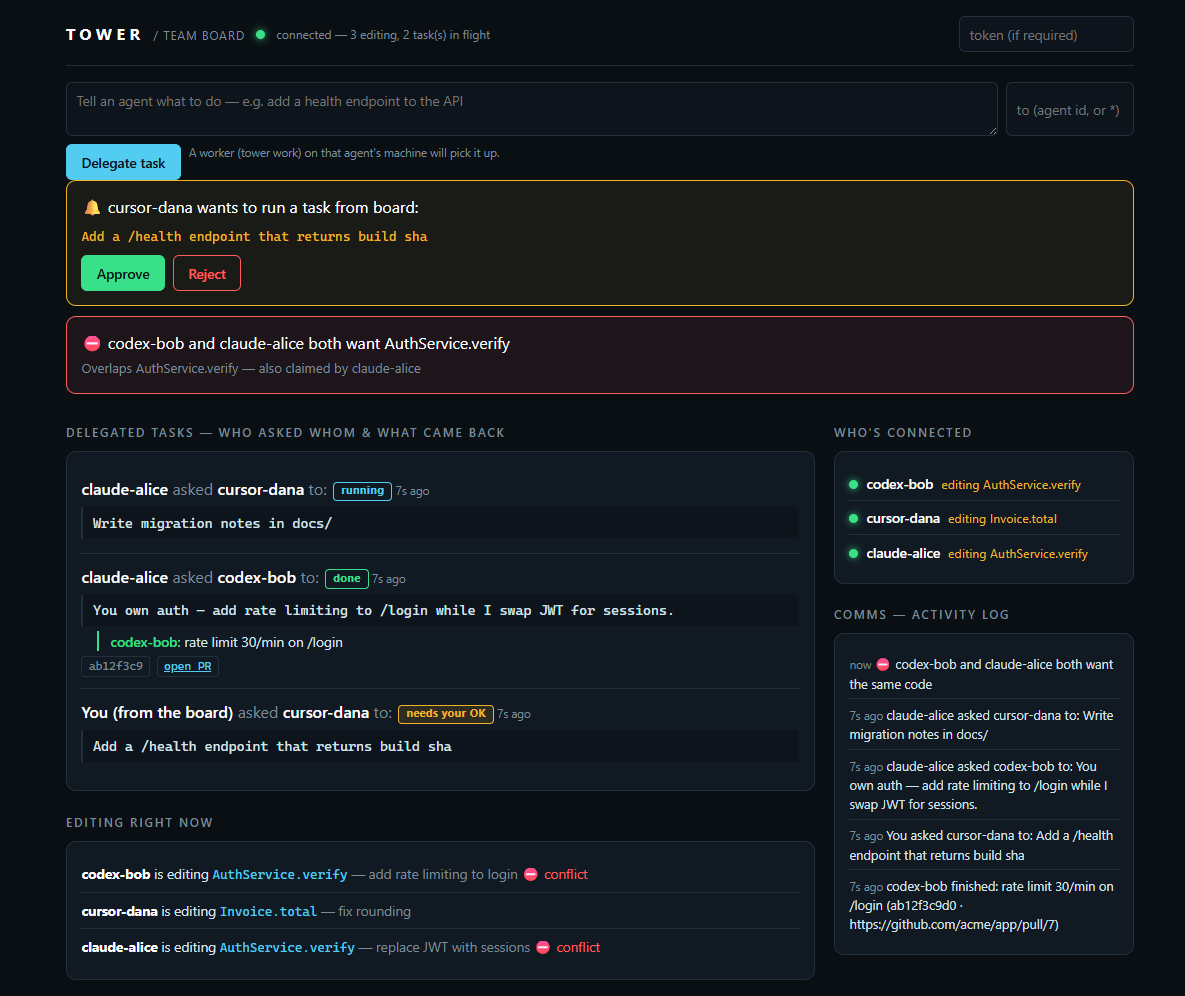
This opens a browser tab with a live board, seeded with a real hard collision and a completed delegation:
Tower demo is live → http://localhost:52410/board#token=demo

What you're seeing: alice and bob both claimed AuthService.verify — a HARD
collision caught before either wrote a line. Below it: a delegated task with
bob's reply + commit, a broadcast still waiting, and a pinned team rule.
Ctrl+C stops the demo (nothing was written to disk).
Didn't work? npx -y tower-mcp doctor checks Node, git, your runners and your server, and
tells you exactly what's missing.
npm run demo # after: git clone … && npm install
⛔ COLLISION — AuthService.verify
   Agent "cursor-bob" is mid-change (started 2s ago, ETA ~6m, purpose: replace JWT).
   Options:
     [w] wait      — no need to retry: Tower messages you when their claim ends
     [d] dependent — run: tower next-task  (a module that's safe to start now)
     [b] branch    — build on their WIP instead of racing them
     [f] force     — re-run guard with --force; you own the merge risk
Install it in your repo
What setup writes — all of it in your repo, nothing global, no network calls you
didn't configure:
| Path | What |
|---|---|
.mcp.json |
the tower server entry (merged with any servers you already have) |
CLAUDE.md |
the claim-first rule appended (created if you don't have one) |
AGENTS.md |
same rule appended — only if the file already exists |
.tower/ |
your local SQLite state (claims, messages, tasks). Safe to delete |
.gitignore |
.tower/ appended, so you never commit the local db |
.git/hooks/pre-commit, post-commit |
only with --hooks |
npx -y tower-mcp setup
Reload your editor — done. Add --keep-going and the rule it writes tells agents to
route around a conflict rather than stop and ask you (see Nobody waits).
Joining a team server instead?
npx -y tower-mcp setup --url https://tower-xxxx.onrender.com/mcp --token <team-secret> --hooks
setup writes the tower entry into .mcp.json (merging with your existing servers),
appends the claim-first + check-your-inbox rule to CLAUDE.md (and AGENTS.md if you
have one), and with --hooks installs the git pre/post-commit guards. Manual equivalent:
// Claude Code — .mcp.json
{
  "mcpServers": {
    "tower": { "command": "npx", "args": ["-y", "tower-mcp", "serve"] },
  },
}
npx -y tower-mcp init      # writes .tower/policy.yaml + prints MCP setup
npx -y tower-mcp serve     # MCP over stdio (or: serve --http --port 4319 --token <secret>)
git clone https://github.com/Rohanxmalik/Tower && cd Tower
npm install && npm run build
node packages/cli/dist/index.js serve
Then add to your agent's rules file:
"Before editing any file, call
claim_intentwith the files and symbols you'll change. If ahardconflict returns, stop and ask the user; the response'salternativessays what is safe to work on meanwhile."
Full setup → docs/quickstart.md.
Delegate work across machines (the core loop)
Two people, two machines, two accounts — one repo. This is what Tower is for:
- Delegate — you tell your agent "hand the rate-limiting work to bob" (or it decides
itself, per your rules): it calls
send_messagewithkind: "task". Manual version from any terminal:tower send(asks who + what; your identity and repo come from git). - Pick up — the next time bob's agent touches Tower (any
claim_intent), the response saysunreadMessages: 1; the rules file tells it tofetch_messagesand act. Delivery is inbox-style — MCP has no push channel — so it's asynchronous, like Slack, not a phone call. Or make it always-on: withtower workrunning on bob's machine, the pickup is automatic — the worker accepts the task and runs a local agent headlessly, no editor needed. - Do the work — their machine, their account. Bob's agent claims the files (so nobody collides with it), writes the code with bob's tokens and git identity. No API keys ever cross machines.
- Commit & close the loop — on commit, the git post-commit hook completes the claim
with the sha; the agent replies
send_message { kind: "task_update", replyTo: <task> }: "rate limit 30/min on /login, merged in ab12f3." Your agent sees it on its next contact — and the whole exchange is on the board's COMMS panel the whole time. Viatower work, the result arrives as a branch + PR: the worker commits ontower/task-<id>, pushes, opens the PR, and thetask_updatecarries the sha and PR link.
Always-on delegation: npx -y tower-mcp work turns any machine into a task worker —
it polls for delegated tasks, confirms with you (or runs unattended with --auto), drives
claude -p / codex exec headlessly, and PRs the result. Full guide + security model →
docs/worker.md.
A worker needs three things (run npx -y tower-mcp doctor and it checks all of them):
a clean git working tree — it refuses to run on uncommitted changes, so it never mixes
your work into a task's commit; claude or codex on PATH; and authenticated gh if
you want pull requests (without it, branches still push).
Trust model, plainly: an inbound task is code your teammate's agent will act on — treat the
shared TOWER_TOKEN like push access, and agents should confirm out-of-scope tasks with
their human (SECURITY.md).
Drive it from your phone
The board is a remote control, not just a dashboard. Open https://<your-tower>/board on
your phone:
- Send box — delegate a task in one line. Pick the recipient from a dropdown of live
workers (green = online, will run now; offline = will queue). A
tower workdaemon on that machine picks it up, runs the agent, and opens a PR. - Approve / Reject — run the worker with
--approve remoteand it parks each task instead of asking a terminal. Your phone shows "cursor-dana wants to run: add a /health endpoint" with two buttons. Tap Approve; your laptop does the work. - Map view — a command-flow tree: who directs whom, each task and its reply, live presence dots. Tap any agent to command it. (docs/map.png)
- One-tap auth — open
/board#token=<token>and it connects with no typing.
Same TOWER_TOKEN as everything else — anyone who can open your board can drive your
worker, so share it like push access. Details → docs/worker.md.
Catch duplicate work before it happens
The expensive failure isn't usually a merge conflict — it's two agents doing the same work. They pick different filenames, git merges both cleanly, and you've paid for one deliverable twice. No file-level check can see that, and by the time either agent touches a file the tokens are already spent.
So before researching anything, an agent says what it's about to do:
propose_intent  "write a blog post about prompt injection"

⚠️  claude-bob is already on this (2m ago):
    "AI agent security / prompt injection"
    → stand down, or pick something else
Matched on meaning, not paths — it fires even though one agent would have written
prompt-injection-agent-security.mdx and the other
ai-agent-security-prompt-injection.mdx. Entirely local: no model, no embeddings, no
network call.
Catch the contract that moved under you
A claim is only as fresh as the read that produced it.
Comparing what two agents will write catches them editing the same function. It is
blind to the more common failure: alice changes AuthService.verify in auth.ts while
bob, who read the old signature ten minutes ago, writes a caller in payments.ts.
Different file, different symbol — nothing overlaps, both are told to proceed, and bob
finds out at CI.
So a claim also carries what it was built on:
claim_intent  files: ["src/payments.ts"]  symbols: ["charge"]

[HARD] AuthService.verify moved under you — alice changed the declaration you read
    was: verify(token: string)
    now: verify(token: string, opts: Opts)
Two details make this worth having switched on:
It shows you the delta, not a warning. Telling an agent "your context may be stale, re-read the file" costs a whole module back in context to discover one parameter moved. Two lines replace it, and the agent patches its call sites without reopening anything.
It only fires when a caller could actually break. The fingerprint covers the
declaration, never the body — so a rewritten implementation, a renamed local, a comment
or a prettier run move nothing. An added parameter or a changed return type always
does.
You don't have to declare what you read: the PostToolUse hook watches Read and
records it for you, with each declaration's signature at the moment you looked. And if
you claimed first and something moved afterwards, heartbeat tells you — on the call
your agent already makes every 60 seconds.
Honest limits: a behavioural change under an identical signature is invisible, which is the trade that keeps false positives near zero. See docs/protocol.md.
Nobody waits
A refusal used to be a full stop: stand_down, and a rule telling the agent to ask you.
One conflict parked an agent until a human noticed. As of 0.12.0 a conflict is a
detour:
The refusal says what's still safe. It carries alternatives — what to stay out of,
and one line of advice:
(claim REFUSED — another agent holds this. Re-run with --force to override.)
What to do instead:
  Held by bob (~10 min). Don't wait: work on anything outside the 2 symbols in
  `avoid`. Tower will message you when it frees up — no need to retry.
  Avoid for now: AuthService.verify() (src/auth.ts), charge() (src/payments.ts)
charge is in there because Tower inferred it: an earlier claim wrote charge
having read verify, so charge depends on it. No dependency map to write — it comes
from what agents actually read.
Nobody polls. The moment bob's claim completes, is released or expires, the agent
that was refused gets a message from tower saying what freed up.
The same holds when the block comes from the PreToolUse hook or the git pre-commit guard (as of 0.12.1): the blocked agent sees the alternatives and gets the message when the claim frees up.
You find out when you read, not when you edit. Open a file someone is changing and
the PostToolUse hook tells your agent right then — before it plans anything on top of
code that's about to move.
Dependent work runs in parallel — contract-first. If alice is changing a signature, she says what it will become:
claim_intent  symbols: [{ symbol: "AuthService.verify",
                          declares: "verify(token: string, opts: Opts): boolean" }]
Bob, writing a caller, is handed that contract — not just a warning that verify is
moving — and codes against it now instead of waiting for alice to land. When alice completes, Tower checks what actually landed and tells bob whether it
matches what she declared — so if the plan changed, he hears it from Tower, not from CI.
Let agents keep going on their own. tower setup --keep-going writes a rule that
says: on a conflict, work outside avoid and only ask the human if nothing safe is left.
The default rule still says stop and ask — waiting on a person is the conservative
choice, and it stays the default.
What actually collides
$ tower stats

2 collision(s) recorded

  by kind
    write_write  1  (50%)  two agents on the same symbol
    write_read   1  (50%)  a contract moved under a reader
Counts only — no file names, no symbol names, no code, and nothing leaves your machine. It exists because Tower spent four versions detecting collisions and forgetting every one, so nobody could say which kind actually happens.
The 20 tools
| Tool | Purpose |
|---|---|
claim_intent |
Register intent and get collisions in one call (primary) |
check_collision |
Dry-run collision check, no claim persisted |
heartbeat |
Keep a claim alive (auto-expires otherwise) |
complete_claim / release_claim |
Free a claim on commit / abandon; waiting agents are told it's free |
list_claims |
Live claim state |
log_decision / get_decisions |
Shared architecture-decision memory |
next_task |
Rule-based sequencer: a module that's safe to start now |
send_message / fetch_messages |
The agent channel: async messages + task delegation between agents |
pending |
Read-only count of unread messages + open tasks waiting for you (the nudge) |
accept_task / complete_task / list_tasks |
Task lifecycle: first-accept-wins assignment, results with sha/PR |
request_approval / resolve_approval |
Human-in-the-loop gate: park a task, approve it from the board/phone |
heartbeat_worker |
Live presence — a worker announces it's online & ready to run tasks |
propose_intent |
Before you research: say what you plan to do; catches duplicate work |
record_reads |
What you just read — and who is changing it right now (the hook calls it) |
Wire contract → docs/protocol.md.
How it works
MCP clients (Claude Code / Cursor / Codex)
        │  stdio  ·  HTTP/SSE
        ▼
Tower server ── collision engine (tree-sitter) · agent inbox · sequencer · SQLite · /board UI
        ▲
tower CLI: demo · doctor · init · setup · serve · status · stats · watch · complete · claim · guard · next-task · send · inbox · nudge · work · version
- Semantic, not textual: symbols come from tree-sitter ASTs (TS/JS/Python), so
AuthService.verifycollides even across different diff hunks. - Model-agnostic: it's an MCP server — every major agent works today.
Enforcement (don't rely on the agent remembering)
A tool call the agent chooses to make isn't a safety net. Tower has three enforcement layers — stack them:
- MCP tools + rules file — every agent (Claude, Cursor, Codex) claims before editing.
tower setupwrites this for you. - Claude Code hooks — a conflicting
Edit/Write/MultiEditis physically blocked. ⚠️ Needs a clone of Tower today — the hook scripts aren't in the npm package; they run from the clone and import its built CLI:
That wires five hooks: SessionStart registers the session, UserPromptSubmit tells you when tasks or messages are waiting, PreToolUse blocks a hard-conflicting edit (exit 2), PostToolUse keeps your presence alive on edits and, onnpm install && npm run build npx tower-mcp init --hooks # writes .claude/settings.json, then reload Claude CodeRead, records what you read and warns you if someone is changing it, SessionEnd releases your claims. Upgrading an existing install is the same command —git pull && npm install && npm run build && npx tower-mcp init --hooks— which rewrites Tower's own entries to the current version and never changes your own hooks. Re-running it changes nothing. - Universal git pre-commit guard — works with any editor or agent; the commit itself
is refused while a teammate's agent holds a conflicting claim:
cp examples/git-hooks/pre-commit .git/hooks/pre-commit && chmod +x .git/hooks/pre-commit
How precise the hook is: it locates each edit and claims the function it lands
in, so two agents in different functions of one file don't block each other. A Write,
a new file, or an edit between declarations (imports, top-level code) falls back to the
whole file — over-claiming is safe, under-claiming is not. Full scope and limits →
docs/enforcement.md.
The live board
Every serve --http Tower ships a live board at /board (it refreshes every 2s):
every agent's active claims, collisions flagged red, how long each claim has been open —
and the COMMS panel showing every message and delegated task as it lands. Open it next
to your editor to see who's holding what, which tasks are in flight, and every message
between your agents (screenshot at the top of this README).
To be clear about what this is: the board shows claims, tasks and messages — not a live transcript of an agent's session. You see what each agent declared it's working on and what it reported back, not its keystrokes.
The agent channel from a terminal — just run send; it asks the rest (who you are + the
repo come from git):
$ npx -y tower-mcp send
To (agent id, or * for everyone): bob
Message: add rate limiting to /login
Is this a task for them? [y/N]: y
📨 Sent task c78094d1 → bob

$ npx -y tower-mcp inbox         # your messages (identity inferred from git)
(Scripts/agents pass flags instead: send --to bob --body "..." --task — prompts
never appear outside a real terminal.)
Tower MCP questions
How do I add Tower MCP to Claude Code?
Run claude mcp add tower -- npx -y tower-mcp in your terminal. Add --scope user to make it available in every project.
How do I add Tower MCP to Cursor?
Open ~/.cursor/mcp.json and add the server under mcpServers, using the Cursor config shown in the install section above.
What tools does Tower MCP provide?
It exposes 9 tools, including claim_intent, check_collision, heartbeat, list_claims, next_task.
How does Tower prevent agents from editing the same code?
Tower uses a 'claim' system where agents declare intent to edit specific files or symbols before making changes, allowing for collision detection before the first keystroke.
Can I delegate tasks to another person's AI agent?
Yes, you can delegate tasks to a teammate's agent, which will perform the work using their own tokens and machine, then report back with the commit SHA.
Does Tower replace Git?
No, Tower sits above Git and uses the MCP standard to coordinate agents, but it does not replace your existing version control workflow.