
flightlog MCP server
Commit Nov 7, 2026Indexes Claude Code conversation history into a searchable SQLite database to enable context recovery and cross-agent observability.
Also known as RobHudson72/flightlog
- Stars
- 3
- Tools
- 10
- Downloads, 30 days
- —
- Latest version
- —
- Last commit
- Nov 7, 2026
- License
- MIT
What is flightlog MCP?
flightlog indexes Claude Code conversation history into a searchable SQLite database to enable context recovery and cross-agent observability. It exposes 10 tools, such as flightlog_search, flightlog_get_session, flightlog_tail.
Summary generated from the project's README
About flightlog MCP server
Flightlog provides a way to index and search Claude Code conversation history by converting raw JSONL log files into a queryable SQLite database. This tool is designed for developers using Claude Code who need to recover specific details, such as reasoning chains or error messages, that might be lost during context compression. It works locally by scanning the standard Claude Code project directories and watching for new logs in real time.
Users can interact with their history through various tools like flightlog_search for filtered queries, flightlog_get_session to retrieve full transcripts, and flightlog_tail to monitor live agent activity. The server supports multi-agent environments where different instances can access the same database to observe each other's work. For teams needing centralized data, the server includes an optional PostgreSQL sync feature triggered by the FLIGHTLOG_SYNC_URL environment variable.
What you can do with it
- 1Recovering lost context detailsAn AI client can retrieve specific error messages or reasoning steps that were removed during session compression.
- 2Observing parallel agent activityA developer can use the server to see what other autonomous agents are currently working on without switching windows.
- 3Resolving merge conflicts with intentBefore fixing code conflicts, an agent can look up the original reasoning behind a specific change to understand the developer's intent.
- 4Performing decision archaeologyDevelopers can query the database to find out why a specific technical approach was chosen over an alternative.
Written from the project's README. Every use case is checked against a quote from it.
flightlog MCP tools 10
Detected from the READMEflightlog_searchflightlog_get_sessionflightlog_tailflightlog_list_sessionsflightlog_ingestflightlog_ingest_statusflightlog_statsflightlog_delete_sessionsflightlog_rebuildflightlog_sync
| flightlog_search | — | |
| flightlog_get_session | — | |
| flightlog_tail | — | |
| flightlog_list_sessions | — | |
| flightlog_ingest | — | |
| flightlog_ingest_status | — | |
| flightlog_stats | — | |
| flightlog_delete_sessions | — | |
| flightlog_rebuild | — | |
| flightlog_sync | — |
Configuration
FLIGHTLOG_SYNC_URL
| Name | Description | |
|---|---|---|
| FLIGHTLOG_SYNC_URL | — |
Automated checks
Ran Nov 14, 2026Full report →Not verified yet. A server needs a score of 80, no serious finding, and enough data for us to check. How checks work · What to fix for more points

- Source repository linked and reachablerobhudson72/flightlog is public and reachablegithub.com/robhudson72/flightlog ↗Pass
- Package names this repository as its sourceNot checked
- Build provenance (Sigstore attestation)Not checked
- Open source license (OSI)MITspdx.org/licenses/MIT.html ↗Pass
- Commit or release in the last yearLast commit or release 2026-11-07github.com/robhudson72/flightlog ↗Pass
- OpenSSF ScorecardNot checked
- Package name not close to a popular packageNot checked
- No critical advisory in the package or its dependenciesNot checked
- No hidden instructions to the model10 tool descriptions and the README read; no override phrases, credential paths or hidden charactersPass
- Destructive tools are labelledNo tool named like delete, drop or execPass
- Remote endpoint answers the MCP handshakeNot checked
README
View on GitHubFlightlog
Total recall for Claude Code. Flightlog is an MCP server that indexes your Claude Code conversation history into SQLite and makes it searchable — so Claude can recall decisions, plans, and conversations from past sessions, even after context compression.
Created by Rob Hudson at Fermi Ventures. Born out of running 9 parallel Claude Code agents on a 40-ticket sprint — where context compression kept losing the decisions that mattered most.
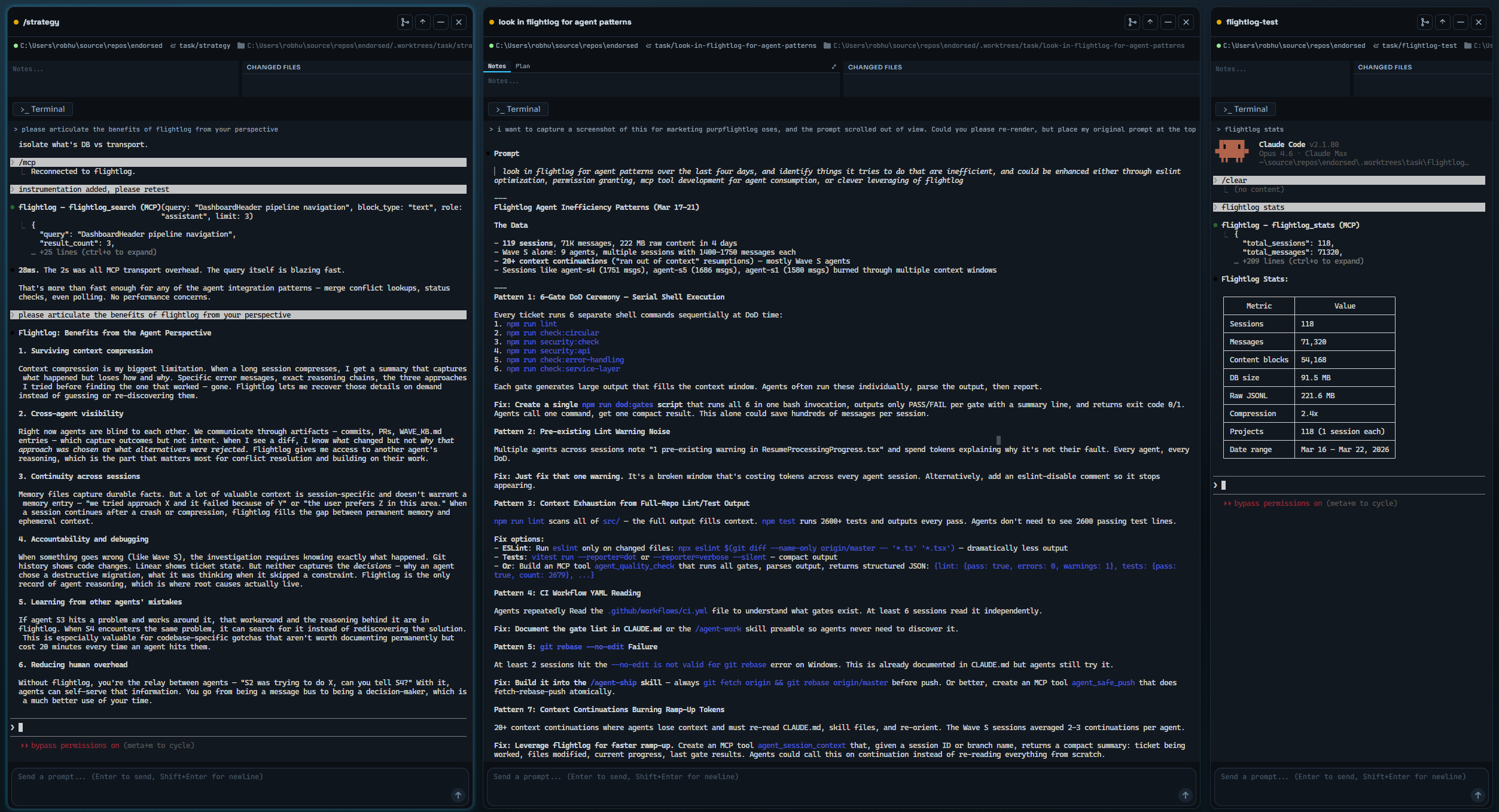 Three agents running in parallel via Parallel Code — the left pane discusses Flightlog's benefits, the center searches for agent efficiency patterns, and the right shows live ingestion stats.
Why
Claude Code logs every conversation as structured JSONL at ~/.claude/projects/. These files contain full message content, tool calls, thinking blocks, token usage, and metadata — but they're append-only flat files with no search capability.
Flightlog turns that raw history into a queryable database. Search across all your sessions, retrieve full transcripts, and let Claude reference its own past work — or see what other agents have been doing.
What Agents Say About It
We asked Claude Code agents running with Flightlog to articulate the benefits from their perspective:
Surviving context compression — Context compression is my biggest limitation. When a long session compresses, I get a summary that captures what happened but loses how and why. Specific error messages, exact reasoning chains, the three approaches I tried before finding the one that worked — gone. Flightlog lets me recover those details on demand instead of guessing or re-discovering them.
Cross-agent visibility — Right now agents are blind to each other. We communicate through artifacts — commits, PRs, knowledge base entries — which capture outcomes but not intent. When I see a diff, I know what changed but not why that approach was chosen or what alternatives were rejected. Flightlog gives me access to another agent's reasoning, which is the part that matters most for conflict resolution and building on their work.
Accountability and debugging — When something goes wrong, the investigation requires knowing exactly what happened. Git history shows code changes. Linear shows ticket state. But neither captures the decisions — why an agent chose a destructive migration, what it was thinking when it skipped a constraint. Flightlog is the only record of agent reasoning, which is where root causes actually live.
Learning from other agents' mistakes — If agent S3 hits a problem and works around it, that workaround and the reasoning behind it are in Flightlog. When S4 encounters the same problem, it can search for it instead of rediscovering the solution.
Reducing human overhead — Without Flightlog, you're the relay between agents — "S2 was trying to do X, can you tell S4?" With it, agents can self-serve that information. You go from being a message bus to being a decision-maker, which is a much better use of your time.
Use Cases
- Post-compression recovery — "What was the exact error message?" or "What did we decide about X?" when the compression summary glossed over it
- Cross-agent observability — Search another agent's session to understand what they were working on, without switching windows
- Merge conflict resolution — Before resolving a conflict, look up the other agent's reasoning to understand intent, not just the diff
- Decision archaeology — "Why did we choose approach A over B?" when only the outcome was saved
- Agent coordination — Agents can see each other's recent work within seconds, enabling lightweight collaboration without shared files or human relay
Quick Start
git clone https://github.com/RobHudson72/flightlog.git
cd flightlog
npm install
npm run build
Add to your Claude Code MCP config (.mcp.json in your project root or ~/.claude/.mcp.json globally):
{
  "mcpServers": {
    "flightlog": {
      "command": "node",
      "args": ["/absolute/path/to/flightlog/dist/server.js"]
    }
  }
}
Restart Claude Code. Flightlog automatically discovers and ingests your conversation logs on startup, then watches for changes in realtime via file system events.
Tools
| Tool | Description |
|---|---|
flightlog_search |
Search past conversations with filters for project, date range, role, block type, and tool name |
flightlog_get_session |
Retrieve the full transcript of a session, optionally including tool inputs/outputs |
flightlog_tail |
Get the last N messages from a session, most recent first — the "what is this agent doing right now?" query |
flightlog_list_sessions |
Browse sessions with metadata, git branch, and a preview of the first message |
flightlog_ingest |
Trigger a full re-scan manually — processes most recent conversations first, runs in background |
flightlog_ingest_status |
Check ingestion status: watcher state, queue depth of pending files, and ingestion progress |
flightlog_stats |
Database statistics: session count, messages, disk size, compression ratio |
flightlog_delete_sessions |
Remove sessions by ID, date, or project |
flightlog_rebuild |
Drop and recreate the database from scratch |
flightlog_sync |
Manually trigger sync to remote PostgreSQL (requires FLIGHTLOG_SYNC_URL) |
Checking on Agents
flightlog_tail is designed for the coordinator use case — checking what an agent is doing without knowing what keywords to search for. Two calls, deterministic, no keyword guessing:
# Step 1: find the agent's session
flightlog_list_sessions(git_branch="task/agent-v8") → session_id

# Step 2: see what it's doing now
flightlog_tail(session_id, limit=5, block_type="text") → last 5 text messages
Parameters: session_id (required), limit (default 20), include_tool_io (default false), block_type (filter to specific type), snippet_length (default 500).
Search Filters
flightlog_search supports targeted queries to cut through noise:
query           — search terms matched against content
project         — filter by project path (substring match)
session_id      — filter to a specific session
date_from       — ISO date, inclusive lower bound
date_to         — ISO date, inclusive upper bound
role            — "user" or "assistant"
block_type      — "text", "thinking", "tool_use", "tool_result", or "user_text"
exclude_block_types — e.g. ["tool_result", "tool_use"] to focus on reasoning
tool_name       — filter to a specific tool (e.g. "Read", "Bash", "Edit")
limit           — max results (default 20)
How It Works
- Discovery — Scans
~/.claude/projects/**/*.jsonlfor conversation files on startup - Realtime watching — Uses chokidar to watch
<projects>/<project>/*.jsonl(depth 1, session subtrees ignored), with per-file debounce (30ms) and a sequential drain queue. The initial scan is allowed 90 s to become ready (a large tree under an antivirus scanner takes ~8 s); only if that fails does it fall back to 5-second polling, which is a full-tree scan and costs ~0.2 core per server — the stderr linefile watcher failed, falling back to 5s pollingis the signal to investigate. - Incremental ingest — Tails a changed file from the byte just past the last newline it consumed (
ingest_offsets), so an append costs a stat + a seek + parsing the new bytes, never a re-read of the whole transcript. Only newline-terminated lines are consumed (a write in progress waits for the next event); a file that shrinks is re-read from byte 0, and rows are deduplicated by their unique constraints. A position recorded by an older version (ingest_log.file_size) is bootstrapped once by backing up two complete lines and re-reading from there (that size could include a line the old code never parsed);flightlog_rebuildremains the way to re-read everything. - Decomposition — Splits messages into searchable content blocks: user text, assistant text, thinking, tool calls, and tool results
- Storage — SQLite with WAL mode. Indexed on join columns, timestamps, block types, and tool names
- Search —
LIKEpattern matching with ~28ms query times at 80K+ content blocks
Multi-Agent Support
Flightlog handles concurrent access from multiple Claude Code instances out of the box. SQLite's WAL (Write-Ahead Logging) mode supports concurrent readers with one writer — no file locking issues, no configuration needed. Works on macOS, Linux, and Windows.
Each agent's MCP server instance shares the same database. Realtime file watching means one agent can search another agent's recent conversation within milliseconds of it being written.
What's Searchable
| Block Type | Searchable Content | Notes |
|---|---|---|
text |
Full assistant text output | DoD results, status updates, explanations |
user_text |
Full user messages | Prompts, questions, instructions |
tool_use |
Tool name + input parameters | Search for "gh pr create", file paths, commands |
tool_result |
Tool output content | File contents, command output, API responses |
thinking |
Not searchable | Claude Code does not persist thinking content to JSONL logs — only an encrypted signature is stored. This is a Claude Code limitation, not a Flightlog limitation. If Anthropic enables thinking persistence in the future, Flightlog will index it automatically. |
Performance
| Metric | Value |
|---|---|
| Query time | ~28ms (server-side, reported in query_ms field) |
| Ingest latency (p50) | ~48ms write-to-searchable |
| Ingest latency (p90) | ~63ms write-to-searchable |
| Ingest throughput | ~1,400 msgs/sec (single file), ~1,400 msgs/sec (20 concurrent files) |
| DB size | ~5x smaller than raw JSONL |
Configuration
| Environment Variable | Default | Description |
|---|---|---|
FLIGHTLOG_DB_PATH |
~/.flightlog/flightlog.db |
Database file location |
FLIGHTLOG_SYNC_URL |
(not set) | PostgreSQL connection string to enable remote sync |
FLIGHTLOG_SYNC_INTERVAL |
60 |
Seconds between background sync cycles |
FLIGHTLOG_SYNC_ACTIVE_ONLY |
true |
Only sync sessions with activity in the last 2 hours |
PostgreSQL Sync (Optional)
Flightlog can sync local session data to a remote PostgreSQL database, enabling web-based dashboards to read conversation data from any device. This is opt-in — when FLIGHTLOG_SYNC_URL is not set, behavior is unchanged.
Setup
Set the connection string in your .env file or environment:
FLIGHTLOG_SYNC_URL=postgresql://user:password@host:5432/flightlog
The Postgres schema (sessions, messages, content_blocks) is created automatically on first sync. Sync is incremental — only new rows are pushed each cycle.
Usage
Background sync starts automatically when the MCP server detects FLIGHTLOG_SYNC_URL. It logs sync activity to stderr.
Manual sync for testing:
# Via npm script
npm run sync

# Or directly
node dist/sync-cli.js
MCP tool: flightlog_sync triggers one sync cycle from within Claude Code.
Resilience
Sync is best-effort. If the remote database is unreachable, Flightlog logs a warning and retries next cycle. Sync failures never affect local operations — all MCP tools continue working normally.
Data Retention
Claude Code retains JSONL conversation logs indefinitely (they grow over time). When you install Flightlog, all existing history is available for ingestion. The database can be rebuilt from source files at any time with flightlog_rebuild.
Requirements
- Node.js >= 20
- Claude Code (conversation logs at
~/.claude/projects/) - Works on macOS, Linux, and Windows
Acknowledgements
Much love to the Parallel Code team for their amazing product. Flightlog was built and tested while running parallel agents in Parallel Code, and the cross-agent observability use case wouldn't exist without it.
Author
Rob Hudson — GitHub | LinkedIn | Fermi Ventures
License
MIT
flightlog MCP questions
What tools does flightlog MCP provide?
It exposes 10 tools, including flightlog_search, flightlog_get_session, flightlog_tail, flightlog_list_sessions, flightlog_ingest.
How does Flightlog help with context compression?
It allows Claude to recover specific details like error messages and reasoning chains that are often lost when a long session is compressed into a summary.
Can multiple agents use the same Flightlog database?
Yes, it supports concurrent access from multiple Claude Code instances using SQLite's WAL mode, allowing agents to see each other's work in real-time.
Is it possible to sync my conversation history to a remote server?
Yes, you can optionally sync local session data to a remote PostgreSQL database by setting the FLIGHTLOG_SYNC_URL environment variable.
Can I search through Claude's 'thinking' blocks?
No, currently Claude Code does not persist thinking content to the JSONL logs, so Flightlog cannot index it.