
Skillview MCP server
Commit Oct 23, 2026Provides a unified dashboard to manage, track, and update Claude Code skills, plugins, and MCP servers in a single table.
Also known as pvjbuilds/skillview
- Stars
- 0
- Tools
- —
- Downloads, 30 days
- —
- Latest version
- —
- Last commit
- Oct 23, 2026
- License
- MIT
What is Skillview MCP?
Skillview provides a unified dashboard to manage, track, and update Claude Code skills, plugins, and MCP servers in a single table.
Summary generated from the project's README
About Skillview MCP server
Managing various Claude Code capabilities like plugins, skills, and MCP servers from different sources can be difficult because they use different storage locations and update commands. Skillview solves this by providing a unified dashboard that displays everything in a single table. It runs locally on your computer using Python 3.8+ and binds to 127.0.0.1, making it a private tool that requires no external accounts or API keys beyond your existing Claude CLI login.
Users can view what each tool does, how to activate it, and whether it is out of date. The dashboard can even generate plain-English descriptions by interacting with the installed Claude CLI. While it reads data by default to remain safe, you can opt-in to an update function that executes the ecosystem's own update commands. On macOS, you can install it as a standard application that lives in your Dock or Spotlight for easy access.
What you can do with it
- 1Identify unused agent capabilitiesFind which skills or plugins are wasting space by viewing a list of items that have never been invoked.
- 2Simplify complex plugin commandsSee every available sub-command, slash command, and hook provided by a plugin in a clear, numbered list.
- 3Convert technical metadata to plain EnglishTransform keyword-heavy model descriptions into human-readable sentences that explain what a tool actually does for you.
Written from the project's README. Every use case is checked against a quote from it.
Automated checks
Ran Nov 16, 2026Full report →Not verified yet. A server needs a score of 80, no serious finding, and enough data for us to check. How checks work · What to fix for more points

- Source repository linked and reachablepvjbuilds/skillview is public and reachablegithub.com/pvjbuilds/skillview ↗Pass
- Package names this repository as its sourceNot checked
- Build provenance (Sigstore attestation)Not checked
- Open source license (OSI)MITspdx.org/licenses/MIT.html ↗Pass
- Commit or release in the last yearLast commit or release 2026-10-23github.com/pvjbuilds/skillview ↗Pass
- OpenSSF ScorecardNot checked
- Package name not close to a popular packageNot checked
- No critical advisory in the package or its dependenciesNot checked
- No hidden instructions to the model0 tool descriptions and the README read; no override phrases, credential paths or hidden charactersPass
- Destructive tools are labelledNot checked
- Remote endpoint answers the MCP handshakeNot checked
README
View on GitHubSkillview
Skillview shows every Claude Code skill, plugin, and MCP server in one table. The install mechanism does not matter.
The table shows what each item does, how to run it, and if it is out of date. Skillview runs on your computer. It has no dependencies. It only reads data, unless you turn on the update function. On macOS it can be a normal app that you open from Spotlight or the Dock.
| Light theme | Dark theme |
|---|---|
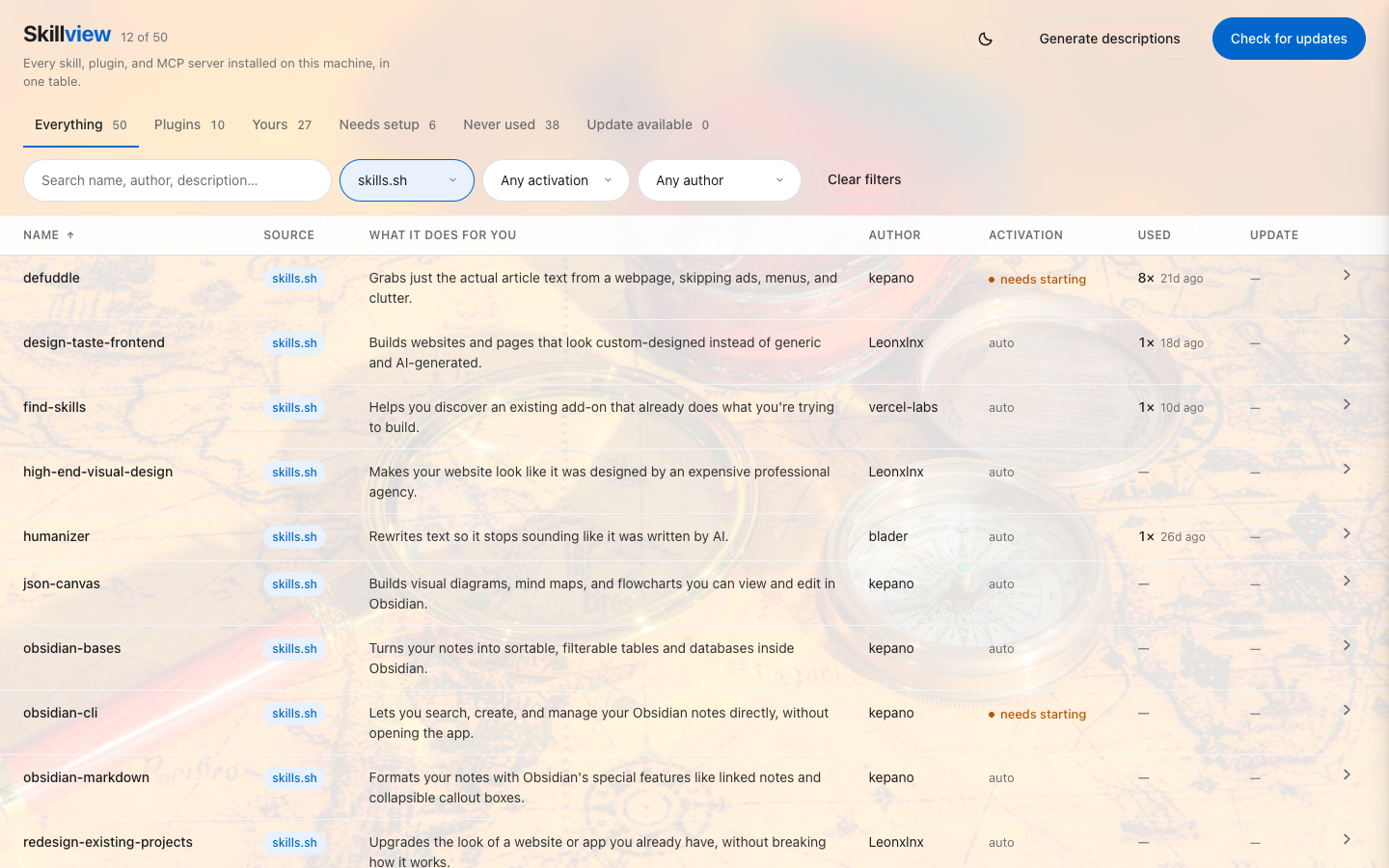 |
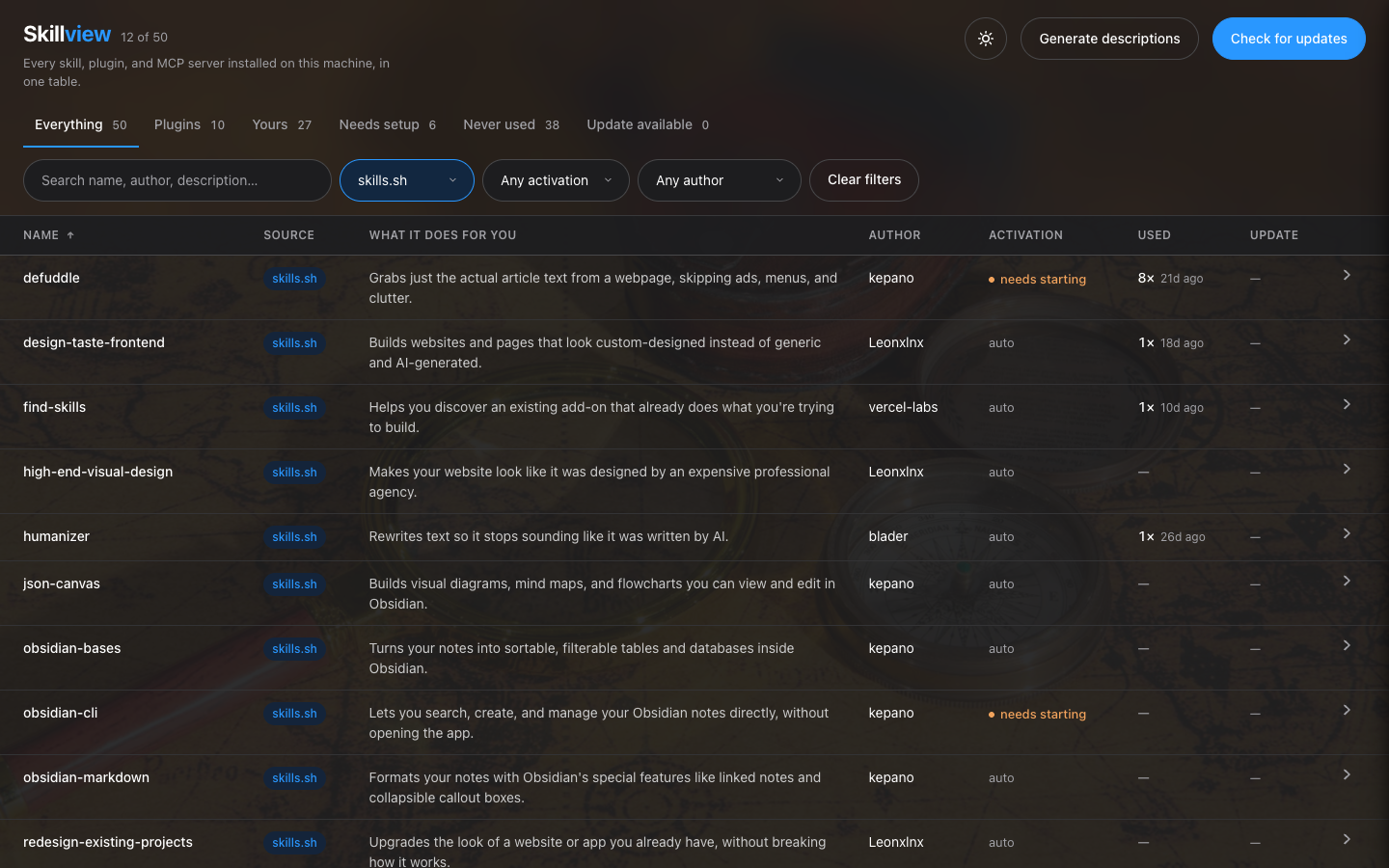 |
The problem
Your agent's capability arrives through mechanisms that don't know about each other — plugin marketplaces, skills.sh, package managers, MCP config, and the skills you wrote yourself. Each has its own storage location, its own metadata format, and its own update command.
Nothing shows them together. So things get installed, forgotten, and then sit unused during the exact task they were installed for. That's the cost this fixes — not disk space.
What you get
- Everything in one table — four install mechanisms, one list, no terminal.
- Plain English, not keyword soup. A
SKILL.mddescription exists to make a model trigger the skill. Skillview rewrites it into what the thing does for you. - How to actually use it. Every sub-command a plugin ships — bundled skills, slash commands, agents, hooks, MCP servers — listed as numbered one-liners.
- What's gone stale, across every mechanism, in one refresh. One network call per source repo.
- What you didn't install. A pack ships 13 skills and you took 3? It shows the other 10.
- What you never actually used. A count and a last-used date per item, read back out of Claude Code's own session transcripts, plus a Never used view. That view is the cull list.
- Who wrote it — derived from whether an upstream exists, so your own skills are correctly marked as yours to maintain.
- Can I use this right now? Fires automatically, needs a slash command, or needs something started first — with the exact command.
Zero dependencies. Python 3.8+ and the standard library. Binds to 127.0.0.1.
Run it
python3 app.py
Then open http://localhost:8477.
No dependencies, no virtualenv, no build step — Python 3.8+ and the standard library. It binds to 127.0.0.1 only.
On macOS: open it like an app
./skillview.command install
This builds Skillview.app in /Applications, with its own icon. Find it with Spotlight (⌘ Space, type "Skillview"), Launchpad or Finder, or keep it in the Dock.
- Click it to start Skillview in the background and open the page. No Terminal window stays open.
- Click it again while it runs to choose Open or Stop. Stop ends only Skillview's own server, never another process on the port.
The app runs with updates turned on (--enable-updates), like run-ui.command. It remembers where this folder is, so if you move the folder, run ./skillview.command install again. From a terminal, ./skillview.command start, stop and status do the same jobs.
Optional: plain-English descriptions
The table works immediately without this. To get descriptions that say what each tool does for you — rather than the keyword-stuffed blurb that exists to make a model trigger the skill — you need the claude CLI installed and signed in:
claude
Run that once in a terminal and complete the login prompt. Then click Generate descriptions in the dashboard.
This is genuinely optional. If the CLI is missing or not signed in, the dashboard says so and falls back to raw descriptions — nothing breaks. There's no API key to configure and no account to create beyond the Claude one you already have.
What it shows
| Column | What it tells you |
|---|---|
| Mechanism | marketplace · skills.sh · local · unknown |
| What it does for you | plain-English, not the model-facing frontmatter blurb |
| Author | who wrote it — derived from whether an upstream source exists, never from a configured name |
| Surface | which agents actually have it installed |
| Activation | auto (fires itself) · manual (you type the command) · needs starting (something must be installed or running first) |
| Used | how many times it has been invoked, and how long ago — or an em-dash for nothing recorded |
| Update | up to date · update available · no upstream · unknown |
Click View on any row for the full picture: every sub-command as a numbered one-liner, prerequisites with their exact commands, install path, source, and the command that updates it.
For plugins, "sub-commands" means everything the plugin ships — bundled skills, slash commands, agents, hooks, and MCP servers. A plugin carrying six skills shows six, not zero.
The two buttons
Check for updates — one network call per distinct source repo, so a full pass is a few requests regardless of how many skills you have. skills.sh installs compare the recorded folder hash against the upstream git subtree SHA, which is exact. Marketplace plugins compare declared version to installed version.
Generate descriptions — shells out to the claude CLI already on your machine (no API key, no setup) and writes one plain sentence per tool into descriptions.json. That file is plain JSON: edit any line by hand and your version is kept. If the CLI isn't installed or isn't logged in, the table falls back to raw descriptions and says so.
Running updates — off by default
Out of the box Skillview only reads. It shows you the update command and you run it yourself. To let it run updates for you:
python3 app.py --enable-updates
Or set "updates": true in config.json, or SKILLVIEW_ENABLE_UPDATES=1.
Why it's opt-in. Everything else here only reads files and makes GET requests. Running updates means a local web server executing shell commands, which is a categorically different thing to leave running. Off by default means a clone you're merely looking at has no write surface at all — the endpoint refuses, and the button never appears.
All of that lives in one file, updater.py, so you can audit the entire write surface in a couple of minutes. What it guarantees, and what test_updater.py asserts:
- No shell, ever. Every command is an argv list run with
shell=False, so quoting, globbing, pipes and;have no meaning. - The page cannot supply a command. A request names an item; that name is looked up in the live inventory and the row's own values build the argv. A name matching no row is refused before anything runs.
- Only known mechanisms have commands. Anything else is refused with the manual instruction rather than guessed at.
- One at a time, under a lock, with a timeout.
Plugin updates change files on disk but the running Claude Code session keeps the old copy, so those report restart required rather than claiming success.
Usage counts — where they come from
The Used column and the Never used view read one local file, ~/.claude/skill-usage/usage.json. Skillview does not produce that file and does not instrument anything: every Skill invocation is already recorded in Claude Code's own session transcripts, so the tally is derived retroactively by a separate script outside this repo. No hook ships here, and nothing new is recorded on your machine because Skillview is installed. If the file is absent, the column reads as blank and the table is otherwise unchanged.
Five limits, all real:
- Only formal invocations are counted. A skill whose guidance the model follows without calling the
Skilltool leaves no trace. - The record starts when your transcripts start. Claude Code deletes sessions older than
cleanupPeriodDays(30 by default). Anything before your oldest retained transcript is gone and cannot be recovered. - Blank is not zero. It means "nothing recorded in the transcripts scanned", which is a weaker claim.
- Some counted skills are not in the table. Claude Code's own built-in skills are invoked through the same tool and land in the tally, but they ship with the harness rather than being installed, so nothing here has a row for them. They are listed under the table alongside genuinely uninstalled items, and the note does not claim to tell you which is which.
- Some skills are rare by design. A skill written to fire only on an explicit ask should read low. Zero is a reason to check the trigger wording, not an instruction to delete. The column reports; you judge.
What it deliberately doesn't do
It doesn't measure usage itself, manage dependencies, or edit skills. It reads, reports, and — if you ask it to — runs the ecosystem's own update command.
Honest limits
- Availability in the claude.ai chat window is server-side and leaves no local trace, so it isn't claimed. The Surface column reports only what's on disk.
- Activation for "needs starting" is detected by pattern-matching install hints in a skill's own docs. It catches the common shapes and will miss unusual phrasing.
- Install sources it doesn't recognise are marked update manually rather than guessed at. It never claims "up to date" without evidence.
- Developed and run on macOS. Linux is statically audited but not yet executed there: paths are
$HOME-relative viapathlibthroughout, every file read/write declaresencoding="utf-8"explicitly (Python 3.7+ auto-coerces away from an ASCII-only locale on POSIX regardless, so this is belt-and-suspenders rather than a fix for a reproduced failure), andrun-ui.command's auto-open falls back to printing the URL when neitheropennorxdg-openexists. If something real turns up on an actual Linux box, please file it. Windows is untested and unsupported.
Where it reads from
Nothing is hardcoded to a user or a path. Locations come from $HOME and CLAUDE_CONFIG_DIR.
~/.claude/plugins/installed_plugins.json   marketplace plugins
~/.claude/plugins/known_marketplaces.json  their source repos
~/.agents/.skill-lock.json                 skills.sh installs
~/.claude/skills/<name>/SKILL.md           everything else
~/.claude/skill-usage/usage.json           invocation counts, if present
Any of these being absent is normal — each is read independently, and a machine with none of them shows an empty table rather than an error.
Layout
app.py            HTTP shim — routes to pure functions, nothing else
inventory.py      filesystem: read every mechanism into one row shape
upstream.py       network: update status per source repo
describe.py       subprocess: claude CLI → cached descriptions
usage.py          read-only: joins the local invocation tally onto the rows
updater.py        the only code that can change anything. Off by default
ui.html           the whole frontend, vanilla, no CDN
skillview.command macOS launcher: start / stop / status / install
Skillview.applescript  source of Skillview.app (built by install)
test_inventory.py python3 test_inventory.py
test_updater.py   python3 test_updater.py
app.py is intentionally thin so the web layer stays replaceable.
Tests
python3 test_inventory.py && python3 test_updater.py
test_updater.py runs against a stubbed subprocess: it asserts what the updater asked to run, so the safety properties are checked without anything executing. python3 updater.py prints the exact command it would run for every installed item, and runs nothing.
Fixture-driven, no framework. Covers the empty machine, each mechanism in isolation, an unrecognised installer, and a SKILL.md whose frontmatter real YAML parsers reject — that last one exists in the wild and takes down other tools.
Licence
MIT.
Skillview MCP questions
Does Skillview require any dependencies?
No, it is a zero-dependency tool that runs on Python 3.8+ using only the standard library.
Is Skillview safe to run updates?
Updates are off by default. When enabled, it uses a secure updater that executes commands without a shell to prevent injection attacks.
How does it track which skills are used?
It reads usage counts and last-used dates from Claude Code's own session transcripts stored in a local JSON file.
Do I need an API key to use the plain-English descriptions?
No, it uses the Claude CLI already installed on your machine; it does not require a separate API key or account setup.