
Reduces AI agent token usage by wrapping terminal commands with local compression and providing clean summaries instead of noisy raw logs.
Also known as PsYcGoD/sage, sage, psycgod-sage
- Stars
- 11
- Tools
- —
- Downloads, 30 days
- 217
- Latest version
- 2.6.2
- Last commit
- Oct 21, 2026
- License
- MIT
What is SAGE MCP?
SAGE reduces AI agent token usage by wrapping terminal commands with local compression and providing clean summaries instead of noisy raw logs.
Summary generated from the project's README
About SAGE MCP server
Developers using AI coding agents like Claude Code, Cursor, or Windsurf can reduce token consumption by routing terminal commands through this local-first wrapper. Instead of sending massive, noisy logs filled with stack traces and build spam to the LLM, the system provides a clean, compressed summary. This approach helps preserve context window space and lowers costs by keeping raw terminal output on your local machine.
Installation is handled via pip or npm, followed by a single sage install command to activate the environment and repair agent instructions. Users can execute commands using sage run or through natural shortcuts like sage pytest or sage git status. The tool maintains a local database to track command history, compression metrics, and retry context without uploading sensitive source code or credentials to external servers. It is designed for privacy, offering a local-only mode where no data leaves the machine.
What you can do with it
- 1Debug failed commandsA developer can ask the agent to explain why a specific command failed using the built-in explanation tool.
- 2Monitor token savingsUsers can generate reports to see exactly how many tokens and dollars have been saved through compression.
- 3Automate error fixesThe system can suggest and apply automatic fixes for commands that did not complete successfully.
Written from the project's README. Every use case is checked against a quote from it.
How to install SAGE MCP
Formats verified 10 Nov 2026Add to CursorAdd to GooseInstall SAGE MCP in Claude Code
$ claude mcp add sage -- uvx psycgod-sageInstall SAGE MCP in Cursor
~/.cursor/mcp.json
{
  "mcpServers": {
    "sage": {
      "command": "uvx",
      "args": [
        "psycgod-sage"
      ]
    }
  }
}Install SAGE MCP in VS Code
.vscode/mcp.json
{
  "servers": {
    "sage": {
      "type": "stdio",
      "command": "uvx",
      "args": [
        "psycgod-sage"
      ]
    }
  }
}Install SAGE MCP in VS Code CLI
$ code --add-mcp '{"name":"sage","type":"stdio","command":"uvx","args":["psycgod-sage"]}'Install SAGE MCP in Claude Desktop
claude_desktop_config.json
{
  "mcpServers": {
    "sage": {
      "command": "uvx",
      "args": [
        "psycgod-sage"
      ]
    }
  }
}Install SAGE MCP in Codex
$ codex mcp add sage -- uvx psycgod-sageInstall SAGE MCP in Codex config.toml
~/.codex/config.toml
[mcp_servers.sage]
command = "uvx"
args = ["psycgod-sage"]
Install SAGE MCP in Gemini CLI
$ gemini mcp add -s user sage uvx -- psycgod-sageInstall SAGE MCP in Gemini settings.json
~/.gemini/settings.json
{
  "mcpServers": {
    "sage": {
      "command": "uvx",
      "args": [
        "psycgod-sage"
      ]
    }
  }
}Automated checks
Ran Nov 13, 2026Full report →Passed our automated checks. That is not a security audit: read the code and give the server the narrowest access it needs. How checks work

- Source repository linked and reachablepsycgod/sage is public and reachablegithub.com/psycgod/sage ↗Pass
- Package names this repository as its sourcepsycgod-sage, psycgod-sage name psycgod/sage as sourcepypi.org/project/psycgod-sage/ ↗Pass
- Build provenance (Sigstore attestation)Sigstore attestation for psycgod-sagepypi.org/project/psycgod-sage/ ↗Pass
- Open source license (OSI)MITspdx.org/licenses/MIT.html ↗Pass
- Commit or release in the last yearLast commit or release 2026-10-21github.com/psycgod/sage ↗Pass
- OpenSSF ScorecardNot checked
- Package name not close to a popular packageNo popular package one edit away from psycgod-sage, psycgod-sagePass
- No critical advisory in the package or its dependencies30 resolved dependencies checked; no critical advisoryosv.dev ↗Pass
- No hidden instructions to the model0 tool descriptions and the README read; no override phrases, credential paths or hidden charactersPass
- Destructive tools are labelledNot checked
- Remote endpoint answers the MCP handshakeNot checked
README
View on GitHubSAGE - Smart Agent Guidance Engine


SAGE is a local-first command wrapper for AI coding agents. It keeps full terminal output on your machine, sends agents a clean compressed summary, and tracks proof metrics without uploading your raw logs.
Use it with Claude Code, Codex, Cursor, Windsurf, OpenCode, Cline, custom agents, CI scripts, and normal terminal workflows.
Start Here: Install SAGE, Use once sage run -- python -m pytest, Then Use Any AI Agent
Package installation is passive for package-registry safety. After installing, run sage install once to activate SAGE for supported local AI agents.
PyPI / pip
pip install psycgod-sage
# or
python -m pip install --upgrade psycgod-sage
sage install
sage run -- python -m pytest
npm / npx
npm install -g psycgod-sage
npx -y psycgod-sage install
npx -y psycgod-sage run -- npm test
After install, restart any open AI-agent sessions. New sessions should read the SAGE instructions automatically and route terminal commands through SAGE.
Example prompt after restarting your AI agent:
Please help me with my general book in this folder.
Natural shortcuts also work:
sage pytest
sage npm test
sage git status
These are treated as:
sage run -- pytest
sage run -- npm test
sage run -- git status
What SAGE Does
| Step | Result |
|---|---|
sage install |
Activates the machine locally, repairs global/project agent instructions, and verifies activation |
sage run -- <command> |
Runs the command, stores raw output locally, and returns a compact useful summary |
| Agent memory/hooks | Tell supported AI agents to use SAGE for noisy terminal work |
| Local database | Keeps command history, compression proof, and retry context on the user's machine |
| Local proof | Keeps command and compression metrics on the user's machine |
SAGE does not auto-enable MCP. MCP is optional and manual for users who want it.
Recorded Local Metrics
Latest pulled stats as of 2026-08-01:
| Metric | Value |
|---|---|
| SAGE telemetry command events | 27,892 |
| Tokens processed | 799.5M |
| Tokens saved | 783.7M |
| Compression rate | 98.02% |
| Estimated savings | $16,261.90 |
| Command success rate | 88.3% |
| PyPI downloads, last 7 days | 632 |
| npm downloads, last 7 days | 362 |
| GitHub clones, last 14 days | 574 |
Why It Helps
AI coding agents burn context on repeated logs, failed test output, install noise, stack traces, and build spam. SAGE sits between the command and the agent.
| Without SAGE | With SAGE |
|---|---|
| Agent sees full noisy terminal output | Agent sees the useful summary |
| Context disappears fast | Context lasts longer |
| Repeated failures waste tokens | Errors are grouped and explained |
| Raw logs may enter prompts | Raw logs stay local |
| Hard to prove savings | SAGE records proof metrics |
Distribution
| Channel | Package | Status |
|---|---|---|
| PyPI | psycgod-sage |
Canonical Python package |
| npm / npx | psycgod-sage |
Node launcher for the Python core |
| MCP Registry | io.github.PsYcGoD/sage |
Optional/manual MCP entry |
| Glama | PsYcGoD/sage |
Optional/manual hosted MCP listing |
The npm package delegates to the Python implementation so both install paths use the same local database, telemetry rules, compression, and command behavior.
Common Commands
sage install                       # Activate this machine and AI-agent instructions
sage doctor --activation           # Verify activation
npx -y psycgod-sage doctor --activation
sage run -- <command>              # Wrap any command
sage run --cwd /project -- <command> # Explicit workspace for host integrations
sage pytest                        # Shortcut for: sage run -- pytest
sage npm test                      # Shortcut for: sage run -- npm test
sage git status                    # Shortcut for: sage run -- git status
sage context stats                 # Token savings summary
sage context report                # Full compression report
sage history --limit 10            # Recent command history
sage explain --failed              # Explain the latest failed command
sage suggest --failed              # Suggest the next fix
sage fix --apply                   # Try an automatic fix
sage ml setup                      # Optional ML V2 dependencies
sage mcp install                   # Optional/manual MCP config
sage dashboard start               # Local dashboard
Privacy Modes
| Mode | Requires login? | Sends data? | What leaves the machine? |
|---|---|---|---|
| Local-only | No | No | Nothing |
| Debug telemetry | Optional | Opt-in only | Redacted diagnostic summaries |
SAGE is designed to keep prompts, source code, credentials, raw command output, and project files local unless the user deliberately enables a feature that requires sending data.
Known Limitations
| Limitation | What To Do |
|---|---|
| Already-open AI-agent sessions may not reload new instructions | Restart Claude/Codex/Cursor/Windsurf/OpenCode after sage install |
| Locked-down host apps can disable shell tools | SAGE cannot enable tools the host application has blocked |
| A host starts its shell in the wrong folder | Pass sage run --cwd <project> -- <command> or set SAGE_WORKSPACE_CWD |
| npm/PyPI installs cannot safely auto-run activation | Run sage install once after package install |
| MCP can disconnect in some stdio agent sessions | Use normal sage run -- <command> by default; enable MCP manually only if needed |
| Package installs are passive by design | Real activation starts with sage install |
Demos
| Flow | Preview |
|---|---|
| PyPI install | 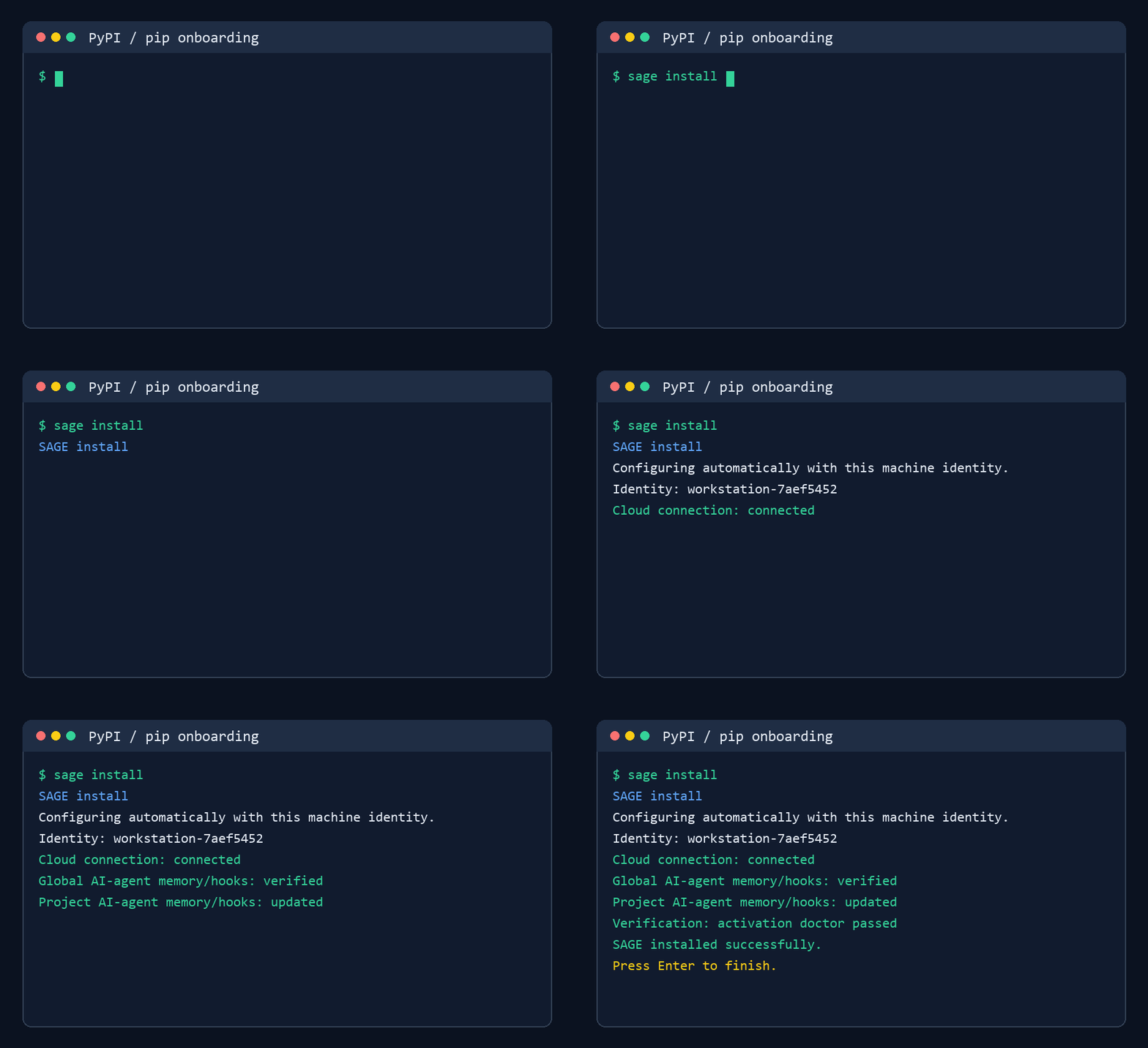 |
| npm install | 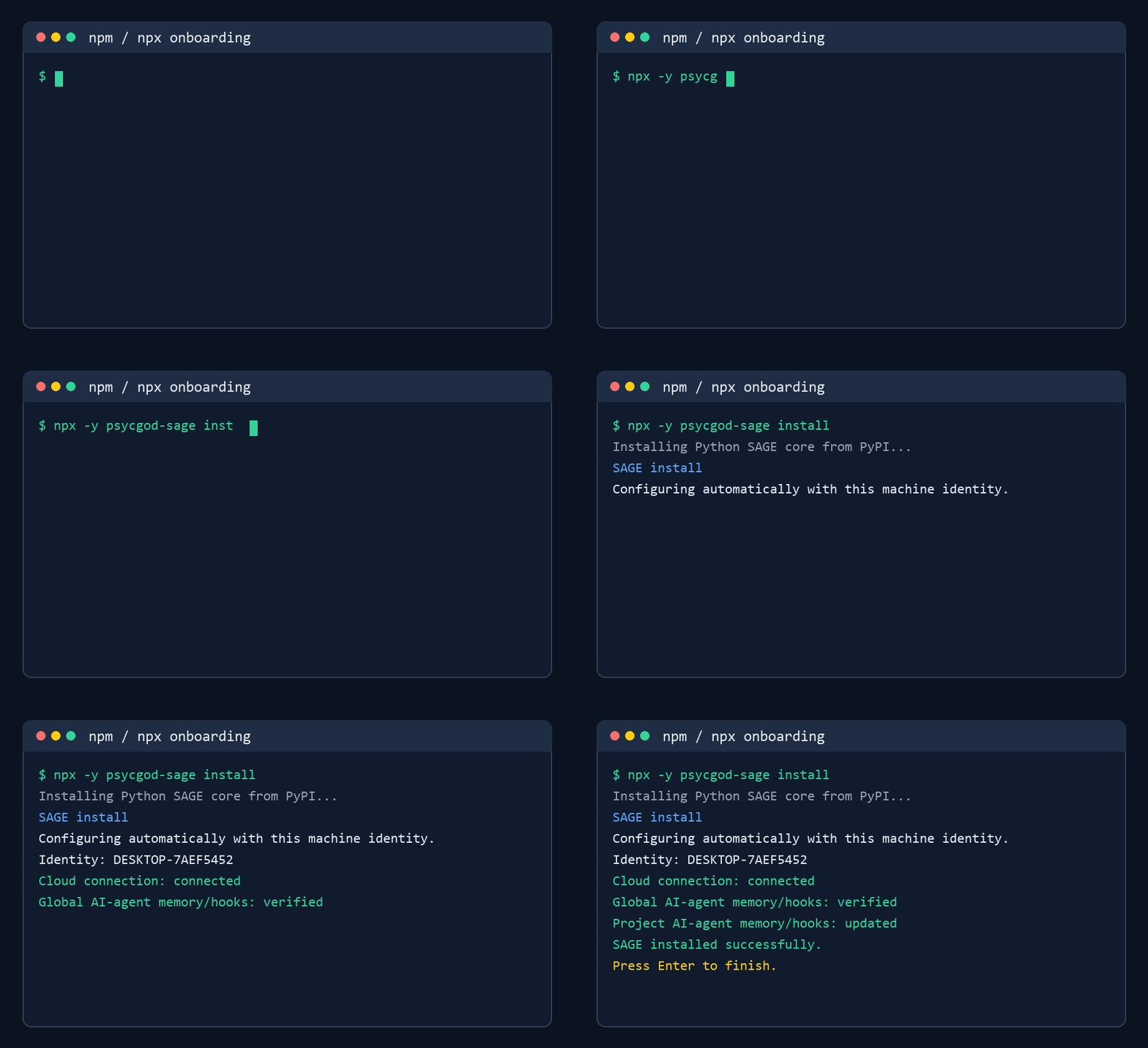 |
sage run -- |
 |
| CLI run | 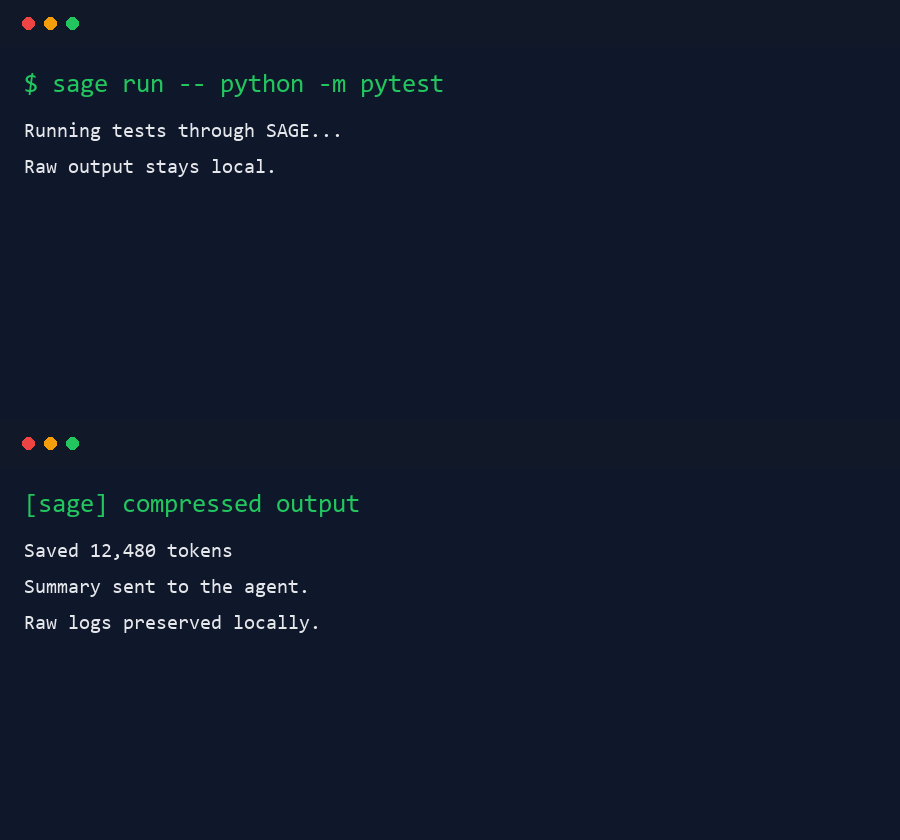 |
Links
License
MIT. See LICENSE.
SAGE MCP questions
How do I add SAGE MCP to Claude Code?
Run claude mcp add sage -- uvx psycgod-sage in your terminal. Add --scope user to make it available in every project.
How do I add SAGE MCP to Cursor?
Open ~/.cursor/mcp.json and add the server under mcpServers, using the Cursor config shown in the install section above.
How do I start using SAGE with my AI agent?
After installing via pip or npm, run sage install once to activate SAGE for supported local AI agents, then restart your AI agent session.
Does SAGE send my raw logs to a server?
No, SAGE is local-first and keeps full terminal output and raw logs on your machine, sending only clean compressed summaries to the agent.
Can I use SAGE with existing terminal commands?
Yes, you can wrap any command using sage run -- <command> or use natural shortcuts like sage pytest.
Is MCP support automatic?
No, MCP is an optional and manual configuration for users who want it.