
Enables coding agents to interact with PlayCanvas scenes by selecting entities, moving objects with gizmos, and applying visual edits directly to source code.
Also known as playcanvas/director
- Stars
- 1
- Tools
- —
- Downloads, 30 days
- —
- Latest version
- —
- Last commit
- Nov 10, 2026
- License
- MIT
What is PlayCanvas Director MCP?
PlayCanvas Director enables coding agents to interact with PlayCanvas scenes by selecting entities, moving objects with gizmos, and applying visual edits directly to source code.
Summary generated from the project's README
About PlayCanvas Director MCP server
Collaborating with coding agents to build 3D applications in PlayCanvas is what director enables. Instead of using text alone to describe spatial changes, you can interact with a running app by clicking entities or using gizmos to move, rotate, and scale objects. The agent receives the entity path, the 3D coordinates, and a visual capture to understand your intent before writing those edits directly into your source code.
This local MCP server works with Claude Code and Codex to manage the entire development lifecycle. It can scaffold new projects using create-playcanvas, start a development server, and attach itself to any running PlayCanvas Engine 2.23+ application. The setup runs on your machine and includes specialized tools like director-design for folding edits into source, director-capabilities for runtime interaction, and director-check for running diagnostics in headless Chrome.
Users interact with the system through a browser-based interface that includes a PlayCanvas Inspector and MiniStats. The server manages state locally and uses a daemon to proxy your development server, ensuring that your visual edits and comments are synchronized with your AI agent.
What you can do with it
- 1Scaffold a 3D projectAsk the agent to build a specific 3D scene from scratch using a command.
- 2Apply spatial edits via gizmosMove or resize objects in the 3D viewport and have the agent update the code.
- 3Run automated diagnosticsUse the agent to preview the application in a headless browser and check for errors.
Written from the project's README. Every use case is checked against a quote from it.
Automated checks
Ran Nov 16, 2026Full report →Not verified yet. A server needs a score of 80, no serious finding, and enough data for us to check. How checks work · What to fix for more points

- Source repository linked and reachableplaycanvas/director is public and reachablegithub.com/playcanvas/director ↗Pass
- Package names this repository as its sourceNot checked
- Build provenance (Sigstore attestation)Not checked
- Open source license (OSI)MITspdx.org/licenses/MIT.html ↗Pass
- Commit or release in the last yearLast commit or release 2026-11-10github.com/playcanvas/director ↗Pass
- OpenSSF ScorecardNot checked
- Package name not close to a popular packageNot checked
- No critical advisory in the package or its dependenciesNot checked
- No hidden instructions to the model0 tool descriptions and the README read; no override phrases, credential paths or hidden charactersPass
- Destructive tools are labelledNot checked
- Remote endpoint answers the MCP handshakeNot checked
README
View on GitHubPlayCanvas Director





| Developer Site | Engine Manual | API Reference | Blog | Forum |
An editor where you and your coding agent work on PlayCanvas apps together. Instead of describing where something is, you point at it: click an entity or drag across an area, and the agent gets its entity path, the 3D point and a capture of what you saw. Move objects with gizmos, and the agent writes your edits into the source.
Director attaches to any running PlayCanvas app, whatever its stack, with its own hot reload, play and pause, and the PlayCanvas Inspector beside it. It works with Claude Code and Codex, and runs entirely on your machine.
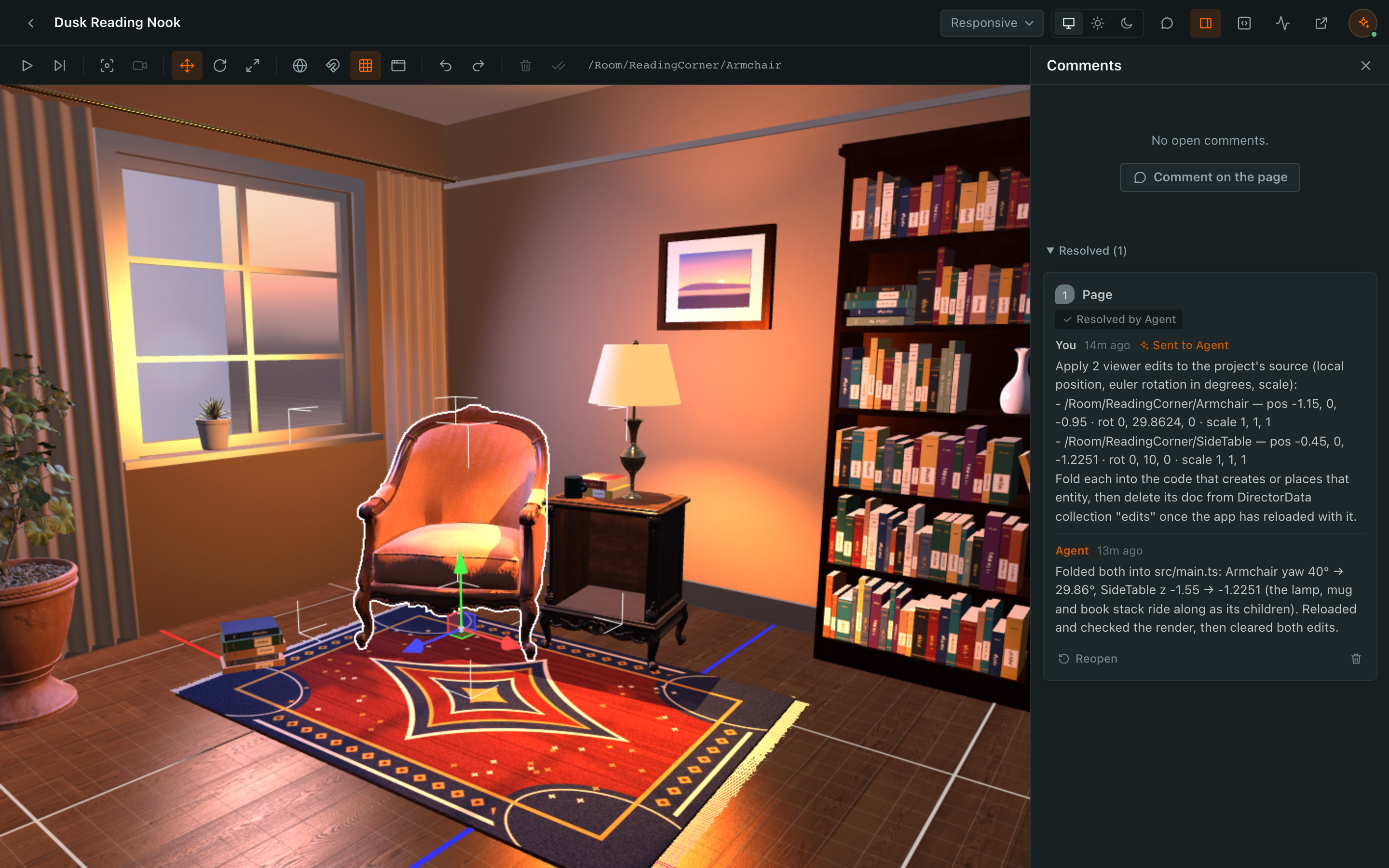
Install
Requires Node.js 22.18+, Chrome or Chromium, and apps on PlayCanvas Engine 2.23+.
claude plugin marketplace add playcanvas/director
claude plugin install playcanvas-director@director
Or, in a session: /plugin install playcanvas-director --marketplace playcanvas/director, then /reload.
codex plugin marketplace add playcanvas/director
codex plugin add playcanvas-director@director
Usage
Ask for a scene ("build my desk in 3D at real scale") or point the agent at an app you have. It scaffolds a project
with create-playcanvas if needed, starts the dev server, attaches Director and opens it in your browser. All stages are
listed at http://localhost:47318/stages.
| Action | How |
|---|---|
| Play and pause | ⌘/Ctrl+P; paused, an editor camera takes over and F focuses |
| Select and edit | Paused, click; 1/2/3 move, rotate, scale; Apply sends edits to the agent |
| Comment | C, click or drag, then Send to Agent; images can be attached |
| Inspect | Inspector and MiniStats in the header |
The plugin reference has every key, setting and tool detail.
| Skill or tool | Purpose | Tokens |
|---|---|---|
director-design |
Scaffold, run, attach, fold edits into source | ~2,600 |
director-capabilities |
The window.agent runtime of published pages |
~1,750 |
Director |
Attach to an app, publish pages, manage stages | ~5,250 |
DirectorComments |
Read, reply to and resolve comments | ~1,300 |
DirectorData |
Read and write a stage's database | ~2,800 |
DirectorCheck |
Preview in headless Chrome, read diagnostics | ~800 |
Context cost
About 560 tokens load at session start: the skill descriptions and the MCP server's instructions. Tool definitions load when used (MCP tool search), and a skill's instructions when a task needs it.
Data and network use
Director has no telemetry and makes no outbound requests of its own. The plugin installs:
- MCP server: its first tool call starts a daemon on
127.0.0.1:47318that proxies the app'slocalhostdev server, keeps state in~/.playcanvas-director, and keeps running after the session (how to stop it). UserPromptSubmithook: adds comments you sent to the agent to your next prompt, if the daemon is running.director-commentsmonitor (Claude Code): checks for new comments every 2 s oncedirector-designloads.- Comment watcher (Codex): one detached process per session that passes new comments to
codex queue.
The tools also open new stages in your browser (DIRECTOR_AUTO_OPEN=0 turns this off) and run headless Chrome for
DirectorCheck. Scaffolding runs npx create-playcanvas@latest from npm. Other traffic is only what the app and its
pages load.
Contributing
See CONTRIBUTING.md. Report bugs in GitHub Issues and vulnerabilities through GitHub Security Advisories.
License
PlayCanvas Director is released under the MIT License.
PlayCanvas Director MCP questions
How do I use Director with Claude Code?
You can install it via the Claude plugin marketplace using the command: claude plugin marketplace add playcanvas/director.
Does Director send data to external servers?
No, Director has no telemetry and does not make any outbound requests of its own.
Can I move objects in the 3D scene?
Yes, you can use gizmos to move, rotate, or scale objects, and the agent will write those edits into your source code.