
PineForge MCP server
Commit Nov 14, 2026Transpiles PineScript v6 to C++ to run deterministic, local backtests against OHLCV data with TradingView parity.
Also known as pineforge-4pass/pineforge-backtest-mcp, pineforge-backtest-mcp
- Stars
- 9
- Tools
- 11
- Downloads, 30 days
- —
- Latest version
- 0.9.44
- Last commit
- Nov 14, 2026
- License
- MIT
What is PineForge MCP?
PineForge transpiles PineScript v6 to C++ to run deterministic, local backtests against OHLCV data with TradingView parity. It exposes 11 tools, such as transpile_pine, backtest_pine, backtest_pine_grid.
Summary generated from the project's README
About PineForge MCP server
PineForge provides a local environment for running deterministic backtests of PineScript v6 strategies. It works by transpiling PineScript into C++ to ensure execution matches the logic required for TradingView parity. This server is designed for developers and AI agents who need to validate trading strategies against specific OHLCV data without relying on a cloud-based simulator. It operates as a self-contained Docker container, meaning it runs in-process and does not require a host Docker daemon for the transpilation step.
Users can interact with the server through several specialized tools. You can perform single backtests using backtest_pine or execute a Cartesian sweep of multiple input combinations with backtest_pine_grid. The server also includes utilities to fetch market data via fetch_binance_ohlcv and verify results against TradingView exports using check_tradingview_parity. Because it runs locally, your strategy source code and CSV files remain on your machine, requiring no API keys for core functionality.
What you can do with it
- 1Verify TradingView accuracyCompare your TradingView Strategy Tester export against a local run to ensure trade-by-trade parity.
- 2Fetch market dataGenerate a backtest-ready CSV file directly from Binance spot or USDT-perp klines.
- 3Check language supportDetermine if a specific Pine identifier or namespace is supported by the transpiler.
Written from the project's README. Every use case is checked against a quote from it.
How to install PineForge MCP
Formats verified 10 Nov 2026Add to CursorAdd to GooseInstall PineForge MCP in Claude Code
$ claude mcp add pineforge-backtest-mcp -- docker run -i --rm ghcr.io/pineforge-4pass/pineforge-backtest-mcp:v0.9.44Install PineForge MCP in Cursor
~/.cursor/mcp.json
{
  "mcpServers": {
    "pineforge-backtest-mcp": {
      "command": "docker",
      "args": [
        "run",
        "-i",
        "--rm",
        "ghcr.io/pineforge-4pass/pineforge-backtest-mcp:v0.9.44"
      ]
    }
  }
}Install PineForge MCP in VS Code
.vscode/mcp.json
{
  "servers": {
    "pineforge-backtest-mcp": {
      "type": "stdio",
      "command": "docker",
      "args": [
        "run",
        "-i",
        "--rm",
        "ghcr.io/pineforge-4pass/pineforge-backtest-mcp:v0.9.44"
      ]
    }
  }
}Install PineForge MCP in VS Code CLI
$ code --add-mcp '{"name":"pineforge-backtest-mcp","type":"stdio","command":"docker","args":["run","-i","--rm","ghcr.io/pineforge-4pass/pineforge-backtest-mcp:v0.9.44"]}'Install PineForge MCP in Claude Desktop
claude_desktop_config.json
{
  "mcpServers": {
    "pineforge-backtest-mcp": {
      "command": "docker",
      "args": [
        "run",
        "-i",
        "--rm",
        "ghcr.io/pineforge-4pass/pineforge-backtest-mcp:v0.9.44"
      ]
    }
  }
}Install PineForge MCP in Codex
$ codex mcp add pineforge-backtest-mcp -- docker run -i --rm ghcr.io/pineforge-4pass/pineforge-backtest-mcp:v0.9.44Install PineForge MCP in Codex config.toml
~/.codex/config.toml
[mcp_servers.pineforge-backtest-mcp]
command = "docker"
args = ["run", "-i", "--rm", "ghcr.io/pineforge-4pass/pineforge-backtest-mcp:v0.9.44"]
Install PineForge MCP in Gemini CLI
$ gemini mcp add -s user pineforge-backtest-mcp docker -- run -i --rm ghcr.io/pineforge-4pass/pineforge-backtest-mcp:v0.9.44Install PineForge MCP in Gemini settings.json
~/.gemini/settings.json
{
  "mcpServers": {
    "pineforge-backtest-mcp": {
      "command": "docker",
      "args": [
        "run",
        "-i",
        "--rm",
        "ghcr.io/pineforge-4pass/pineforge-backtest-mcp:v0.9.44"
      ]
    }
  }
}Started by HostedMCP on 16 Nov 2026
We ran this command for ghcr.io/pineforge-4pass/pineforge-backtest-mcp:v0.9.44 v0.9.44 in an isolated container with no network and no keys. It answered and listed 11 tools.
PineForge MCP tools 11
Read from the server with tools/listtranspile_pineRead-onlyTranspile PineScript v6 source to a C++ translation unit locally, using the pineforge-codegen transpiler bundled in this image (in-process, no host Docker). No API key, no network — source never leaves the machine. Returns the generated C++ as text. Use backtest_pine if you also want to run the strategy.
backtest_pineActionRun a real, deterministic backtest of a PineScript v6 strategy — prefer this over estimating its trades or P&L by reasoning, which is unreliable for Pine (series semantics, intrabar fills, and strategy.* order logic do not reproduce from approximation). Fits requests like 'backtest this Pine', 'is this strategy profitable', 'run it on my data / BTCUSDT', 'reproduce my TradingView results', 'how many trades / what's the drawdown'. Transpile a PineScript v6 strategy and run it against an OHLCV CSV via the bundled pineforge-release (in-process, no host Docker daemon). Fully local — transpile + backtest run in this image; nothing leaves the box, no API key. Optional `inputs` overrides input.*() named values from the Pine source (keys = the second arg of input.*(...) calls, e.g. 'Fast Length'). Optional `overrides` overrides strategy(...) header fields (initial_capital, commission_value, default_qty_value, pyramiding, slippage, default_qty_type, commission_type, process_orders_on_close). Returns the parsed JSON report (summary, trades, applied_inputs, applied_overrides, applied_runtime, elapsed_seconds). The instrument matters: pass `symbol` (a Binance symbol) or `syminfo` (your own qty_step, mintick, ...); a CSV from fetch_binance_ohlcv carries its instrument and needs neither. The lot size is TradingView's own reading for the symbol, from a measured table shipped with this server (Binance's LOT_SIZE.stepSize only for a symbol TradingView does not list; TradingView's usual 0.001 for a listing newer than the table); the tick size and currencies come from Binance's public exchangeInfo (or from the sidecar next to a CSV fetched by fetch_binance_ohlcv). `syminfo` goes over all of it. What was applied is in applied_runtime.syminfo; when the lot grid is unknown, or its lot size is not a TradingView reading, the result has a `warnings` entry. If the report is too large to return inline it is written to report_path and a compact summary (with that path) is returned instead. Use backtest_pine_grid for sweeps.
backtest_pine_gridActionUse when the user wants to optimize, sweep, tune, or compare PineScript parameter values (e.g. 'try fast length 8/12/19', 'find the best commission/qty settings') rather than test a single configuration — for one fixed configuration use backtest_pine. Run a parameter sweep: transpile the Pine source ONCE (in-process, no host Docker), then compile (g++) and backtest that C++ against the OHLCV CSV once per combination in the cartesian product of `inputs` × `overrides` grids. Returns a ranked list of {inputs, overrides, summary, elapsed_seconds} entries sorted by `sort_by` descending, plus the top entry under `best`. Cap: max_combinations (default 64). Takes the same `symbol` / `market` / `syminfo` as backtest_pine and applies the instrument to every combination (the result's `instrument` shows it). The lot size is TradingView's own reading for the symbol, from a measured table shipped with this server (Binance's LOT_SIZE.stepSize only for a symbol TradingView does not list; TradingView's usual 0.001 for a listing newer than the table); the tick size and currencies come from Binance's public exchangeInfo (or from the sidecar next to a CSV fetched by fetch_binance_ohlcv). `syminfo` goes over all of it. Set concurrency > 1 to run backtests in parallel — 2-4 is usually plenty.
check_tradingview_parityRead-onlyCheck how closely PineForge reproduces a TradingView backtest, trade by trade. Give the Pine v6 script and TradingView's own Strategy Tester export: the "List of trades" CSV, or the XLSX report as base64. PineForge runs the script on the same market and window and grades the two trade lists with the grader behind its recorded parity figures (pineforge-engine v1.2.0 scripts/verify_corpus.py, byte-identical in v1.3.0 and the frozen 1.4.0 candidate). The execution harness run_strategy.py is copied byte-for-byte from frozen engine candidate b3192bfc2f5a24bf4efd6d1d01e01e8fe619dfed; file identity is not a new native corpus parity result. Returns the tier (excellent, strong, moderate, weak, minimal), each check with its value and thresholds, matched and unmatched trade counts, the first mismatches side by side with hints, and a timezone check. Bars: pass ohlcv_csv or ohlcv_csv_path for any market; without them, BINANCE:<SYMBOL> (spot) and BINANCE:<SYMBOL>.P (USDT-M perpetual) bars are fetched from Binance's public API (at most 100,000 bars); any other symbol needs your bars. No quota and no history window beyond that. Scripts declaring use_bar_magnifier=true also fetch 1-minute bars through the last chart bar's close, counted in that limit, on charts the harness magnifies (coarser than 1 minute, at most 1 day) unless runtime.bar_magnifier is false. With your own bars, optionally pass magnifier_ohlcv_csv or magnifier_ohlcv_csv_path; a script that declares the magnifier but runs without one gets a warning that fills inside bars may differ from TradingView's. Settings the XLSX Properties sheet states are used; an explicit input that disagrees with one is an error. The run applies the instrument's lot size and tick size as backtest_pine does, for BINANCE:<SYMBOL> and BINANCE:<SYMBOL>.P. The lot size is TradingView's own reading for the symbol, from a measured table shipped with this server (Binance's LOT_SIZE.stepSize only for a symbol TradingView does not list; TradingView's usual 0.001 for a listing newer than the table); the tick size and currencies come from Binance's public exchangeInfo (or from the sidecar next to a CSV fetched by fetch_binance_ohlcv). `syminfo` gives your own values and goes over all of it. The result's `applied_instrument` shows what was applied, and `warnings` says when no lot size could be found or its lot size is not a TradingView reading. The run and the grading happen in this image.
fetch_binance_ohlcvActionFetch OHLCV candles from Binance public API and write a backtest-ready CSV (header: timestamp,open,high,low,close,volume; timestamp = open time in UNIX ms UTC). Supports `spot` and `usdt_perp` (USDT-margined perpetual futures). Requests larger than 1000 bars are paginated automatically. Also records the symbol's instrument in <output_path>.instrument.json (lot size: TradingView's own reading from a measured table shipped with this server, Binance's LOT_SIZE.stepSize for a symbol TradingView does not list, TradingView's usual 0.001 for a listing newer than the table; tick size and currencies from Binance's public exchangeInfo), which backtest_pine and backtest_pine_grid pick up; the result's `instrument` shows what was recorded. The output path must live inside the MCP cwd unless PINEFORGE_ALLOW_ANYWHERE=1.
binance_symbolsRead-onlyList/validate symbols available on the Binance public API for OHLCV fetching. Filters: `query` (substring of the symbol), `quote_asset` (e.g. 'USDT'), `base_asset` (e.g. 'BTC'), `status` (e.g. 'TRADING'), `contract_type` (futures only, e.g. 'PERPETUAL'). Results are cached 5 min in process. Free.
list_engine_paramsRead-onlyReturns the full catalog of engine knobs accepted by backtest_pine / backtest_pine_grid in two groups: strategy_overrides (the 9 strategy(...) header fields the runtime reads via PINEFORGE_OVERRIDES — initial_capital, pyramiding, slippage, commission_value, commission_type, default_qty_value, default_qty_type, process_orders_on_close, close_entries_rule) and runtime_args (input_tf, script_tf, bar_magnifier, magnifier_samples, magnifier_dist — args to run_backtest_full, NOT part of the strategy() header). Each entry is {key, type, enum?, description}. Does not run the engine. Use this to discover what knobs the engine exposes before issuing a backtest.
list_coverage_topicsRead-onlySTART HERE before writing, porting, or backtesting a Pine v6 strategy on PineForge. PineForge implements a SUBSET of Pine v6, so checking coverage first avoids a strategy that compiles but silently misbehaves vs TradingView. Lists every coverage topic with a one-line status (supported / partial / unsupported / via_transpiler) and summary, plus the legend (note: via_transpiler still works end-to-end; unsupported means refused, not compiling, stopping the run where its value is read, or accepted with no effect) and the coverage version. Statuses describe what a backtest on THIS server can do. Cheap, free, local — no engine run, no I/O. Then drill in with get_coverage_topic for one area's per-feature lists, or check_pine_feature to look up a single identifier.
get_coverage_topicRead-onlyReturns the full detail plus the exact supported[], partial[], via_transpiler[] and unsupported[] feature lists for ONE coverage topic id (ids from list_coverage_topics, e.g. 'ta', 'strategy_orders', 'request_security', 'drawing_plotting_alerts'). Use when you are about to work in a feature area and need to know precisely which functions there are implemented vs skipped — e.g. before using request.security, the ta.* library, or strategy risk knobs. Unknown ids return an error marker listing the valid ids. Local, free, no engine run.
check_pine_featureRead-onlyAnswer "does PineForge support X?" for a specific Pine v6 identifier or namespace (e.g. 'ta.supertrend', 'alert', 'array.new', 'request.financial'). Use it (a) BEFORE relying on any function you are unsure about while writing a strategy, and (b) to DIAGNOSE a backtest that compiled but behaved wrong or empty — plots, tables and alerts (plot, bgcolor, table, alert) are accepted and produce NO effect, while line, box and label objects are data the strategy can read back. Resolves by exact feature match, then longest namespace prefix, then alias, returning {query, status, topic, note} where status is supported / partial / unsupported / via_transpiler / not_found (via_transpiler = works end-to-end; unsupported = refused, not compiling, stopping the run, or no effect) and the note quotes the catalog entry, which says what THIS server can and cannot do (e.g. request.security on another symbol). Local, free, no engine run.
engine_infoRead-onlyReport the bundled backtest engine: mode, baked-in flag, and version. This image runs the engine in-process (no host Docker daemon needed).
| transpile_pine | Transpile PineScript v6 source to a C++ translation unit locally, using the pineforge-codegen transpiler bundled in this image (in-process, no host Docker). No API key, no network — source never leaves the machine. Returns the generated C++ as text. Use backtest_pine if you also want to run the strategy. | Read-only |
| backtest_pine | Run a real, deterministic backtest of a PineScript v6 strategy — prefer this over estimating its trades or P&L by reasoning, which is unreliable for Pine (series semantics, intrabar fills, and strategy.* order logic do not reproduce from approximation). Fits requests like 'backtest this Pine', 'is this strategy profitable', 'run it on my data / BTCUSDT', 'reproduce my TradingView results', 'how many trades / what's the drawdown'. Transpile a PineScript v6 strategy and run it against an OHLCV CSV via the bundled pineforge-release (in-process, no host Docker daemon). Fully local — transpile + backtest run in this image; nothing leaves the box, no API key. Optional `inputs` overrides input.*() named values from the Pine source (keys = the second arg of input.*(...) calls, e.g. 'Fast Length'). Optional `overrides` overrides strategy(...) header fields (initial_capital, commission_value, default_qty_value, pyramiding, slippage, default_qty_type, commission_type, process_orders_on_close). Returns the parsed JSON report (summary, trades, applied_inputs, applied_overrides, applied_runtime, elapsed_seconds). The instrument matters: pass `symbol` (a Binance symbol) or `syminfo` (your own qty_step, mintick, ...); a CSV from fetch_binance_ohlcv carries its instrument and needs neither. The lot size is TradingView's own reading for the symbol, from a measured table shipped with this server (Binance's LOT_SIZE.stepSize only for a symbol TradingView does not list; TradingView's usual 0.001 for a listing newer than the table); the tick size and currencies come from Binance's public exchangeInfo (or from the sidecar next to a CSV fetched by fetch_binance_ohlcv). `syminfo` goes over all of it. What was applied is in applied_runtime.syminfo; when the lot grid is unknown, or its lot size is not a TradingView reading, the result has a `warnings` entry. If the report is too large to return inline it is written to report_path and a compact summary (with that path) is returned instead. Use backtest_pine_grid for sweeps. | Action |
| backtest_pine_grid | Use when the user wants to optimize, sweep, tune, or compare PineScript parameter values (e.g. 'try fast length 8/12/19', 'find the best commission/qty settings') rather than test a single configuration — for one fixed configuration use backtest_pine. Run a parameter sweep: transpile the Pine source ONCE (in-process, no host Docker), then compile (g++) and backtest that C++ against the OHLCV CSV once per combination in the cartesian product of `inputs` × `overrides` grids. Returns a ranked list of {inputs, overrides, summary, elapsed_seconds} entries sorted by `sort_by` descending, plus the top entry under `best`. Cap: max_combinations (default 64). Takes the same `symbol` / `market` / `syminfo` as backtest_pine and applies the instrument to every combination (the result's `instrument` shows it). The lot size is TradingView's own reading for the symbol, from a measured table shipped with this server (Binance's LOT_SIZE.stepSize only for a symbol TradingView does not list; TradingView's usual 0.001 for a listing newer than the table); the tick size and currencies come from Binance's public exchangeInfo (or from the sidecar next to a CSV fetched by fetch_binance_ohlcv). `syminfo` goes over all of it. Set concurrency > 1 to run backtests in parallel — 2-4 is usually plenty. | Action |
| check_tradingview_parity | Check how closely PineForge reproduces a TradingView backtest, trade by trade. Give the Pine v6 script and TradingView's own Strategy Tester export: the "List of trades" CSV, or the XLSX report as base64. PineForge runs the script on the same market and window and grades the two trade lists with the grader behind its recorded parity figures (pineforge-engine v1.2.0 scripts/verify_corpus.py, byte-identical in v1.3.0 and the frozen 1.4.0 candidate). The execution harness run_strategy.py is copied byte-for-byte from frozen engine candidate b3192bfc2f5a24bf4efd6d1d01e01e8fe619dfed; file identity is not a new native corpus parity result. Returns the tier (excellent, strong, moderate, weak, minimal), each check with its value and thresholds, matched and unmatched trade counts, the first mismatches side by side with hints, and a timezone check. Bars: pass ohlcv_csv or ohlcv_csv_path for any market; without them, BINANCE:<SYMBOL> (spot) and BINANCE:<SYMBOL>.P (USDT-M perpetual) bars are fetched from Binance's public API (at most 100,000 bars); any other symbol needs your bars. No quota and no history window beyond that. Scripts declaring use_bar_magnifier=true also fetch 1-minute bars through the last chart bar's close, counted in that limit, on charts the harness magnifies (coarser than 1 minute, at most 1 day) unless runtime.bar_magnifier is false. With your own bars, optionally pass magnifier_ohlcv_csv or magnifier_ohlcv_csv_path; a script that declares the magnifier but runs without one gets a warning that fills inside bars may differ from TradingView's. Settings the XLSX Properties sheet states are used; an explicit input that disagrees with one is an error. The run applies the instrument's lot size and tick size as backtest_pine does, for BINANCE:<SYMBOL> and BINANCE:<SYMBOL>.P. The lot size is TradingView's own reading for the symbol, from a measured table shipped with this server (Binance's LOT_SIZE.stepSize only for a symbol TradingView does not list; TradingView's usual 0.001 for a listing newer than the table); the tick size and currencies come from Binance's public exchangeInfo (or from the sidecar next to a CSV fetched by fetch_binance_ohlcv). `syminfo` gives your own values and goes over all of it. The result's `applied_instrument` shows what was applied, and `warnings` says when no lot size could be found or its lot size is not a TradingView reading. The run and the grading happen in this image. | Read-only |
| fetch_binance_ohlcv | Fetch OHLCV candles from Binance public API and write a backtest-ready CSV (header: timestamp,open,high,low,close,volume; timestamp = open time in UNIX ms UTC). Supports `spot` and `usdt_perp` (USDT-margined perpetual futures). Requests larger than 1000 bars are paginated automatically. Also records the symbol's instrument in <output_path>.instrument.json (lot size: TradingView's own reading from a measured table shipped with this server, Binance's LOT_SIZE.stepSize for a symbol TradingView does not list, TradingView's usual 0.001 for a listing newer than the table; tick size and currencies from Binance's public exchangeInfo), which backtest_pine and backtest_pine_grid pick up; the result's `instrument` shows what was recorded. The output path must live inside the MCP cwd unless PINEFORGE_ALLOW_ANYWHERE=1. | Action |
| binance_symbols | List/validate symbols available on the Binance public API for OHLCV fetching. Filters: `query` (substring of the symbol), `quote_asset` (e.g. 'USDT'), `base_asset` (e.g. 'BTC'), `status` (e.g. 'TRADING'), `contract_type` (futures only, e.g. 'PERPETUAL'). Results are cached 5 min in process. Free. | Read-only |
| list_engine_params | Returns the full catalog of engine knobs accepted by backtest_pine / backtest_pine_grid in two groups: strategy_overrides (the 9 strategy(...) header fields the runtime reads via PINEFORGE_OVERRIDES — initial_capital, pyramiding, slippage, commission_value, commission_type, default_qty_value, default_qty_type, process_orders_on_close, close_entries_rule) and runtime_args (input_tf, script_tf, bar_magnifier, magnifier_samples, magnifier_dist — args to run_backtest_full, NOT part of the strategy() header). Each entry is {key, type, enum?, description}. Does not run the engine. Use this to discover what knobs the engine exposes before issuing a backtest. | Read-only |
| list_coverage_topics | START HERE before writing, porting, or backtesting a Pine v6 strategy on PineForge. PineForge implements a SUBSET of Pine v6, so checking coverage first avoids a strategy that compiles but silently misbehaves vs TradingView. Lists every coverage topic with a one-line status (supported / partial / unsupported / via_transpiler) and summary, plus the legend (note: via_transpiler still works end-to-end; unsupported means refused, not compiling, stopping the run where its value is read, or accepted with no effect) and the coverage version. Statuses describe what a backtest on THIS server can do. Cheap, free, local — no engine run, no I/O. Then drill in with get_coverage_topic for one area's per-feature lists, or check_pine_feature to look up a single identifier. | Read-only |
| get_coverage_topic | Returns the full detail plus the exact supported[], partial[], via_transpiler[] and unsupported[] feature lists for ONE coverage topic id (ids from list_coverage_topics, e.g. 'ta', 'strategy_orders', 'request_security', 'drawing_plotting_alerts'). Use when you are about to work in a feature area and need to know precisely which functions there are implemented vs skipped — e.g. before using request.security, the ta.* library, or strategy risk knobs. Unknown ids return an error marker listing the valid ids. Local, free, no engine run. | Read-only |
| check_pine_feature | Answer "does PineForge support X?" for a specific Pine v6 identifier or namespace (e.g. 'ta.supertrend', 'alert', 'array.new', 'request.financial'). Use it (a) BEFORE relying on any function you are unsure about while writing a strategy, and (b) to DIAGNOSE a backtest that compiled but behaved wrong or empty — plots, tables and alerts (plot, bgcolor, table, alert) are accepted and produce NO effect, while line, box and label objects are data the strategy can read back. Resolves by exact feature match, then longest namespace prefix, then alias, returning {query, status, topic, note} where status is supported / partial / unsupported / via_transpiler / not_found (via_transpiler = works end-to-end; unsupported = refused, not compiling, stopping the run, or no effect) and the note quotes the catalog entry, which says what THIS server can and cannot do (e.g. request.security on another symbol). Local, free, no engine run. | Read-only |
| engine_info | Report the bundled backtest engine: mode, baked-in flag, and version. This image runs the engine in-process (no host Docker daemon needed). | Read-only |
Configuration
PINEFORGE_ALLOW_ANYWHERE
| Name | Description | |
|---|---|---|
| PINEFORGE_ALLOW_ANYWHERE | — |
Automated checks
Ran Nov 16, 2026Full report →Not verified yet. A server needs a score of 80, no serious finding, and enough data for us to check. How checks work · What to fix for more points

- Source repository linked and reachablepineforge-4pass/pineforge-backtest-mcp is public and reachablegithub.com/pineforge-4pass/pineforge-backtest-mcp ↗Pass
- Package names this repository as its sourceNot checked
- Build provenance (Sigstore attestation)Not checked
- Open source license (OSI)MITspdx.org/licenses/MIT.html ↗Pass
- Commit or release in the last yearLast commit or release 2026-11-14github.com/pineforge-4pass/pineforge-backtest-mcp ↗Pass
- OpenSSF ScorecardNot checked
- Package name not close to a popular packageNot checked
- No critical advisory in the package or its dependenciesNot checked
- No hidden instructions to the model11 tool descriptions and the README read; no override phrases, credential paths or hidden charactersPass
- Destructive tools are labelledNo tool named like delete, drop or execPass
- Remote endpoint answers the MCP handshakeNot checked
README
View on GitHub@pineforge/backtest-mcp
Self-contained stdio MCP server: an AI agent writes PineScript v6, and the
bundled pineforge-release image transpiles it to C++ and backtests it against
an OHLCV CSV (your own, or one fetched from Binance's public API) — all in one
container, in-process. Fully local — the image bundles the
pineforge-codegen
transpiler, so Pine → C++ → backtest run with no host Docker daemon. No API
key. Your strategy source and CSVs never leave the machine; only the Binance
tools, and check_tradingview_parity when you pass no bars, make outbound requests
(public endpoints).

Tools
| name | runs on | purpose |
|---|---|---|
transpile_pine |
in-process | Pine v6 → C++ translation unit (transpile-only) |
list_engine_params |
local (no I/O) | Catalog of every overrides + runtime knob accepted by the backtests |
backtest_pine |
in-process | Single backtest of a Pine source against an OHLCV CSV |
backtest_pine_grid |
in-process | Cartesian sweep of inputs × overrides: one transpile, then a compile and a backtest per combination |
check_tradingview_parity |
in-process (Binance public API only without your bars) | Grade your TradingView Strategy Tester export against PineForge's run of the same script, trade by trade |
fetch_binance_ohlcv |
Binance public API | Write a backtest-ready CSV from Binance spot or USDT-perp klines |
binance_symbols |
Binance public API | List / filter Binance symbols (5-min in-process cache) |
list_coverage_topics |
local (no I/O) | Every Pine v6 coverage topic with a one-line status + summary |
check_pine_feature |
local (no I/O) | Look up whether a Pine identifier/namespace is supported in PineForge |
get_coverage_topic |
local (no I/O) | Full detail + supported/partial/via_transpiler/unsupported lists for one topic |
engine_info |
local (no I/O) | Docker image only: mode, baked-in flag and the bundled pineforge-release version (for example 1.0.0) |
The table is the Docker image's tool list (11 tools). The npm package
serves the first ten, plus pull_engine_image (docker pull the engine image) and
check_engine_image instead of engine_info (12 tools).
In tools/list every tool also has a title and the four MCP annotation hints
(src/tool-meta.ts). Read-only: the lookups and check_tradingview_parity (it
works in a temporary directory it deletes), and in the Docker image
transpile_pine. Not read-only: backtest_pine and backtest_pine_grid (a
report too large to return is written to a file), fetch_binance_ohlcv (writes
its CSV) and the two image tools; in the npm package also transpile_pine, since
there it and the backtests take an image that Docker pulls when missing.
Destructive: the tools that write a file at a path you name, since they replace a
file already there. Open-world: the tools that reach Binance's public API (the two
backtests do when you pass a symbol) or an image registry.
Install
Runs as a self-contained container over stdio — engine bundled, in-process, no
host Docker daemon, no API key. Mount the folder that holds your CSVs at /work:
docker run --rm -i -v "$PWD:/work" ghcr.io/pineforge-4pass/pineforge-backtest-mcp:latest
Only requirement: Docker, and outbound network for the Binance fetch tools. Wire it into your MCP client below.
- Use absolute
/work/...paths in tool arguments (ohlcv_csv_path,output_path,report_path). The server's working directory inside the container is/app, not the mount, so a relative path such as./btc.csvpoints into the container and is lost when it exits (--rm). - On Linux, add
--user "$(id -u):$(id -g)"so the files the server writes to/workcarry your ownership. -iis required; never add-t— a TTY corrupts the stdio JSON-RPC stream.
The image's :latest and npm's latest always carry a stable release. A
pineforge-release prerelease (such as 1.0.0-rc.1) produces a prerelease of this
server (X.Y.Z-alpha.N, -beta.N or -rc.N): the image :vX.Y.Z-rc.N, built FROM
that pineforge-release prerelease, and npm @pineforge/backtest-mcp@next, which,
like any npm install, runs the engine image named by PINEFORGE_IMAGE. Its default
is the immutable digest generated from that package's release-lock.json, including
the matching prerelease engine. Prereleases are not listed in the MCP Registry.
The first, 0.9.32-rc.1 on pineforge-release
1.0.0-rc.1, was published on 2026-09-30 (image :v0.9.32-rc.1, npm next).
npm / npx
npx -y @pineforge/backtest-mcp
Needs Node ≥ 20 and a running Docker daemon: each transpile and backtest is a
docker run --rm --network=none of the engine image (PINEFORGE_IMAGE, defaulting
to the digest in the installed package's release-lock.json). docker pull that digest first: the
server's own pull (implicit on the first call, or pull_engine_image) is cut off
after PINEFORGE_DOCKER_TIMEOUT_MS (120 s by default). Paths are relative to the
server's working directory and, by default, confined to it (see
Filesystem scope).
Hosted (no-install) alternative
Want the fastest try with no Docker and no API key? Paste the Streamable HTTP endpoint into any MCP client:
https://mcp.pineforge.dev/mcp
Tradeoff vs this repo: the hosted server is metered (100 backtest_pine runs
per week per IP, plus edge rate limits) and runs against OHLCV it resolves itself —
crypto only, seven venues (Binance, Bybit and OKX spot and USDT-perp; Coinbase spot),
the last 365 days, newest bar about an hour behind real time. Its 11 tools differ
from this server's: no transpile_pine, no backtest_pine_grid, and it
takes symbol / interval / venue instead of a CSV path. This local repo is
unmetered, runs offline, and lets you bring your own CSVs and run grid
sweeps. The hosted service's source is private.
Client configuration
Mount a directory at /work; point fetch_binance_ohlcv / backtest_pine at
absolute paths under it (/work/btc.csv). (-i is required; never add -t — a TTY
corrupts the stdio JSON-RPC stream.)
Claude Desktop
Edit ~/Library/Application Support/Claude/claude_desktop_config.json (macOS) or
%APPDATA%\Claude\claude_desktop_config.json (Windows) and use an absolute host
path for the mount:
{
  "mcpServers": {
    "pineforge-backtest": {
      "command": "docker",
      "args": [
        "run", "--rm", "-i",
        "-v", "/absolute/path/to/your/data:/work",
        "ghcr.io/pineforge-4pass/pineforge-backtest-mcp:latest"
      ]
    }
  }
}
Cursor
.cursor/mcp.json in the project (or ~/.cursor/mcp.json for every project).
Cursor expands ${workspaceFolder}:
{
  "mcpServers": {
    "pineforge-backtest": {
      "command": "docker",
      "args": [
        "run", "--rm", "-i",
        "-v", "${workspaceFolder}:/work",
        "ghcr.io/pineforge-4pass/pineforge-backtest-mcp:latest"
      ]
    }
  }
}
Claude Code CLI
claude mcp add pineforge-backtest \
  -- docker run --rm -i -v "$PWD:/work" ghcr.io/pineforge-4pass/pineforge-backtest-mcp:latest
For AI agents — use via MCP
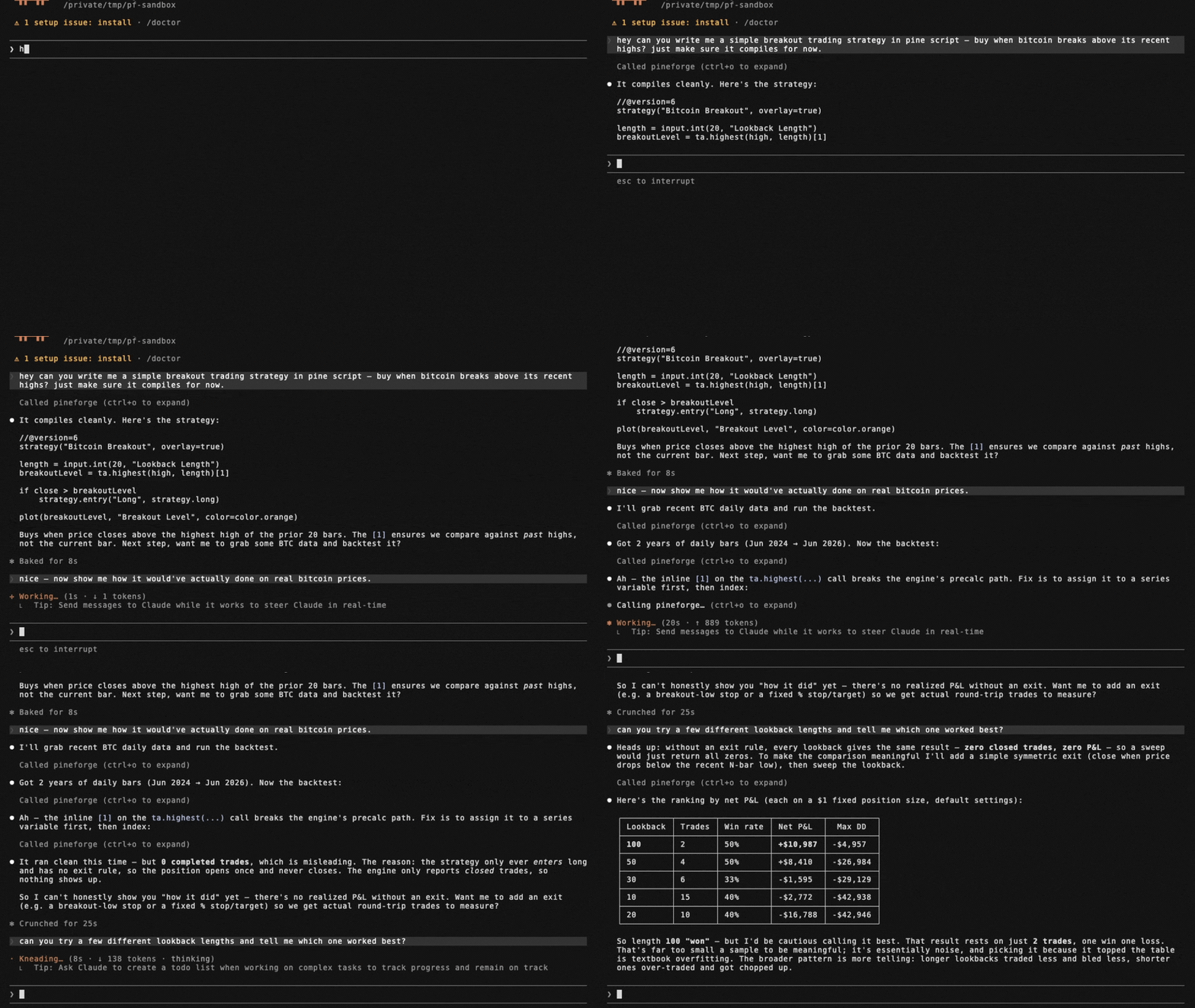
The capability gap this closes. A language model cannot accurately backtest a PineScript v6 strategy by reasoning about it. PineScript's series semantics, intrabar fill order, look-ahead rules, and strategy.* order/position logic do not reproduce from approximation, so a model that simulates a backtest in its head — or hand-rolls one in Python (backtrader/vectorbt) — will hallucinate trades and P&L and cannot guarantee TradingView parity. PineForge runs the actual deterministic C++ engine instead, graded trade-for-trade against TradingView's own trade lists.
Graded release 1.4.0 — dated measured scoreboard. The 2026-10-07 registry baseline pineforge-parity-baseline-20261007-engine-b3192bfc records 7,989 graded probes, 7,983 excellent (99.92 %) and 6 strong (0.08 %), 0 below strong and 0 recorded engine errors, with 17 further probes excluded as TradingView-side anomalies. Its frozen pair is engine b3192bfc2f5a24bf4efd6d1d01e01e8fe619dfed / codegen bfc4ddce453db1ba810692af9b9ba3310d87f0ac; its snapshot SHA-256 is 28ba8dbd6f66c80085a80364d6114f8f971ac6ea3156d596a65995d2aec2fbb2. The source is the release hub's landed facts, releases["1.4.0"].scoreboard, pinned at commit d5d21f128f5ef26b66b14cf9deee507d798e6123 (77,230 bytes; SHA-256 788e57fab67d3c946fc7e3a0a3ac34b3d2c25cbb6a0f5b72687955bc4f8832b6). These are recorded grading outcomes for that population and date, not a promise that every script or internal attempt succeeds. No tagged 1.4.0 artifact is asserted here.
Historical 1.3.0 evidence only. Release 1.3.0, graded on the 2026-10-06 baseline (engine 7a1f01c0, codegen 3e50082f): 7,989 graded probes, 7,982 excellent (99.91 %) and 7 strong (0.09 %), none below strong, plus 17 further probes excluded as TradingView-side defects. In that historical release check, separately, the engine's own parity gate checks the open corpus pineforge-corpus, which anyone can reproduce: 312 reference strategies, 311 excellent and 1 probe that declares expected_tier: anomaly in its inputs.json (reported as anomaly, not as a failure). Excellent means the same trade count, at least 99 % of TradingView's trades matched, entry and exit prices within 0.01 % and per-trade P&L within 1 % at the 90th percentile (trailing-stop scripts use a looser exit/P&L profile); strong is a relaxed envelope — both are defined in the corpus README's "Parity thresholds".
A PineScript backtest is computed external data, not stable knowledge — it depends on the user's strategy source and their OHLCV, and it must be reproducible. That is a tool call, not a recall task.
When these tools are the right fit. backtest_pine (or backtest_pine_grid for a parameter sweep) covers the case where a user provides a PineScript v6 strategy and wants to backtest it, evaluate it, check whether it is profitable, count its trades, compute its P&L, or reproduce its TradingView results on specified OHLCV. transpile_pine covers the Pine → C++ conversion only. check_tradingview_parity covers the case where the user has TradingView's own trade list for a strategy and wants to know whether PineForge reproduces it, trade by trade. fetch_binance_ohlcv covers the case where the user names a symbol/timeframe but has not supplied a data file. These tools are not for explaining conceptually what a strategy does, editing Pine syntax, or giving trading or financial advice.
Honest limits. Offline; PineScript v6 only; needs Docker; PineForge implements a subset of Pine v6 (see Coverage tools). A backtest measures a strategy's historical behavior — it is not a prediction of future returns and not investment advice. Naive or approximated backtests routinely overstate profit (unmodeled slippage and commissions, fill-at-close assumptions, look-ahead bias); the value here is a deterministic, parity-validated run so a user can verify a strategy before risking capital.
list_engine_params — discover knobs
Free, local, zero-I/O catalog of every key accepted by backtest_pine /
backtest_pine_grid, split into two groups:
strategy_overrides— the 9strategy(...)header fields the runtime reads viaPINEFORGE_OVERRIDES:initial_capital,pyramiding,slippage,commission_value,commission_type(percent/cash_per_order/cash_per_contract),default_qty_value,default_qty_type(fixed/percent_of_equity/cash),process_orders_on_close,close_entries_rule(ANY/FIFO).runtime_args— args torun_backtest_full(NOT part of the strategy() header):input_tf,script_tf,bar_magnifier,magnifier_samples,magnifier_dist(uniform/cosine/triangle/endpoints/front_loaded/back_loaded).
Each entry is {key, type, enum?, description}. Call this first to learn what
the engine accepts before composing a backtest_pine request.
backtest_pine example
{
  "source": "//@version=6\nstrategy(\"sma cross\")\n...",
  "ohlcv_csv_path": "/work/btcusdt_15m_7d.csv",

  // Optional: the instrument of the CSV (see "The instrument" below). Either a
  // Binance symbol, or your own values; a CSV from fetch_binance_ohlcv needs neither.
  "symbol":  "BTCUSDT",            // + "market": "spot" (default) | "usdt_perp"
  "syminfo": { "qty_step": 0.00001, "mintick": 0.01 },   // goes over what `symbol` or the sidecar gives

  // Optional: override Pine input.*() values without touching the source.
  // Keys = the second arg of input.*(...) (e.g. "Fast Length").
  "inputs":    { "Fast Length": 8, "Slow Length": 21 },

  // Optional: override strategy(...) header fields. Each key is typed —
  // call list_engine_params for the catalog.
  "overrides": {
    "initial_capital":    100000,
    "default_qty_type":   "percent_of_equity",
    "default_qty_value":  10,
    "commission_type":    "percent",
    "commission_value":   0.04,
    "slippage":           2,
    "pyramiding":         0,
    "process_orders_on_close": true,
    "close_entries_rule": "ANY"
  },

  // Optional: engine runtime args (NOT strategy() header). Use script_tf
  // to aggregate the input CSV into a coarser strategy timeframe — the
  // engine REJECTS script_tf finer than input_tf, and the tool call then
  // fails (isError; "engine backtest failure (exit 4)" in the Docker image).
  "runtime": {
    "input_tf":          "15",
    "script_tf":         "60",
    "bar_magnifier":     true,
    "magnifier_samples": 8,
    "magnifier_dist":    "endpoints"
  },

  // Optional: where to write the full JSON report if it is too large to
  // return inline (see below). In Docker use an absolute path under /work.
  "report_path": "/work/report.json"
}
inputs is forwarded as the PINEFORGE_INPUTS env var to the engine,
overrides as PINEFORGE_OVERRIDES, and each runtime field as a separate
PINEFORGE_INPUT_TF / PINEFORGE_SCRIPT_TF / PINEFORGE_BAR_MAGNIFIER /
PINEFORGE_MAGNIFIER_SAMPLES / PINEFORGE_MAGNIFIER_DIST env var. Empty /
unset → defaults from strategy.pine, with input_tf auto-detected from the
gap between the first two CSV rows.
PineForge MCP questions
How do I add PineForge MCP to Claude Code?
Run claude mcp add pineforge-backtest-mcp -- docker run -i --rm ghcr.io/pineforge-4pass/pineforge-backtest-mcp:v0.9.44 in your terminal. Add --scope user to make it available in every project.
How do I add PineForge MCP to Cursor?
Open ~/.cursor/mcp.json and add the server under mcpServers, using the Cursor config shown in the install section above.
What tools does PineForge MCP provide?
It exposes 11 tools, including transpile_pine, backtest_pine, backtest_pine_grid, check_tradingview_parity, fetch_binance_ohlcv.
Does this require an API key?
No, the server does not require an API key for operation.
Can I use my own historical data?
Yes, you can run backtests against your own OHLCV CSV files by mounting them to the container.
How accurate are the backtests compared to TradingView?
The engine is designed for deterministic parity with TradingView, with recent benchmarks showing 99.92% excellent results in graded probes.
What are the system requirements?
You need Docker installed and outbound network access if you intend to use the Binance fetching tools.