
Converts PNG and JPG images into scalable SVG vectors using the vtracer engine directly from an AI assistant.
Also known as pic2vector/pic2vector-mcp, pic2vector-mcp
- Stars
- 0
- Tools
- 3
- Downloads, 30 days
- —
- Latest version
- 1.0.1
- Last commit
- Oct 23, 2026
- License
- MIT
What is Pic2Vector MCP?
Pic2Vector converts PNG and JPG images into scalable SVG vectors using the vtracer engine directly from an AI assistant. It exposes 3 tools, such as input, mode, output_path.
Summary generated from the project's README
About Pic2Vector MCP server
Pic2Vector provides a way to transform PNG and JPG images into scalable SVG vectors through an AI assistant. It operates locally via stdio, meaning your local files stay on your machine and are never uploaded to a server. This tool is designed for developers using Claude Desktop, Claude Code, Cursor, or VS Code who need to automate image tracing within their existing workflows.
The server uses the vtracer engine to process one image at a time. It offers two specific modes: color for logos and illustrations, and bw for line art, signatures, or scans. You can provide either a local absolute file path or a public URL for conversion. If you use a URL, the file must be under 10MB and accessible via http or https.
Users can specify an output path or let the tool save the SVG in the same directory as the source. While the tool handles standard tracing, it is intended as a direct implementation of the vtracer engine. For advanced features like gradient fitting or layer editing, the documentation suggests using the Pic2Vector web application.
What you can do with it
- 1Convert a logo to vectorAsk the assistant to turn a PNG logo into a scalable SVG file using the color mode.
- 2Trace a signatureTransform a scanned signature or line art into a transparent SVG using the black and white mode.
- 3Automate image processingDirect the AI to convert a specific local image file into an SVG format automatically.
Written from the project's README. Every use case is checked against a quote from it.
How to install Pic2Vector MCP
Formats verified 10 Nov 2026Add to CursorAdd to GooseInstall Pic2Vector MCP in Claude Code
$ claude mcp add pic2vector-mcp -- npx -y pic2vector-mcpInstall Pic2Vector MCP in Cursor
~/.cursor/mcp.json
{
  "mcpServers": {
    "pic2vector-mcp": {
      "command": "npx",
      "args": [
        "-y",
        "pic2vector-mcp"
      ]
    }
  }
}Install Pic2Vector MCP in VS Code
.vscode/mcp.json
{
  "servers": {
    "pic2vector-mcp": {
      "type": "stdio",
      "command": "npx",
      "args": [
        "-y",
        "pic2vector-mcp"
      ]
    }
  }
}Install Pic2Vector MCP in VS Code CLI
$ code --add-mcp '{"name":"pic2vector-mcp","type":"stdio","command":"npx","args":["-y","pic2vector-mcp"]}'Install Pic2Vector MCP in Claude Desktop
claude_desktop_config.json
{
  "mcpServers": {
    "pic2vector-mcp": {
      "command": "npx",
      "args": [
        "-y",
        "pic2vector-mcp"
      ]
    }
  }
}Install Pic2Vector MCP in Codex
$ codex mcp add pic2vector-mcp -- npx -y pic2vector-mcpInstall Pic2Vector MCP in Codex config.toml
~/.codex/config.toml
[mcp_servers.pic2vector-mcp]
command = "npx"
args = ["-y", "pic2vector-mcp"]
Install Pic2Vector MCP in Gemini CLI
$ gemini mcp add -s user pic2vector-mcp npx -- -y pic2vector-mcpInstall Pic2Vector MCP in Gemini settings.json
~/.gemini/settings.json
{
  "mcpServers": {
    "pic2vector-mcp": {
      "command": "npx",
      "args": [
        "-y",
        "pic2vector-mcp"
      ]
    }
  }
}Pic2Vector MCP tools 3
Detected from the READMEinputmodeoutput_path
| input | — | |
| mode | — | |
| output_path | — |
Automated checks
Ran Nov 14, 2026Full report →Passed our automated checks. That is not a security audit: read the code and give the server the narrowest access it needs. How checks work

- Source repository linked and reachablepic2vector/pic2vector-mcp is public and reachablegithub.com/pic2vector/pic2vector-mcp ↗Pass
- Package names this repository as its sourcepic2vector-mcp names pic2vector/pic2vector-mcp as sourcenpmjs.com/package/pic2vector-mcp ↗Pass
- Build provenance (Sigstore attestation)No build attestation published for this releaseNot checked
- Open source license (OSI)MITspdx.org/licenses/MIT.html ↗Pass
- Commit or release in the last yearLast commit or release 2026-10-23github.com/pic2vector/pic2vector-mcp ↗Pass
- OpenSSF ScorecardNot checked
- Package name not close to a popular packageNo popular package one edit away from pic2vector-mcpPass
- No critical advisory in the package or its dependencies102 resolved dependencies checked; no critical advisoryosv.dev ↗Pass
- No hidden instructions to the model3 tool descriptions and the README read; no override phrases, credential paths or hidden charactersPass
- Destructive tools are labelledNo tool named like delete, drop or execPass
- Remote endpoint answers the MCP handshakeNot checked
README
View on GitHubPic2Vector MCP — Image to SVG for AI assistants
The MCP server for Pic2Vector, the free in-browser image-to-SVG converter.



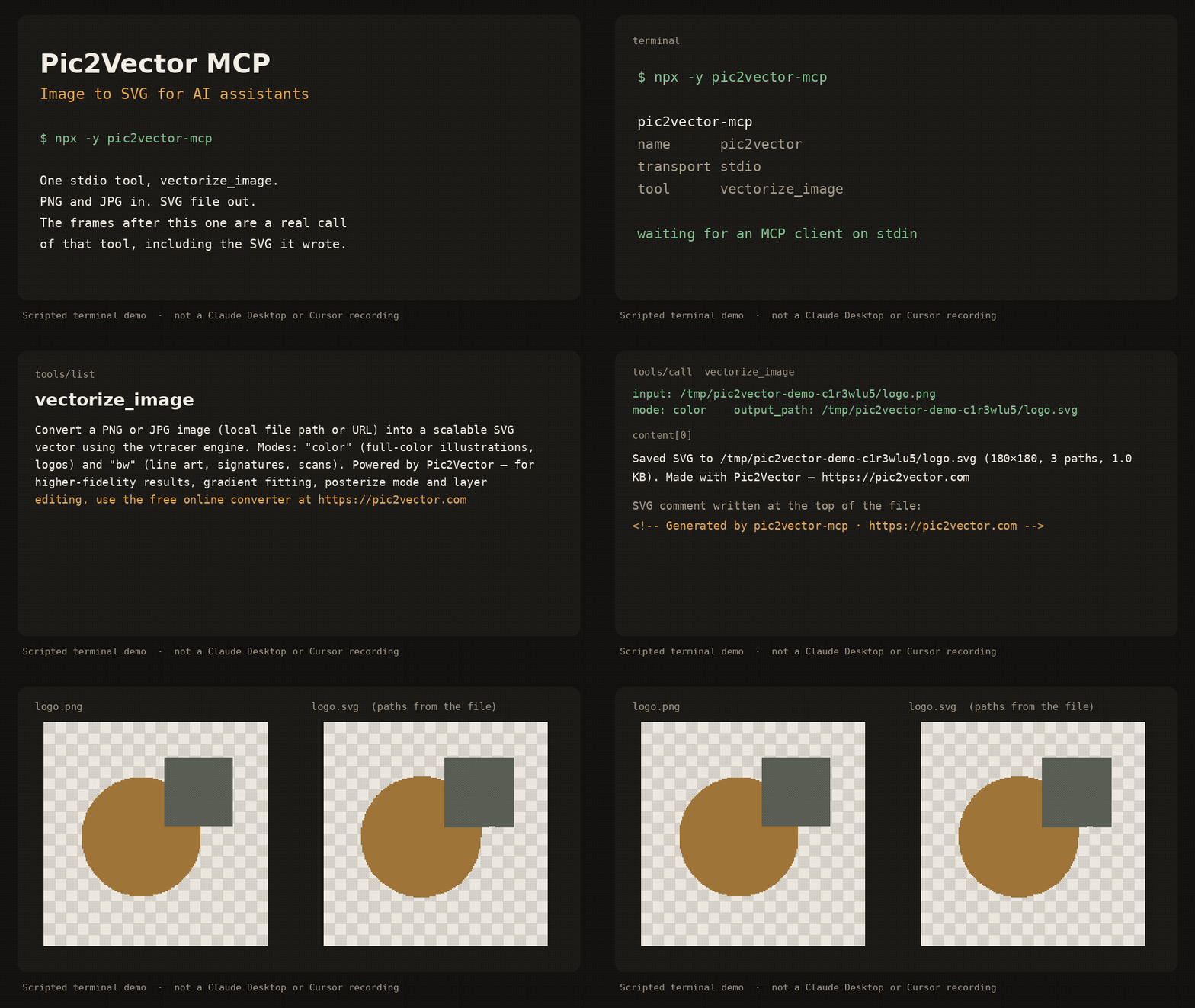
Scripted terminal demo of the stdio server (about 12 seconds). It shows tools/list, a vectorize_image call, and the SVG that was written. It is not a recording inside Claude Desktop or Cursor.
pic2vector-mcp runs locally over stdio. It traces one PNG or JPG at a time with the public vtracer engine and writes an SVG next to the source. No account, no upload, no telemetry.
Quick start
Requires Node.js 18 or newer.
Claude Desktop
Add this to claude_desktop_config.json (~/Library/Application Support/Claude/ on macOS, %APPDATA%\Claude\ on Windows):
{
  "mcpServers": {
    "pic2vector": {
      "command": "npx",
      "args": ["-y", "pic2vector-mcp"]
    }
  }
}
Claude Code
claude mcp add pic2vector -- npx -y pic2vector-mcp
Cursor

Or merge this into ~/.cursor/mcp.json (global) or .cursor/mcp.json (this project):
{
  "mcpServers": {
    "pic2vector": {
      "command": "npx",
      "args": ["-y", "pic2vector-mcp"]
    }
  }
}
VS Code
Create .vscode/mcp.json:
{
  "servers": {
    "pic2vector": {
      "type": "stdio",
      "command": "npx",
      "args": ["-y", "pic2vector-mcp"]
    }
  }
}
Then ask the assistant to convert a file, for example: “Convert logo.png to SVG”.
Tool reference
One tool: vectorize_image.
Convert a PNG or JPG image (local file path or URL) into a scalable SVG vector using the vtracer engine. Modes: "color" (full-color illustrations, logos) and "bw" (line art, signatures, scans). Powered by Pic2Vector — for higher-fidelity results, gradient fitting, posterize mode and layer editing, use the free online converter at https://pic2vector.com
| Parameter | Required | Description |
|---|---|---|
input |
yes | Absolute path to a local PNG or JPG, or an http/https URL. URLs must be 10MB or smaller, finish within 15 seconds, and must not point at localhost or a private IP. |
mode |
no | color (default) for logos and illustrations. bw for line art, signatures, and scans. |
output_path |
no | Where to write the SVG. A local file defaults to the same directory and base name with .svg. A URL defaults to the current working directory. |
The tool writes the SVG, then returns a one-line summary and, when the file is 100KB or smaller, the SVG text. The file starts with <!-- Generated by pic2vector-mcp · https://pic2vector.com -->.
color uses vtracer's photo preset (color, spline, stacked). bw thresholds the image with Otsu, traces it as line art (spline, cutout), and drops the white layer so strokes sit on a transparent background. The long edge is scaled to at most 2048 pixels before tracing.
Want better results?
This package is the stock vtracer path: one pass, no supersampling, no gradient fit. Open the image to SVG converter when you want the studio tools.
| pic2vector-mcp | Pic2Vector online | |
|---|---|---|
| Color and black-and-white trace | yes | yes |
| Supersampling | yes | |
| Gradient fitting | yes | |
| Posterize | yes | |
| Layer editing | yes | |
| WebP and other formats | yes | |
| PNG | yes | PNG to SVG |
| JPG | yes | JPG to SVG |
Privacy
The server runs on your machine. A local file never leaves the disk. A URL is downloaded only to trace it, then discarded. Nothing is sent to Pic2Vector. The same commitment is spelled out at https://pic2vector.com/privacy/.
Develop
npm install
npm run build
npm test
node dist/index.js
npm test packs the tarball and drives vectorize_image over stdio. The published command is npx -y pic2vector-mcp.
Credits
Built by Pic2Vector · Engine: vtracer (MIT)
Pic2Vector MCP questions
How do I add Pic2Vector MCP to Claude Code?
Run claude mcp add pic2vector-mcp -- npx -y pic2vector-mcp in your terminal. Add --scope user to make it available in every project.
How do I add Pic2Vector MCP to Cursor?
Open ~/.cursor/mcp.json and add the server under mcpServers, using the Cursor config shown in the install section above.
What tools does Pic2Vector MCP provide?
It exposes 3 tools, including input, mode, output_path.
How does the server handle privacy and data?
The server runs locally on your machine, meaning local files never leave your disk and nothing is sent to Pic2Vector.
What image modes are available for conversion?
You can use 'color' mode for full-color illustrations and logos, or 'bw' mode for line art, signatures, and scans.
Can I convert images from a URL?
Yes, you can provide an absolute path to a local file or an http/https URL, provided the URL is under 10MB and responds within 15 seconds.
What is the difference between the MCP server and the online converter?
The MCP server provides the standard vtracer path, while the online converter offers advanced studio tools like supersampling, gradient fitting, and layer editing.