
ideate MCP server
Commit Nov 9, 2026Lets an AI client manage idea-centric workspaces, link repository worktrees, and perform inline diff or markdown reviews via MCP tools.
Also known as paultyng/ideate
- Stars
- 9
- Tools
- —
- Downloads, 30 days
- —
- Latest version
- —
- Last commit
- Nov 9, 2026
- License
- MIT
What is ideate MCP?
ideate lets an AI client manage idea-centric workspaces, link repository worktrees, and perform inline diff or markdown reviews via MCP tools.
Summary generated from the project's README
About ideate MCP server
Managing idea-centric workspaces and linking repository worktrees is what Ideate enables for developers using AI agents. This macOS-only application serves as a central hub where every idea is treated as a unique directory containing context files, external resources, and agent sessions. It allows you to organize work across one or multiple repositories without the need for manual stash management by using per-idea worktrees on shared branches.
Users interact with the system through a desktop dashboard or a CLI that communicates via a Unix socket. AI clients connect to the Ideate MCP server to perform operations like starting idea sessions, creating ideas, or linking repositories. A standout feature is the integrated review loop, where agents can request diff or markdown reviews through MCP tools, allowing you to provide inline feedback directly within the application surface. This setup ensures that your agentic workflows remain tightly coupled with your project context and code changes.
What you can do with it
- 1Create and manage idea workspacesAsk an AI agent to initialize a new project directory with its own context and history.
- 2Link repositories to specific ideasInstruct an agent to connect existing code repositories to a workspace as worktrees.
- 3Perform inline code reviewsReview code changes or markdown documentation directly within the interface after an agent requests it.
- 4Manage multi-repo agent sessionsRun an AI session that spans across several linked repositories on the same branch.
Written from the project's README. Every use case is checked against a quote from it.
Automated checks
Ran Nov 14, 2026Full report →Not verified yet. A server needs a score of 80, no serious finding, and enough data for us to check. How checks work · What to fix for more points

- Source repository linked and reachablepaultyng/ideate is public and reachablegithub.com/paultyng/ideate ↗Pass
- Package names this repository as its sourceNot checked
- Build provenance (Sigstore attestation)Not checked
- Open source license (OSI)MITspdx.org/licenses/MIT.html ↗Pass
- Commit or release in the last yearLast commit or release 2026-11-09github.com/paultyng/ideate ↗Pass
- OpenSSF ScorecardNot checked
- Package name not close to a popular packageNot checked
- No critical advisory in the package or its dependenciesNot checked
- No hidden instructions to the model0 tool descriptions and the README read; no override phrases, credential paths or hidden charactersPass
- Destructive tools are labelledNot checked
- Remote endpoint answers the MCP handshakeNot checked
README
View on GitHubIdeate


One home for every idea.
Each idea is a directory — linked repos as worktrees, context files, external resources, and AI agent sessions, all in one place. A session can range across multiple repos on the same branch. Agents request diff and markdown reviews via MCP; you respond inline.
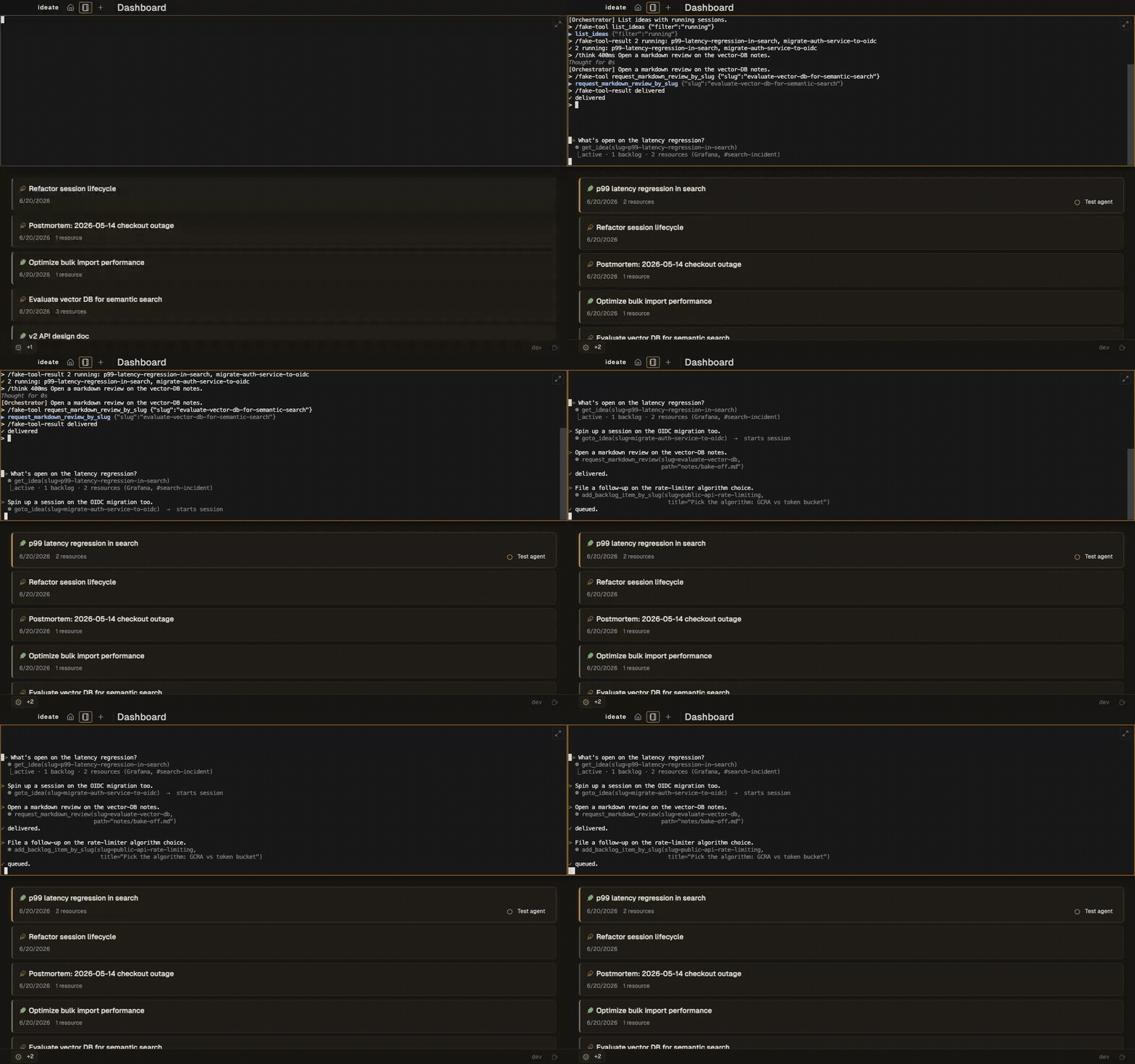
Why Ideate
- One repo, multiple repos, or none — the idea is the unit; link code only when the work calls for it.
- Per-idea worktrees — when code is in play, sessions range across linked repos on a shared branch, no stash juggling.
- In-app review loop — agents request diff or markdown reviews via MCP; you respond inline in the same surface.
If this resonates, star the repo.
Status
v0.1 preview release. macOS only. Pre-built downloads from the Releases page are signed + notarized — first launch opens normally. If you build from source the binary is adhoc-signed, so first launch needs right-click → Open. M-series Mac tested; Intel/Linux/Windows on the roadmap.
Not for you if: you need multi-user sharing, cloud sync, or Linux/Windows today.
Install
Pre-built (macOS)
Grab the latest signed .dmg from Releases; open it, drag Ideate to Applications. Tag-driven CI signs and notarizes on every v* tag. If no release is listed yet, build from source below.
From source
Prereqs: Go 1.26+, Node 20+, go-task, buf.
git clone https://github.com/paultyng/ideate.git
cd ideate

task setup            # install wails CLI + npm install in frontend/
task generate:proto   # generate proto code into internal/gen/
task build            # produces cmd/ideate/build/bin/ideate.app

open cmd/ideate/build/bin/ideate.app
Daily Use
- Launch
ideate(or open the .app). The dashboard shows your ideas grouped by status. - The orchestrator drawer is pinned on the home page. Type into it ("create an idea called X", "list my active sessions") and the agent dispatches the right MCP tool.
- Click any idea to open its detail view: sessions, repo worktrees, context files, history. Start an agent session from the sidebar.
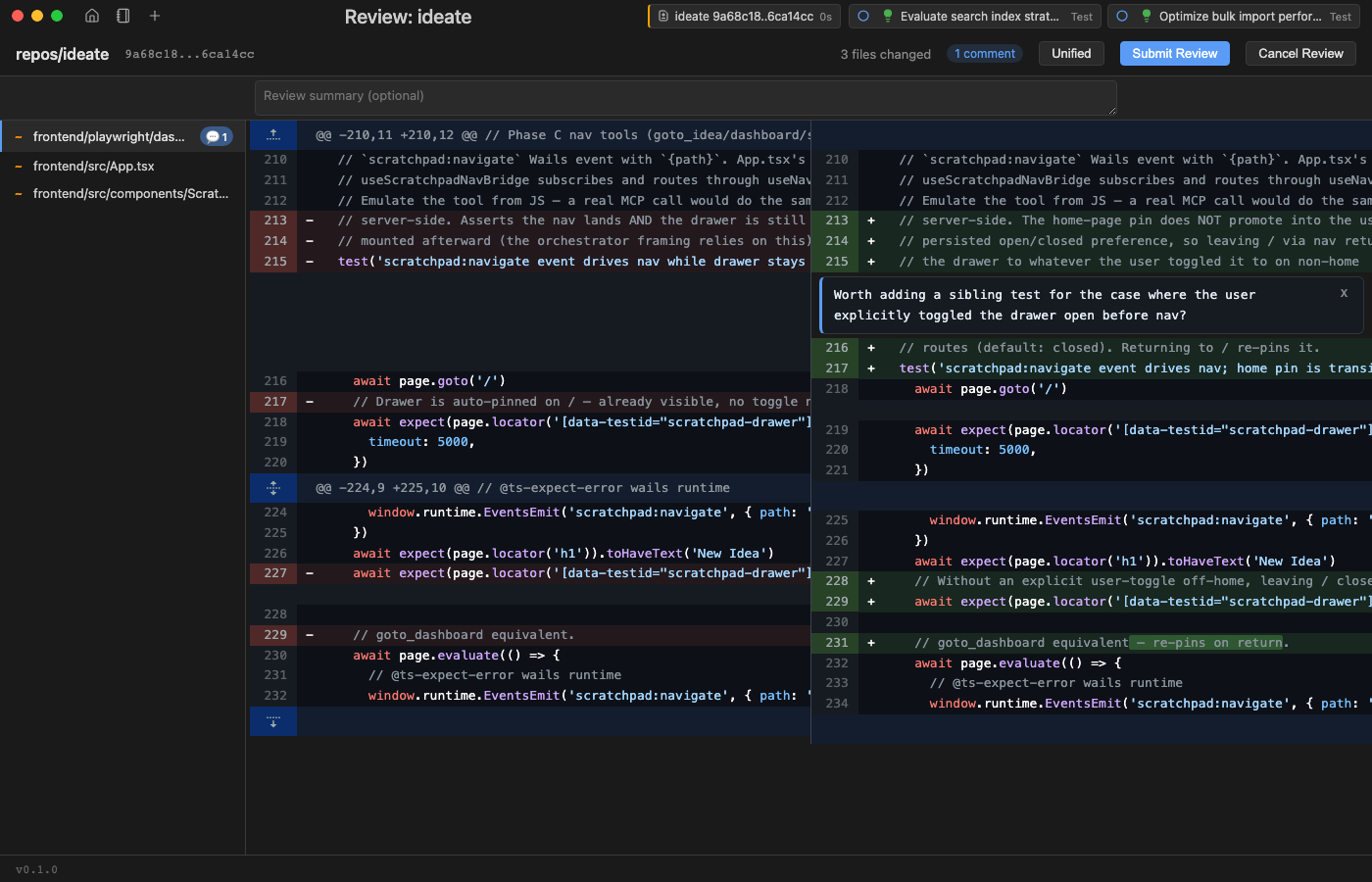
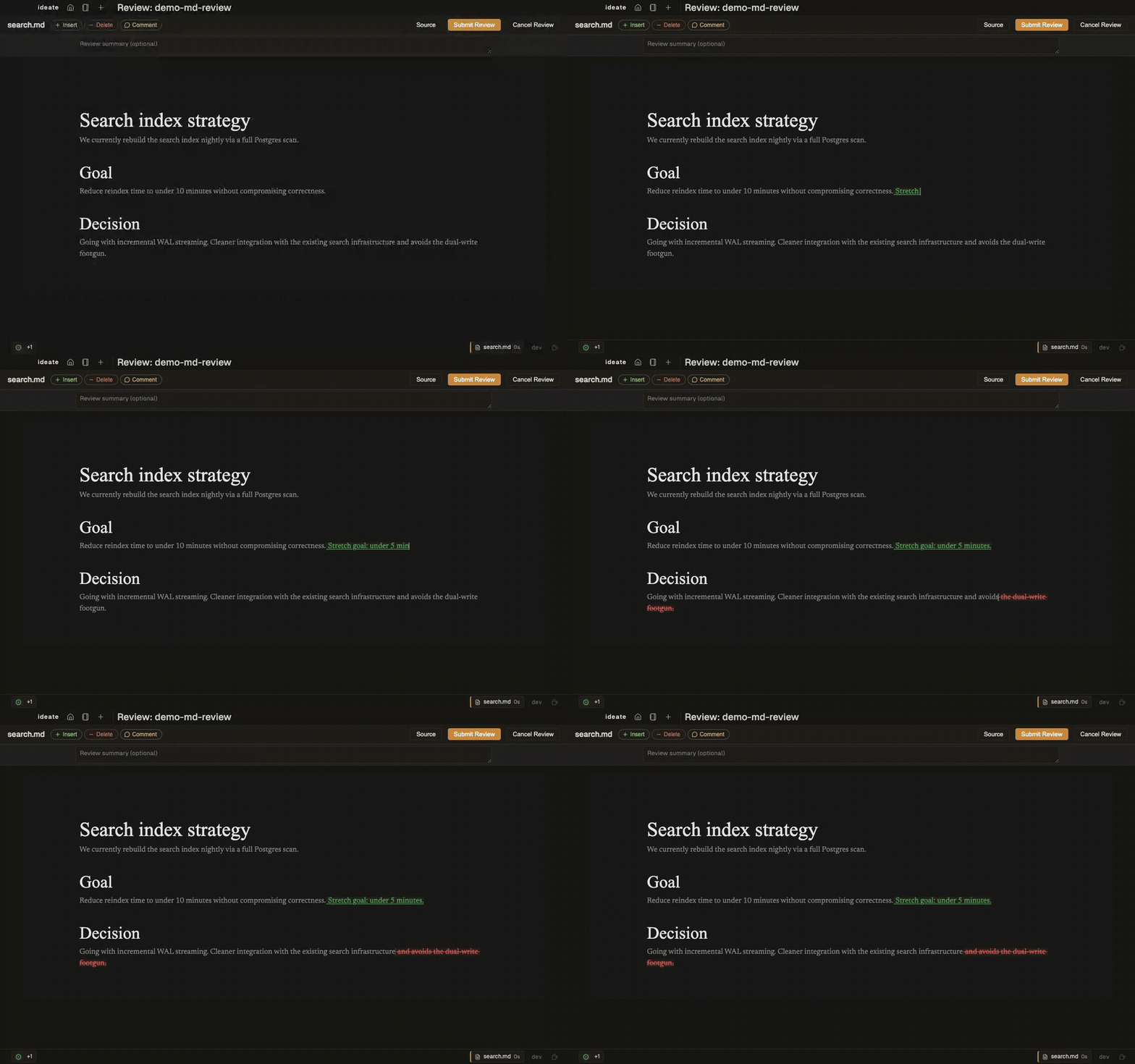
- Reviews — diff or markdown — go through the same surface. Agents request them via MCP; you respond inline; the agent sees your feedback in the next turn.
The footer toggles a sleep inhibitor for long-running sessions.
Screenshots
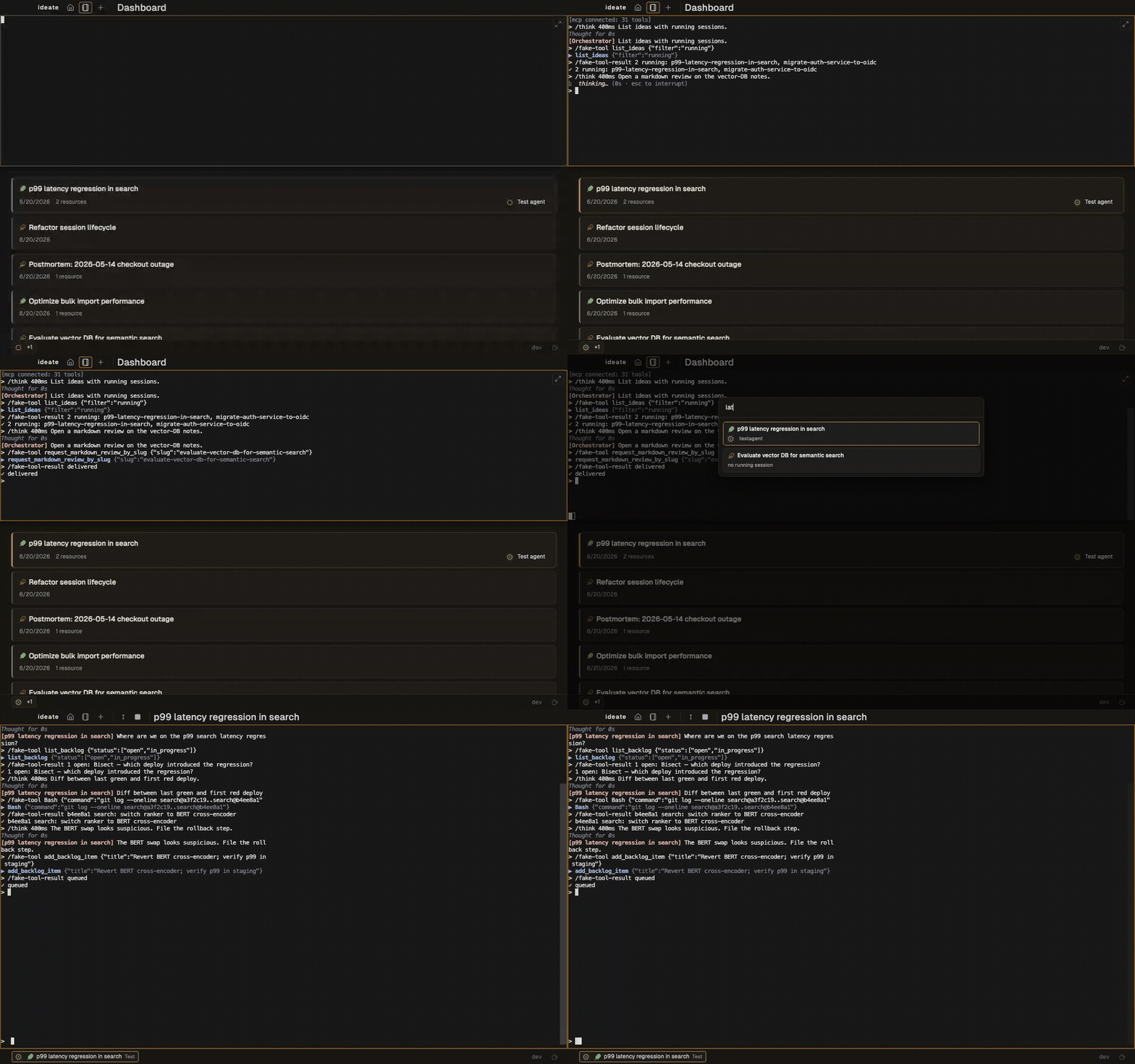
Quick-switch across ideas
Diff review with inline comment
Markdown review with CriticMarkup edits
CLI
Single binary; subcommands talk to a running app via Unix socket.
| Command | Purpose |
|---|---|
ideate |
Launch the app (daemon) |
ideate review <id> |
Open a review by ID (diff or markdown — kind detected) |
ideate review diff |
Open diff review UI for an existing review |
ideate review diff start |
Create a new diff review and print its ID |
ideate review md start --path <file> |
Create a new markdown review for the given file |
ideate review status <id> |
Print review record as JSON |
ideate status |
Health check (is the app running?) |
Session creation, repo linking, and idea import live in the UI; agents reach the same operations via MCP tools (start_idea_session, link_repo*, create_idea).
Run ideate <command> --help for full flag reference.
MCP Tools
Each agent session is wired with an Ideate MCP server (injected via --mcp-config). Tools are split into three tiers: idea-bound, cross-idea, and orchestrator-only. Agents discover the full surface at session start.
Integrations
Resources are pluggable. Each idea links to external systems via typed resources — docs, issue trackers, repos, CI, observability dashboards, feature flags, deploys, incidents. Built-ins cover common SaaS resource types; extend via the resource type registry.
Agent integration is via MCP — any tool with an MCP server (or a thin CLI shim) works from inside an agent session without Ideate-specific glue.
Architecture
See CLAUDE.md for the architecture overview, data model, and resolved decisions. Short version: each idea is a directory with an idea.md (YAML frontmatter + Markdown body) plus per-idea sessions, history, and backlog; agent integration is via an Ideate MCP server + HTTP hooks; the desktop UI is React in a system webview via Wails v2.
Contributing
See CONTRIBUTING.md for contribution guidelines and docs/development.md for the dev-loop commands and local port assignments. CLAUDE.md covers the architecture and data model. Run task ci before pushing.
Similar Software / Prior Art
Tools that overlap with or inspired aspects of this project.
Idea / Project Management
| Tool | What It Does |
|---|---|
| GitKraken Launchpad | Cross-platform PR/issue aggregation |
| Pieces for Developers | Local-first context memory across tools |
| Backstage | Service catalog with plugin architecture (Spotify/CNCF) |
| Huly (GitHub) | OSS PM platform — issues, docs, chat |
| Obsidian | Local-first note-taking with developer integrations via plugins |
| Eclipse Mylyn | Pioneered task-focused interfaces (2004) |
| Plane (GitHub) | Modern dev-focused PM with GitHub PR integration |
| Tegon | AI-first issue tracker, omni-channel bug reporting |
| Focalboard (GitHub) | Local-first personal project board |
| DevDash | Configurable terminal developer dashboard |
| Diffity | GitHub-style diff viewer with inline comments |
Agent Orchestration
| Tool | What It Does |
|---|---|
| Maestro (site) | Open-source agent orchestrator |
| Automaker | Kanban + agent execution in git worktrees |
| Stoneforge | Director/Worker/Steward agent coordination |
| Composio Agent Orchestrator | Fleet management for parallel coding agents |
| Paperclip | Org charts + ticketing for AI agent teams |
| Conductor | Durable workflow orchestration engine (Orkes) |
| CrewAI, LangGraph, AutoGen | Agent runtime frameworks |
| IttyBitty | Barebones multi-agent orchestrator for Claude Code |
| Claude Code Agent Farm | Runs 20–50+ Claude Code agents in parallel |
| KaibanJS | Kanban UI for agentic workflows |
| Vibe Kanban | Kanban board for AI coding agents |
| Superset | Electron app for orchestrating CLI agents in parallel with isolated worktrees — closest architectural precedent |
| Crush | Pure-Go terminal coding agent with MCP client + diff review |
| Pi | Minimal terminal coding harness — "adapt Pi to your workflows, not the other way around" |
Wails Apps
| Tool | Relevance |
|---|---|
| RWKV-Runner (6K+ stars) | Most popular Wails+LLM project — chat interface, model management |
| ask-mai | Multi-provider LLM chat with MCP client/server support |
| specprint | Spec-driven Claude dev workspace |
| WailsTerm | Terminal emulator with Wails + xterm.js |
| wails-terminal | Demo terminal app using Wails + xterm.js |
| eDEX-UI Golang | Sci-fi terminal rebuilt from Electron to Wails (150 MB → 42 MB) |
License
MIT.
ideate MCP questions
How do agents interact with Ideate?
Agents interact through an Ideate MCP server, allowing them to use tools for creating ideas, linking repositories, and starting sessions.
Can I review code changes within the app?
Yes, agents can request diff or markdown reviews via MCP, and you can respond to them inline within the application.
Does Ideate support cloud synchronization?
No, Ideate is a local-first application and does not currently support multi-user sharing or cloud sync.