
Lets AI agents query databases and inspect schemas through safe, visible MCP tools with read-only access by default.
Also known as pattrnlabs/grain, grain, grain-tools
- Stars
- 3
- Tools
- —
- Downloads, 30 days
- —
- Latest version
- 0.10.49
- Last commit
- Nov 4, 2026
- License
- —
What is Grain MCP?
Grain lets AI agents query databases and inspect schemas through safe, visible MCP tools with read-only access by default.
Summary generated from the project's README
About Grain MCP server
Grain SQL provides a workspace for developers to manage database connections and execute queries directly within VS Code. It functions as an MCP server that allows AI agents from Claude Code, Cursor, and GitHub Copilot to interact with your data. The system is designed with a focus on security, offering read-only access by default through a safe mode that restricts agents to specific commands like SELECT, SHOW, and DESCRIBE.
Users can connect to a wide variety of data sources including PostgreSQL, MySQL, SQLite, Snowflake, BigQuery, and DuckDB. The server runs locally on your machine, ensuring that passwords remain in your OS keychain and queries never leave your environment. It supports remote development setups such as WSL, dev containers, and GitHub Codespaces, making it a versatile tool for modern engineering workflows.
What you can do with it
- 1Grant AI agents database accessAllow an AI agent to inspect your database schema and run queries through the MCP protocol.
- 2Monitor agent activityWatch every query an AI agent executes in real time through a dedicated results panel.
- 3Secure data explorationRestrict AI agents to read-only operations to prevent accidental data modification.
Written from the project's README. Every use case is checked against a quote from it.
How to install Grain MCP
Formats verified 10 Nov 2026Add to CursorAdd to GooseInstall Grain MCP in Claude Code
$ claude mcp add --env 'GRAIN_CONNECTIONS=<YOUR_GRAIN_CONNECTIONS>' grain -- npx -y grain-toolsInstall Grain MCP in Cursor
~/.cursor/mcp.json
{
  "mcpServers": {
    "grain": {
      "command": "npx",
      "args": [
        "-y",
        "grain-tools"
      ],
      "env": {
        "GRAIN_CONNECTIONS": "<YOUR_GRAIN_CONNECTIONS>"
      }
    }
  }
}Install Grain MCP in VS Code
.vscode/mcp.json
{
  "servers": {
    "grain": {
      "type": "stdio",
      "command": "npx",
      "args": [
        "-y",
        "grain-tools"
      ],
      "env": {
        "GRAIN_CONNECTIONS": "<YOUR_GRAIN_CONNECTIONS>"
      }
    }
  }
}Install Grain MCP in VS Code CLI
$ code --add-mcp '{"name":"grain","type":"stdio","command":"npx","args":["-y","grain-tools"],"env":{"GRAIN_CONNECTIONS":"<YOUR_GRAIN_CONNECTIONS>"}}'Install Grain MCP in Claude Desktop
claude_desktop_config.json
{
  "mcpServers": {
    "grain": {
      "command": "npx",
      "args": [
        "-y",
        "grain-tools"
      ],
      "env": {
        "GRAIN_CONNECTIONS": "<YOUR_GRAIN_CONNECTIONS>"
      }
    }
  }
}Install Grain MCP in Codex
$ codex mcp add grain --env 'GRAIN_CONNECTIONS=<YOUR_GRAIN_CONNECTIONS>' -- npx -y grain-toolsInstall Grain MCP in Codex config.toml
~/.codex/config.toml
[mcp_servers.grain]
command = "npx"
args = ["-y", "grain-tools"]

[mcp_servers.grain.env]
GRAIN_CONNECTIONS = "<YOUR_GRAIN_CONNECTIONS>"
Install Grain MCP in Gemini CLI
$ gemini mcp add -s user -e 'GRAIN_CONNECTIONS=<YOUR_GRAIN_CONNECTIONS>' grain npx -- -y grain-toolsInstall Grain MCP in Gemini settings.json
~/.gemini/settings.json
{
  "mcpServers": {
    "grain": {
      "command": "npx",
      "args": [
        "-y",
        "grain-tools"
      ],
      "env": {
        "GRAIN_CONNECTIONS": "<YOUR_GRAIN_CONNECTIONS>"
      }
    }
  }
}Configuration
GRAIN_CONNECTIONSSecretJSON array of Grain connection profiles for headless use.
GRAIN_MAX_ROWSMaximum rows returned by query tools. Defaults to 10000.
GRAIN_MCP_SAFE_MODESet to false to allow mutating SQL. Defaults to true.
| Name | Description | |
|---|---|---|
| GRAIN_CONNECTIONS | JSON array of Grain connection profiles for headless use. | Secret |
| GRAIN_MAX_ROWS | Maximum rows returned by query tools. Defaults to 10000. | |
| GRAIN_MCP_SAFE_MODE | Set to false to allow mutating SQL. Defaults to true. |
Automated checks
Ran Nov 14, 2026Full report →Passed our automated checks. That is not a security audit: read the code and give the server the narrowest access it needs. How checks work · What to fix for more points

- Source repository linked and reachablepattrnlabs/grain is public and reachablegithub.com/pattrnlabs/grain ↗Pass
- Package names this repository as its sourcegrain-tools names pattrnlabs/grain as sourcenpmjs.com/package/grain-tools ↗Pass
- Build provenance (Sigstore attestation)No build attestation published for this releaseNot checked
- Open source license (OSI)No licenseFinding
- Commit or release in the last yearLast commit or release 2026-11-04github.com/pattrnlabs/grain ↗Pass
- OpenSSF ScorecardNot checked
- Package name not close to a popular packageNo popular package one edit away from grain-toolsPass
- No critical advisory in the package or its dependencies31 resolved dependencies checked; no critical advisoryosv.dev ↗Pass
- No hidden instructions to the model0 tool descriptions and the README read; no override phrases, credential paths or hidden charactersPass
- Destructive tools are labelledNot checked
- Remote endpoint answers the MCP handshakeNot checked
README
View on GitHubGrain
A fast SQL workspace for VS Code, and for the AI agents you work with.
Docs · Changelog · Report a bug · Ask a question


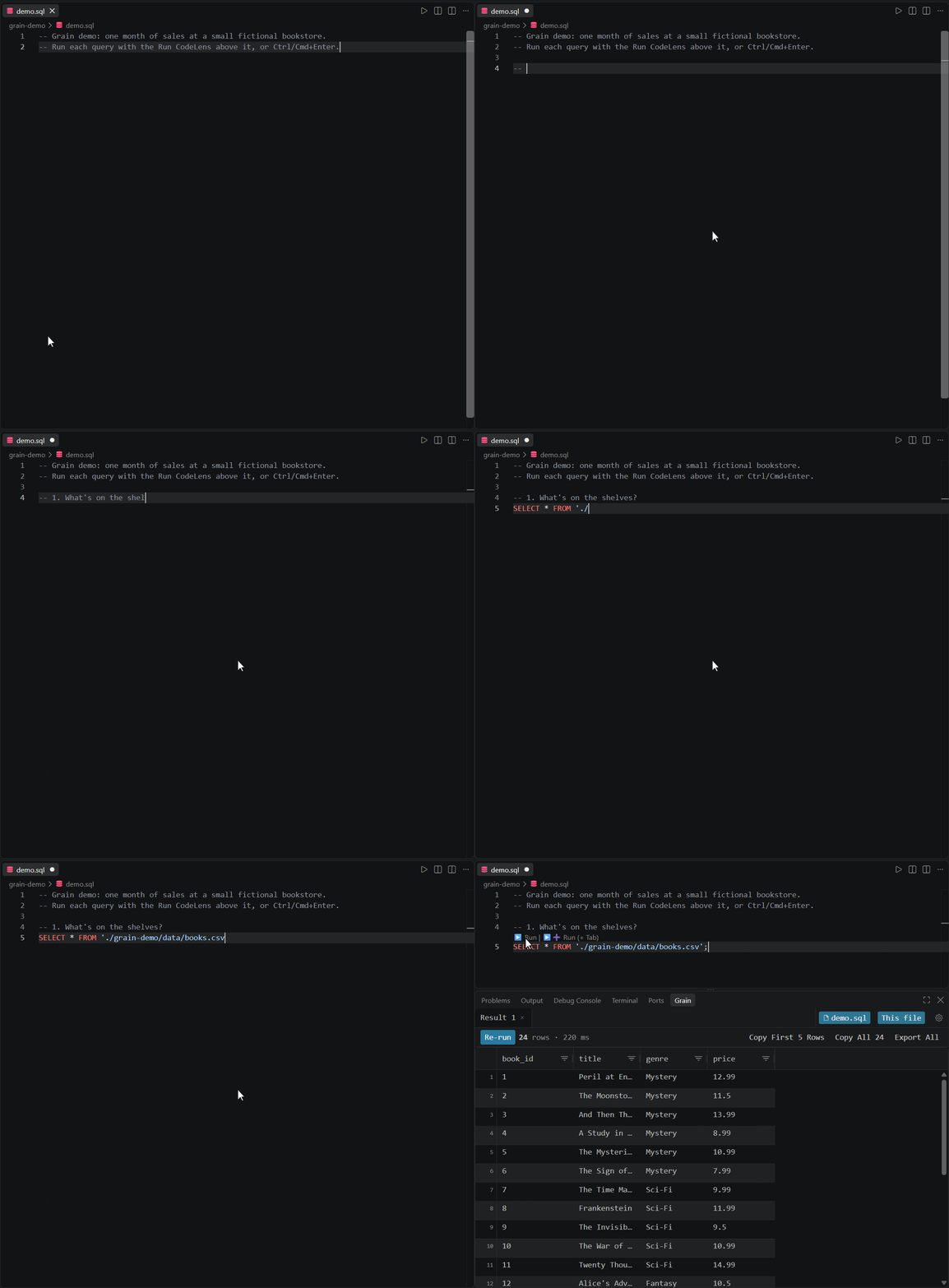
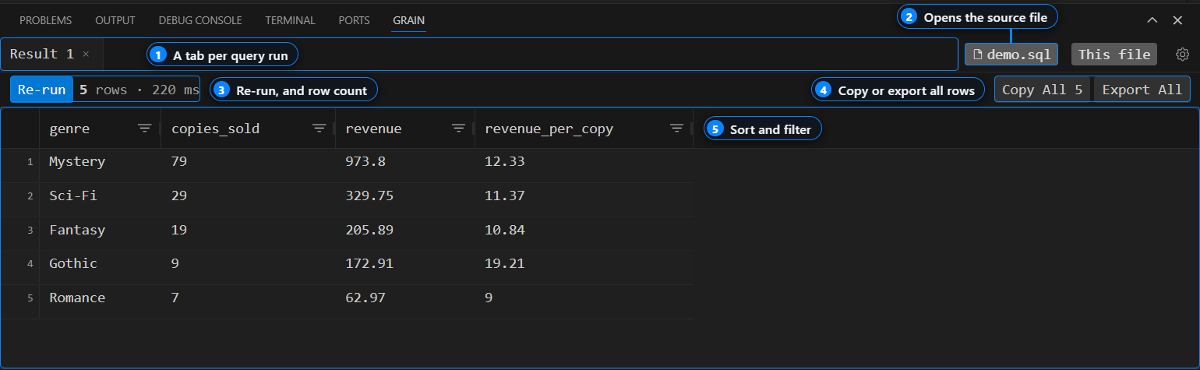
Run SQL from any .sql file with Ctrl+Enter and get the results in a
sortable grid inside VS Code. Passwords stay in your OS keychain, and Grain
has no hosted service.
Quick start
- Install Grain from the VS Code Marketplace or Open VSX (for Cursor, Windsurf, and VSCodium).
- Open a folder in VS Code. Grain adds its demo files there.
- Open the Grain panel and click Try the Demo.
- Put your cursor in any query in the file that opens and press
Ctrl+Enter(Cmd+Enteron macOS).
The demo reads two CSV files through Grain's built-in DuckDB connection, so there's nothing to set up. To query your own database, run Grain: Manage Connections, add a profile, and test it before you save.
If Grain is useful to you, a star on this repo helps other developers find it.
Use Grain from an AI agent
Grain can serve your database connections to Claude Code, Cursor, and GitHub Copilot over MCP. Agents get read-only access by default, and every query an agent runs shows up in your Grain results panel, so you can see exactly what it did.
MCP is off until you turn on grain.mcpEnabled in settings. Setup steps for
each client are in the MCP docs, and example
prompts are in examples/agents/.
Features
| Feature | What it does |
|---|---|
| Run from the editor | Ctrl+Enter runs the file; Run Query Under Cursor runs one statement; Run Query in New Tab keeps the previous result |
| Non-blocking queries | Queries run in a background process, so a slow query doesn't freeze VS Code |
| Connection manager | Create, test, and switch database profiles without editing JSON |
| Result grid | Sort, filter, and resize columns, see each column's SQL type, copy a selection as TSV |
| Full export | The grid shows the first 500 rows; export re-runs the query and writes every row to CSV, TSV, or JSON |
| Agent access over MCP | Claude Code, Cursor, and Copilot can query your connections; their results land in your panel |
| Remote setups | Works over WSL, dev containers, GitHub Codespaces, and Remote - SSH |
Supported databases
Through Trino or Presto you can query your cluster's Iceberg, Delta Lake, and Hive tables. DuckDB queries local CSV and Parquet files directly.
PostgreSQL and Trino / Presto are bundled with the extension. The others load their driver on first use, and if a driver is missing, Grain tells you what to install.
Need another database? Request a connector. Requests with the most 👍 get built first.
Examples
Runnable queries for Postgres, MySQL,
Elasticsearch, and DuckDB, plus
agent prompts. Open any .sql file with Grain installed
and press Ctrl+Enter.
Privacy
- Your SQL, results, and passwords stay on your machine. Passwords are stored in VS Code Secret Storage, backed by your OS keychain, and never in a settings file.
- Agents are read-only by default. With
grain.mcpSafeModeon (the default), agents can only runSELECT,SHOW,DESCRIBE,EXPLAIN,WITH, and metadata queries. Agents can't read stored passwords or change saved connections. - Telemetry is anonymous. Grain sends usage data that never includes SQL,
results, credentials, hostnames, or schema names. Turn it off with
grain.telemetry.enabled.
FAQ
Is Grain open source?
No. Grain is closed-source. This repo holds the issue tracker, docs, and
examples.
Which databases does it support?
The nine listed above. To ask for another one,
request a connector.
Do my queries or passwords leave my machine?
No. There's no Grain server. Queries go straight from VS Code to your database,
and passwords stay in your OS keychain. See Privacy for what the
anonymous telemetry does and doesn't include.
How do I connect Claude Code or Cursor?
Turn on grain.mcpEnabled, then follow the steps for your client in the
MCP docs.
Why does my database show a driver error?
Some connectors load their driver on first use. The error message names what
to install. If it's still failing after that,
file a bug report
with the Output panel logs (View → Output → Grain).
Getting help
- Bug: file a bug report
- Feature idea: file a feature request
- New database: request a connector
- Question: check the FAQ and docs, then ask a question
We don't have a fixed roadmap yet. What we build next depends a lot on what people ask for here, especially connector requests. See CONTRIBUTING.md for how to file a good issue.
Star History
License
Grain is closed-source. See LICENSE.
Grain MCP questions
How do I add Grain MCP to Claude Code?
Run claude mcp add --env 'GRAIN_CONNECTIONS=<YOUR_GRAIN_CONNECTIONS>' grain -- npx -y grain-tools in your terminal. Add --scope user to make it available in every project.
How do I add Grain MCP to Cursor?
Open ~/.cursor/mcp.json and add the server under mcpServers, using the Cursor config shown in the install section above.
Is Grain open source?
No, Grain is closed-source.
Do my queries or passwords leave my machine?
No, there is no Grain server; queries go directly from VS Code to your database and passwords are stored in your OS keychain.
How do I connect Claude Code or Cursor?
Enable grain.mcpEnabled in your settings and follow the client-specific steps in the MCP documentation.
Which databases does it support?
It supports PostgreSQL, MySQL, SQL Server, SQLite, Snowflake, BigQuery, Trino/Presto, DuckDB, and Elasticsearch.