
MCP Proxy MCP server
Commit Sep 8, 2026Expose backend API endpoints as multi-tenant Model Context Protocol tools through a lightweight reverse proxy and admin interface.
Also known as openserv-labs/mcp-proxy
- Stars
- 17
- Tools
- —
- Downloads, 30 days
- —
- Latest version
- —
- Last commit
- Sep 8, 2026
- License
- MIT
What is MCP Proxy MCP?
MCP Proxy exposes backend API endpoints as multi-tenant Model Context Protocol tools through a lightweight reverse proxy and admin interface.
Summary generated from the project's README
About MCP Proxy MCP server
Exposing backend API endpoints as multi-tenant tools is what mcp-proxy enables for developers using the Model Context Protocol. It acts as a bridge between MCP clients, such as OpenServ agents, and your existing services by mapping specific tools to backend POST endpoints. You can manage these integrations through a dedicated admin interface where you define tool names, descriptions, and parameter schemas for validation.
This server supports multiple applications, allowing you to host different environments or integrations from a single instance. Each application maintains its own unique backend URL and set of tools. To secure your configuration, the admin API requires an ADMIN_TOKEN, while client connections are made via specific application names through the mcp or sse endpoints. It is designed to work with any MCP-compatible client without requiring code changes to your original backend services.
What you can do with it
- 1Expose existing web APIsTurn your standard REST endpoints into tools that an AI agent can call directly.
- 2Control hardware via AIConnect physical devices like an Arduino to an MCP client to control LEDs or read sensors.
- 3Manage multiple service integrationsHost several different backend services under one proxy using a multi-tenant setup.
- 4Validate tool parametersEnsure that the data sent by an AI client matches the expected format before it reaches your backend.
Written from the project's README. Every use case is checked against a quote from it.
Configuration
ADMIN_TOKENBACKEND_ALLOWED_HOSTSBACKEND_ALLOW_HTTPCORS_ORIGINSLOG_LEVELMONGODB_URI
Automated checks
Ran Nov 14, 2026Full report →Not verified yet. A server needs a score of 80, no serious finding, and enough data for us to check. How checks work · What to fix for more points

- Source repository linked and reachableopenserv-labs/mcp-proxy is public and reachablegithub.com/openserv-labs/mcp-proxy ↗Pass
- Package names this repository as its sourceNot checked
- Build provenance (Sigstore attestation)Not checked
- Open source license (OSI)MITspdx.org/licenses/MIT.html ↗Pass
- Commit or release in the last yearLast commit or release 2026-09-08github.com/openserv-labs/mcp-proxy ↗Pass
- OpenSSF ScorecardNot checked
- Package name not close to a popular packageNot checked
- No critical advisory in the package or its dependenciesNot checked
- No hidden instructions to the model0 tool descriptions and the README read; no override phrases, credential paths or hidden charactersPass
- Destructive tools are labelledNot checked
- Remote endpoint answers the MCP handshakeNot checked
README
View on GitHubMCP Proxy
What is MCP Proxy?
MCP Proxy is a bridge between the OpenServ agent ecosystem and your own backend services. While it is designed with OpenServ in mind, it can be used with any client that speaks the Model Context Protocol (MCP). It allows you to define, manage, and expose custom "tools" (API endpoints) to MCP clients using a simple admin interface. Each tool is described with a name, description, and parameter schema, and is mapped to a backend endpoint.
Words to Know
- Application Name: A unique identifier for your integration. Each Application has its own backend URL and set of tools.
- Backend URL: The base URL where your backend services live. Each tool is mapped to a POST endpoint at
${backendUrl}/${toolName}. - Tools: Each tool is a function or API endpoint you want to expose to MCP clients. You define its name, description, and parameters in the admin UI.
- Parameter Schema: Each tool has a schema describing the expected parameters (name, type, description) for validation and documentation.
How it Works
-
Configure an Application
- Go to
/adminand enter a new Application Name and your backend URL. - Define tools for this application, specifying their names, descriptions, and parameters.
- Go to
-
Proxying Requests
- When an MCP client connects (via
/mcp?applicationName=...or/sse?applicationName=...), the proxy loads the tools and backend URL for that Application Name. - When the client calls a tool, MCP Proxy validates the parameters and forwards the request as a POST to your backend at
${backendUrl}/${toolName}. - The backend responds with JSON, which is returned to the client.
- When an MCP client connects (via
-
Multi-Application Support
- You can manage multiple Applications, each with its own backend and tool set.
- This allows you to host multiple integrations or environments from a single MCP Proxy instance.
Example Use Case
Suppose you have a backend with endpoints like /weather, /stock, and /translate.
You want MCP clients (such as OpenServ agents) to be able to call these as tools.
- In the admin UI, set Application Name:
my-company - Backend URL:
https://api.mycompany.com - Add tools:
weather(parameters: city, country)stock(parameters: symbol)translate(parameters: text, targetLanguage)
Now, any MCP-compatible client can connect to your MCP Proxy with ?applicationName=my-company and call these tools. The proxy will forward the requests to your backend, validate parameters, and return the results.
Real Hardware Example: Arduinogent
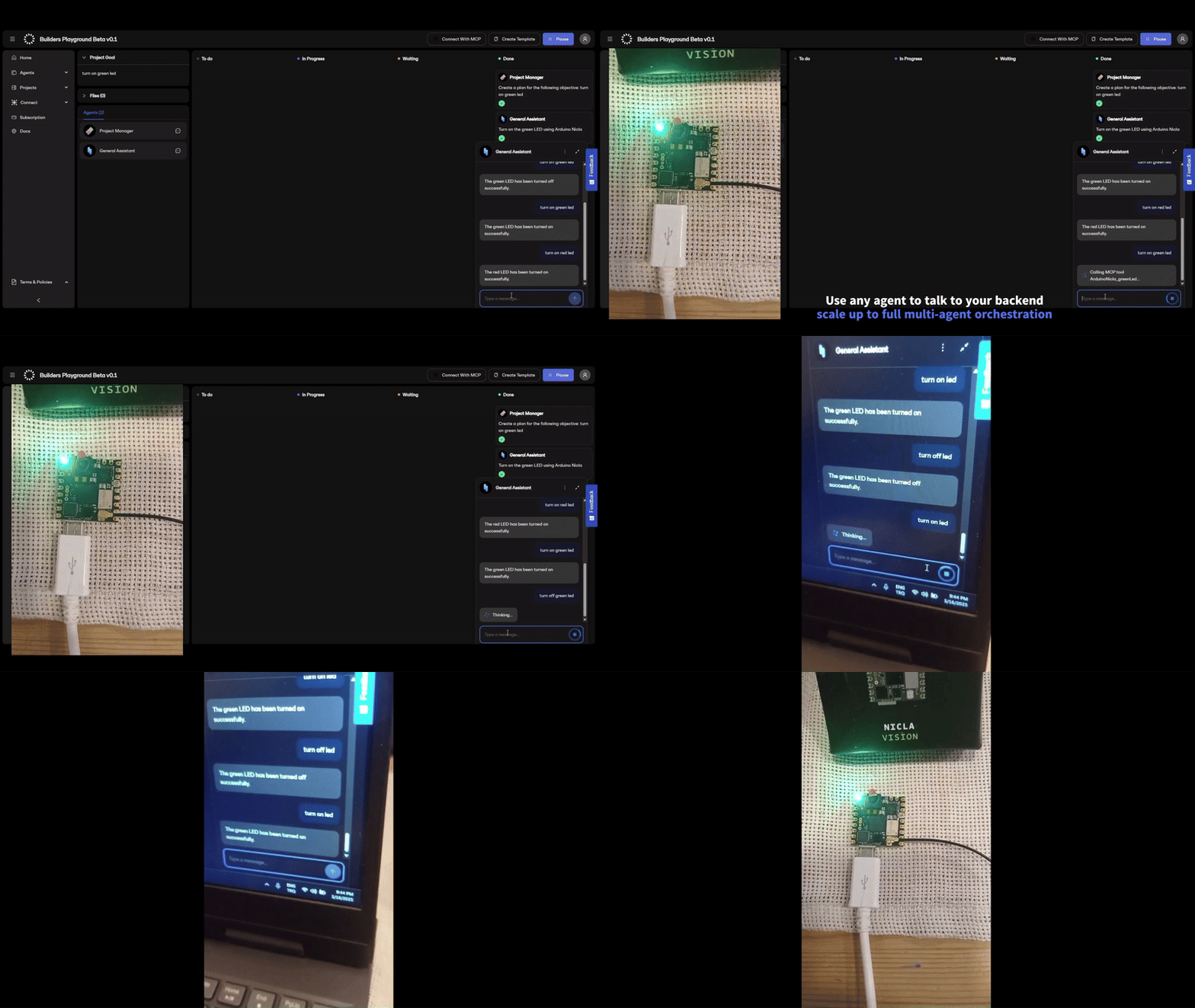
You can use MCP Proxy to connect real-world devices to MCP clients. For example, we created Arduinogent: a simple Arduino web server that exposes tool endpoints directly from an Arduino board. This lets you control or query your Arduino from any MCP-compatible client!
- In the admin UI, set Application Name:
arduino-lab - Backend URL:
http://<your-arduino-ip>(a private, plain-HTTP backend, so setBACKEND_ALLOWED_HOSTSandBACKEND_ALLOW_HTTP- see Backend URLs) - Add tools, e.g.:
led(parameters: state)temperature(no parameters)
Example Arduino code:
const char* ssid = "YOUR_WIFI_SSID";
const char* password = "YOUR_WIFI_PASSWORD";
WebServer server(80);

void handleLed() {
  String body = server.arg("plain");
  // Parse JSON body for { "state": "on" } or { "state": "off" }
  if (body.indexOf("on") >= 0) {
    digitalWrite(LED_BUILTIN, LOW); // turn LED on
    server.send(200, "application/json", "{\"result\":\"LED on\"}");
  } else {
    digitalWrite(LED_BUILTIN, HIGH); // turn LED off
    server.send(200, "application/json", "{\"result\":\"LED off\"}");
  }
}

void handleTemperature() {
  float temp = 23.5; // Replace with real sensor reading
  server.send(200, "application/json", String("{\"temperature\":") + temp + "}");
}

void setup() {
  pinMode(LED_BUILTIN, OUTPUT);
  WiFi.begin(ssid, password);
  while (WiFi.status() != WL_CONNECTED) delay(500);
  server.on("/led", HTTP_POST, handleLed);
  server.on("/temperature", HTTP_POST, handleTemperature);
  server.begin();
}

void loop() {
  server.handleClient();
}
Now, you can control your Arduino from any MCP client via MCP Proxy, just like any other backend!
Why use MCP Proxy?
- No code changes to your backend: Just expose POST endpoints.
- Centralized tool management: Add, update, or remove tools via the admin UI.
- Parameter validation: Ensures clients send the right data.
- Multi-tenant: Host multiple integrations with different backends.
- MCP compatibility: Works out-of-the-box with OpenServ agents and any other MCP client.
Installation
Setup
-
Clone the repository:
git clone https://github.com/openserv-labs/mcp-proxy.git cd mcp-proxy -
Install dependencies:
npm install -
Create a
.envfile in the project root (see.env.example):PORT=3000 HOST=127.0.0.1 MONGODB_URI=mongodb://localhost:27017/mcp-proxy ADMIN_TOKEN=<a long random secret> CORS_ORIGINS= LOG_LEVEL=infoGenerate the admin token with
openssl rand -hex 32. The admin API is disabled untilADMIN_TOKENis set - see Securing the admin API. -
Build the project:
npm run build -
Start the server:
npm start
Securing the admin API
The admin API (/admin/api/*) reads and writes the backend URL and tool
definitions for every application, so it is protected by an admin credential.
Admin token
Every /admin/api/* request must carry the ADMIN_TOKEN as a bearer token:
curl http://127.0.0.1:3000/admin/api/tools \
  -H "Authorization: Bearer $ADMIN_TOKEN" \
  -H "X-Application-Name: my-company"
X-Application-Name selects which application to act on; it is not a
credential. The admin UI at /admin prompts for the token and keeps it in the
tab's sessionStorage only.
The server fails closed: if ADMIN_TOKEN is unset or shorter than 16
characters, every admin API request is rejected with 503 and the reason is
logged at startup.
Network binding
The server binds 127.0.0.1 by default. To expose it, set HOST=0.0.0.0 -
only behind a firewall or reverse proxy, and only with ADMIN_TOKEN set.
CORS
Cross-origin requests are refused unless CORS_ORIGINS lists the exact origins
you want to allow (comma-separated), for example
CORS_ORIGINS=https://admin.example.com. Setting CORS_ORIGINS=* restores the
old allow-anything behaviour and is not recommended.
Backend URLs
An application's backend URL is fetched server-side, so a bad value turns the proxy into a relay into its own network. Backend URLs are therefore validated when they are stored and re-checked on every tool call, and the connection itself is restricted.
By default a backend URL must:
- use
https, with no embedded credentials and no query string or fragment; - point at a public host - loopback, private, link-local, carrier-grade NAT and
reserved ranges are refused, including the
169.254.169.254andfd00:ec2::254cloud metadata endpoints.
Host names are additionally checked against the addresses they actually resolve
to, at the moment the connection is made, so a name that resolves into private
space cannot be used to get around the rule. Redirects are not followed, so a
backend cannot bounce the proxy inward either. HTTP_PROXY/HTTPS_PROXY are
ignored for backend calls for the same reason: a forward proxy would resolve the
backend host itself, out of reach of these checks.
Two settings adjust this:
| Variable | Effect |
|---|---|
BACKEND_ALLOWED_HOSTS |
Comma-separated allow list; an entry may start with *. to match subdomains. When set, only these hosts are reachable, and they are trusted (private addresses are permitted). |
BACKEND_ALLOW_HTTP |
Set truthy to permit http:// backends. |
Backend request limits
| Variable | Default | Effect |
|---|---|---|
BACKEND_TIMEOUT_MS |
15000 |
Total deadline for a backend call - not an idle timeout, so a tool that legitimately takes longer needs this raised. |
BACKEND_MAX_RESPONSE_BYTES |
1048576 |
Largest backend response the proxy will read. Larger responses fail the tool call. |
To reach a backend on a private network - the Arduino example above, or a
service on localhost - name it explicitly and allow plain HTTP:
BACKEND_ALLOWED_HOSTS=192.168.1.50
BACKEND_ALLOW_HTTP=true
Note that /mcp and /sse are the client-facing endpoints and carry no
credential of their own, so anyone who knows an application name can trigger a
tool call. The control on that path is which URLs the proxy is willing to
fetch, not who may ask it to.
Contributing
Contributions are welcome! Please feel free to submit a Pull Request. For major changes, please open an issue first to discuss what you would like to change.
- Fork the repository
- Create your feature branch (
git checkout -b feature/AmazingFeature) - Commit your changes (
git commit -m 'Add some AmazingFeature') - Push to the branch (
git push origin feature/AmazingFeature) - Open a Pull Request
License
MIT License

Copyright (c) 2025 OpenServ Labs

Permission is hereby granted, free of charge, to any person obtaining a copy
of this software and associated documentation files (the "Software"), to deal
in the Software without restriction, including without limitation the rights
to use, copy, modify, merge, publish, distribute, sublicense, and/or sell
copies of the Software, and to permit persons to whom the Software is
furnished to do so, subject to the following conditions:

The above copyright notice and this permission notice shall be included in all
copies or substantial portions of the Software.

THE SOFTWARE IS PROVIDED "AS IS", WITHOUT WARRANTY OF ANY KIND, EXPRESS OR
IMPLIED, INCLUDING BUT NOT LIMITED TO THE WARRANTIES OF MERCHANTABILITY,
FITNESS FOR A PARTICULAR PURPOSE AND NONINFRINGEMENT. IN NO EVENT SHALL THE
AUTHORS OR COPYRIGHT HOLDERS BE LIABLE FOR ANY CLAIM, DAMAGES OR OTHER
LIABILITY, WHETHER IN AN ACTION OF CONTRACT, TORT OR OTHERWISE, ARISING FROM,
OUT OF OR IN CONNECTION WITH THE SOFTWARE OR THE USE OR OTHER DEALINGS IN THE
SOFTWARE.
MCP Proxy MCP questions
How do I connect my backend services to MCP Proxy?
You can connect your services by defining an Application with a backend URL and mapping tools to POST endpoints at ${backendUrl}/${toolName}.
Can I use MCP Proxy with hardware like Arduino?
Yes, you can connect real-world devices by setting the backend URL to the device's IP and enabling plain HTTP if necessary.
How is the admin API secured?
The admin API is protected by an ADMIN_TOKEN which must be provided as a bearer token in every request.
Does MCP Proxy support multiple different backends?
Yes, it supports multi-tenancy, allowing you to manage multiple applications each with its own backend and tool set.