
Dive MCP server
Dive is a desktop MCP host app that connects LLMs with tools like ChatGPT, Anthropic, and Ollama to local and cloud-based model integrations.
Also known as OpenAgentPlatform/Dive
- Stars
- 1,824
- Tools
- —
- Downloads, 30 days
- —
- Latest version
- —
- Last commit
- Jul 31, 2026
- License
- MIT
What is Dive MCP?
Dive is an MCP server. Dive is a desktop MCP host app that connects LLMs with tools like ChatGPT, Anthropic, and Ollama to local and cloud-based model integrations.
Summary generated from the project's README
About Dive MCP server
Connecting large language models to local and cloud-based tools from a single desktop interface is what Dive enables for developers and AI enthusiasts. This open-source host application works on Windows, macOS, and Linux, allowing users to link models from ChatGPT, Anthropic, and Ollama to various Model Context Protocol integrations. It supports both stdio and SSE modes to ensure compatibility with different server architectures.
Users can manage their setup through a dedicated model_settings.json file to handle multiple API keys and switch between models. The application provides built-in tools like a File Manager, Bash for command execution, and Fetch for web requests. For those seeking a simpler experience, the OAP Cloud integration offers one-click access to managed servers, removing the need for manual Python or Docker installations. The software is available in both Electron and Tauri versions, offering different performance profiles depending on the operating system and user preference.
Written from the project's README. Every use case is checked against a quote from it.
Automated checks
Ran Nov 14, 2026Full report →Not verified yet. A server needs a score of 80, no serious finding, and enough data for us to check. How checks work · What to fix for more points

- Source repository linked and reachableopenagentplatform/dive is public and reachablegithub.com/openagentplatform/dive ↗Pass
- Package names this repository as its sourceNot checked
- Build provenance (Sigstore attestation)Not checked
- Open source license (OSI)MITspdx.org/licenses/MIT.html ↗Pass
- Commit or release in the last yearLast commit or release 2026-07-31github.com/openagentplatform/dive ↗Pass
- OpenSSF ScorecardNot checked
- Package name not close to a popular packageNot checked
- No critical advisory in the package or its dependenciesNot checked
- No hidden instructions to the model0 tool descriptions and the README read; no override phrases, credential paths or hidden charactersPass
- Destructive tools are labelledNot checked
- Remote endpoint answers the MCP handshakeNot checked
README
View on GitHub








Dive is an open-source MCP Host Desktop Application that seamlessly integrates with any LLMs supporting function calling capabilities. ✨
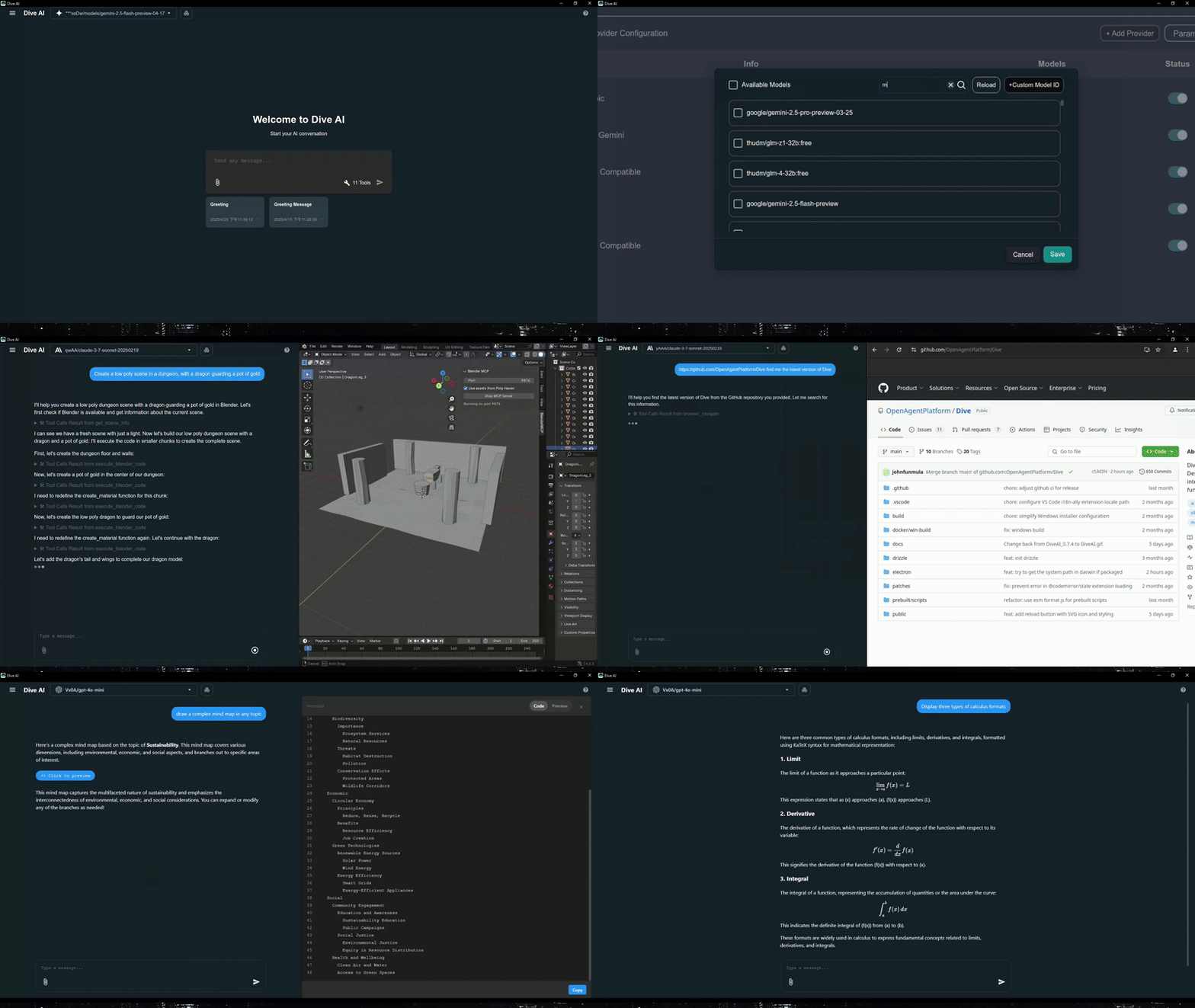
Features 🎯
- 🌐 Universal LLM Support: Compatible with ChatGPT, Anthropic, Ollama and OpenAI-compatible models
- 💻 Cross-Platform: Available for Windows, MacOS, and Linux
- 🔄 Model Context Protocol: Enabling seamless MCP AI agent integration on both stdio and SSE mode
- ☁️ OAP Cloud Integration: One-click access to managed MCP servers via OAPHub.ai - eliminates complex local deployments
- 🏗️ Dual Architecture: Modern Tauri version alongside traditional Electron version for optimal performance
- 🌍 Multi-Language Support: Supports 24+ languages including English, Traditional Chinese, Simplified Chinese, Spanish, Japanese, Korean, German, French, Italian, Portuguese, Russian, Thai, Vietnamese, Filipino, Indonesian, Polish, Turkish, Ukrainian, Swedish, Norwegian, Finnish, and Lao
- ⚙️ Advanced API Management: Multiple API keys and model switching support with
model_settings.json - 🛠️ Granular Tool Control: Enable/disable individual MCP tools for precise customization
- 💡 Custom Instructions: Personalized system prompts for tailored AI behavior
- ⌨️ Keyboard Shortcuts: Comprehensive hotkey support for efficient navigation and operations (rename, settings, reload, new chat, etc.)
- 📝 Chat Draft Saving: Automatically saves chat input drafts to prevent data loss
- 🔄 Auto-Update Mechanism: Automatically checks for and installs the latest application updates
- 🔐 MCP Server Authentication: Added support for MCP server authentication
⚠️ Note: This feature is currently unstable and may require frequent re-authorization
- 🛠️ Built-in Local Tools: Pre-configured tools available out of the box - Fetch (web requests), File Manager (read/write files), and Bash (command execution)
- 🤖 MCP Server Installer Agent: Intelligent agent that helps you install and configure MCP servers automatically
- 🔔 Multiple Elicitation Support: Handle multiple MCP elicitation requests simultaneously in the UI
- 📁 @ File Path Search: Extended @ keyword in chat input to search file paths
Recent updates(2026/02/26) - v0.14.0+ 🎉
- 🛠️ Skills & Slash Commands: Support skills and more slash commands
- 🔍 Chat History Search: Support chat history search
Platform Availability
| Platform | Electron | Tauri |
|---|---|---|
| Windows | ✅ | ✅ |
| macOS | ✅ | 🔜 |
| Linux | ✅ | ✅ |
Migration Note: Existing local MCP/LLM configurations remain fully supported. OAP integration is additive and does not affect current workflows.
Download and Install ⬇️
Get the latest version of Dive:

Windows users: 🪟
Choose between two architectures:
- Tauri Version (Recommended): Smaller installer (<30MB), modern architecture
- Electron Version: Traditional architecture, fully stable
- Python and Node.js environments will be downloaded automatically after launching
MacOS users: 🍎
- Electron Version: Download the .dmg version
- You need to install Python and Node.js (with npx uvx) environments yourself
- Follow the installation prompts to complete setup
Linux users: 🐧
Choose between two architectures:
- Tauri Version: Modern architecture with smaller installer size
- Electron Version (Recommended): Traditional architecture with .AppImage format
- You need to install Python and Node.js (with npx uvx) environments yourself
- For Ubuntu/Debian users:
- You may need to add
--no-sandboxparameter - Or modify system settings to allow sandbox
- Run
chmod +xto make the AppImage executable
- You may need to add
- For Arch users:
- If you are using Arch Linux, you can install dive using an AUR helper. For example:
paru -S dive-ai
- If you are using Arch Linux, you can install dive using an AUR helper. For example:
MCP Setup Options
For more detailed instructions, please see MCP Servers Setup.
The easiest way to get started! Access enterprise-grade MCP tools instantly:
- Sign up at OAPHub.ai
- Connect to Dive using one-click deep links or configuration files
- Enjoy managed MCP servers with zero setup - no Python, Docker, or complex dependencies required
Benefits:
- ✅ Zero configuration needed
- ✅ Cross-platform compatibility
- ✅ Enterprise-grade reliability
- ✅ Automatic updates and maintenance
Build 🛠️
See BUILD.md for more details.
Contributing 🤝
We welcome contributions from the community! Here's how you can help:
Development Setup
- Fork the repository
- Clone your fork:
git clone https://github.com/YOUR_USERNAME/Dive.git - Install dependencies:
npm install - Start development:
npm run dev(Electron) orcargo tauri dev(Tauri) - Make your changes and test thoroughly
- Submit a pull request
License 📄
Dive is open-source software licensed under the MIT License.
Connect With Us 🌐
- 💬 Join our Discord
- 🐦 Follow us on Twitter/X Reddit Thread
- ⭐ Star us on GitHub
- 🐛 Report issues on our Issue Tracker
Dive MCP questions
Which LLMs does Dive support?
Dive works with ChatGPT, Anthropic, Ollama, and other OpenAI-compatible models that support function calling.
Which platforms can I run Dive on?
Dive runs on Windows, macOS, and Linux, with both Electron and Tauri builds.
Does Dive support MCP server authentication?
Yes, Dive adds MCP server authentication, though the feature is currently noted as unstable and may require frequent re-authorization.
What built-in tools does Dive include?
Dive ships with local tools for fetching web requests, managing files, and running bash commands.