
Manage and live-debug LoRaWAN devices on a ChirpStack v4 network server via its gRPC API.
Also known as oliveres/chirpstack-mcp-server, chirpstack-mcp-server
- Stars
- 0
- Tools
- —
- Downloads, 30 days
- 113
- Latest version
- 0.1.1
- Last commit
- Aug 30, 2026
- License
- MIT
What is ChirpStack MCP?
ChirpStack manages and live-debug LoRaWAN devices on a ChirpStack v4 network server via its gRPC API.
Summary generated from the project's README
About ChirpStack MCP server
Managing LoRaWAN networks and debugging hardware devices from within an AI coding session is what this server enables. It connects to a ChirpStack v4 network server via its native gRPC API, allowing developers to use agents like Claude Code or Claude Desktop to interact with their IoT infrastructure. By providing access to various toolsets, the server allows for the management of devices, applications, gateways, and profiles.
Users configure the connection using the CHIRPSTACK_SERVER address and a CHIRPSTACK_API_KEY. The server supports different transport modes including stdio and streamable-http, and can be configured to use TLS for secure communication. It is designed to help developers iterate on payload codecs and inspect link quality without leaving their development environment. The toolsets are modular, meaning you can limit the agent to specific tasks like debugging or device management by adjusting the CHIRPSTACK_TOOLSETS variable.
What you can do with it
- 1Iterate on payload codecsAn AI agent can read a device profile's codec, identify errors in a raw uplink, and deploy a fix using the profile_set_codec tool.
- 2Live device debuggingDevelopers can watch uplinks and events arrive in real time to verify device behavior.
- 3Queue downlink commandsYou can instruct an AI to send specific data to a LoRaWAN device by queuing a downlink.
- 4Monitor network eventsThe server can wait for a specific live event to occur on a device to confirm a successful operation.
Written from the project's README. Every use case is checked against a quote from it.
How to install ChirpStack MCP
Formats verified 10 Nov 2026Add to CursorAdd to GooseInstall ChirpStack MCP in Claude Code
$ claude mcp add --env 'CHIRPSTACK_API_KEY=<YOUR_CHIRPSTACK_API_KEY>' --env 'CHIRPSTACK_SERVER=<CHIRPSTACK_SERVER>' chirpstack-mcp-server -- uvx chirpstack-mcp-serverInstall ChirpStack MCP in Cursor
~/.cursor/mcp.json
{
  "mcpServers": {
    "chirpstack-mcp-server": {
      "command": "uvx",
      "args": [
        "chirpstack-mcp-server"
      ],
      "env": {
        "CHIRPSTACK_API_KEY": "<YOUR_CHIRPSTACK_API_KEY>",
        "CHIRPSTACK_SERVER": "<CHIRPSTACK_SERVER>"
      }
    }
  }
}Install ChirpStack MCP in VS Code
.vscode/mcp.json
{
  "servers": {
    "chirpstack-mcp-server": {
      "type": "stdio",
      "command": "uvx",
      "args": [
        "chirpstack-mcp-server"
      ],
      "env": {
        "CHIRPSTACK_API_KEY": "<YOUR_CHIRPSTACK_API_KEY>",
        "CHIRPSTACK_SERVER": "<CHIRPSTACK_SERVER>"
      }
    }
  }
}Install ChirpStack MCP in VS Code CLI
$ code --add-mcp '{"name":"chirpstack-mcp-server","type":"stdio","command":"uvx","args":["chirpstack-mcp-server"],"env":{"CHIRPSTACK_API_KEY":"<YOUR_CHIRPSTACK_API_KEY>","CHIRPSTACK_SERVER":"<CHIRPSTACK_SERVER>"}}'Install ChirpStack MCP in Claude Desktop
claude_desktop_config.json
{
  "mcpServers": {
    "chirpstack-mcp-server": {
      "command": "uvx",
      "args": [
        "chirpstack-mcp-server"
      ],
      "env": {
        "CHIRPSTACK_API_KEY": "<YOUR_CHIRPSTACK_API_KEY>",
        "CHIRPSTACK_SERVER": "<CHIRPSTACK_SERVER>"
      }
    }
  }
}Install ChirpStack MCP in Codex
$ codex mcp add chirpstack-mcp-server --env 'CHIRPSTACK_API_KEY=<YOUR_CHIRPSTACK_API_KEY>' --env 'CHIRPSTACK_SERVER=<CHIRPSTACK_SERVER>' -- uvx chirpstack-mcp-serverInstall ChirpStack MCP in Codex config.toml
~/.codex/config.toml
[mcp_servers.chirpstack-mcp-server]
command = "uvx"
args = ["chirpstack-mcp-server"]

[mcp_servers.chirpstack-mcp-server.env]
CHIRPSTACK_API_KEY = "<YOUR_CHIRPSTACK_API_KEY>"
CHIRPSTACK_SERVER = "<CHIRPSTACK_SERVER>"
Install ChirpStack MCP in Gemini CLI
$ gemini mcp add -s user -e 'CHIRPSTACK_API_KEY=<YOUR_CHIRPSTACK_API_KEY>' -e 'CHIRPSTACK_SERVER=<CHIRPSTACK_SERVER>' chirpstack-mcp-server uvx -- chirpstack-mcp-serverInstall ChirpStack MCP in Gemini settings.json
~/.gemini/settings.json
{
  "mcpServers": {
    "chirpstack-mcp-server": {
      "command": "uvx",
      "args": [
        "chirpstack-mcp-server"
      ],
      "env": {
        "CHIRPSTACK_API_KEY": "<YOUR_CHIRPSTACK_API_KEY>",
        "CHIRPSTACK_SERVER": "<CHIRPSTACK_SERVER>"
      }
    }
  }
}Configuration
CHIRPSTACK_API_KEYRequiredSecretChirpStack API key (tenant or global admin)
CHIRPSTACK_SERVERRequiredhost:port of the ChirpStack API (the web-UI port, usually 8080)
CHIRPSTACK_TLSUse TLS instead of plain h2c (default: false)
CHIRPSTACK_TOOLSETSComma-separated toolsets to enable, or 'all' (default: devices,debug,applications,profiles,gateways)
| Name | Description | |
|---|---|---|
| CHIRPSTACK_API_KEY | ChirpStack API key (tenant or global admin) | RequiredSecret |
| CHIRPSTACK_SERVER | host:port of the ChirpStack API (the web-UI port, usually 8080) | Required |
| CHIRPSTACK_TLS | Use TLS instead of plain h2c (default: false) | |
| CHIRPSTACK_TOOLSETS | Comma-separated toolsets to enable, or 'all' (default: devices,debug,applications,profiles,gateways) |
Automated checks
Ran Nov 14, 2026Full report →Passed our automated checks. That is not a security audit: read the code and give the server the narrowest access it needs. How checks work

- Source repository linked and reachableoliveres/chirpstack-mcp-server is public and reachablegithub.com/oliveres/chirpstack-mcp-server ↗Pass
- Package names this repository as its sourcechirpstack-mcp-server names oliveres/chirpstack-mcp-server as sourcepypi.org/project/chirpstack-mcp-server/ ↗Pass
- Build provenance (Sigstore attestation)Sigstore attestation for chirpstack-mcp-serverpypi.org/project/chirpstack-mcp-server/ ↗Pass
- Open source license (OSI)MITspdx.org/licenses/MIT.html ↗Pass
- Commit or release in the last yearLast commit or release 2026-08-30github.com/oliveres/chirpstack-mcp-server ↗Pass
- OpenSSF ScorecardNot checked
- Package name not close to a popular packageNo popular package one edit away from chirpstack-mcp-serverPass
- No critical advisory in the package or its dependencies81 resolved dependencies checked; no critical advisoryosv.dev ↗Pass
- No hidden instructions to the model0 tool descriptions and the README read; no override phrases, credential paths or hidden charactersPass
- Destructive tools are labelledNot checked
- Remote endpoint answers the MCP handshakeNot checked
README
View on GitHubchirpstack-mcp-server
An MCP server for ChirpStack v4. It lets an AI agent (Claude Code, Claude Desktop, or any MCP client) manage a LoRaWAN network and — the part that matters while you are building a device application — debug devices live: queue a downlink, watch the uplinks and events as they arrive, iterate a payload codec, and inspect link quality, all from the coding session.
The server talks to ChirpStack's native gRPC API with a single API key. It carries no device- or vendor-specific logic.
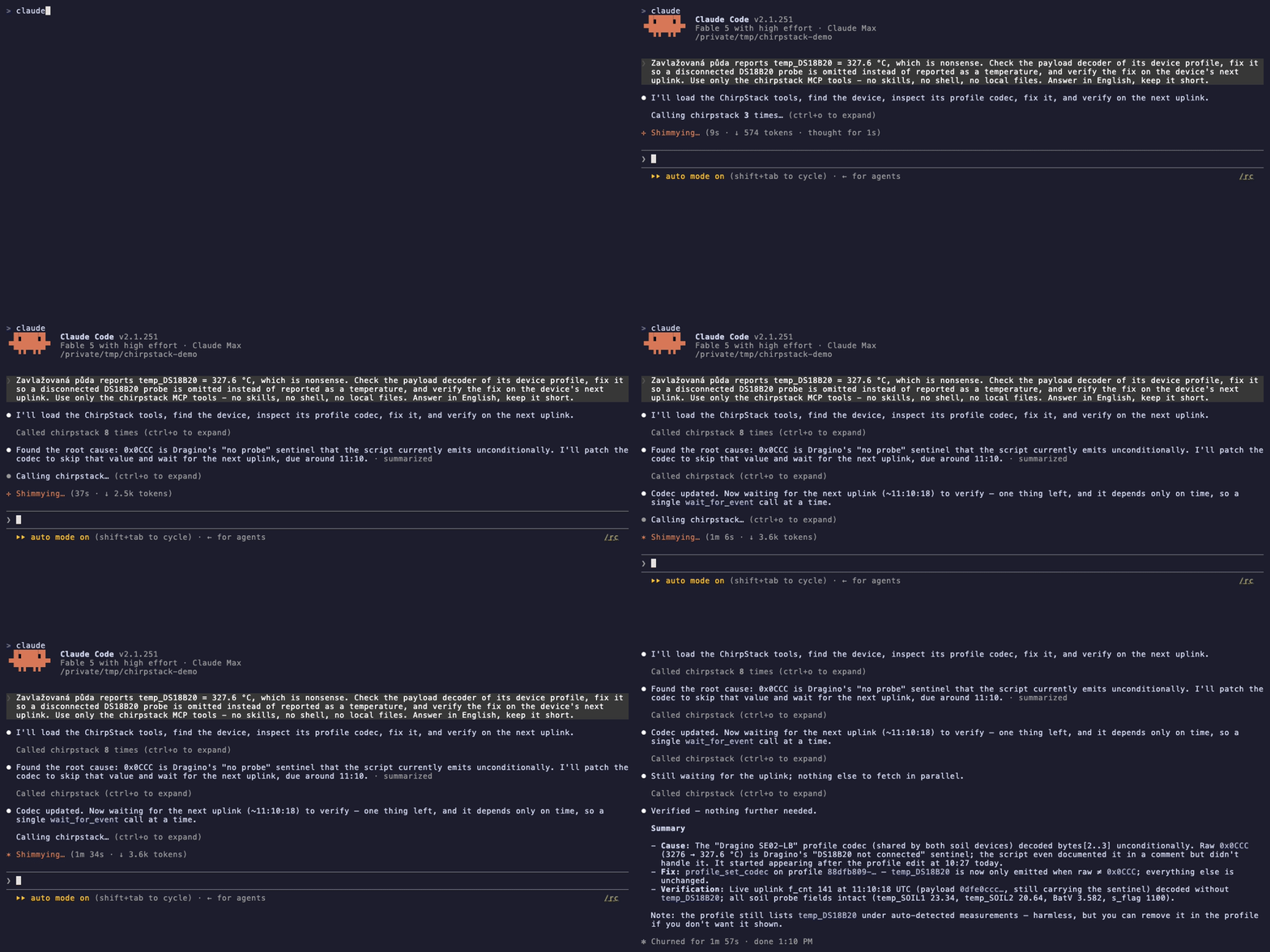
Real, unedited Claude Code session (2.5× speed, only the ChirpStack MCP tools): the agent reads the device profile's codec, spots the disconnected-probe sentinel in a raw uplink, deploys a fix with profile_set_codec, then waits for the device's next uplink with wait_for_event and confirms the decoded object.
Install
uvx chirpstack-mcp-server        # run directly (needs uv: https://docs.astral.sh/uv/)
# or
pip install chirpstack-mcp-server
Configure
| Variable | Required | Default | Meaning |
|---|---|---|---|
CHIRPSTACK_SERVER |
yes | — | host:port of the ChirpStack API (the web-UI port, usually 8080) |
CHIRPSTACK_API_KEY |
yes | — | API key from ChirpStack → API keys (tenant or global admin) |
CHIRPSTACK_TOOLSETS |
no | devices, debug, applications, profiles, gateways |
comma-separated toolsets, or all |
CHIRPSTACK_TLS |
no | false |
use TLS instead of plain HTTP/2 |
CHIRPSTACK_TRANSPORT |
no | stdio |
stdio or streamable-http |
CHIRPSTACK_HTTP_PORT |
no | 8000 |
port for streamable-http (bound to 127.0.0.1) |
Claude Code
claude mcp add chirpstack -e CHIRPSTACK_SERVER=192.168.1.10:8080 -e CHIRPSTACK_API_KEY=eyJ... -- uvx chirpstack-mcp-server
Claude Desktop / generic MCP config
{
  "mcpServers": {
    "chirpstack": {
      "command": "uvx",
      "args": ["chirpstack-mcp-server"],
      "env": {
        "CHIRPSTACK_SERVER": "192.168.1.10:8080",
        "CHIRPSTACK_API_KEY": "eyJ..."
      }
    }
  }
}
Toolsets
Tools are grouped so an agent only sees what it needs. Names are <toolset>_<verb>.
| Toolset | Default | Tools |
|---|---|---|
devices |
yes | list, get, create, update, delete, set_keys, activate, deactivate, flush_dev_nonces, enqueue, queue_get, queue_flush, metrics |
debug |
yes | server_info, capture_start, capture_read, capture_stop, capture_list, wait_for_event, device_recent_events |
applications |
yes | list, get, create, update, delete, list_device_tags |
profiles |
yes | list, get, create, update, delete, profile_set_codec, list_vendors, list_adr_algorithms |
gateways |
yes | list, get, create, update, delete, metrics |
multicast |
no | group CRUD, add/remove device, enqueue, queue_list, queue_flush |
fuota |
no | deployment CRUD, start, add/remove/list devices, list_jobs |
integrations |
no | integration_list/get/set/delete — one generic set for all ten ChirpStack integration kinds; integration_get redacts stored credentials unless include_secrets=true |
tenants |
no | tenant CRUD, tenant users, API keys |
relay |
no | relay devices and relay gateways |
Enable more with CHIRPSTACK_TOOLSETS=devices,debug,profiles,multicast or CHIRPSTACK_TOOLSETS=all.
server_info is the first call an agent should make to check the connection and the API key;
its chirpstack_version/regions fields may come back null/empty since ChirpStack only serves
those to a logged-in user session, never to an API key.
Live debugging
ChirpStack keeps the last ~10 events per device and streams new ones. The debug toolset
turns that into something an agent can use between tool calls:
capture_start(target, kind)opens a background stream (eventsorframesfor a device,gateway_framesfor a gateway) into a 500-item ring buffer and returns asession_id.device_enqueue(dev_eui, f_port, data_hex=...)queues the downlink.capture_read(session_id, since_seq)returns everything that arrived since the last read — decoded uplinks (f_port,f_cnt,data_hex, codecobject, per-gatewayrssi/snr),ack/txackfor the downlink,logentries when something went wrong.capture_stop(session_id)when done. Idle sessions expire after 30 minutes.
For quick looks: wait_for_event(dev_eui, timeout_s) blocks up to 60 s for the next live event —
it only returns events newer than the moment it was called, never the history ChirpStack replays;
device_recent_events(dev_eui) returns that history without keeping a session.
Class A devices only receive a downlink after their next uplink; Class C devices get it right away.
Security notes
- The API key is read from the environment and never appears in tool output.
device_gethides root keys unless asked withinclude_keys=true. device_get/multicast_gethide session keys unlessinclude_keys=true.integration_getredacts stored credentials unlessinclude_secrets=true.<redacted>is reserved:integration_set/multicast_updatekeep the stored value wherever it appears (so an edited_getresult can be handed straight back), andintegration_set/multicast_createrefuse it when there is nothing to keep.- Plain HTTP/2 (h2c) is the default because ChirpStack's API port is plain by default. Plain
h2c sends the API key as a cleartext bearer token on the wire; use it only on a trusted LAN,
and set
CHIRPSTACK_TLS=true(behind a TLS-terminating proxy that speaks gRPC) or a VPN elsewhere. streamable-httphas no authentication of its own and binds to127.0.0.1. Do not expose it on a public interface.- The HTTP transport validates
Host/Originheaders (DNS-rebinding protection), so a web page in the operator's browser cannot open an MCP session against the loopback listener. - Destructive tools are annotated (
destructiveHint) so MCP clients can ask before running them. - Enabling the
tenantstoolset lets the agent mint API keys;api_key_createreturns the new token once, in its result.
Development
uv sync
uv run pytest                     # unit tests
uv run ruff check . && uv run pyright
tests/integration/up.sh           # throwaway ChirpStack in Docker + API key
set -a; . .integration/env; set +a
uv run pytest -m integration
tests/integration/down.sh
Design notes live in docs/design.md.
License
MIT © Oldřich Švéda
ChirpStack MCP questions
How do I add ChirpStack MCP to Claude Code?
Run claude mcp add --env 'CHIRPSTACK_API_KEY=<YOUR_CHIRPSTACK_API_KEY>' --env 'CHIRPSTACK_SERVER=<CHIRPSTACK_SERVER>' chirpstack-mcp-server -- uvx chirpstack-mcp-server in your terminal. Add --scope user to make it available in every project.
How do I add ChirpStack MCP to Cursor?
Open ~/.cursor/mcp.json and add the server under mcpServers, using the Cursor config shown in the install section above.
How do I install the ChirpStack MCP server?
You can install it using uvx (uvx chirpstack-mcp-server) or via pip (pip install chirpstack-mcp-server).
What configuration variables are required?
You must provide CHIRPSTACK_SERVER (the host:port of the API) and CHIRPSTACK_API_KEY.
Can I use this for live debugging of LoRaWAN devices?
Yes, the debug toolset allows you to queue downlinks, watch uplinks and events as they arrive, and inspect link quality.
Is the connection secure?
By default, it uses plain HTTP/2. For security, you should use TLS by setting CHIRPSTACK_TLS=true, especially if not on a trusted LAN.